How to set PHP timezone using PHP function, .htaccess, and php.ini files
Sep 15, 2026
/
By Jordana A.
/
4 min Read

PHP defaults to Coordinated Universal Time (UTC) regardless of your server’s timezone. Configuring the PHP timezone accurately is crucial for precise data management and time-sensitive operations like logging and scheduling.
This practice is especially vital for web applications with global audiences outside the UTC timezone. For instance, it makes handling daylight saving time easier.
You can change your website’s PHP timezone settings using the PHP function or by modifying the .htaccess or php.ini files. This article will explore each method so that you can choose the most suitable one for your needs.

How to Set PHP Timezone Using a PHP Function
The date_default_timezone_set() function sets a script’s default timezone for all date and time functions. It ensures accurate handling of time-related data in PHP web applications, even if your web hosting server is in a different timezone than you or your target audience.
The list of supported timezones is available on PHP’s official website. Double-check using the timezone abbreviation list to ensure you select the correct timezone.
Here’s an example of how to use the date_default_timezone_set() function:
<?php
date_default_timezone_set('America/New_York');
?>
If you’re working on a standalone PHP script or a simple project, place the function at the top of your file before any timezone-related PHP functions are called. However, setting the timezone in the configuration or bootstrap file is best for larger projects.
You can find your website’s configuration file in the root directory called public_html. While the file name varies depending on the CMS used, it’s usually named config.php.
How to Change PHP date.timezone With the .htaccess File
Changing the PHP date.timezone setting using the .htaccess file is often done in shared hosting environments where the php.ini file is inaccessible. The .htaccess file lets you override server configurations for specific directories, including the timezone setting.
The .htaccess file is accessible using a file manager, an FTP client, and SSH. Using the hosting account’s file manager should be the easiest method for beginners.
How to Change PHP date.timezone Using File Manager
Here’s how to change your website’s default timezone in the .htaccess file using Hostinger’s File Manager:
- Navigate to Files → File Manager from Hostinger dashboard.
- Select Access files of [your website] to browse directories on that specific site.

- Access the public_html directory and double-click the .htaccess file to edit. Create a new .htaccess file if it’s not already present.
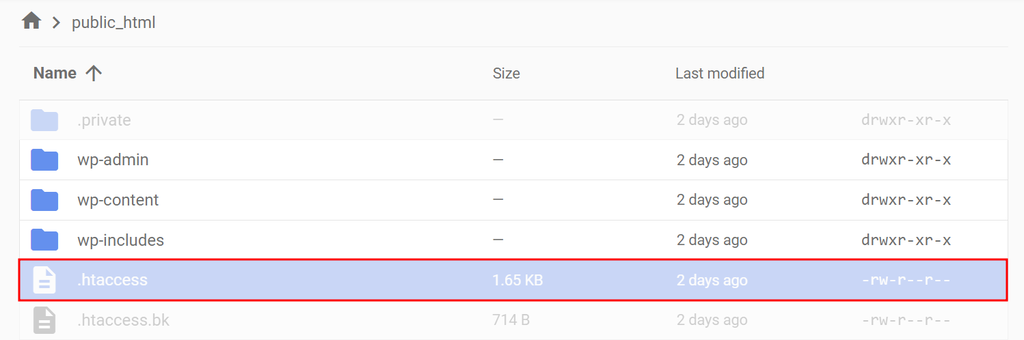
- Enter the following script at the very top of the file. In this example, we’re setting the timezone to Central Standard Time (CST) using America/Chicago as the parameter. Browse the timezone list to verify whether PHP supports your desired timezone.
php_value date.timezone 'country/state'
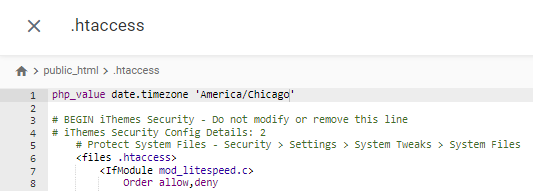
- Hit Save once you’re done.

How to Change PHP date.timezone Using an FTP Client
You can also modify the PHP timezone setting by editing the .htaccess file with an FTP client, such as FileZilla. Hostinger users can find their FTP details in Files → FTP Accounts on Hostinger dashboard.
Here’s how to modify the PHP default timezone in the .htaccess file using the FileZilla FTP client:
- Configure FileZilla and connect to the FTP web server.
- Locate the .htaccess file in the public_html directory. Right-click on it and select View/Edit.
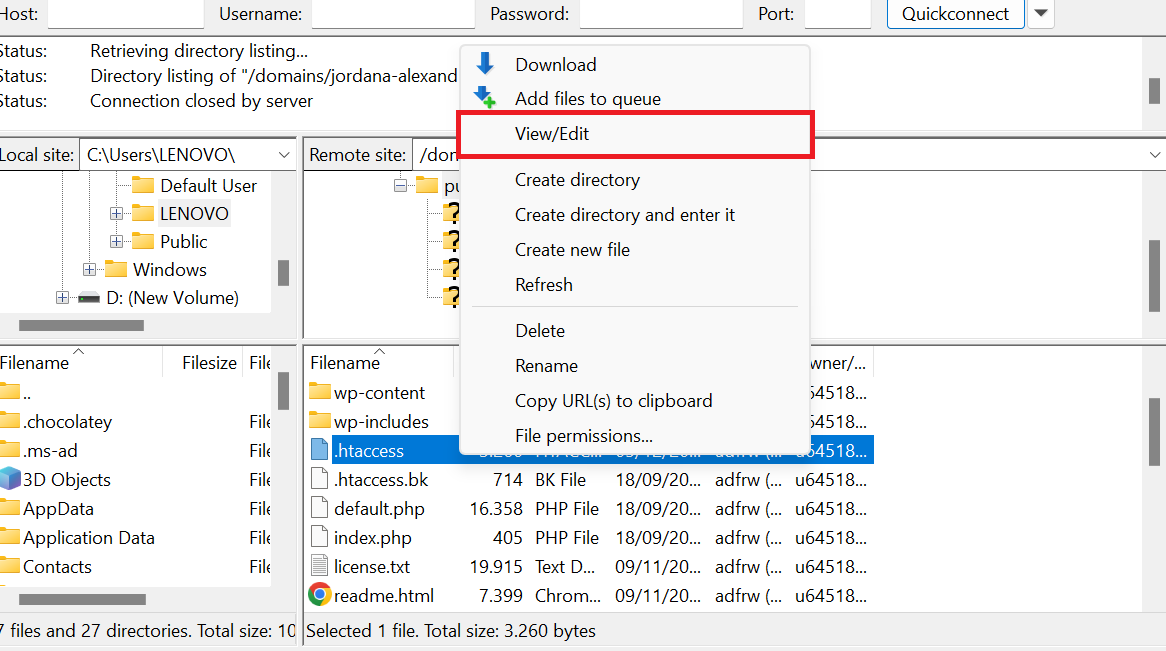
- Set the timezone by entering the following script at the very top of the scripts. Don’t forget to change the date.timezone value with your preferred location.
php_value date.timezone 'country/state'
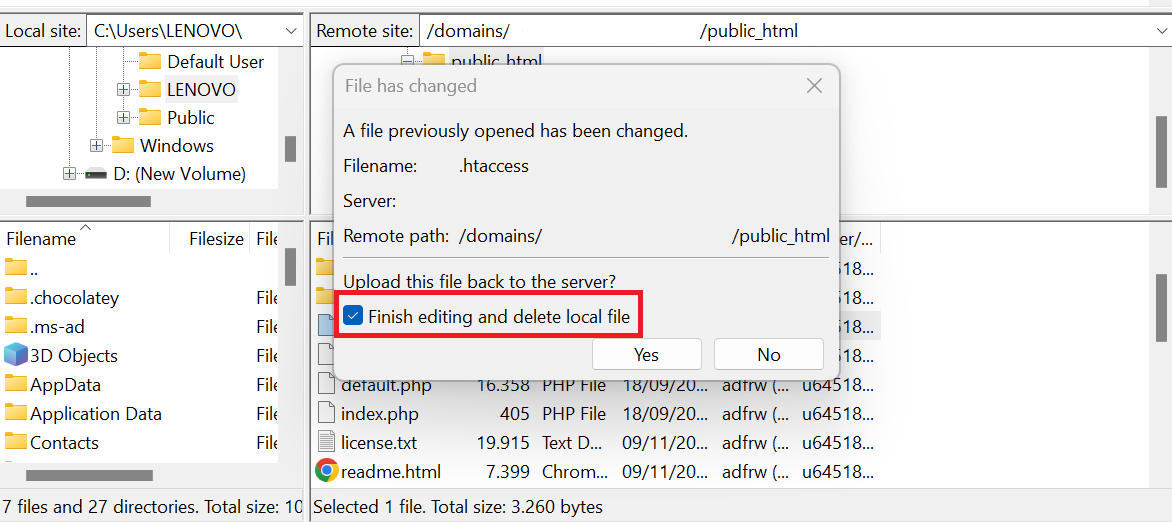
- Check the Finish editing and delete local file option before saving the changes.
How to Change PHP date.timezone Using SSH
Secure Shell Protocol (SSH) is a remote administration protocol that provides direct access and control over server files. It ensures secure data transmission across remote servers from the terminal window, making it a popular choice for experienced command-line users.
In this tutorial, we’re using PuTTY, a popular SSH client. Check out our article on how to use the PuTTY SSH client to access your server.
Follow these steps to change the date.timezone value with the PuTTY SSH client:
- Establish an SSH connection. Hostinger users can find their SSH details in Advanced → SSH Access on Hostinger dashboard.
- Enter the following command to check your server’s timezone.
php -i | grep "date.timezone"
- Use this command to see all the available time zones. Take note of the one you want to use.
timedatectl list-timezones
- Input this command to set the timezone. Replace the timezone identifier based on your preference in Step 3.
timedatectl set-timezone [region/location]
If you encounter an error during the configuration process, try these solutions:
- Gain root privileges ‒ as modifying system settings requires root permissions, try adding sudo before the timedatectl command. sudo grants temporary root permissions for executing the command.
- Check the PATH environment variable ‒ PATH lets you run a command without specifying a path. Verify yours with echo $PATH and locate timedatectl with find / -name timedatectl 2>/dev/null.
- Check user permissions ‒ some SSH commands are restricted for non-root users, causing an access error.
How to Set PHP Timezone Using the php.ini File
Setting the desired timezone in PHP scripts using the php.ini file is best for a global implementation across the site. This method ensures server-level consistency, which is crucial for server-side operations like cron jobs.
Eliminating repeated timezone settings in scripts also streamlines your PHP configuration, making your code cleaner and more efficient.
Follow these steps to set a new timezone in PHP using the php.ini file. We’re using Hostinger’s File Manager, but feel free to use an FTP client if that’s your preference.
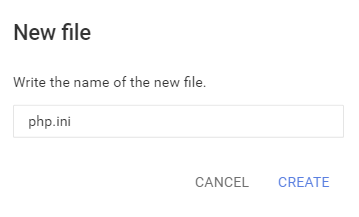
- Access the public_html directory and locate the php.ini file. If you don’t have it yet, click New File and name it php.ini.
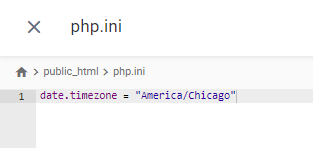
- Add the following script to the newly created file. Remember to change the timezone identifier with your preferred location.
date.timezone = "country/state"
- Click Save once you’re done.
- Log in to your server with an SSH client and execute this command to restart the Apache web server:
service apache2 restart
Did You Know?
A content delivery network is great for websites with a global audience. It stores your website in different data centers globally and sends data from the nearest location to the visitors. This network of servers speeds up your website and keeps your main server from getting overloaded. Get Hostinger CDN for free when buying Business or any of the Cloud hosting plans.
Conclusion
Setting the correct timezone in PHP is crucial for ensuring accurate and consistent date and time handling across your web applications. It helps you maintain a seamless user experience for a global audience, meet legal standards for time-sensitive data, and ensure reliable scheduling and logging.
Let’s recap three effective ways to change the timezone configuration in PHP:
- Using a PHP function ‒ ideal for applications requiring dynamic timezone changes or those working on shared servers without access to global settings.
- Editing the .htaccess file ‒ allows for directory-specific configuration in shared hosting environments.
- Editing the php.ini file ‒ lets you modify timezone settings globally across all PHP scripts, ensuring server-level consistency.
We hope this article helped you understand the benefits and proper implementation of setting timezones in PHP scripts. Leave a comment if you have any questions. Good luck!
This article is a localized version of How to set PHP timezone using PHP function, .htaccess, and php.ini files, originally published in English.

Jordana is a Senior Content Writer with a background in Information Systems. She has over five years of experience in WordPress and is casually dabbling with PHP and MySQL. Her passion for writing and technology drives her to create tutorials for anyone wanting to build their online presence. Follow her on LinkedIn.