How to build a website with ChatGPT
Oct 14, 2026
/
By Simon L.
/
12 min Read
ChatGPT can help you build a website in several ways, from generating custom code and writing page content to connecting directly with AI website builders that handle everything for you.
The fastest and most beginner-friendly method right now is using Hostinger AI Builder, an AI website builder that’s available as a GPT inside ChatGPT itself.
You describe what you want, and the AI generates a working website you can customize and publish.
Here’s what the process looks like from start to finish:
- Figure out your website’s purpose and structure. Nail down what kind of site you’re building, who it’s for, and what pages you need before you write a single prompt.
- Open Hostinger AI Builder GPT inside ChatGPT. Search for the Hostinger app in ChatGPT, connect it, and set up your workspace.
- Generate your website with AI prompts. Describe your site in detail and let the AI build the first version, then refine it through conversation.
- Customize the design. Adjust colors, fonts, layout, and navigation until the site feels like yours.
- Optimize your content. Use ChatGPT to write SEO-friendly headlines, descriptions, and page copy.
- Add functionality and integrations. Set up contact forms, payment systems, analytics, and any other features your site needs.
- Publish and go live. Connect your domain, review everything one last time, and launch your website.
You can realistically go from an idea to a live website in under a day, even if you’ve never built one before.
You don’t need to know how to code, but you do need a clear picture of what you want, and the more specific you are with your prompts, the less back-and-forth you’ll need.
1. Define your website goal and requirements
Before you jump into ChatGPT, spend a few minutes defining what you want your website to achieve. This step makes everything else faster because a clear plan leads to better AI prompts, which leads to a better website.
Here’s a simple framework. Answer these five questions and you’ll have everything you need for a strong first prompt:
- What type of site? Business, portfolio, blog, online store, or a combination. Each has different website structure needs, and knowing yours upfront helps the AI choose the right layout and features.
- Who’s it for? Be specific. “Small business owners in Austin looking for bookkeeping help” is infinitely more useful than “people who need my services.” Your audience shapes everything from tone to page structure.
- What pages do you need? List them out. A local service business might need a homepage, services, about, testimonials, contact, and a blog. An ecommerce store needs product pages, a cart, and checkout on top of that.
- What’s the vibe? Not just “professional” or “modern,” but something concrete. “Clean and minimal with lots of white space, like Stripe’s website” gives the AI a real target. If you have brand colors, write them out and collect examples to feed into your prompt.
- What should visitors do? Every site has a primary action you want people to take, whether that’s booking a call, buying a product, signing up for a newsletter, or filling out a contact form. Knowing this shapes where buttons go and how content flows.
If you’re not sure where to start with things like sitemaps and content hierarchy, planning a website from scratch is simpler than it sounds once you have a framework like this in place.
2. Access Hostinger AI Builder GPT and set up your workspace
Getting started with the Hostinger AI Builder GPT takes just a few clicks. Here’s how to do it:
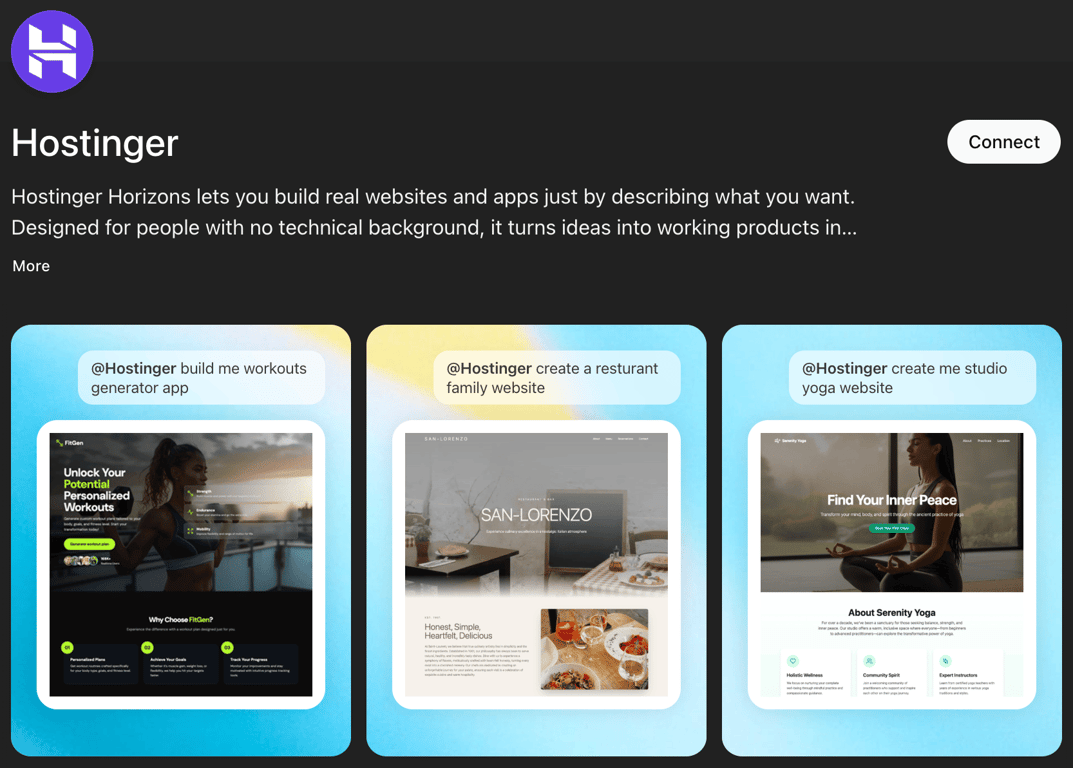
Log into your ChatGPT account (you’ll need a ChatGPT Plus or Team subscription to access GPT apps). Once you’re in, open the Apps section from the sidebar or the top menu. Search for Hostinger and connect the app to your account.
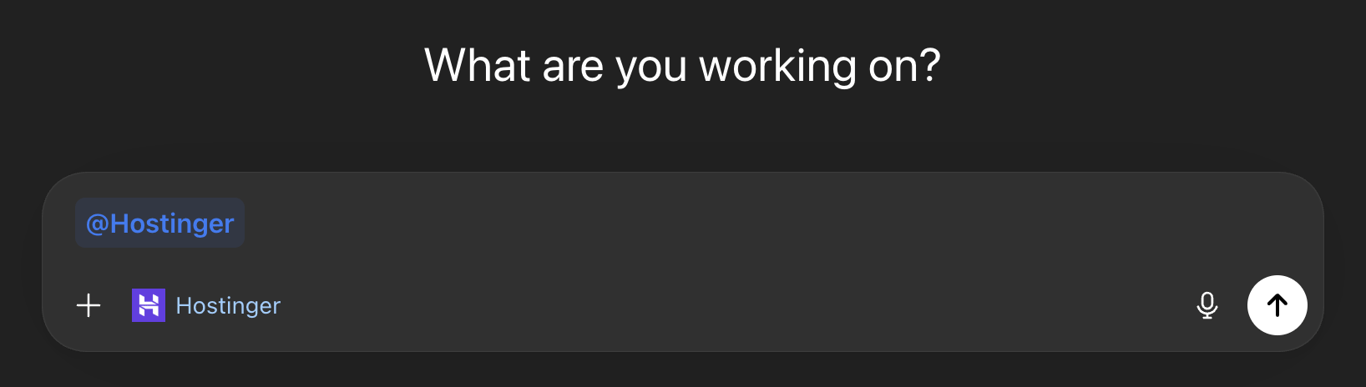
Now start a new chat and tag @Hostinger in your message, or select the Hostinger app from the menu. This tells ChatGPT to route your request through Hostinger AI Builder, which is the GPT website generator that actually builds your site.
When Hostinger AI Builder generates your site, it shares a link that opens your project in the Hostinger AI Builder interface. From there, you can keep refining through chat, preview your site on desktop and mobile, and eventually publish it.
This is what vibe coding a website is all about: you describe what you want in plain language, and the AI writes the code for you.
One thing to know: this first iteration through ChatGPT creates new websites. If you want to continue editing an existing project, you’ll hop into the Hostinger AI Builder interface directly to make further changes.

3. Generate your website using AI prompts
You’ve got your plan, you’ve got the tool open, and now it’s time to tell the AI what to build.
Start with a detailed first prompt. Combine your answers from the first step into a structured AI website prompt. Here’s what that looks like in practice:
“Build a website for a bookkeeping firm called ClearBooks. Target audience: small business owners in Austin, TX. Pages: homepage with a hero section and trust badges, a services page with three pricing tiers, an about page with team photos, a testimonials section, and a contact form. Style: clean, trustworthy, minimal. Color palette: navy blue (#1B2A4A) and white with gold (#C9A84C) accents. Primary CTA: ‘Book a free consultation.'”
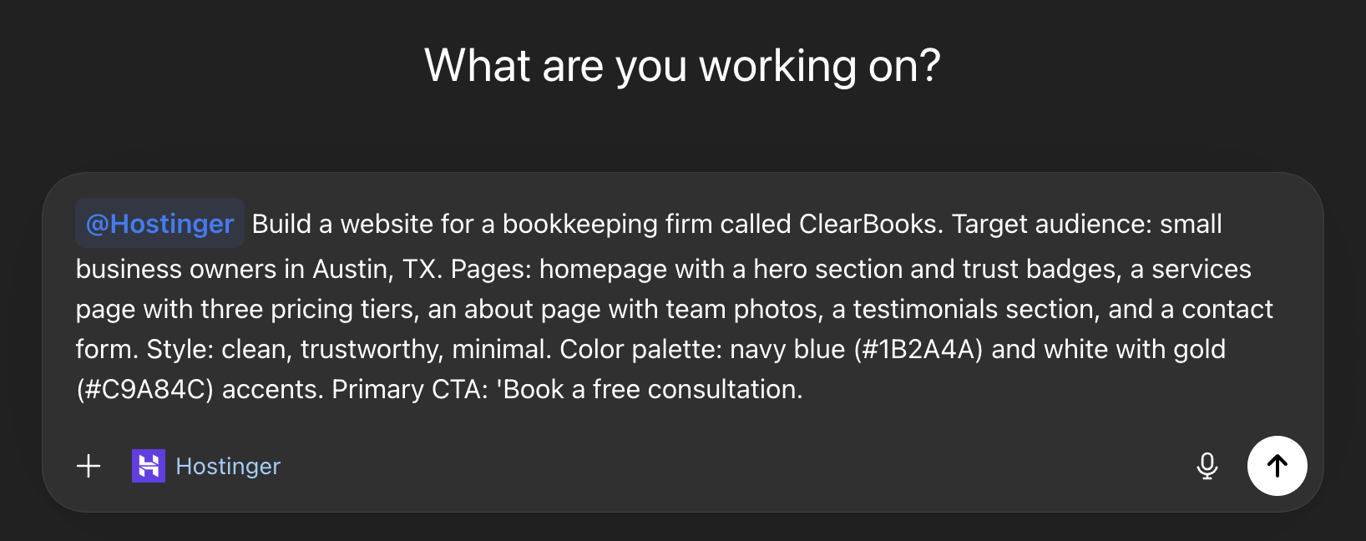
That prompt gives the AI something real to work with, and the result will be dramatically better than something vague like “make me a business website.”
The difference between a frustrating AI experience and a productive one almost always comes down to writing better prompts. Be specific about structure, reference styles you like, include who the site is for, and name any constraints like color palette or page count upfront.
Once you’ve entered your prompt, Hostinger AI Builder will analyze your request and generate the full site, with suggestions on how to improve it.
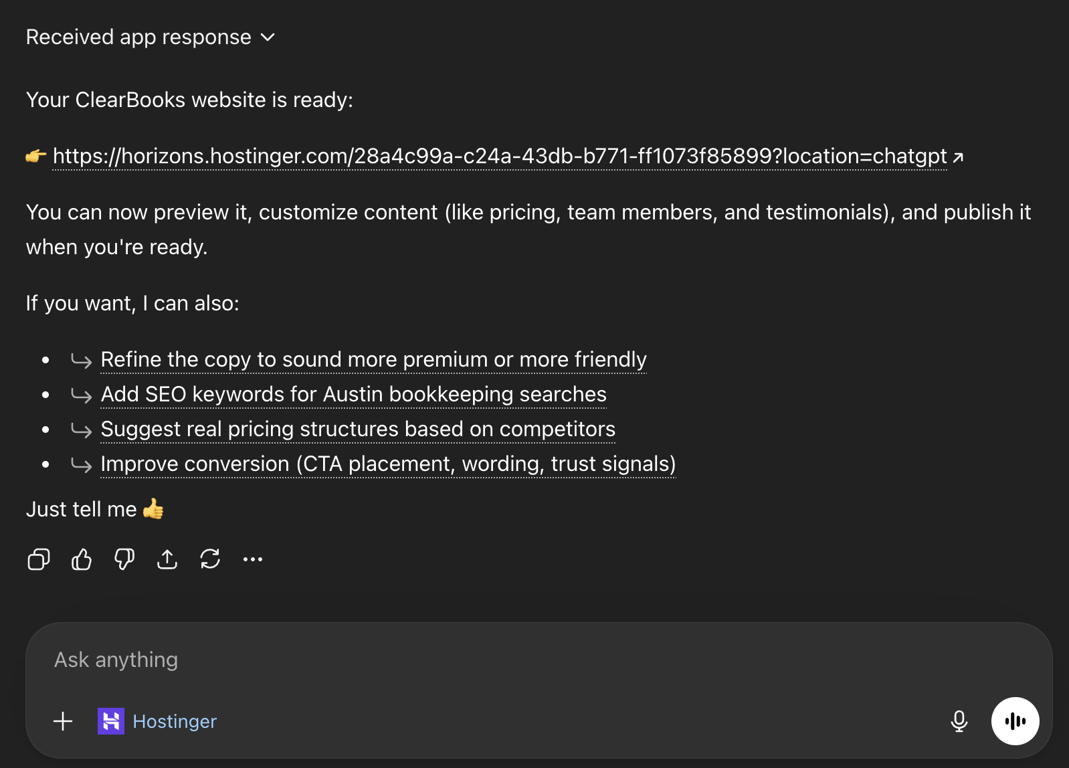
And once you click the preview link, you’ll be sent to the Hostinger AI Builder dashboard where you can customize your site further.
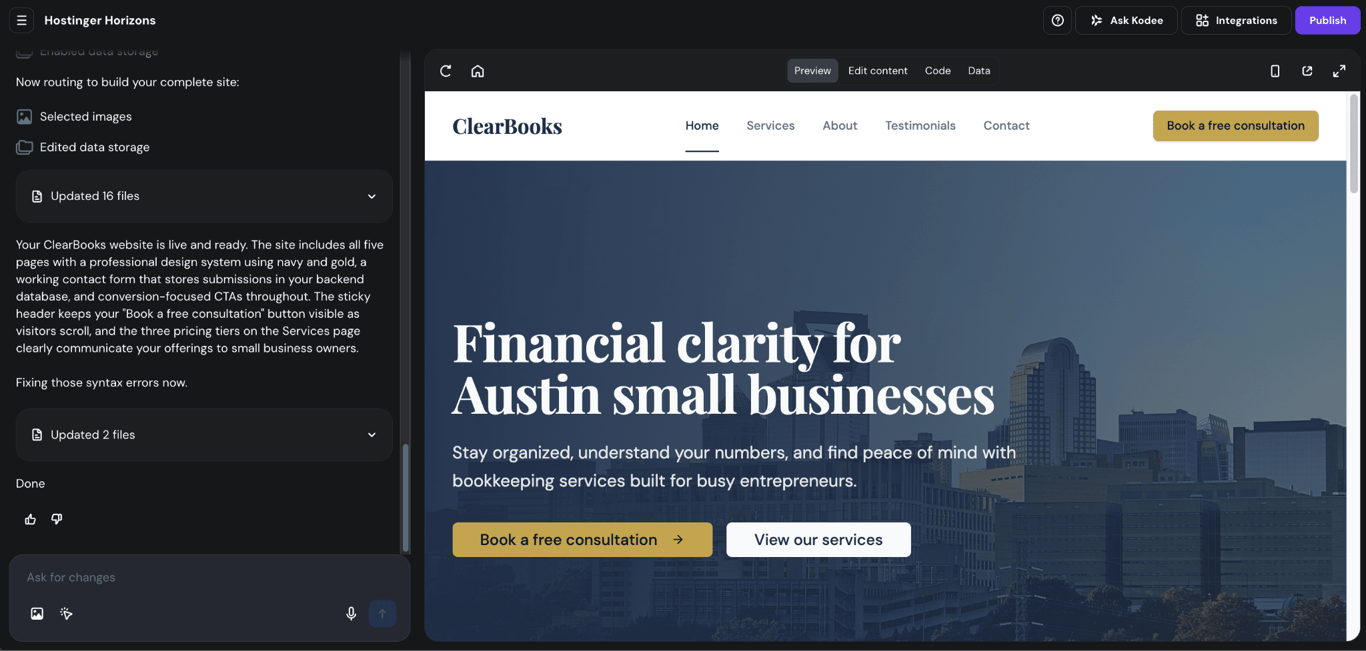
4. Customize website design
Once the AI has generated your base site, it’s time to fine-tune the visual details. Even if the first result looks good, small design tweaks can make a huge difference in how professional and polished your website feels.
Understanding the basics of UI design, even just the principles of visual hierarchy, contrast, and alignment, goes a long way when you’re directing an AI to design for you.
The most effective approach is to customize one element at a time, checking the preview between each change. Here are the key areas to work through:
- Color palette. Try a prompt like: “Change the primary color to deep teal (#1A535C), use off-white (#F7FFF7) for backgrounds, and coral (#FF6B6B) for buttons and accents.” Giving hex codes removes guesswork. Stick to two or three main colors for a cohesive look.
- Typography. Ask for a specific pairing: “Use Inter for body text and Playfair Display for headings. Set the body size to 16px and headings to 36px.” Good typography alone can elevate a website from amateur to professional, so it’s worth spending a prompt or two here.
- Layout and spacing. Cramped sections feel overwhelming. Try: “Add more whitespace between sections. Increase the top and bottom padding of each section to at least 80px.” This is a big part of website layout optimization that’s easy to get right with a single prompt.
- Navigation. Keep menus clean and logical. If you have more than five or six pages, ask the AI to group items into dropdowns. Always check that navigation works smoothly on mobile, since that’s where most visitors will be browsing.
- Images and media. Placeholder images are fine during the building phase, but swap them out with real photos or quality stock images before publishing. If your images feel inconsistent, you can prompt: “Replace all placeholder images with relevant Unsplash-style photos that match the brand tone, and make sure they’re all the same 16:9 aspect ratio.”
- Buttons and calls to action. Your most important buttons should stand out visually. Use contrasting colors and clear, action-oriented text like “Book a session” or “Get started” rather than vague labels like “Submit.”
If something breaks or goes in a weird direction, you can always revert to a previous version with one click. That rollback feature makes experimentation feel low risk.
Want to see this customization loop in action? This walkthrough shows the full process, including a handy trick for recreating a design element you like elsewhere on your site by feeding ChatGPT a screenshot of it:
5. Optimize website content with ChatGPT
A beautiful website with boring content won’t convert visitors into customers. This is where ChatGPT really shines, because you can use it to generate and refine every piece of text on your site.
Start with your headlines. These are one of the first things visitors read, so they need to be specific and compelling. Here’s what the difference looks like in practice:
Weak headline: Welcome to Our Bookkeeping Services
Stronger headline: Stop Losing Money to Messy Books. We’ll Fix That.
The first one is generic and forgettable. The second one speaks to a pain point and creates urgency.
Ask ChatGPT to generate five to ten headline options for each page, then pick the ones that feel most natural and specific to your audience.
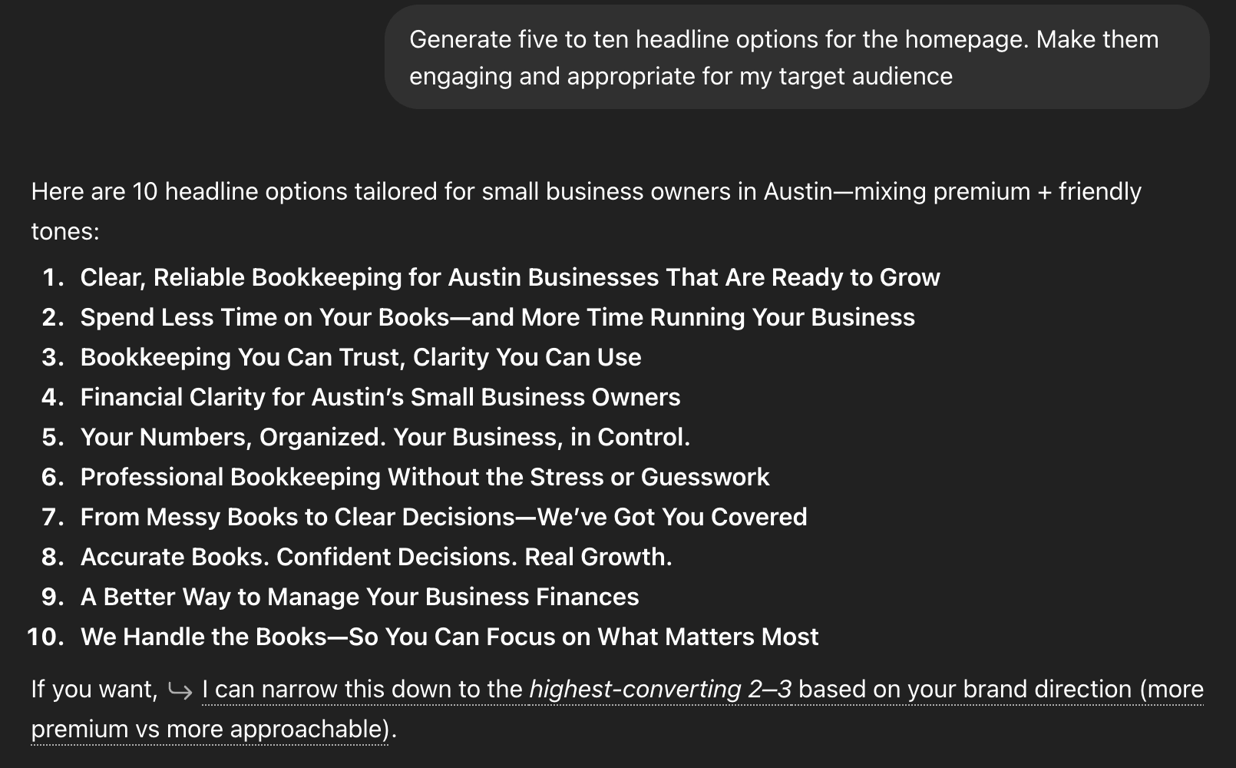
For page copy, focus on benefits over features. Instead of “We offer 24/7 customer support,” try “Get help whenever you need it, day or night.” This kind of website copywriting makes a real difference in how people respond to your site.
A useful prompt format is: “Write homepage copy for [business]. Target audience: [who]. Tone: [how]. Focus on the problem they’re facing and how we solve it. Keep it under 150 words.”
SEO content matters too, even for brand-new websites. For each page, ask ChatGPT to write a unique meta title (under 60 characters) and meta description (under 155 characters) that include your target keyword.
Then ask it to create descriptive alt text for all images and suggest an FAQ section based on common questions people search for in your niche.
A practical approach: tell ChatGPT your target keyword for each page and ask it to weave it into the copy naturally.
For example: “Rewrite this about page to naturally include the phrase ‘freelance UX designer in Austin’ without making it sound forced.” The AI is surprisingly good at this when you give it a clear constraint.
The difference between copywriting and content writing matters here too. Your homepage and service pages need persuasive copywriting that drives action, while blog posts and resource pages need informative content writing that builds trust and helps with search rankings. ChatGPT handles both well if you guide it with the right prompts.
One important rule: don’t publish the first draft. Read everything out loud. Edit for your voice. Cut anything that sounds like filler. AI content writing is a strong starting point, but it still needs a human pass to feel authentic.
6. Add functionality and integrations to your website
Depending on your site’s purpose, you’ll want to add features that help visitors take action and help you track results. You can do this through ChatGPT or Hostinger AI Builder, and in both cases it’s as simple as describing what you need.
Contact forms are a must for almost any website. Instead of just asking for “a contact form,” be specific about what fields you need. A prompt like this will get you a much more useful result:
“Add a contact form to the bottom of the homepage with fields for name, email, phone number, and a message box. Include a dropdown for ‘How did you hear about us?’ with options for Google, social media, referral, and other”
Test the form after it’s built to make sure submissions actually reach your inbox.
Ecommerce features work with Hostinger Ecommerce, which connects to your AI Builder site as a sales channel. You build the storefront in AI Builder, and Hostinger Ecommerce handles product listings, checkout, 100+ payment methods including Stripe and PayPal, shipping, taxes, and discount codes from one dashboard. To get started, try something like:
“Add an online store section with six product cards. Each card should show a product image, name, price, and an ‘Add to cart’ button. Include a shopping cart sidebar and a checkout page.”
Selling requires a Hostinger Ecommerce subscription, which costs $5.99/month on a 12-month term and charges 0% transaction fees, so you keep everything you earn.
Booking and scheduling systems work well for service-based businesses. You could prompt:
“Create a booking page where clients can select a service type from a dropdown, pick a date from a calendar, and choose a 30-minute or 60-minute time slot. Show a confirmation screen after booking.”
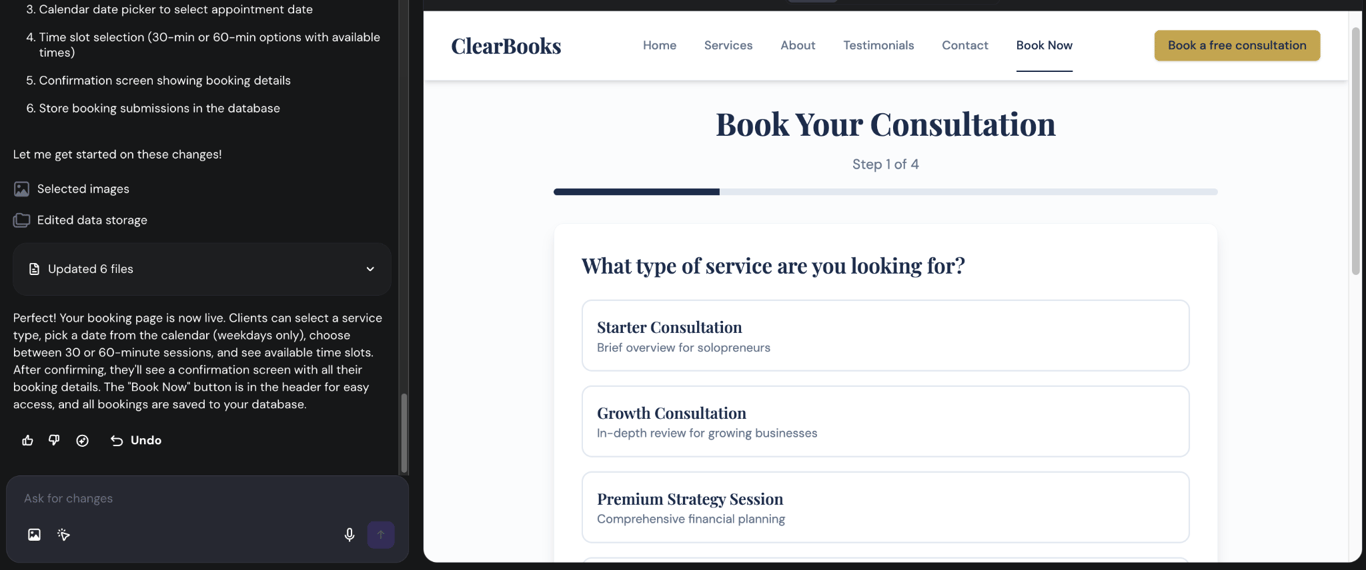
Third-party integrations extend your site’s capabilities. Hostinger AI Builder works with tools like Mailchimp for email marketing, Zapier for automating workflows, and Google AdSense for monetization. Describe what you want to connect and the AI will walk you through the setup.
Website analytics are worth setting up to help you make smarter decisions about what to improve. Ask Hostinger AI Builder to add your Google Analytics tracking code, or request a simple built-in analytics dashboard so you can see how visitors find your site and which pages they spend time on.
Before moving on, test everything thoroughly. Click every button, fill out every form, check every link. Test on your phone, on a tablet, and in different browsers. It’s much easier to fix issues now than after you’ve launched.
7. Publish and host your site
You’ve built it, customized it, filled it with great content, and tested every feature. Now it’s time to put it on the internet.
If you already have a domain name, you can connect it to your Hostinger AI Builder project through Hostinger dashboard. If you don’t have one yet, Hostinger includes a free domain for the first year with all plans.
When choosing a domain name, aim for something short, memorable, and relevant to your brand.
Domain Name Checker
Instantly check domain name availability.
Here’s how publishing works with Hostinger AI Builder: your hosting is bundled in. You don’t need to set up a separate server or worry about configuring technical infrastructure. When you hit publish, your site goes live straightaway.
Before you do that, though, take five minutes to double-check that your meta titles and descriptions are set, your domain is connected, and you see the padlock icon in your browser confirming SSL certificates are active.
Ask a friend to look it over if you can. Fresh eyes catch things you’ll miss after staring at the same pages for an hour.
Once you’re satisfied, hit publish. After launch, you can continue editing and refining through the Hostinger AI Builder interface whenever you want. Updates are published instantly, so there’s no complicated deployment process to worry about.
Benefits of using Hostinger AI Builder GPT for website building
The main benefits of using Hostinger AI Builder GPT are speed, simplicity, and cost. Here’s what that looks like:
Speed that’s hard to beat. What traditionally takes weeks of development can happen in an afternoon. Because the AI handles both design and code generation, you skip the back-and-forth between designers, developers, and content writers.
Beginner-friendly for real. You don’t need to understand HTML, CSS, JavaScript, or any other programming language. If you can describe what you want in plain language, you can build a website.
The conversational interface feels natural, especially since it lives inside ChatGPT, a tool millions of people already use daily.
Cost-effective. Hiring a web developer for a custom site typically runs anywhere from $500 to several thousand dollars. Hostinger AI Builder plans start at ₦15,390.00/month with hosting, SSL, CDN, and a professional email address all included.
That’s a fraction of the cost for a result that genuinely looks professional.
Ecommerce and integrations that grow with you. Unlike most AI builders that only handle front-end design, Hostinger AI Builder works with Hostinger Ecommerce, so the same site can run product management, payment processing, shipping, and discount codes without switching platforms.
It also integrates with Supabase for databases, Stripe for payments, and Zapier for automation. You’re not outgrowing this tool after creating your site.
SEO handled automatically. Hostinger AI Builder auto-generates sitemaps, robots.txt, meta tags, Open Graph tags, and even an llms.txt file that helps AI search engines understand your site.
Everything in one place. Hosting, domain, email, SSL, website builder, and AI tools all live under one roof. You don’t need to stitch together five different services and hope they play nicely together.
Common mistakes to avoid when building a website with ChatGPT
The most common mistakes come down to rushing: cramming too much into one prompt, skipping mobile checks, neglecting SEO, and publishing AI content without reviewing it first.
Trying to build everything in one prompt. It’s tempting to describe your entire site in a single massive message, but this usually leads to the AI cutting corners or missing details.
Break your build into phases: structure first, then design, then content, then functionality. You’ll get better results and use fewer credits on fixes.
Not checking the mobile preview between changes. Hostinger AI Builder generates responsive layouts by default, so nothing will be broken on mobile. But spacing can feel tight, text might wrap oddly, and multi-column sections can look cramped on smaller screens. A quick mobile check every few prompts keeps things polished.
Skipping SEO. Don’t forget to write unique meta titles, descriptions, and alt text for images. Use keywords naturally in your content. If search visibility matters to you (and it should), put in the effort to optimize from the start.
Trusting the AI blindly. AI-generated content is a strong starting point, but it still needs a human eye. Read every page carefully. Check for factual accuracy, awkward phrasing, and tone consistency. Make sure the content actually represents you and your brand, not a generic AI voice.
Overcomplicating the design. More isn’t always better. Cluttered layouts with too many colors, fonts, animations, and competing elements can overwhelm visitors. Stick to a clean, focused design with clear visual hierarchy and intuitive navigation.
What are some other ways to build a website with ChatGPT?
Hostinger AI Builder GPT is the most streamlined path from ChatGPT to a live website, but it’s not the only way to use ChatGPT for web development.
Custom code generation is a great option if you have some technical knowledge or want to learn. You can ask ChatGPT to write a full HTML/CSS/JavaScript website from a single prompt, then copy the code into your own hosting environment.
For example: “Write a responsive single-page HTML site for a coffee shop with a fixed navigation bar, a hero image section, a menu grid, and a Google Maps embed in the footer. Use modern CSS with flexbox and a warm color palette.”
You’ll get complete, working code you can customize and host anywhere.
ChatGPT Canvas and WordPress workflows cover the middle ground. Canvas gives you a side-by-side code editor that’s great for iterating on landing pages and event pages quickly.
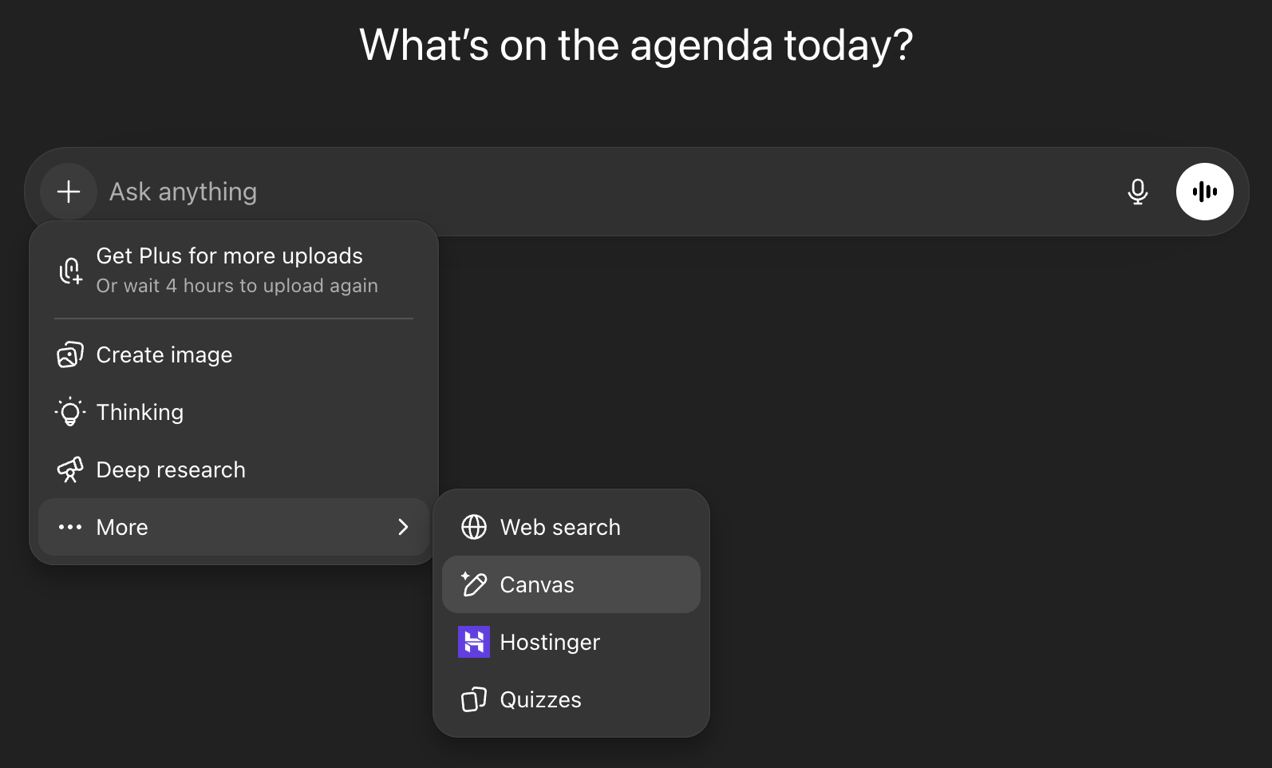
For WordPress users, ChatGPT is excellent at generating custom theme code, writing PHP functions, and building WooCommerce templates. It won’t host anything for you, but it dramatically speeds up the development work.
Drag-and-drop builders like Hostinger AI Builder pair well with ChatGPT for content. You handle the visual layout in the builder, and ChatGPT writes the page copy, blog posts, product descriptions, and FAQ sections that go into it.
And if your goal is a single high-converting page rather than a full site, our guide on creating a landing page with ChatGPT walks through the focused workflow for that.
How can I use ChatGPT to make money beyond building a website?
There are dozens of ways to make money with ChatGPT, and most of them get easier once you have a website to build on.
Freelance services are the most direct path. Content writing, copywriting, social media management, and SEO consulting all become more profitable when you can produce higher quality work in less time.
The key is using the AI to handle first drafts and research while you focus on strategy, client communication, and quality control.
Digital products are another strong option. You can create and sell ebooks, online courses, templates, printables, Notion dashboards, or Canva design bundles.
ChatGPT helps with outlining, writing, and even marketing copy for these products. Pair that with a website you built using the process above, and you have a complete sales funnel.
Niche websites are where website-building and content skills combine. Build a site around a specific topic, publish helpful content consistently (with ChatGPT helping you write faster), and monetize through affiliate marketing, display ads, or your own products.
Some creators are building entire portfolios of small niche sites, each earning a few hundred dollars per month.
AI consulting is a growing field. As businesses figure out how to integrate AI into their workflows, people who understand tools like ChatGPT are in demand.
You don’t need to be a developer, you just need to know your way around prompting. Helping small businesses set up ChatGPT for customer support, content creation, or internal processes is a real service you can charge for.
Every one of these paths starts with the same thing: getting something live on the internet. That part takes less than a day now. So start building.
This article is a localized version of How to build a website with ChatGPT, originally published in English.

Simon is a dynamic Content Writer who loves helping people transform their creative ideas into thriving businesses. With extensive marketing experience, he constantly strives to connect the right message with the right audience. In his spare time, Simon enjoys long runs, nurturing his chilli plants, and hiking through forests. Follow him on LinkedIn.