How to locate and create .htaccess file – A step-by-step guide
Sep 15, 2026
/
By Tomas A.
/
2 min Read

.htaccess (hypertext access) is a hidden file used to configure additional features for websites hosted on Apache Web Server. With it, you can rewrite URL, password-protect directories, enable hotlink protection, disallow access to specific IP addresses, change your website’s time zone or alter default index page, and much more. Here you’ll learn how to locate and create .htaccess file.
How to Locate an Open .htaccess File?
We will show how to locate and open .htaccess file in both Hostinger dashboard and cPanel.
Hostinger dashboard
Finding and editing the file in Hostinger dashboard takes only a few clicks. Here’s how to do it:
- Once you’re logged in to your WordPress Dashboard, use the search feature to find the File Manager located under the Files category.
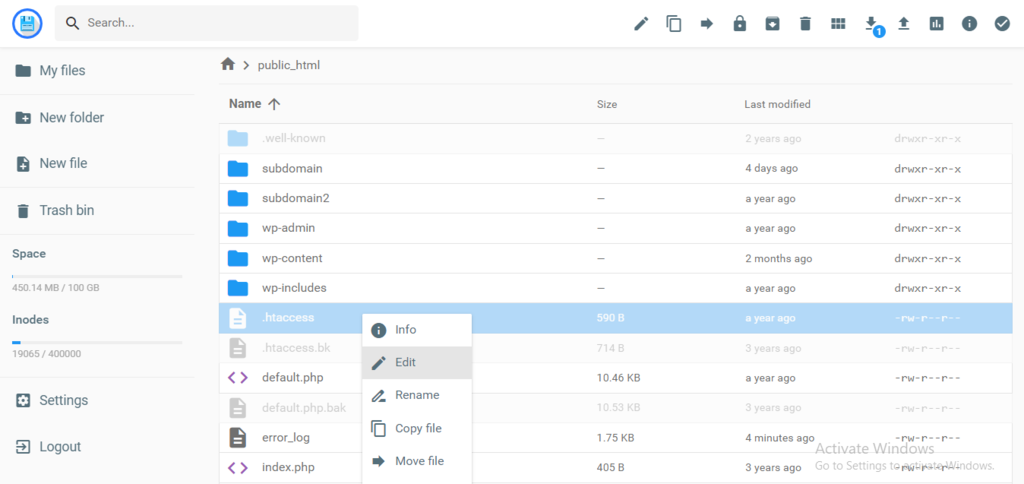
- By default, .htaccess is visible in Hostinger dashboard’s public_html directory, so you can immediately access the file and its content by right-clicking and selecting Edit.
cPanel
If you are using cPanel, the process is more or less similar.
- Access File Manager → public_html.
- If you can’t find the file, go to the Settings on the upper right menu and tick the Show Hidden Files option to enable viewing.
Important! This only applies to cPanel-based hosting platforms.
How to Create .htaccess File?
If .htaccess file is not present, here’s how you create one. This method is applicable to both Hostinger dashboard and cPanel:
- Click the New File button in the upper menu.
- Enter .htaccess as the file name, insert the code below and press Create to save your changes.
# BEGIN WordPress
<IfModule mod_rewrite.c>
RewriteEngine On
RewriteBase /
RewriteRule ^index.php$ - [L]
RewriteCond %{REQUEST_FILENAME} !-f
RewriteCond %{REQUEST_FILENAME} !-d
RewriteRule . /index.php [L]
</IfModule>
# END WordPres

Conclusion
You’ve learned how to locate and create .htaccess file using the File Manager. .htaccess enables you to create website redirects, set default pages, password-protect directories and much more.
If you have any questions regarding this guide, let us know in the comments below!
This article is a localized version of How to locate and create .htaccess file – A step-by-step guide, originally published in English.

Tomas provides top-notch technical advice on a daily basis to our valued customers. He also likes to create websites and do various coding side projects.