Cache miss: What it is, types, and how to reduce it
Oct 14, 2026
/
By Linda D.
/
6 min Read
A cache miss occurs when requested data isn’t found in a cache, forcing the system to retrieve it from another source. Cache misses occur in CPU memory, web browsers, and website caching systems, potentially increasing data retrieval times and reducing performance.
The four types of CPU cache misses are compulsory, capacity, conflict, and coherence misses. In website caching, misses can also occur when cached content expires or is removed.
To reduce cache misses, monitor your cache hit ratio, adjust cache expiration settings, review cache replacement policies, and check memory limits when necessary. The right approach depends on the caching system and the cause of the misses.

What is a cache miss?
A cache miss occurs when a system looks for requested data in its cache but cannot find it, so it must retrieve the data from another source. This takes longer than a cache hit, where the requested data is already stored in the cache.
Cache misses occur in different systems, including CPU caches and website caching systems such as browser caches and content delivery networks (CDNs). For example, when a CDN doesn’t have a cached copy of a webpage, it may need to retrieve the content from the origin server before delivering it to the visitor.
Frequent cache misses can increase data retrieval times and reduce performance, depending on the caching system.
What are the four types of cache misses?
The four types of cache misses are compulsory, capacity, conflict, and coherence misses. These categories primarily describe CPU cache behavior and explain why requested data may be unavailable in a processor’s cache.
- Compulsory miss: Occurs when the CPU accesses data for the first time and it has not been loaded into the cache. Also called a cold miss, it’s unavoidable on the initial access.
- Capacity miss: Happens when the cache is too small to hold all the data a program actively uses, causing previously cached data to be evicted.
- Conflict miss: Occurs when multiple memory blocks map to the same cache set and repeatedly replace one another, even when other cache space is available.
- Coherence miss: Happens in multicore systems when cached data is invalidated to maintain consistency between processor cores, requiring the data to be retrieved again.
These classifications are specific to processor caching. Website and CDN cache misses can occur for different reasons, such as expired content, cleared caches, or requests for resources that haven’t been cached yet.
Cache Miss Penalties and Cache Hit Ratio
Caching enables computer systems, including websites, web apps, and mobile apps, to store copies of files in a temporary location called a cache.
A cache sits close to the central processing unit and the main memory. The latter serves as a dynamic random access memory (DRAM), whereas a cache is a form of static random access memory (SRAM).
SRAM has a lower access time, making it an ideal choice for improving performance. For example, website cache will automatically store the static version of the site content the first time users visit a web page.
Hence, every time they revisit the website, their devices don’t need to redownload the site content. The cache will take over the query and process the request.
Generally, here are three cache mapping techniques to choose from:
- Direct-mapped cache. It’s the simplest technique, as it maps each memory block into a particular cache line.
- Fully-associative cache. This technique lets any block of the main memory go to any cache line available at the moment.
- Set-associative cache. It combines fully-associative cache and direct-mapped cache techniques. Set-associative caches arrange cache lines into sets, resulting in higher hit rates.
To help ensure successful caching, website owners can track their miss penalties and hit ratios.
Cache Miss Penalties
A cache miss penalty is the additional time required to retrieve data when it isn’t available in the cache. In CPU caching, this means accessing a slower cache level or main memory (RAM), which increases data retrieval time.
Most modern CPUs use three cache levels, each with different capacities and access speeds:
- L1 cache. The smallest and fastest cache, typically located within each CPU core. It stores frequently accessed data and instructions for quick retrieval.
- L2 cache. Larger but slower than L1. It provides additional storage for data that isn’t available in L1 and is often dedicated to an individual CPU core.
- L3 cache. Usually the largest and slowest CPU cache level. It’s commonly shared across multiple CPU cores and helps reduce the need to retrieve data from RAM.
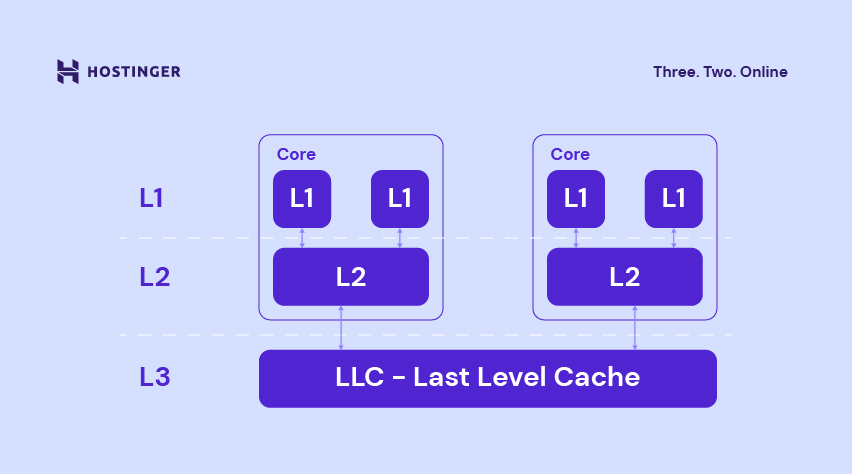
When the CPU can’t find the requested data in L1, it checks the next cache level, typically L2, and then L3. If the data isn’t available in any of these caches, the processor retrieves it from RAM.
Accessing slower memory levels increases the cache miss penalty because retrieving the requested data takes longer. However, a higher penalty doesn’t necessarily mean a higher cache miss rate, which measures how frequently cache lookups fail.
Cache Hit Ratio
The cache hit ratio measures the percentage of requests successfully served from the cache. A higher hit ratio generally means fewer requests need to retrieve data from a slower source, improving caching efficiency.
Calculate the cache hit ratio using this formula:
Cache hit ratio (%) = Cache hits / (Cache hits + Cache misses) × 100
For example, if a website records 107 cache hits and 16 misses, its cache hit ratio is approximately 87%.
There is no universal ideal cache hit ratio. A good percentage depends on the caching system, content type, and how frequently the cached data changes. Instead of relying on fixed benchmarks, monitor the hit ratio alongside response times and server load.
Website owners can check cache performance through their CDN or server caching analytics, where available. WordPress caching plugins such as LiteSpeed Cache, WP Rocket, WP Super Cache, and W3 Total Cache help manage caching, although not all provide detailed cache hit ratio statistics.
How to Reduce Cache Misses?
To reduce cache misses, identify why requested data isn’t available in the cache and adjust the caching configuration accordingly. Common causes include expired cache entries, insufficient cache capacity, and cache replacement policies that remove frequently accessed data.
The most effective solution depends on the caching system. For websites, adjusting cache expiration settings can reduce unnecessary misses, while CPU and application caches may require different approaches.
Before making changes, monitor the cache hit ratio and response times to identify performance issues. Keep in mind that some cache misses are necessary to ensure users receive fresh or updated content.
Option 1. Increase the Cache Lifespan
Adjusting the cache lifespan can reduce cache misses caused by expired content. The cache lifespan, also called time to live (TTL), determines how long cached data remains valid before it must be refreshed.
A longer TTL can reduce unnecessary cache misses for content that rarely changes. However, keeping cached content for too long may cause visitors to see outdated information.
Choose a cache lifespan based on how frequently your content changes and whether the caching system automatically clears outdated entries.
For WordPress websites, you can configure cache expiration settings through caching plugins:
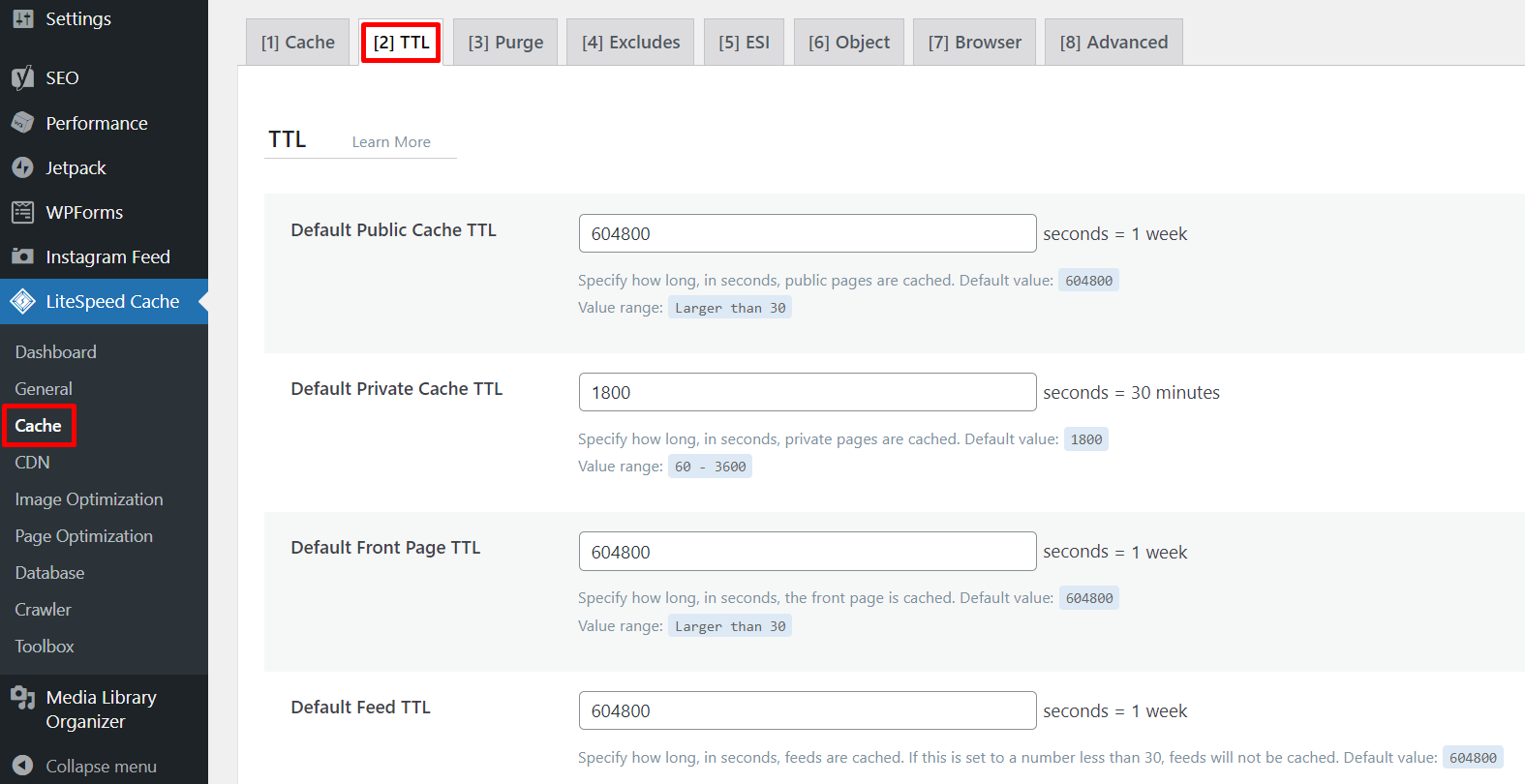
- LiteSpeed Cache: Navigate to LiteSpeed Cache → Cache → TTL. You can configure separate expiration times for public pages, the homepage, feeds, and REST API responses.
- WP Rocket: Navigate to Advanced Rules → Cache Lifespan. The default is 10 hours, but you can adjust it based on your website’s requirements.
- WP Super Cache and W3 Total Cache: Both offer cache expiration settings, although their configuration options differ.
If your WordPress pages contain time-sensitive security tokens (nonces), be careful when increasing the cache lifespan. Expired nonces can cause forms and other interactive features to stop working correctly.
After changing the TTL, verify that your website displays the updated content correctly, and monitor the cache hit ratio to evaluate the results.
Option 2. Optimize Cache Policies
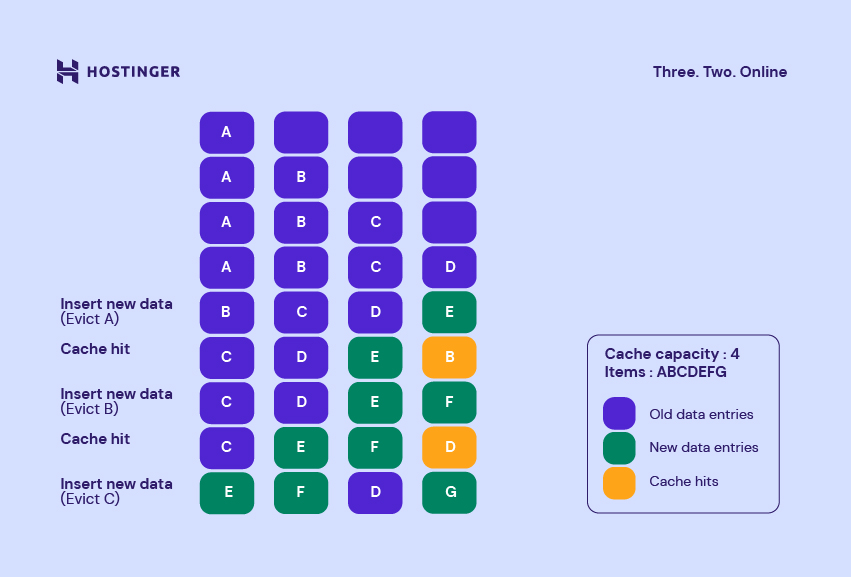
Cache replacement policies determine which stored data is removed when a cache reaches its capacity. Choosing an appropriate policy can reduce cache misses by keeping frequently accessed data available for longer.
Four common cache replacement policies are:
Most Recently Used (MRU): Removes the most recently accessed item. This approach can work for specific access patterns, but it isn’t suitable for every caching system.
First In, First Out (FIFO): Removes the oldest cached item based on when it was added, regardless of how often it’s accessed.
Last In, First Out (LIFO): Removes the most recently added item first, regardless of its access frequency.
Least Recently Used (LRU): Removes the item that hasn’t been accessed for the longest time, helping retain recently requested data.
For most WordPress websites, cache replacement policies are managed automatically by the caching system and aren’t directly configurable through standard caching plugins.
However, some caching systems, such as Redis, allow administrators to configure eviction policies and memory limits. If cached data is being removed too frequently, review cache eviction statistics and available memory before adjusting these settings.
For websites using a content delivery network (CDN), focus on optimizing cache expiration and caching rules, since the provider may manage eviction policies automatically.
Option 3. Expand Random Access Memory (RAM)
Insufficient memory can increase cache misses when a caching system must remove stored data to make room for new entries. This is particularly relevant to in-memory caching systems such as Redis and Memcached.
To identify memory-related caching problems:
- Monitor cache memory usage. Check whether your caching system is approaching its configured memory limit.
- Review cache evictions. Frequent evictions may indicate that the cache cannot retain frequently accessed data.
- Adjust memory allocation if necessary. Increasing the cache’s available memory may help reduce capacity-related misses, provided the server has sufficient resources.
For WordPress websites, object caching can reduce repeated database queries by storing frequently accessed data in memory. Check whether your hosting environment supports persistent object caching before adjusting its memory settings.
Increasing your server’s RAM doesn’t automatically reduce CPU cache misses or improve caching for every type of website. It helps when insufficient memory is the contributing factor.

How to monitor and improve cache performance
Reducing cache misses starts with understanding why your caching system isn’t retaining frequently requested data. Increasing cache lifespan, reviewing eviction policies, or adjusting memory limits can help, depending on the cause.
For website owners, the next steps are:
- Monitor cache performance. Check your cache hit ratio, response times, and eviction statistics where available.
- Adjust your caching settings. Review expiration times and memory limits, making changes based on how frequently your content is accessed and updated.
- Measure the results. Run a website speed test before and after making changes to see whether they improve loading performance.
If caching isn’t the main performance bottleneck, explore other website optimization techniques to identify areas for improvement.
This article is a localized version of Cache miss: What it is, types, and how to reduce it, originally published in English.

Linda is a seasoned Content Writer specialized in website creation. With her passion for the written world and obsession with helping others, her goal is to deliver resourceful content pieces for all skill levels. When she’s not writing, Linda likes to cross stitch and watch films. Follow her on LinkedIn.