OpenClaw security: A checklist for securing a local AI agent
Mar 10, 2026
/
Larassatti D.
/
12 min Read
Securing OpenClaw matters more than securing a typical chatbot because it’s an AI agent that can take real actions on your behalf. It can run system commands, access files, send emails, interact with APIs, and automate workflows across multiple services.
Because of this, mistakes or misconfigurations don’t stay confined to a chat window – they can affect your server, your data, and any connected systems.
On one hand, OpenClaw runs locally on infrastructure you control, so your data doesn’t need to pass through a third-party cloud service. On the other hand, security depends on the level of access you grant, how secrets are stored, how well the agent is isolated, and whether its network exposure is intentional.
Safe automation comes down to clear boundaries. To experiment with OpenClaw securely, define what it’s allowed to do, what it should never do on its own, and how you’ll detect and respond to issues when something goes wrong.
With a careful, deliberate setup from the start, OpenClaw can be useful and safe – most common risks can also be prevented.
What sparked the OpenClaw security discourse
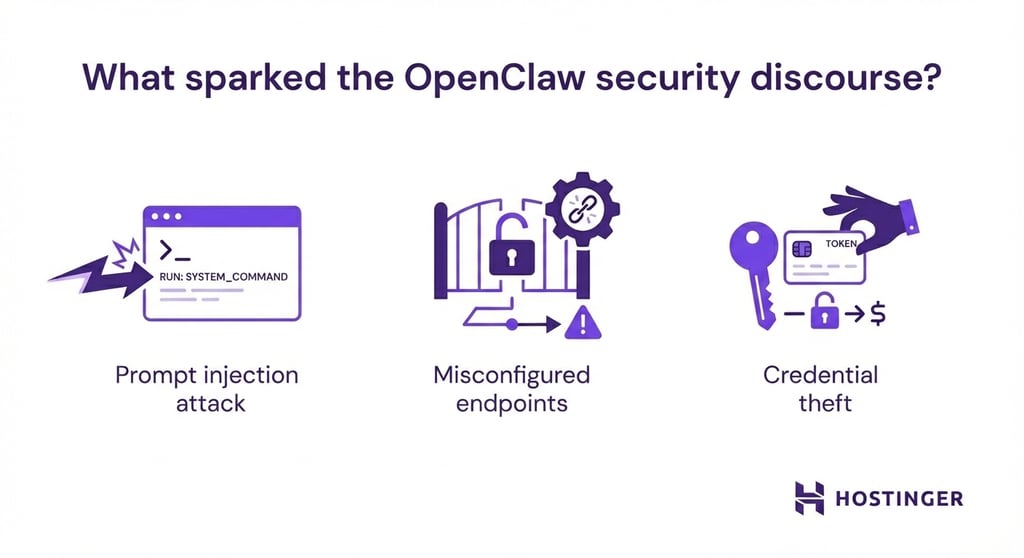
Proof-of-concept demos showed that malicious websites could embed hidden instructions in pages OpenClaw was asked to summarize, leading the agent to exfiltrate data or modify system files. This is what researchers have identified as prompt injection attacks.
Configuration issues amplified these risks. Some users exposed OpenClaw gateways to the public internet using default settings, inadvertently leaking API keys, OAuth tokens, and private chat histories. Researchers later confirmed that plaintext credentials were exposed through misconfigured endpoints and prompt-injection vectors.
Commodity infostealers such as RedLine, Lumma, and Vidar also began targeting OpenClaw installations – often before security teams even knew the software was running.
Because credentials and conversation context were stored in plaintext, attackers could steal not only access keys but also full records of workflows and user behavior, a phenomenon analysts described as cognitive context theft.
Together, these incidents highlighted a central reality: the risk is largely a function of deployment. An agent running with root permissions, public internet exposure, unrestricted command execution, and no human oversight presents a different security posture than one running as a restricted user, behind a VPN, with command allowlists and approval workflows.
This distinction matters because AI agents operate differently from traditional software. They run continuously, ingest natural language from multiple sources, and autonomously decide which tools to invoke. While a misconfigured web server may leak data, a misconfigured AI agent can delete databases, send fraudulent emails, or leak credentials within seconds.
What can OpenClaw access?
OpenClaw can connect to several high-impact systems:
- Email (IMAP, SMTP, Gmail, Outlook APIs). OpenClaw can read inboxes, process attachments, manage folders, and send emails. If compromised, an attacker could exfiltrate sensitive correspondence or send convincing phishing emails directly from your account.
- Team communication tools (Slack, Discord, WhatsApp, Telegram). These platforms rely on long-lived access tokens with broad permissions. A compromised agent could monitor private conversations, impersonate users, or send messages to mislead teams or conceal malicious activity.
- Calendars and scheduling systems. OpenClaw can create meetings, send invites, and analyze availability. While this seems benign, calendar data can be used to schedule fake meetings for phishing or to map team structures and working patterns.
- Browser automation. OpenClaw can navigate websites, fill forms, click buttons, and extract data. If you’ve configured it to access internal dashboards or financial accounts, session cookies and credentials become part of the attack surface.
- File system access. Depending on permissions, OpenClaw may read configuration files, access documents, and write data to disk. Running the agent with elevated privileges expands this access to system files and other users’ data.
- System command execution. This is where the power of automation meets the risk of security. OpenClaw can run shell commands, install software, modify services, and execute scripts. With unrestricted command execution, a single compromised input can cascade into full system control.
- External APIs. API keys extend OpenClaw’s reach to cloud infrastructure platforms, payment processors, and internal productivity tools. Each integration grants not just data access but also the ability to take actions.
OpenClaw acts as a bridge between systems, so if one entry point is compromised, such as a malicious email or web page, an attacker can move laterally through everything the agent is allowed to access. This is why each new system integration increases the agent’s blast radius.
For instance, if you configure an OpenClaw agent for customer support, you could give it access to email (to read requests), a database (to look up customer details), a payment processor (to issue refunds), and Slack (to notify the team).
A single prompt-injection attack in a support email could chain these permissions together – querying customer records, issuing fraudulent refunds, and posting misleading messages to Slack to mask the activity.
The biggest OpenClaw security risks
Most OpenClaw security incidents fall into a few repeatable categories. In almost every case, the issue isn’t a flaw in the agent itself, but how it’s deployed, exposed, and permissioned.
Weak VPS hardening
Many OpenClaw installations run on virtual private server (VPS) instances with default security settings: SSH exposed on port 22 with password authentication enabled, minimal firewall rules, delayed security updates, and services running with excessive privileges.
When OpenClaw runs on top of this weak foundation, any initial compromise becomes dangerous. An attacker who gains access through an unrelated vulnerability suddenly has an AI agent with broad system access that can automate reconnaissance, persistence, and lateral movement, which can accelerate the attack dramatically.
Exposed ports and services
OpenClaw’s gateway runs on port 18789 by default, with the Canvas host on port 18793. When these ports are exposed to the public internet, they become discoverable through routine port scanning.
Attackers actively probe VPS IP ranges for open services, and an unauthenticated or weakly protected OpenClaw instance is an easy target. If OpenClaw shares a server with other services, a single exposed endpoint can lead to broader compromise, such as leaking database credentials, SSH keys, or API tokens stored elsewhere on the system.
Using public gateways instead of private networking
For convenience, some users expose OpenClaw through public URLs, webhooks, or chatbots without strong authentication, rate limiting, or input validation. A public Telegram bot or email forwarding rule can unintentionally become a remote command interface.
No sandboxing or isolation
When OpenClaw runs directly on the host operating system, it inherits all the user account’s permissions. There’s no file system isolation, no network restrictions, and no resource limits to contain damage. Without sandboxing, a single compromised command runs with full user privileges.
Overly permissive skills and command execution
Granting OpenClaw unrestricted command execution is equivalent to giving every untrusted input root-level influence.
Many users enable broad permissions during testing and never tighten them later. This allows the agent to delete files, install software, modify services, or execute arbitrary code simply because nothing prevents it.
Unsafe secret storage
OpenClaw relies on API keys and credentials to interact with external systems, but storing these secrets in plaintext configuration files makes them trivial to steal once file access is gained.
Even environment variables can expose secrets to other processes running under the same user.
Prompt injection with tool execution
A successful injection can trigger file deletion, data exfiltration, or system changes through embedded instructions in emails, web pages, or chat messages.
This risk grows as OpenClaw processes untrusted inputs autonomously – summarizing unknown websites, reading emails from external senders, or monitoring public channels. Each input becomes a potential execution vector with real-world consequences.
OpenClaw security checklist for self-hosted setups
OpenClaw security issues are preventable with better configuration, a careful rollout, and basic defense-in-depth practices. As OpenClaw’s development is still in its early stages, we can also expect ongoing improvements as the project matures.
That said, at the time of writing, there’s no standardized framework that guarantees the safe operation of AI agents. And as OpenClaw is self-hosted, you’re fully responsible for its security posture.
For that reason, before deploying OpenClaw and securing it, make sure you’re comfortable with server-level configuration, understand Linux security fundamentals, as well as know how to work with the command line, firewall rules, and system troubleshooting.
The exact steps will vary depending on whether you run it on a VPS, a local machine, or a private server, but the principles below focus on securing OpenClaw in a VPS environment, where misconfiguration tends to have the biggest impact.
1. Keep OpenClaw private by default
The safest OpenClaw setup is one that isn’t reachable from the public internet. So, avoid exposing dashboards, APIs, or agent endpoints unless there’s a clear and justified need.
Start with private access only. Configure OpenClaw to listen on 127.0.0.1 instead of 0.0.0.0, so it’s accessible only from the server itself.
For remote access, use an SSH tunnel: connect with ssh -L 8080:localhost:8080 user@your-vps.com, then access OpenClaw at http://localhost:8080 on your local browser.
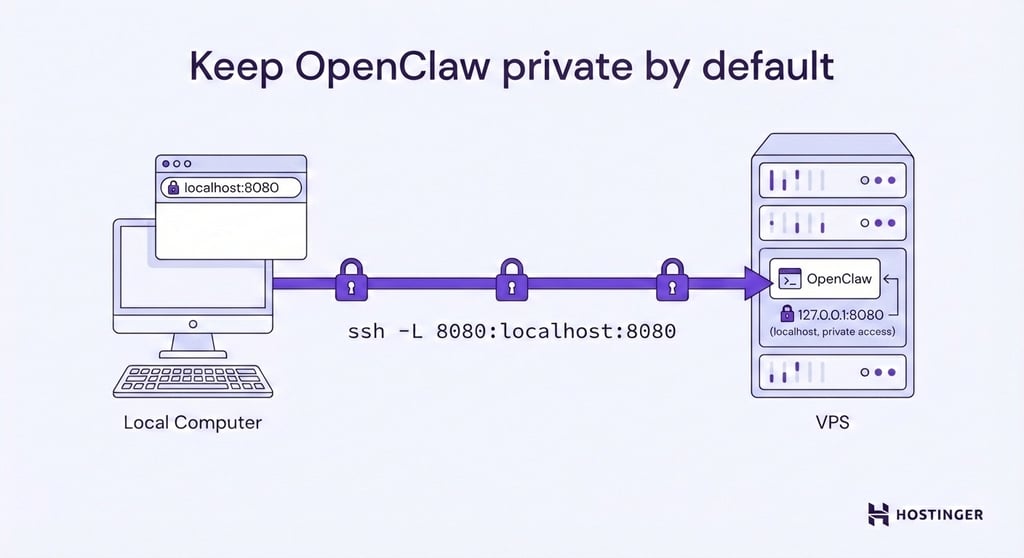
Alternatively, VPN solutions create secure private networks that let you access OpenClaw without exposing yourself to the public internet.
As an extra layer of protection, block OpenClaw’s ports at the firewall level using Uncomplicated Firewall (UFW). Even if something is misconfigured later, firewall rules help ensure the service isn’t accidentally exposed. OpenClaw typically uses port 18789 for the gateway.
If it’s highly necessary to make your OpenClaw publicly accessible, put it behind strong authentication, rate limiting, and a reverse proxy such as NGINX. The proxy validates requests before they reach OpenClaw, adding inspection and filtering that the agent itself doesn’t provide.
2. Check open ports and close everything you don’t need
One of the fastest security wins is auditing which ports are exposed and closing anything OpenClaw doesn’t actively use.
Run sudo ss -tlnp or sudo netstat -tlnp on your VPS to see which services are listening and on which ports.
Look for unexpected entries, such as old development servers, database ports (3306, 5432), or services you enabled once and forgot about.
Close unnecessary ports, and for services that need to run but don’t need external access, bind them to localhost only (127.0.0.1) instead of all interfaces (0.0.0.0). This makes them accessible to applications on the same server but invisible to external scans.
Also, consider changing your default SSH port to a less common one. This can reduce the noise from automated scans and brute-force attempts.
Real protection comes from firewall rules that explicitly allow only what’s needed and block everything else. Changing ports can cut down bot noise, but it’s not a substitute for proper security controls.
3. Harden SSH access before you do anything else
SSH is the foundation of VPS security, and one of the most common paths attackers use to gain access. Before securing OpenClaw itself, make sure your server access is properly locked down.
First, make sure you use only trusted SSH tools like PuTTY when accessing your server. Reputable clients reduce the risk of credential leaks and man-in-the-middle attacks.
Then switch to SSH keys for logging in, and disable password authentication entirely. This eliminates brute-force password attacks completely.
Restrict which users or IP addresses can connect, if possible. For users with static IPs, configure your firewall to accept SSH only from those addresses. This prevents attackers from even attempting connections.
4. Never run OpenClaw as root
Running OpenClaw as root means any mistake or exploit gives attackers complete system control. A misconfigured command or successful prompt injection becomes catastrophic when the agent operates with the highest privilege level.
Create a dedicated Linux user specifically for OpenClaw, run all OpenClaw processes as this user, store configuration in this user’s home directory, and grant only the minimum permissions needed for OpenClaw to function.
This containment limits damage. If OpenClaw is compromised, the attacker can only affect what the OpenClaw user can access. Recovery becomes simpler because you know the scope of potential modifications.
5. Restrict what OpenClaw can do with an allowlist
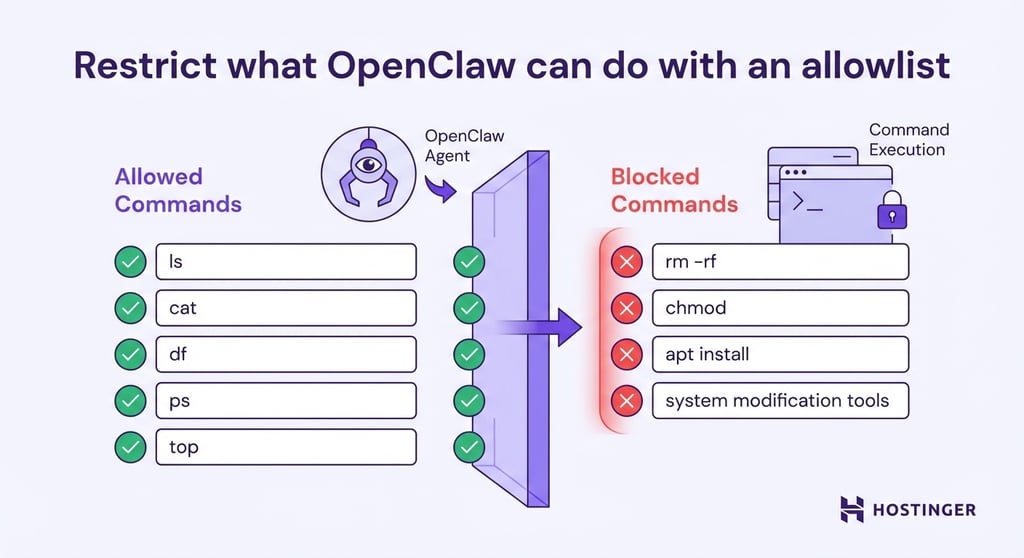
Without limits, OpenClaw can execute anything it’s asked to – intentionally or not. Command allowlisting flips the security model from “block specific dangerous things” to “permit only approved actions.”
Start with read-only Linux commands like ls, cat, df, ps, or top. These let OpenClaw gather information without modifying anything. Add write permissions carefully by allowing file creation in specific directories, not in system paths or configuration folders.
Never grant unrestricted access to package managers, system modification tools, or destruction commands. Use Linux permissions, AppArmor, or restricted shell configurations to enforce these limits technically, not just through agent behavior.
Each new capability you give to OpenClaw should be a deliberate decision, not an accident. Adjust Linux permissions and expand them gradually as you confirm safe operation.
6. Require human approval for high-risk actions
Human-in-the-loop approval means OpenClaw proposes actions but waits for your explicit confirmation before executing anything with significant impact. Always configure approval requirements on your OpenClaw instance for critical actions, including:
- Sending emails or messages to external recipients
- Deleting or modifying files
- Making purchases, refunds, or financial transactions
- Deploying code or changing production systems
- Running shell commands with write access
- Accessing or exfiltrating sensitive data
You can manage OpenClaw’s approval settings in the gateway configuration and in the Mac system settings for exec approvals. However, these protections have an important limitation: the approval system can be modified via API access if the gateway is compromised.
This means, as explained in the previous steps, strong gateway security is highly critical to maintaining your approval workflows.
7. Store API keys and tokens safely
OpenClaw needs credentials to access email, messaging platforms, cloud APIs, and AI providers. Storing these secrets in plaintext configuration files makes them easy to steal, as anyone with file access can recover your entire integration stack.
Instead, store API keys as environment variables so they’re never written to config files or version control systems. Set them in your shell environment or systemd service file, and OpenClaw will read them at startup without ever saving them to disk.
For stronger protection, use a secret manager like AWS Secrets Manager or an encrypted vault that injects credentials at runtime. These tools provide short-lived tokens that rotate automatically, limiting the window of opportunity if a credential leaks.
Additionally, rotate your API keys regularly, or do so immediately if you suspect compromise. Make rotation straightforward by using secret management rather than hunting through multiple config files.
Never commit API keys to version control, and ensure credential files have restrictive permissions (chmod 600) and are readable only by the user you set up for OpenClaw.
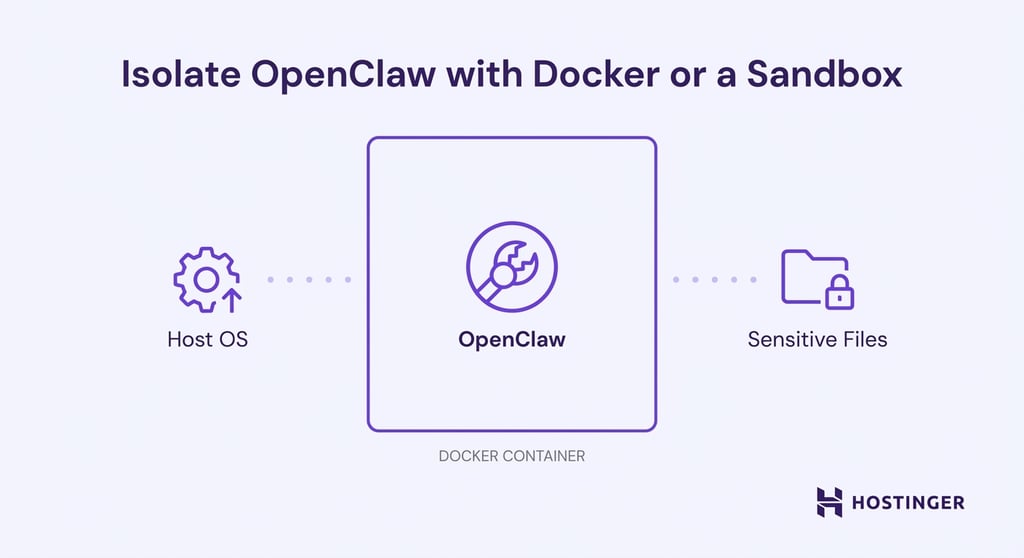
8. Isolate OpenClaw with Docker or a sandbox
Instead of running OpenClaw directly on your host system, use Docker or another sandboxing approach to create boundaries.
A Docker container runs OpenClaw in an isolated environment with its own filesystem, restricted network access, and CPU and memory resource limits. The container can’t see your host system’s files, access other processes, or make arbitrary network connections. This isolation limits the blast radius in case something goes wrong.
Mount only the specific directories OpenClaw needs and leave everything else inaccessible. Use minimal base images, run as a non-root user inside the container, and configure explicit network rules for which external services the container can reach.
Even if an attacker fully compromises the OpenClaw process, they’re contained within the Docker environment with no direct path to your host system, other services, or sensitive files outside the mounted volumes. The container becomes your security boundary.
9. Be careful with browser automation and external messages
Prompt injection risk increases sharply when OpenClaw processes untrusted content. When the agent visits websites to extract information, those pages can embed hidden instructions designed to influence its behavior.
The same risk applies to emails and chat messages from unknown senders. An attacker might include concealed text, such as white-on-white instructions, knowing you’ve asked OpenClaw to summarize your inbox or messages.
This risk is higher when using older or less capable language models, which are generally more susceptible to following malicious instructions embedded in otherwise harmless content.
To reduce exposure, limit browser automation to allowlisted domains you control and use read-only browser sessions that can’t access authenticated services. Never allow OpenClaw to browse arbitrary websites while logged into sensitive accounts.
For email and chat processing, use strict source allowlists and assume all external input is potentially hostile. Add human review before OpenClaw takes action based on information extracted from untrusted sources.
➡️ Dive deep into how these risks are also reflected in the emerging AI browsers.
10. Lock down chat integrations and bot access
Restrict command acceptance to specific user IDs. On Telegram, verify the sender’s user ID before processing any command. On Discord, check both server ID and user roles.
Never let your OpenClaw bot join public servers or channels where strangers can send it messages.
Use private channels and servers rather than public ones. Enable multi-factor authentication on the accounts OpenClaw uses for chat integrations – if an attacker compromises your Telegram account, MFA adds an extra barrier to authenticated sessions.
Configure chat integrations to use short-lived session tokens that expire after hours or days rather than permanent credentials. Regular re-authentication creates natural break points where compromised sessions stop working.
Also, review bot permissions carefully: does it need to delete messages and manage users, or just send and receive in private chats? Minimal permissions reduce damage if bot tokens leak.
11. Turn on logging so you can audit actions
Configure OpenClaw to log every action with context that enables investigation. At a minimum, log:
- Commands executed and their parameters
- Files accessed or modified
- API calls and integrations triggered
- Who or what requested each action (user, automated schedule, external message)
- Success or failure status
Use structured logging (JSON format) rather than unstructured text. Structured logs make it easy to search and filter. Queries like “Show me all file deletions in the last 24 hours,” or “Which APIs were called from external email triggers?” become trivial with proper formatting.
On Linux systems, system-level logs can be reviewed using the journalctl command, which makes it easier to audit OpenClaw’s activity, trace failures, and investigate suspicious behavior over time. Consider forwarding logs to a separate system or append-only storage so attackers who compromise OpenClaw can’t delete evidence.
Review logs weekly to build a baseline understanding of normal behavior. This makes anomalies obvious when they appear.
12. Update OpenClaw and dependencies safely
Staying up to date reduces exposure to known issues, but updates should be deliberate, not rushed. OpenClaw is a young, rapidly evolving software, so it updates frequently and adds security improvements as the community discovers and patches vulnerabilities.
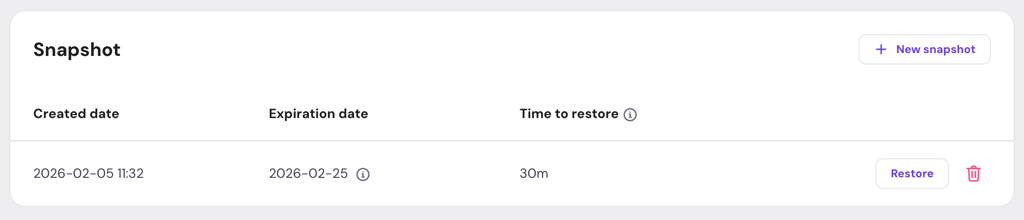
Follow a simple routine: create a VPS snapshot first, update one component at a time, test that core workflows still function, and keep the snapshot for 24-48 hours in case subtle issues appear. This keeps security improvements from becoming availability problems.
Monitor the OpenClaw GitHub repository for security releases and patch announcements. When vulnerabilities become public, attackers develop exploits quickly – delayed patching leaves you exposed during the window between disclosure and your update.
Additionally, the Python packages, Node modules, or system libraries OpenClaw uses also have vulnerabilities. Tools like pip-audit for Python or npm audit for Node identify outdated packages with known security issues.
💡 Managing snapshots is simpler with Hostinger’s OpenClaw hosting, as they are integrated into hPanel (our server management panel) alongside Docker, security controls, and recovery tools.
13. Start with low-risk automations and expand slowly
The safest way to deploy OpenClaw is to treat it like production software, even for personal use.
Start with read-only reporting: daily email summaries, weather and calendar briefings, aggregated news from RSS feeds. These operations consume data and generate text but don’t modify systems or trigger external actions. Run these for days or weeks to validate stability.
Next, add low-stakes write operations: saving generated reports to specific directories, posting summaries to private chat channels, and creating calendar events. These have consequences but a limited scope. Mistakes mean cleaning up files or deleting spurious calendar entries.
Only after demonstrating reliable operation should you enable higher-risk capabilities, such as sending emails to external addresses, executing system commands that modify configuration, browser automation with logged-in accounts, or managing production infrastructure.
Then, make sure each expansion includes conscious evaluation.
What should you automate first with OpenClaw?
When you’re getting started with OpenClaw, the safest approach is to start with automations that are useful but low-risk. These help you understand how the agent behaves without giving it deep system access or irreversible powers.
Make your first OpenClaw automations read-only, reversible, and easy to audit, including:
- Daily or weekly briefings. Have OpenClaw summarize news sources, documentation updates, or internal notes and send you a short report. This requires minimal permissions and no system changes.
- Inbox or message summaries. Let OpenClaw summarize emails or messages you receive, rather than replying or taking action. This keeps the agent in an “observe-only” role while you evaluate its accuracy.
- Scheduled reports. Generate periodic summaries from logs, dashboards, or databases without allowing OpenClaw to modify anything. Reporting builds confidence without expanding the blast radius.
- Reminders and task tracking. Use OpenClaw to create reminders or compile task lists from your notes or chats, without granting file deletion, command execution, or external write access.
Treat every new automation as an experiment. Run OpenClaw in a sandboxed or isolated environment, connect only the integrations you need, and avoid combining multiple systems at once.
After each change, review the logs to see exactly what actions were taken, which tools were invoked, and whether anything unexpected happened. If something feels unclear, roll back and simplify before adding more capabilities.

All of the tutorial content on this website is subject to Hostinger's rigorous editorial standards and values.

Larassatti Dharma is a content writer with 4+ years of experience in the web hosting industry. She has populated the internet with over 100 YouTube scripts and articles around web hosting, digital marketing, and email marketing. When she's not writing, Laras enjoys solo traveling around the globe or trying new recipes in her kitchen. Follow her on LinkedIn


Comments
0 responses