OpenClaw costs: How much does it cost to run OpenClaw on a private server
Mar 10, 2026
/
Alma
/
7 min Read
OpenClaw costs range from approximately $6 to $200+ per month, depending on how the system is deployed and how intensively it runs. While OpenClaw itself is open source and free to install, operating it requires ongoing costs for server infrastructure and AI model usage.
The total cost of running OpenClaw depends on the VPS resources allocated, the language models connected, the frequency of automation triggers, and the level of usage monitoring as workflows scale.
Most personal users fall in the $6–13 range, small teams typically spend $25–50, mid-sized or scaling teams land in the $50–100 range, and heavy-automation setups can push past $100 when processing thousands of AI interactions daily.
The good news? You control the key levers behind your OpenClaw costs.
Is OpenClaw free or paid?
OpenClaw is completely free software. It has no licensing fees, subscription costs, or built-in usage charges. It is released under the MIT license, which allows you to run and modify it without paying for the software itself.
The costs begin when you operate it. OpenClaw requires:
- A server or VPS running continuously
- AI model API calls for every automation step
- Storage for logs, memory, and transcripts
Many users misunderstand open source to mean zero cost. The software is free, but the operational expenses are not.
Hosting and infrastructure costs
Hosting OpenClaw costs between $5 and $50+ per month for most deployments.
OpenClaw needs to stay online continuously. It monitors your triggers, processes tasks, and executes workflows around the clock. That means you need a VPS or dedicated server. Your server specs directly determine your monthly bill, so understanding what you actually need helps you avoid overpaying.
Server specifications directly affect pricing:
- 1–2 vCPU, 2–4 GB RAM → suitable for light personal use
- 2–4 vCPU, 8 GB RAM → stable small-team deployment
- 4+ vCPU, 16 GB RAM → heavy automation or browser workflows
Light personal setups typically run on a basic VPS plan costing $5–10/month. Production environments with higher uptime guarantees, better isolation, and additional RAM often range between $15–40/month.
Cost is influenced by:
- Server size (CPU and RAM). More vCPU cores and higher RAM increase the monthly cost directly.
- Backup frequency. Weekly backups are often included in entry plans, while daily or snapshot-based backups improve recovery options but increase storage and billing.
- Isolation level (shared vs dedicated resources). Shared VPS plans cost less but share CPU and memory with other tenants, which can cause slowdowns during neighbor spikes.
- Uptime requirements. OpenClaw runs continuously to monitor triggers and execute workflows. Standard uptime (99–99.9%) is sufficient for personal projects. Higher SLA guarantees, redundancy, and failover configurations will increase cost.
Setting up OpenClaw on your server involves matching these specs to your actual automation needs, which helps you land on the right plan without overspending.
Production deployments justify stronger isolation and guaranteed performance, and dedicated resources, like Hostinger’s VPS plans, guarantee your OpenClaw instance never competes for resources.

AI model and token usage costs
AI model usage is the highest variable cost of running OpenClaw. Most users spend between $1 and $150 per month on tokens, depending on model selection and workflow intensity.
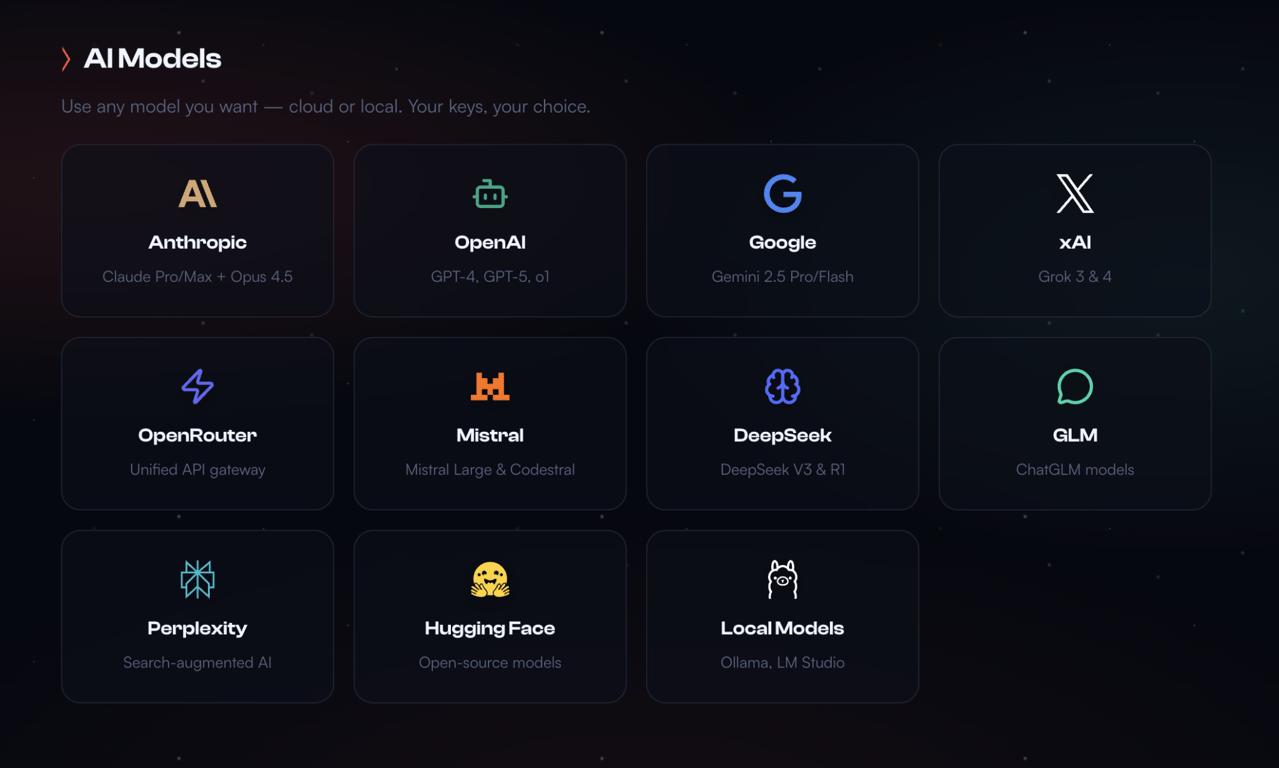
OpenClaw doesn’t include its own AI model. It connects to external language models from providers like OpenAI, Anthropic, Google, and others.
Every conversation, automation step, and decision OpenClaw makes triggers an API call to one of these models. That call consumes tokens.
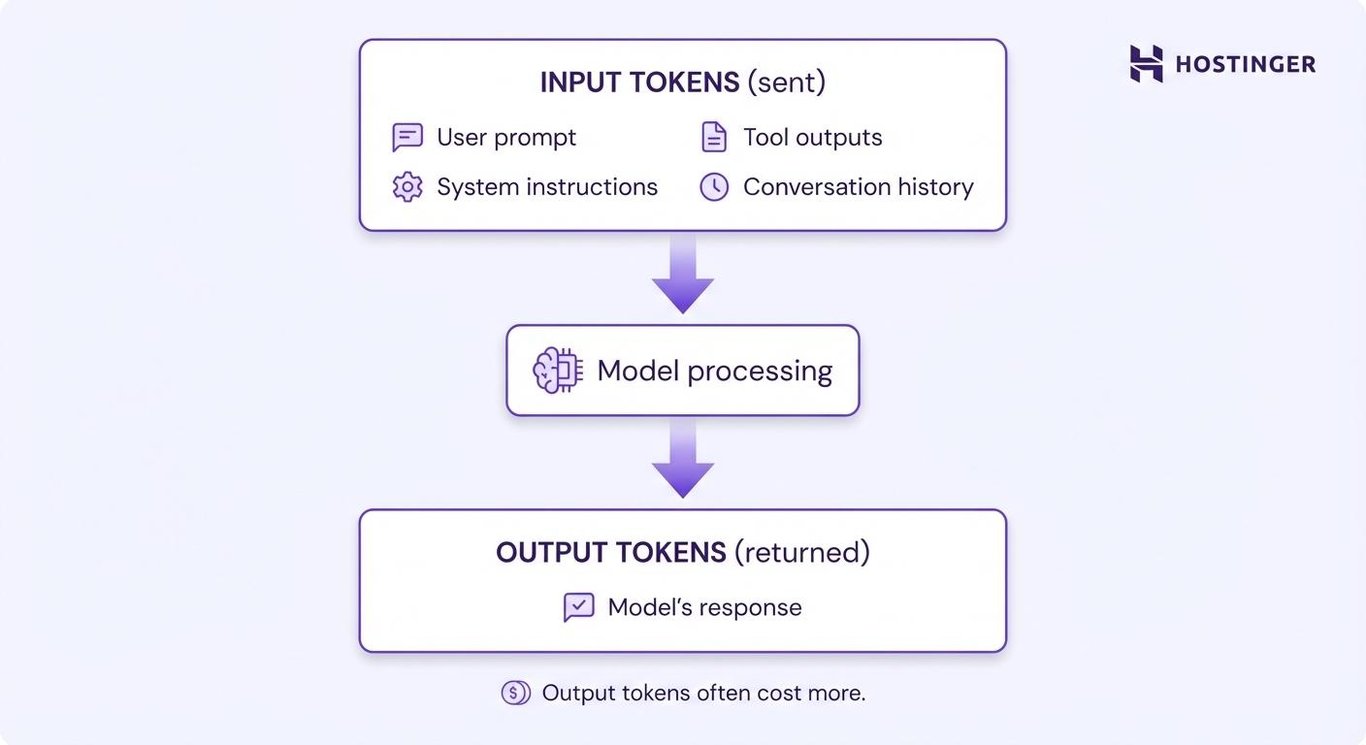
Tokens represent pieces of text. You pay separately for:
- Input tokens. Your prompt and context
- Output tokens. The model’s response
Output tokens usually cost 2–5× more than input tokens.
Here’s what current token pricing looks like for popular models:
Budget models (great for routine tasks):
- GPT-4o-mini → $0.15 input and $0.60 output per million tokens
- Llama 3.1 8B → $0.05 input / $0.08 output per million tokens
Mid-tier models (balanced cost and performance):
- Claude Haiku 4.5 → $1.00 input / $5.00 output per million tokens
- GPT-4o → $2.50 input / $10.00 output per million tokens
Premium models (complex reasoning):
- Claude Opus 4.5 → $5.00 input / $25.00 output per million tokens
A typical OpenClaw interaction uses roughly 1,000 input tokens and 500 output tokens. That single call costs about $0.00045 with GPT-4o-mini or $0.0075 with GPT-4o.
Multiply by your usage frequency: 1,000 interactions per month runs $0.45 with the budget model versus $7.50 with the premium one.
Low-usage experiments–testing OpenClaw with a few dozen messages per week, running simple automations occasionally–cost under $1/month in tokens. Heavy automation scenarios with thousands of multi-step workflows, browser sessions, and complex reasoning can easily hit $50–150/month in API costs alone.
Model choice has a greater impact on cost than server size. Routing simple tasks to smaller models reduces spend significantly without sacrificing quality for routine operations.
How automation scope affects costs
Automation scope directly increases token usage and resource consumption because the more tasks you automate, the more AI calls OpenClaw makes, and the faster costs accumulate.
Each workflow trigger, each step in a multi-step automation, and each tool invocation potentially fires an API request.
High-cost patterns include:
- Browser automation sessions
- Parallel task execution
- Batch document processing
- Multi-agent orchestration
- Large-context retrieval workflows
Browser automation hits especially hard. While OpenClaw’s architecture documentation explains that the system reduces token usage by roughly 90% by parsing accessibility trees rather than sending screenshots, navigation still requires repeated model decisions.
File operations and parallel runs compound costs, too. If you set up OpenClaw to process batches of documents, generate multiple reports simultaneously, or monitor several messaging platforms at once, you’re multiplying the base cost by the number of parallel workflows.
Here’s the thing beginners often miss: Cost risk appears when workflows scale from testing to production. A task that triggers 10 times per day in testing may trigger 500 times per day once connected to live inputs.
Start small, monitor costs daily for the first week, then scale gradually.
You can explore different OpenClaw use cases to see which automation patterns fit your budget and business needs.
Development vs production environment costs
Running separate development and production environments roughly doubles your infrastructure costs, adding another $5–20/month for a test VPS plus the AI tokens consumed during development and debugging.
However, separate environments provide:
- Safer testing of workflow changes
- Reduced risk of production disruption
- Protection of live credentials and data
- Model cost testing before scaling
Skipping a development environment reduces cost but increases operational risk, so you’ll need a second server for testing changes before pushing them live.
If a misconfigured automation calls GPT-4 5,000 times instead of 50, you’d rather catch that in a dev environment with budget models than in production with premium ones. The safety is worth the added cost for anything business-critical.
The common trade-off is that solo developers and small projects often skip separate environments to save money, accepting the risk of breaking their production setup during updates.
A middle-ground approach uses production hardware but switches to cheaper AI models for testing.
Additionally, according to OpenClaw security best practices, isolating test environments helps prevent accidental exposure of production credentials, real customer data, or live integrations during development.
Typical OpenClaw cost scenarios
With a cost‑optimized setup, OpenClaw costs $6–13/month for personal projects, $25–50/month for small business workflows, $50–100/month for scaling teams, and $100–200+/month for heavy operations, depending on usage patterns and model selection.
Here’s what scenarios look like with current pricing:
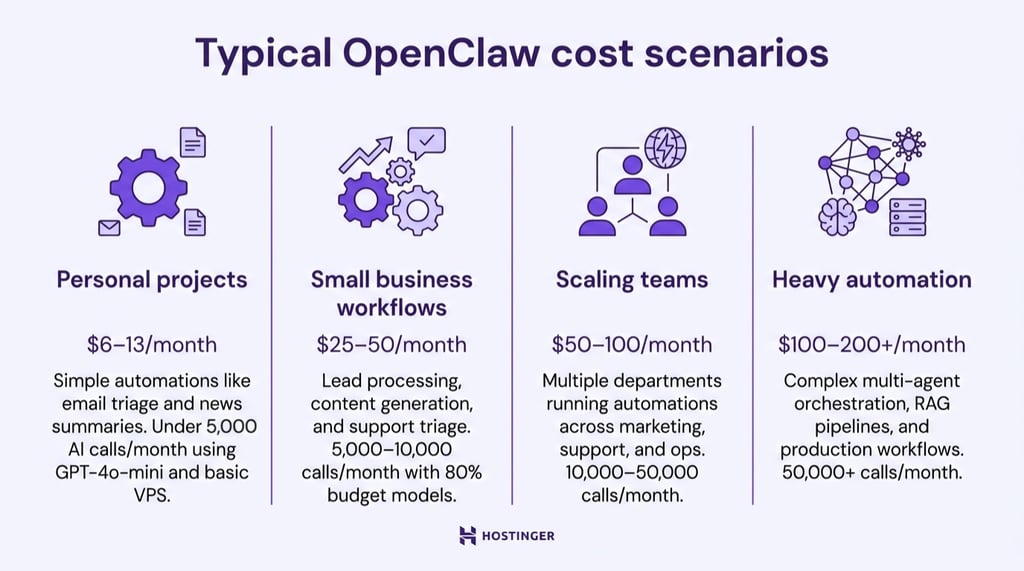
Personal projects (under 5,000 AI calls/month)
You’re running simple automations–email triage, daily news summaries, occasional web research. With GPT-4o-mini as your primary model and a basic VPS, you’ll spend roughly $6–13/month total.
That breaks down to RM27.99/month for Hostinger KVM 1 hosting, plus $1–6 in AI tokens depending on usage intensity. This is cheaper than a single Zapier Professional subscription.
Small business workflows (5,000–10,000 calls/month)
You’re running lead processing, content generation, CRM syncing, and customer support triage across a small team. Using a mix of 80% budget models and 20% mid-tier models for complex tasks, expect $25–50/month.
Most of that cost comes from AI tokens ($15–35), with server costs around $7–15 depending on performance needs.
Scaling teams (10,000–50,000 calls/month)
You’re running multiple departments on OpenClaw–marketing, support, internal ops–with several automations per team and regular browser steps. With a mix of 60–80% budget models and 20–40% mid‑tier models, monthly costs land in the $50–100 range.
Most of that comes from AI tokens ($35–80), with infrastructure in the $10–20 range for 2–4 vCPU servers and 8–16 GB RAM.
Heavy automation (50,000+ calls/month)
You’re running complex multi-agent orchestration, RAG pipelines, extensive browser automation, and production workflows. Heavy usage requires 4–8 vCPU servers with 16+ GB RAM. Your monthly bill runs $100–200+, with $80–150 in AI costs and $15–25 in infrastructure.
Strategic model routing (using budget models for routine tasks, premium models only when needed) keeps this manageable.
The variability comes from model choice more than anything else. Switching from GPT-4o to GPT-4o-mini for 80% of your calls can cut costs by 60–80%, with minimal impact on quality for simple tasks.
Hidden and often overlooked OpenClaw costs
Hidden or often overlooked costs for OpenClaw include backups, storage growth, monitoring tools, and idle automations that silently drain your budget. These expenses sneak up on people because they’re easy to miss during initial setup:
- Backups ($0–6/month). OpenClaw stores conversation history, memory files, and configuration that you can’t afford to lose. Hostinger includes free weekly backups, but daily backups cost $6/month.
- Storage growth ($2–5/month). OpenClaw writes JSONL transcripts and Markdown memory files that accumulate over months. Block storage runs about $0.10/GB/month at most providers. An active deployment might accumulate 20–50 GB of logs and memory over six months, adding $2–5/month you didn’t budget for.
- Monitoring tools ($0–15/month). Free options include Grafana Cloud (10,000 metrics free), Uptime Robot (50 monitors free), and Netdata (self-hosted). Paid options like Datadog start around $15/host/month. Most OpenClaw users get by on free monitoring until they hit scale.
- Idle automations (10–30% of AI spend) – That test automation you set up three months ago and forgot about? It’s still calling APIs. A GitHub discussion on controlling OpenClaw costs shows that unused automations and forgotten test workflows commonly account for 10–30% of monthly AI spend.
How to keep OpenClaw costs under control
OpenClaw costs remain predictable when usage is monitored, and automation expands gradually.
Practical strategies include:
- Routing tasks to budget models. Use smaller, low-cost models for classification, extraction, and short summaries, and reserve premium models for complex reasoning. Tiered routing can reduce API spend by 60–80%.
- Monitoring token usage weekly, not monthly. Set hard spending limits and enable budget alerts at 50%, 75%, and 90% thresholds to catch spikes early. Use separate API keys per workflow to track cost attribution and identify which automation is driving usage.
- Enabling prompt caching. Caching reduces repeated input token costs when the same instructions are reused, with some models discounting cached input tokens by up to 90% within short time windows.
Structure frequently used skills with static instructions first and place variable input at the end. This improves cache hit rates and lowers recurring token spend for high-frequency workflows. - Scaling gradually. Each active automation increases baseline resource usage and potential API calls. Add one workflow at a time, monitor costs for a week, confirm they align with expectations, then expand.
- Using integrated AI credits that centralize billing. Instead of managing multiple external API keys and provider invoices, Hostinger bundles Nexos AI credits directly with your VPS. Credits are managed inside hPanel, centralizing billing, reducing surprise charges, and making usage tracking and cost forecasting more predictable.
Hostinger’s one-click OpenClaw deployment and integrated AI credits let you go from zero to running autonomous AI agents in under 5 minutes, switch between Claude, ChatGPT, and Gemini without redeploying or reconfiguring API keys, and manage both infrastructure and AI usage from a single dashboard, with transparent, controllable costs.
More advanced users who prefer managing their own API keys can still do so–OpenClaw’s configuration file supports 20+ providers.
For comprehensive strategies on running OpenClaw efficiently, check out OpenClaw best practices.
All of the tutorial content on this website is subject to Hostinger's rigorous editorial standards and values.

Alma is an AI Content Editor with 9+ years of experience helping ideas take shape across SEO, marketing, and content. She loves working with words, structure, and strategy to make content both useful and enjoyable to read. Off the clock, she can be found gaming, drawing, or diving into her latest D&D adventure.
Comments
0 responses