WordPress database: what it is, how to manage it, and best practices
Mar 10, 2026
/
Luqmanul M. & Brian
/
5 min Read
A WordPress database stores all the data that makes up a WordPress website, including login credentials, pages, posts, themes, and plugins.
Basic knowledge of databases helps you understand how the platform works and troubleshoot errors more efficiently. It also enables you to perform tasks inaccessible through the WordPress dashboard, such as changing usernames.
In this article, we’ll explain what a WordPress database is and why it’s important. We’ll also show how you can access and manage it.
What Is a WordPress Database?
A WordPress database is a storage of your website data that uses the MySQL database management system. All WordPress databases have a default MySQL structure, which enables your website to function properly.
How a WordPress Database Works
When installing WordPress for the first time, you’ll also create a database to contain the core tables. It is usually stored on your web host server, often referred to as a database host.
A database management system (DBMS) is then used to control and manage it. This software splits complex data into smaller parts to organize them better.
DBMS works similarly to saving files and folders on a computer drive. Each folder contains specific file categories. This enables users to locate, modify, and delete any desired data easily.
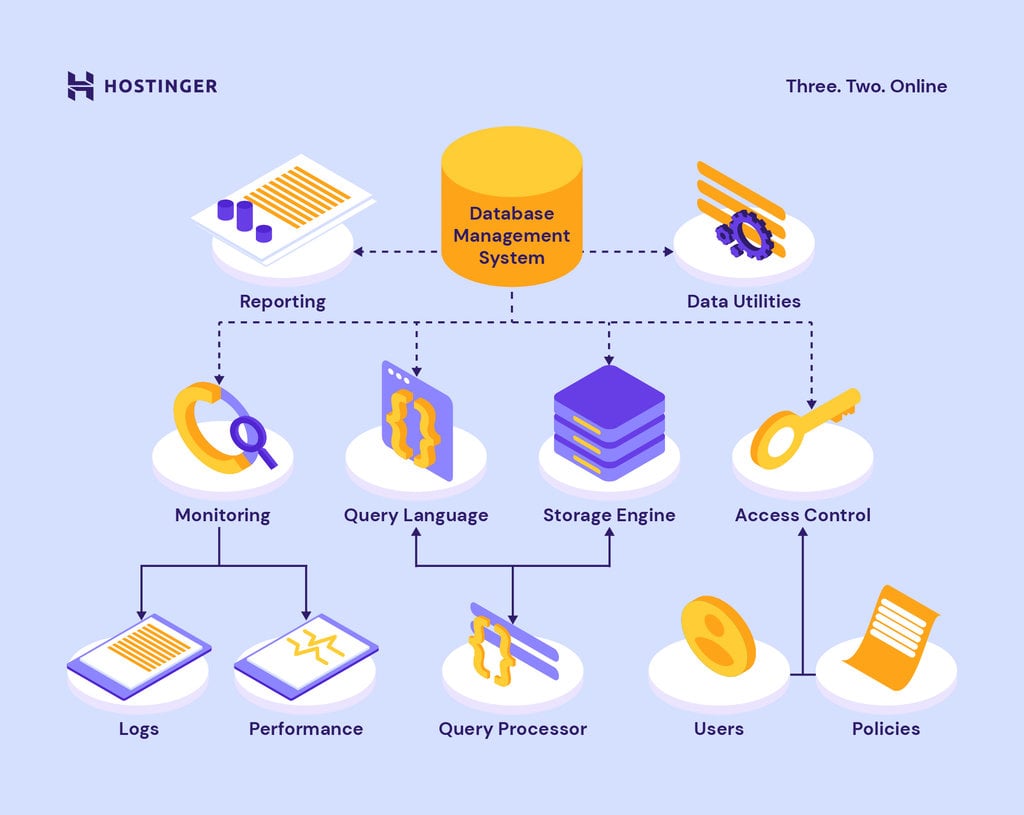
WordPress uses MySQL as its management system. MySQL uses the Structured Query Language to create, read, update, and delete data from a database.
While most MySQL queries run automatically, users can also perform them manually to change WordPress URLs and carry out other tasks.
What Is a WordPress Database Host?
A host is a server that stores a database. Usually, a website and its database are hosted on the same server. As a result, localhost is the typical hostname used to manage and connect a WordPress site to the database.
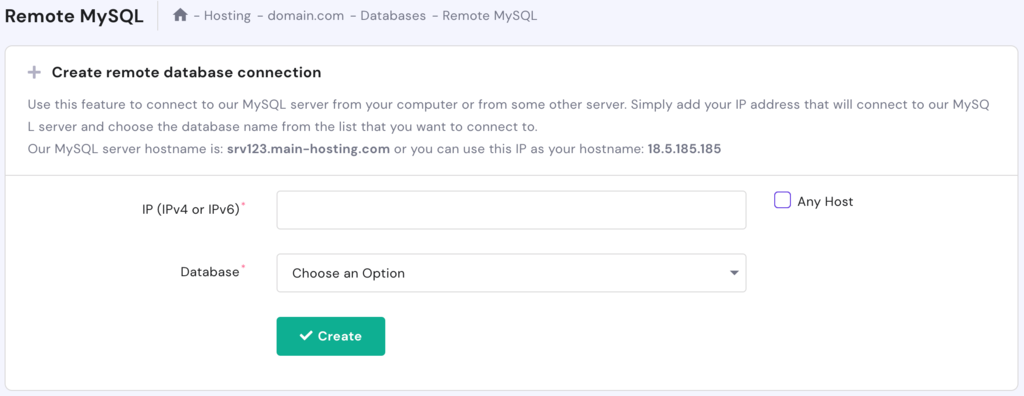
WordPress users can also use MySQL remote connection to connect their database to a remote server. In Hostinger, simply access Remote MySQL in hPanel. Note that a Hostinger hostname is required to enable the remote connection.
What Is a WordPress Database Table?
A database stores data in the form of tables. Each table consists of unique data displayed in columns and rows that contain more specific pieces of information or parameters.
By default, a WordPress database contains the following tables;
- wp_commentmeta – keeps the metadata of each comment posted on the website.
- wp_comments – stores data related to user comments, including the author name, URL, IP address, email, and comment content.
- wp_links – it was used for holding information from the Links feature. Since the feature has been deprecated, this table is often empty.
- wp_options – contains WordPress configuration settings, such as website URL, default category, and posts per page.
- wp_postmeta – keeps metadata of each post on the site, such as custom fields.
- wp_posts – stores data from articles, custom post types, pages, and navigation menu items.
- wp_termmeta – stores metadata of the terms.
- wp_terms – contains the WordPress terms for each post tag and category.
- wp_term_relationships – maintains the association between posts and terms in the wp_terms table.
- wp_term_taxonomy – describes the taxonomy for each category, link, and tag in the wp_terms table.
- wp_usermeta – keeps the metadata of each registered user on a WordPress site.
- wp_users – contains the list of users, including their usernames, passwords, and email accounts.
Each table stores specific data about your site. When you make website changes, the data on these tables can add and pile up. That’s why you should learn how to access and optimize your WordPress databases.
How to Access a WordPress Database
When setting up the platform manually, you’ll have to create a brand new WordPress database. To speed up the process, consider looking for a hosting provider with automatic installation.
Our WordPress hosting services let you install WordPress in just a few clicks.
After the installation, access the database directly via your control panel, the hPanel:
- Go to Hosting -> Manage.
- Scroll down to the Databases section.
- Select MySQL Databases to view and create databases and users.

- Click Enter phpMyAdmin to access the database.
Alternatively, access phpMyAdmin using our unique direct link:
- Open Databases -> phpMyAdmin.
- Click on the link at the top of the screen.
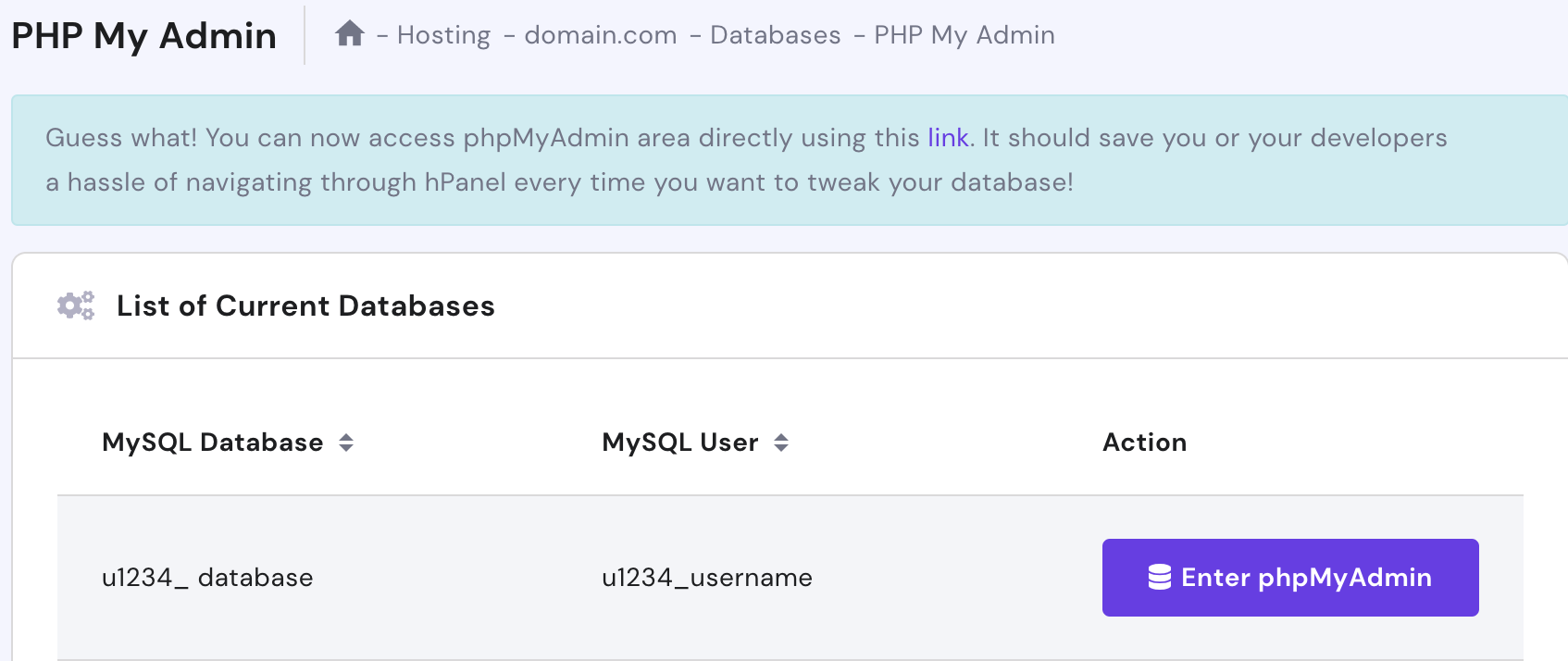
- Once the login screen appears, fill in your MySQL database username and password.
How to Manage a WordPress Database?
After you click on the direct link or the Enter phpMyAdmin button, this interface will appear:
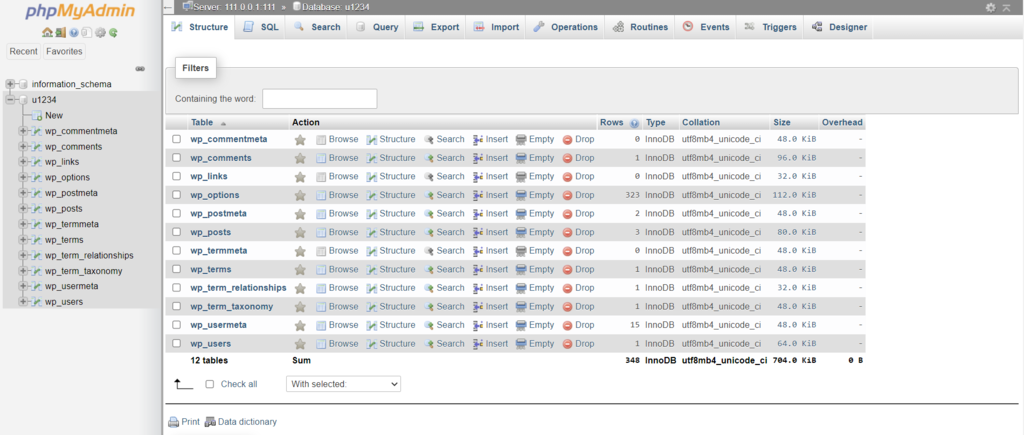
Here, you can access the default WordPress database tables and perform basic management tasks, such as:
- Running a MySQL query.
- Creating and deleting tables.
- Searching and sorting data based on specified criteria.
- Inserting, editing, and deleting records, rows, and columns.
Remember that a database contains essential settings for your WordPress website. Thus, be careful not to remove any data accidentally.
As a precaution, we recommend creating a database backup:
- Choose the database source on the left pane.
- Go to the Export tab.
- Pick an export method – Quick or Custom. The first option lets you quickly download the backup file, while the latter gives more options when exporting.
- Select the database format – SQL is the most common.
- Click Go.
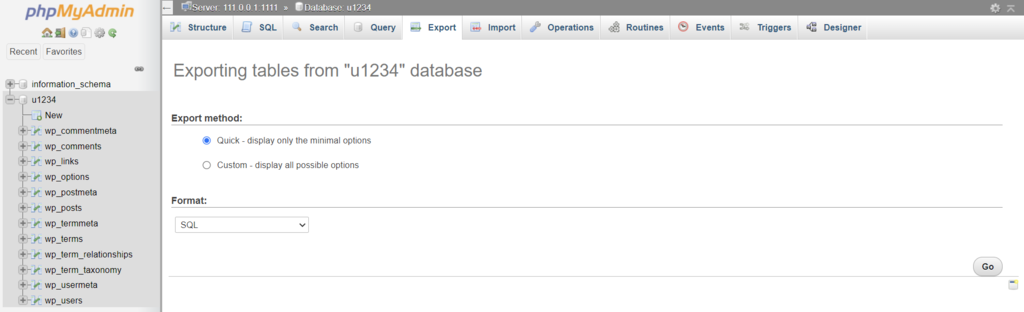
Your computer will then download and save the SQL files. To retrieve the database backup file, simply go to the Import tab, upload the correct file, and click Go.
Pro Tip
You can also use WordPress plugins to manage your database. Check out our list of the best WordPress database management plugins.
How to Optimize a WordPress Database
Database tables can become fragmented over time, creating memory overheads that affect the MySQL query speed. Fortunately, phpMyAdmin enables you to optimize the database:
- Go to Hosting -> Manage.
- Access Databases -> phpMyAdmin -> Enter phpMyAdmin.
- Under the Structure section, click on Check all -> Optimize table.
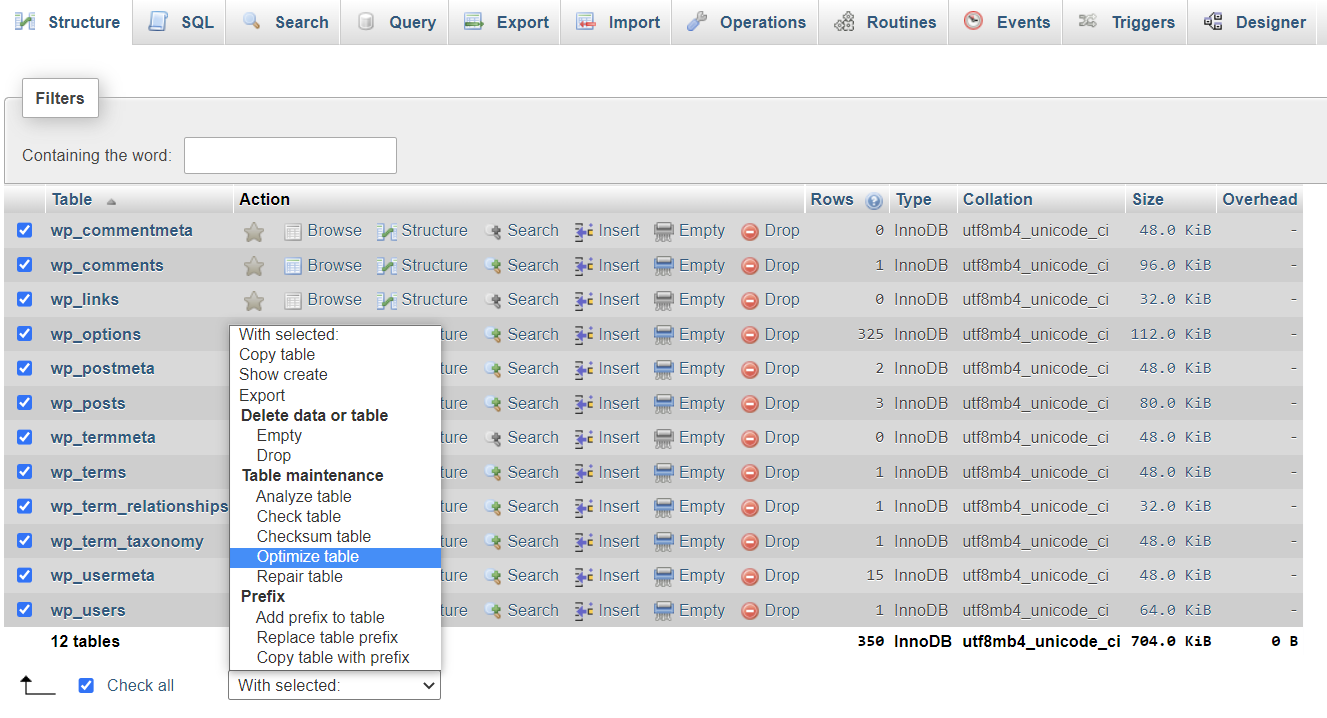
This process will clean up some memory and boost database performance.
Other Helpful Database Tricks in hPanel
Apart from managing and optimizing a site’s database, hPanel also enables you to perform other database-related tasks.
Change the Current WordPress Database Password
Your database password needs to be updated regularly to improve your WordPress security. Here’s how:
- Go to Hosting -> Manage -> MySQL Databases.
- Click on the three dots to the right of the database name and select Change Password.
- Type in your new password and click Update.
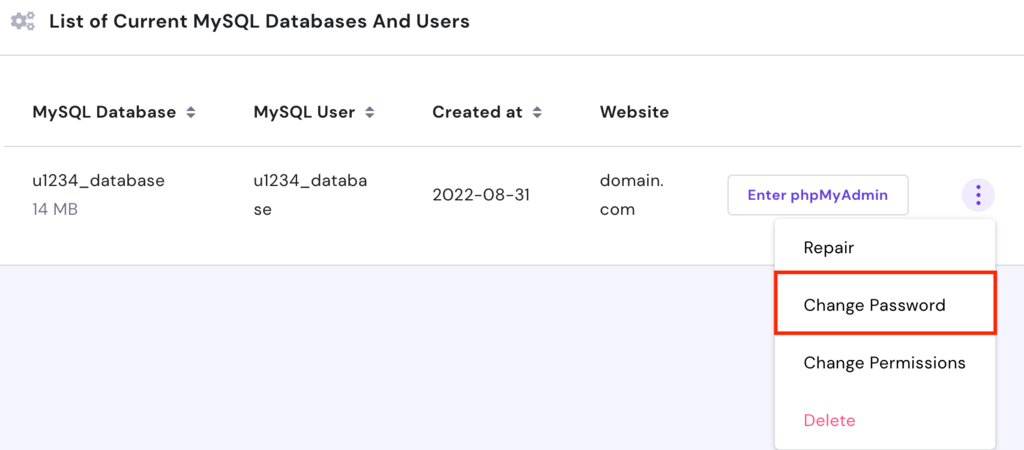
Change Permissions
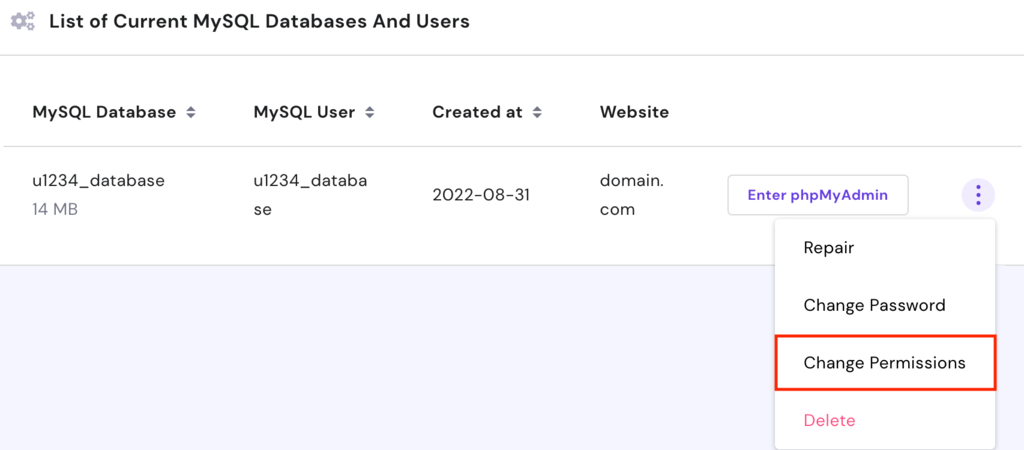
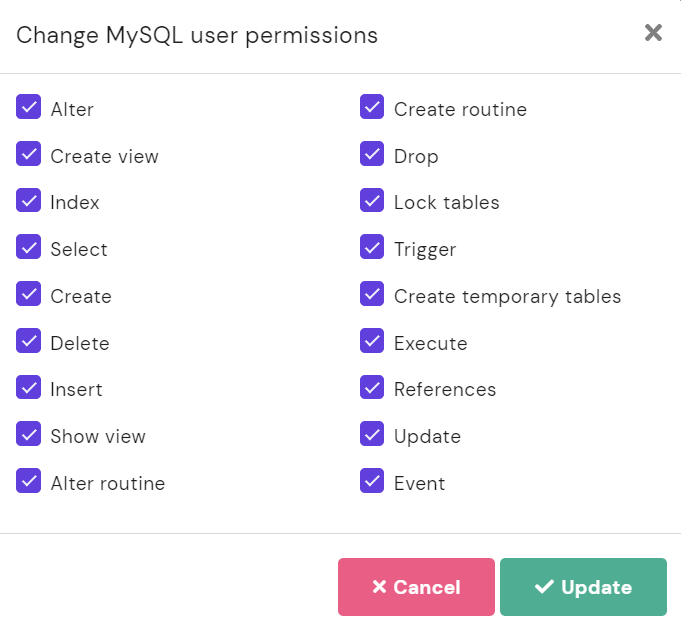
By default, MySQL users have complete control over modifying a database. If you want to create a custom database with limited permissions, follow these steps:
- Click on the three dots and choose Change Permissions.
- Unselect any permissions you wish to remove.
- Click Update.
Delete a Database
If, for some reason, you need to remove a database, click on the options button and choose Delete.
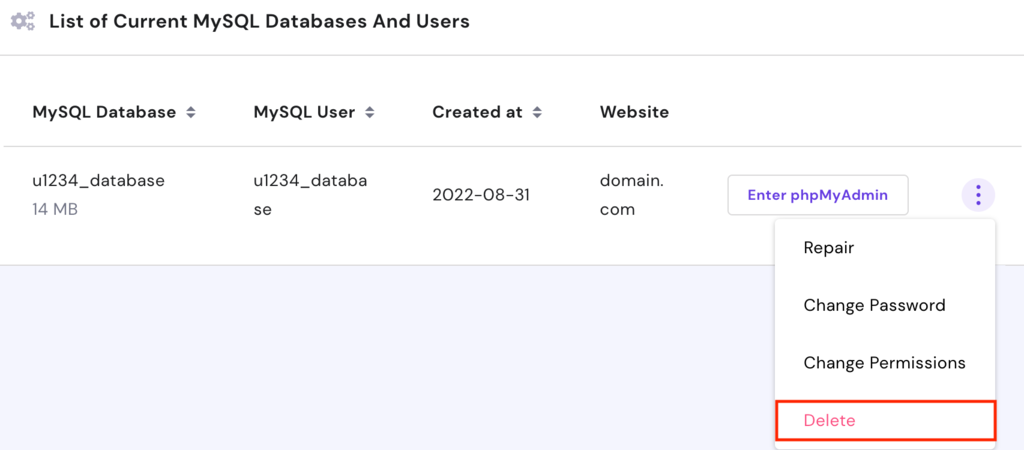
Remember to create database backups before deleting them, as this action is irreversible.

Conclusion
Databases are an essential part of WordPress sites. They store data and files and ensure your website works well.
In this guide, we’ve explained what a WordPress database is, how it works, and its main components. We’ve also shown you how to access and manage your databases via hPanel and phpMyAdmin.
If you have any questions, please share them in the comment section below.
Learn Other Advanced WordPress Techniques
WordPress Pagination Guide
How to Create a Shortcode in WordPress
Guide to Lazy Loading on WordPress
How to Change WordPress Excerpt Length
A Complete Guide to WordPress A/B Testing
How to Hide a Page Title in WordPress
How to Create Tables in WordPress

Luqman is a self-proclaimed social scientist. He is passionate about education, technology, and everything in between. He wants to help create a high-quality education system. Having spent the past four years as a social researcher and blog guru, he lends his skills to Hostinger's digital content team. As for free time, he enjoys reading scientific (and not-so-scientific) literature with a cup of black arabica coffee as a companion.

Brian is a Content Writer who loves telling complex stories in a simple way. He has written all types of content, including tutorials, blog posts, landing pages, social media posts, white papers, infographics, and YouTube scripts. Follow him on LinkedIn.


