Top 8 WordPress accessibility plugins every website should use
Dec 02, 2025
/
By Ekta S.
/
11 min Read
Not all website visitors are the same, so you must make your site accessible to everyone. The easiest way to do that is by installing a WordPress accessibility plugin.
But what does an accessible website even mean? An accessible website ensures that people with disabilities can also use it. This means content is seen, heard, and understood by everyone equally.
Web accessibility is also legally required based on the ADA and WCAG guidelines. Moreover, different countries have their own rules, such as the EEA for Europe. In other words, not optimizing for accessibility can both affect the user experience and give you legal risks.
Finding the right accessibility solution can be challenging, especially with many options available. Don’t fret, though – after testing multiple options, we have found the best WordPress accessibility plugins to help you choose the right one for your WordPress website.
Ready? Let’s begin.
The 8 best WordPress plugins to improve accessibility
To create this list, we tested each WordPress plugin and its features.
We specifically looked for the ones with the best accessibility features, such as screen reader compatibility, keyboard navigation tools, color, link highlights, contrast adjustments, and regulatory compliance.
We also considered each plugin’s pricing, customer support and help resources, user rating, and plugin update frequency. Finally, we also considered reviews from other users.
So rest assured – when we say best, we really mean these are the best WordPress plugins for accessibility.
1. WP Accessibility
WP Accessibility stats:
- Rating: 4.8/5
- Active installations: 50,000+
- Price: Free
WP Accessibility is easy to use and perfect for beginners who want to start by addressing common accessibility issues in core WordPress, their active theme, and content pages.
WP Accessibility has an analytics section called Accessibility Stats, where you can review how it’s used on your site.
It doesn’t collect personal details other than the user’s fingerprint key, which is used to identify user behavior patterns. Instead, it collects page views and user activity data to provide a statistical report on your website’s most used features. This helps you optimize your site for more inclusivity.
You can disable user activity tracking by changing the Page Statistics Tracking setting to None.
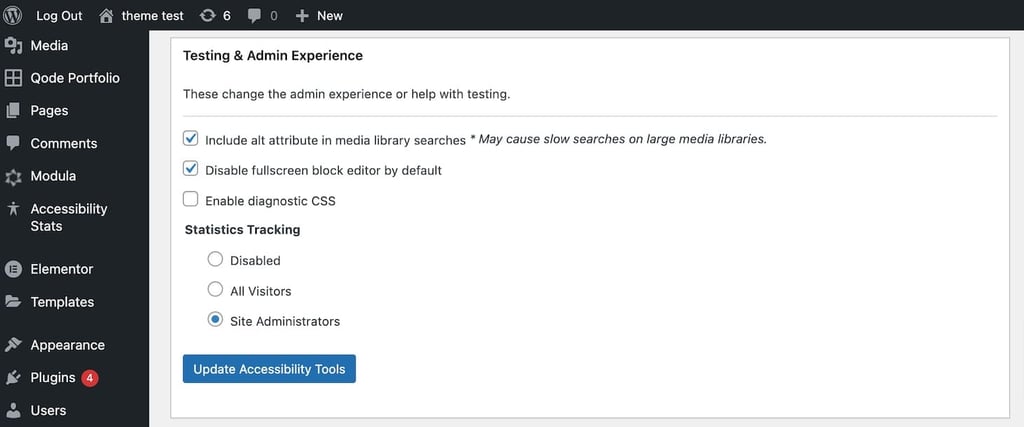
To configure WP Accessibility on your site, install and activate it on your WordPress. Then, go to WP Accessibility from your dashboard and choose the features according to your needs.
Advanced users can also customize the plugin by modifying stylesheets in the theme directory.
Key features
- Skip to content links: WP Accessibility adds a Skip to Content link so keyboard users and screen readers can bypass navigation and access the main content directly.
- Color contrast control: Users can adjust color contrast according to WCAG to ensure compliance and improve readability.
- Accessibility toolbar: Display a toolbar with features like font size adjustments and contrast controls to give users the freedom to adjust accordingly.
- Form labeling: Automatically add labels to form fields to improve usability for those who use screen readers.
- Accessibility fixes: Instantly address common accessibility issues, such as adding ARIA landmarks, preventing links from opening in a new tab, and improving heading structures.
Pros
- Free to use: You won’t pay a dime to use the plugin, and you will get all the essential features to improve your site accessibility.
- Updated frequently: The plugin is regularly updated to deliver optimized performance and security to your site.
Cons
- Accessibility compliance: WP Accessibility doesn’t ensure compliance with accessibility guidelines, which means you may have to seek more legal solutions.
Verdict
WP Accessibility is perfect for beginners looking for a free, easy-to-use option. It gives users an analytics section to review the most used features so they can optimize their websites for better accessibility.
2. Accessibility by UserWay
UserWay Accessibility stats:
- Rating: 3.9/5
- Active installations: 80,000+
- Price: Freemium, with pricing plans starting at $490/year
If you’re looking for an accessibility plugin that also complies with WCAG 2.1, ATAG 2.0, European EN 301 549, ADA, & Section 508 regulations, then UserWay’s Accessibility plugin is for you.
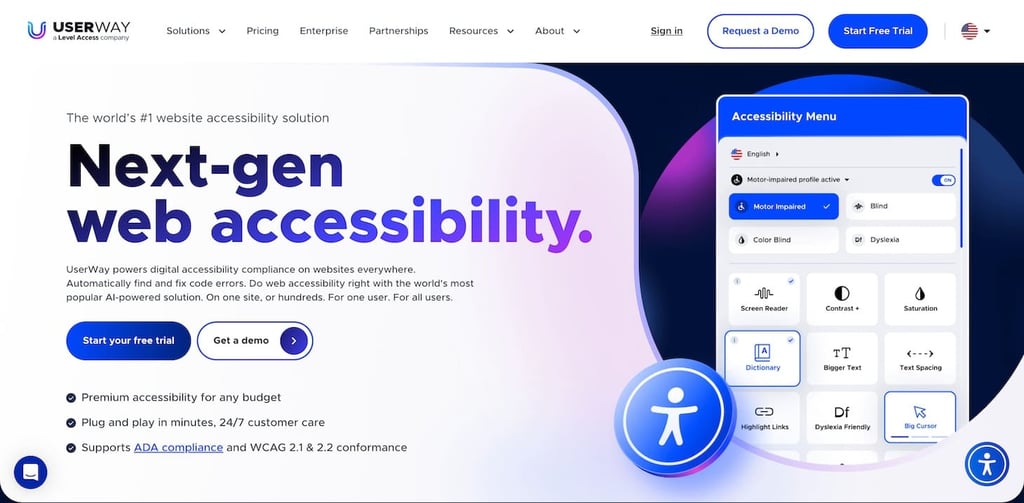
Not only is it legally compliant, but it also gives your website visitors many options to optimize your site for accessibility. Readers can select the features they want or choose an accessibility profile to enable all the relevant settings.
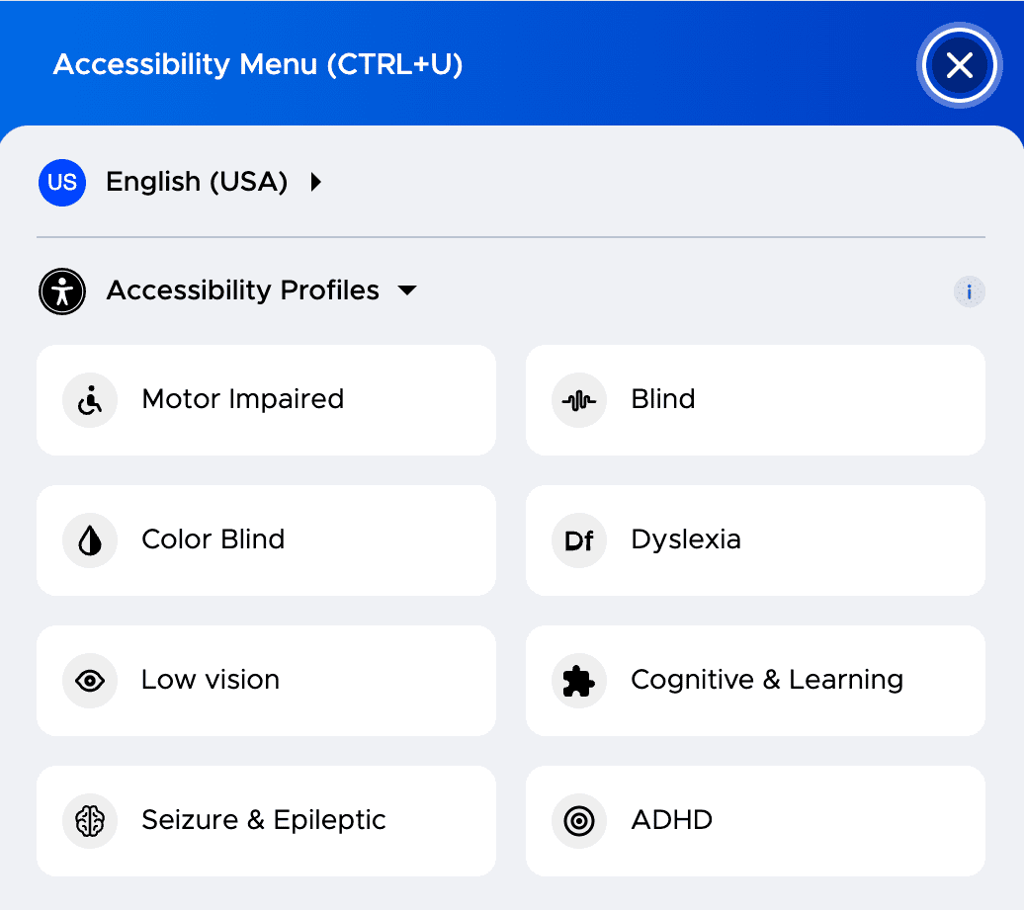
UserWay Accessibility is also well-documented and supported by its creators. So, if you ever need a plugin or website-specific help, contact its 24/7 support or browse through the blog, tutorials, and other resources.
Key features
- Rich tool stack: Includes a large cursor, screen reader, voice navigation, contrast management, image hiding, and other features to deliver a personalized user experience.
- Live site translations: Allows users to translate your website into 50+ languages. This means better accessibility for a global audience.
- Document accessibility: You get tools to convert documents like PDFs and Office files into accessible formats.
- Accessibility monitoring and audits: Provides ongoing monitoring and detailed audits to ensure your site’s compliance with accessibility standards.
- Legal support and mitigation: UserWay professionals also provide legal support to reduce the risk of accessibility-related legal issues.
Pros
- Complete solution: UserWay Accessibility offers legal compliance and high-quality features for different accessibility profiles, so no additional solutions are required.
- Free accessibility checker: Check whether your site is accessible with UserWay’s free accessibility checker and other tools.
Cons
- Limited free version: The free plugin has limited capabilities, offering only up to 20% ADA compliance. The paid version provides up to 90% compliance.
Verdict
Accessibility by UserWay is suitable for large websites that need a secure, legally compliant, and complete solution. However, it comes at a premium price.
3. WP Accessibility Helper (WAH)
WP Accessibility Helper stats:
- Rating: 4.7/5
- Active installations: 20,000+
- Price: Freemium, with premium plans starting at $199/year
WP Accessibility Helper (WAH) is helpful if you want to optimize your site for front-end accessibility and provide tools for visitors to interact directly.
The free version offers basic features like keyboard navigation support, font size adjustments, color contrast toggles, and screen reader-friendly content. WAH PRO includes premium features like sidebar layouts, buttons with icons, mobile optimization, and a minibar.
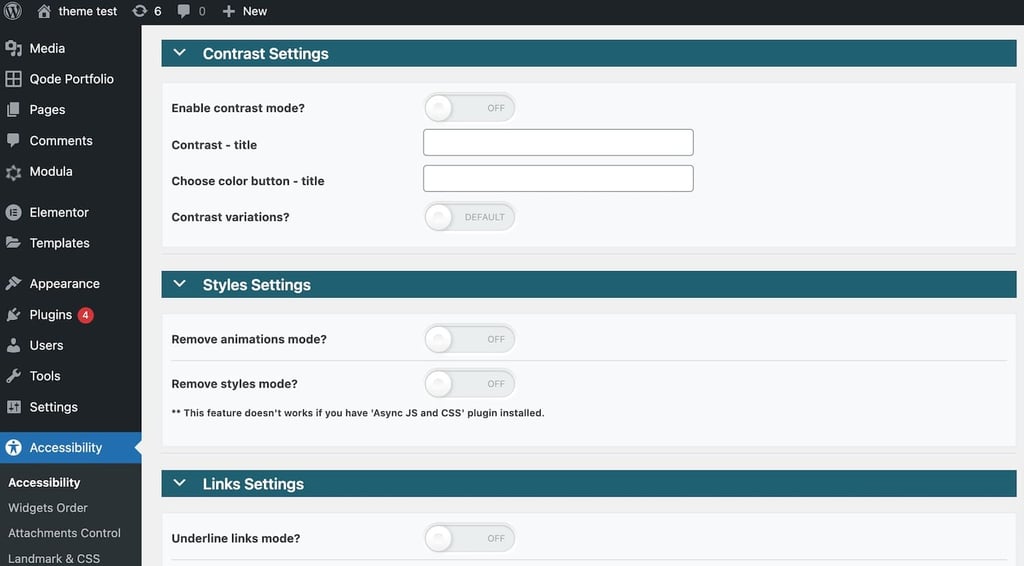
It uses the Document Object Model (DOM) to detect accessibility issues, so you get detailed reports and real-time suggestions on how to comply with accessibility standards and make your site more inclusive.
Key features
- CSS unloader: Users can disable CSS files and view the page in its basic HTML form without the styles and colors.
- Link highlighting: Highlights and underlines links on a page to make them easier for users to locate and access.
- HTML5 landmark: Allows you to configure HTML5 landmark elements, which help users with assistive technology navigate specific sections of a page.
- CSS animation remover: Removes site animations created using CSS. While animations can enhance visual appeal, they may trigger headaches or seizures in some users.
- Monochrome and sepia modes: Provide different color schemes, such as monochrome and sepia, to aid users with visual impairments or color sensitivity.
Pros
- Excellent zoom-in features: Allows users with visual impairments to enlarge text and images on WordPress sites to improve readability.
Cons
- Limited plugin support: Some users reported the plugin author being unresponsive, so you might have to seek other ways to fix issues that can arise.
Verdict
WP Accessibility Helper is ideal for beginners due to its user-friendly interface and powerful features. Its DOM model provides real-time accessibility reports to provide instant feedback on compliance improvements.
4. WP ADA Compliance Check Basic
WP ADA Compliance Check Basic stats:
- Rating: 4.5/5
- Active installations: 3,000+
- Price: Freemium, with pricing plans starting at $199/year
WP ADA Compliance Check Basic can scan your entire website, including pages, theme files, widgets, PDFs, CSS files, and linked files, for accessibility compliance for the ADA, Section 508, and WCAG 2.1 Level A/AA regulations.
It also automatically identifies and fixes issues in newly published content pieces. You get weekly accessibility reports and can also review accessibility issues in the Error References tab.
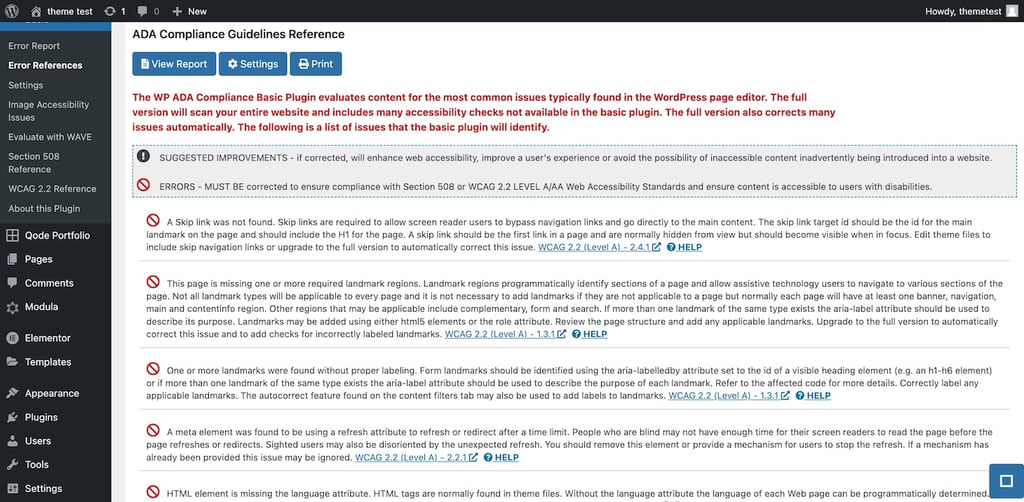
The free plugin can only scan 15 pages for 52 accessibility checks, which you might find limiting. It also cannot identify issues in theme files. Meanwhile, the premium version can scan unlimited pages for 81 checks.
Key features
- WAVE integration: Includes WAVE directly into WordPress to find and fix accessibility issues like missing alt text, improper heading structure, and color contrast problems.
- Accessibility statements and policies: Helps create and manage accessibility statements and policies to educate users about how to optimize the site.
- Free HTML validation plugin: Checks the website’s HTML for errors to ensure clean and standards-compliant code.
- Missing alt texts: Automatically finds and adds relevant alt texts to images for better readability.
- Comprehensive accessibility checklist: Includes a checklist aligned with WCAG standards to cover all potential accessibility issues.
Pros
- Detailed accessibility reports: The plugin lists your site’s accessibility issues and provides easy-to-follow instructions for troubleshooting.
Cons
- Limited free version: The free version only scans 15 pages at a time, which can be limiting to sites with many pages.
Verdict
The limited free version can be a turn-off for website users who are not ready to upgrade to the premium version. However, it’s a good option for small sites like portfolios and resumes.
5. Equalize Digital Accessibility Checker
Equalize Digital Accessibility Checker stats:
- Rating: 5/5
- Active installations: 4,000+
- Price: Freemium, with premium plans starting at $144/year
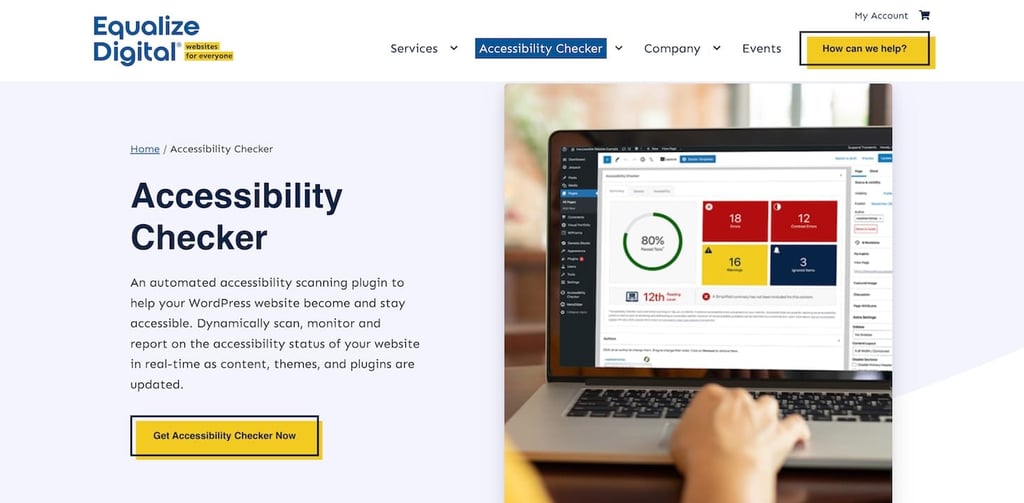
If you don’t want to limit the number of pages you scan for accessibility measures, Equalize Digital Accessibility Checker is for you. However, scanning a site completely at once is only available for Pro users.
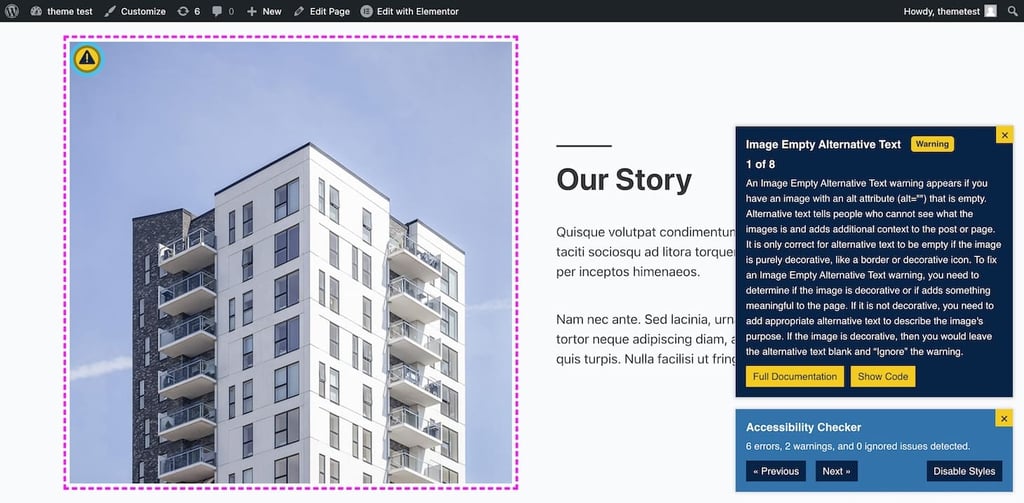
It uses the Flesch-Kincaid Readability Test to check your website text is easy to understand and adds a simpler summary to meet WCAG 2.1 reading standards. Every scan includes an Accessibility widget that highlights issues with instructions on fixing them while editing the page.
Equalize Digital Accessibility Checker provides excellent support with easy-to-understand documentation, helpful blog posts, and a Facebook group where you can always seek help from the community of users.
Key features
- Comprehensive scanning: It conducts over 40 checks to ensure compliance with accessibility standards.
- Bulk issue identification: It scans your website, identifies accessibility issues, and groups them by type so you can prioritize the most critical problems.
- Privacy and data control: Data from scans stays on your server, which means your visitors’ information is protected and not sent to external sources.
- Accessibility statement. It provides an accessibility statement draft to edit and insert in your site footer.
- Customizable ignore feature: Bulk-ignore certain warnings to avoid them in all future reports. Add notes, usernames, dates, and times for future reference.
Pros
- Real-time feedback: You get instant accessibility checks and suggestions on each page, so you don’t have to identify issues from a bulk report. This makes fixing issues while creating or editing content easy.
Cons
- Ignores headers and footers: As it works on the WordPress editor, it ignores non-page checks such as header and footers.
Verdict
Equalize Digital Accessibility Checker is good for small businesses. It’s a great idea to start with the free version and slowly upgrade to the premium plugin.
6. Accessibility Lite
Accessibility Lite stats:
- Rating: 5/5
- Active installations: 5,000+
- Price: Free
If your priority is a lightweight and SEO-friendly website, then Accessibility Lite is the right choice. It was developed by highly skilled, SEO-oriented programmers to ensure it doesn’t bloat your site.
Once you activate the plugin, you can choose the options you want to display or hide. After configuration, your site will include an accessibility icon, which users can click to open the toolbar.
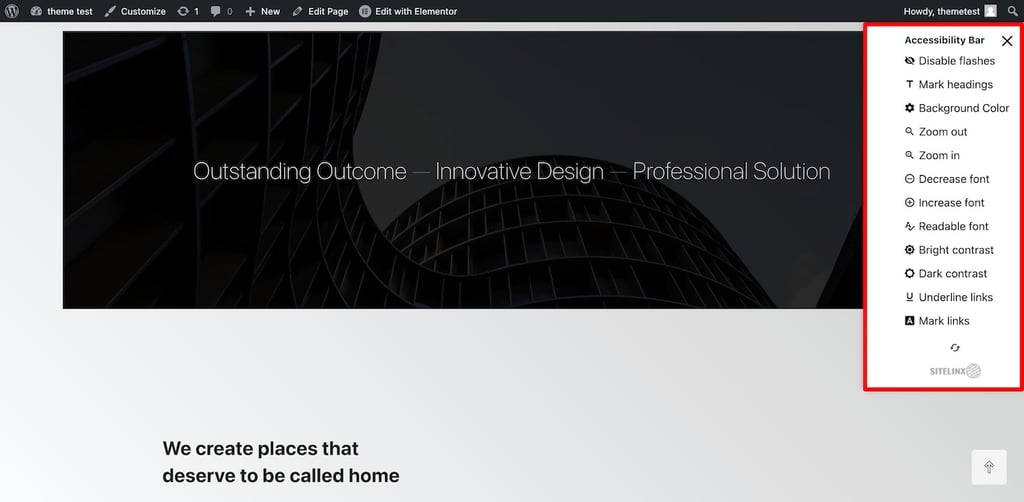
Accessibility Lite is WCAG-compliant and mainly adds features to simplify your site’s user interface (UI). For example, it hides flashy buttons, underlines links, and adds missing alt texts and dark mode options.
Key features
- Accessibility statement and feedback links: Display links to the accessibility statement and feedback page to promote transparency and user engagement.
- Link highlighting: Highlight links to make them more visible and accessible to users with difficulty finding them.
- Focus mode effects: Add or remove visual effects on items in focus mode to help maintain attention and improve navigation for visually impaired users.
- Disable or enable check mark: Allows easy toggling of accessibility options on the website. Users can choose to display or hide the accessibility toolbar.
- Font adjustments: Give options to adjust font sizes and improve readability.
Pros
- SEO-friendly and lightweight: The plugin is SEO-friendly and lightweight to ensure your site loads fast. This is an upside because adding heavy plugins could negatively affect your site speed.
Cons
- Not a complete solution: Although the plugin offers all the essentials, it doesn’t comply with accessibility regulations. You’ll have to seek legal support for full compliance.
Verdict
Accessibility Lite is ideal for new site owners who want a free and fast accessibility solution. It offers decent features and is optimized for SEO.
7. accessiBe
accessiBe stats:
- Rating: 4.3/5
- Active installations: 20,000+
- Price: Premium, standard plans start at $490/year for sites under 1,000 pages
If legal accessibility is your primary concern and you don’t mind paying a premium price, accessiBe is perfect. It’s an AI-powered web accessibility plugin that provides daily scans, analysis reports, and 24/7 compliance with ADA, AODA, and EAA.
accessiBe professionals also offer personalized assistance called Litigation Support. So, if your compliance is challenged, rest assured that you’ll always have help.
You can also display an accessibility statement on your site to inform users about its features.
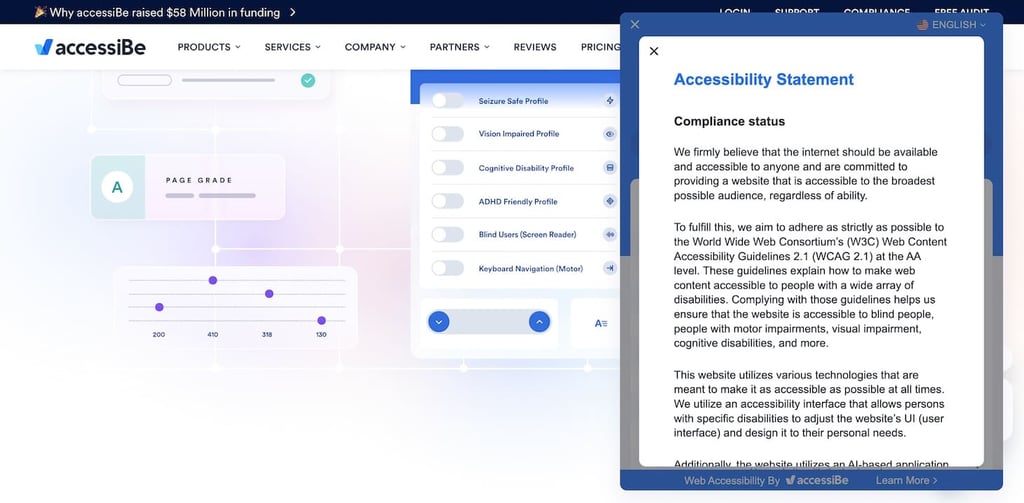
Other features include an AI-powered screen reader, link highlighting, color adjustments, cursor size, and a reading guide. Although accessiBe provides a free plugin, you can only use it with the premium accessiBe software. So, you’ll have to purchase the license first to activate it on your site.
Key features
- Automatic content scanning and fixing: accessiBe automatically scans and fixes issues with new and existing website content.
- Multilingual support: accessiBe supports multiple languages to make your website readable to a global audience.
- Accessibility profiles: Combines common features to address specific disabilities. For example, selecting the Vision Impaired Profile activates all features that aid vision impairment.
- Accessibility interface: A user-friendly interface allows visitors to customize the website’s appearance and functionality according to their specific needs.
- AI-powered accessibility adjustments: Use AI to automatically analyze and modify websites, enhancing accessibility for users with disabilities.
Pros
- Daily accessibility audits: It performs daily audits to identify and fix accessibility issues, which is great for websites that receive thousands of visitors daily.
Cons
- Expensive for beginners: The plugin can be expensive for some beginners, which could prevent small business owners from using it.
Verdict
accessiBe is suitable for website owners who want premium accessibility features and are willing to pay an equally premium price for them. Beginners with budget constraints might find it costly.
8. Octa Code Accessibility
Octa Code Accessibility stats:
- Rating: 5/5
- Active installations: 2,000+
- Price: Freemium, with pricing plans starting at $6/month
Accessibility by Octa Code helps you display an accessibility widget on your website with tools such as font size control, keyboard navigation, link highlights, and multi-lingual language options based on readers’ preferences.
The pro version includes an accessibility statement display and premium features such as the ability to customize the toolbar’s branding and position. You can also test the demo to see how the plugin’s widget would look on your site.
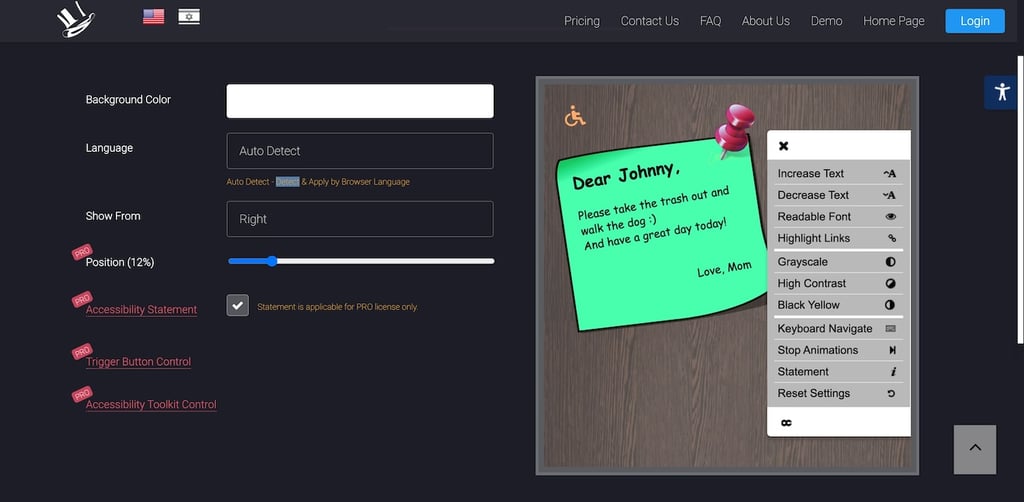
It’s easy to use, regularly updated, and well-supported. If you need help, you can use the WordPress support forum or email the plugin developers directly.
Key features
- Accessibility profiles: You get features like voice navigation and screen reader support to aid users with visual or cognitive disabilities.
- Custom widget settings: You can customize the widget’s colors, icon sizes, and positions to match the website’s design.
- Stop animations: Provides an option to stop animations, which can help users with motion sensitivity.
- Contrast displays: Users with visual impairments can choose contrast modes such as black and white and black and yellow to improve readability.
- Keyboard navigation: Offer simple navigation using keyboard shortcuts to enhance accessibility for users with motor impairments.
Pros
- Beginner-friendly: Installing and configuring the plugin is easy and does not require any coding skills. It’s perfect for beginners with small projects.
Cons
- Fewer customization options: You get few options to customize the accessibility toolbar, for example, you can’t change the font. The branding features are only available with the premium version.
Verdict
Octa Code Accessibility is great for website developers working on multiple small projects. They can easily enable one premium license on many sites.
Why use WordPress accessibility plugins?
If your website caters to a global audience, optimizing your website for accessibility is non-negotiable. But other than fulfilling legal compliances, you get many benefits from using a web acessibility plugin:
Enhanced user experience
Accessibility plugins make your website inclusive for everyone, including people with disabilities. They add features like easier navigation and text resizing that users can select according to their needs. This personalization makes your site more user-friendly, delivering a positive experience.
Improved SEO rankings
Search engines often prioritize accessible websites to rank in SERPs. This is because search bots use alt text for images and clear headings to understand every page’s context while indexing.
Accessibility plugins automatically add descriptive alt texts and missing titles to make your site more likely to appear at the top of the search results.
Increased audience reach
Making your website accessible means more people can use it. By optimizing for various accessibility profiles, more people will be able to use your website comfortably. This leads to more traffic and better engagement.
Positive brand image
A commitment to accessibility can improve your brand’s reputation. It shows that you believe in inclusivity, care about your website’s users, and want to make their experience better.
All these things combined help build trust and loyalty in your audience.
Download free web accessibility checklist
Conclusion
Which WordPress accessibility plugin is right for you depends on your specific needs.
If you’re a beginner, a free plugin like WP Accessibility is sufficient. However, free options are limited and don’t necessarily comply with accessibility laws.
If you’re looking for a more robust and compliant solution, Accessibility by UserWay is a great choice. It’s compliant with most accessibility laws and offers features for different accessibility profiles.
If you’re still unsure, figure out your accessibility requirements first. Then, return to our list and determine which plugin best suits your needs.
WordPress accessibility plugins FAQ
What accessibility standards should my WordPress site comply with?
Your WordPress site should meet the WCAG 2.1 Level AA standards, which include ensuring the content is perceivable, operable, and understandable for everyone.
To cater to a global audience, you must comply with laws from different countries. For example, the EAA applies to European countries, the RPDA applies to India, the ACA applies to Canada, and the DDA applies to Australia.
How do I add accessibility to a WordPress website?
The easiest way to enhance the accessibility of a WordPress website is to use accessible themes and plugins. In addition, provide alt text for images, use clear headings, and ensure keyboard navigation. Test your site using tools like screen readers and contrast settings.
Does WordPress have an accessibility checker?
Yes, WordPress offers accessibility checker plugins like WP ADA Compliance Check, which helps identify and fix common accessibility issues on your site.
This article is a localized version of Top 8 WordPress accessibility plugins every website should use, originally published in English.

Ekta Swarnkar is a content writer and strategist for B2B SaaS and marketing brands. She's helped various companies grow their visibility, authority, and revenue with long-form, actionable content. Connect with her on LinkedIn.

Comments
0 responses