7 Lovable alternatives compared through a real-world app build
Sep 30, 2026
/
By Ksenija
/
35 min Read
Hostinger AI Builder and Base44 are the strongest Lovable alternatives for end-to-end app building, with both delivering functional apps that remained reliable through refinement and publishing.
Bolt.new, Replit, v0, and Netlify are also capable alternatives, but each showed limitations at different stages of the process.
Each platform has different strengths once you move beyond the first version it generates, so the right Lovable alternative depends on whether you prioritize design, reliable data handling, refinement, or getting the finished app live.
Testing methodology
I tested Lovable and seven alternatives by asking each platform to build the same web app: KeepMeAlive, a houseplant tracker with watering schedules.
I used the same core prompt for every platform so I could compare how well each one interpreted the same requirements:
Build a responsive web app called KeepMeAlive for people who want to keep track of their houseplants and watering schedules.

The app should let users:

- Add a plant with its name, plant type, location in the home, and watering frequency in days.
- View all added plants from a main dashboard.
- See each plant's current watering status, including whether it needs watering today, is overdue, or doesn't need watering yet.
- Mark a plant as watered. When this happens, automatically calculate and display its next watering date based on its watering frequency.
- Filter plants by watering status.

Include several realistic sample plants when the app first loads so the dashboard doesn't start empty.

Make the interface responsive and easy to use on both desktop and mobile. Use a clean, modern visual style appropriate for a houseplant care app.
I didn’t stop at the first generated version. For each app, I tested whether I could add plants, filter them by watering status, mark them as watered, update their next watering date, and keep changes after refreshing the page. I also checked the mobile experience where possible.
I put each of the AI app builders through three refinement tests:
- Visual refinement – Improve the generated design without changing the app’s structure or functionality.
- Existing functionality – Test whether each builder could modify existing functionality using one standardized prompt: “Add an Edit option to each plant card. Let me update the plant’s name, plant type, location, and watering frequency. After I save the changes, update the plant card and recalculate the next watering date if the watering frequency has changed.”
- New functionality – See how each builder handled the same more complex addition, giving them the same prompt: “Add a plant care guide. When I click a plant card, open a detailed view with useful information about that type of plant. Include its preferred light conditions, watering needs, ideal temperature, humidity preference, common problems to watch for, and typical lifespan. Keep the plant’s existing watering information and controls available in the detailed view.”
Each prompt named one change and told the builder to leave everything else unchanged, so I could see whether it followed instructions without breaking what already worked.
Finally, I published each working app and added another feature after publishing to see how the platform handled changes to an app that was already live.
Throughout the tests, I used ✅ for a successful result, 🟡 for a result that worked with issues or required an extra step, ❌ for a failed test, and ⚪ when I couldn’t test a feature.
I rated each platform from 1 to 5 across first-draft design, prompt accuracy, functionality, ease of refinement, handling complex changes, and publishing. The Overall rating reflects its performance across these six test areas.
The table below summarizes what stood out most from testing each platform, alongside the first draft it generated from the same KeepMeAlive prompt.
| Platform | First draft | Insights |
| Lovable | 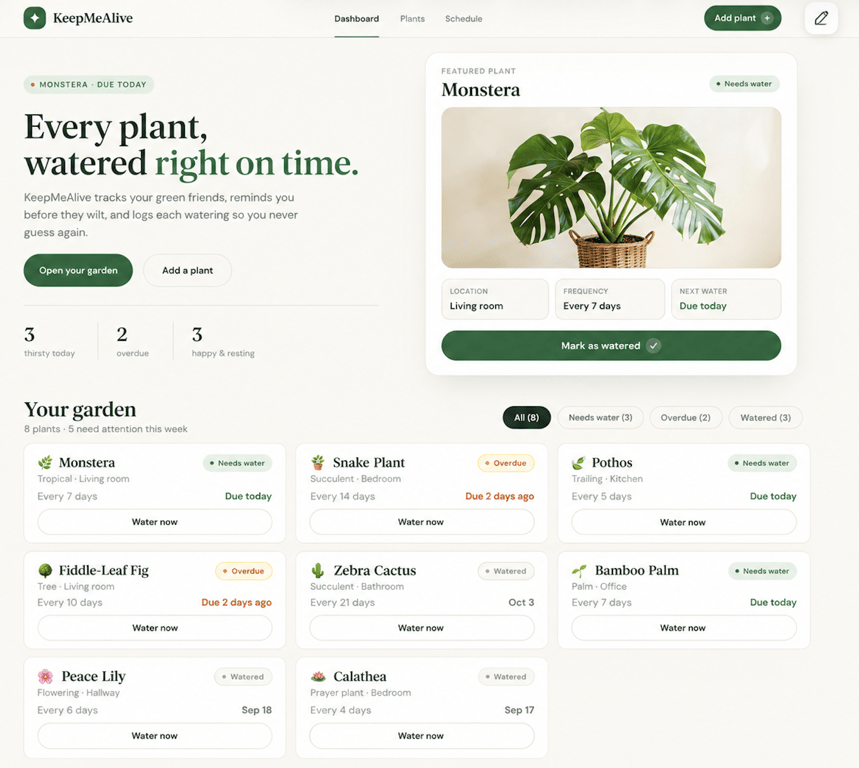 | Lovable was the strongest all-around benchmark: polished from the first prompt, functionally reliable, and easy to refine. Its main weakness appeared with more complex features, where the care guide looked complete but lacked plant-specific depth. |
| Hostinger AI Builder | 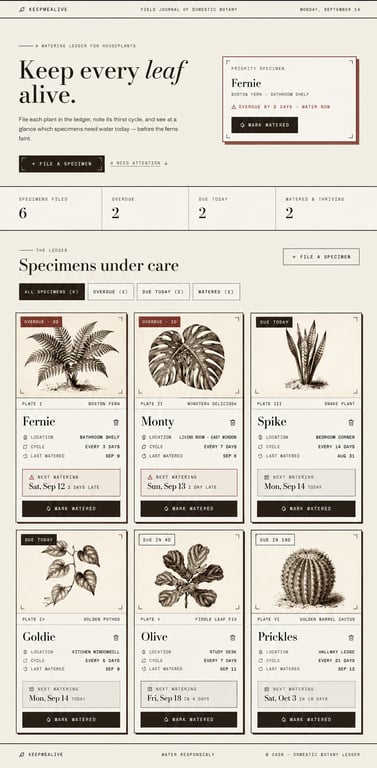 | Hostinger AI Builder turned the same prompt into the most visually distinctive app in the test, styled like a botanical field journal. The core features worked, and plants and watering changes were still there after a page refresh. |
| Bolt.new | 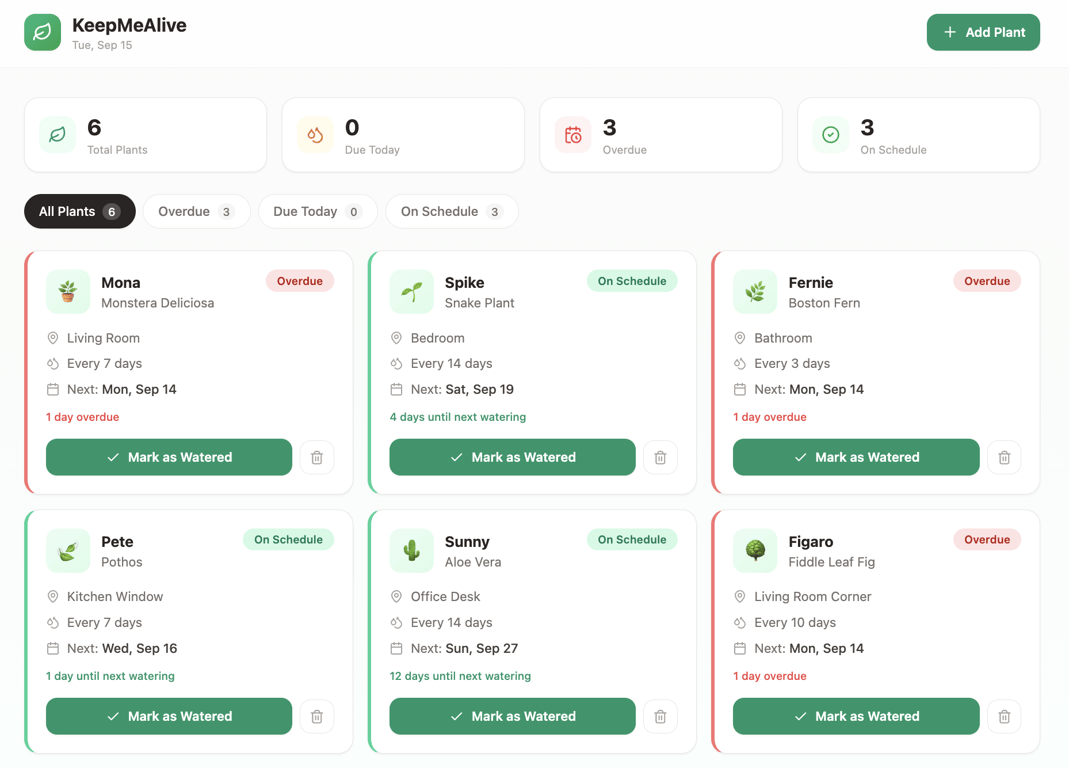 | Bolt.new was the fastest at turning a prompt into features that actually worked. The only weakness was accuracy during later changes: editing could introduce visual mismatches, while the generated care guide included incorrect advice for a custom plant. |
| Base44 | 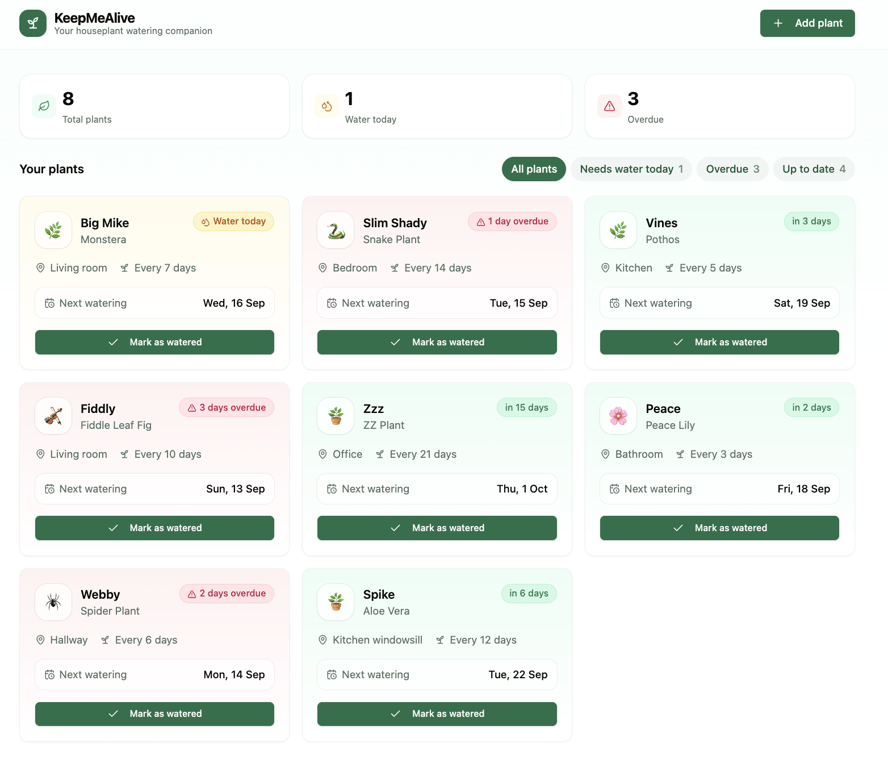 | Base44 was the most reliable at saving and updating user data. The first draft worked without corrective prompting and later changes were easy to add, but visual customization and generated plant-specific content were less convincing. |
| Replit | 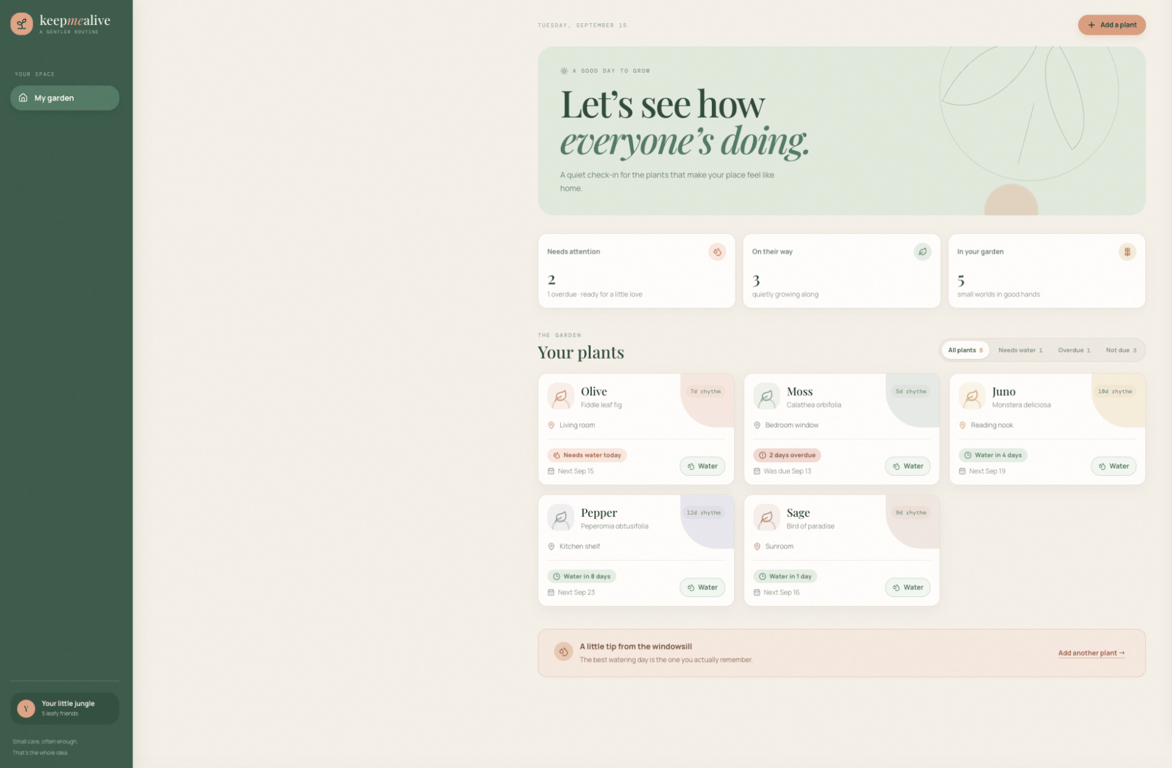 | Replit offered the most control as the app became more complex, handling advanced functionality like the drag-and-drop watering planner. The tradeoff was a less predictable workflow, with some changes taking longer and causing preview or server issues. |
| Netlify | 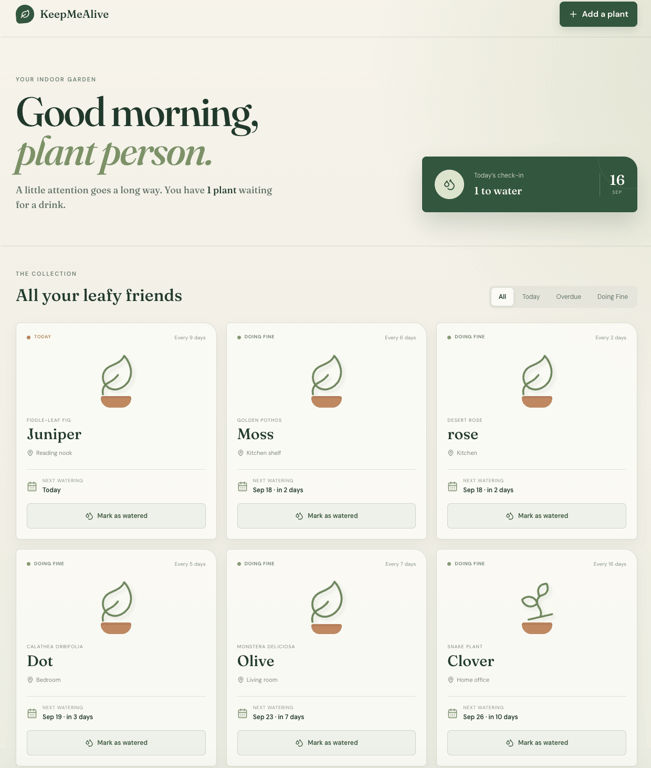 | Netlify produced the second most distinctive design after Hostinger and handled functional changes reliably. Visual refinement was its weak spot: the requested plant illustrations took around 13 minutes and still didn’t become meaningfully distinctive. |
| v0 | 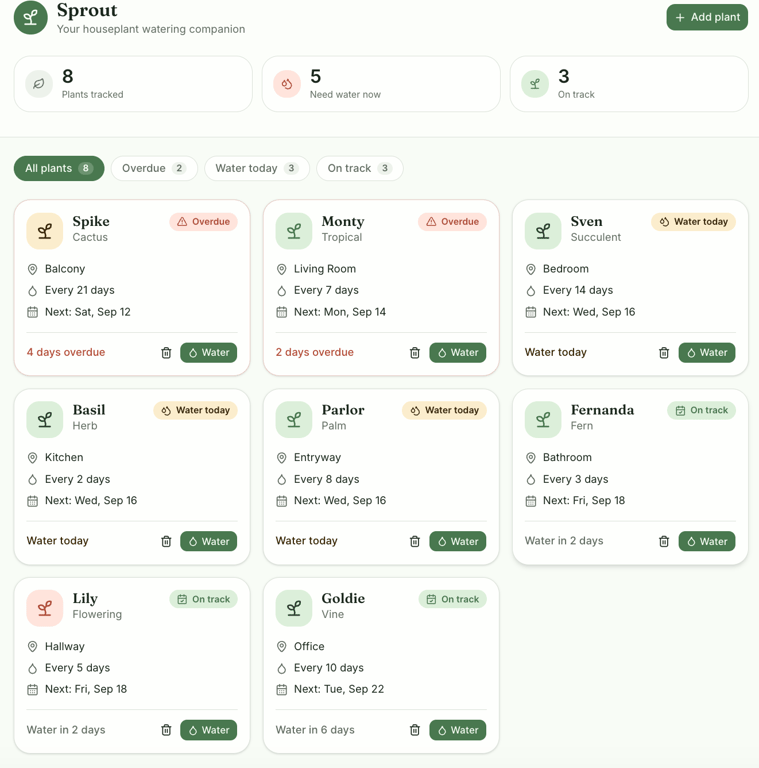 | V0 produced one of the more polished first drafts, but its biggest limitation was fundamental: added plants and watering changes disappeared after a page refresh. |
| Bubble | N/A | Bubble was the clear outlier because it never produced a usable first draft. AI-assisted fixes made the situation worse, increasing the reported workflow and navigation issues instead of getting the app to a testable state. |
Lovable alternatives compared
Here’s how Lovable and the seven alternatives performed across the full KeepMeAlive test.
| Platform | Best for | First draft | Functionality | Refinement | Publishing | Overall verdict |
| Lovable | All-around app building | 5/5 | 5/5 | 5/5 | 5/5 | Strong benchmark throughout the full build |
| Hostinger AI Builder | Visually distinctive apps | 5/5 | 5/5 | 4/5 | 5/5 | Strong combination of visual design and reliable functionality |
| Bolt.new | Feature-rich apps | 4/5 | 5/5 | 5/5 | 5/5 | Reliable for building and extending functionality, weaker with generated custom content |
| Base44 | Tracker and organizer apps | 4/5 | 5/5 | 5/5 | 5/5 | Reliable for apps that continuously store and update user data |
| Replit | Dashboard-style apps | 4/5 | 5/5 | 4/5 | 4/5 | Powerful for more involved builds, with a less predictable workflow |
| Netlify | Interactive web tools | 4/5 | 5/5 | 3/5 | 5/5 | Functionally reliable, but less effective for prompt-driven visual refinement |
| v0 | Quickly testing app ideas | 4/5 | 2/5 | 5/5 | 4/5 | Strong for interactive prototypes, limited as a persistent tracker |
| Bubble | N/A | 1/5 | 1/5 | 1/5 | N/A | Did not reach a usable first draft in this test |
A few differences became especially clear across the full test. Hostinger AI Builder combined reliable app functionality with the most distinctive first-draft design, while Base44 was particularly dependable when the app needed to preserve and build on user data over time.
Replit and Bolt.new handled increasingly complex functionality well, although Replit’s workflow became less predictable, and Bolt’s generated content became less reliable with custom plant types.
v0 was the clearest example of the difference between generating an app and generating a fully usable one: the interface and app-level refinements worked well, but user data disappeared after refresh.
Netlify had almost the opposite problem, handling functionality reliably while struggling with a relatively straightforward visual refinement.
Bubble was the only platform that never produced a usable first draft, so I couldn’t take it through the complete test.
Lovable – The benchmark
Lovable is an AI app builder that lets you create and refine web applications through natural-language prompts, with built-in tools for hosting and publishing the finished app.
Lovable has a free plan with 5 daily build credits, capped at 30 per month, making it suitable for trying the platform and smaller projects. Pro plan starts at $25/month and includes 100 monthly credits – roughly 100 prompts, since each message you send uses one, custom domains, unlimited lovable.app domains, and the option to remove Lovable branding.
Lovable: First draft
Lovable’s first draft was already close to the app I had described. It created a dashboard with eight sample plants, watering statuses, next watering dates, filters, and controls for adding and watering plants.
It also went beyond my prompt by adding a featured plant, watering statistics, plant images, and an unrequested hero section with a headline, supporting copy, and CTA buttons.
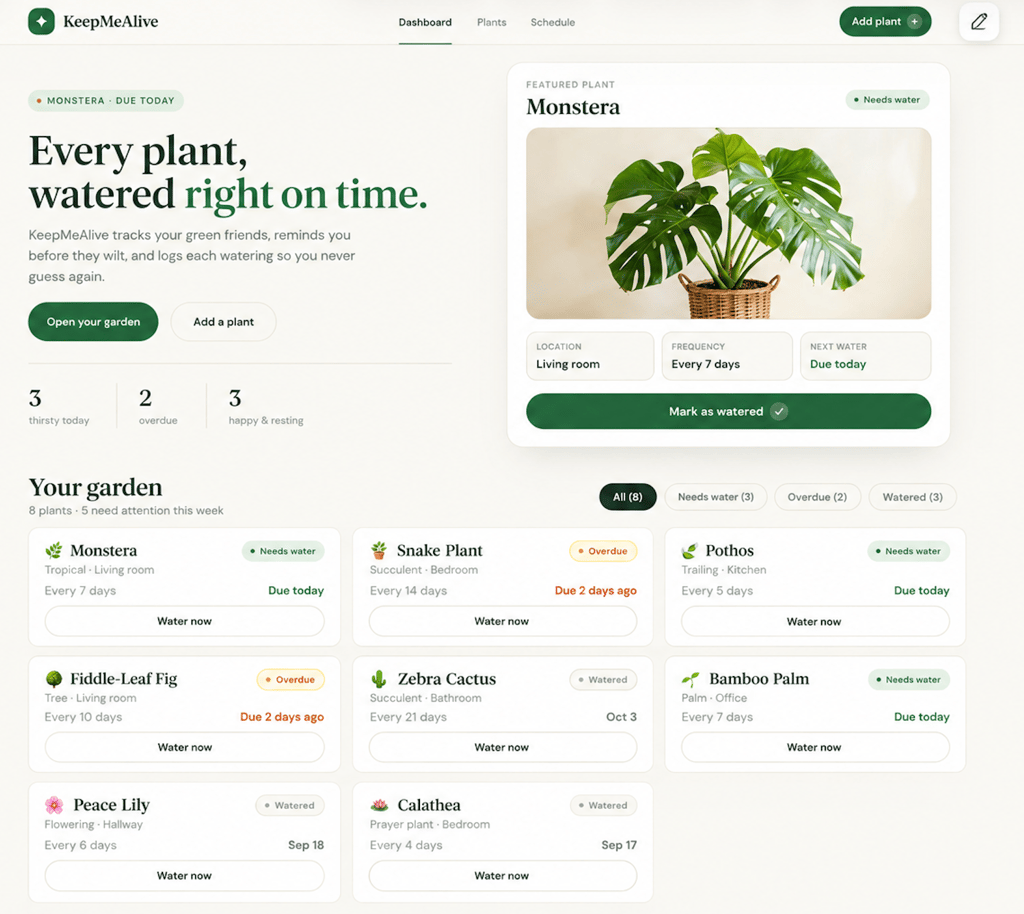
Visually, I liked the result. Lovable made good use of the limited design direction I provided, with a restrained green color palette, clear status labels, and plant cards that made the watering schedule easy to scan.
The mobile version also adapted cleanly to the smaller screen without making the cards or controls difficult to use.
There were a few inconsistencies with the prompt, though. I asked for three watering states: due today, overdue, and not due yet. Lovable used Needs water, Overdue, and Watered. The meaning was still understandable, but Watered didn’t directly match the requested not due yet status.
The dates on the plant cards were also unclear because they weren’t labeled as the last watering date or next watering date. The introductory copy said KeepMeAlive “reminds you before they wilt,” even though the original app-building prompt didn’t include a reminder feature.
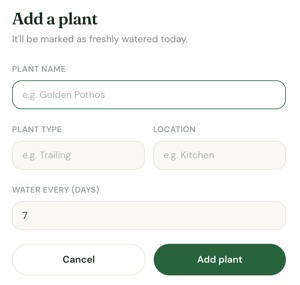
The Add plant button opened a pop-up window with all four requested fields: plant name, plant type, location, and watering frequency in days. Lovable treated a newly added plant as “watered” on the day it was created.
Next, I tested the main interactions to see whether the generated app actually worked:
- Adding a plant ✅ – I added Test Fern with a 10-day watering frequency. It appeared at the end of the garden with a Watered status, and Lovable calculated its next watering date exactly 10 days from the date I added it.
- Dashboard updates ✅ – Adding Test Fern increased the total plant count from eight to nine and the Watered count from three to four. The dashboard statistics and filter counts updated automatically.
- Filtering ✅ – All four filters – All, Needs water, Overdue, and Watered – showed the correct plants and reflected the changes I made while testing the app.
- Marking a plant as watered ✅ – When I watered the Monstera, its status changed from Needs water to Watered, and its next watering date moved from Due today to exactly seven days later, based on its watering frequency.
- Saved changes ✅ – After refreshing the app, Test Fern was still there, and the Monstera retained its Watered status and watering date. The updated plant and status counts were also preserved.
- Mobile responsiveness ✅ – The app adapted cleanly to the smaller screen, with the plant cards, filters, and controls remaining clear and easy to use.
Lovable’s first draft refinement
I gave Lovable three follow-up prompts that covered different types of changes: a visual adjustment, an existing feature expansion, and a more complex new feature.
I sent each prompt separately and tested the app after every change to see whether Lovable followed the instructions without breaking functionality that already worked.
Prompt 1: Visual refinement
Change the primary buttons from green to a warm terracotta orange. Make the buttons slightly more rounded and add a subtle hover effect. Keep the rest of the app’s colors, layout, content, and functionality unchanged.
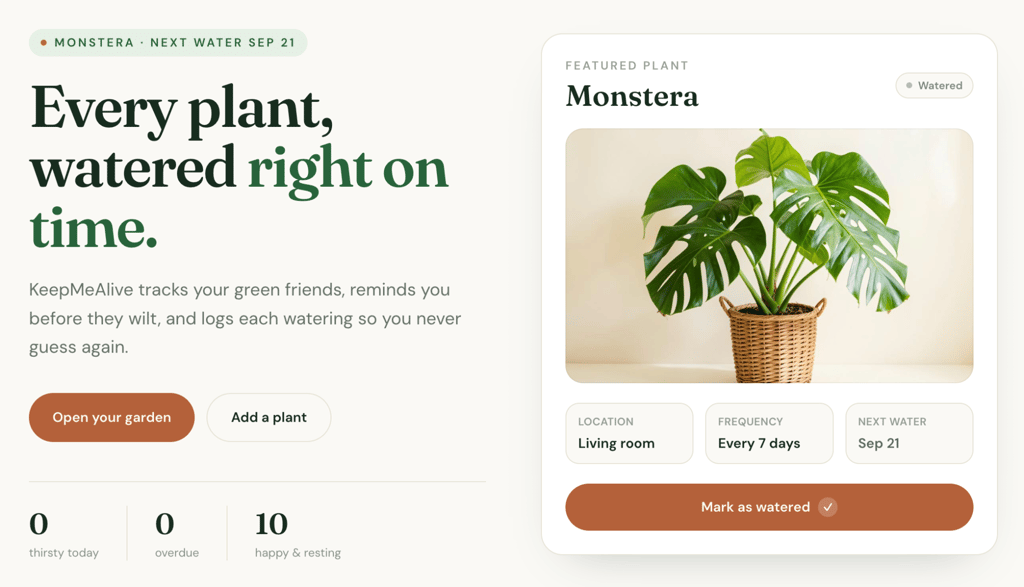
Visual edits ✅ – Lovable changed the primary buttons to terracotta orange, adjusted their styling, and added the requested hover effect without making unrelated changes to the layout or breaking existing functionality.
Prompt 2: Functional refinement
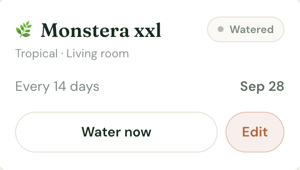
Editing existing data ✅ – Lovable added an Edit option to each plant card and saved changes correctly. Updating a plant’s details also preserved the existing app structure and functionality.
Prompt 3: New feature/logic refinement
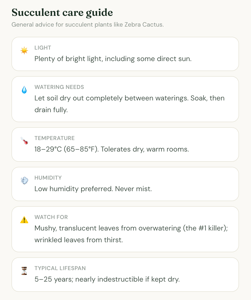
Adding a more complex feature 🟡. Lovable added a care guide to the plant details view without breaking the existing watering and editing features.
The guide covered all the information I requested, including light, watering, temperature, humidity, common problems, and lifespan.
However, the advice was written for broad plant categories rather than individual plants. My Monstera received a generic “Tropical care guide,” while my Zebra Cactus received general succulent advice. Neither told me anything I couldn’t have guessed from the category name.
Lovable publishing flow
Publishing KeepMeAlive took one click from the builder, with no setup. Lovable automatically provided a lovable.app URL and let me choose who could see the app, change the address, or connect a custom domain before going live.
Post-publishing edits in Lovable
After publishing KeepMeAlive, I noticed one feature I would want in a real plant tracker: the ability to remove plants I no longer want to track.
I tested how Lovable handles changes to a published app with the following prompt:
Add an option to remove a plant from the garden. Put the option inside the plant details view and ask for confirmation before deleting the plant to prevent accidental removal. When a plant is deleted, remove all of its associated data and update the dashboard statistics and filter counts automatically.
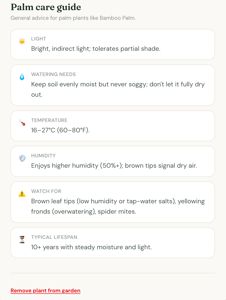
Post-publishing edit ✅ – Lovable successfully added the requested feature to the existing app, and the new functionality worked without affecting the rest of KeepMeAlive.
Lovable didn’t automatically send the change to the live app. Instead, it gave me a Publish changes option, so I could test the update while the live version stayed untouched, then publish it when I was ready.
Publishing the changes kept KeepMeAlive at the same URL, so I didn’t need to create a new deployment or change the existing link.
Lovable verdict
Here’s a summarized view of Lovable’s performance across each area of the test:
| Test area | Rating | What I found |
| First-draft design | 5/5 | Polished, coherent, and responsive with very little design direction |
| Prompt accuracy | 4/5 | Covered the core requirements, with minor issues around watering statuses, dates, and generated copy |
| Functionality | 5/5 | Adding plants, filtering, watering, date calculations, and saved data all worked |
| Ease of refinement | 5/5 | Visual and functional changes worked without breaking existing features |
| Complex changes | 4/5 | Built the requested care guide, but some information was based on broad plant categories |
| Publishing | 5/5 | Published directly to a lovable.app URL and kept later changes separate until I chose to publish them |
| Overall | 5/5 | Remained reliable from the first draft through refinement, publishing, and post-launch updates |
What I liked:
- I rarely had to rephrase a prompt to get what I wanted. Most of what I asked for worked on the first attempt, so I spent more time improving the app than correcting it.
- The first draft gave me something I actually wanted to continue working on. It already looked polished enough that refinement felt like improving a real app, not rescuing a rough first attempt.
- I could make fairly substantial changes without worrying about breaking what already worked. That made me more comfortable experimenting as the app became more complex.
- I had control over when changes went live. Being able to test an update first and publish it to the same app when ready made the post-launch workflow feel predictable.
What I didn’t like:
- Lovable sometimes interpreted requirements a little too freely. The Watered status and reminder wording were small examples, but they made me check whether the app actually matched what I had asked for.
- Some details looked polished before I analyzed them closely. The unlabeled watering dates are a good example. The interface looked finished, but the information could have been clearer.
- The care guide exposed the limits of what the AI writes for you. Lovable built the feature correctly, but broad care advice for plant categories wasn’t as useful as plant-specific information.
1. Hostinger AI Builder – best for visually distinctive apps
Hostinger AI Builder is a no-code website and web app builder integrated into Hostinger’s hosting platform.
You can create projects with text or voice prompts, attach images and PDFs as references, and refine them through AI chat, visual editing, or – in Agentic mode – the built-in code editor.
The workspace includes preview/testing and built-in backend capabilities, and lets you publish to a live URL or connect a custom domain.
Hostinger AI Builder is available with the Premium plan at CA$ 4.19 and includes 5 AI credits for website and app creation.
Hostinger AI Builder: First draft
Hostinger turned the app into a botanical field journal, using illustrated plant cards, serif typography, a muted cream color palette, and labels such as “specimens” and “watering ledger.”
Comparing Hostinger vs. Lovable output, the difference was immediately visible: Hostinger took a bolder approach to the prompt, while Lovable produced a more conventional app-style dashboard, despite both receiving the same instruction to use a clean, modern visual style.
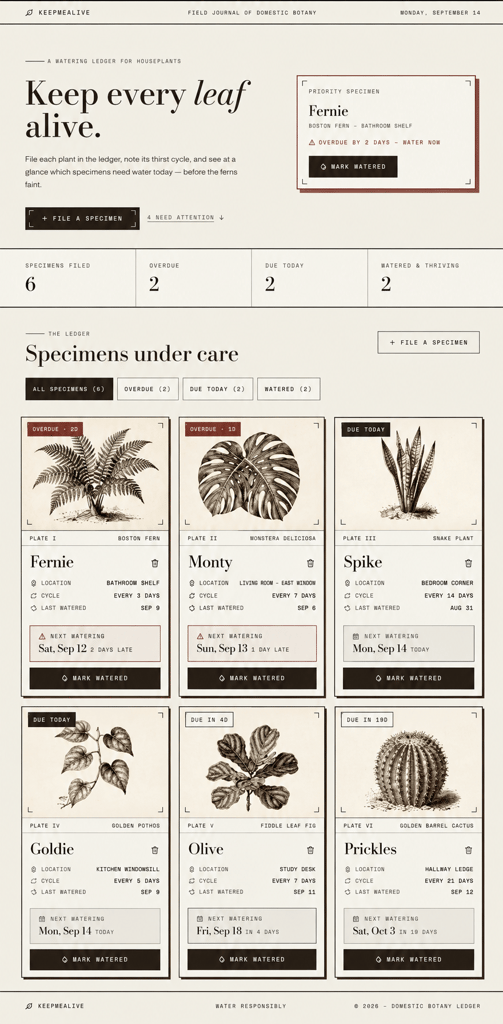
The first draft included six sample plants, dashboard statistics, watering-status filters, next watering dates, and controls for adding and watering plants.
It also added details I hadn’t requested, including last-watered dates, a priority specimen (the plant most in need of attention), and controls for deleting plants.
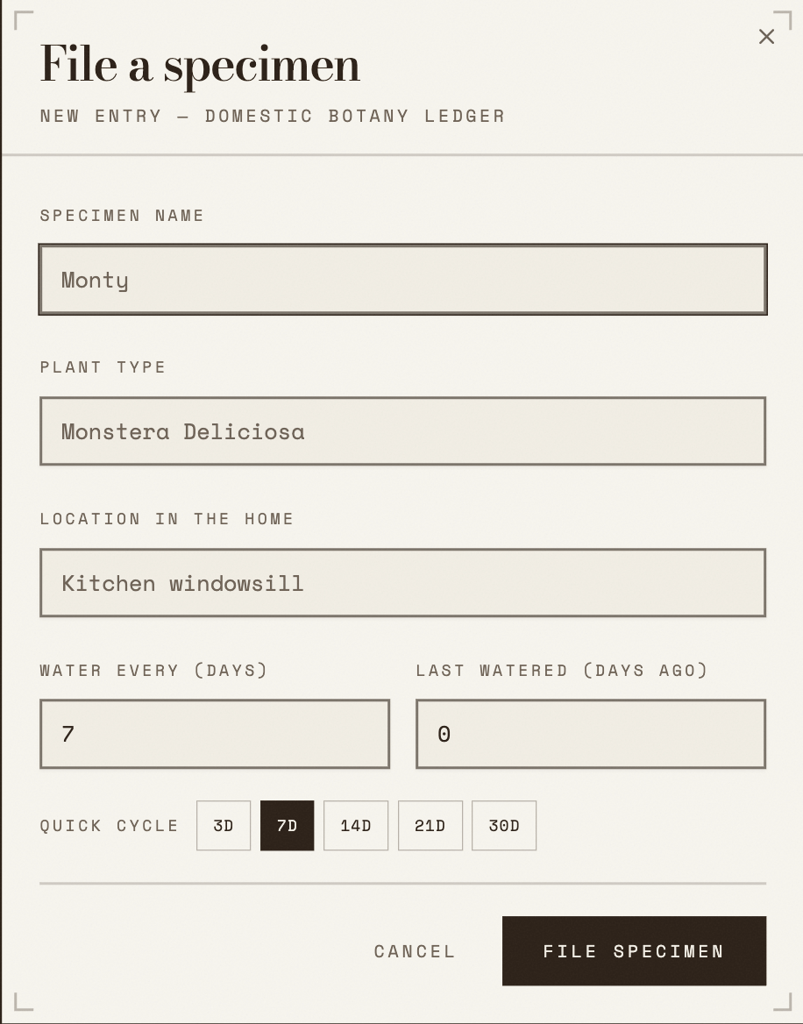
The Add plant form contained all four requested fields: plant name, plant type, location, and watering frequency.
The form also included a Last watered (days ago) field, which let me add a plant partway through its watering cycle rather than treating it as freshly watered. Watering frequency could be entered manually or selected using quick options for 3, 7, 14, 21, and 30 days.
I tested the app to see whether the design was backed up by working functionality:
- Adding a plant ✅ – I added Test Fern as a Boston Fern in the Office with a 10-day watering frequency. It appeared in the watering ledger with the correct next watering date.
- Dashboard updates ✅ – Adding Test Fern increased the plant count from six to seven, and the relevant statistics and filter counts updated automatically.
- Filtering ✅ – The All specimens, Overdue, Due today, and Watered filters displayed the appropriate plants, with counts changing as plant statuses changed.
- Marking a plant as watered ✅ – The watering controls updated the plant’s status and recalculated its watering schedule correctly.
- Saved changes ✅ – The plants and watering changes remained after I refreshed the app.
- Mobile responsiveness ✅ – The app remained usable and the design held together on a smaller screen.
Hostinger AI Builder’s first draft refinement
With the core functionality working, I moved on to refining the first draft to see whether Hostinger could preserve its distinctive design and reliability as I introduced new changes.
For the visual test, I tailored the prompt to Hostinger’s field-journal design. I wanted to make the different watering states easier to distinguish while preserving the visual style it had already created.
Prompt 1: Visual refinement
Make the watering status easier to distinguish visually while keeping the botanical field-journal style. Keep the existing terracotta treatment for overdue plants, add a muted sage green accent to plants that have been watered, and use a soft golden accent for plants that are due today. Apply these colors subtly to the status labels and next-watering boxes. Keep the existing layout, typography, illustrations, content, and functionality unchanged.
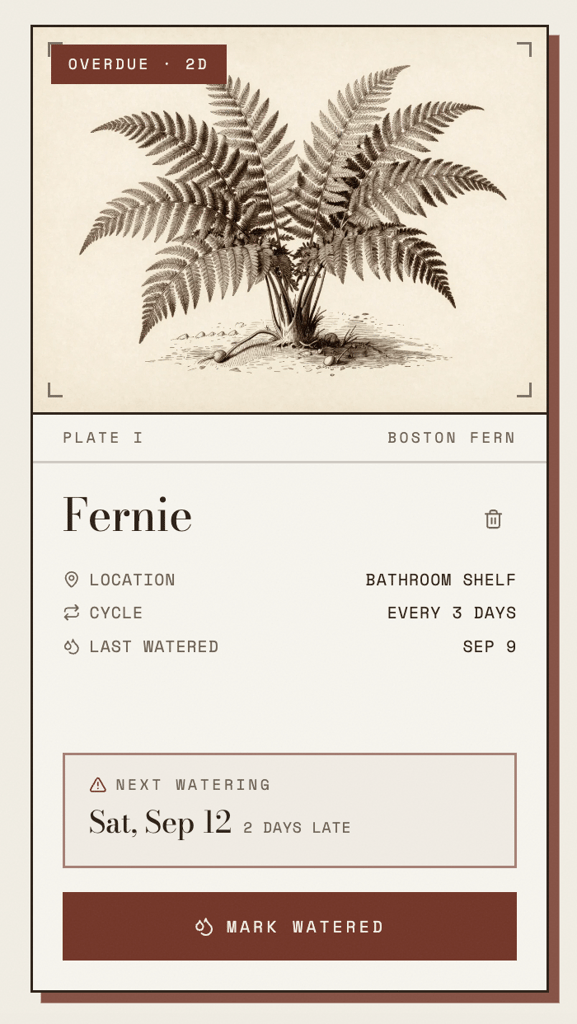
Visual edits ✅ – Hostinger extended the existing color system without disrupting the field-journal design. It preserved the terracotta treatment for overdue plants and added the requested sage accents to the other watering-status labels and next-watering boxes.
The layout, typography, illustrations, and existing functionality remained unchanged.
Prompt 2: Functional refinement
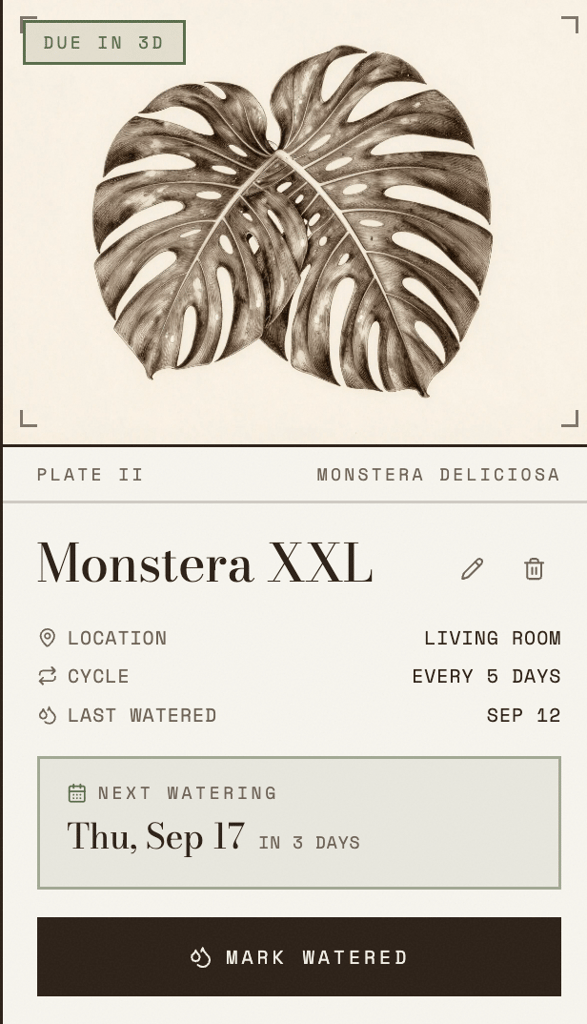
Editing existing data 🟡. Hostinger added the requested Edit option, but my first attempt to save the changes returned a database error. The builder detected the issue and offered a Fix with AI option, which resolved it without any manual troubleshooting.
After the fix, I could edit the plant successfully, and changing its watering frequency automatically recalculated the next watering date.
Prompt 3: New feature/logic refinement
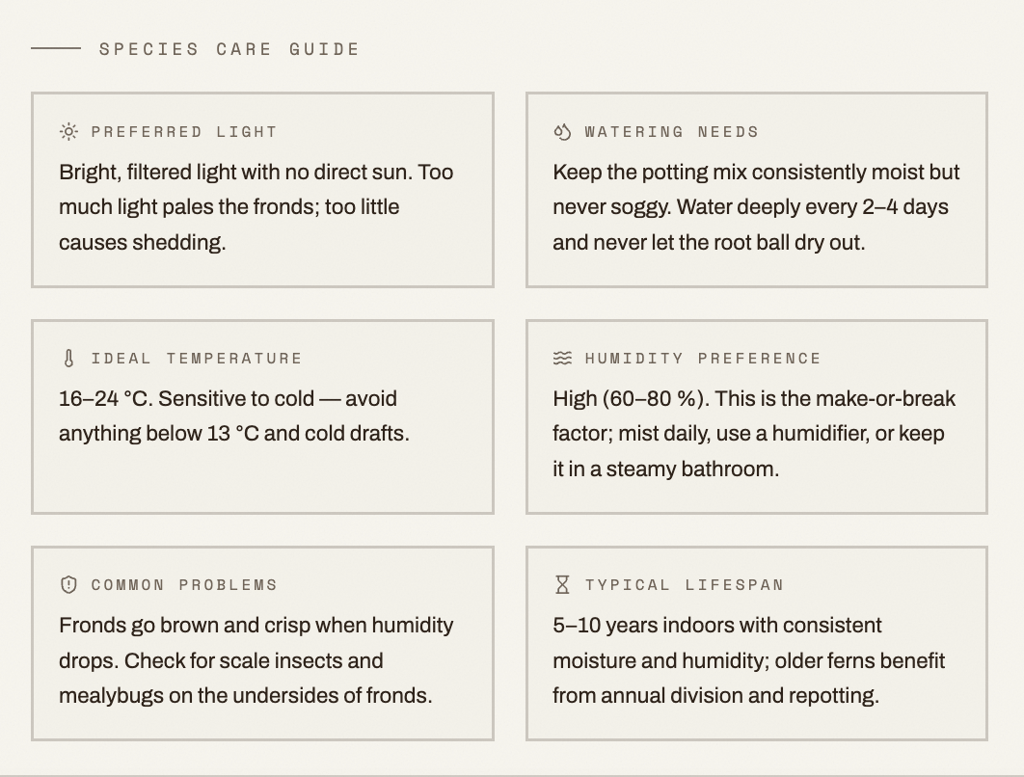
Adding a more complex feature ✅ – Hostinger added all six requested care categories while keeping the existing watering information and controls available in the detailed view.
The guidance also changed based on the plant type. The Boston Fern and Monstera Deliciosa received different recommendations for light, watering, temperature, humidity, common problems, and lifespan.
This was more specific than Lovable’s implementation, which generated guidance based on broader plant categories.
Hostinger AI Builder publishing flow
Hostinger’s publishing process was very direct. Clicking Publish immediately started deploying KeepMeAlive without requiring me to configure any deployment settings first.
Once the app was live, Hostinger automatically gave it a temporary Hostinger site domain and gave me the option to connect a custom domain from the same screen. I could visit and share the live app immediately.
Post-publishing edits in Hostinger AI Builder
After publishing KeepMeAlive, I wanted to see how Hostinger handles a more substantial update to an already live app. I decided to add a feature that would make the watering information easier to plan around, by giving it the following prompt:
Add a 7-day watering schedule above the specimen ledger. Show the next seven days in a horizontal timeline and display which plants need watering on each day based on their existing next watering dates. Highlight today and overdue plants clearly. Match the existing botanical field-journal design and keep all existing plant data and functionality unchanged.
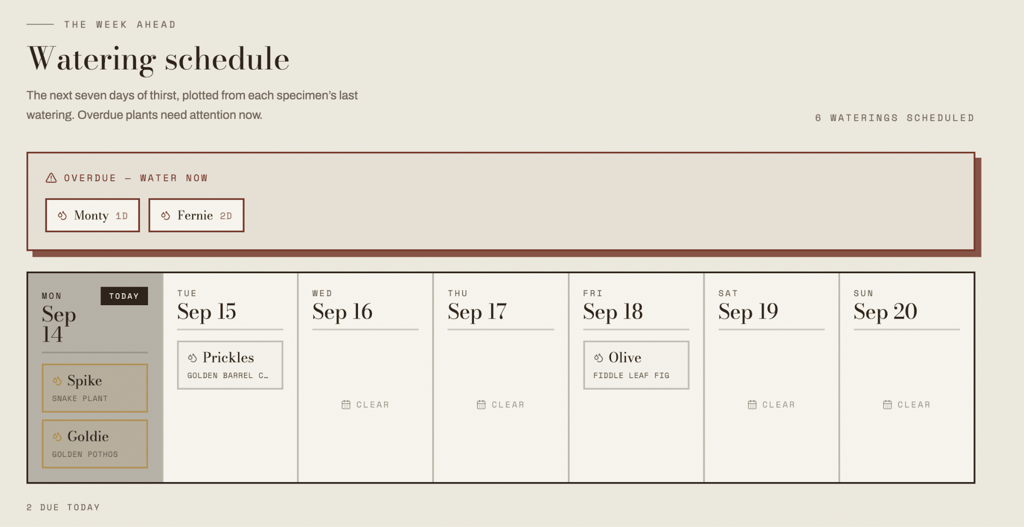
Post-publishing edit ✅ – Hostinger added the requested seven-day watering schedule using the plants’ existing next watering dates.
It highlighted the current day, grouped upcoming plants under their scheduled dates, and separated overdue plants into an Overdue – water now area. The new section also matched the existing botanical field-journal design.
The change didn’t automatically appear on the live app. I could test the new schedule in the builder while the published version remained unchanged, then publish the update when I was ready.
Publishing kept KeepMeAlive at the same address, and my plants and features came through unchanged.
Hostinger AI Builder verdict
Here’s a quick overview of Hostinger AI Builder’s performance across each area of the test:
| Test area | Rating | What I found |
| First-draft design | 5/5 | Distinctive, responsive botanical field-journal design with useful UI details generated without additional direction |
| Prompt accuracy | 5/5 | Followed the requested watering states and core functionality closely while adding useful supporting features |
| Functionality | 5/5 | Adding, filtering, watering, date calculations, persistence, and mobile use all worked |
| Ease of refinement | 4/5 | Most changes worked, but editing initially caused a database error that required Fix with AI |
| Complex changes | 5/5 | Generated detailed care guides for recognized plant types |
| Publishing | 5/5 | Published directly to a temporary Hostinger domain and kept later changes separate until I chose to publish them |
| Overall | 5/5 | Combined the most distinctive first-draft design with reliable core functionality and a straightforward path from building to publishing |
What I liked:
- The first draft had the strongest visual identity of the apps I tested. I gave Hostinger very little design direction, yet the result felt much less generic than a typical AI-generated dashboard.
- The builder often anticipated useful details I hadn’t specified, particularly the last-watered field, quick watering cycles, and clearer watering information.
- I didn’t have to sacrifice functionality for the more distinctive design. The core interactions worked, survived a refresh, and remained usable on mobile.
- Fix with AI made the database error relatively easy to recover from. I could continue working on the app without figuring out what had gone wrong behind the scenes.
- I felt comfortable making changes after publishing because they stayed separate from the live app until I chose to publish them.
What I didn’t like:
- The Edit feature showed that generated features weren’t always reliable on the first attempt. It ultimately worked, but only after an additional repair step.
- The first build took longer than Lovable’s, so the stronger visual result came with a slower start.

2. Bolt.new – best for feature-rich apps
Bolt.new is an AI app builder from StackBlitz that generates web applications from natural-language prompts. It combines the AI building experience with access to the underlying code, so you can continue working through prompts or make changes directly in the project.
Bolt has a free plan with public and private projects, website hosting, unlimited databases, and up to 1 million tokens per month, but websites retain Bolt branding. paid Pro plan starts at $25/month when billed yearly. The Pro plan includes 10million tokens per month, support for public and private projects, website hosting, unlimited databases, and removal of Bolt branding from published projects.
Bolt.new: First draft
The result was the most straightforward dashboard of the platforms I had tested so far. Bolt used a simple white layout with green buttons, summary cards, status filters, and a three-column grid of plant cards.
The design had less decoration than Lovable or Hostinger. There was no featured plant or introductory section, and the plant visuals were small emoji-style illustrations. However, Bolt put a lot of practical information directly on the dashboard.
It organized plants into Overdue, Due Today, and On Schedule, closely matching the three watering states in my prompt.
Each card also displayed the watering frequency, the next watering date, and the relative timing, with labels such as 1 day overdue, 4 days until next watering, and 12 days until next watering.
Bolt generated six sample plants and added locations, summary statistics, and delete controls that I hadn’t requested.
Dashboard statistics and filter counts were visible alongside the plant cards, making the overall watering schedule easy to scan.
Visually, the first draft felt more functional than polished. I preferred Lovable’s larger imagery and fuller layout, but Bolt made the practical watering information easier to find.
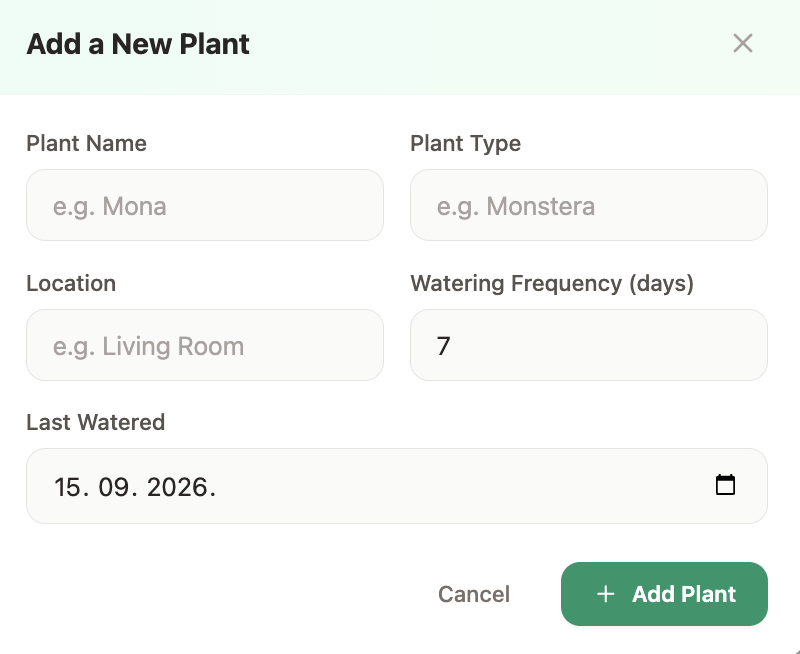
The Add plant form included all four requested fields: plant name, plant type, location, and watering frequency. Bolt also added a Last Watered date field, which it used to determine the plant’s current watering status and next watering date.
Next, I checked whether the app worked without me having to fix anything:
- Adding a plant ✅ – I added a Desert Rose with a two-day watering frequency. It appeared as On Schedule, with its next watering date correctly calculated, and a rose illustration generated for the new plant.
- Dashboard updates ✅ – Plant totals and watering-status counts updated automatically after I added and watered plants.
- Filtering ✅ – The All Plants, Overdue, Due Today, and On Schedule filters displayed the correct plants and updated their counts as plant statuses changed.
- Marking a plant as watered ✅ – The plant’s watering status and next watering date updated according to its watering frequency.
- Saved changes ✅ – Added plants and watering changes remained after refreshing the app.
- Mobile responsiveness ✅ – The dashboard, filters, plant cards, Add Plant form, and watering controls remained clear and usable on mobile.
Bolt.new’s first draft refinement
Bolt handled the core interactions without any corrective prompting, so I moved on to testing whether refinements would integrate just as cleanly.
For the visual test, I adapted the prompt to Bolt’s simpler dashboard design rather than repeating the same styling request used for the other platforms.
Prompt 1: Visual refinement
Make the plant cards feel more polished and visually distinctive without changing the dashboard structure. Increase the prominence of each plant illustration, add a subtle tinted background area behind the illustration, and strengthen the visual hierarchy between the plant name, watering status, and schedule information. Keep the existing colors, status logic, controls, layout, plant data, and functionality unchanged.
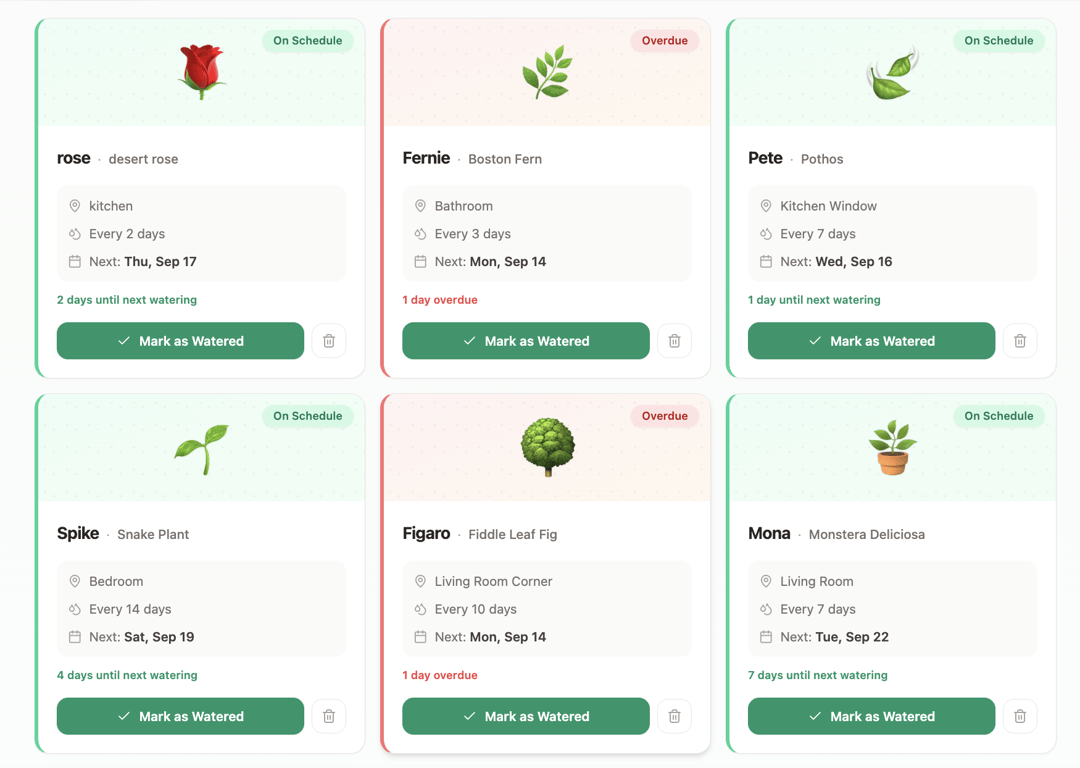
Visual edits ✅ – Bolt enlarged the plant illustrations and placed them against tinted header areas, giving the cards greater visual emphasis while preserving the overall dashboard structure.
It also reorganized the location and watering details to make the information easier to scan. The existing status colors, controls, plant data, and functionality remained unchanged.
Prompt 2: Functional refinement
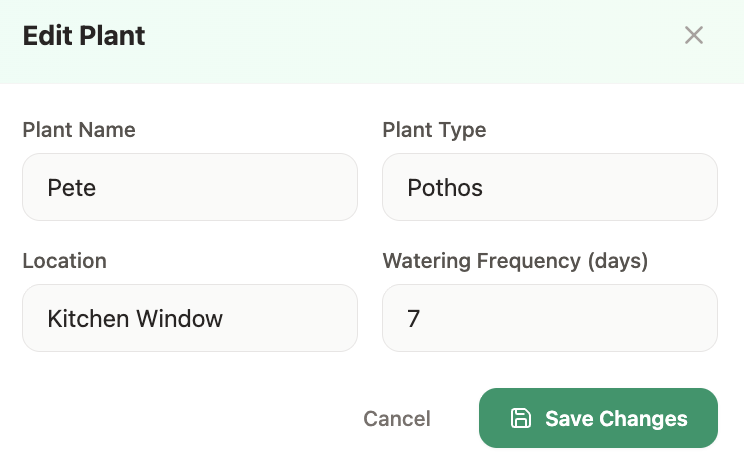
Editing existing data 🟡 – Bolt added the requested Edit option and correctly saved the changes to the plant data. Changing the watering frequency also recalculated the next watering date as requested.
The plant illustration was less reliable. When I changed the plant type from Desert Rose to Sunflower, Bolt replaced the original image with a generic potted plant instead of an illustration reflecting the new plant type.
Prompt 3: New feature/logic refinement
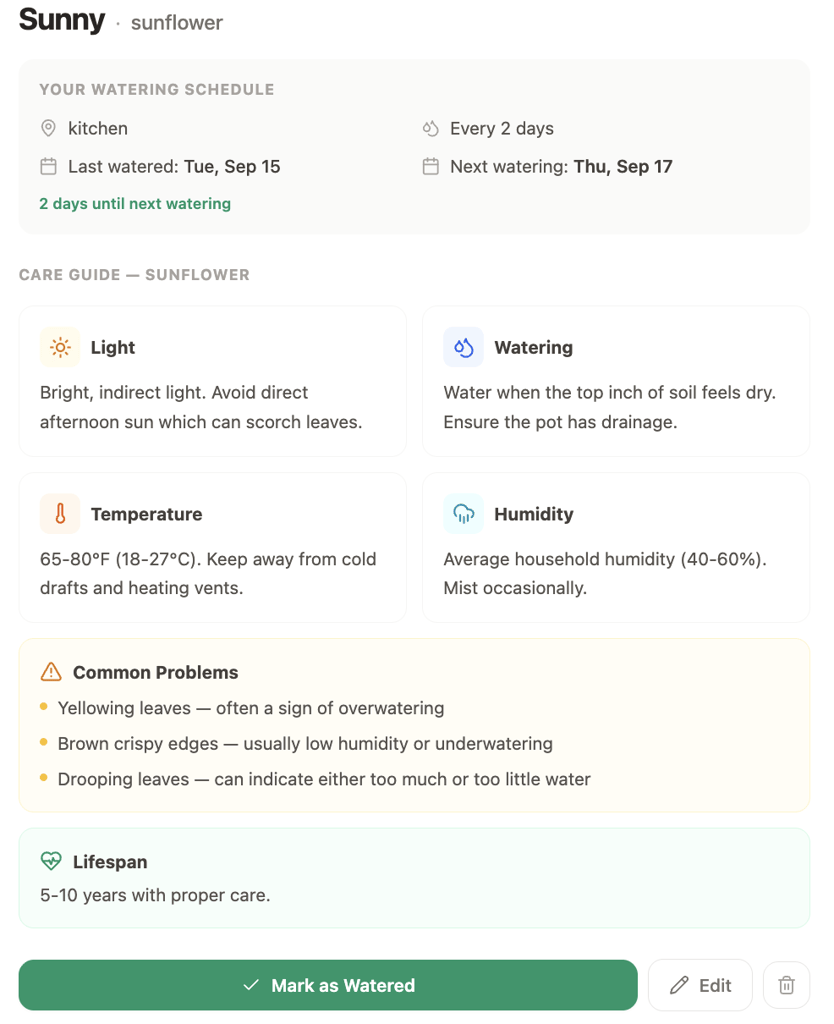
Adding a more complex feature 🟡 – Bolt added all six requested care categories and kept the existing watering information and controls available in the detailed view.
For recognized plants such as Monstera Deliciosa, the guidance was specific to the plant, covering bright indirect light, higher humidity, and Monstera-specific issues such as limited fenestration.
The custom Sunflower exposed a limitation. Its guide recommended bright, indirect light and avoiding direct afternoon sun, which is inaccurate for a plant that generally requires full sun.
Although Bolt successfully built the requested feature, the generated care information wasn’t reliable across all plant types.
Bolt.new publishing flow
Publishing the app was straightforward and didn’t require any additional deployment setup. Bolt immediately gave me a public bolt.host URL, and the live app retained the functionality and data from the builder.
I could also switch the site between public and private access, run a security audit before publishing, and connect a custom domain.
Post-publishing edits in Bolt
To see how Bolt handles changes after an app is already live, I asked it to add a more substantial feature:
Add a Plant Sitter mode that generates a temporary care sheet using the plants already in the app. Include each plant’s name, location, watering frequency, next watering date, and current watering status. Organize the plants by when they need attention so someone unfamiliar with my collection can easily follow the schedule. Add a short notes field for each plant where I can leave specific care instructions for the sitter. Make the care sheet a clean standalone view that can be printed or shared, while keeping all existing plant data and functionality unchanged.
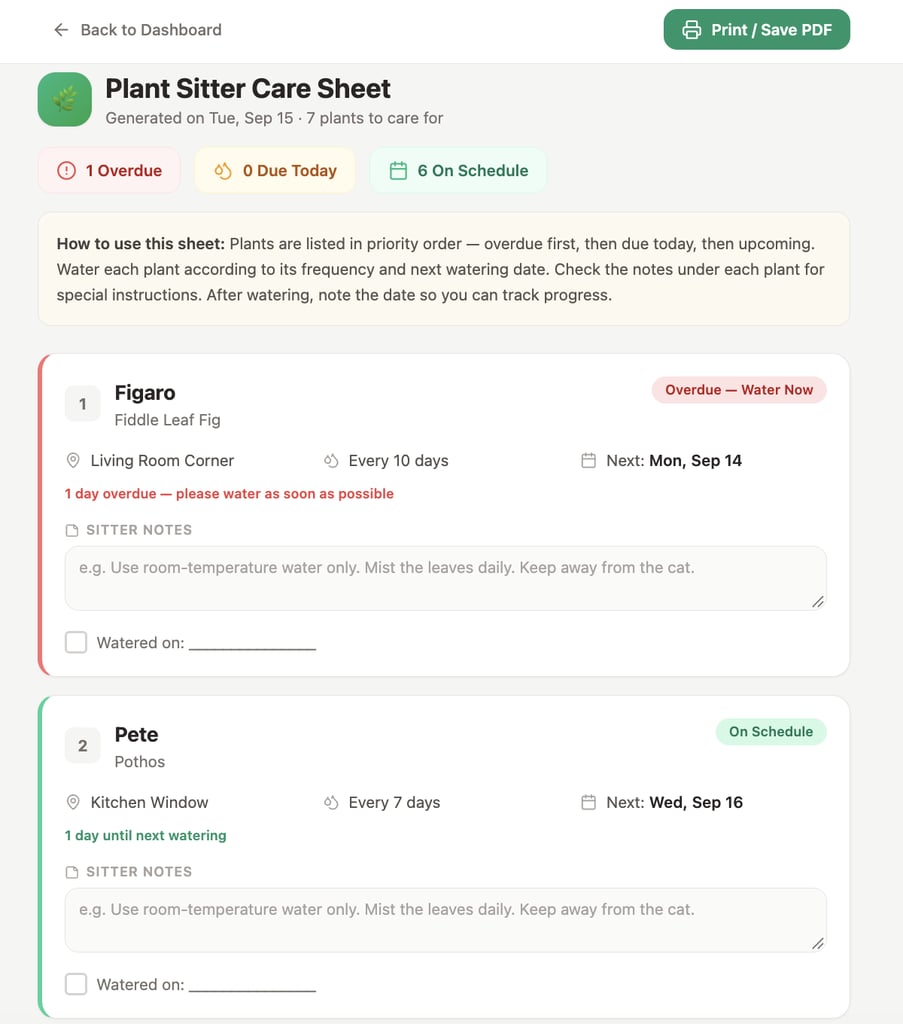
Post-publishing edit ✅ – Bolt created a separate care sheet that organized the existing plants by watering priority and included their location, watering frequency, next watering date, and current status.
It also went beyond the prompt by adding a watering checklist and Print / Save PDF option alongside the requested sitter notes.
The change remained separate from the live app while I tested it in the builder. Once I clicked Publish → Update, Bolt added Plant Sitter mode to the existing live app without affecting its plant data or existing features.
Bolt.new verdict
Across the six test areas, Bolt.new earned the following ratings:
| Test area | Rating | What I found |
| First-draft design | 4/5 | Clean, responsive, and easy to scan, but less visually polished than Lovable or distinctive than Hostinger |
| Prompt accuracy | 5/5 | Followed the requested watering states closely and clearly presented dates, frequencies, and status information |
| Functionality | 5/5 | Adding plants, filtering, watering, date calculations, persistence, and mobile use all worked without fixes |
| Ease of refinement | 5/5 | Visual and functional changes integrated cleanly without breaking the existing app or data |
| Complex changes | 4/5 | Built the care guide and Plant Sitter mode successfully, but custom plant imagery and generated care information were less reliable |
| Publishing | 5/5 | Published directly to a bolt.host URL and let me test later changes before updating the existing live app with Publish → Update |
| Overall | 4/5 | Reliable across building, refinement, and publishing, although inconsistent custom imagery and care information may make Bolt.new alternatives worth exploring. |
What I liked:
- The first draft prioritized useful information. Watering statuses, dates, frequencies, and relative timing were all visible without opening individual plants.
- I could refine the app without worrying much about breaking what already worked. The visual changes, editing feature, and later Plant Sitter mode all slotted in without disturbing the rest of the app.
- Bolt handled the Plant Sitter request particularly well. The finished feature pulled in the plants I’d already added and added useful details such as a watering checklist and Print / Save PDF option.
What I didn’t like:
- The first draft was visually simpler than some of the other apps I tested. The small illustrations and basic card design made it feel less polished.
- The illustrations became less reliable with plants Bolt didn’t recognize. Changing Desert Rose to Sunflower produced a generic plant illustration.
- I wouldn’t rely on the generated care information without checking it. The inaccurate Sunflower advice showed that a complete-looking guide could still contain significant errors.
3. Base44 – best for tracker and organizer apps
Base44 is an AI app builder that generates the frontend, backend, database, and other app functionality from natural-language prompts.
You can continue refining the generated app via prompts or in-app code edits, and then publish it on the same platform.
Base44 has a free plan with 25 monthly message credits, 100 integration credits, and up to five apps.
Paid plans start with Starter at $16/month when billed annually, which increases the allowance to 100 message credits and 2,000 integration credits per month and adds features such as custom domain connections.
Base44: First draft
Base44 generated a complete dashboard with eight sample plants in a three-column layout. It added summary cards for total plants, plants needing water today, and overdue plants, followed by status filters and individual plant cards.
The watering information closely matched my requirements. Base44 used Needs water today, Overdue, and Up to date, with each card showing the watering frequency, next watering date, and relative timing, such as 3 days overdue or in 6 days.
Card backgrounds also changed according to watering status, making the different states easy to distinguish.
The overall design was clean and easy to scan, with watering information that was just as easy to follow as in Lovable.
Base44 fell behind in the way it illustrated individual plants. Lovable used larger plant imagery, while Base44 relied on emoji-style icons and sometimes interpreted plant names literally. The Snake Plant received a snake icon, for example, while the Spider Plant received a spider.
Base44 included the requested Add plant control and Mark as watered action, while also adding plant counts to each filter and showing the exact number of days until or since watering.
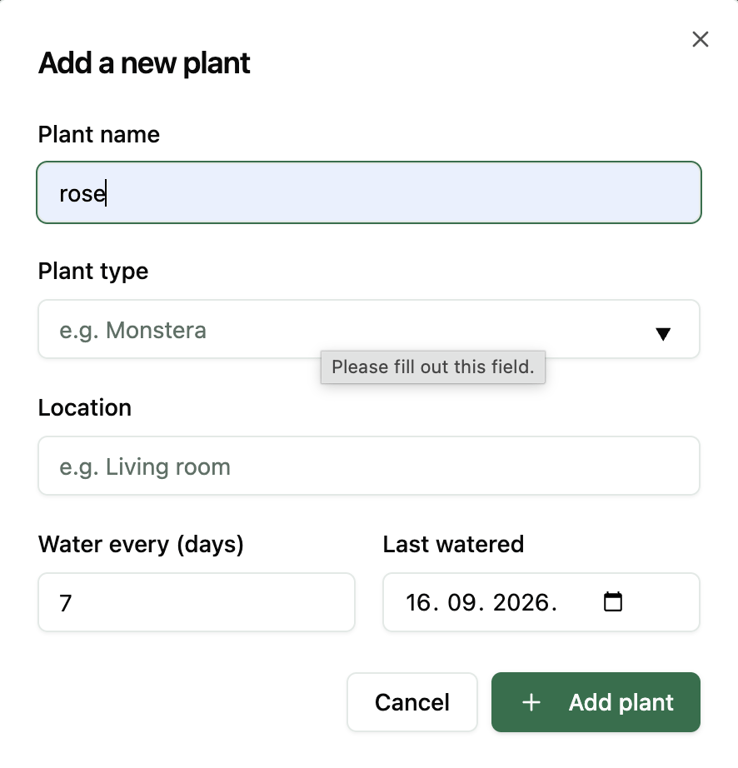
The Add plant form contained all four requested fields: plant name, plant type, location, and watering frequency. Base44 also added a Last watered date field, which it used to calculate the next watering date.
Testing the main interactions gave me the following results:
- Adding a plant ✅ – I added a Desert Rose named Rose to the bedroom, with a 7-day watering schedule. Base44 added it immediately, calculated the next watering date, and showed that watering was due in 7 days.
- Dashboard updates ✅ – Plant totals and watering-status counts updated automatically as I added and watered plants.
- Filtering ✅ – The All plants, Needs water today, Overdue, and Up to date filters displayed the correct plants and corresponding counts.
- Marking a plant as watered ✅ – Watering a plant updated its status and calculated the next watering date according to its watering frequency.
- Saved changes ✅ – Added plants and watering changes remained after refreshing the app.
- Mobile responsiveness ✅ – The dashboard, filters, plant cards, Add plant form, and watering controls remained clear and usable on mobile.
Base44’s first draft refinement
After testing the initial app, I used the three refinement prompts to see how Base44 handled a visual adjustment, editing existing plant data, and adding a more complex care guide.
Prompt 1: Visual refinement
Make the plant cards more visually distinctive without changing the dashboard structure. Replace the small emoji-style plant icons with larger botanical illustrations that reflect each plant type, and give the illustration area a subtle background treatment. Keep the existing colors, watering statuses, controls, plant data, layout, and functionality unchanged.
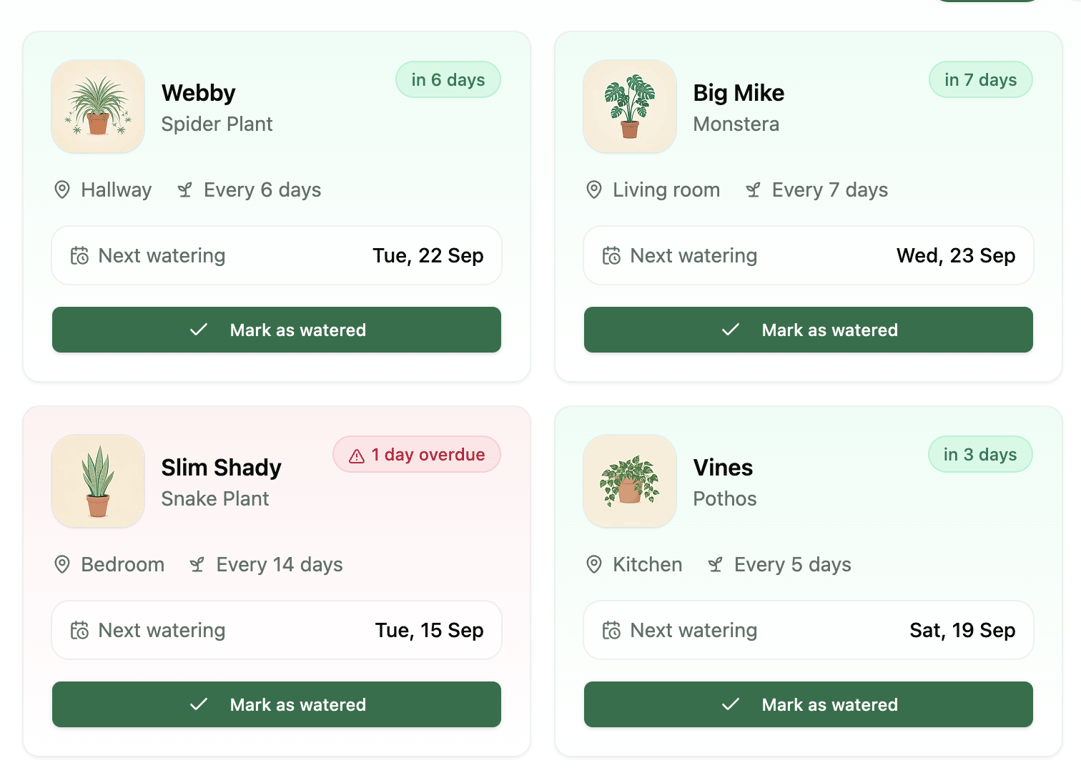
Visual edits ✅ – Base44 replaced the emoji-style icons with larger botanical illustrations that reflected each plant type. The Spider Plant, Monstera, Snake Plant, and Pothos all received distinct visuals with subtly tinted backgrounds.
The dashboard structure, watering information, status colors, controls, and existing plant data remained unchanged. The new visuals also persisted after refreshing the app.
Prompt 2: Functional refinement
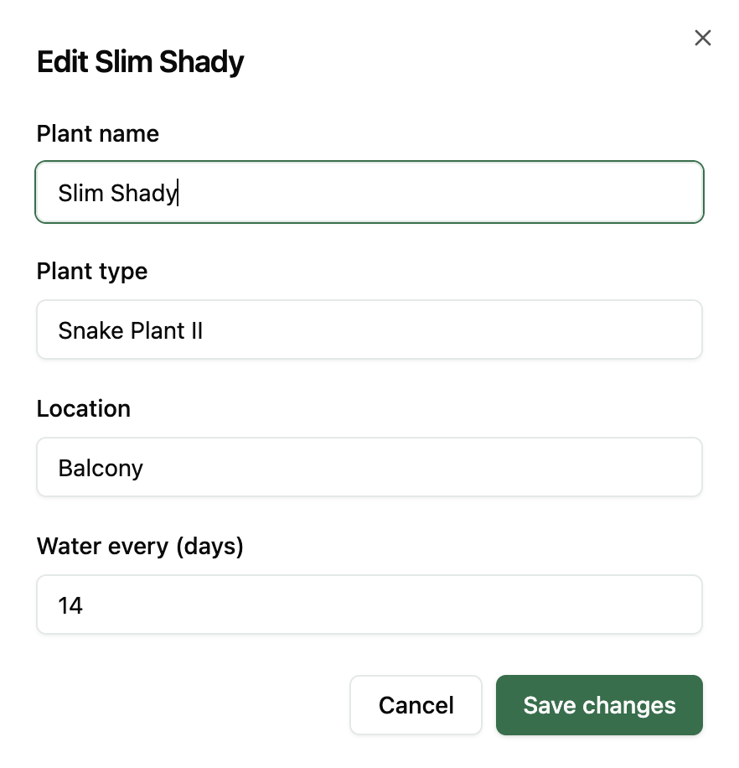
Editing existing data ✅ – Base44 added the Edit option, allowing me to change all four requested plant details. Updating the watering frequency correctly recalculated the next watering date.
Prompt 3: New feature/logic refinement
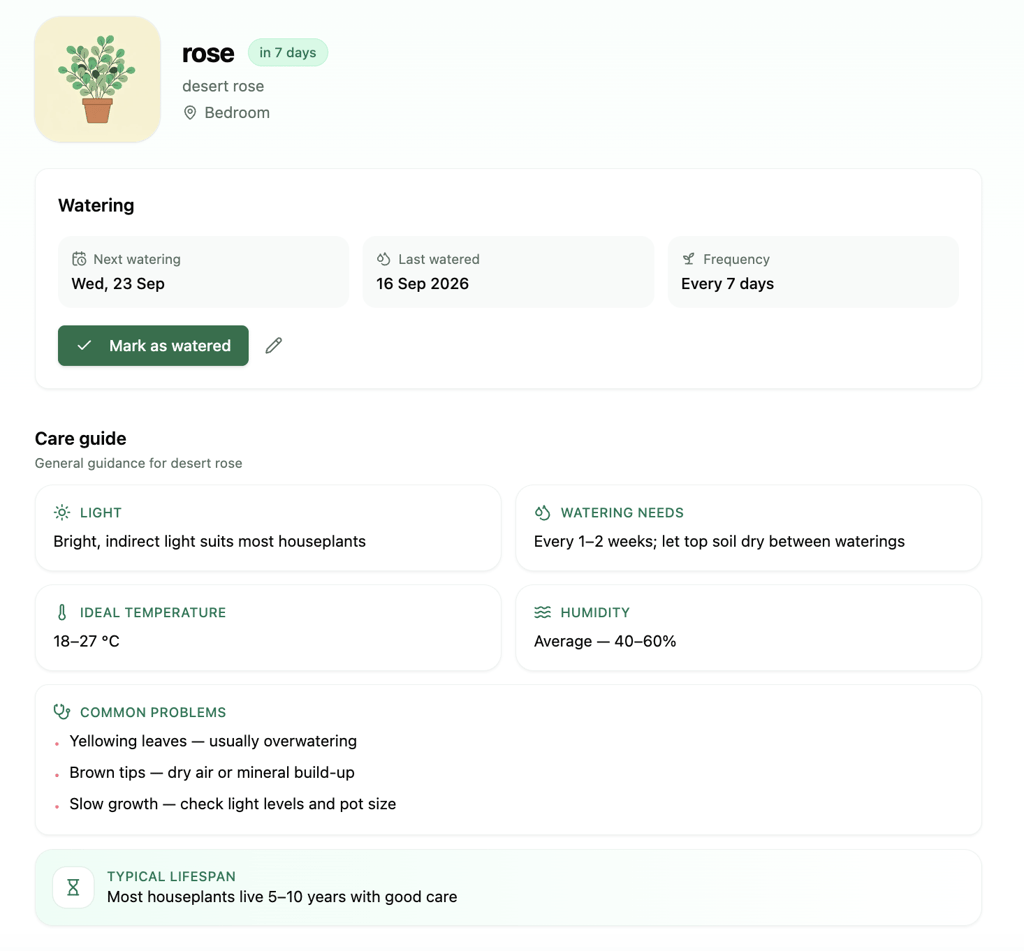
Adding a more complex feature 🟡 – Base44 added all six requested care categories while preserving the plant’s watering information and controls.
Unlike the other builders I tested, Base44 opened the care guide as a separate page rather than a pop-up window, with an option to return to the main dashboard.
The guidance was specific for recognized plants such as the Spider Plant, including relevant problems and lifespan information.
However, my custom Desert Rose received generic advice framed around what works for “most houseplants,” rather than guidance specific to that plant type.
Base44 publishing flow
Base44 published KeepMeAlive almost immediately and didn’t require any additional deployment setup.
Before publishing, I could choose who could see the app and run a security scan. Base44 then provided a public base44.app address and offered the option to connect a custom domain.
The live app worked exactly as it had in the builder, and my plants were still there.
Post-publishing edits in Base44
For the post-publishing test, I added a feature that required Base44 to store new data over time, building on the persistence that had already worked throughout the initial test:
Add a watering history for each plant. Every time I mark a plant as watered, save the date and add it to that plant’s history. Show the watering history in the plant’s detailed view, with the most recent watering first. Also, show how many times the plant has been watered in total. Keep the existing watering schedule, care guide, plant data, and functionality unchanged.
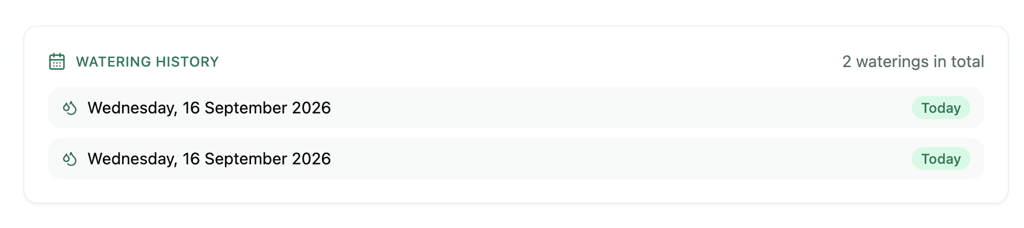
Post-publishing edit ✅– Base44 added a watering history to each plant and saved every watering action as a separate entry.
I watered the same plant twice, and both events appeared in its history, with the total watering count correctly showing two.
The update stayed separate from the live app while I tested it in the builder. After publishing the changes, the watering history appeared on the existing base44.app version, with the previous plant data and functionality still intact.
Base44 verdict
Here’s how Base44 scored after completing the full test:
| Test area | Rating | What I found |
| First-draft design | 4/5 | Clean and easy to scan, but the original emoji-style plant visuals were fairly basic and, in some cases, inaccurate |
| Prompt accuracy | 5/5 | Closely followed the requested dashboard, watering states, filters, dates, and core interactions |
| Functionality | 5/5 | Adding, filtering, and watering plants worked correctly, and changes persisted after refresh |
| Ease of refinement | 5/5 | Visual changes and plant editing worked cleanly without disrupting existing data or functionality |
| Complex changes | 4/5 | The care guide and persistent watering history worked, although custom plant content was less reliable, a limitation worth weighing against Base44 alternatives |
| Publishing | 5/5 | Published almost immediately to a base44.app address, kept my plants and changes intact, supported custom domains, and let me test changes before publishing |
| Overall | 4/5 | A reliable result across generation, refinement, persistence, and deployment, with weaker handling of care content for custom plant types |
What I liked:
- I never had to think about whether my plant data would still be there after a refresh. That made Base44 feel much closer to a usable app than a temporary prototype.
- The weak first-draft visuals were easy to improve. One prompt was enough to turn the basic emoji-style icons into much better plant-specific illustrations.
- I felt comfortable making further changes because previous functionality and data stayed intact throughout the refinement process.
What I didn’t like:
- The literal emoji choices in the first draft made the app feel less polished. A snake for Snake Plant and a spider for Spider Plant were amusing, but not particularly useful as illustrations.
- I’d be cautious about relying on the care advice it writes for plants it doesn’t recognize well. My Desert Rose received generic houseplant advice, while the sample plants Base44 created itself got much more specific guidance.
- Opening the care guide as a separate page pulled me out of the dashboard and made me navigate back each time. Most of the other builders used a pop-up window instead, which kept me in place.
4. Replit – best for dashboard-style apps
Replit is a browser-based development platform that combines AI-powered app creation with a full coding environment.
Its Replit Agent can create an app from a prompt, while the workspace gives you access to the generated project, development tools, and deployment controls as you continue building.
Paid plans start with Core at $18/month when billed annually. It includes up to 30 hours of chat and 60 projects in Free Mode, plus $20 of usage toward Replit’s more powerful AI models.
Replit: First draft
Replit’s first draft was a more conventional dashboard, with a soft green-and-cream color palette, rounded cards, and a sidebar that stayed visible on every screen.
Visually, it was closer to Lovable than Hostinger, although the sidebar gave it more of a traditional web-app layout.
The dashboard included five sample plants, watering statistics, status filters, next watering dates, watering frequencies, and controls for adding and watering plants.
Replit also added plant illustrations, locations, summary cards, and a care tip that I hadn’t requested.
It stood out for how clearly it presented the watering information. It used Needs water, Overdue, and Not due to match the three states in my prompt, while individual plant cards showed more specific timing with labels such as Needs water today, 2 days overdue, and Water in 4 days.
Dates were labeled Next or Was due, so I never had to guess which one I was looking at – the problem I’d had with Lovable’s unlabeled dates.
Lovable’s first draft was visually richer, with larger imagery, a featured plant, and a fuller introduction.
Replit’s design was more restrained, but I found the watering status and scheduling information easier to understand at a glance.
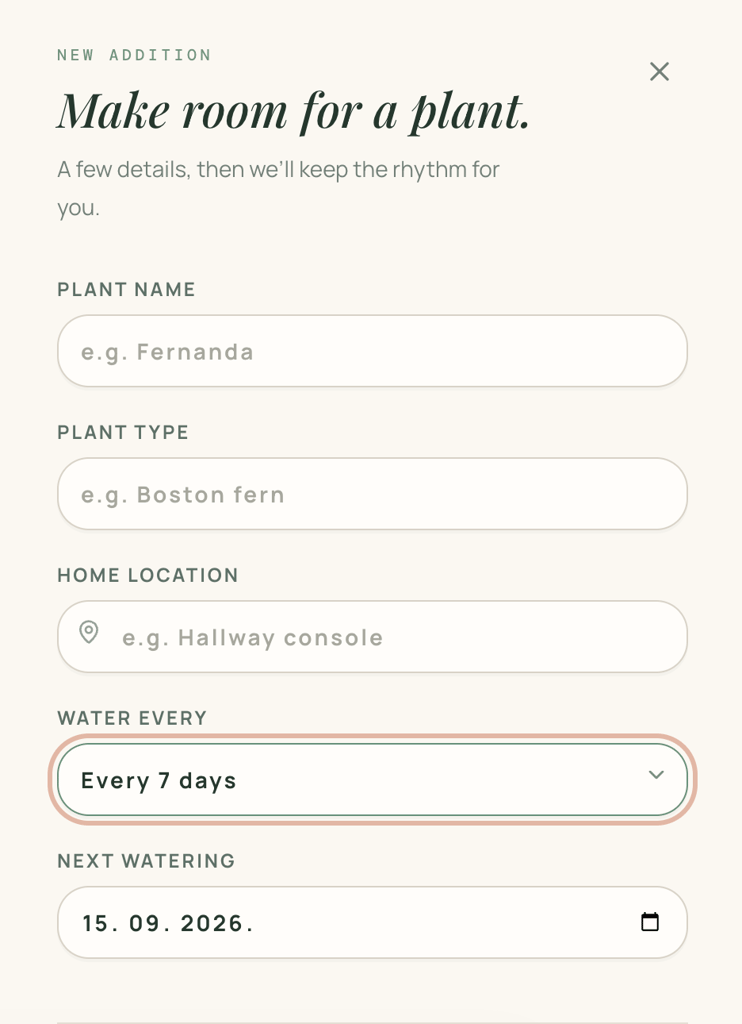
The Add plant form included all four requested fields: plant name, plant type, home location, and watering frequency. Replit also added a Next watering date field, so I could set when a plant was next due instead of starting its cycle from today.
I then tested the core interactions before making any refinements:
- Adding a plant ✅ – I successfully added a new plant, and it appeared on the dashboard with its watering information.
- Dashboard updates ✅ – Plant totals and watering-status counts updated after adding and watering plants.
- Filtering ✅ – The status filters displayed the correct plants and recalculated their counts as the underlying data changed.
- Marking a plant as watered ✅ – The plant’s status and next watering date updated according to its watering frequency.
- Saved changes ✅ – Added plants and watering changes remained after refreshing the app.
- Mobile responsiveness ✅ – The dashboard adapted to the smaller screen and remained easy to use on mobile.
Replit’s first draft refinement
With Replit’s first draft working as intended, I moved on to the same three refinement tests I used with Lovable and Hostinger AI Builder, starting with a visual change to Replit’s existing design.
Prompt 1: Visual refinement
Make the plant cards more visually distinctive by replacing the small abstract plant icons with larger botanical illustrations that reflect each plant type. Integrate the illustrations into the existing cards without making them significantly taller. Keep the current green-and-cream color palette, typography, card layout, watering information, and functionality unchanged.
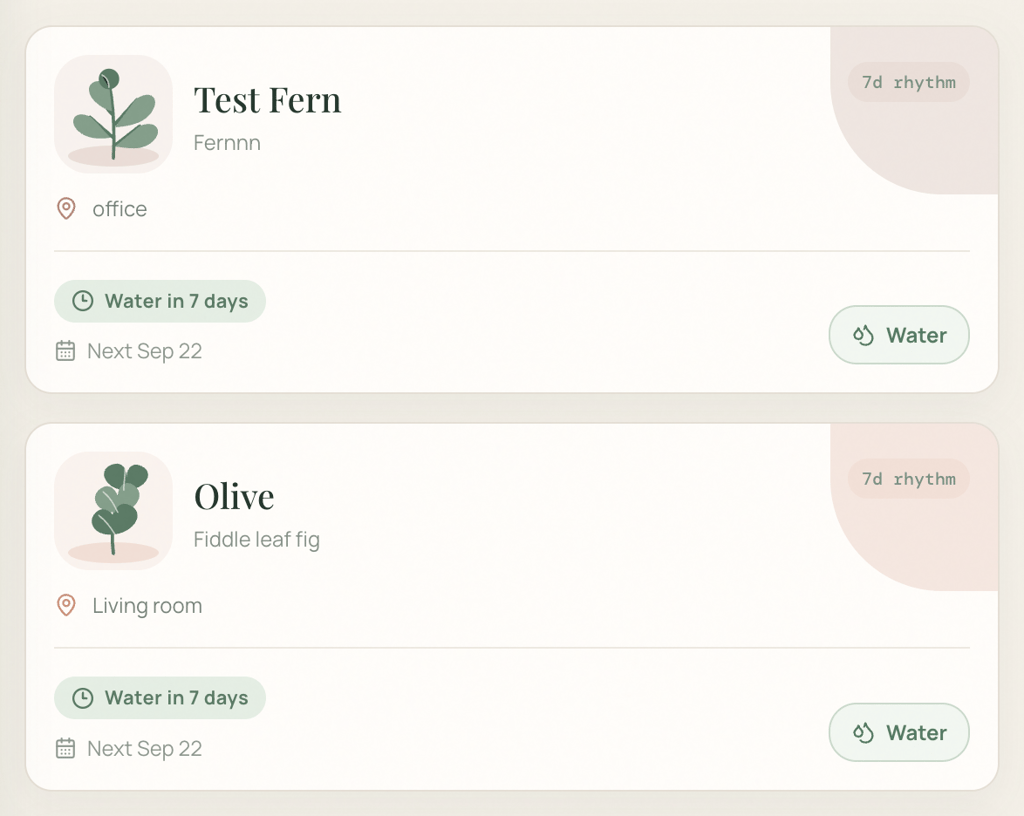
Visual edits ✅ – Replit replaced the small abstract icons with larger botanical illustrations that varied by plant type while preserving the existing card layout, watering information, and functionality.
The change was fairly subtle, and the refinement process was more involved than with Lovable or Hostinger. It took about two minutes and several interactions before the change was ready to be applied to the main version.
Prompt 2: Functional refinement
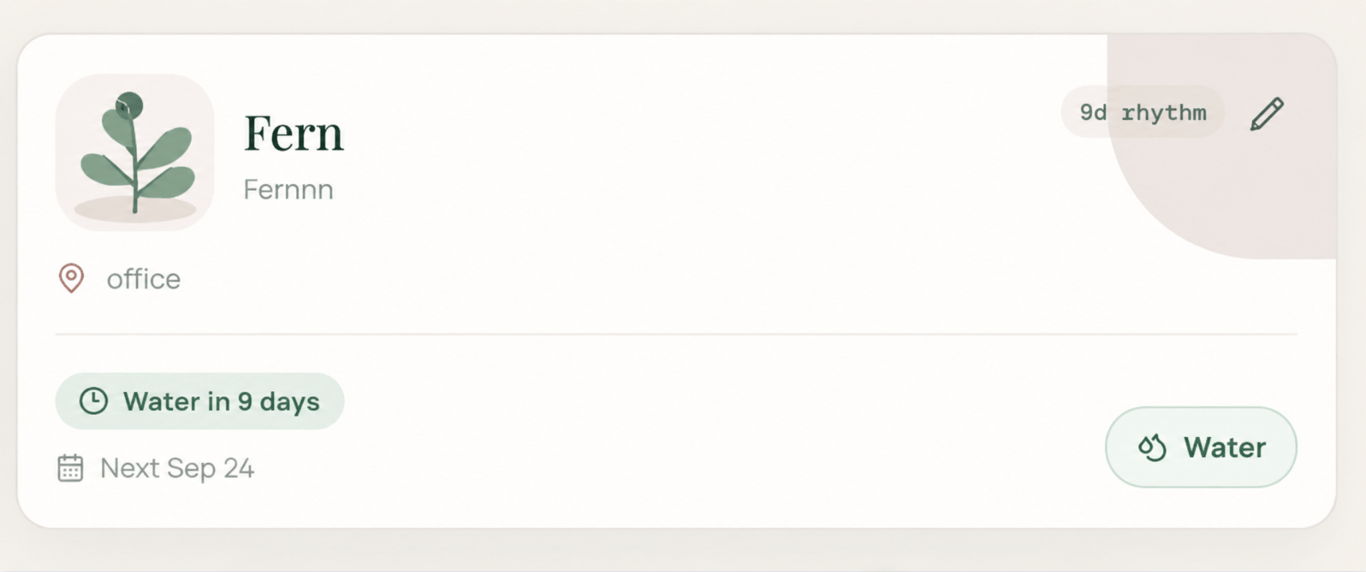
Editing existing data ✅ – Replit added the requested Edit option, and I was able to update and save the plant details. Changing the watering frequency also recalculated the next watering date without affecting existing functionality.
Prompt 3: New feature/logic refinement
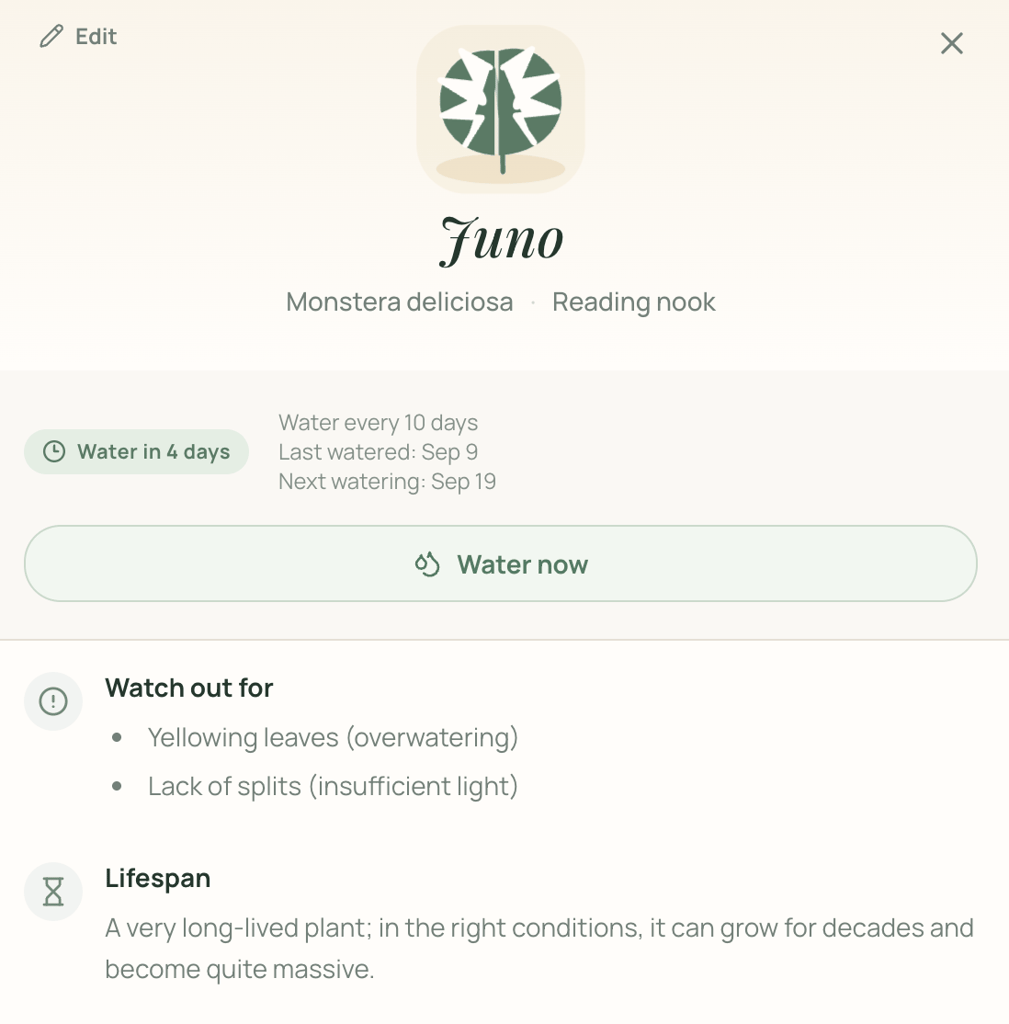
Adding a more complex feature ✅ – Replit added the care guide with all six requested categories while keeping the existing watering information, controls, and Edit option available in the detailed view.
The guidance also changed based on the plant type. The Monstera guide included specific information about fenestrations, the effect of insufficient light on leaf splits, humidity needs, and lifespan.
The level of detail, however, wasn’t consistent across all the plants I tested. The Fern guide gave broader advice, particularly for humidity and lifespan, while the Monstera guidance was more tailored.
Overall, Replit produced more plant-specific guidance than Lovable, but was less consistent than Hostinger.
Replit publishing flow
The publishing panel automatically suggested an available replit.app domain, but I could change the subdomain, connect a custom domain, choose who could access the app, enable a feedback widget, or review security before going live.
After I clicked Publish, KeepMeAlive went live at keep-me-alive-plant-care.replit.app. Replit also noted that the published app uses credits and offered an auto-reload option to help avoid interruptions.
The process was straightforward, but there were more deployment and availability considerations than with Lovable or Hostinger.
Post-publishing edits in Replit
After publishing KeepMeAlive, I wanted to see how Replit handled a substantial update to an already live app.
I decided to add a weekly planner that would let users reschedule upcoming watering tasks directly from the dashboard, using the following prompt:
Add a weekly drag-and-drop watering planner to the dashboard. Show the next seven days as separate columns and place each plant under its current next watering date. Let me drag a plant from one day to another to reschedule it. When I move a plant, automatically update its next watering date everywhere in the app. Show overdue plants in a separate section and let me drag them onto a day to reschedule them. Keep the existing plant data, watering controls, filters, care guides, and functionality unchanged, and match the existing visual style.
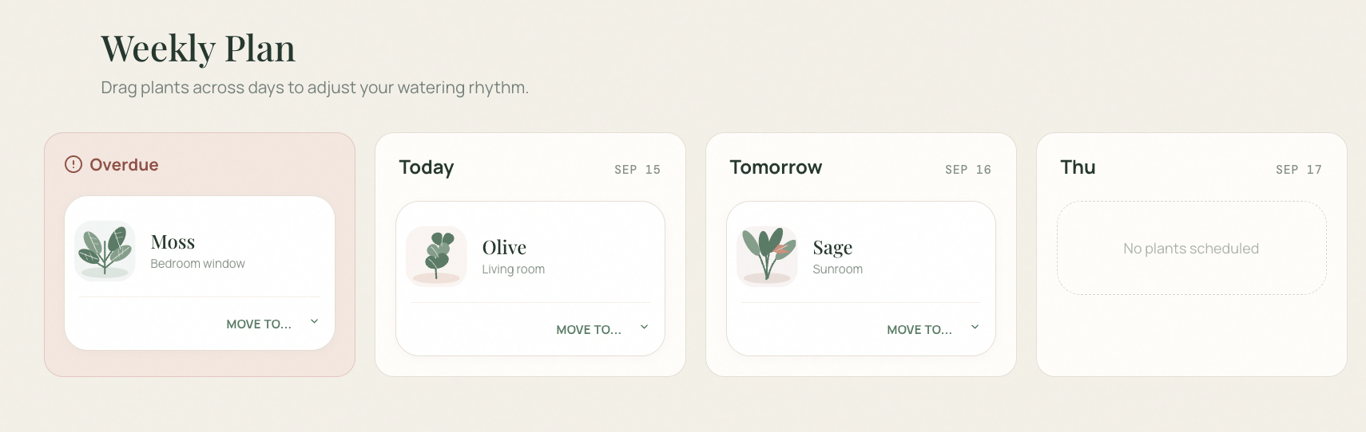
Post-publishing edit 🟡 – Replit built the weekly planner with separate columns for the next seven days and a dedicated section for overdue plants.
The drag-and-drop worked, and moving a plant to another day updated its watering schedule.
While Replit was building the feature, the preview repeatedly failed to reload and briefly lost its connection to Replit’s servers.
Replit eventually reported that the feature was complete, but the planner still didn’t appear in the preview.
Once I published the update, the planner appeared on the live app and worked correctly. This temporarily left the live version ahead of what I could see in the builder, making the post-publishing workflow less predictable than with Lovable or Hostinger.
Replit verdict
Taking the full Replit test into account, here’s how I rated it across each area:
| Test area | Rating | What I found |
| First-draft design | 4/5 | Polished and responsive with a clear dashboard structure, though less visually distinctive than Hostinger and less visually rich than Lovable |
| Prompt accuracy | 5/5 | Followed the requested watering states closely and presented dates and status information particularly clearly |
| Functionality | 5/5 | Adding plants, filtering, watering, date calculations, persistence, and mobile use all worked |
| Ease of refinement | 4/5 | Follow-up changes worked, but some took longer and required more interaction before they were ready to apply |
| Complex changes | 4/5 | Built the care guide and working drag-and-drop planner, although the latter caused preview and server issues during implementation |
| Publishing | 4/5 | Provided useful deployment controls and a replit.app domain, but running the published app consumes credits and the preview temporarily fell out of sync with the live version |
| Overall | 4/5 | Delivered an accurate and reliable app, but refinement and post-publishing changes were less smooth than the initial build, an important consideration when comparing Replit with alternative platforms |
What I liked:
- I rarely had to correct Replit’s interpretation of the core requirements. The watering states and scheduling information were particularly close to what I had described in the original prompt.
- The first draft was easy to understand immediately. Labels such as Not due, Water in 4 days, and Next made the underlying watering schedule much clearer than in some of the other apps.
- Replit gave me more publishing controls available before going live than most platforms, including access settings, custom domains, and a security review.
What I didn’t like:
- Refinements sometimes felt more involved than necessary. Even a relatively small visual change took longer and required several interactions before I could apply it.
- The post-publishing update was the least predictable part of the experience. Errors that prevented the updated app from building correctly, a temporary server disconnect, and the preview falling out of sync made it difficult to tell whether the change had actually worked.
- The published app keeps using Replit credits while it’s live, so hosting it has an ongoing cost the other platforms didn’t charge me.
5. Netlify – best for interactive web tools
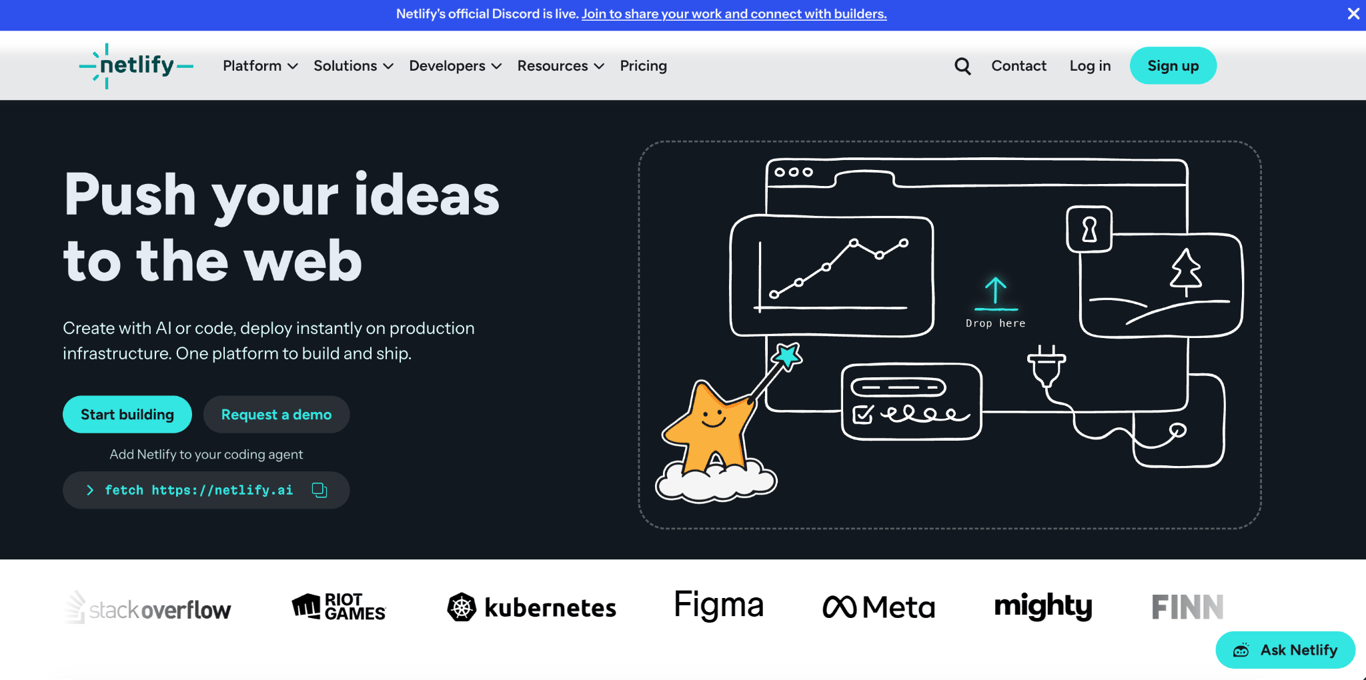
Netlify is a web development platform that combines AI-assisted app building with hosting and deployment tools.
You can generate an app from a prompt, continue making changes, test new versions through deploy previews, and publish the finished app from the same platform.
Netlify has a free plan that includes AI, Git and API deployments, unlimited deploy previews, structured data storage, and custom domains with SSL.
Paid plans start at $9/month and add 1,000 monthly credits, smart secret detection, one-day observability, and priority email support.
Netlify: First draft
The first draft had a distinctive editorial-style design with a cream background, dark green serif typography, generous spacing, and large plant cards.
Netlify handled the initial generation differently from the other platforms I tested. Once KeepMeAlive was ready, it immediately deployed the first draft to a private netlify.app URL, where I could test it before making it public.
It generated five sample plants in a three-column layout and added filters for All, Today, Overdue, and Doing Fine.
The watering information closely followed my requirements. Each card showed the plant type, location, watering frequency, next watering date, and relative timing, such as 1 day overdue, Today, or in 3 days.
The different states were easy to understand, and every card included the requested Mark as watered control.
However, the visual execution was less consistent. The same generic plant illustration appeared across several different plant types, and copy such as “Good morning, plant person” felt less polished than the rest of the interface.
The Add plant form included exactly the four fields I requested: plant name, plant type, location, and watering frequency. It didn’t introduce a last-watered field or other additional inputs.
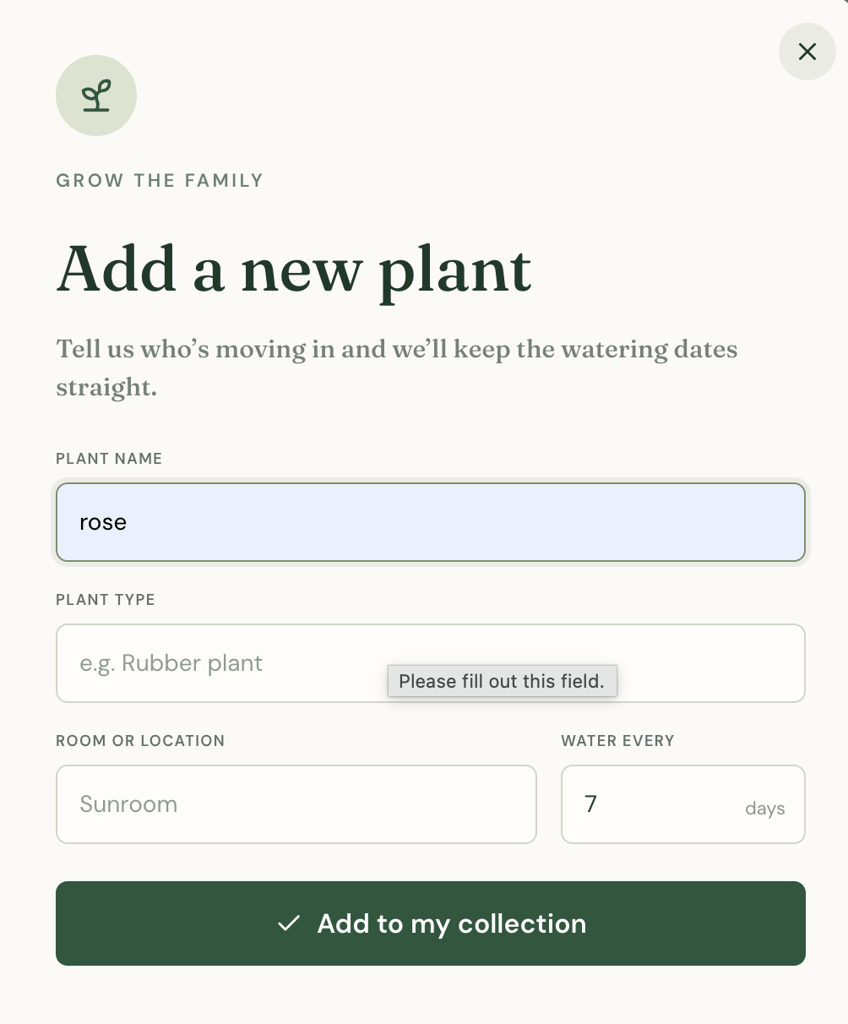
After testing the main interactions, I got the following results:
- Adding a plant ✅ – I added a Desert Rose named Rose with a two-day watering frequency, and it appeared in the collection correctly.
- Dashboard updates ✅ – Adding and watering plants updated the plant information and relevant dashboard counts automatically.
- Filtering ✅ – The All, Today, Overdue, and Doing Fine filters displayed plants according to their current watering status.
- Marking a plant as watered ✅ – Watering a plant updated its status and next watering date based on its watering frequency.
- Saved changes ✅ – The changes I made remained after refreshing the app.
- Mobile responsiveness ⚪ – Not tested. I couldn’t find a mobile preview or device-switching control in the private app view, so I wasn’t able to test responsiveness using the same method as with the other builders. This doesn’t necessarily mean Netlify doesn’t provide a way to test mobile layouts.
Netlify’s first draft refinement
With the first draft working, I started refining the app to see how Netlify handled follow-up changes.
Prompt 1: Visual refinement
Make the plant cards feel more polished and visually distinctive without changing the dashboard structure. Increase the prominence of each plant illustration, add a subtle tinted background area behind the illustration, and strengthen the visual hierarchy between the plant name, watering status, and schedule information. Keep the existing colors, status logic, controls, layout, plant data, and functionality unchanged.
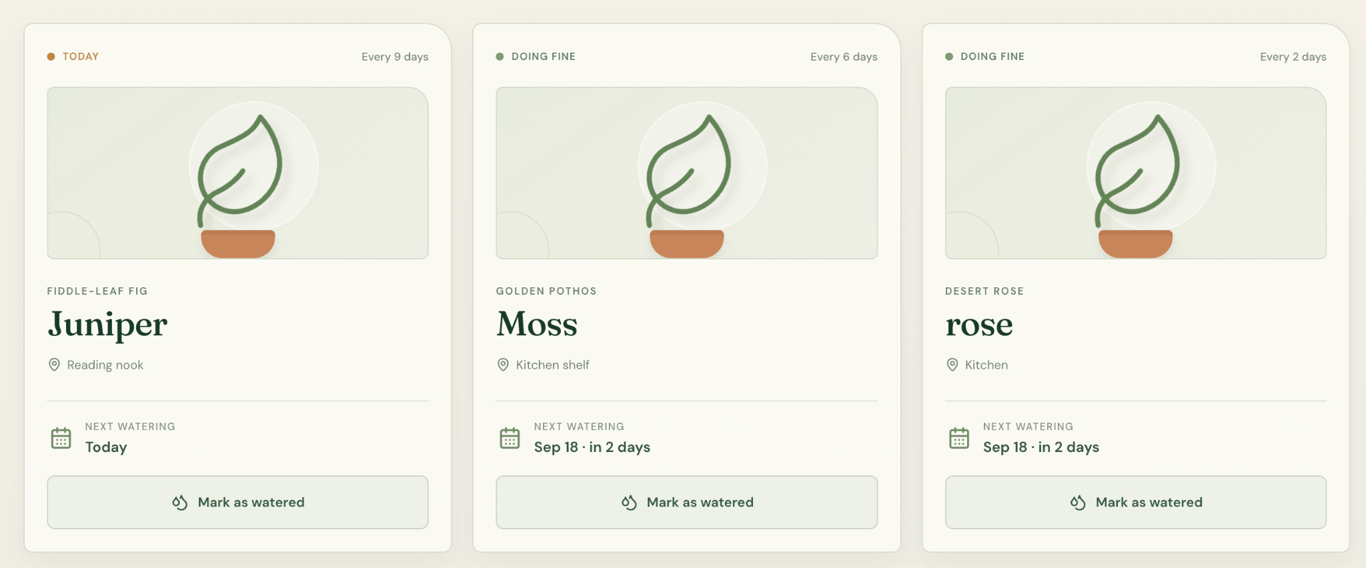
Visual edits ❌ – Netlify added the requested tinted backgrounds and adjusted the card presentation, but it didn’t address the main issue with the plant visuals.
The Fiddle-Leaf Fig, Golden Pothos, and Desert Rose still used the same generic illustration, so the cards weren’t more visually distinctive by plant type.
The change also took around 13 minutes to generate, making this the slowest visual refinement in my test.
Prompt 2: Functional refinement
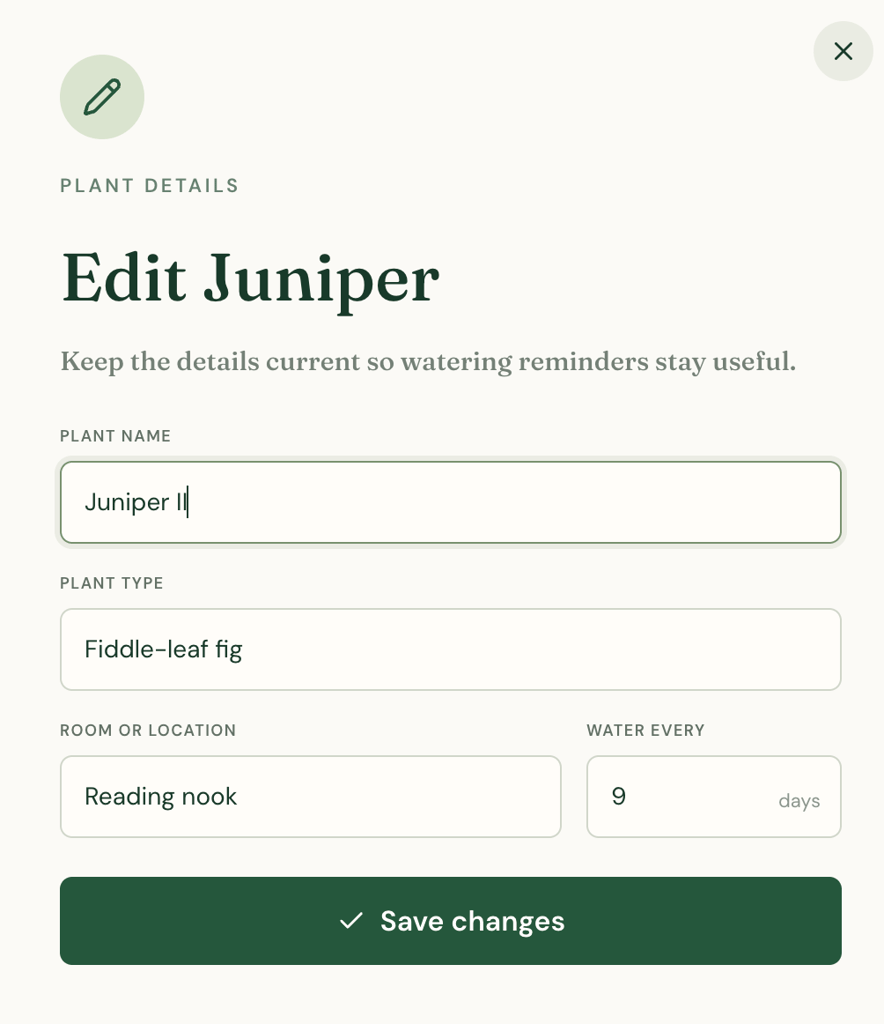
Editing existing data ✅ – Netlify added the requested Edit option, allowing me to update all four plant details. The alterations were saved correctly, and changing the watering frequency recalculated the next watering date as requested.
Prompt 3: New feature/logic refinement
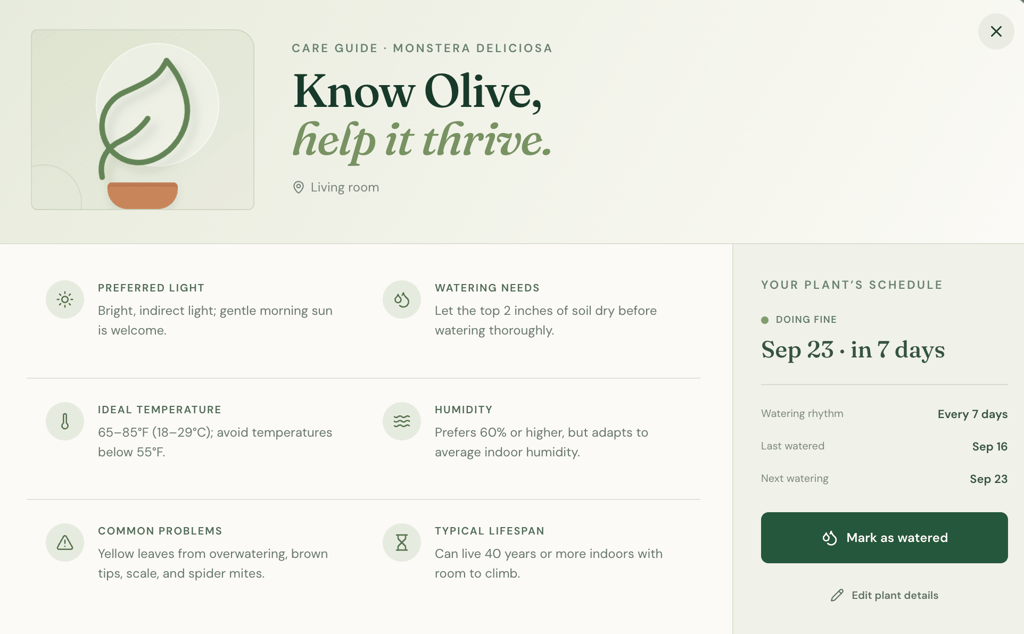
Adding a more complex feature ✅ – Netlify created a dedicated care guide view that includes all six requested categories while keeping the plant’s existing watering schedule and controls available.
The content also adapted to the plant type. Golden Pothos and Monstera, for example, received different guidance for watering, humidity, common problems, and lifespan.
This made the care guide feel plant-specific rather than like the same information had been reused across every plant.
Netlify publishing flow
Netlify generated a separate deploy preview where I could check the app before making it live.
Publishing required clicking Publish to production and confirming the deployment, after which the app became available at its existing netlify.app URL.
This kept the preview and production versions clearly separated and gave me a chance to review changes before pushing them live.
Post-publishing edits in Netlify
After publishing KeepMeAlive, I wanted to see whether Netlify could add a feature that records activity over time without affecting the data and functionality already in the live app. I asked it to create a watering history:
Add a watering history for each plant. Every time I mark a plant as watered, save the date and add it to that plant’s history. Show the watering history in the plant’s detailed view, with the most recent watering first. Also, show how many times the plant has been watered in total. Keep the existing watering schedule, care guide, plant data, and functionality unchanged.
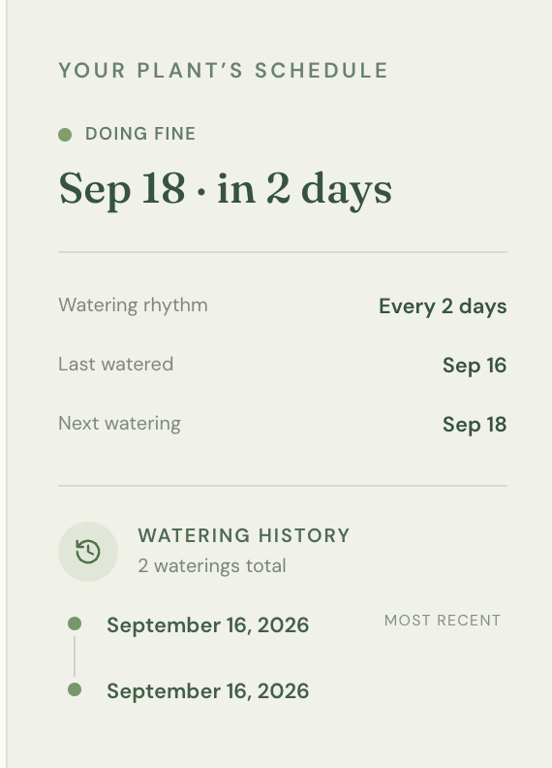
Post-publishing edit ✅ – Netlify added the watering history without disrupting the existing app. I watered the same plant twice, and both events appeared as separate entries, while the total increased to 2 waterings, showing that the history correctly accumulated previous records.
The change remained separate from the production app while I tested it. Once I was satisfied with the result, I could publish the update to the existing live deployment.
Netlify verdict
Here’s how the full Netlify experience translated into my ratings:
| Test area | Rating | What I found |
| First-draft design | 4/5 | Distinctive editorial-style interface with clear watering information, but generic repeated plant illustrations and some weaker generated copy |
| Prompt accuracy | 5/5 | Included the requested plant data, watering states, filters, calculations, and core interactions |
| Functionality | 5/5 | Adding, filtering, and watering plants worked correctly, with changes preserved after refresh |
| Ease of refinement | 3/5 | Functional editing worked, but the visual refinement took around 13 minutes and still failed to make the plant illustrations distinctive |
| Complex changes | 5/5 | The plant-specific care guide and persistent watering history both worked correctly without disrupting existing functionality |
| Publishing | 5/5 | Used deploy previews for testing before production, published to a netlify.app URL, and kept later changes separate until explicitly pushed live |
| Overall | 4/5 | Strong functionality, persistence, complex feature handling, and deployment, held back mainly by the slow and unsuccessful visual refinement |
What I liked:
- Most of the functional changes did what I asked on the first try, which made building the app feel straightforward.
- The first draft was a pleasant change from the more conventional AI-generated dashboards, with a look that gave the app some personality.
- As the app became more complex, Netlify gave me fewer reasons to second-guess whether a functional change would work as intended.
What I didn’t like:
- Visual refinement was the most frustrating part of using Netlify. The AI was much better at interpreting functional requirements than subjective design requests, a limitation that may make alternatives to Netlify more suitable for design-heavy projects.
- I couldn’t find a convenient way to preview the generated app on mobile, which made it harder to evaluate responsiveness with the same confidence as the other platforms.
6. v0 – best for quickly testing app ideas
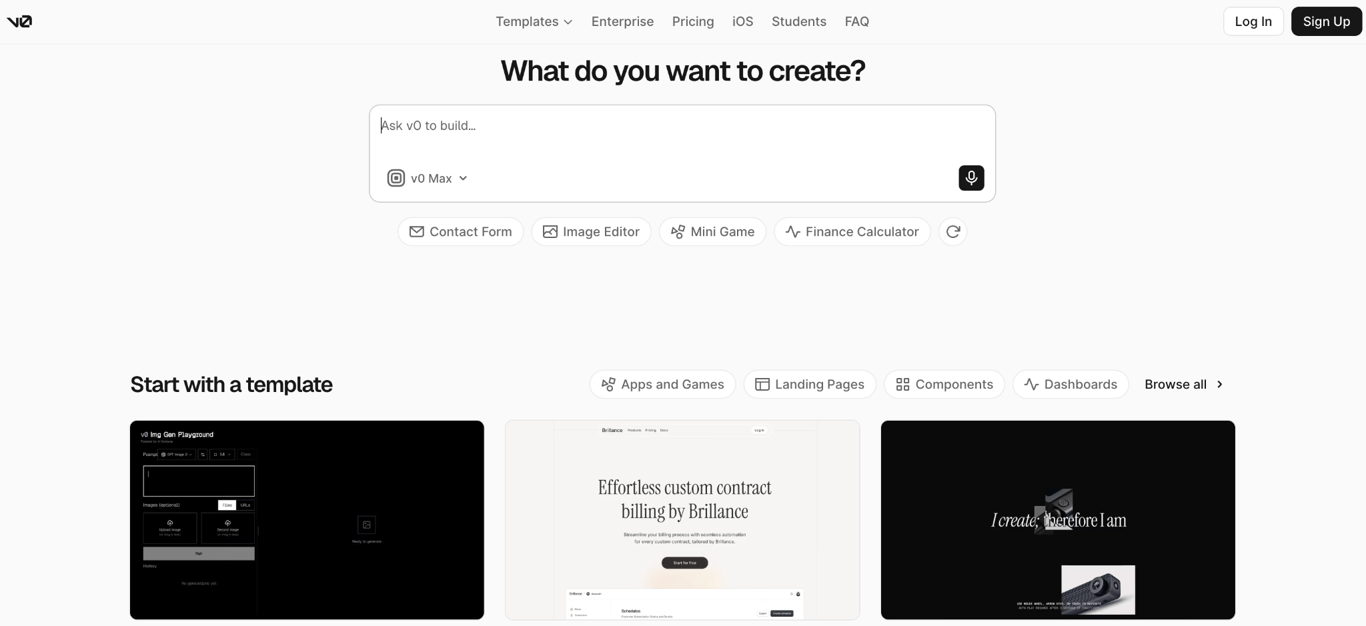
v0 is Vercel’s AI development platform for building web apps with AI while keeping access to the underlying code.
You can generate an app from a prompt, refine it through chat or visual editing, sync the project with GitHub, and deploy it directly to Vercel.
v0 has a free plan that includes $5 in monthly credits, Vercel deployment, Design Mode, and GitHub sync.
The paid Plus plan starts at $30/user/month and includes $30 in monthly credits, $2 in daily credits when you log in, access to all models, and the option to purchase additional credits.
v0: First draft
v0 produced a polished, fully populated dashboard with eight sample plants arranged in a three-column layout.
It also added summary counters showing the total number of plants, how many needed water, and how many were on track.
The watering information was particularly clear. v0 used Overdue, Water today, and On track, closely matching the three states in my prompt.
Each card also displayed the plant’s location, watering frequency, next watering date, and relative timing, such as 4 days overdue or Water in 6 days.
The first draft used a soft green palette, serif headings, rounded cards, and color-coded status labels.
The repeated card structure made the dashboard easy to scan, although the small generic plant icons gave individual plants little visual distinction.
Comparing v0 with Lovable, v0 presented more watering information directly on each card, while Lovable used a more visually varied layout.
The Add plant form included all four requested fields: plant name, plant type, location, and watering frequency. v0 also added a Last watered date field and used dropdowns for plant type and location.
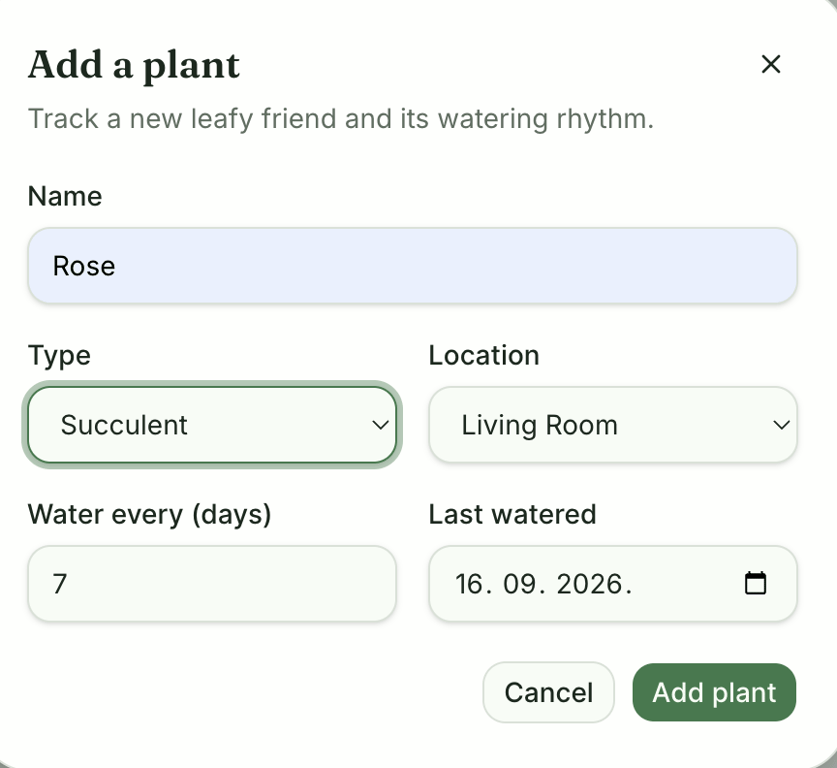
Next, I tested the generated functionality:
- Adding a plant ✅ – I added Rosie with a seven-day watering frequency, and she appeared on the dashboard correctly.
- Dashboard updates ✅ – Adding and watering plants updated the dashboard correctly during the active session.
- Filtering ✅ – The All plants, Overdue, Water today, and On track filters displayed the correct plants for each status.
- Marking a plant as watered ✅ – Clicking Water updated the plant’s status and next watering date according to its watering frequency, and repositioned its card based on the new watering priority.
- Saved changes ❌ – Refreshing the app removed newly added plants and reverted watering changes to the default sample data.
- Mobile responsiveness ✅ – The dashboard, filters, plant cards, Add plant form, and watering controls remained clear and usable on mobile.
v0’s first draft refinement
The initial dashboard was already clean and easy to use, so I focused the first change on making the repetitive plant cards more visually distinctive without changing the overall layout or watering functionality.
Prompt 1: Visual refinement
Make the plant cards more visually distinctive without changing the dashboard structure. Replace the small generic plant icons with larger botanical illustrations that reflect each plant type, and give the illustration area a subtle background treatment. Keep the existing colors, watering statuses, controls, plant data, layout, and functionality unchanged.
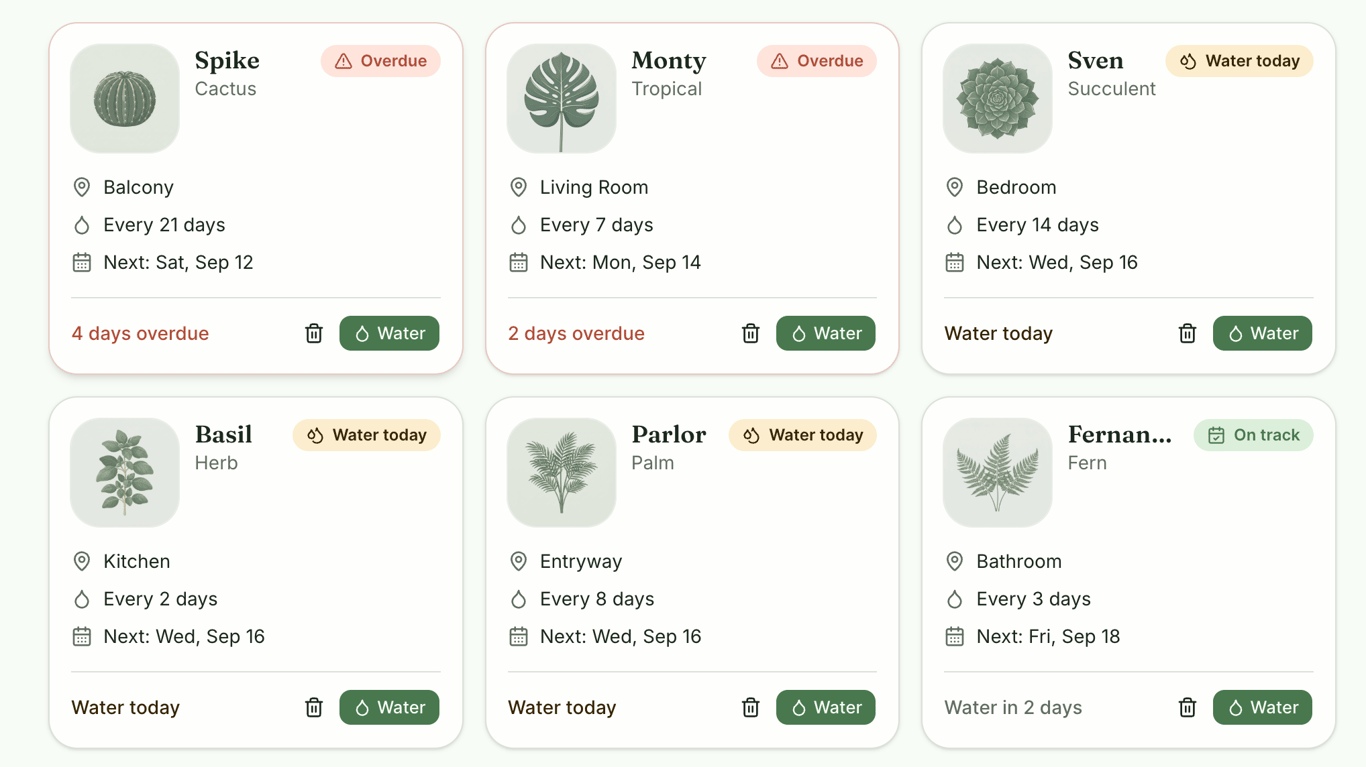
Visual edits ✅ – v0 replaced the small generic icons with larger botanical illustrations and added subtle background treatments behind them.
The illustrations varied by plant type, while the existing layout, watering information, controls, and functionality remained unchanged. The visual changes also persisted after refreshing the app.
Prompt 2: Functional refinement
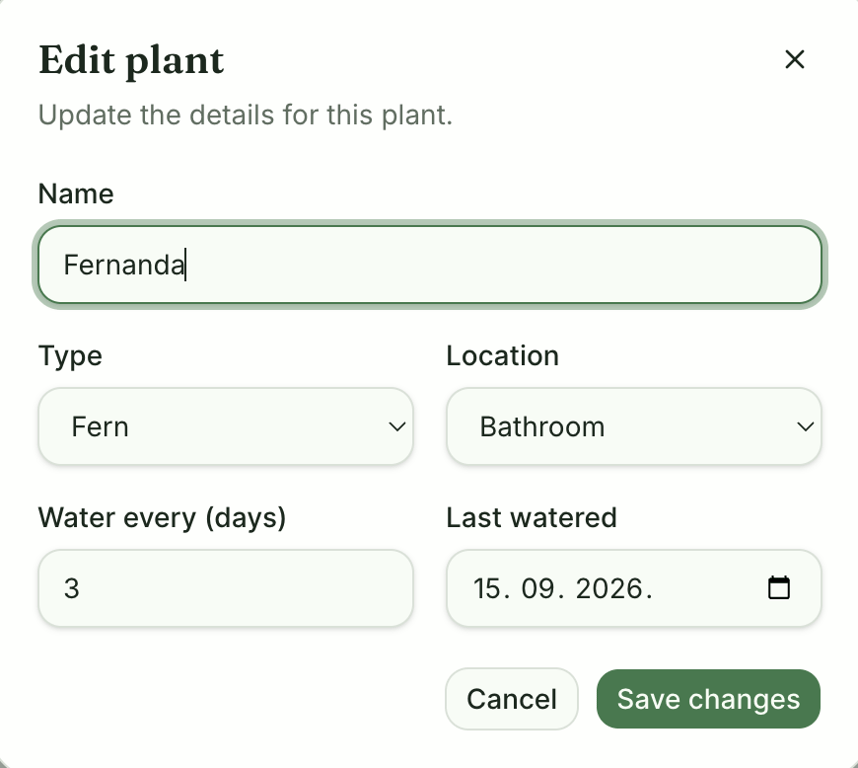
Editing existing data 🟡 – v0 added the requested Edit option and let me update all four plant details. Changing the watering frequency also recalculated the next watering date correctly.
However, the edited data only remained available during the active session. After refreshing the app, the changes reverted along with the other user-generated plant data.
Prompt 3: New feature/logic refinement
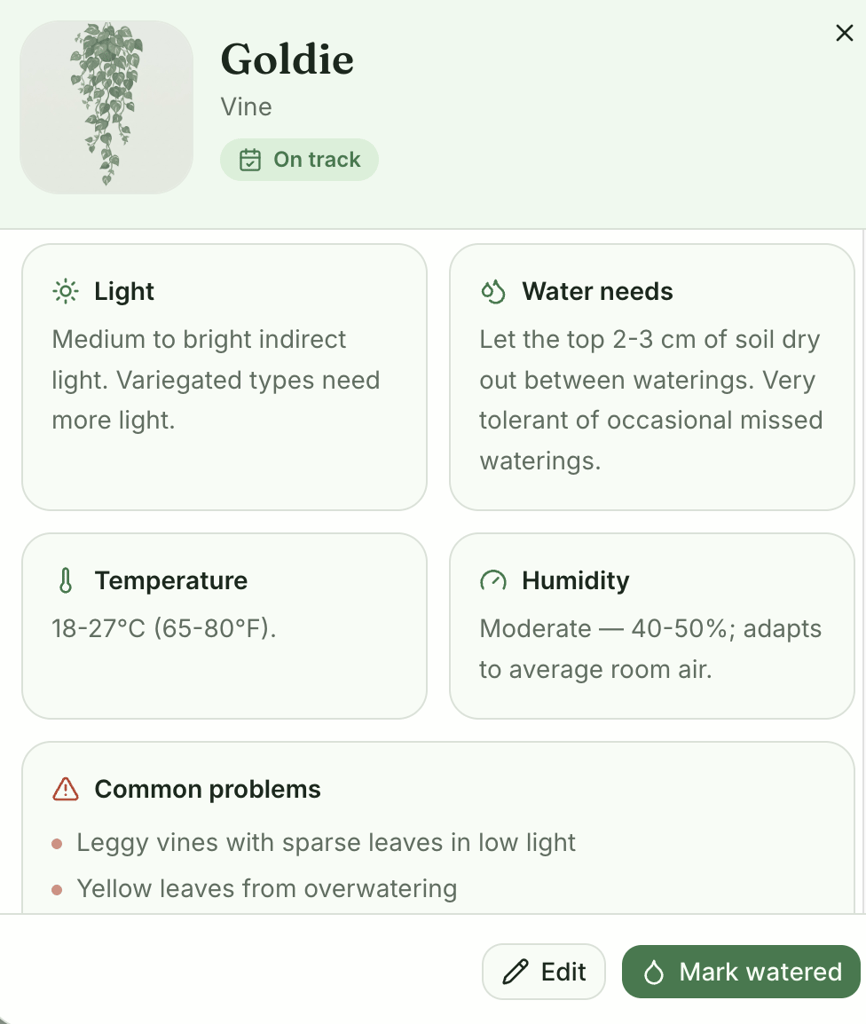
Adding a more complex feature ✅ – v0 added a detailed care view with all six requested categories while keeping the existing watering information and controls available.
The guidance also changed between plant types. The cactus received recommendations for direct sun, sparse watering, and low humidity, while the vine received guidance for indirect light, more frequent watering, moderate humidity, and warnings about issues such as leggy growth and yellow leaves.
The care guide itself persisted after refreshing the app.
v0 publishing flow
v0 published the app to a vercel.app address and let me choose who can access it before deployment.
I could also connect a custom domain, check how the published app was running on Vercel, and update the live version from the same screen.
However, publishing didn’t solve the app’s biggest problem. The live app still resets user changes after a refresh, so any plants I added or watered disappeared as soon as I reloaded the page.
Post-publishing edits in v0
After publishing KeepMeAlive, I tested a larger update by adding a second way to browse the existing plant collection. I asked v0 to organize plants by their location while keeping the original dashboard available:
Add a Room view alongside the existing dashboard. Group the existing plants by their location in the home, such as the Living Room, Bedroom, Kitchen, Bathroom, Balcony, and Office. Show each room as a separate section with the plants assigned to it, along with each plant’s watering status and next watering date. Let me switch between the existing dashboard and Room view without changing any plant data or functionality. Keep the current design style consistent.
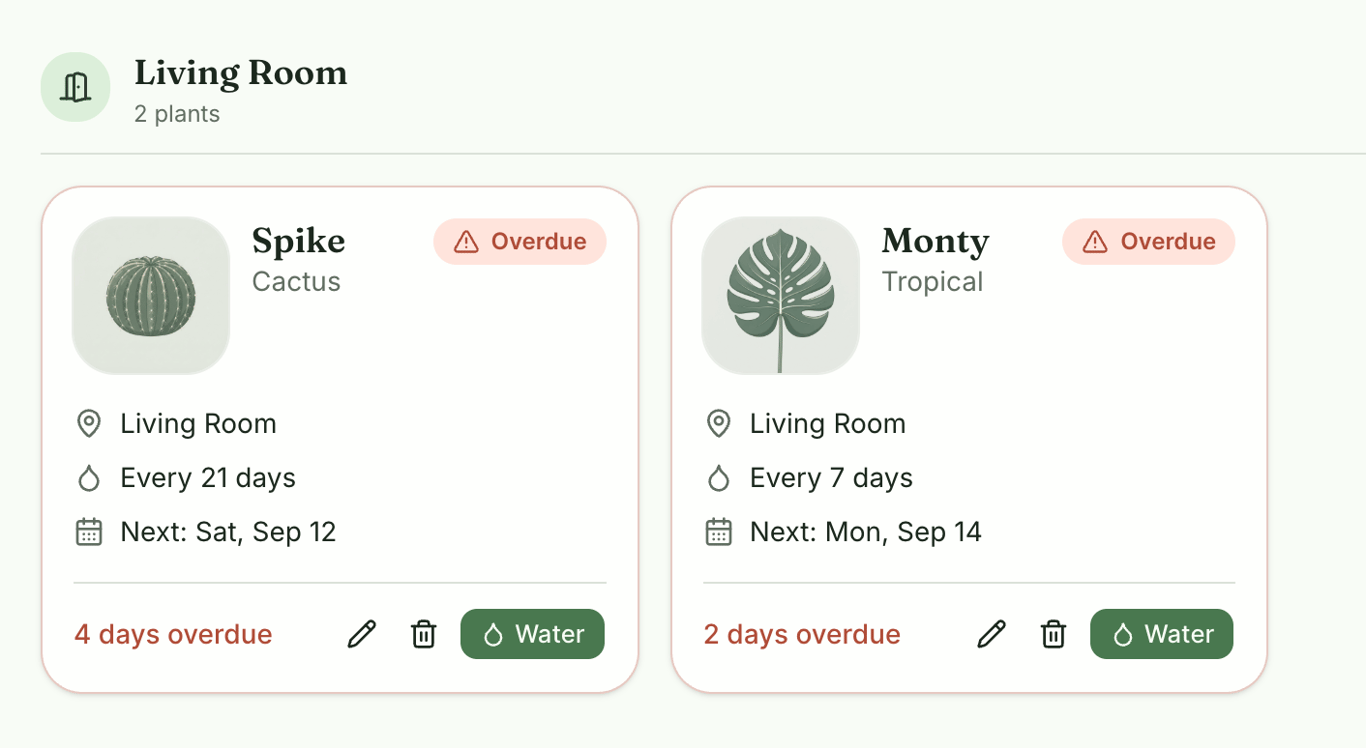
Post-publishing edit 🟡 – v0 added the Room view successfully, grouping plants by their saved locations while preserving their watering information and controls. The new view also matched the existing design.
The change stayed separate from the live app until I clicked Update, which pushed it to the existing vercel.app deployment. The Room view remained available after refreshing the live app.
However, the underlying data-persistence problem remained. Watering, editing, and other user changes still reverted after a refresh, even though the new Room view itself persisted.
v0 verdict
The difference between persistent app changes and temporary user data is reflected in my ratings:
| Test area | Rating | What I found |
| First-draft design | 4/5 | Clean, responsive, and easy to scan, although the initial plant visuals were fairly generic |
| Prompt accuracy | 5/5 | Closely followed the requested dashboard structure, watering states, filters, and core interactions |
| Functionality | 2/5 | Core interactions worked during the session, but user-generated data reset after refresh, a key limitation to consider when comparing v0 with alternative platforms |
| Ease of refinement | 5/5 | Visual and functional changes worked cleanly and persisted after refreshing |
| Complex changes | 5/5 | Added plant-specific care guides and the post-publish Room view while preserving the existing interface and controls |
| Publishing | 4/5 | Published directly to Vercel and supported updating the existing deployment, but publishing didn’t stop changes from disappearing after a refresh |
| Overall | 3/5 | Strong for generating and iterating on an interactive prototype, but the lack of persistent user data limited its usefulness as a working tracker |
What I liked:
- The first draft made watering schedules particularly easy to understand, with clear statuses, dates, and relative timing.
- Refining the generated app was smooth. I didn’t encounter errors when changing the design or adding functionality.
- I could test changes before updating the existing Vercel deployment.
What I didn’t like:
- User-generated data disappeared after every refresh, which significantly limited what I could do with the finished app.
- The initial plant cards looked repetitive because of their small, generic illustrations.
- Deleting a plant happened immediately without a confirmation step.
7. Bubble – N/A
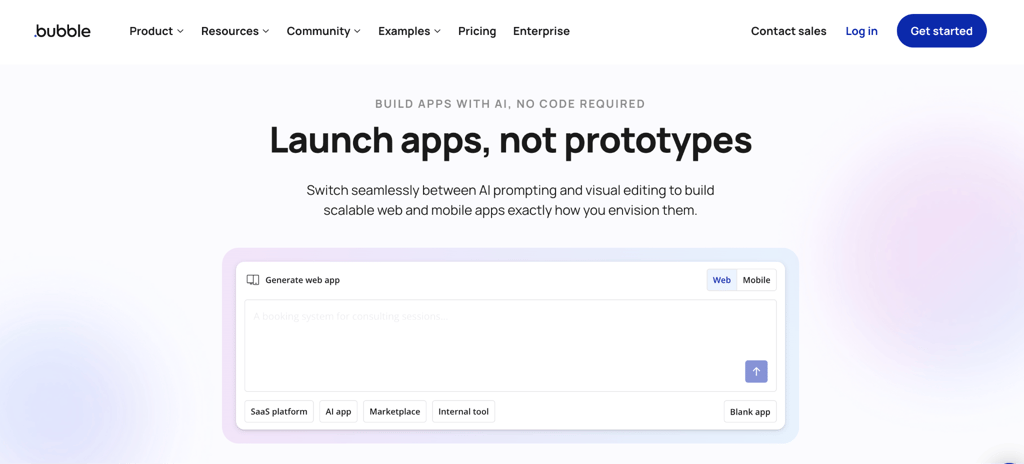
Bubble is a no-code development platform that combines AI app generation with a visual editor.
It has a free plan for building and testing apps, while publishing a live app requires a paid plan.
The Starter plan begins at $59/month when billed annually and includes 175,000 monthly workload units, recurring workflows, basic version control, and a custom domain.
Bubble: First draft
Bubble was the first platform in my test to reject the full prompt. Its initial prompt field was limited to 500 characters, whereas my standardized KeepMeAlive prompt exceeded 1,000 characters. To continue the test, I condensed the prompt.
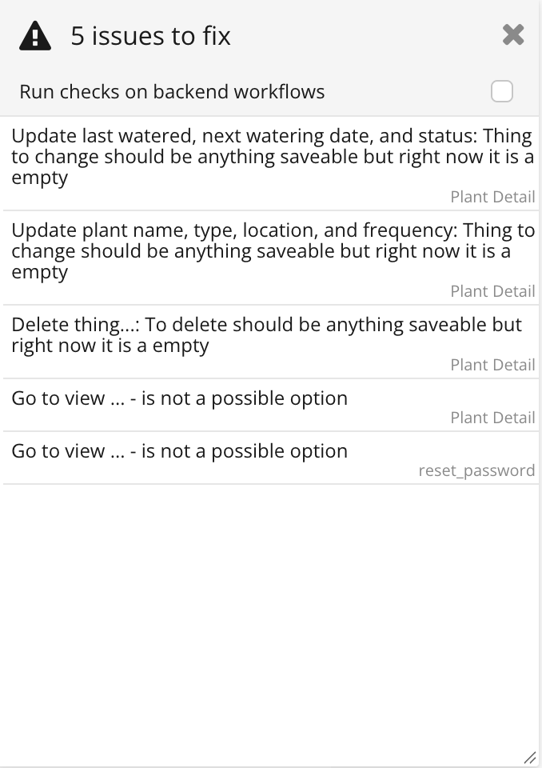
First-draft result ❌ – Bubble didn’t produce a usable KeepMeAlive app from the condensed prompt.
The generated preview was blank, and Bubble reported 5 workflow and navigation issues in the editor. These included incomplete actions to change and delete data, as well as invalid navigation between views.
Bubble offered to fix the detected issues using its AI; however, it addressed them one at a time, requiring me to review and apply each fix separately. More importantly, the number of reported issues increased from 5 to 22 during the process.
At this point, I’d look at Bubble alternatives rather than continue manually repairing the generated project.
Which Lovable alternative should you choose?
For most users looking for a Lovable alternative, I’d start with Hostinger AI Builder. In my test, it came closest to Lovable’s overall reliability while producing a more distinctive first draft.
The core app worked without corrective prompting, data persisted, and later refinements and publishing remained straightforward.
For other priorities, consider one of these best AI coding tools:
- Base44 → trackers and organizers. It was particularly reliable with structured, persistent data, making it a good fit for apps where users regularly add and update information.
- Replit → more complex apps. Its full development environment gives you more control over the project as its functionality grows. It also successfully handled the more complex drag-and-drop watering planner in my test, although larger changes required more hands-on troubleshooting.
- Bolt.new → feature-rich apps. Bolt was particularly good at extending the app with different types of functionality while keeping existing features working. It handled everything from editing plant details and generating care guides to adding the larger Plant Sitter workflow after publishing, making it a strong fit for apps that need to grow beyond their initial feature set.
- v0 → quick prototyping.v0 produced a polished, interactive first draft quickly and handled subsequent feature changes well, making it useful for turning an idea into a working prototype. However, user data disappeared after refresh, limiting its suitability for apps that need persistent data.
- Netlify → interactive web tools. Netlify reliably handled features that responded to user actions, including filtering plants, updating watering schedules, and maintaining a watering history. This makes it well-suited to web tools built around ongoing user interaction rather than static content.
This article is a localized version of 7 Lovable alternatives compared through a real-world app build, originally published in English.

Ksenija is a digital marketing enthusiast with extensive expertise in content creation and website optimization. Specializing in WordPress, she enjoys writing about the platform’s nuances, from design to functionality, and sharing her insights with others. When she’s not perfecting her trade, you’ll find her on the local basketball court or at home enjoying a crime story. Follow her on LinkedIn.