Squarespace vs WordPress: Which one is better to build a website?
Oct 14, 2026
/
By Larassatti D.
/
7 min Read
Squarespace is an all-in-one website builder that handles hosting and maintenance for you, whereas WordPress is a self-hosted content management system (CMS) that grants you full ownership and limitless customization options.
Think of Squarespace like renting an apartment – everything’s maintained for you, but you can’t change the floor plan – while WordPress is like owning a house, where you control everything but also fix everything.
Squarespace is better for:
- Beginners who want a beautiful website up and running in a few hours.
- Creatives, photographers, and restaurants needing visual-heavy portfolios.
- Small business owners who don’t want to manage updates or security.
WordPress is better for:
- Business owners who plan to scale their website with complex features.
- Bloggers and publishers who need advanced SEO capabilities.
- Developers and agencies requiring full control over the code and server.
Squarespace overview
Squarespace is a software-as-a-service (SaaS) platform that bundles your website builder, hosting, security, and domain into a single monthly subscription. It’s famous for its award-winning, mobile-responsive templates that look professional with minimal effort.
As Squarespace is a closed-source software, the company manages all the technical aspects for you, ensuring your site is always online and updated without requiring any manual intervention.
However, this convenience comes with limitations. Squarespace simplifies the process of creating a website by removing technical barriers, but it also places a ceiling on how much you can customize. You can only use the tools and integrations it provides or approves.
Squarespace use cases
Squarespace’s features work best for these website types:
- Portfolio websites. Squarespace is ideal for photographers, designers, artists, and creatives who need visually polished layouts made without custom code.
- Small to medium business websites. Squarespace is great for service-based businesses that need a simple, professional online presence with built-in tools.
- Personal websites and blogs. The platform is suitable for beginners who want an easy solution for personal branding, writing, or sharing content.
- Simple ecommerce stores. Squarespace works well for merchants with small product catalogs who want a straightforward, all-in-one setup.
- Event or booking sites. Squarespace is useful for weddings, events, consultants, or salons that need built-in scheduling and appointment tools.
WordPress overview
Known for its flexibility, WordPress is an open-source content management system (CMS) that powers over 40% of all websites. Unlike Squarespace, WordPress is free to download, but you’ll need to purchase your own hosting and domain name to run it.
WordPress’ self-hosted setup gives you full ownership of your data, files, and server environment, meaning you can move your site to any hosting provider whenever you like.
Moreover, WordPress has a massive community and ecosystem. With thousands of free and premium plugins and themes, you can build any type of website, from a simple blog to a complex membership platform, online store, or even a social network.
Although WordPress has a steeper learning curve and requires hands-on management for maintenance, its flexibility and control far exceed what Squarespace offers.
➡️ Find out how WordPress.org differs from WordPress.com.
WordPress use cases
Here are just some of the website types you can build with WordPress:
- Blogs and content-heavy sites. WordPress is perfect for publishers, personal bloggers, and media websites that need robust blogging tools and content organization.
- Business websites. This CMS is suitable for companies of any size that want a scalable, fully customizable online presence.
- Ecommerce stores. WordPress is ideal for building everything from small shops to large online stores using WordPress ecommerce plugins like WooCommerce.
- Membership and community sites. WordPress is great for creating online communities, courses, or subscription-based platforms with dedicated plugins.
- Custom or complex projects. The platform is best suited for websites that require advanced features, integrations, or full control over design and functionality.
Squarespace vs WordPress comparison table
See the table below for a clearer comparison between Squarespace and WordPress.
| Feature | Squarespace | WordPress |
| Setup | Drag-and-drop builder with guided setup | Requires hosting, theme/plugin configuration |
| Customization | Built-in tools and approved extensions only | Unlimited: 60,000+ free plugins, full code access |
| Ecommerce | Up to 10,000 products, 3 payment processors (Stripe, PayPal, Square) | WooCommerce: unlimited products, 78+ official payment gateway extensions |
| SEO | Basic tools (meta tags, sitemaps, 301 redirects) | Advanced plugins (Yoast, Rank Math, schema markup) |
| Maintenance | Automatic updates, security, and backups included | You handle plugin updates, security patches, and backups |
| Performance | Optimized cloud hosting with built-in CDN | Depends on hosting provider ($3-500+/month) |
| Scalability | Works well for small to medium sites | Scales from personal blogs to enterprise sites |
| Performance | Well-optimized cloud hosting environment | Depends on your chosen hosting provider, and it can be boosted with proper optimization |
| Support | Email and live chat support | Community forums, no official support |
| Control | Platform-locked, limited database access | Full ownership – export and move anywhere |
What are the advantages of Squarespace over WordPress
Here are some features that make Squarespace a better choice over WordPress:
- Ease of use and simplicity. Squarespace lets you build a website with AI, and the drag-and-drop editor is quick to master. The Squarespace interface is also highly intuitive, making it a beginner-friendly platform.
- Design options. Squarespace provides ready-to-tweak templates that look modern and professional.
- All-in-one convenience. All of the essentials required to build a Squarespace site are provided, including premium themes, built-in blogging tools, online selling, marketing, and SEO.
- External services. The platform offers third-party extensions, referred to as Squarespace apps, to help you grow your online presence and business.
- Cost predictability. The fixed monthly or yearly pricing plans make it easier to estimate the ongoing costs of using the platform.
- Direct customer support. Squarespace offers multiple channels for customer support, including live chat, email, a knowledge base, video tutorials, and a community forum.
What are the disadvantages of Squarespace over WordPress
On the other hand, compared to WordPress, Squarespace comes with some drawbacks:
- Limited customization. The primary downside of Squarespace is that you are renting your website’s infrastructure. For instance, you can’t upload custom software or modify the core code, which blocks you from adding complex functionality.
- Higher long-term costs. Squarespace does not offer a free tier, and its commerce plans can be expensive. Some lower-tier plans even charge an additional 3% transaction fee on sales.
- Data portability issues. Moving a site away from Squarespace is more complicated, as you can’t simply export your entire database and design to another server.
- Navigation limits. The platform doesn’t handle deep menu hierarchies well, making it unsuitable for large sites with complex features.
What are the advantages of WordPress over Squarespace
Choose WordPress over Squarespace if you’re looking for:
- Unrestricted freedom. WordPress offers unparalleled flexibility, allowing you to build exactly the site you want without arbitrary limits on features or design.
- Versatile interface. The admin panel, page editor, and theme customizer are intuitive for both average users and experienced developers.
- Advanced customization. With thousands of plugins and themes available, WordPress provides virtually limitless options for tailoring your website.
- Cost-effective setup. As open-source software, WordPress is free to download. Pair it with budget-friendly hosting and domain services to keep overall costs low.
- Scalable infrastructure. Compared to Squarespace, self-hosted WordPress scales more effectively. You can choose hosting that suits your current traffic and upgrade resources as your site grows.
- Large user community. An extensive collection of tutorials, forums, and resources makes it easy to find help when managing your site.
What are the disadvantages of WordPress over Squarespace
Choosing WordPress over Squarespace comes with certain trade-offs:
- Higher responsibility. With WordPress, you act as the site administrator, which demands time, upkeep, and technical awareness.
- Steeper learning curve. WordPress is more complex for beginners, while Squarespace is more intuitive and beginner-friendly.
- Add-on dependence. WordPress’s built-in features are limited to basic sites, so you’ll need plugins for ecommerce, memberships, and other advanced functionality.
- Limited direct support. WordPress doesn’t offer official customer support channels; help primarily comes from community forums, documentation, or premium plugins and themes that you use.
Which one has better performance: Squarespace or WordPress?
🏆 WordPress
WordPress offers better performance potential by allowing you to utilize advanced caching technologies and select the hosting infrastructure of your choice.
While Squarespace offers decent, consistent speeds, you have no control over the server environment. If your site loads slowly, there’s very little you can do to improve its performance.
With WordPress, you can choose a managed hosting provider that implements the best server optimization for WordPress (like Hostinger with LiteSpeed). Additionally, you have complete control to implement the best practices for speeding up WordPress, including minifying code and serving next-gen image formats.

Which platform is more scalable: Squarespace or WordPress?
🏆 WordPress
Squarespace’s infrastructure is ideal for small to medium-sized websites, while WordPress is scalable to an enterprise level.
Squarespace enforces hard limits on navigation depth and can struggle with performance if you upload thousands of products or blog posts.
Meanwhile, WordPress lets you optimize your database, use content delivery networks (CDNs) of your choice, and create custom post types to manage vast libraries of content.
This makes WordPress a viable choice for businesses intending to grow into prominent media publications or major ecommerce retailers.
➡️ Explore our list of WordPress website examples to give you a better idea of the diverse website types that can be built with the CMS.
Which one is easier to use: Squarespace or WordPress?
🏆 Squarespace
Squarespace is easier to use, as it provides a simpler “what you see is what you get” (WYSIWYG) visual site editor. It also allows you to build a website with AI by simply answering multiple designated questions about the purpose of your site’s creation.
Tweaking your site elements is as simple as clicking on any text or image on the screen and editing it directly. The interface is intuitive, and the options are simplified to prevent users from breaking the site design.
To mimic this experience, WordPress has adopted a block editor (Gutenberg), but the dashboard is still cluttered with technical settings for plugins, tools, and permalinks that create a learning curve.
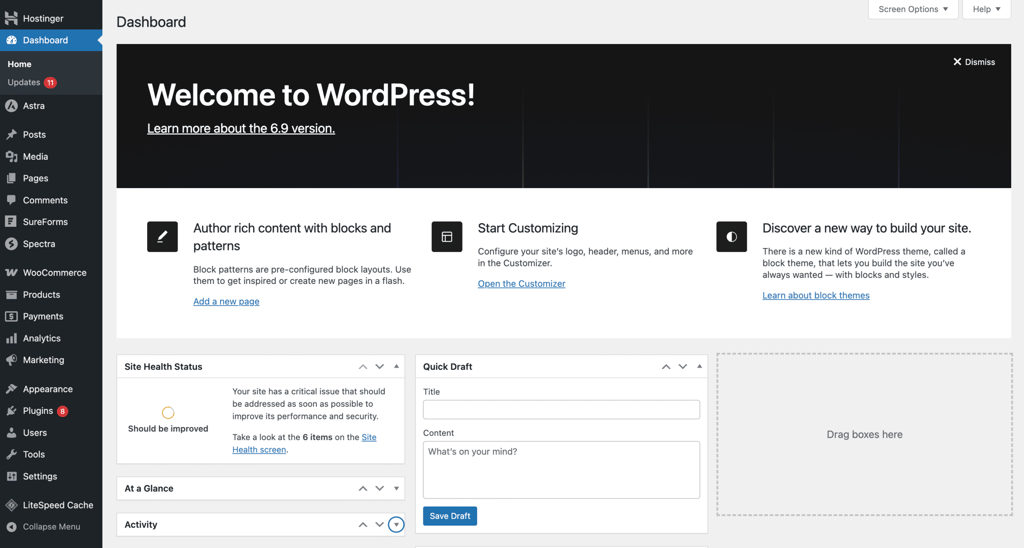
Note that, depending on your hosting provider, additional features may be available to help you create and maintain your website more easily. For example, Hostinger has an AI Website Builder for WordPress, which is similar to Squarespace’s AI feature. You can simply write a prompt and get your site ready to edit.
What are the alternatives to Squarespace and WordPress?
If neither WordPress nor Squarespace aligns with your goals, there are other CMS platforms and website builders that range from beginner-friendly builders to advanced systems designed for large-scale websites, including:
- Hostinger AI Builder. An excellent choice for users who want the simplicity of Squarespace at a lower price. The built-in AI tools are helpful to create content, layouts, and even entire website structures automatically, making it one of the fastest ways to launch a site.
- Drupal. Best suited for enterprise-level websites that require high security, structured data handling, and heavy customization. It has a steeper learning curve than WordPress and is commonly used by governments, universities, and large organizations needing granular control.
- Joomla. A robust open-source CMS that sits between WordPress and Drupal in complexity. It offers strong built-in multilingual features, flexible user management, and powerful content organization. While its community is smaller than WordPress, it provides more advanced features out of the box.
- Ghost. A modern, open-source platform built specifically for publishers and content creators. It’s excellent for blogs, newsletters, and paid content, but it’s not as versatile as WordPress for ecommerce or complex sites.
- Magento (Adobe Commerce). A highly advanced ecommerce platform built for large, scalable online stores. Magento offers unparalleled flexibility for custom product types, complex catalogs, multi-store setups, and integrations.
When to use Squarespace vs WordPress?
Pick Squarespace if you want an all-in-one, beginner-friendly website builder, and choose WordPress if you want complete control, flexibility, and room to grow.
You may prefer Squarespace to WordPress if you want to make a website quickly and easily. Each Squarespace template is professionally designed, and the platform includes all the essential features needed to launch a fully functional website right out of the box.
However, accessing more advanced tools may require upgrading to a higher-tier plan. And because Squarespace offers limited extensions, minimal ecommerce customization, and no control over the hosting environment, scaling your site in the long run can be challenging.
In comparison, WordPress offers far more flexibility in both functionality and design. Its built-in features are more basic, but the real strength comes from its large plugin ecosystem, which lets you expand, customize, and scale your website however you want.
The trade-off is the steeper learning curve. While you don’t need coding knowledge to get started, some technical familiarity can be helpful, and you can gradually learn as you build.
If you’re still unsure which one to choose between these platforms, check out other WordPress alternatives. You can also find a Squarespace alternative if you prefer to use a website builder rather than a CMS.
This article is a localized version of Squarespace vs WordPress: Which one is better to build a website?, originally published in English.

Larassatti Dharma is a content writer with 5+ years of experience in the web hosting industry. She has populated the internet with over 100 YouTube scripts and articles around web hosting, digital marketing, and email marketing. When she's not writing, Laras enjoys solo traveling around the globe or trying new recipes in her kitchen. Follow her on LinkedIn