Ecommerce launch checklist for a successful online store
Mar 10, 2026
/
Simon L.
/
12 min Read
An ecommerce launch checklist includes the strategic, technical, and operational tasks required to build a functional online business from scratch.
Launching a store is exciting, but it requires careful preparation to ensure you don’t run into avoidable issues later. If you rush the process, you might face broken links, payment failures, or confusing navigation that drives customers away.
Following a structured checklist helps you minimize these risks. It ensures your store is ready to accept payments, ship products, and impress visitors from day one.
A successful launch requires a combination of technical setup, product readiness, marketing planning, and logistics. When these elements work together, you build a foundation for a business that can actually grow.
Here is the essential checklist to guide your launch:
- Identify your ideal customers and market position. Understanding who you’re selling to shapes every decision you’ll make, from product selection to how you communicate your brand’s value.
- Choose an ecommerce platform that fits your needs. The right platform grows with your business and makes management easier, not harder.
- Secure your domain name and hosting service. Your online address and the infrastructure behind it need to reflect your brand and support your traffic.
- Build compelling product pages. Well-organized, detailed listings with quality visuals help customers understand what they’re buying and why they should buy it from you.
- Craft a website that converts visitors into customers. A beautiful, fast, and intuitive site keeps people engaged instead of bouncing to your competitors.
- Integrate trusted payment processing systems. Offering secure, convenient payment options builds trust and reduces cart abandonment.
- Establish shipping methods and tax calculations. Transparent, fair shipping and tax settings prevent surprise costs that drive customers away at checkout.
- Develop your marketing and search optimization plan. Getting found online and attracting your target audience requires strategic planning before launch day.
- Conduct comprehensive website and checkout testing. Catching bugs and friction points before customers do saves your reputation and your sales.
- Set up customer support and growth strategies. Launching is just the beginning. Having systems in place to help customers and scale your business ensures long-term success.
1. Define your target audience and niche
Your target audience is the specific group of people most likely to buy from you. Your niche is the particular market segment you’ll focus on serving better than anyone else.
When you clearly define your target audience, everything becomes easier. Your product selection makes sense. Your branding resonates. Your marketing messages hit home.
You’re not shouting at a broad crowd – you’re having a conversation with people who actually care about what you’re offering.
Start by researching your potential customers deeply. What problems do they face? What solutions are they already looking for? What age range, income level, and lifestyle do they have?
Tools like Google Trends, social media audience insights, and competitor analysis can give you valuable data. Look at what your competitors are doing and read their customer reviews to find gaps in the market. Those gaps are your opportunities.
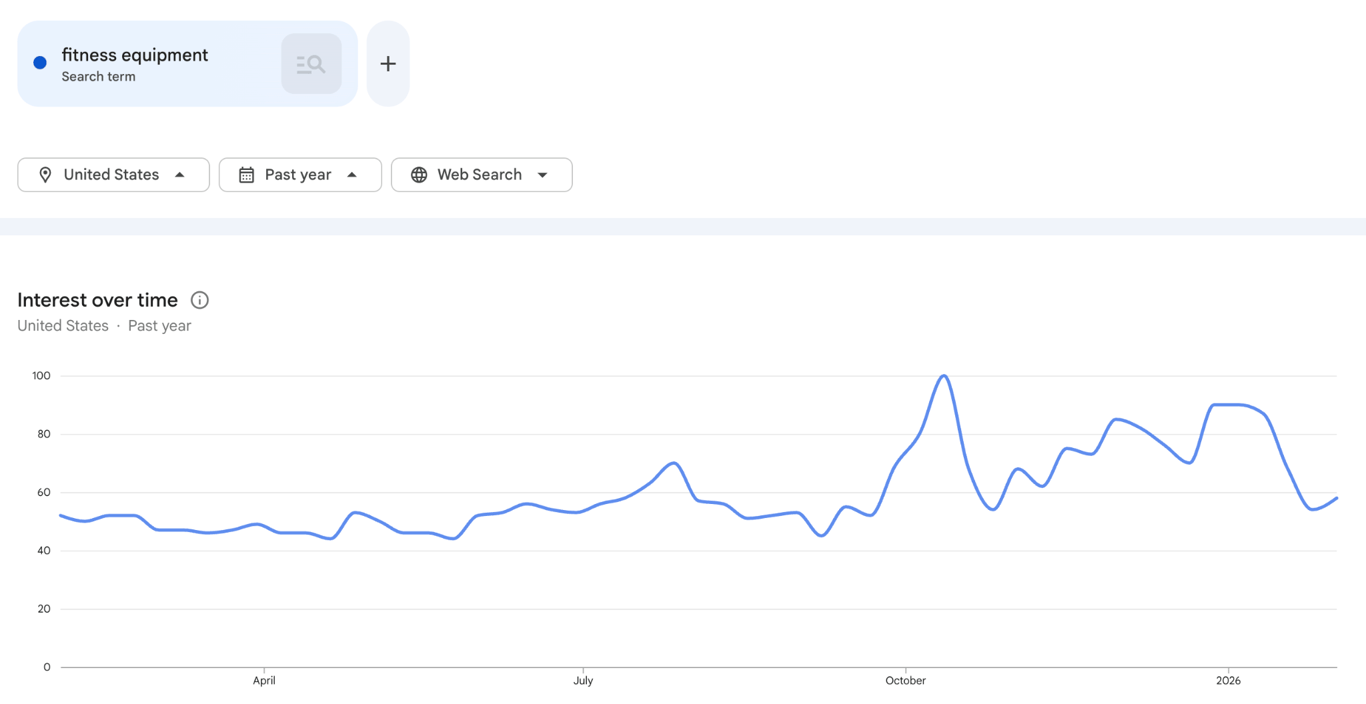
Let’s say you’re selling fitness equipment, but your audience includes busy parents looking for quick home workouts, young professionals wanting to build muscle, and seniors focused on mobility.
Each segment needs different messaging, even if they’re buying similar products. The more specific you can get about who you’re serving and what makes your approach unique, the stronger your foundation for everything that follows.
Once you know who you are selling to, you can start to make an ecommerce website that speaks directly to their needs.
2. Select the right ecommerce platform
An ecommerce platform is the software that powers your online store, handling everything from displaying products and processing payments to managing inventory and tracking orders.
Your ideal platform depends on three main factors: your business size, your budget, and your technical skills.
If you choose a platform that is too complex, you might spend more time managing code than selling products. If it is too simple, you might outgrow it in six months.
When evaluating platforms, consider hosting options, scalability, and integrations. Can the platform handle growth if you suddenly get a spike in traffic or expand your product line?
Does it integrate smoothly with the tools you need, such as email marketing software, accounting programs, and inventory management systems? Will you own your data, or are you locked into a specific ecosystem?
For those with a small product catalog and no desire to get into all the technical details, Hostinger Website Builder is ideal. It offers built-in ecommerce features and requires minimal setup, so you don’t have to worry about technical details.

If you’re more tech-savvy or planning to scale quickly, prioritize flexibility and customization options, even if there’s a steeper learning curve.
To give you an idea of what’s out there: Shopify is your all-in-one solution, though you’ll pay higher monthly fees for that convenience. WooCommerce gives you tons of flexibility if you’re comfortable with WordPress, but you’ll need to handle more of the technical setup yourself.
And Hostinger Website Builder? It sits in that sweet spot between the two, where it’s easy enough to get running fast, but with solid ecommerce features when you need them.
Check out this comparison of the best ecommerce platforms to see detailed breakdowns of what each option offers and which might be the best fit for your specific needs.
3. Register a domain name and set up hosting
A domain name is your store’s unique address on the internet that customers type or click to find you. Hosting is the service that stores your website’s files and makes them accessible online 24/7.
Together, they form the essential infrastructure that makes your online store exist and accessible to the world.
When you look at how to register a domain, ensure the name aligns with your branding, is easy to remember, and works well for SEO. Ideally, it matches your business name and is short enough that people can type it without mistakes.
Avoid numbers, hyphens, or unusual spellings that confuse people. If your ideal domain is taken, get creative with different extensions, such as .shop, .store, .online, or slight variations, but make sure it still feels like your brand.
From an SEO perspective, having relevant keywords in your domain can help, but don’t sacrifice memorability for keyword stuffing. A domain like BestOrganicCoffeeBeansOnline.com might seem SEO-friendly, but RetroRoastery.coffee is more memorable and brandable. The right balance matters.
Domain Name Checker
Instantly check domain name availability.
When it comes to ecommerce hosting, you need more than the most basic option. Your store will handle customer data, process payments, and need to load quickly even during traffic spikes. Choosing a web hosting provider means looking for adequate bandwidth, strong security features, and reliable uptime.
Make sure your hosting provider offers SSL certificates (essential for secure transactions), automatic backups, and scalable resources as your store grows.

4. Create and organize product listings
Product listings are the individual pages or sections on your website where you showcase each item you’re selling, complete with descriptions, images, pricing, and purchase options.
Write compelling descriptions
You need to know how to write product descriptions that tell a story and highlight benefits, rather than just listing features. Instead of saying “100% cotton t-shirt,” explain how it fits, feels, and looks.
Help customers visualize themselves using the product by answering the questions they would ask in person: What are the dimensions? How do you care for it? Is it suitable for their specific needs?

Use high-quality images
Since people can’t touch or try on products online, your product pages need high-quality photos. Show multiple angles, include zoom functionality, and use lifestyle shots to demonstrate the product in use. Blurry or poorly lit images look unprofessional and kill trust instantly.
Organize for easy navigation
Organization is just as important as the listings themselves. Use clear categories and tags so customers can easily find what they need. If someone lands on your site looking for “women’s running shoes,” they shouldn’t have to wade through hiking boots.
Set strategic prices
You also need to determine how to price your product effectively from the start. Research competitor rates, understand your costs and margins, and decide if you are competing on value or cost.
Ask yourself: Can you operate efficiently enough to offer the lowest prices and drive high volume? Or can you offer superior quality, service, or unique features that justify premium pricing to customers willing to pay more?
Manage inventory from day one
Finally, set up your inventory management system immediately. Nothing damages your reputation faster than selling items you don’t actually have in stock. Track quantities, set up low-stock alerts, and automate reordering to keep your operations running smoothly.
5. Design an attractive and user-friendly website
Your website is your storefront, salesperson, and brand ambassador all rolled into one. A well-designed ecommerce site looks good and guides visitors effortlessly toward making a purchase.
The role of UX (user experience) and UI (user interface) design can’t be overstated here. Good UX means the site feels natural and effortless to use. Good UI means visual elements guide the eye and encourage action.
Together, they reduce bounce rates and boost conversions by making the buying process as smooth as possible.
This starts with having a responsive site. More than half of online shopping happens on mobile devices, so if your site doesn’t work perfectly on phones and tablets, you’re losing sales.
Test your design on multiple screen sizes to ensure images scale properly, text remains readable, and buttons are easy to tap.
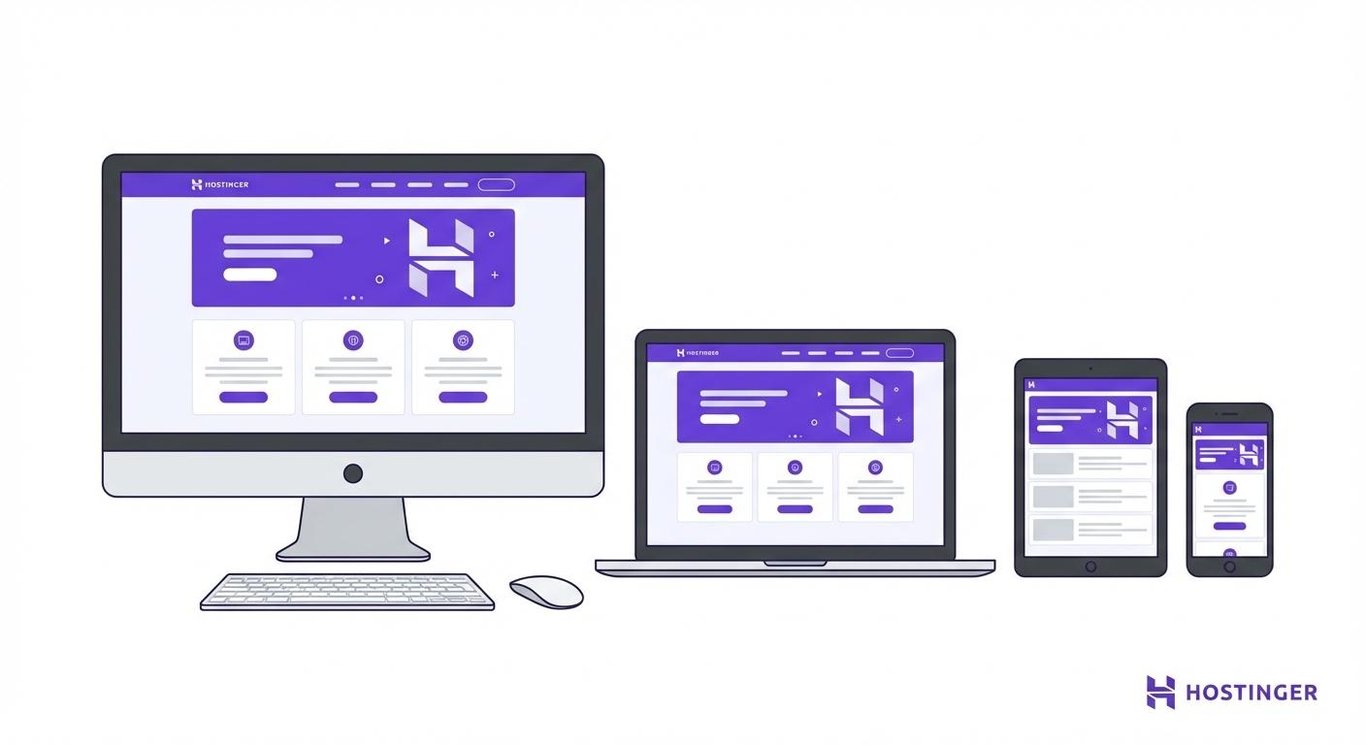
Here are some website design tips to keep in mind:
- Your menu structure should be logical, your search function should actually work well, and important pages, like your cart and checkout, should always be accessible. If someone has to click more than three times to find a product or complete a purchase, you’ve made it too complicated.
- Fast-loading pages are vital for keeping visitors engaged. Optimize your images, minimize unnecessary scripts, and choose hosting that can handle your traffic without slowing down. Speed isn’t just about user experience – it’s also an important Google ranking factor.
- When customizing themes or templates, focus on reinforcing your branding consistently. Use your color palette, fonts, and voice throughout the site. But don’t sacrifice functionality for aesthetics. A gorgeous site that’s confusing to navigate or slow to load won’t generate sales no matter how beautiful it is.
6. Set up secure payment gateways
Payment gateways are the services that securely process credit card and other payment transactions between your customers, their banks, and your business account.
Choose trusted providers
Integration with popular, trusted payment gateways builds immediate credibility. Options like PayPal, Stripe, Square, and Authorize.Net are recognized and trusted by customers worldwide.
Offering multiple payment methods increases conversions because different customers have different preferences. Some want to pay with credit cards, others prefer digital wallets like Apple Pay or Google Pay, and some might want to use buy-now-pay-later services like Afterpay or Klarna.
Maintain security standards
While reputable payment gateways handle the technical side of security for you, it’s still your responsibility to adhere to PCI compliance (Payment Card Industry Data Security Standard).
This means knowing the security guidelines and maintaining safe account practices, such as using strong passwords, enabling two-factor authentication, and keeping your software updated.
Display trust signals
Be transparent about what payment methods you accept and display security badges prominently on your checkout page.

These small trust signals, such as logos from payment providers, SSL certifications (that “https” and padlock icon in the browser), and clear privacy policies, can be the difference between a completed sale and an abandoned cart.
Factor in transaction costs
Most payment gateways charge a percentage of each sale plus a small flat fee. Factor these costs into your pricing strategy so they don’t unexpectedly eat into your margins.
Sometimes paying slightly higher gateway fees is worth it if that provider offers better features or trust recognition.
7. Configure shipping and tax settings
Configuring shipping and tax settings involves calculating shipping costs based on destination and weight, determining which carriers you’ll use, and automatically applying the correct sales tax or VAT based on customer location.
Getting these details right prevents surprise costs at checkout that cause customers to abandon their carts.
Set up shipping zones and rates
Start by setting up shipping zones and rates that make sense for your business model. Will you ship nationally, internationally, or both? Each region will have different costs and carrier options.
Give your customers flexibility by offering multiple shipping speeds, such as standard, expedited, and overnight, and choosing a pricing structure that fits your margins.
These can be flat-rate shipping (same price regardless of order size), weight-based shipping (varies by product weight), or free shipping with a minimum order value.
Choose the right carriers
Your shipping costs will depend on which carriers you work with. Services like UPS, DHL, and local carriers each have strengths and weaknesses.
Local options are often cost-effective for lightweight packages domestically, while other carriers might be better for larger items or international shipments. Compare their prices based on your products, budget, and where your customers are located.
Automate tax calculations.
Tax calculations can get complicated quickly, especially if you’re selling across multiple states or countries. In the US, sales tax rules vary by state and sometimes by county or city. Internationally, you might need to deal with VAT, GST, or other tax systems.
Most modern ecommerce platforms include tax calculation tools or integrate with services like TaxJar or Avalara that handle this complexity automatically. These tools track where you have tax obligations, calculate the right rates, and even file reports for you.
Be transparent about costs
Surprise costs at the very end of checkout are a major reason for cart abandonment. Show estimated shipping and tax as early in the process as possible, ideally on product pages or in the cart view before checkout begins.
8. Implement marketing and SEO strategies
Marketing and SEO (search engine optimization) involves driving traffic to your store from channels like social media, email newsletters, and paid ads, and improving your visibility in search engines.
SEO
Start with SEO for ecommerce. This means optimizing your product pages, category pages, and blog content to rank in search engines like Google.
Use relevant keywords naturally in your titles, descriptions, and headers. Write unique, detailed content rather than copying manufacturer descriptions. Create helpful blog posts that answer questions your target audience is asking. This drives organic traffic from search engines and establishes you as an authority in your niche.
Technical SEO matters too. Ensure your site loads quickly, has a clear structure with logical URLs, includes alt text for images, and submits a sitemap to search engines. These behind-the-scenes details help search engines understand and rank your site properly.
Social media
Social media marketing allows you to connect with potential customers where they already spend time.
Choose platforms where your target audience is most active, for example, Instagram and TikTok for younger, visual audiences, Facebook for broader demographics, and LinkedIn for B2B.
Post consistently, engage with followers, and use a mix of promotional and valuable content, such as behind-the-scenes videos, product teasers, and countdown posts.

Email marketing
Email marketing remains one of the highest-ROI channels for ecommerce. Build an email list for pre-launch promotions by offering early access, launch discounts, or valuable content related to your niche.
This builds excitement and creates a customer base ready to buy on day one.
Then segment subscribers based on interests or behavior, and send personalized campaigns. Welcome series, abandoned cart reminders, and post-purchase follow-ups can all drive significant revenue.
Paid ads
Paid advertising through Google Ads, Facebook Ads, or other platforms can generate traffic quickly while your organic strategies build momentum.
Set up conversion tracking so you know exactly which ads, keywords, and audiences are driving actual sales, not just clicks.
Start with a daily budget you’re comfortable losing while you learn (even $10-20 per day can provide valuable data), and only increase spending once you’ve identified campaigns with a positive return on ad spend.
9. Test your website and checkout process
Before you announce your launch to the world, you need to thoroughly test every aspect of your website to catch bugs, friction points, and technical issues that could cost you sales or damage your reputation.
This is about making sure things look good and that everything actually works the way it’s supposed to.
Here’s a checklist of everything to test and systematically work through it. It might feel tedious, but discovering problems now is infinitely better than customers discovering them after launch.
- Start by testing on different devices and browsers. What looks perfect on your desktop in Chrome might be broken on Safari on an iPhone. Test on various screen sizes (phones, tablets, desktops), different operating systems (iOS, Android, Windows, Mac), and multiple browsers (Chrome, Firefox, Safari, Edge).
- Check for bugs and delays everywhere. Click every link, fill out every form, try every filter and search function. Do images load properly? Are there any broken links? Does the site respond quickly, or do certain pages lag? Even small delays frustrate users and increase bounce rates.
- The payment flow deserves extra attention. Go through the entire checkout process multiple times in various scenarios, like with different shipping addresses, payment methods, and promo codes.
- Make sure calculations are accurate, confirmation emails send properly, and order information appears correctly in your admin panel. Actually process test transactions (most payment gateways offer test modes for this) to verify everything works end to end.
- Test contact forms and any other ways customers might reach you. Submit inquiries and make sure they arrive where they’re supposed to. Check automated responses to ensure they’re appropriate and helpful.
- Site speed testing should be done with tools like Google PageSpeed Insights or GTmetrix. These tools identify specific issues slowing your site down and provide recommendations for improvement.
Don’t just test yourself – recruit friends, family, or beta users to try out your site with fresh eyes. They’ll catch things you’ve become blind to and provide valuable feedback about what’s confusing or frustrating from a new user’s perspective.
10. Prepare customer service and post-launch plans
The work doesn’t end on launch day, in fact, it’s just beginning. Setting up support channels and planning for ongoing operations ensures you can handle customer needs and scale your business effectively.
Preparing customer service
Customer service channels should be established before you get your first inquiry. Decide how customers can reach you and make those options clearly visible on your site.
Each channel has trade-offs. Email is manageable but slower. Live chat provides immediate responses but requires availability or chatbot setup. Phone is personal but most resource-intensive. Choose what makes sense for your business size and resources.
Master one channel before expanding
Start with one support channel and nail it before adding more. It's better to respond to emails reliably within 24 hours than to offer live chat that sits unanswered. Also, set up auto-responses for off-hours to let people know when they'll hear back. It manages expectations and shows you're on top of things.
Create clear policies for returns and refunds before any issues arise. When customers know they can easily return products if needed, they’re more comfortable making that first purchase. Your policies should balance being fair to customers with protecting your business from abuse. Display these policies prominently, especially on product pages and during checkout.
Set up systems for handling common issues efficiently. Template responses for frequently asked questions save time while still providing helpful information. A knowledge base or FAQ section on your site can deflect many customer service inquiries entirely by letting people find answers themselves.
Setting up for post-launch success
Tracking progress and data is essential for post-launch success. Set up Google Analytics or similar tools to track traffic sources, popular products, conversion rates, and customer behavior.
This data tells you what’s working and what needs improvement. Monitor sales patterns, inventory levels, and site performance regularly.
Actively collect customer feedback through post-purchase surveys, product reviews, and direct communication. People will tell you exactly what you’re doing right and what needs to change. Acting on this feedback shows customers you care and helps you continuously improve.
Keep learning and adapting. The ecommerce landscape changes constantly as new marketing channels emerge, customer expectations evolve, and technology advances.
Stay curious, test new approaches, and don’t be afraid to pivot based on what the data and your customers tell you.
What to focus on after launching your ecommerce store
Launching your store is a major milestone worth celebrating, but it’s really just the starting line. The ongoing work of managing and scaling your ecommerce business requires consistent attention to maintain momentum and drive growth.
Balance your inventory
Inventory management becomes a continuous balancing act where you need enough stock to fulfill orders quickly without tying up too much capital in excess inventory.
Track what’s selling quickly versus what’s moving slowly, then use this data to make smarter purchasing decisions and spot trends early. Running out of best-sellers frustrates customers, but holding too much slow-moving stock hurts your cash flow.
Commit to ongoing marketing
Marketing becomes even more important after launch. Initial excitement fades, so you need consistent strategies to attract new customers and keep existing ones engaged.
Continue optimizing your content for search engines, expanding your content marketing, testing new advertising channels, and building your email list. Stores that succeed long-term treat ecommerce marketing as an ongoing commitment, not a launch-day event.
Continuously optimize and improve
Keep analyzing your data and experimenting with improvements. A/B test product page layouts, try new marketing messages, adjust pricing strategies, and optimize your checkout flow. Small incremental improvements compound into significant growth over time.
Remember, every successful ecommerce store started exactly where you are now. This checklist gives you the roadmap, but now it’s time to take action. Your store doesn’t need to be flawless on day one. It just needs to exist and serve real customers. Start today.


Simon is a dynamic Content Writer who loves helping people transform their creative ideas into thriving businesses. With extensive marketing experience, he constantly strives to connect the right message with the right audience. In his spare time, Simon enjoys long runs, nurturing his chilli plants, and hiking through forests. Follow him on LinkedIn.

Comments
0 responses