Hotlinking: What it is and how to prevent it
Dec 02, 2025
/
Hasna A.
/
6 min Read
Hotlinking is when someone embeds an image or media file from your website onto theirs by linking directly to your file’s URL. Instead of uploading the image to their own server, they use yours, forcing your server to do the work and deliver the file to their visitors.
This practice represents a problem because it effectively steals your bandwidth, which can drive up your hosting costs and slow down your website for your actual visitors. Think of it like a neighbor powering their holiday lights with your electricity, while you pay the bill.
It can also constitute copyright infringement if done without permission, creating potential legal issues and ethical concerns.
Fortunately, protecting your site is straightforward. You can prevent hotlinking by enabling protection through your hosting control panel, editing your site’s .htaccess file, using a Content Delivery Network (CDN), or installing a simple WordPress plugin.
Why is hotlinking bad?
Website owners are the most affected ones when hotlinking occurs. For those who do it, hotlinking might seem like an easy way to acquire website assets, but in reality, hotlinking can harm them too.
Let’s go over the five main reasons why you should avoid hotlinking:
- Reusing assets without permission is unethical. Unless the content is under the Creative Commons license, you have to acquire the permission and rights before using it on your site.
- Hotlinking can have legal repercussions. Hotlinking copyrighted content can lead to legal and monetary consequences. If the original owner sends the perpetrator a copyright infringement notice and the perpetrator fails to respond, the original owner can file a lawsuit.
- You have no control over the hotlinked file. A hotlinked image is connected to the original website. If the original owner decides to modify or delete the content at any time, the changes will also be shown on the perpetrator’s website.
- Hotlinking makes you appear unoriginal and unprofessional. Due to its bad reputation, adopting this practice can reflect poorly on you. People may assume you lack originality and don’t respect other users’ rights.
- You would be leeching off another website owner’s resources and increasing their hosting costs. When someone views a hotlinked image, it eats up the origin server’s bandwidth. So, the perpetrator is not only stealing content but also stealing website resources from the original owner.
What does no hotlinking mean?
No hotlinking is a technical barrier that prevents other websites from embedding your media files directly.
When enabled, if someone tries to link to your image, it will either appear as a broken image on their site or be replaced by a different image you specify, like one that says Image stolen from [Your Website].
Is hotlinking legal?
Hotlinking isn’t explicitly illegal, so it often falls into a legal gray area. However, it’s widely considered unethical and unprofessional because it almost always results in copyright infringement.
When you display a hotlinked image, you show copyrighted content on your site without a license, violating the owner’s rights and forcing them to pay for your website’s traffic.
How to stop hotlinking
Now that you’ve learned why you should stop hotlinking, you might be wondering what to do instead when you want to use images from other websites.
The most important part is making sure that you’ve been given the authorization to use the image. You can often acquire images by simply asking for the owner’s permission. Others are under a strict legal license – for example, copyrighted photographs.
Once you’ve received the permission or taken care of the legal process, you should upload the file to your own host or use a third-party provider. For images, use an image hosting service like Imgur. This way, you won’t be stealing bandwidth from the original website owner.
If, for any reason, you can’t acquire the image you want, try these alternatives:
- Find a similar replacement. You might still be able to deliver the same message with a different image. For example, if there’s a specific photo you can’t get, try acquiring a similar one from another source, such as a stock image service like Unsplash, Shutterstock, or Pexels.
- Link the page, not the image. If you can’t replace the image with a similar alternative, consider adding a link to the image’s original web page. You might not be able to show the image exactly as you wanted, but your visitors will still have the opportunity to see it by clicking on the link you provided.
How to protect your site from getting hotlinked
Putting hotlink protection in place is very important to prevent content and bandwidth theft issues.
Before proceeding, remember that hotlink protection won’t hurt your website’s presence in search results. As long as you don’t block search engines from indexing your images, your search engine optimization (SEO) efforts will be unaffected.
Let’s go over four different methods to protect your assets from getting hotlinked.
Method 1: Accessing hPanel settings
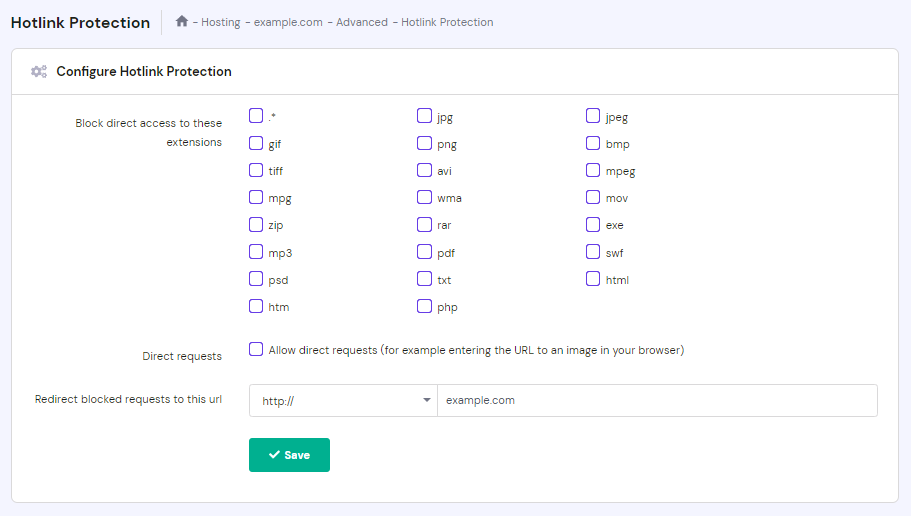
If you host your website on Hostinger, you can set up hotlink protection right from hPanel. The process should be similar on other control panels. Follow these steps:
- Log in to your hosting account and head to the dashboard.
- Under Advanced, select Hotlink Protection.

- Under Block direct access to these extensions, choose which file extensions you would like to protect. Once applied, visitors won’t be able to view the direct links attached to the file extensions you’ve selected.
- In the Redirect blocked requests to this url field, you can enter the URL of an error page you want to show visitors who attempt to hotlink your website.

Method 2: Using an FTP client
Another option is to edit your website’s .htaccess file by accessing it through an FTP client like FileZilla or the file manager on your hosting account’s control panel.
This method involves editing your website’s code, so be careful – a small error can render your site unusable.
- Once you’ve connected to your website’s FTP or opened up the file manager, navigate to the public_html folder.
- Within the public_html folder, find the .htaccess file and download it.
- On your computer, make a copy of the original .htaccess file in case something goes wrong.
- Open the .htaccess file using your preferred text editor.
- Copy and paste the following code into the file:
RewriteEngine onRewriteCond %{HTTP_REFERER} !^$RewriteCond %{HTTP_REFERER} !^http(s)?://(www.)?google.com [NC]RewriteCond %{HTTP_REFERER} !^http(s)?://(www.)?bing.com [NC]RewriteCond %{HTTP_REFERER} !^http(s)?://(www.)?yahoo.com [NC]RewriteCond %{HTTP_REFERER} !^http(s)?://(www.)?yourdomain.com [NC]RewriteRule .(jpg|jpeg|png|gif)$ – [NC,F,L]
- Change yourdomain.com to your site’s actual domain.
- Save the edited .htaccess file and upload it back to the public_html folder.
Method 3: Using a CDN
Using a content delivery network (CDN) for your website has many benefits. A CDN can increase content delivery speed, providing better performance for your visitors. It can also offer asset management features for website administrators, including hotlink protection.
Activating hotlink protection will vary depending on the CDN provider you use. Let’s explore how to set up hotlink protection on two popular CDN providers – Cloudflare and KeyCDN.
Here’s how to activate hotlink protection on Cloudflare:
- Log in to your Cloudflare account and navigate to the dashboard.
- Select the Scrape Shield app, which is located on the right of the apps bar.
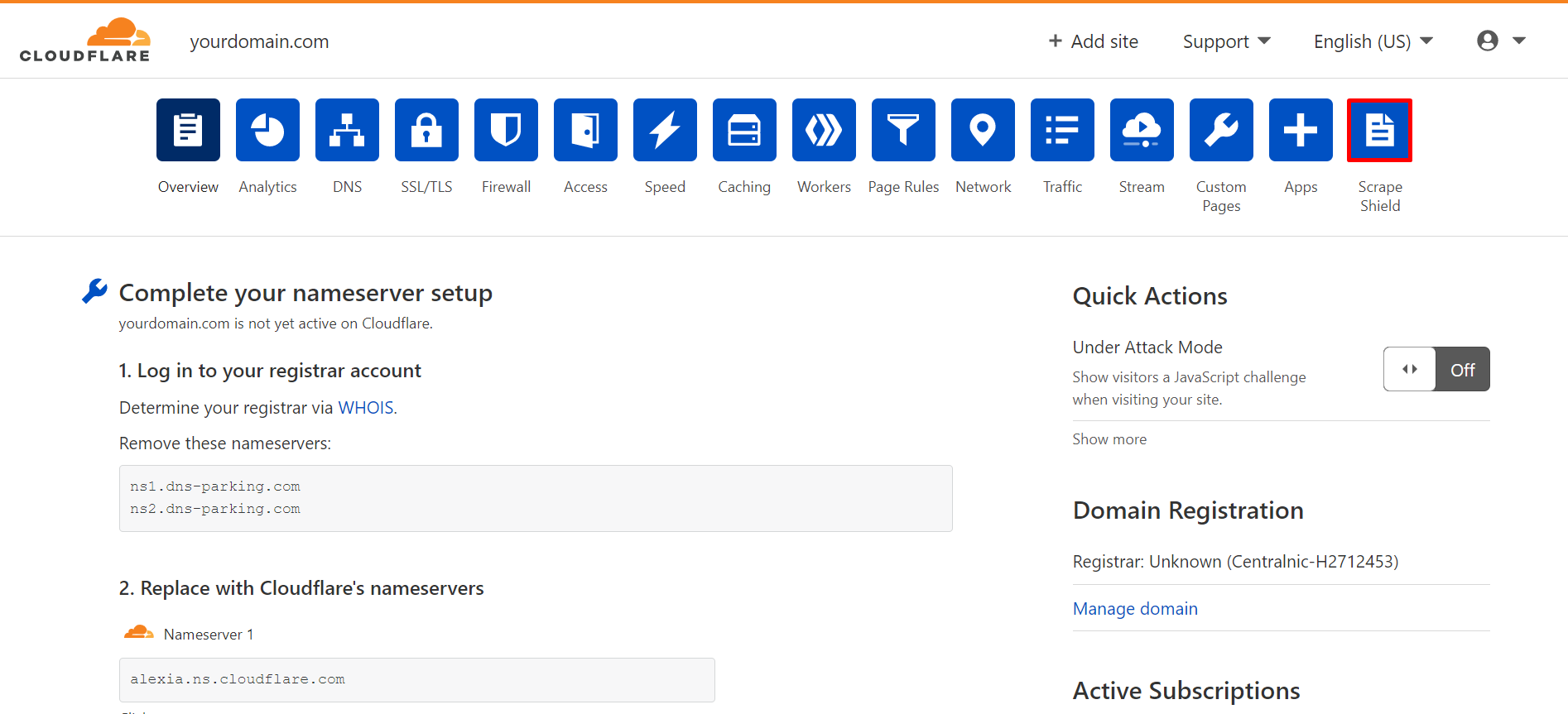
- Switch Hotlink Protection on.
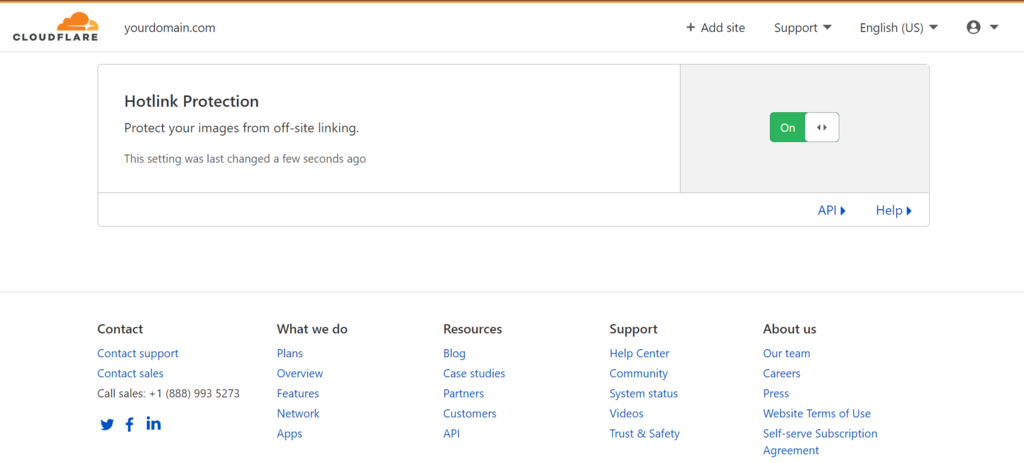
The Scrape Shield app by Cloudflare specifically prevents image hotlinking and supports .gif, .ico, .jpg, .jpeg, and .png file types.
Here’s how to activate hotlink protection on KeyCDN:
- Log in to your KeyCDN account and go to the dashboard.
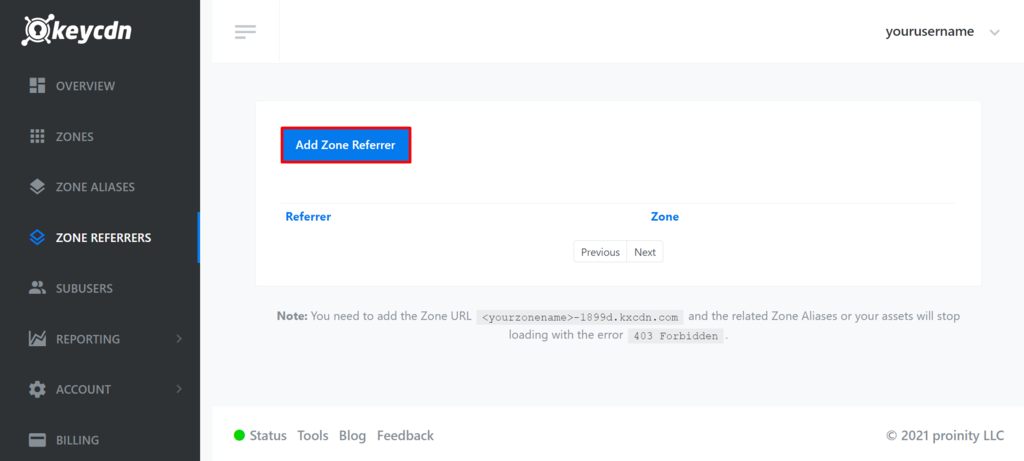
- Select Zone Referrers from the sidebar.
- Click Add Zone Referrer.
- Enter the URL of the zone referrer. Zone referrers are the URLs that are allowed to view direct links to your website assets. URLs that aren’t included in the zone referrers will be blocked.
- Select the Zone from the drop-down menu.
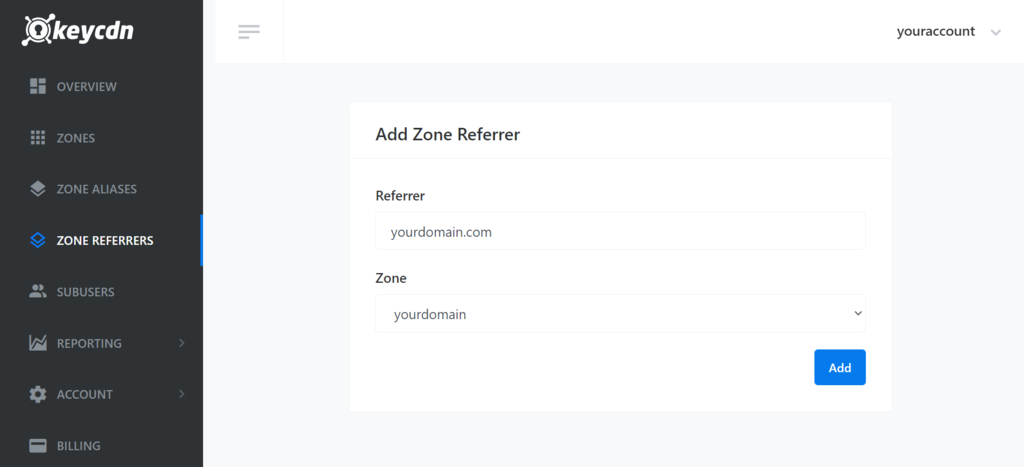
- Click Add to save your settings.
- Feel free to add multiple zone referrers.
Method 4: Using a WordPress plugin
If you use WordPress as your website’s content management system (CMS), several plugins can prevent hotlinking. We’ll go over three of them.
The first is the All In One WP Security and Firewall plugin, which can automatically edit your website’s .htaccess file to prevent hotlinks. Follow these steps to set it up:
- From the WordPress dashboard, install the plugin and activate it.
- Navigate to the WP Security menu → Firewall → Prevent Hotlinks.
- Select Check this if you want to prevent hotlinking to images on your site.
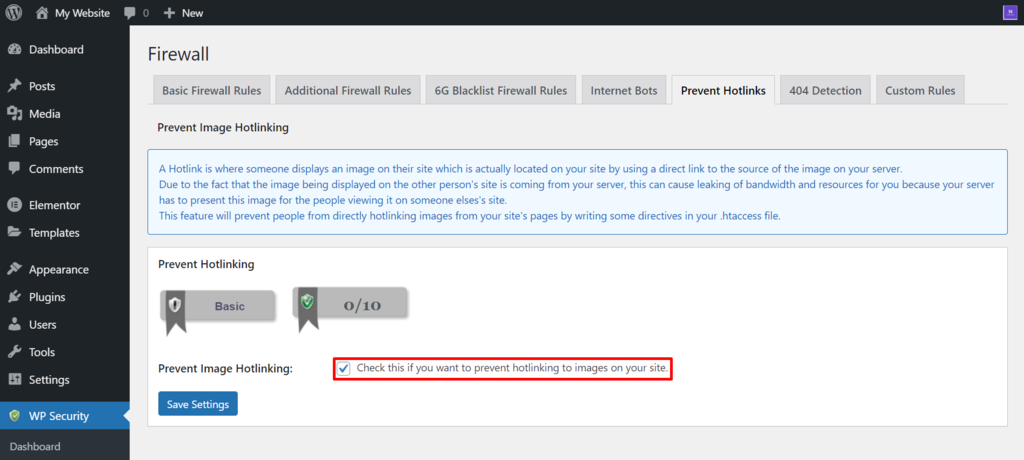
- Click Save Settings.
Another plugin you can use is WP Content Copy Protection & No Right Click. This plugin can block visitors from copying text and right-clicking on your website. If you enable the right-click prevention, your visitors won’t be able to find or save the direct link to your content files.
Here’s how to enable the right-click protection on your site using this plugin:
- Install and activate the plugin.
- Click Copy Protection from your WordPress dashboard’s sidebar.
- Select the Premium RightClick Protection tab.
- Select the types of pages where you want to enable right-click protection. You can allow it on Posts, the Homepage, and other Static pages.
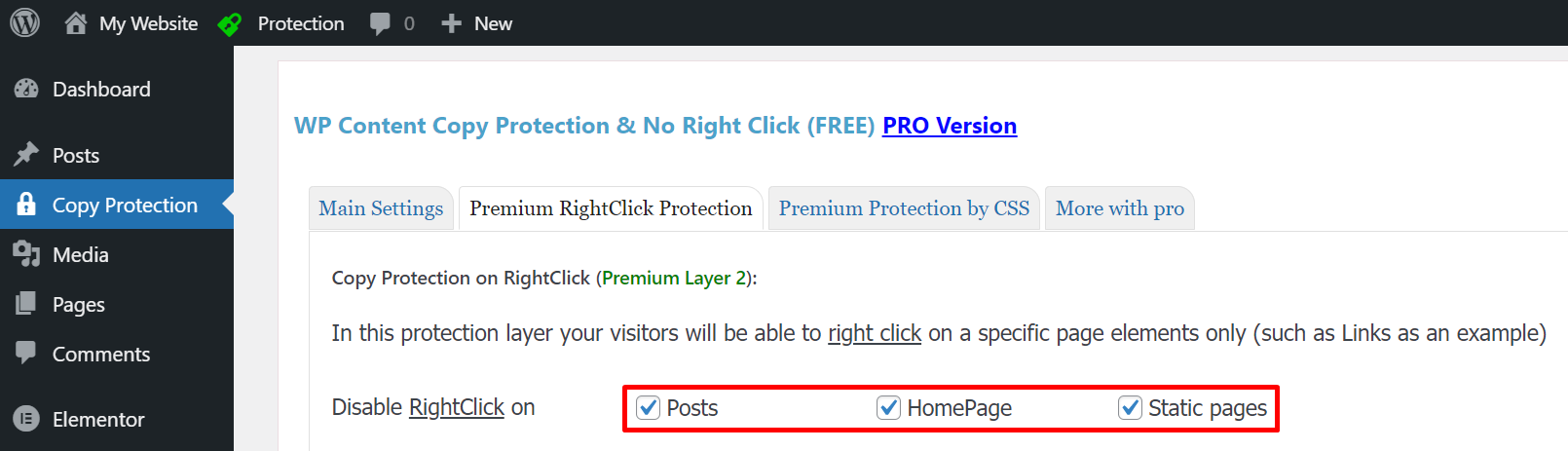
- Click Save Settings.
Secure Copy Content Protection and Content Locking is another option to disable right-click and asset copying. Here’s how to set it up:
- Install and activate the plugin.
- From the WordPress dashboard, navigate to Copy Protection → Options.
- Make sure that both Disable right-click and Disable right-click for images are ticked. Tick Show Message to give your visitors a message when they attempt to right-click on your site.
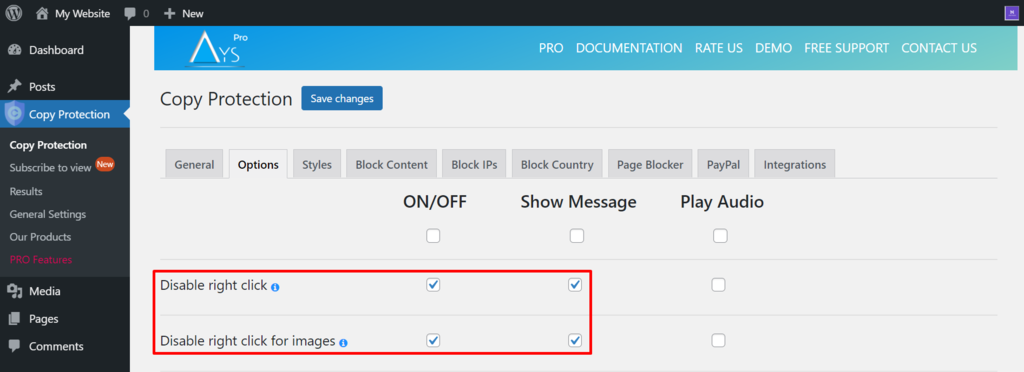
- Click Save Changes.
What are further WordPress optimization methods?
Preventing hotlinking is an essential form of site optimization, but it’s just one part of keeping your site fast and efficient.
Other methods include caching your pages, compressing images, minifying CSS and JavaScript files, and using a lightweight theme.
By following the best WordPress optimization practices, you can improve everything from load times to search engine rankings, giving your visitors the best possible experience.
Suggested reading
To protect all the work you've put into your site, download a website backup regularly and learn the first steps to take if you ever need to diagnose and fix a hacked website.
All of the tutorial content on this website is subject to Hostinger's rigorous editorial standards and values.

Hasna is passionate about tech, culture, and the written word. She hopes to create content that helps people succeed on the web. When not writing, rearranging, or polishing sentences, she enjoys live music and overanalyzing movies.