How to Start a Blog: A Quick Guide for Beginners
Oct 18, 2024
/
Paulius Z.
/
4 min Read
Millions of people enjoy sharing their thoughts about the experiences and adventures they had. Talking about hobbies, travelling advice, fitness instructions – the choices are endless. However, how should someone start a blog?
People choose blogs because it’s not only an easy and fun way to put your creativity into writing, but also a powerful marketing tool for businesses of any size.
The best thing is – starting a blog is not a difficult feat.
Still not convinced? Perhaps you’re overwhelmed by the technical aspects of building a blog? If that’s the case, we’re here to help you out.
How to Start a Blog – Video Tutorial
Learn how to start a blog using WordPress to help your brand or business.


How to Start a Blog in 6 Easy Steps?
No matter what kind of theme or idea you’re aiming for, we’re going to walk you through each and every step of how to start a blog.
1. Think About Your Niche
This is the first and most important step in your blogging journey. Think of what you want to blog about – what are your talents and passions?
Perhaps there’s a particular skill you’re really good at and could share that knowledge with others? Or you want to go behind-the-scenes of your business and let people know more about its products?
Make sure to stay focused on a particular niche. Be it fashion, food or photography. While it might be tempting to blog about plenty of different topics, that will make it harder to decide on a target audience.
2. Choose Your Blogging Platform
Here’s a surprise – you don’t need technical skills to start blogging. We’re going to use a content management system, or CMS for short.
Content management systems are specifically designed for people who want to focus on their content, rather than some mind-boggling technicalities. While there are plenty of options out there, we recommend choosing the most popular CMS – WordPress.
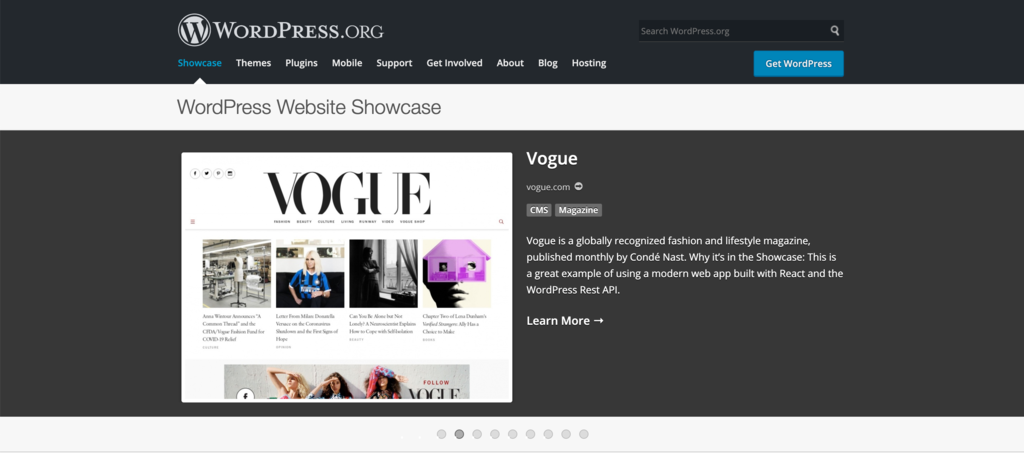
It’s incredibly user-friendly and packs a huge library of themes and plugins.
 What is more, the CMS is open-source and has a huge community. So if you run into any trouble, you can rely on thousands of tutorials, videos, forums, and professional developers to give you a helping hand.
3. Pick a Reliable Web Host
Now, you do need to entrust your newly made blog to dependable hands so your website could be accessed without any hiccups. Here’s where web hosts come into play.
Hostinger has been the expert of the craft for more than a decade, providing quality services for our users. Over the years we’ve created our own control panel for an even easier way to manage your website.
Now, in order to move forward, we need to decide what kind of web hosting service you’ll need. However, ask yourself what kind of a website you envision:
- How much traffic would I expect? What are my goals towards attracting more visitors?
- What’s my budget? How many features will I need?
- How quickly do I want my website to be set up? Will I receive support if I get stuck?
Here’s a quick breakdown of the kind of services we offer here at Hostinger:
WordPress hosting is the most affordable and easiest way to have your site live. If you’re thinking about building a personal blog or if this is simply your very first website, WordPress Hosting option is great as it is easy to use and reliable.
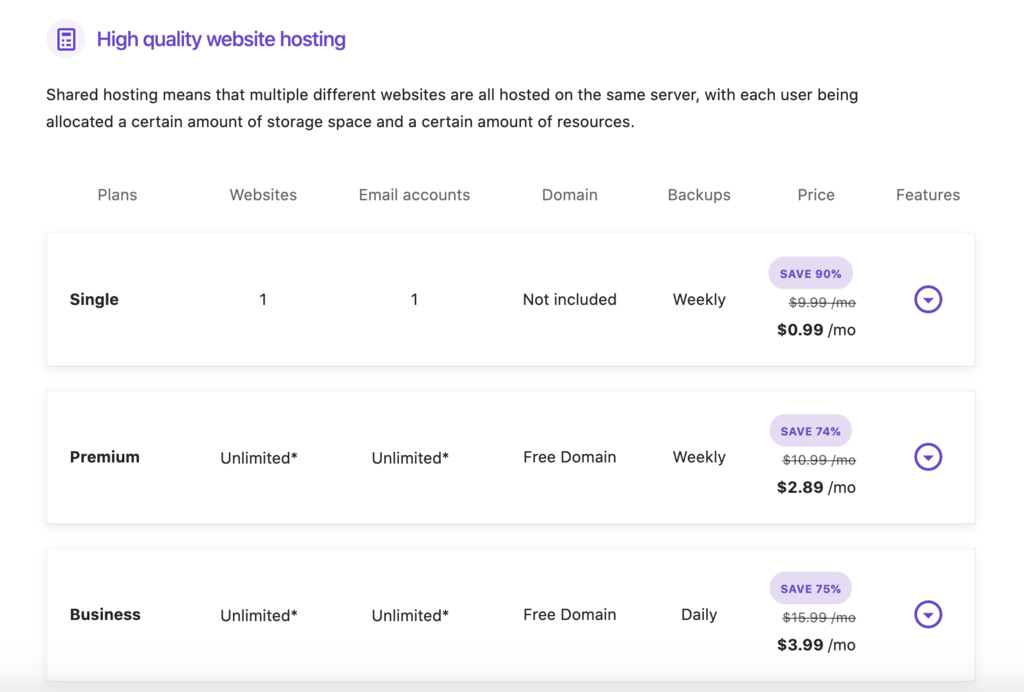
For larger businesses and companies, managed cloud server hosting is an excellent option if you’re expecting heavy traffic spikes. Unlike WordPress Hosting, you’ll receive a larger portion of server resources. However, that does come at a little bit more cost.

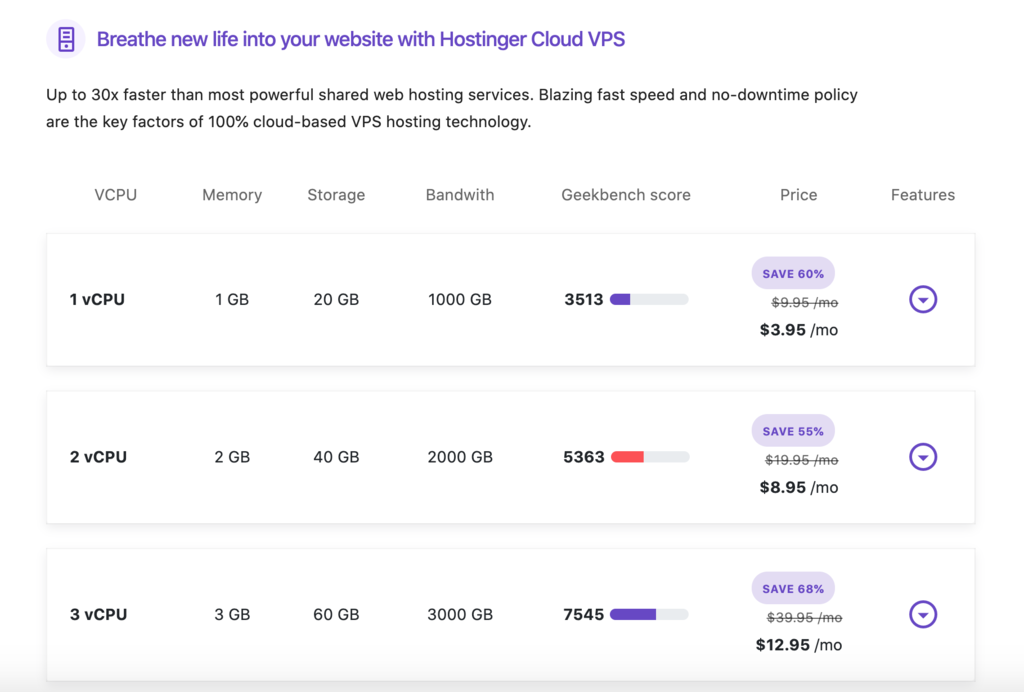
A Virtual Private Server, or VPS for short, allows for much more freedom and flexibility, at the cost of requiring server management skills. While it might not be the best option for a blog, VPS plan is a perfect solution if you ever want to tackle a much bigger project.
4. Select Your Perfect Domain Name
A domain name is essentially an address to your website. That’s why thinking of a proper one is an essential task.
Think of what represents your branding persona or niche best. Feel free to turn on your imagination and find something that you’d be happy with.
To see whether the name is taken or not, use our domains checker to view what’s available. If it’s vacant, choose a domain extension alongside and make your purchase right there.
5. Time to Set Up Your Platform
Once you’re all set, it’s time to install your CMS. This can be easily done using our hPanel. Navigate to your hosting account, select the Auto Installer option and choose WordPress.
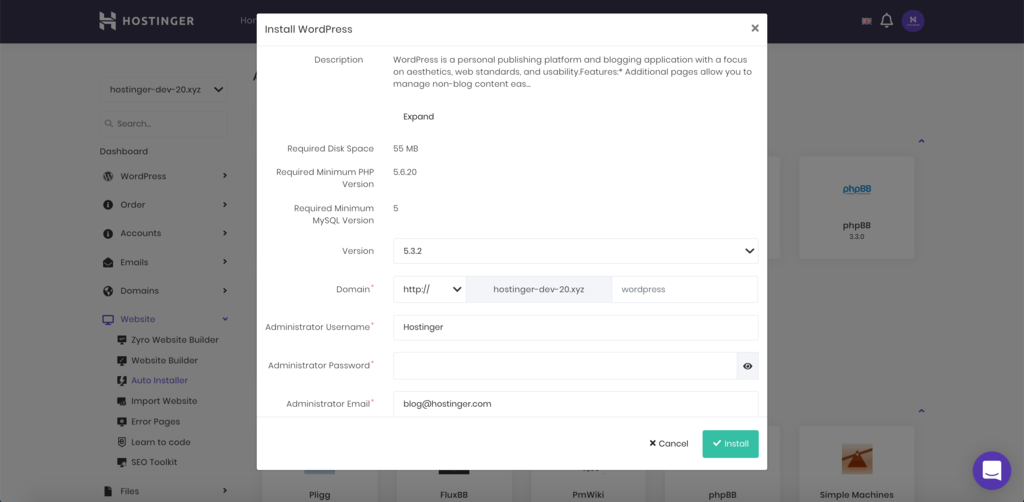
For more information on how to install WordPress step-by-step, we’ve prepared a detailed guide that goes in-depth on how to have your CMS set up and ready.
6. Start Publishing
If you want to become a successful blogger, you need to provide quality content. Focus on your work, since quantity alone will not bring more traffic.
Don’t be afraid to experiment here and there, seek out for new ideas whenever possible. Start slow and build your blogging by constantly challenging yourself.
Using a CMS paired with good web hosting allows aiming your attention at creating quality pieces rather than troubleshooting server issues all day.
If you focus your attention on the quality of your content and SEO, you’ll notice an increase in website traffic in no time and potentially be favoured by the search engines.
Conclusion
Starting a blog isn’t hard nor has to be expensive. With the right hosting service and a good CMS, you’ll be publishing your content in no time.
Hopefully, this guide was helpful. If you have any questions, make sure to leave them in the comment section.
Go online with Hostinger today and good luck.
All of the tutorial content on this website is subject to Hostinger's rigorous editorial standards and values.

Paulius is as a Content Editor who excels in creating engaging technology-based content, while his keen eye for detail ensures accuracy in all aspects of his work. In addition to his role, Paulius brings 4+ years of valuable experience to the team, with a particular knack for crafting YouTube-related content. Beyond his professional know-how, he is more than willing to talk to you about everything board games.
Comments
April 08 2020
I just visited this page and wish to start one blog Have some queries please help me 1 what is legal formalities in India to start blog ? Means if I want to write on lifestyle so do I need to share content in some specific way or just what I want I can write . 2. If people will read it can someone put question on it that it's not right or it's not good ...in short how to avoid hustle 3 money treatment if earned by blog like tax etc 4. How to use pic and links of other related blogs in my blog 5 how to reach people and how to track visitors. 6. Do I need a business registered to run a blog ? Please please please answer my queries ..if mentoring is good the result will be awesome. There is huge possibility that you charge for this knowledge as nothing comes free but please I hope you will help me with these questions . I hope you will not disappoint me ...please ... Thank you :)
April 09 2020
Hey, To answer your 1,3,6 questions, you can create a blog freely without any legal formalities, but when you start making money, Income Tax and Service Tax are liable to be paid. You should contact the responsible institution in India to get all the info about taxes and registration. 2) If you don't want people commenting on your posts, you can turn it off in your settings. 4) To direct users to other websites, you can simply direct them through a link in your post or a banner at your website, as well regarding image usage there are a lot of free stock images websites. 5) You can find some tips about how to drive traffic to your website here, and here is an article about Analytic Plugins Hope I've answered your questions. Let me know if you need anything else.
April 08 2020
Need to know more...
April 10 2020
Nice
April 30 2020
I am currently using free wordpress plan. So, if I switch to hostinger web hosting and domain..will i get my domain in .com or i will get in .org? Do i have to build a website for any of the one I choose or i can simply continue my blogging by filling the domains box or I have to build a perfect website for it. Please let me know, I am planning to buy latest by tomorrow.
May 01 2020
Hey Ria, when buying annual hosting plans you will receive a free domain of your choice (does not apply o Single Shares Hosting) as well to maximize your savings you can use coupon code LEARN20. If you are already using Wordpress you will be able to transfer your website, here is a tutorial on this topic. If you have more questions do not hesitate to ask!
May 05 2020
In premium web hosting plan mentioned that ;- Free Domain Free SSL Certificate But my question is, Is it applicable for "n" nos. of domain & web site freely as per users wish ??
May 06 2020
Hey, Parth, when buying, yearly Premium Shared hosting plan, you will receive one free domain and one Free SSL. Looking forward to having you onboard!
June 02 2020
How many days will it take to activate WordPerfect starter blogging site
June 02 2020
Hey Samuel, Activation is instant.
September 02 2020
Hi Paulius, This article is simply amazing !! I really love your content and I learned a lot from you. Thanks for sharing this informative article with us. Looking more from your side!!