How to Renew a Domain Name: 3 Methods
Dec 06, 2024
/
Jordana A.
/
4 min Read

Since domain ownership isn’t permanent, it’s important to renew it regularly. The renewal process varies based on the domain’s status. For instance, if you miss the expiration date, you must go through the domain recovery process to reactivate it.
This article will cover three common domain renewal methods, including their respective steps and best practices.
Let’s start with the most common scenario ‒ renewing your domain before it expires.
How to Renew an Active Domain
An expired domain can render related services, such as websites and email, inaccessible. This can hurt your brand’s credibility and reputation. To maintain continuous ownership, renew all your domains before they expire.
The renewal process is similar for most domain registrars. Here’s how to do it if you purchased your domain name from Hostinger:
- Go to Billing → Subscriptions from hPanel.
- Click Renew Now next to the domain you want to extend.
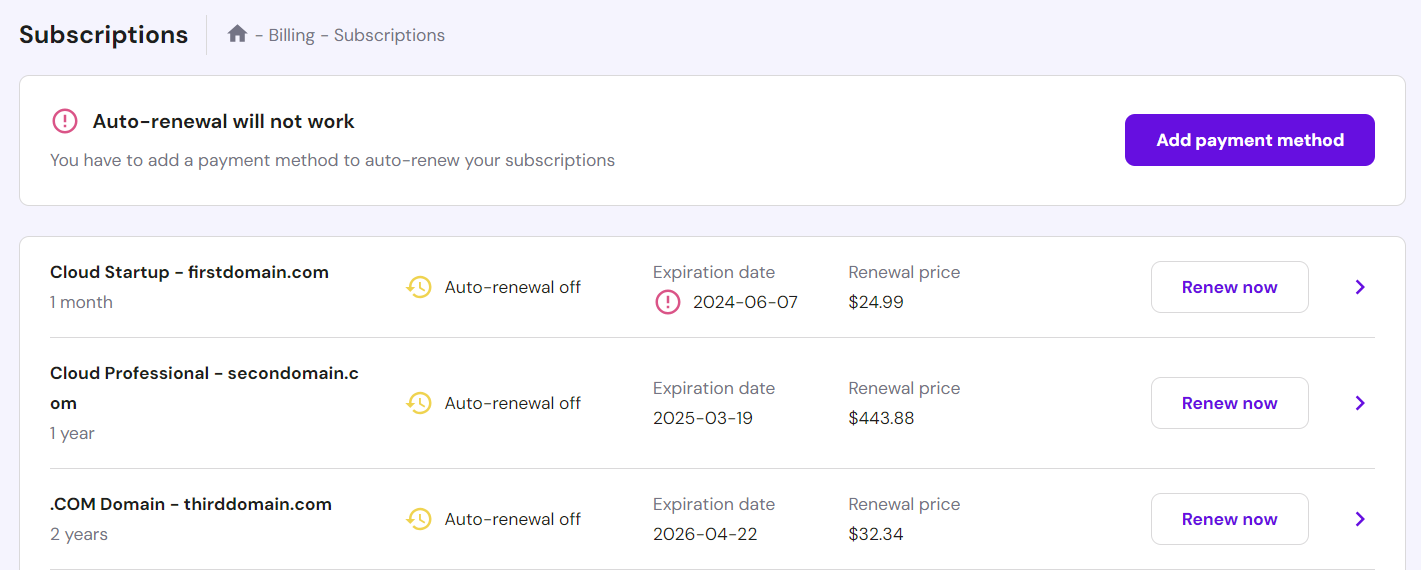
- Set the registration period, then proceed to choose the payment method.
- Check the Domains page to see if the domain’s expiration date has been updated according to the renewal period.
Alternatively, renew your domain from the Domains page:
- Navigate to the Domains page from hPanel.
- Click Manage next to the domain you want to renew.
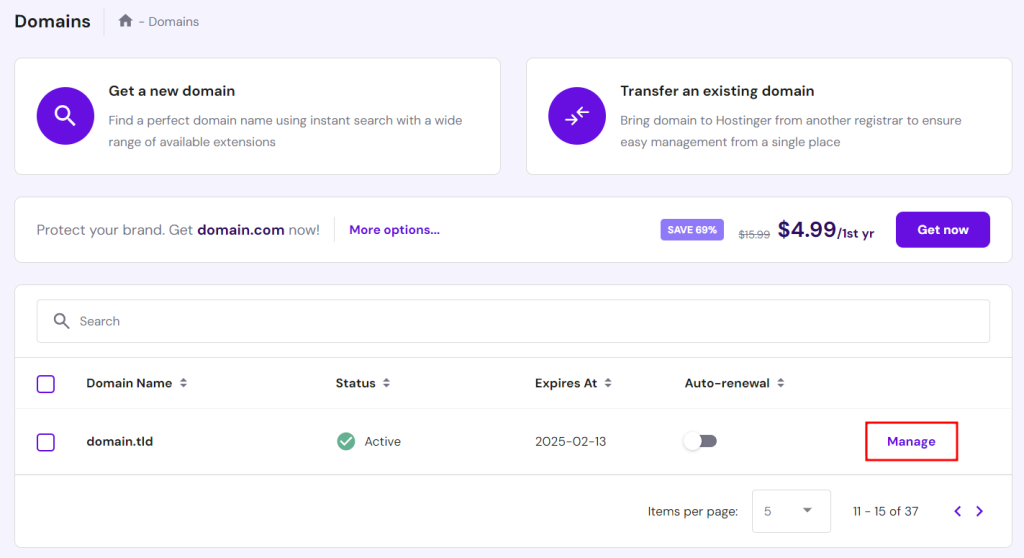
- In the Domain Overview page, select Renew now next to the expiration date. For some TLDs, renewal is only possible within 28 days of expiration. If you can’t find the button, this could be why.
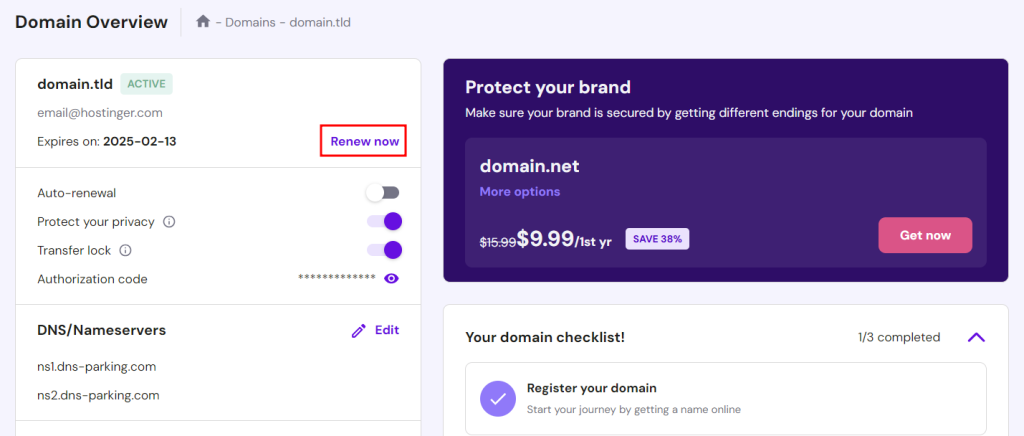
- Choose the payment method and follow the rest of the instructions to complete the renewal process.
- Check the Domains page to see if the domain’s expiration date has been updated according to the renewal period.
How to Renew an Expired Domain
When a domain name expires, it enters a grace period of up to 30 days. During this time, the owner can reactivate it at the standard renewal rate.
Renewing a domain in Hostinger’s grace period can be done via the Domains or Billing section. Here’s how to do it through Domains:
- Go to Domains from hPanel.
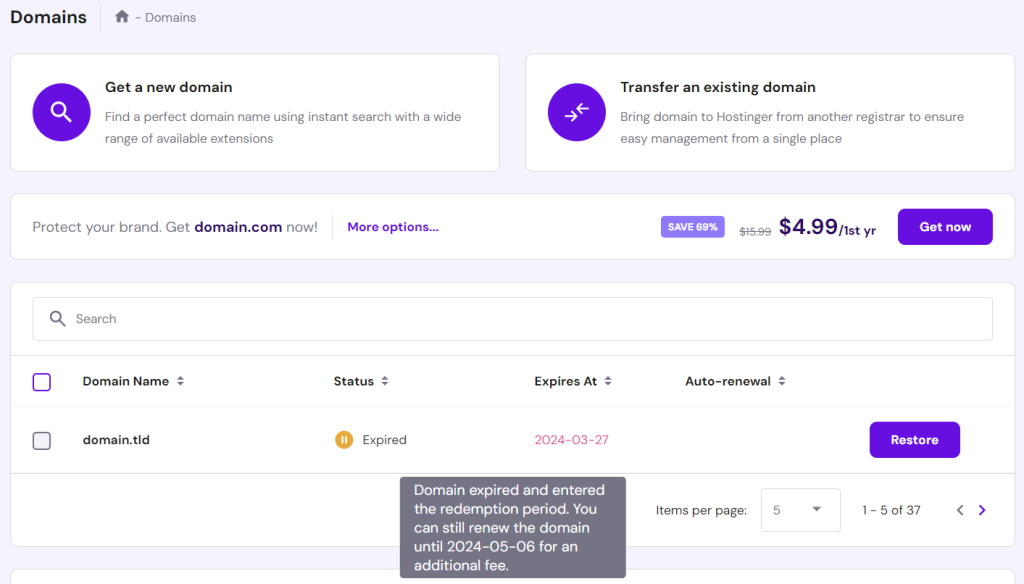
- Hover over the registered domain’s status to confirm it’s still in the grace period.
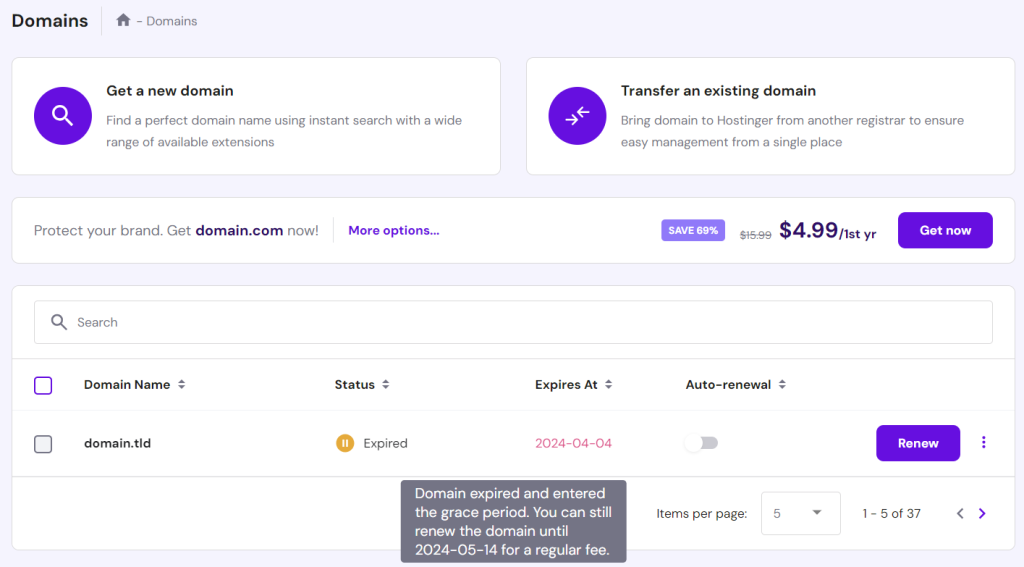
- Select the Renew button next to the expired domain to start the domain renewal process. Choose your preferred payment method and follow the rest of the instructions.
- To ensure that the renewal was successful, go back to the Domains page and check if the status has changed from “Expired” to “Active”.
Important! Some TLDs may not have a grace period and will go into the redemption period after expiration. The grace period for domains also varies, depending on the domain registration service provider and TLD.
Renewing a domain name in the redemption period follows similar steps. Click the Restore button next to the expired domain and pay the redemption and renewal fees. The domain will become active around 24 hours after payment.
How to Renew a Domain Automatically
Updating your contact information with the domain registrar ensures you get renewal reminders to avoid downtime. However, you still have to renew the domain manually.
To simplify domain renewals, many domain registrars offer an auto-renewal feature that handles everything for you. With Hostinger, automatic domain renewal happens 30 days before the expiration date when enabled.
To activate the domain auto-renewal feature, go to Billing → Subscriptions and click on the arrow icon next to the domain you want to customize. After adding a payment method, click on the Enable auto-renewal button.

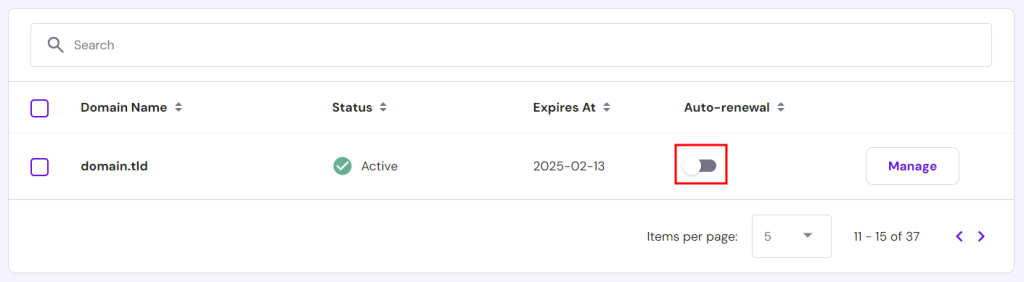
Alternatively, head to Domains and toggle on the Auto-renewal option.
Many domain registrars charge more for renewals, making domain transfer an appealing option. To reduce downtime risks when switching registrars, transfer at least a month before expiration.
Check out our guide on the best domain registrars to compare registration, renewal, and transfer prices.
Conclusion
An expired domain name can disrupt your website and email services, so it’s important to renew it as soon as possible. Domain renewal duration and cost vary based on the domain extension, registrar, and status.
Let’s recap the three domain name renewal methods:
- Active domain renewal ‒ works for domains that aren’t due for renewal.
- Expired domain renewal ‒ applies to domains that have entered the redemption period.
- Domain auto-renewal ‒ a feature offered by most registrars to automatically renew domains before they expire.
We hope this article helped you understand domain name renewal better. If you still have questions, check out the FAQ section or leave a comment below.
Learn More About Domains
How to Sell a Domain Name
What is Domain Squatting and How to Prevent Cyber Squatting
How to Renew Domain Name FAQ
This section covers some of the most common questions about domain name renewal.
How Much Does It Cost to Renew a Domain Name?
The cost to renew a domain name differs based on the domain extension, chosen registrar, and additional services like WHOIS domain privacy protection. Standard domain renewals usually range between $10-50/year.
How Long Does It Take to Renew a Domain?
Renewing an active domain name doesn’t require any downtime. However, reactivating an expired domain can take up to 48 hours to propagate.
What Happens When a Domain Expires?
When a domain expires, it enters a 30-day grace period for renewal. If not renewed, the domain can be sent to auction. Even though Hostinger clients will have priority within 30 days after the initial expiry date and get all the notifications, only renewing your domain on time ensures you won’t lose it. See our domain name cost guide for the full price breakdown.
All of the tutorial content on this website is subject to Hostinger's rigorous editorial standards and values.

Jordana is a Senior Content Writer with a background in Information Systems. She has over five years of experience in WordPress and is casually dabbling with PHP and MySQL. Her passion for writing and technology drives her to create tutorials for anyone wanting to build their online presence. Follow her on LinkedIn.