WooCommerce SEO: How to optimize your store for search engines
Mar 10, 2026
/
Aris S.
/
14 min Read
WooCommerce SEO is the process of optimizing your product pages, categories, and overall user experience to boost your store’s visibility in search engine results. The primary objective is to enable more users to discover your products and make a purchase.
WooCommerce SEO is an integral part of a broader marketing effort for a successful online store, alongside establishing a strong brand and offering high-quality products. Here are the main SEO strategies to boost your store’s traffic and sales:
- Lay the SEO groundwork. Properly configure the underlying technical aspects of your online store by choosing fast hosting, ensuring mobile responsiveness, and securing your site with HTTPS.
- Pay attention to product titles. Craft clear, concise, and keyword-rich titles under 60 characters to accurately describe your products and direct users to your product pages.
- Create distinct product descriptions. Write persuasive, valuable content that focuses on the product’s benefits and solves customer pain points, all while naturally incorporating relevant keywords.
- Optimize your product slugs. The product permalinks need to be concise, descriptive, and keyword-focused, helping both search engines and users understand your page content.
- Optimize product images. Use descriptive file names, include alt text, and serve compressed product images via a content delivery network (CDN) to enhance site speed and improve the user experience.
- Configure your taxonomy for SEO. Organize your products into logical, keyword-rich categories and tags to capture broader search queries.
- Activate breadcrumbs. Implement a breadcrumb trail to enhance user navigation, improve internal linking, and boost your listing’s visibility or rich snippets in rich results.
- Implement structured data. Use schema markup structured data so that search engines can display your product with additional details, such as star ratings and prices, which helps increase click-through rates (CTR).
- Work on Core Web Vitals. Minimize code, compress files, and remove unused plugins on your WordPress instance to enhance your site’s speed and provide a more responsive user experience.
- Develop content marketing material. Publish high-quality, long-form articles that target informational and commercial keywords to create a content funnel that converts readers into clients.
After optimizing your WooCommerce store, regularly track key metrics, such as organic traffic, keyword rankings, and conversion rates, using tools like Google Search Console and Google Analytics. This helps you assess the strategy’s effectiveness and make an adjustment as needed.
Before getting deeper into the monitoring, explore the WooCommerce SEO best practices in more detail.
1. Set up SEO foundations for your WooCommerce store
A successful SEO strategy for your store begins by establishing a robust technical and architectural groundwork. This is where a proper WordPress SEO setup plays a crucial role.
This initial step involves foundational actions that overlap with general WordPress SEO best practices, which in turn improve your WooCommerce store’s performance. By enhancing the underlying architecture, search engines like Google will be confident that your site provides a safe and enjoyable experience.
Here are the essential tasks you need to do to establish a solid SEO setting for WooCommerce:
- Choose a fast and reliable hosting provider. Your host is the foundation of your site, determining its speed, uptime, and traffic capacity – factors that directly influence search rankings. The best WooCommerce hosting providers offer built-in caching, servers optimized for WordPress, and a CDN to minimize loading times for visitors worldwide.
- Install a secure sockets layer (SSL) certificate. This certificate encrypts the connection between your site and visitors, protecting sensitive information like payment details. Once installed, your URL switches to HTTPS, a direct ranking factor for Google, and a non-negotiable trust signal for customers.
- Configure WordPress visibility settings. WordPress includes a setting to intentionally discourage search engines from indexing your site. This is useful for sites under development, but for an active store, you must ensure the Search engine visibility checkbox under your site settings is unchecked. If left enabled, this option will cause your site to be deindexed, removing your pages from search results.
- Install a WordPress SEO plugin. A high-quality SEO plugin, such as Yoast SEO, AIOSEO, or Rank Math, helps manage complex elements like meta titles, descriptions, sitemaps, and readability without requiring coding. These plugins automate technical SEO tasks and offer on-page recommendations to streamline the optimization process.

2. Optimize product titles
Optimizing individual product titles is crucial because they serve as the primary clickable link that directs users from search engine result pages (SERPs) to your product pages. If they are enticing and relevant to search queries, potential customers are more likely to be attracted.
To write an SEO-friendly product title, you should employ the following strategies:
- Be keyword-rich and concise. Your product titles must be clear, concise, and include relevant keywords, but without stuffing. They should clearly inform both search engines and potential customers exactly what the product is.
- Target long-tail keywords. Use long-tail keywords that customers are likely to use when they are close to a purchasing decision, like “Brown bi-fold leather wallet with RIFD blocking” instead of “Brown leather wallet by Leatherworks.co.” This enables search engines to match your product to more relevant search queries.
- Keep it short. To avoid truncation or being omitted in search results, aim to keep your product titles under 60 characters. This ensures customers can easily scan the title and determine whether the product is relevant to their queries.
- Include essential details. Incorporate key information such as the product type, its main feature, the target audience, and the brand name if it’s relevant. For example, instead of “men’s swimming pants,” use “Lightweight quick-dry swim trunks for men – AquaPro.”
- Differentiate product and SEO titles. While your product page will have a main title, a good SEO plugin allows you to set a separate, distinct SEO title that is more catchy and attractive for search results, ensuring it’s not misleading.
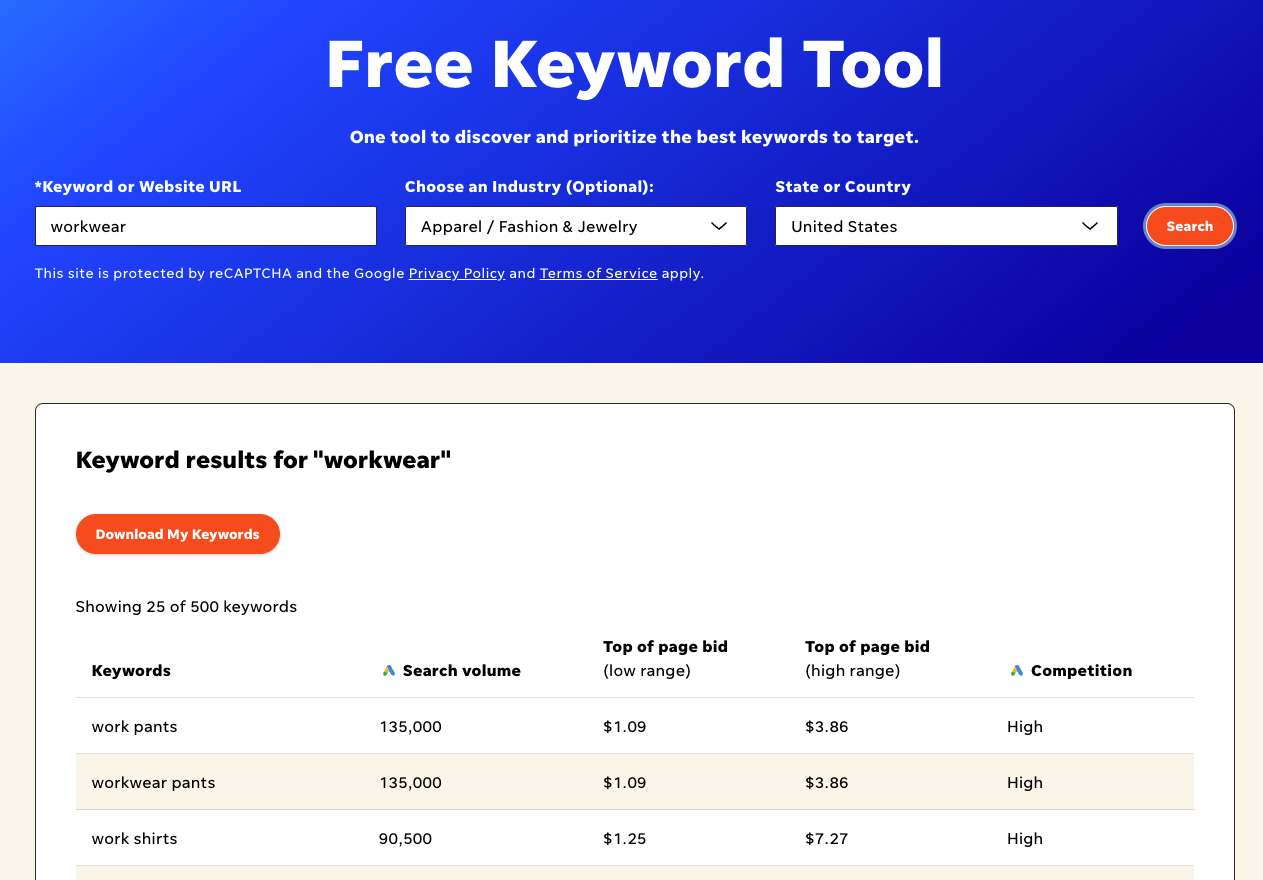
When researching keywords, use a tool like Semrush, WordStream, or Moz Keyword Explorer. These solutions provide valuable insights, such as search volume, keyword difficulty, and matching terms, to help you determine whether the queries are ideal for your niche.
3. Write unique product descriptions
Product descriptions serve two critical roles: they convince a customer to purchase an item, and impact the SEO performance of the product page.
A good product description not only follows SEO best practices but also includes detailed information to help the user determine whether the item is right for their needs. Here are tips for writing a helpful, SEO-driven description:
- Avoid duplicate content. Never copy the product description directly from the manufacturer. Generic content often lacks persuasive copy, sounds less professional, and can lead to a duplicate content penalty from search engines, which hurts your rankings.
- Write for humans first. While you must include primary and secondary keywords, the content should remain natural. Both customers and search engines can determine when you are simply stuffing keywords, which impacts your ranking as well as your reputation.
- Focus on benefits, not just features. Including benefits will entice customers to purchase the product and help target relevant long-tail keywords. To effectively sell the advantage of using a product, include a bulleted list of features immediately followed by the benefit those features provide.
- Connect on an emotional level. Ideal descriptions relate to the thoughts, desires, and needs of your target audience, presenting the product as a solution. To connect deeper with customers, identify their pain points and explain how your product will help them.
- Use sensory language. Trigger customers’ sensory areas of the brain by strategically using words related to sight, sound, taste, smell, and touch. This is especially critical in an online environment where they cannot physically interact with the product.
- Mind the length and formatting. Use bulleted lists, limit each paragraph to three sentences, use proper headings, and include ample whitespace to make your product description easily scannable. For long-form descriptions, avoid going over 500 words, while short descriptions should be fewer than 100 words.
4. Use clean product slugs
The product slug in WooCommerce is a customizable portion of the product permalink that helps uniquely identify the product and improve search visibility. It is an important ranking factor that helps both search engines and users understand a page’s content.
Creating SEO-friendly permalinks that are clean, concise, and descriptive improves your pages’ chances of appearing in relevant search results. Here are the best practices for creating a permalink or slug in WordPress:
- Be keyword-focused and short. Your slug should be concise and contain the main keyword that describes the product, which effectively improves search ranking. For example, use yourstore.com/men-work-shirts instead of a generic URL like yourstore.com/?p=123.
- Keep it clean and simple. Avoid using special characters, symbols, and unnecessary filler words known as stop words, such as and, the, or of. Use hyphens to separate words when needed to avoid adding unnecessary characters and cluttering the URL.
- Set a consistent structure. Maintain a consistent URL structure across all products and categories. By default, WooCommerce URLs include the /product/ keyword, such as https://example.com/product/my-t-shirt.
- Modify the permalink to optimize the slug. Customize the default URL structure to make it cleaner and more descriptive, like https://example.com/my-t-shirt instead of https://example.com/product/my-t-shirt. You can achieve this using a plugin like Permalink Manager for WooCommerce, but be sure to set up a 301 redirect to prevent broken links and maintain optimal search engine discoverability.
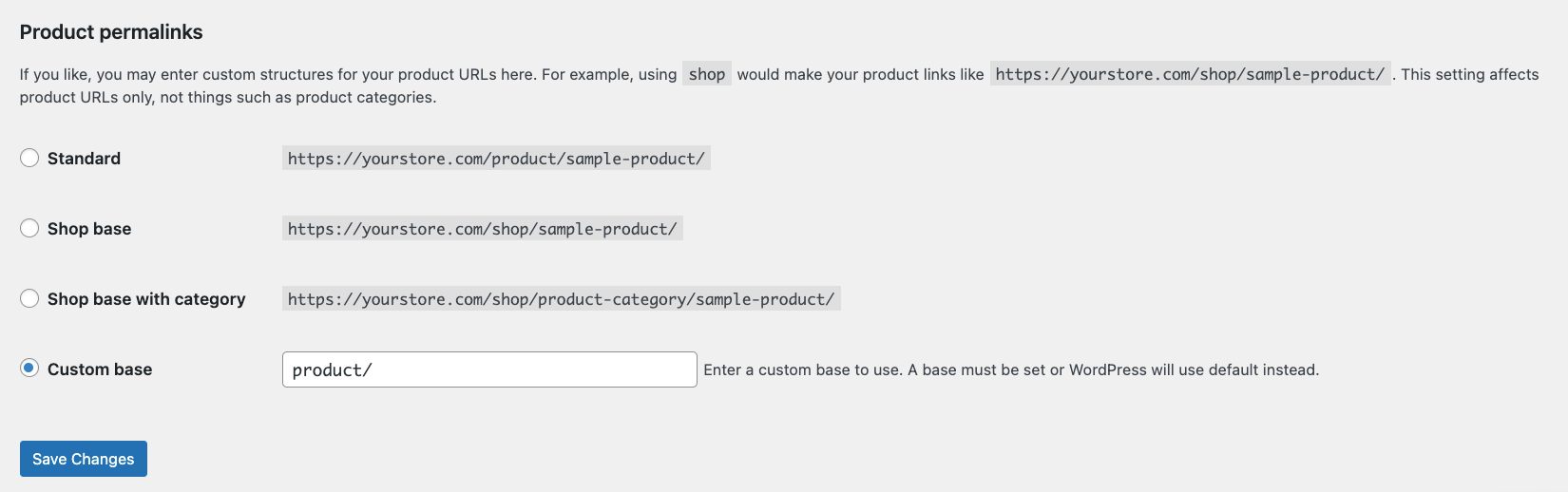
You can change WooCommerce permalinks by navigating to Settings → Permalinks in your WordPress dashboard, scrolling to the Product permalinks section, and selecting your preferred structure.
5. Optimize the product images
While images are essential for building customer trust and enhancing the user experience, their optimization is often overlooked in an overall strategy for optimizing a WooCommerce store.
Optimized images not only improve site speed but also increase visibility in Google Image Search, driving customers with deeper purchase intent to your site.
Here are the best practices to optimize the images of your WooCommerce store:
- Use descriptive alternative text (alt text). Add alternative text to images of your products to describe the content to search engines and visitors using screen readers, serving as an important accessibility and ranking factor. To write a good alt text, be specific, include relevant keywords naturally, and keep it concise – ideally under 125 characters.
- Optimize the file naming. Before uploading, name your files with descriptive, keyword-rich names to increase the likelihood of your image being featured in search results. Replace generic names like IMG_1234.jpg with names like 12-cup-coffee-maker-stainless-steel.jpg, but avoid making them too long.
- Compress images for site speed. Since large, slow-loading images severely hurt your search rankings and frustrate visitors, compress your images to reduce file size without sacrificing quality. You can use a photo editing application like Photoshop, or an online tool like TinyPNG and ShortPixel.
- Serve images via a CDN. Use a CDN to cache static content of your online store, like images, on a server closer to your customers. This enables your images to load more quickly and reduces the host server load, improving overall site performance.
- Avoid duplicate images. Don’t upload the same image multiple times, as it wastes storage space. Instead, reuse the image that you already uploaded to the WordPress media library for visually identical products, such as shirts of various sizes.
6. Structure product categories and tags for SEO
Product categories and tags are WordPress taxonomies that organize your products, making it easier for customers to find items and search engines to understand your store’s structure.
Properly structured category pages are a crucial part of your WooCommerce SEO checklist, which involves following practices:
- Use categories and tags strategically. Use categories for broad, hierarchical grouping that acts like the table of contents for your store, such as men’s, women’s, or unisex. Meanwhile, add tags for more specific keywords that describe a product’s properties, like casual or summer wear.
- Avoid duplication. Never use the exact same name for both a tag and a category. Also, be consistent with naming, such as using only t-shirt and not t-shirts or tshirt, because confusing search engines will affect your store’s SEO performance.
- Optimize category pages for broad keywords. Category pages are typically higher up in the site hierarchy and can rank for broader, more competitive keywords that individual product pages would struggle with. With this in mind, include high-volume keywords like office chair or men’s outerwear to effectively improve your store’s searchability.
- Add unique, helpful content. Write relevant, keyword-rich descriptions for each category and avoid duplicate content across similar pages. Include helpful buying guides, comparison information, or a brief introduction to improve both SEO and user experience.
- Highlight popular products. Showcase your bestsellers at the top of category pages to simplify customer navigation and pass more link authority to your most important products.
- Optimize SEO titles and descriptions. Optimize the meta title and meta description for the category page to improve its visibility on search engines. Additionally, place your primary keyword near the beginning of the title to help users scan the search results more easily and enhance keyword prominence, a crucial ranking factor.
📚 Suggested reading
Check out our tutorial to learn how to properly write meta description and meta title on WordPress.
7. Enable breadcrumbs for better navigation
Breadcrumbs are navigational trails that show a page’s location within your site’s hierarchy. They commonly look like this:

Enabling breadcrumbs contributes to enhancing WooCommerce SEO and overall user experience because it brings several benefits:
- Internal linking and SEO. Breadcrumbs create crucial internal links between pages in your WooCommerce site, helping search engines to understand your site’s hierarchy and structure. Not only does this improve SEO performance, but it also simplifies user navigation across your site.
- Search engine visibility (rich results). Breadcrumbs often appear directly SERPs as rich results. This enhances your listing’s visibility to users, which helps improve the CTR.
- Improved customer experience. They enable customers to easily navigate back to previous categories or related products, enhancing the browsing experience and helping them find what they’re looking for.
Given the benefits, enabling breadcrumbs on your WooCommerce online store is crucial. It is also relatively simple, as you can use an SEO plugin like Yoast, with the following steps:
- In your WordPress admin dashboard, navigate to the sidebar → Appearance → Theme Editor.
- Edit your single.php file to add breadcrumbs in your blog posts, or header.php to add them to your entire website.
- Copy and paste the following code snippet at the bottom of the file:
<?php
if ( function_exists( 'yoast_breadcrumb' ) ) {
yoast_breadcrumb( '<p id="breadcrumbs">','</p>' );
}
?>- Click the Update File button to save your changes.
- Go to the WordPress sidebar → Yoast SEO → Settings.
- On the Yoast SEO setting page, expand Advanced and select Breadcrumbs.
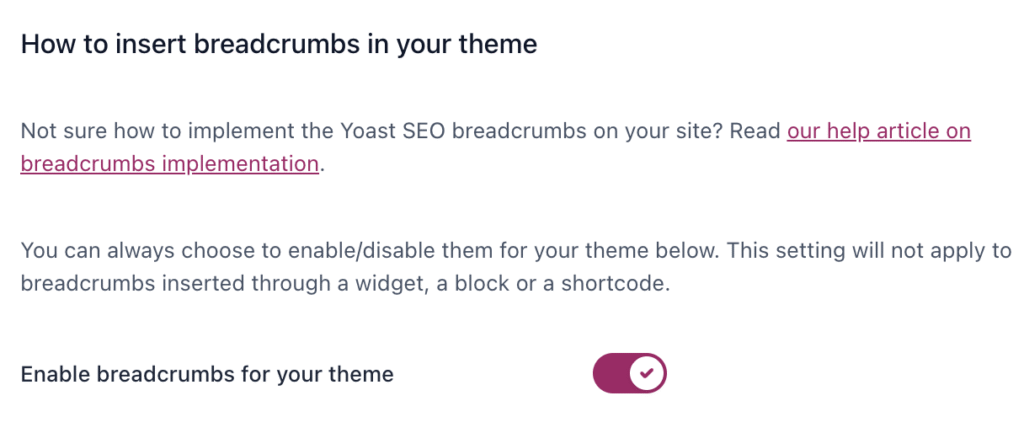
- Scroll down and toggle Enable breadcrumbs for your theme on.
- Click the Save changes button.
If you wish to use other plugins or methods, refer to our guide on how to enable breadcrumbs in WordPress.
8. Add product schema markup to enable rich snippets
Schema markup for WooCommerce is code added to your store to give search engines explicit information about your products. For example, you can include price, availability, and customer ratings.
Schema markup commonly appears as rich snippets in search results, which are enhanced listings that display extra information like star ratings, prices, and product availability. These snippets are especially useful for boosting your products’ visibility and attracting more clicks.
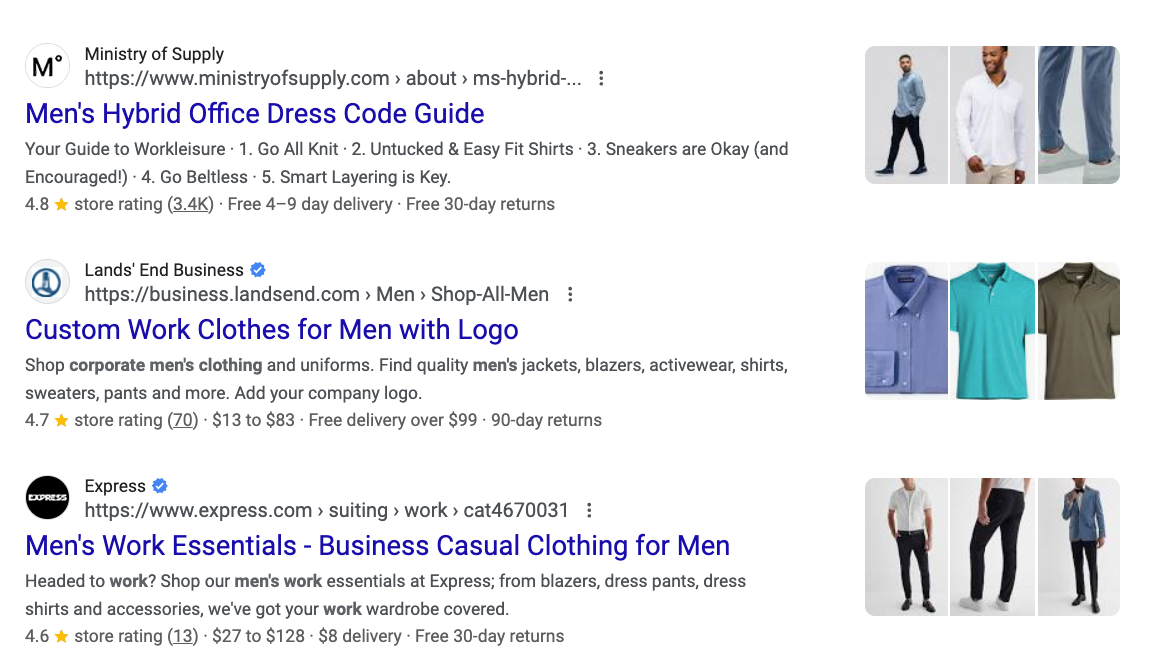
Many WooCommerce themes include built-in schema markup. Use Schema Markup Validator to check whether your site has this feature enabled. Simply enter your site address into the tool and run the test to see all active schema and identify any errors.
If your ecommerce store doesn’t have schema markup, consider adding it manually or using a WordPress plugin like Schema. Check out our tutorial to learn more about how to enable schema markup and different schema types.
Alternatively, you can switch to a WooCommerce theme with built-in schema markup.
9. Improve Core Web Vitals
Core Web Vitals (CWV) are the metrics Google uses to measure its performance, ensuring your site is fast, interactive, and visually stable. Achieving a good CWV score is important because a fast site is a ranking factor, but it also keeps visitors engaged and reduces lost sales.
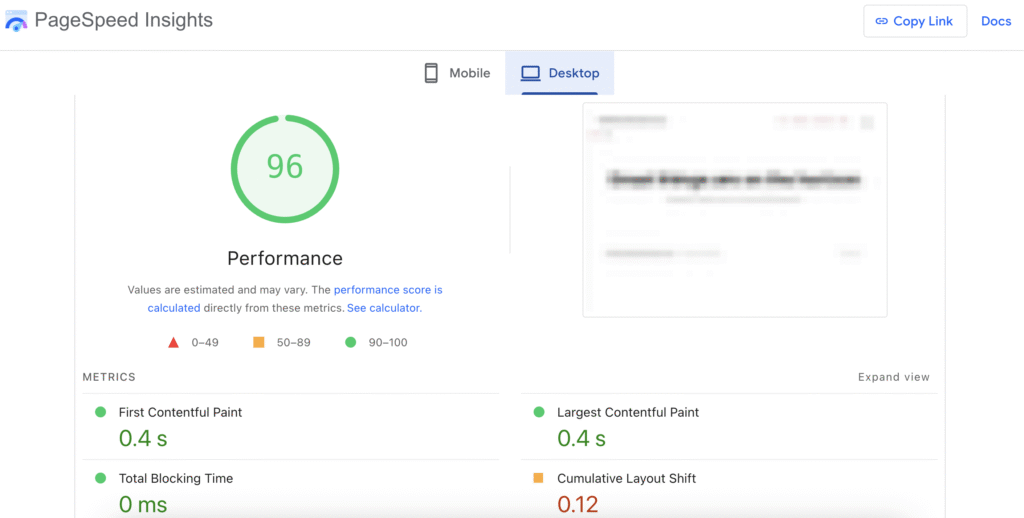
You can check your site’s performance against these metrics using tools like PageSpeed Insights or GTMetrix. For Hostinger users, the hPanel integrates with PageSpeed Insights for easy access to performance reports.
To effectively speed up your WooCommerce store, implement these key strategies:
- Choose reliable hosting. Selecting a hosting plan designed for ecommerce, such as Hostinger’s Managed WooCommerce hosting, helps maintain optimal performance. Since it’s specifically designed for online stores, it can reliably handle high volumes of traffic and transactions.
- Enable WordPress caching. Activating caching drastically reduces loading times by storing a static version of your content and frequently accessed database queries in memory. Aside from a caching plugin, Hostinger users can enable it via hPanel.
- Optimize image and static content. Optimize all images on your store using the best practices explained earlier, and implement lazy loading to load the assets only when visitors access them. Similarly, optimize other static content, such as videos.
- Audit plugins and extensions. Overloading your site with too many plugins can waste resources and slow down your site. Regularly check plugins, keep only the essential ones, and use multi-function plugins to minimize the number of installations.
- Minify scripts and update PHP. Minifying JavaScript, CSS, and HTML scripts removes redundant characters, such as whitespace and comments, from your code, thereby reducing page size and speeding up loading time. You should also maintain an up-to-date PHP version for better execution speed and resource management.
- Clean up the database. Over time, databases accumulate unnecessary data that prolongs back-end query execution, such as old product revisions and expired options. Cleaning this data and limiting the number of WordPress revisions enhances query efficiency.

10. Use blog content to attract organic traffic
Creating blog posts is an effective strategy to establish your expertise, improve your credibility, and drive organic traffic that is highly likely to convert into customers.
In order for the SEO content for ecommerce to be effective, you need to structure a content funnel by intelligently targeting different types of keywords:
- Informational keywords. Target users who are starting their research and looking for information using what is or how to keywords. Content for these queries effectively builds awareness of your brand, establishes your authority in the product niche, and draws potential customers to the top of your marketing funnel.
- Commercial keywords. Aimed towards users who have moved past initial research and are comparing solutions, using queries like “best men’s leather wallet for durability.” These keywords are closer to a purchase decision and attract visitors who are likely to make a purchase.
After identifying the type of keywords, brainstorm blog topics that are relevant to your brand using tools like Google Trends or Ahrefs. Then, refine your ideas by focusing on long-tail keywords with lower competition to increase the likelihood of ranking on the search engine results pages.
Once you have identified the keywords and topic, write the blog content. To create SEO-driven, informative, and engaging articles that effectively attract sales, follow these practices:
- Build topical authority and clusters. Organize your content around core topics and link related posts together to create a content cluster. This signals to search engines that your site offers a comprehensive and expert resource, thereby boosting the authority of your main topic pages and product pages.
- Include keywords strategically. Add target keywords to title tags, meta descriptions, headings, and anchor text for internal linking. These are key areas where search engines look to understand the content’s relevance.
- Use internal links to guide buyers. Link to product, category, or other converting pages in your blog posts. This directly guides readers from informational content to the products they need to purchase.
- Maintain content quality and freshness. In addition to creating new content, regularly audit underperforming blog posts. Aside from improving the performance of existing keywords, it benefits the entire store because fresh content indicates to search engines that your site is active.
- Plan a consistent schedule. Use a content calendar to plan topics, keywords, and publishing dates, and consider writing in batches. This maintains a steady content flow and helps you create the cluster more strategically.
How to track your WooCommerce SEO progress
Tracking your WooCommerce SEO performance involves monitoring your site traffic and customer behavior. This is crucial for making informed decisions and ensuring that your SEO efforts translate into tangible sales.
Important! Since SEO is a long-term commitment, noticeable improvements often take three to six months to appear.
To objectively assess your WooCommerce SEO performance, regularly monitor the following metrics:
| Metric | What it measures | Why it matters |
| Organic traffic | Visitors coming from unpaid search results, not ads or promotions. | Indicates that users actively search for your products or content, a signal of good keyword strategy. |
| Keyword rankings | The position of your content or product in the SERP of the given keyword, relative to other websites. | Directly measures how successful your content and on-page optimization are in competing with other websites. |
| Conversion rate | The percentage of visitors who complete a desired action on your website, such as making a purchase or signing up for a newsletter. | Determines if your optimized web pages are effective in generating sales or subscribers. |
| Bounce rate | The percentage of visitors who leave your site after viewing only one page. | May indicate the quality of user experience, which affects other key metrics, such as rankings and conversion rates. |
| Abandonment rates | Measures how often customers leave items in the shopping cart or abandon the shopping funnel. | Points to bottlenecks in the purchasing process, which may impact performance or user experience. |
Common tools used for tracking SEO metrics include:
- MonsterInsights and Google Analytics (GA). MonsterInsights integrates Google Analytics with WooCommerce, allowing you to check detailed data like revenue by category, cart abandonment rate, and top-performing products directly from your WordPress dashboard.
- Google Search Console (GSC). GSC is used to monitor keyword rankings, indexing issues, and CTR, helping you identify underperforming queries and address visibility issues that directly affect search traffic.
- Website speed testing tools. Tools like gtmetrix.com and tools.pingdom.com are vital for auditing your site’s performance and diagnosing Core Web Vitals issues.
If the tracked metrics show that specific pages underperform, the strategy – whether it’s the keywords, content, or user experience (UX) – must undergo continuous refinement.
Is WooCommerce good for SEO?
WooCommerce is by default SEO-friendly because it runs as a plugin on top of WordPress, a Content Management System (CMS) that provides a lightweight and well-performing underlying infrastructure for your online store. It inherits WordPress’s clean permalink system and semantic HTML structure, supports breadcrumbs, and works with established SEO plugins.
However, this strong foundation alone won’t automatically guarantee top search rankings. Achieving high visibility and attracting motivated buyers requires actively customizing and optimizing the content you add, such as product titles, images, and descriptions.
The core principles remain: you must continuously fine-tune your strategy using proven SEO techniques and leveraging powerful tools to significantly enhance product SEO as well as maintain your position in SERPs.
Next steps: Secure your WooCommerce store
Beyond implementing proper SEO practices, securing your WooCommerce store is a crucial step that contributes to search engine ranking and customer trust.
Search engines like Google will mark an unsafe site with warnings, which can hurt your traffic. Similarly, customers are much more likely to visit and make a purchase on a website that looks and feels secure.
Securing your WooCommerce store is especially important because it collects sensitive data like shipping addresses, payment information, and personal details. Safeguarding this information is not only crucial for your business reputation but also helps avoid legal liabilities.
Some of the most essential practices for securing your WooCommerce store include installing an SSL certificate to enable HTTPS, implementing specialized tools like Wordfence to protect your site against common threats, and regularly updating all software in your infrastructure.Check out our tutorial on securing a WooCommerce store to learn more about the best practices in more detail.

Aris is a Content Writer specializing in Linux and WordPress development. He has a passion for networking, front-end web development, and server administration. By combining his IT and writing experience, Aris creates content that helps people easily understand complex technical topics to start their online journey. Follow him on LinkedIn.


