What Transport Layer Security (TLS) is and how it works
Mar 10, 2026
/
Sopha M.
/
5 min Read

Transport Layer Security (TLS) encrypts communication between websites and visitors to avoid security issues like data breaches. It works by generating cryptographic keys that the client and server use to encrypt the exchanged information, verifying that both parties are legitimate.
TLS is the updated version of Secure Sockets Layer (SSL), but with more benefits like improved security and a more efficient encryption method. Both serve a similar purpose in establishing HTTPS, a secure connection method for a website.
Since TLS offers various benefits, such as avoiding costly cyber attacks and improving visitor trust, it has become an essential website security practice. Learn more about what TLS is, how it works, how it differs from SSL, and why you should install it on your website.
What is Transport Layer Security (TLS)?
Transport Layer Security (TLS) is a cryptographic protocol that uses data encryption to secure the connection between a web server and a web application over the internet.
TLS applies to all data exchanged over a network, including emails, web browsing sessions, and file transfers. As a result, cybercriminals cannot access users’ sensitive data like login credentials and credit card numbers as they are encrypted.
TLS is the newer, updated version of Secure Sockets Layer (SSL). While both security protocols serve the same purpose and work similarly, there are important distinctions between them.
How does TLS work
TLS encrypts communication between the client and server to establish a secure connection. It uses two security layers: the TLS handshake and record protocol, which use symmetric and asymmetric cryptography methods to secure data transfer between clients and web servers.
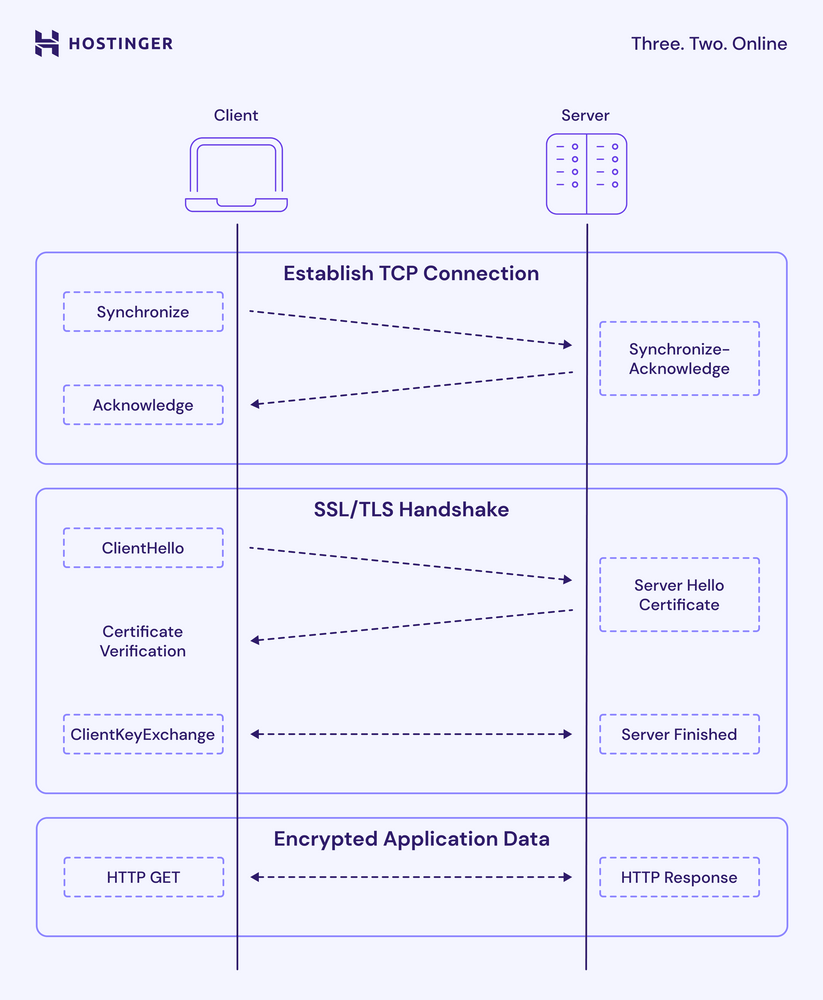
The TLS handshake protocol uses asymmetric cryptography to generate public-private keys that allow the client and server to verify each other and exchange data securely. Here’s how it works:
- When accessing a secured web application or site, the client sends a list of all TLS versions, suggestions for a cipher suite, and a random string of numbers.
- The server confirms the TLS options to use to connect to the client.
- The server sends a TLS certificate to the client for authentication.
- After validating the certificate, the client sends a pre-master key encrypted by the server’s public key and decrypted by the private key.
- The client and server generate session keys using the random numbers and the pre-master key.
- Both the client and server exchange encrypted messages to confirm they can exchange data securely.
- The TLS handshake process is finished, and the secure connection is initiated.
The TLS record protocol uses symmetric encryption to generate unique session keys for each connection during the handshake process. It also adds all data exchanged with a hash-based message authentication code (HMAC) to verify the data authenticity.
As standard practice for most modern browsers and other applications, TLS serves three purposes:
- Encryption. It hides the data transferred from third parties through encoded information.
- Authentication. TLS connection ensures both parties’ identities are who they claim to be by providing a certificate.
- Integrity. Finally, it verifies that the data transmitted has not been forged or tampered with during the delivery process.
TLS vs SSL: What’s the difference?
Secure Sockets Layer (SSL) is just the older version of TLS. Since the first version of TLS was released as an upgrade of SSL 3.0, they are often used interchangeably and commonly referred to collectively as TLS/SSL.
Both work similarly, using cryptographic keys with various application-layer protocols, such as HTTP, FTP, IMAP, and SMTP. However, they have several important differences:
| Transport Layer Security (TLS) | Secure Sockets Layer (SSL) | |
| Protocol | Secure Sockets Layer (SSL 2.0, 3.0) – deprecated and insecure | Transport Layer Security (TLS 1.0–1.3) – actively maintained and used |
| Encryption | Limited ciphers, weaker MACs | Modern ciphers, compatible with HMAC |
| Handshake process | Slower, fewer alert types, vulnerable to downgrade attacks | Faster, multiple alert messages, protects against downgrade |
| Security strength | Vulnerable to known attacks (POODLE, BEAST), no longer secure or compliant | Stronger design, mitigates known attacks, industry standards |
Overall, TLS offers a more streamlined handshake process, robust encryption algorithms, and secure cipher suites. As a result, it has better data security and authentication than SSL.
Since they work similarly, SSL and TLS serve the same purpose in establishing a secure data transfer as HTTPS.
How does TLS work with HTTPS?
TLS enables web applications or sites to establish a secure HTTPS connection. Before we discuss it, note the difference between HTTP and HTTPS.
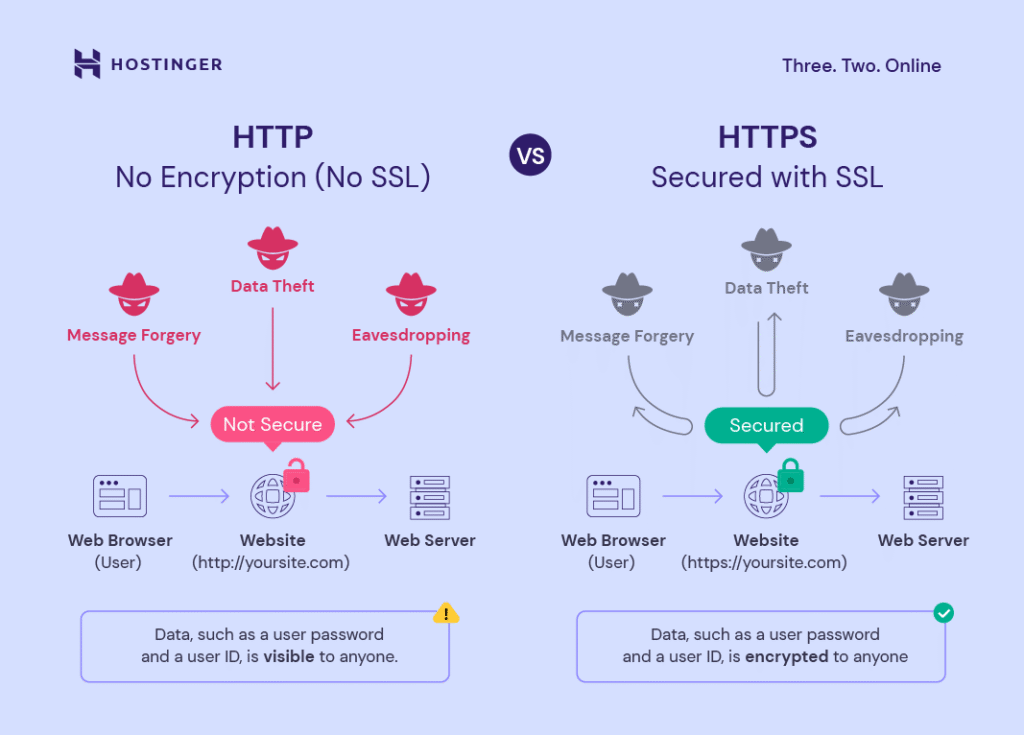
HTTP is the standard protocol for communicating and transferring data between applications. Here, information like passwords and contact details is transported in plain form, meaning parties infiltrating the connection can access the data. This is why most modern browsers deem HTTP sites as not secure.
Meanwhile, HTTPS is the secure version of HTTP that uses TLS as the security layer to encrypt data over the network and protect communications between a web server and a browser. In short, HTTPS is the implementation of TLS, which works on top of the Transmission Control Protocol (TCP).
Additionally, TLS has various versions, with the security standard now being TLS 1.2 or later. TLS 1.3, its latest version, offers a shorter TLS handshake process and more secure algorithms, resulting in faster connections and better performance.

What are the benefits of TLS?
TLS provides encryption, authentication, and integrity – three core benefits that protect businesses and applications from costly data breaches and cyberattacks. Here’s how it can safeguard your website:
- Preventing eavesdropping and tampering. TLS prevents eavesdropping by encrypting all communications. Because it uses trusted cipher suites, hackers cannot intercept or alter online transactions.
- Providing data integrity. TLS provides privacy and data integrity by supporting robust authentication code. It prevents third-party modification during transport, ensuring that all information will reach its destination without any loss or alteration from third parties.
- Improving search engine optimization (SEO). TLS enables your website to use the secure HTTPS protocol. Since website security is a vital Google ranking factor, it improves your site’s ranking on search engines.
- Enhancing customer trust. Using a TLS connection offers users a secure web browsing experience. Since customers feel safe, they are more likely to input their data to create a new account or make online purchases.
- Offering granular control. TLS has a robust and reactive alert system to help users identify problems. It gives users control over what can be transmitted, so they can receive notifications like “err SSL version” or “cipher mismatch error” about potential issues.
To get TLS benefits, purchase a TLS certificate from a certificate authority like DigiCert, Sectigo, or GeoTrust. If you use a web hosting service from a provider like Hostinger, you already get a free SSL/TLS certificate for your site.
Since it provides various benefits, installing a free TLS certificate is one of essential practices to keep your website secure and reliable.
What are other important security practices besides TLS?
TLS is a crucial first step in securing your website, but it’s just one piece of a complete security strategy. While it protects data during transit, a comprehensive website security plan should also include regular security audits.
A security audit is a thorough technical analysis of your site’s systems, code, and configurations to find weaknesses cyber criminals might exploit to access sensitive data. It looks for issues like cross-site scripting (XSS), unpatched vulnerabilities, bugs, and weak password policies.
Since new threats and vulnerabilities emerge continuously, regularly performing security audits protects your website and its users from potential attacks. Given its importance, we recommend you check out our tutorial on conducting a website security audit to learn more about how to do it and the tools that help streamline the task.

Dinda is a WordPress and digital marketing enthusiast. She loves to share her knowledge with others so that they can be successful in their online endeavors. During her free time, she enjoys watching movies and exploring historical places.



Comments
August 26 2024
How to enable TLS 1.2 on hostinger?
August 28 2024
Hey there! To activate TLS 1.2 on Hostinger, make sure your SSL certificate is correctly installed and active. Hostinger's Web and Cloud hosting plans come with free SSL certificates that support TLS 1.2 by default. If you're using VPS hosting, you'll need to manually install SSL certificates following your operating system's guidelines ;)