SMTP ports: Which one should you use for email services
May 22, 2026
/
Noviantika G. & Linda D.
/
6 min Read

Choosing the right SMTP port is important when setting up an email server, as it plays an important role in mail submission. A wrong server configuration may cause errors when sending and receiving emails.
The best SMTP port to use depends on your specific needs. Some of the most common SMTP ports are 25, 465, 587, and 2525. Port 587 is considered the most secure.
This article will explain what SMTP ports are used for and discuss its four types. We will also explain their functions and features to help you choose the right port for your SMTP server.

What Is an SMTP Port?
An SMTP port is a specific port on a server that SMTP (Simple Mail Transfer Protocol) uses to communicate. It’s a communication endpoint that handles email data transfer over SMTP as it moves from one server to another.
What Are SMTP Ports Used For?
Before we jump into what SMTP ports are used for, let’s define what SMTP, SMTP ports, and SMTP server ports are.
- SMTP – a set of rules governing how email is sent and received.
- SMTP ports – the specific ports on a server that SMTP uses to communicate.
- SMTP server ports – communication endpoints that handle information transfers from one server to another.
To start using an outgoing server, you must configure your email account. To do this, enter an IP address and a host port number to route your emails.
There are phases emails go through before they reach the recipient:
- Email submission – submit emails to an outgoing mail server over SMTP. So, you must decide which port to use.
- SMTP relay – relay messages between two mail servers. Users don’t have to configure a port for SMTP relaying as it uses the default port.
- Email receiving – the emails arrive at the recipient server. This process is handled by the Internet Message Access Protocol (IMAP or Post Office Protocol 3 (POP3).
Suggested Reading
Check out our comparison article about POP3, IMAP, and SMTP to learn more about these email protocols.
Which SMTP Port Should You Use?
Each SMTP port supports at least one encryption level. The SSL/TLS encryption, for instance, determines email transmission security. Make sure to choose an SMTP port that is most suitable for your security needs.
The four available encryption levels are:
- Secure Sockets Layer (SSL) – a deprecated technology that protects email transmissions between two SMTP servers.
- Transport Layer Security (TLS) – the successor of SSL, it encrypts internet traffic using more modern and secure systems.
- Opportunistic TLS (STARTTLS) – it upgrades an insecure connection to a secure one using SSL/TLS.
- Null (NONE) – provides no encryption.
Here’s a comparison table for SMTP ports and their encryption level type:
| SMTP (Outgoing Mail Server) | |||
| Port number: 465 | Port number: 587 | Port number: 25 | Port number: 2525 |
| Encryption: SSL | Encryption: STARTTLS | Encryption: NONE | Encryption: TLS |
Pro Tip
On hPanel, you can check your account’s default email configuration by navigating to Emails → Domain Name → Configuration settings.
SMTP Port 25
Port 25 is the default SMTP port to send and receive emails. It uses Transmission Control Protocol (TCP) to establish a connection between two computers.
SMTP port 25 is a good channel to test your connection or troubleshoot email configuration issues. For example, suppose the server won’t respond using port 25 when setting up your website’s contact form. In that case, the issue may not be caused by the SMTP server.
That said, port 25 has some drawbacks. Although port 25 is still recognized as the default SMTP port by the Internet Assigned Numbers Authority (IANA), we don’t recommend using it as a mail submission channel. One reason is that port 25 is commonly used to spread spam and malware.
This standard SMTP port also doesn’t encrypt messages, transmitting information in plain text. Threat actors can intercept unencrypted data sent over port 25, which may introduce many SMTP vulnerabilities.
As a result, many email hosting and internet service providers (ISPs) have decided to block unsolicited email messages sent over port 25 traffic.
SMTP Port 465
IANA introduced port 465 as an upgrade to port 25. However, the Internet Engineering Task Force (IETF) never officially endorsed 465 as an official SMTP port.
This newer version facilitates secure email transmission via Simple Mail Transfer Protocol over SSL (SMTPS). As a result, mail submission on port 465 is securely encrypted using an SSL or TLS certificate.
Unfortunately, SMTP port 465 has been deprecated and is no longer a widely accepted standard port for mail submission. We recommend using it only if your hosting or email service providers require the protocol.
SMTP Port 587
SMTP port 587 was introduced as a successor to channel 465. IANA and IETF recognize it as the current default port for email submission.
SMTP port 587 also supports STARTTLS, which works with SSL and TLS encryption. STARTTLS is a protocol command issued between an email program and a server. It encrypts information transmitted via TLS connections and offers SMTP authentication for accessing the mail server.
As a result, port 587 enables secure message submission and protects against spam and malware.
SMTP port 587 is currently the best option. It provides a more robust email security mechanism than the other ports.
However, there are some potential issues with using port 587 for SMTP. Since it is a newer version, not all email servers support port 587. Some may even block port 587 traffic to prevent spam. It may also be slower than other ports due to the additional layer of encryption.
Pro Tip
If you want to use port 587 for SMTP, check whether your email provider supports it. If your email provider doesn’t support port 587, choose different ports, such as port 25 or port 465. Also, if you use a firewall, you may need to configure it to enable traffic on port 587.
SMTP Port 2525
Port 2525 is a modern protocol used to connect to SMTP mail servers. It’s considered a secure option since it supports TLS encryption for data transmission.
This port is commonly used as it’s supported by many ESPs, ISPs, and cloud web hosting services. Sometimes, it’s used for configuring a virtual private server (VPS).
Port 2525 is usually an alternative when encountering connectivity issues with SMTP submission. For instance, if you use port 587 but the connection is blocked or refused, try switching to port 2525.
However, port 2525 is a non-standard channel. IANA and IETF don’t recognize it as an official SMTP method. Some email and web hosting providers also don’t support it.
For example, Hostinger only uses ports 465 and 587 for SMTP submission. We stopped supporting port 2525 in 2017.
Using SMTP at Hostinger
You can create an email account at Hostinger using Hostinger Email. On top of that, you can choose to use custom PHP scripts or a mail client to send emails.

If you opt for an email client or device, you must configure the settings using the SMTP details from your chosen email service.
For those using Hostinger Email, here’s how to access the SMTP details on hPanel and configure your email client:
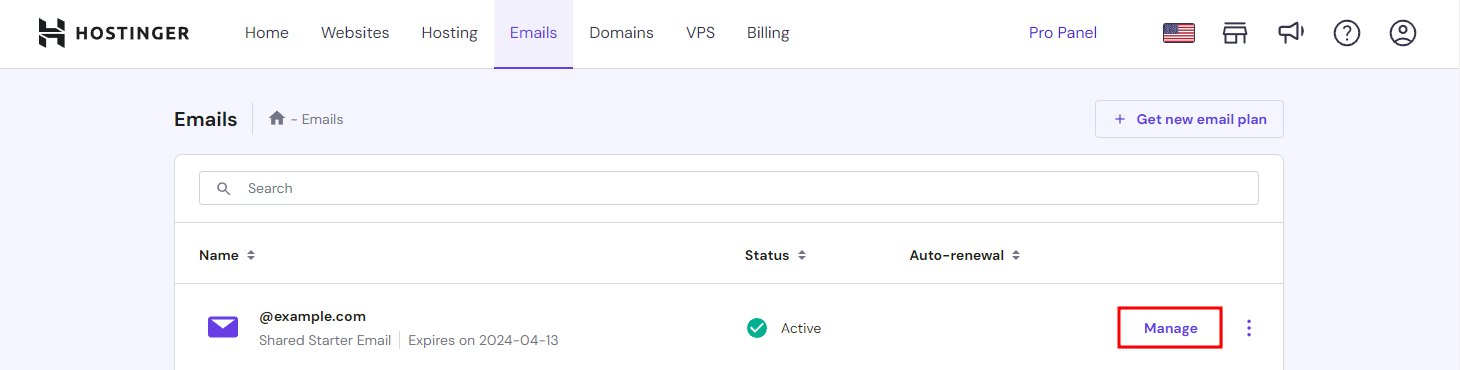
- Log in to hPanel and go to Emails from the menu bar.
- Choose an email address and click Manage.
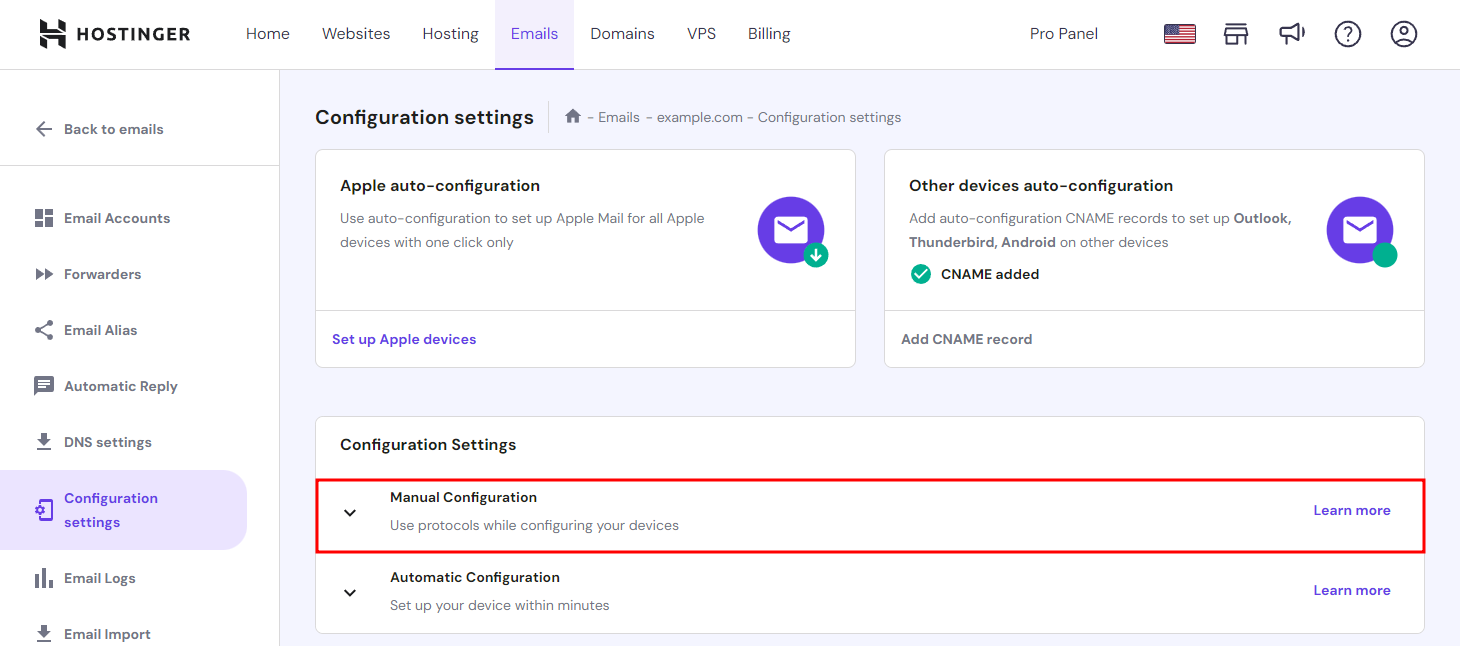
- Choose Configuration Settings from the sidebar and locate Manual Configuration.
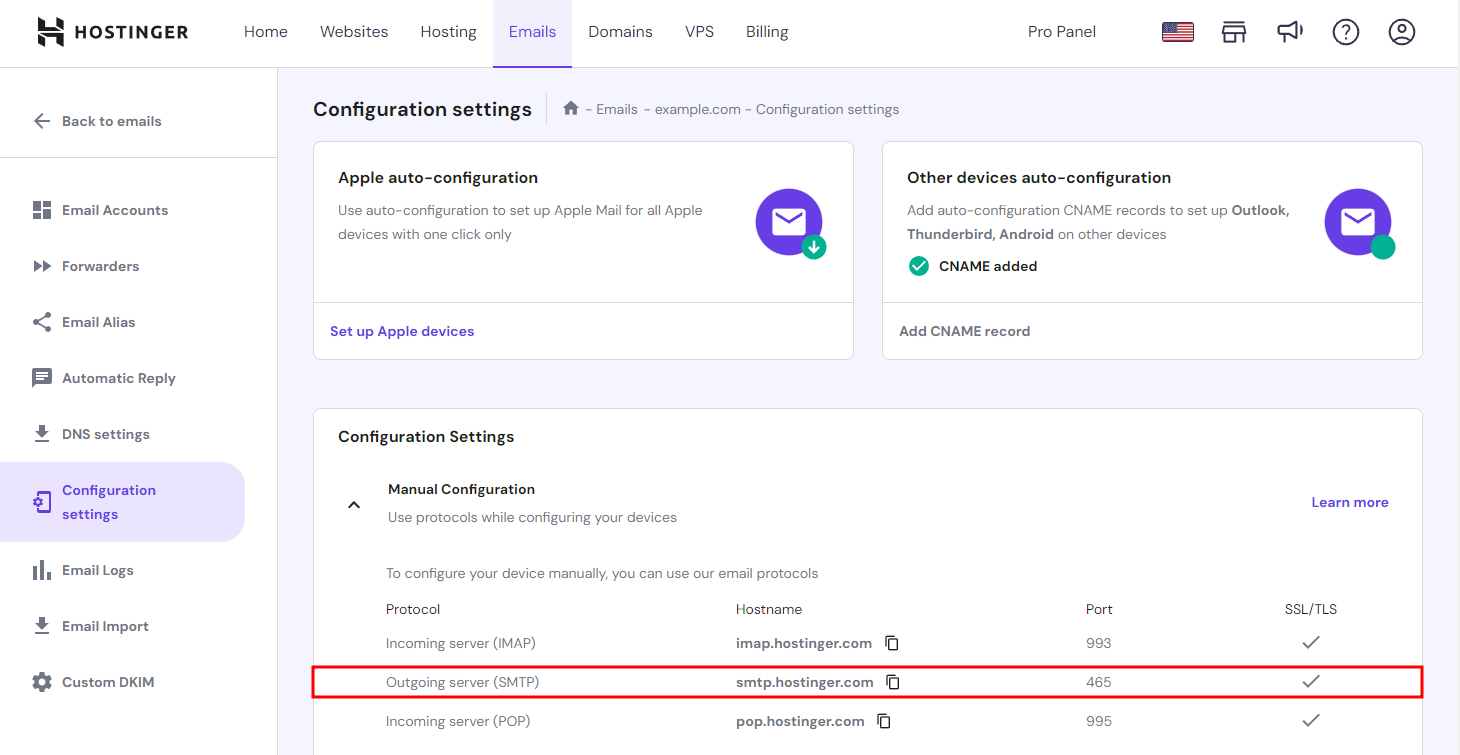
- Expand the Manual Configuration section and collect your Outgoing server (SMTP) details, including the SMTP hostname, port, and SSL/TLS support.
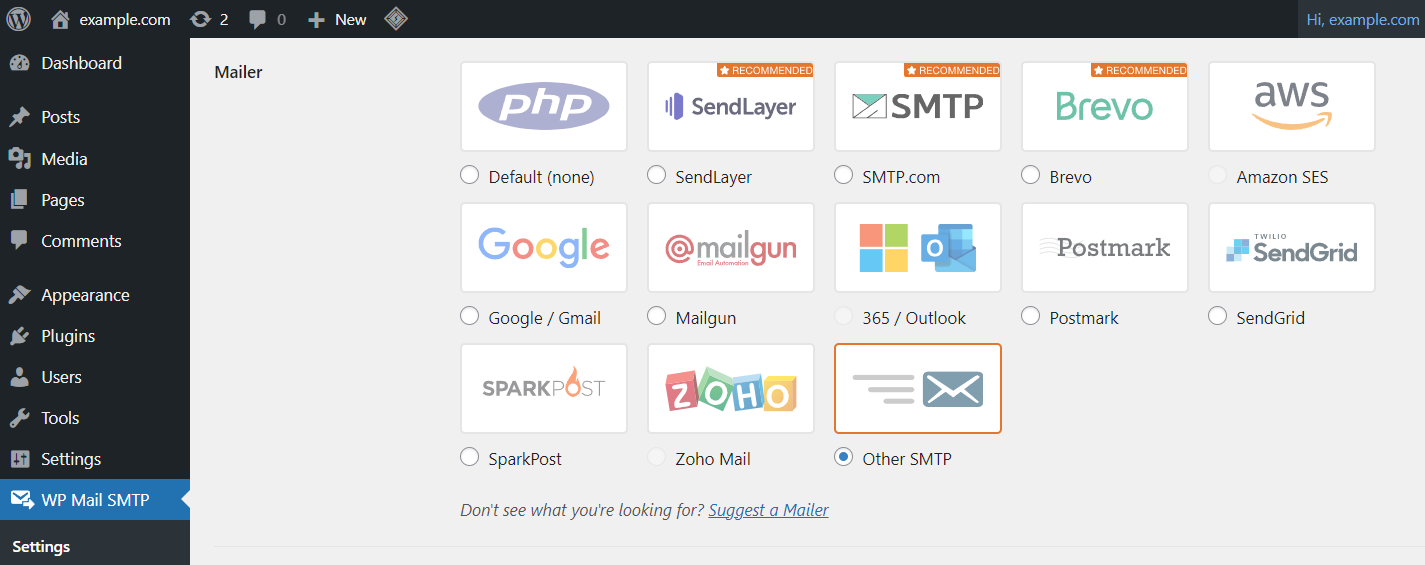
- Go to your email client settings to configure its SMTP. For example, if you use WP Mail SMTP, navigate to the Mailer section and select Other SMTP.
- Scroll down and fill out the Other SMTP form with the details from hPanel. Enter the SMTP hostname, encryption level, and port.
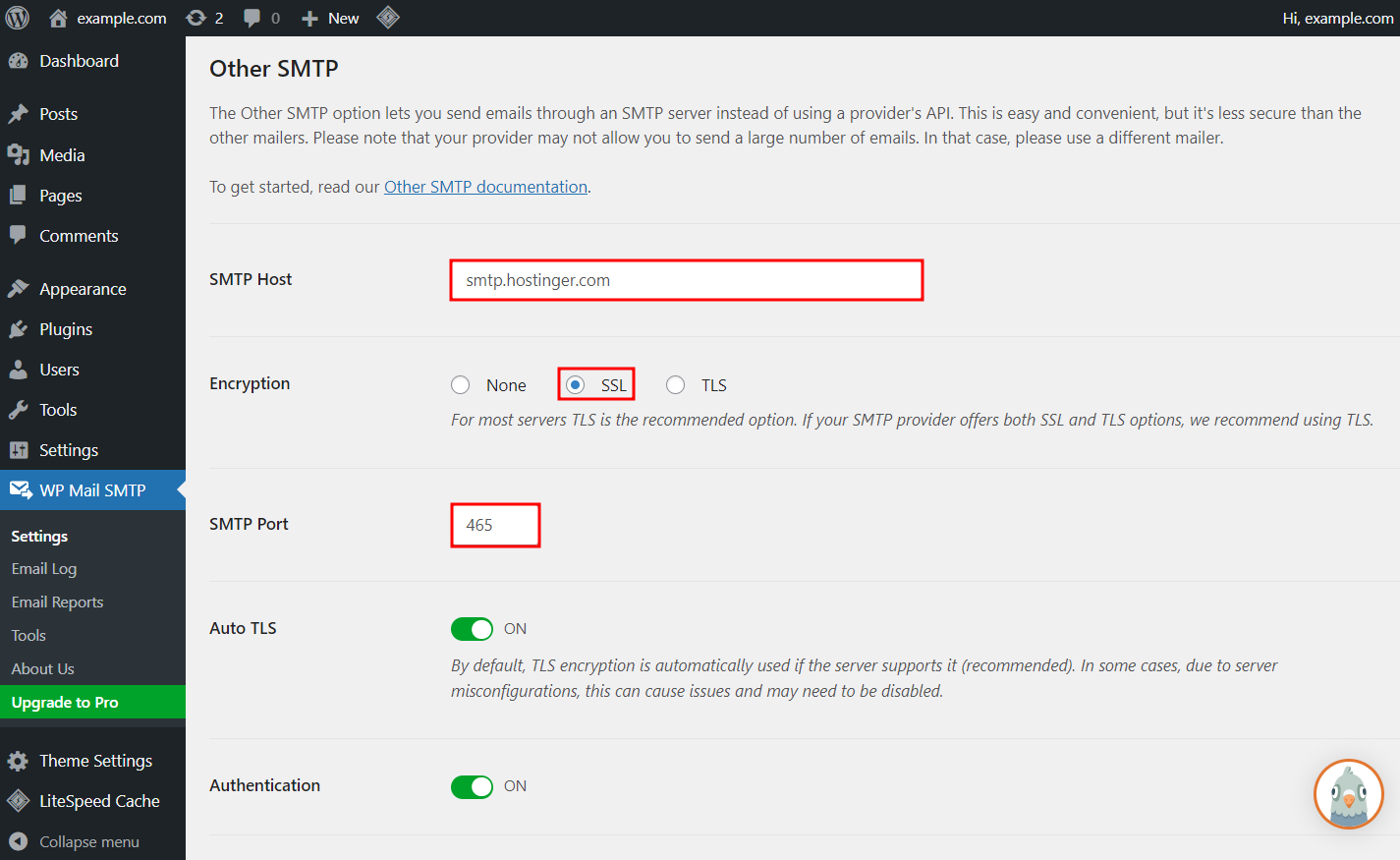
- Click Save Settings.
To make sure the SMTP is configured properly, try sending test emails from the client using Hostinger’s services. If you have email encryption issues, try these details instead:
Encryption level: TLS or STARTTLS
SMTP port number: 587
Hostname: smtp.hostinger.com
Conclusion
SMTP is a protocol that allows you to send emails across the internet. Meanwhile, SMTP ports are network communication endpoints between mail servers, helping route messages to the right server.
Choosing the right host port is important for sending emails securely and reliably. Here is a summary of the four different SMTP ports:
- Port 25 – the default mail submission port. However, it’s not recommended because it doesn’t have an encryption mechanism. Currently, port 25 is mostly used as a message relay port.
- Port 465 – intended as a secure SMTP port, as it uses SSL encryption. However, IANA stopped supporting the protocol and replaced it with STARTTLS encryption.
- Port 587 – the successor of port 465 and the default transmission channel for SMTP. Port 587 provides a secure email delivery process using STARTTLS encryption.
- Port 2525 – an alternative port you can use when there are connection issues with port 587. However, IANA and IETF don’t recognize it as an official SMTP port.
We hope this article has helped you choose the right port for your SMTP. If you have any questions or suggestions, please leave them in the comments section below.
Check Out These Email Tutorials
How to Set up Outlook
How to Set up Gmail for Your Own Email
How to Add Emails on Mac

Noviantika is a web development enthusiast with customer obsession at heart. Linux commands and web hosting are like music to her ears. When she's not writing, Noviantika likes to snuggle with her cats and brew some coffee.

Linda is a seasoned Content Writer specialized in website creation. With her passion for the written world and obsession with helping others, her goal is to deliver resourceful content pieces for all skill levels. When she’s not writing, Linda likes to cross stitch and watch films. Follow her on LinkedIn.