What is JSON: understanding syntax, storing JSON data and downloadable cheat sheet
Mar 10, 2026
/
Irfan F.
/
4 min Read

JSON (JavaScript Object Notation) is a text-based file format designed for data interchange. It represents structured data based on the JavaScript object syntax. Because of this, a JavaScript program can convert JSON data into native JavaScript objects without parsing or serializing the data.
JSON is popular because of its self-describing, easy-to-understand, lightweight, and compact style. It is compatible with many programming languages, environments, and libraries.
In this article, we will explain what JSON is and how to manage data using it. We will also provide you with a downloadable cheat sheet to help you learn this data format.
Download comprehensive JSON cheat sheet
What Is a JSON – Video Tutorial
Learn what is JSON and how it works by watching this video.


What Is a JSON file and Why You Should Use it
JSON is a format that stores structured information. It is mainly used to transmit web application data between a virtual server host and a client. JSON appears in files with the .json extension or inside quotes as strings or objects assigned to a variable in other file formats.
JSON is a simple and lightweight alternative to Extensive Markup Language (XML), which has become less common as a data interchange format. This is because converting XML to a JavaScript object takes tens to hundreds of lines of code and requires further customization based on the specific element being parsed.
In comparison, a JSON parser only takes one line of code to change text to JavaScript since the syntax of both is very similar.
JSON utilizes server-side parsing to increase responsiveness. The process doesn’t require any prior knowledge about the object being parsed. That’s why JSON is widely used as a standard data exchange format.
Furthermore, it allows users to request data from different domains by utilizing a method called JSON padding (JSONP) that employs callback functions to transmit JSON data. It effectively bypasses the limitations of the same-origin policy.
Understanding JSON Syntax
As the JSON structure is based on the JavaScript object literal syntax, they share a number of similarities.
These are the core elements of JSON syntax:
- Data is presented in key/value pairs.
- Data elements are separated by commas.
- Curly brackets {} determine objects.
- Square brackets [] designate arrays.
As a result, JSON object literal syntax looks like this:
{“key”:“value”,“key”:“value”,“key”:“value”.}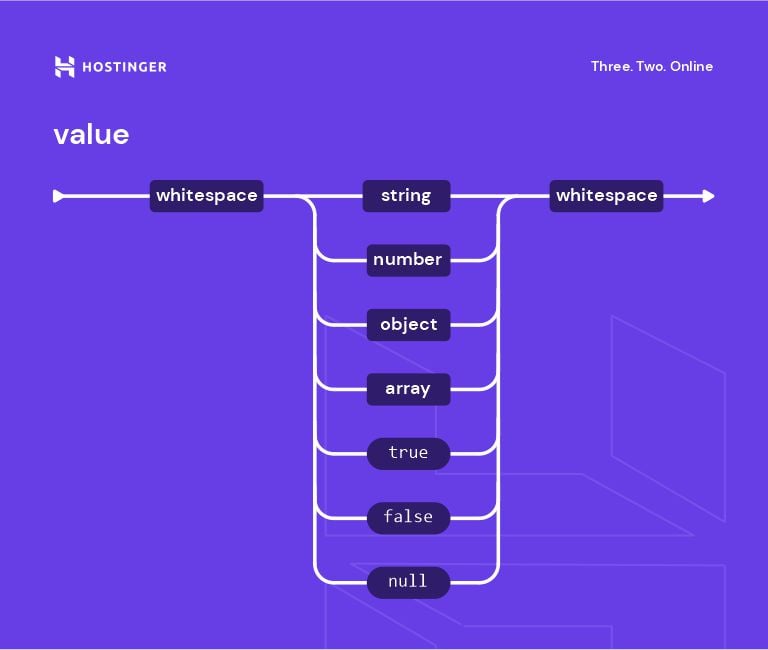
Types of Values
In this section, we’ll discuss the types of JSON values.
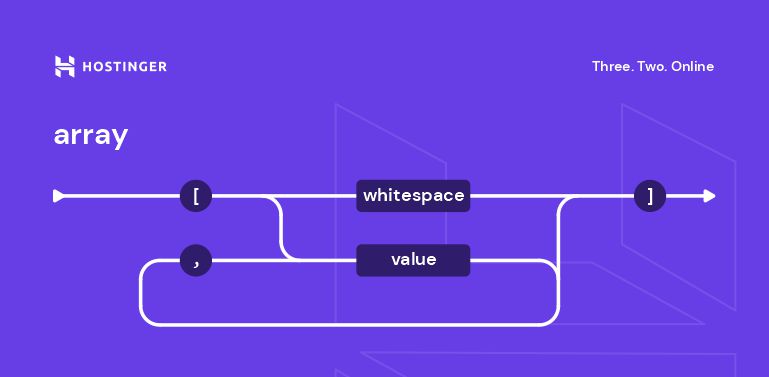
Array
An array is an ordered collection of values. An array value can contain JSON objects, meaning that it uses the same key/value pair concept. For example:
{
"students":[
{"firstName":"Tom", "lastName":"Jackson"},
{"firstName":"Linda", "lastName":"Garner"},
{"firstName":"Adam", "lastName":"Cooper"}
]
}
The information within the square brackets forms an array of three objects.
Object
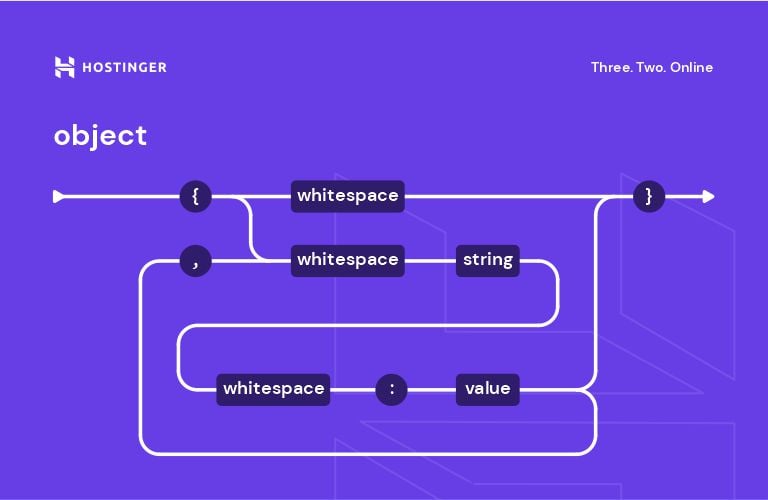
JSON objects are made up of pairs of two components:
- Keys are strings – sequences of characters surrounded by quotation marks.
- Values are valid JSON data types. They can be in the form of an array, object, string, boolean, number, or null.
A colon is placed between each key and value, with a comma separating pairs. Both components are held in quotation marks.
{
"employees":{
   "firstName":"Tom",
   "lastName":"Jackson"
}
}
Here, employees is the key, while everything inside the curly braces is the object.
String
String values are set sequences of zero or more Unicode characters with double quotes enclosing them.
For example:
{"firstName":"Tom"}This example shows that Tom signifies a string as it’s a set of characters inside a double quote.
Number
A number in JSON should be an integer or a floating point.
For example:
{“age”:30}Boolean
Booleans contain true or false as values.
For example:
{“married”:false)Null
Null is an empty value. It’s to show that there is no information.
For example:
{"bloodType":null}Ways to Store JSON Data
There are two ways to store JSON data – objects and arrays. The former are sets of key/value pairs, while the latter are lists of values.
In this section, we will explain storing JSON data using objects and arrays further.
Using Objects
A JSON object starts and ends with curly brackets. It contains key/value pairs called properties, with commas separating each line. A colon goes between each key and value.
While keys must be strings, values can be either of the six JSON data types – strings, numbers, objects, arrays, booleans, or nulls.
Note that JSON objects are different from objects in the JSON data type. The former serve as a method of storing data while the latter represent an associative array of key/value pairs.
Let’s look at an example where we have three key/value pairs. firstName, lastName, and gender are the keys, and Tom, Jackson, and male are the values.
The JSON object will look like this:
{
"firstName":"Tom",
"lastName":"Jackson",
"gender":"male"
}
The values used are strings, therefore, they are also inside quotation marks, just like the keys.
Using Arrays
Another way to store data involves using arrays. The values are enclosed in square brackets, with commas separating each line. Each value in JSON arrays can be of a different type.
Keep in mind that JSON arrays are different from arrays as values – the latter consist of ordered collections of elements, typically all of the same type.
Take a look at this example:
{
"firstName":"Tom",
"lastName":”Jackson”,
“gender”:”male”,
"hobby":[
“football",
"reading",
"swimming"
]
}
What differentiates this from the previous method is the fourth key/value pair. hobby is the key, and there are several values (football, reading, swimming) in the square brackets representing an array.
Arrays can be useful when paired with technologies like JSONP or JavaScript libraries like React.js, which can help overcome the cross-domain issue. They also support for loop that let users run repeated commands to look up data, making the process faster and more effective.
JSON Cheat Sheet
Download comprehensive JSON cheat sheet
Coding with JSON
Here is a simple example of JSON usage – we will break down each element for clarity.
{
  "className":"Class 2B",
  "year":2022,
  "phoneNumber":null,
  "active":true,
  "homeroomTeacher":{"firstName":"Richard", "lastName":"Roe"},
  "members":[{
      "firstName":"Jane","lastName":"Doe"},
      {"firstName":"Jinny","lastName":"Roe"},
      {"firstName":"Johnny","lastName":"Roe"},
      ]
}
Here’s what each pair indicates:
- The first line “className”:”Class 2B” is a string.
- The second pair “year”:2022 has a numeric value.
- The third pair “phoneNumber”:null represents a null – there is no value.
- The fourth pair “active”:true is a boolean expression.
- The fifth line “homeroomTeacher”:{“firstName”:”Richard”, “lastName”:”Roe”} represents an object literal.
- Lastly, the script from the sixth line onwards is an array.

Conclusion
JavaScript Object Notation (JSON) is a human-readable text-based format designed for data interchange. It is supported by many programming languages, environments, and libraries.
JSON is notable as it allows users to request data across domains using the JSONP feature. What’s more, it is simpler and more lightweight than XML.
JSON syntax consists of two core elements – values that are one of the six available data types and keys that are strings.
When it comes to storing data, JSON offers two methods to do it:
- Objects. This method starts and ends with curly brackets and has two or more key/value pairs with commas separating them. A colon follows each key to distinguish it from the associated value.
- Arrays. This method employs square brackets enclosing the elements with commas separating them.
We hope this article has helped you understand JSON. If you have any questions or suggestions, please leave them in the comments section below.

Irfan believes that technology and the internet can help improve our lives significantly. That's why he shares his experience as a WordPress blogger to educate others. In his free time, Irfan enjoys good films and books.
Comments
November 04 2020
Hi, can you expand on this article and show how to serve JSON files from a wordpress site? I have uploaded via ftp a JSON file and im getting a 404 page. Any help would be appreciated :)
February 02 2021
Hi there, Neil! I suggest you drop a message to our Customer Success team - they'll be happy to help troubleshoot ;)