Website builder vs WordPress: Key differences between website builders and WordPress
Mar 10, 2026
/
Larassatti D.
/
9 min Read
Website builders and WordPress both let you create professional websites without coding from scratch, but they take fundamentally different approaches to site building.
Website builders incorporate drag-and-drop tools that make them easy to use, even for complete beginners. They bundle hosting, security, and maintenance into one platform, so you don’t have to manage any technical tasks.
WordPress, on the other hand, is a self-hosted CMS that offers unmatched customization through themes, plugins, and full access to your site files. While it requires separate hosting and ongoing maintenance, it scales much more effectively for complex or growing websites.
The table below breaks down how these options compare across practical concerns:
| Category | Website builders | WordPress |
| Ease of use | Beginner-friendly, drag-and-drop interface with no technical setup | Steeper learning curve, more configuration required |
| Core features | Built-in tools for design, SEO, and marketing in an all-in-one platform | Thousands of plugins and themes are available to extend functionality |
| Customization | Limited to what the builder provides – less flexible for unique features | Highly customizable with more control over design and functionality |
| Hosting model | Hosting, security, and updates are handled by the website builder team | Self-hosted – you choose your hosting provider and manage updates |
| Maintenance | Minimal – most work is handled by the platform | Requires manual updates, backups, and optimization |
| Cost | Predictable monthly or yearly subscription pricing | Hosting and domain costs, as well as optional premium themes or plugins |
| Ideal use cases | Small to medium online stores, portfolios, personal sites, and users wanting simplicity | Blogs, ecommerce stores, scalable sites, and users who need full control |
In short, website builders offer an all-in-one, beginner-friendly environment, while WordPress gives you maximum flexibility and control – especially when paired with reliable hosting.
What are the advantages of a website builder over WordPress?
Website builders are designed to remove technical barriers. They are often the best choice if you need to get a professional site live quickly and easily. For users who want simplicity, these are the plus points of website builders:
- Beginner-friendly setup. Most builders now are AI-powered. You only need to write a prompt or answer a few questions, and the AI tool creates a layout, copy, and images for you.
- Ready-to-use infrastructure. You don’t need to worry about hosting, configuring an SSL certificate, or managing server updates. The website builder provider will handle it.
- Drag-and-drop site editor. You can visually move elements like text boxes and buttons exactly where you want them without writing CSS.
- Dedicated support. If something breaks, you have direct access to a customer support team.
What are the disadvantages of a website builder compared to WordPress?
The trade-off for simplicity is control. Since you are renting space on a proprietary platform, your ability to build a website is limited by the provided tools.
For instance, while you can change colors and fonts, you can’t add complex custom functionality. If the builder doesn’t offer a specific feature, like a complex booking system or a particular database integration, you can’t do code-level tweaking to add those.
Platform lock-in is another considerable limitation of a website builder. If you outgrow the site-building features of a tool, migrating your content to another platform is difficult. Unlike WordPress, where you can export your entire database, builders require you to manually migrate your content if you decide to leave.
What are the advantages of WordPress over a website builder?
WordPress powers over 40% of all websites. Its dominance comes from several key capabilities:
- Open-source flexibility. You can modify the source code of your site. If you can code it (or hire someone who can), WordPress can do it.
- Rich plugin and theme ecosystem. There are tens of thousands of plugins and themes available in both free and premium pricing models. Thanks to this, WordPress can be used to create any type of website.
- Full ownership. You fully own your website data. You can download your website files and move them to any hosting provider you want.
- Scalability. WordPress can handle everything from a personal blog to a site with millions of monthly visitors, provided your hosting plan can support it.
What are the disadvantages of WordPress compared to a website builder?
Self-hosted WordPress requires ongoing technical involvement and isn’t a “set it and forget it” solution.
For one, it doesn’t have an official support team. If your site breaks, gets hacked, or goes offline, you’ll need to diagnose the problem yourself using documentation and community forums, or hire a developer. Your hosting provider can help with server issues but typically won’t troubleshoot WordPress-specific problems like plugin conflicts or theme customization.
This creates a learning curve for understanding basic technical concepts, such as hosting, domains, and Domain Name System (DNS), as well as how to use WordPress in general.
You’re also responsible for maintenance. WordPress regularly releases core updates, and your themes and plugins need updating too. Skipping updates can expose your site to security vulnerabilities, though WordPress itself has strong security when properly maintained. You also need to create your own WordPress backups unless your hosting provider does it for you.
Which is easier to use: Website builders or WordPress?
🏆 Website builders
If you want a tool that lets you build a website in a single day or faster, use a builder. Meanwhile, choose WordPress if you are willing to spend a weekend learning the ropes.
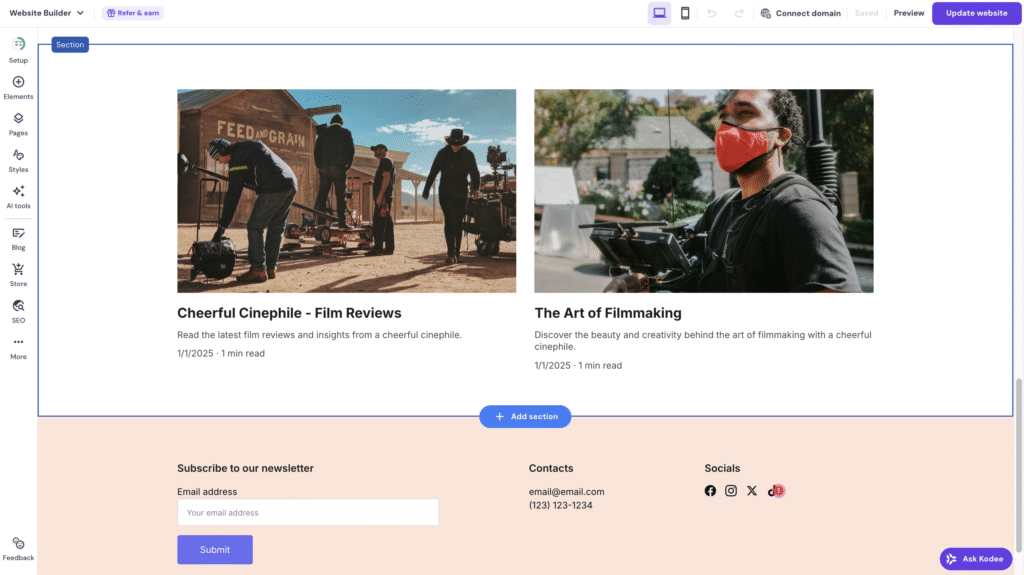
Website builders are tailored for ease of use. The onboarding process involves a wizard that sets everything up for you. Adjusting the site content, layout, and design is very simple through a what you see is what you get (WYSIWYG) visual interface. You simply need to click on any site element you want, edit the content, and drag and drop it to the desired location. There’s almost zero technical skill required.
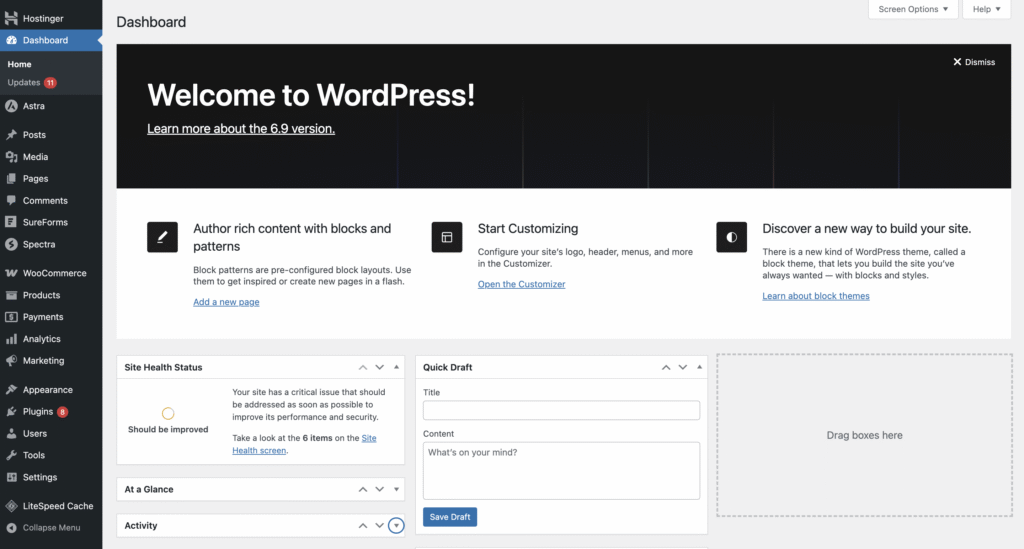
While WordPress has adopted the Gutenberg block editor to create a similar experience, it still relies on a content management system (CMS) workflow. You create content in a dashboard and then preview it to see how it looks.
Which offers better customization: Website builders or WordPress?
🏆 WordPress
WordPress is like owning a house – you can make any changes you want. With access to the style.css and functions.php files, you can alter the fundamental behavior of your site.
You can choose from a wide range of page builder plugins like Elementor or Beaver Builder to enjoy visual design control beyond what most website builders offer. And the repository of over 60,000 plugins can bring nearly any functionality you want to your site.
Meanwhile, using website builders is like furnishing a rented house. You can paint the walls and change the furniture, but you can’t knock down a wall. You’re limited to the design constraints and site-building features set by the platform.
Which is more scalable: Website builders or WordPress?
🏆 WordPress
WordPress runs on any type of hosting you choose, provided it meets minimum requirements. This means you can scale your WordPress site by starting with a plan that has lower resources and upgrading once your traffic grows, without having to rebuild your site. You can optimize the database, implement advanced caching, and use a content delivery network (CDN) of your choice to enhance performance.
Website builders handle scalability automatically within their platform limits. They typically include CDNs and auto-scaling infrastructure, so traffic spikes don’t require manual intervention.
However, you’re constrained by the plan you choose. Higher-tier plans support more storage, bandwidth, and features, but you can’t optimize server configurations or implement custom performance solutions if you hit your plan’s ceiling.
Which is cheaper: Website builders or WordPress?
🏆 It depends on your website needs
For a simple site, a website builder makes a better cost-to-value ratio, as everything is already included in a fixed subscription charge. For a large, complex site, WordPress is often cheaper in the long run because you avoid the high transaction fees or tiered limits that builders impose on high-revenue sites.
Website builders are similar to software-as-a-service (SaaS) businesses that use a subscription model. You only need to pay a single recurring fee, either monthly or annually, according to your preference. The subscription plans include everything you need to launch a site, while the pricing tiers determine the features you can use.
As an example, Hostinger Website Builder pricing starts from CA$ 2.79/month, with a free domain name if you choose yearly subscriptions.
- Pros: Predictable costs without having to juggle multiple vendors.
- Cons: Higher tiers for ecommerce can get expensive. Some website builders also charge extra transaction fees.

On the other hand, WordPress itself is free, but you’ll still need to cover the basic infrastructure that keeps your site online. At minimum, this includes hosting and a domain name. These can actually be cheaper than most website builders if you take the time to find the best deals.
- Hosting: At Hostinger, our managed hosting for WordPress starts at CA$ 2.79/month, including a free domain for the first year if you sign up for an annual subscription.
- Themes: Many great WordPress themes are available for free – premium options usually start at a modest one-time or annual fee.
- Plugins: Free plugins are widely available. However, advanced features often require an upgrade to a premium plan. You can check our list of best WordPress plugins for a better idea of which ones your site needs.
- WordPress developer help: Optional, but may be needed if you want custom complex functionality or don’t want to handle technical tasks yourself.
➡️ Refer to our full WordPress pricing breakdown for a clearer picture of the total cost of building a WordPress site.
Which is better for ecommerce: Website builders or WordPress?
🏆 It depends on the size of your store
For small stores with 500 products, an ecommerce website builder is often a better option. The ecommerce tools are built in, so your inventory, payments, and shipping settings are all in one dashboard.
The setup is also very simple, as all the features are ready to use – you only need to adjust the store according to your preferences. That said, some website builders charge extra transaction fees and have a hard limit on the number of products you can list.
For large stores, WordPress with an ecommerce plugin like WooCommerce is superior. WooCommerce allows for complex variations, multi-currency setups, and thousands of products.
You can choose from hundreds of payment gateways that enable integration with WordPress, whereas builders might restrict you to just a few that they can provide. However, this means you’ll need to configure multiple ecommerce site elements one by one.
Which is better for SEO: Website builders or WordPress?
🏆 WordPress.
WordPress enables in-depth technical search engine optimization (SEO), as you fully own your site’s infrastructure. You can control the hosting you choose, your site’s schema markup, canonical tags, and WordPress robots.txt files. SEO plugins, such as RankMath or Yoast SEO, are also beneficial for analyzing areas for improvement in real-time.
Furthermore, there are several ways to speed up WordPress, including making the code cleaner and manually compressing images, which is a ranking factor for Google.
Website builders have significantly closed the gap. The SEO features will depend entirely on what the company provides. Most website builders allow you to easily edit meta titles, descriptions, and alt text, but you can’t do any code-level optimization. For a local business, this is usually enough.
Which is easier to maintain: Website builders or WordPress?
🏆 Website builders
Website builder providers handle platform maintenance automatically. They patch security vulnerabilities, update software, and maintain server infrastructure in the background. If you encounter technical problems with the platform itself, you contact their support team.
You’re still responsible for your site’s content, SEO, and regular updates to pages and products, but you don’t manage servers, security patches, or software updates.
With WordPress, you’re fully responsible for your site’s maintenance. For example, you must ensure that your site is secure, the plugins and themes are compatible, and your site backups are restorable. Fortunately, these tasks can be easier with a managed hosting service.
Hostinger’s managed hosting for WordPress provides an AI troubleshooter tool to help you spot any issues, an automatic backup feature, and smart auto-updates to ensure your WordPress core, plugins, and themes are updated.
Which one should you choose: Website builders or WordPress?
Your choice depends on your goals, budget, and technical comfort.
Choose a website builder if:
- You need to launch a website as soon as possible.
- You have zero coding knowledge and no desire learn it.
- You want a fixed, more predictable subscription price.
- You’re building a simple portfolio, a restaurant site, or a small local business page.
Choose WordPress if:
- You want full ownership and control over your website data.
- You plan to scale the site into a large business or publication.
- You need advanced features, such as membership areas, a learning management system, or complex databases.
- You want to have granular control over your site’s technical SEO.
What are the key differences between Hostinger Website Builder and Hostinger managed hosting for WordPress?
Hostinger offers two different paths depending on how hands-on you want to be: a beginner-friendly website builder for simplicity, or managed hosting for WordPress if you want more control and advanced features.
Hostinger Website Builder is an AI-powered tool included with our web hosting plans. You can create a personalized website in minutes by describing your vision in an AI prompt. From there, you can customize your pages with built-in tools like the AI writer, AI logo maker, and AI image generator. It’s designed for users who want an easy, guided way to build a site without having to deal with technical setup.
Managed hosting for WordPress is built specifically for the WordPress CMS. These plans come with WordPress-optimized performance features like LiteSpeed Enterprise servers, automatic updates, and an AI troubleshooter. You’ll also get the WordPress AI Assistant, which can help you write content, fix errors, and perform tasks directly inside your WordPress dashboard. This option is ideal if you want the flexibility of WordPress while letting Hostinger handle the technical and server-side work.
How can I incorporate website design best practices?
Good design principles – visual hierarchy, consistent spacing, readable typography, and clear navigation – apply whether you’re using a website builder or WordPress.
Website builders provide templates with built-in structure. Pre-designed sections use grid systems and spacing that follow basic design principles, which helps beginners avoid common layout mistakes. However, you still need to make decisions about color combinations, font pairings, content hierarchy, and where to place calls-to-action.
WordPress themes also provide design frameworks, but with page builders like Elementor or Gutenberg, you have more control over spacing, typography, and layout customization. This flexibility means you can create highly custom designs, but you’re also responsible for maintaining consistent spacing and visual hierarchy throughout your site.
Both platforms can produce professional or unprofessional results depending on your design choices. For detailed guidance on layout principles, color theory, typography, and user experience, see our guide on web design best practices.

Larassatti Dharma is a content writer with 4+ years of experience in the web hosting industry. She has populated the internet with over 100 YouTube scripts and articles around web hosting, digital marketing, and email marketing. When she's not writing, Laras enjoys solo traveling around the globe or trying new recipes in her kitchen. Follow her on LinkedIn