Web Hosting Security Best Practices and What to Look for in Secure Website Hosting
Mar 10, 2026
/
Mulan G. & Saulius L.
/
7 min Read
With cyber threats becoming increasingly sophisticated, web hosting security is more important than ever. It’s crucial to ensure that your website is on a secure hosting platform and follows the best security practices.
In this article, we’ll explore the security features that a web hosting service should have. We’ll also review the best security tips to protect yourself and your client’s websites from hackers, malware, and other online threats.
Download WordPress security checklist
What Security Features to Look for in Web Hosting Providers
We’ll explain the key security features that any web host should have. Without strong security measures, all websites on your hosting account may be vulnerable. This can lead to downtime, lost income, and harm your reputation, especially when you’re managing a client’s website.
Software Security
The most secure web hosting services implement many software security features to ensure your website runs on the latest and most secure software.
An important one is firewall protection, which blocks unauthorized access to your website and prevents malicious attacks. Another critical feature is malware scanning and removal, which helps to identify and eliminate any malicious code that may have infected your website.
Additionally, many web hosting companies offer regular software updates and patches to address system vulnerabilities.
Hostinger’s software security measures include an anti-DDoS traffic analyzer and anti-malware software to protect your hosting account from cyber threats.
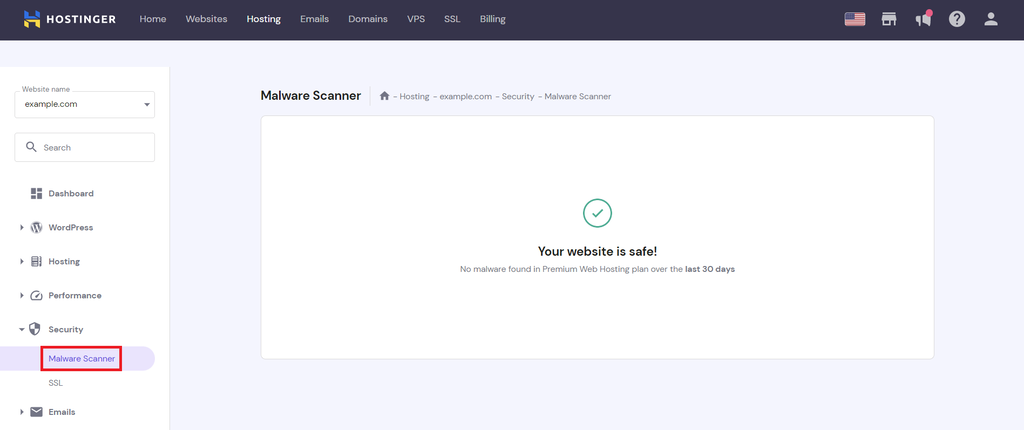
Our malware scanner is integrated into hPanel and automatically scans your websites for harmful files. To see the scan results, go to Websites → Dashboard. On the left sidebar, select Security → Malware Scanner.
If the tool finds malware, it will display the number of detected and cleaned suspicious files. It also gives a summary that includes the discovered malware total, actions taken, malware timeline for the past 30 days, and the compromised and malicious file details.
SSL Certificate
Secure Sockets Layer (SSL) is a security protocol that encrypts data exchanged between a web server and a user’s browser. It ensures that private information, such as usernames, passwords, or billing details, cannot be intercepted by third parties.
Having an SSL certificate, you can force HTTPS on the website, which will also improve its SEO and performance.
Hostinger offers free SSL certificates with every plan purchase, so all websites on your hosting account are secured.
Backups and Restorations
Cyber attacks, natural disasters, hardware failures, and human errors are all potential threats to a website’s availability. Reliable backup and restoration services will ensure the website data is recoverable in case of incidents.
Most web hosts offer regular weekly or daily backups, including Hostinger. Also, ensure the provider has an easy-to-use restoration feature to recover your website quickly and conveniently. This can help prevent website downtime and data loss.
DDoS Protection
Distributed denial-of-service (DDoS) attacks overload a website with traffic from multiple sources, making it unavailable to legitimate users. This can result in costly downtime and damage to your reputation. By choosing a secure web host with strong DDoS protection, you can help prevent these attacks and ensure that your website remains accessible and secure.
Web hosting companies’ DDoS protection typically uses algorithms that block malicious traffic before it reaches the server. Secured web hosting services also have advanced filtering techniques that can distinguish between legitimate and illegitimate traffic.
A good web hosting service uses these measures to make sure that your website stays accessible even when there is a wave of harmful traffic coming in.
Hostinger offers secure hosting by including DDoS protection even in the basic web hosting plans.
Network Monitoring
Network monitoring involves regularly scanning your website’s network and web server infrastructure for unusual activity, such as unauthorized access attempts or suspicious traffic patterns. By doing so, web hosting providers quickly detect and respond to potential security incidents before they can cause significant damage to your website or compromise sensitive data.
To determine if a web hosting service monitors its network, check the web host’s website or contact its customer support. Choose web hosts that offer 24/7 monitoring, use advanced tools to secure their web servers, and have positive reviews about detecting and fixing issues. Also, check for guarantees or Service Level Agreements (SLAs) related to network uptime and performance to see their commitment to network maintenance.
At Hostinger, users can directly check our infrastructure status page for information about all our web hosting services.
CDN Support
A content delivery network (CDN) caches website content on servers located around the world. When visitors access your site, the CDN retrieves the content from a server location closest to them rather than the primary server.
Thus, setting up a CDN helps to reduce load times and improve website performance. Many CDNs also offer DDoS protection to prevent attacks and keep your website safe from malicious traffic.
Apart from offering support to Cloudflare, we have launched the beta version of our in-house developed CDN to help ensure that your website is fast and secure, providing a positive experience for its visitors.

10 Best Web Hosting Security Practices
In addition to having a secure hosting provider, it’s essential to implement web security practices on your own to protect your websites from security issues.
Below, we’ll explore the best methods to maintain web hosting security.
1. Back Up Data on a Regular Basis
Having backups, you can quickly restore a website that has been hacked or experienced issues. Either manually back up your data regularly or schedule automatic backups.
We also recommend storing additional backups locally on your computer or hard drive. This is especially important if the web host only retains backups for a limited time.
More About Website Backups
If you’re a WordPress user, make sure to learn how to back up a WordPress site.
2. Use SSL Encryption
SSL is important to ensure secure access to and from your website, protecting sensitive customer data. If your web host doesn’t give you a free SSL certificate, you can purchase it from an SSL certificate authority.
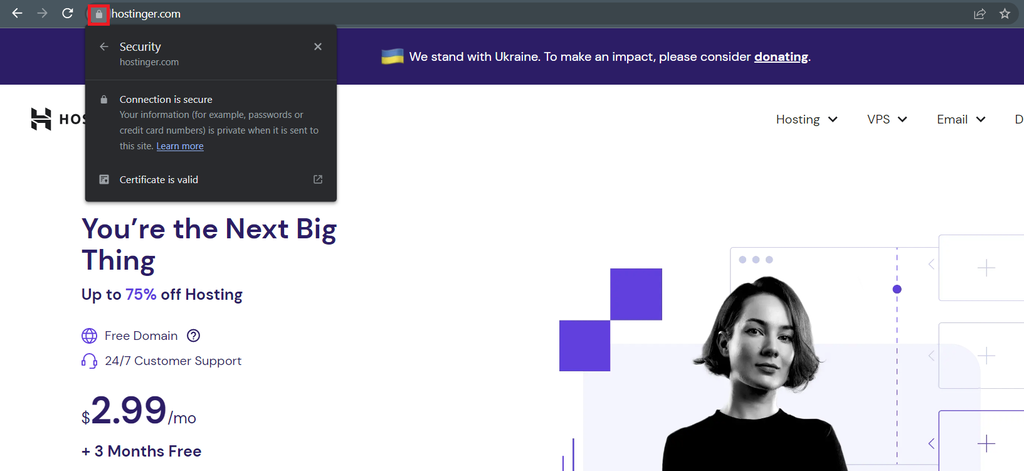
When your website has an SSL certificate, the browser will display a padlock icon next to the site’s URL – visitors can click on it to view the certificate details.
3. Use SFTP Instead of FTP
We recommend using SFTP (Secure File Transfer Protocol) instead of FTP (File Transfer Protocol).
SFTP encrypts all data, including login credentials and transferred files, during transmission. This prevents attackers from eavesdropping, tampering, or stealing your data. SFTP also uses a different port from FTP, making it harder for attackers to target SFTP connections.
Pro Tip
Consider transferring your files using SFTP clients like FileZilla.
4. Remove Unused Applications
Vulnerabilities in web applications like coding issues, misconfigured web servers, design flaws, or lack of form validation can give criminals access to your websites.
Therefore, it’s essential to regularly monitor your applications and remove any unused or compromised ones. Deleting outdated and unused themes and plugins will also strengthen WordPress security.
Suggested Reading
Learn more about web application security to mitigate any risks that may impact your website.
5. Periodically Change Passwords
Weak passwords can be easily compromised by attackers, putting your website and sensitive information at risk.
We recommend changing passwords at least every three to six months. To make the process easier, use a password manager to generate and store all passwords. This can also avoid password fatigue and reusing the same password for multiple accounts.
6. Install and Set Up a Web Application Firewall
Web application firewalls (WAF) filter and monitor traffic between a web app and the internet, blocking suspicious or malicious requests and generating alerts for further investigation. It helps protect web apps from cyber attacks like cross-site scripting (XSS) and SQL injection.
Not all web hosting companies include a web application firewall with their services, so you might need to get one separately. Cloudflare’s WAF is a great option. In addition to security advantages, it is easy to activate and has a free plan available.

Apart from using an AI-powered firewall to protect your virtual private server hosting, Hostinger fully supports Cloudflare.
7. Scan Website Files for Malware
Malware can create or modify files and steal information like passwords, thus harming your website and reputation. If your web host doesn’t offer built-in website security tools, fortunately, there are third-party software that check a website for viruses and remove any threats.
One of them is SiteGuarding, which scans for various malware types, even for unknown viruses and new threats. We also recommend installing WordPress security plugins for regular malware scanning.
More About Website Viruses
8. Run Constant Software Updates
To protect your website from potential attacks, regularly update all software. Software updates usually contain security patches that address previous vulnerabilities.
Hackers often take advantage of outdated software to gain unauthorized access to websites and steal sensitive information. It’s also important to keep plugins, themes, and other website components updated.
Important! Always back up your website before performing updates to avoid data loss or downtime.
9. Restrict Website Access for Unauthorized Users
Unauthorized access to a website can result in data breaches or other malicious activities. To prevent unauthorized data access, follow these practices:
- Use two-factor authentication – add an extra layer of security by using and requiring a second form of identification.
- Create user roles – control what specific users can and cannot do, preventing unauthorized access and actions.
- Use an access manager – if you work in an agency or collaborate with other freelancers, use the hosting account sharing feature on hPanel to create and manage access.
- IP allow-listing – create a URL blocklist to limit access to authorized IP addresses only.
10. Use Additional Security Extensions
Website security extensions provide an extra layer of protection against various online threats, such as malware, phishing, and hacking attempts.
They can also offer features such as ad blocking, script blocking, and cookie management to enhance website performance and improve user privacy.
Below are some browser extensions to try:
- Malwarebytes Browser Guard – keeps your online data safe by blocking trackers, malware, and scams.
- uBlock Origin – blocks ads and trackers on websites. It also has advanced filtering capabilities, allowing users to customize their preferences and block specific elements on web pages.
Conclusion
Improving web host security is essential to protect your business’s reputation and sensitive data. In this article, you’ve learned that finding a web hosting company with security protocols like software security, SSL certificates, backups, and DDoS protection is the first step.
In addition to that, it’s important to follow best web hosting security practices, such as backing up website data, removing unused applications, changing passwords regularly, scanning for malware, and updating software regularly.
We hope this article will help maintain your and your clients’ websites secure. Leave us a comment below if you have any questions.
Web Hosting Security FAQ
This section answers the most frequently asked questions about web hosting security.
Which Hosting Type Is the Most Secure?
A hosting type that provides dedicated resources, like a virtual private server (VPS), is considered the safest. If one VPS is compromised, it won’t affect other VPS users on the same physical server. However, it’s important to note that VPS security ultimately depends on your own security measures.
How Do I Find a Secure Web Hosting Provider?
Safe and reliable web hosts support several security measures, including SSL certificates, automatic backups, frequent security updates, 24/7 support, a strong firewall, and DDoS protection. When browsing your options, pick a provider offering these features.
Can a Hosting Provider Guarantee Website Security?
No hosting platform can guarantee foolproof security due to external factors like user behavior and third-party integrations. Reputable web hosts can minimize risks and strengthen website security by providing software updates, firewalls, and backups. Website owners must also implement security measures and updates to further enhance security.
What Are the Most Common Security Threats a Web Hosting Service Faces?
The most common website hosting security threats are malware, phishing, XSS, SQL injection, and distributed denial-of-service (DDoS) attacks.

Mulan is a Digital Marketing enthusiast experienced in creating social media content. She is eager to help people learn in the simplest way possible. During her free time, Mulan likes to cook and watch sci-fi or documentaries.

As VP of Product at Hostinger, Saulius oversees Web Hosting Platform & Tools, Managed WordPress, and WebPro Experience. Saulius enjoys observing users through their daily life activities, looking for problems to solve, and building products that make users more efficient online, help them spend more time on the things they love, and leave all the rest for technology to solve. Follow him on LinkedIn.