How to locate and create .htaccess file – A step-by-step guide
Mar 10, 2026
/
Tomas A.
/
2 min Read
.htaccess (hypertext access) is a hidden file used to configure additional features for websites hosted on Apache Web Server. With it, you can rewrite URL, password-protect directories, enable hotlink protection, disallow access to specific IP addresses, change your website’s time zone or alter default index page, and much more. Here you’ll learn how to locate and create .htaccess file.
How to Locate an Open .htaccess File?
We will show how to locate and open .htaccess file in both Hostinger’s hPanel and cPanel.
hPanel
Finding and editing the file in Hostinger’s hPanel takes only a few clicks. Here’s how to do it:
- Once you’re logged in to your WordPress Dashboard, use the search feature to find the File Manager located under the Files category.
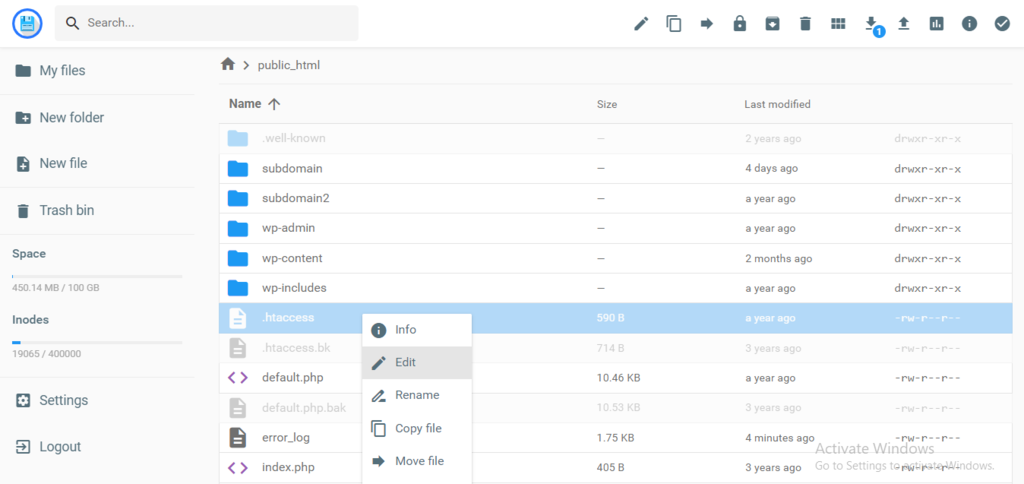
- By default, .htaccess is visible in hPanel’s public_html directory, so you can immediately access the file and its content by right-clicking and selecting Edit.
cPanel
If you are using cPanel, the process is more or less similar.
- Access File Manager → public_html.
- If you can’t find the file, go to the Settings on the upper right menu and tick the Show Hidden Files option to enable viewing.
Important! This only applies to cPanel-based hosting platforms.
How to Create .htaccess File?
If .htaccess file is not present, here’s how you create one. This method is applicable to both hPanel and cPanel:
- Click the New File button in the upper menu.
- Enter .htaccess as the file name, insert the code below and press Create to save your changes.
# BEGIN WordPress
<IfModule mod_rewrite.c>
RewriteEngine On
RewriteBase /
RewriteRule ^index.php$ - [L]
RewriteCond %{REQUEST_FILENAME} !-f
RewriteCond %{REQUEST_FILENAME} !-d
RewriteRule . /index.php [L]
</IfModule>
# END WordPres

Conclusion
You’ve learned how to locate and create .htaccess file using the File Manager. .htaccess enables you to create website redirects, set default pages, password-protect directories and much more.
If you have any questions regarding this guide, let us know in the comments below!

Tomas provides top-notch technical advice on a daily basis to our valued customers. He also likes to create websites and do various coding side projects.


Comments
April 13 2018
I'm 71and still have no idea how to get rid of 403 forbidden
April 13 2018
I'm 71 and tried for ages I can't get rid of 403 forbidden I have,nt a clue what I'm doing.
April 28 2018
Hey Marshadeans, We have a tutorial on 403 error
August 07 2019
I can access my website using http:// but I can't access directly "tripticianandaman.in". How to solve this problem ????
September 24 2019
Hey Avinash, Most likely you need to create a redirect from http to https. See instructions how to do this here.
September 25 2019
Thank you for this post. this help me a lot. Good luck
March 11 2020
Hello Tomas, How can I get support from you on htaccess setting on Hostinger VPS for Laravel project? thanks!
March 12 2020
Hi Fulvio, Here are the tutorials we have on <htaccess You can always contact the Hostinger via chat support. :)
August 31 2020
Can we use this for using a site without publishing it, I mean by using an html file on our desktop while testing it?
November 11 2020
Hey there. What you are describing would be testing a website locally. You can test your site locally, of course, but you can't use this guide to locate the .htaccess file, as your local computer is not using our hPanel which the guide is about. :)
October 18 2020
Hi, I created a website using Flask and hosted this using a free web hosting service. I redirected the URL to my personal domain name. The domain that I redirected from has https but the domain that I redirected to (my personal domain) has http. How can I use https on personal domain name? Will this tutorial solve my problem or do I need to do something else? Your help will be appreciated, Domantas G.
February 02 2021
Hi there, James! In this case, you'll also need an SSL on your personal domain, which you're redirecting to. Then once you have it setup, proceed make the redirect via .htaccess file to https version of your personal domain.
October 29 2020
if this is not a WordPress website then ??
February 02 2021
Hi there! Each CMS has a different code for their default .htaccess file. What CMS are you using on your side?
November 12 2020
hello there, If I try to access the web with non www, I always enter parked free, how can I access the web on the page that I created with non www?
February 02 2021
Hi there! It seems like it would most likely be an issue of DNS - for further help, I'd suggest to drop us a message via live chat from your account.
December 07 2020
Hostinger reset the htaccess file which contains my personal rules from time to time
February 09 2021
Hi there! If this issue is still occurring, please contact our Customer Success team - they'll be happy to have a look for you :)
December 09 2020
Can i know what is the coding for add in WWW in my url in htacess ? no clue how to add in www.
February 09 2021
Hi there! Use this code to force www:
RewriteEngine On RewriteCond %{HTTP_HOST} ^yourdomain.com [NC] RewriteRule ^(.*)$ http://www.yourdomain.com/$1 [L,R=301]May 10 2021
Hello, I have a doubt about the htaccess file: I added code to this file to forward a URL. It works normally fine but, at random moments, the file returns to its default status (removes the code I added). It has happened 2 times in 2 months, and I don't if it is an error or I am doing some action that resets this file. This is causing me troubles since every time it happens I receive a storm of angry clients that are not forwarded correctly. Please could you help me with this? Thanks in advance. Best regards
May 13 2021
Hi Vicente, Please contact Customer Success so they can look further into this! :)
September 11 2021
Hi there! What does " RewriteRule .* - [E=HTTP_AUTHORIZATION:%{HTTP:Authorization}] " mean in the Wordpress block inside an htaccess file? Especially in the following context -- RewriteEngine On RewriteRule .* - [E=HTTP_AUTHORIZATION:%{HTTP:Authorization}] RewriteBase / RewriteRule ^index\.php$ - [L] RewriteCond %{REQUEST_FILENAME} !-f RewriteCond %{REQUEST_FILENAME} !-d RewriteRule . /index.php [L] What is "RewriteRule .* - [E=HTTP_AUTHORIZATION:%{HTTP:Authorization}]" doing here and how does it affect the lines beneath it?
September 20 2021
Hi Arif, it looks like it has something to do with the user authentication process (have a look at the thread here). This is completely standard though, so you have nothing to worry about :)
January 10 2022
if i made the site in VSC & just uploaded the files, what do i put insdead of wordpress?
January 11 2022
Hi! Each CMS or code you run on your website, will have a different .htaccess file configurations. I have checked online and it looks like VSC doesn't have .htaccess by default, but you can create one using a plugin and then create redirects and anything else you need in it. You can read more about it here and here :)
June 28 2022
i have created .htaccess file it working fine for react application but it also changing changing response of api and response comming my index.html page. I want to load only react application and not for node.js rest api, How can i do that?
July 01 2022
You can use React without using Node.js by creating a simple HTML web page or by using an existing website. In the head section of your HTML page, add the React and React-dom script tags. You can learn more about it here!
April 20 2023
Ads are not showing on client side and only shows when I log in as administrator in WordPress
April 21 2023
Hello there! Seems like there could be some issues with JavaScript. Since I'm not sure which ad inserter plugin you are using, I'm attaching these forum threads for more information: Thread 1, thread 2, thread 3.
July 13 2023
How do I do the same but with my index.php inside of the public_html/public folder ?
July 14 2023
Hello! I assume you want to change your default index.php location to public_html/public? If so refer to this tutorial and make changes to public_html/.htaccess file. Also check out this forum thread.
May 20 2024
how to solve an error like this I have a website "abc.com/blog" but when i type "abc.com/blog//" the page still open cannot redirect to the original "abc.com/blog" what should I add in .htaccess file that if user type 2, 3,4 or unlimited slashes the page redirected to its own original URL
June 06 2024
Hello, You can solve this issue by adding a rule to your .htaccess file. This rule will redirect any URLs with multiple slashes to the correct one with a single slash. Here's what you can add:
RewriteEngine On
RewriteCond %{REQUEST_URI} ^(.*)//+(.*)$
RewriteRule .* %1/%2 [R=301,L]
This will ensure that URLs with multiple slashes are redirected to the correct format. Simply add this to your .htaccess file and it should solve the problem!November 06 2024
Does your code apply to all websites? Or just default to wordpress source code.
November 13 2024
Hey! The code may not apply to all websites, as each CMS has its own default structure :D