What is the difference between HTML vs html5
Mar 10, 2026
/
Domantas G.
/
10 min Read
HyperText Markup Language (HTML) is the most widely used markup language for creating web pages and applications. It comprises predefined elements and tags for labeling content pieces and describing the structure of pages.
We’ll go over the difference between HTML and HTML5 as well as the advantages of HTML5 for developers and end-users. In addition, we will answer the most frequently asked questions about HTML5 and provide an HTML5 cheat sheet to make the learning process easier.
Let’s get started.
What Is HTML?
HTML is the primary language of the World Wide Web (WWW). Developers use it to design web page elements, such as text, hyperlinks, and multimedia files.
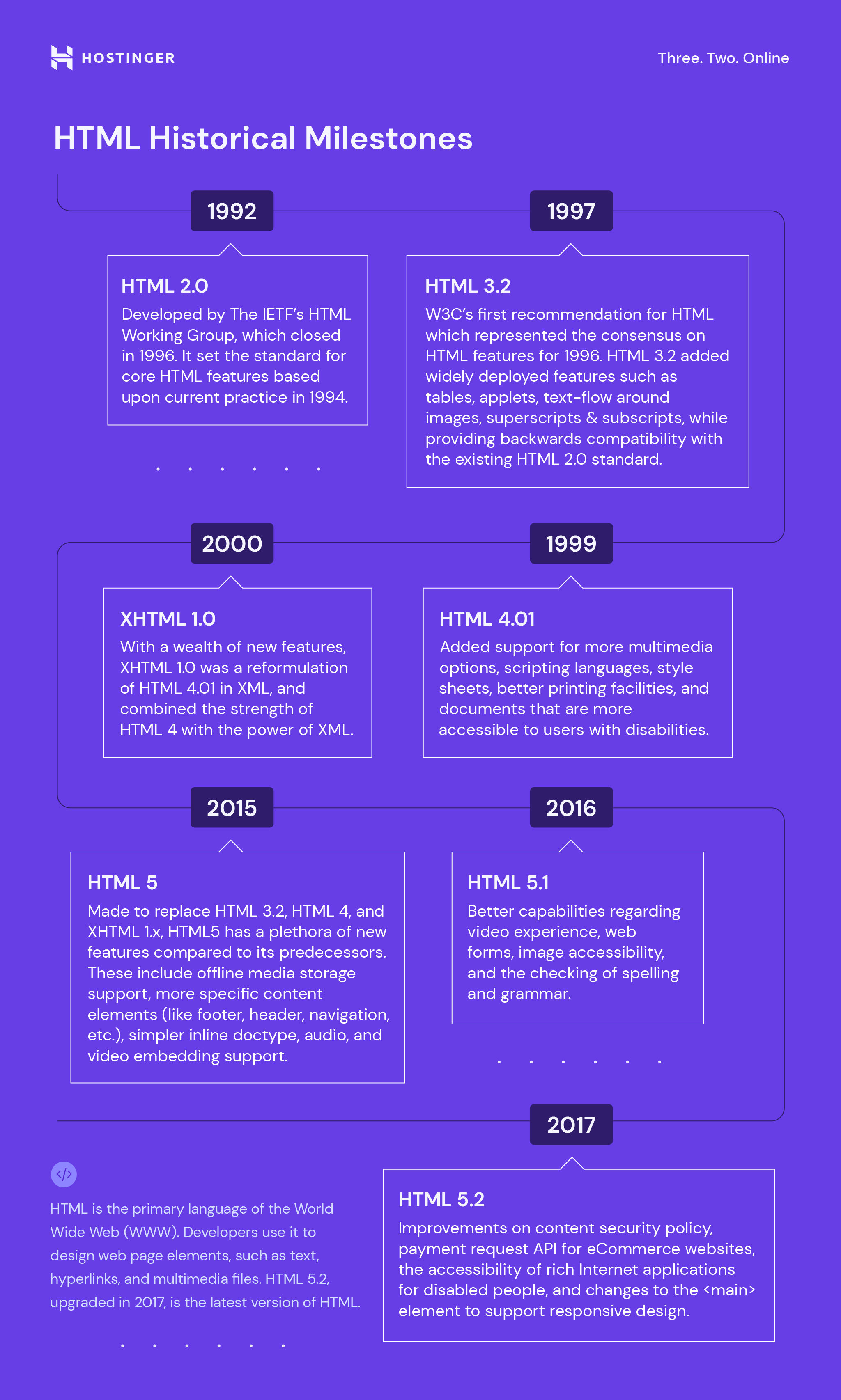
HTML 5.2, upgraded in 2017, is the latest version of HTML. Check out the graphic below for more historical HTML milestones.
Download complete HTML cheat sheet
HTML works by using various tags, including those for headings, tables, and paragraphs, to define the text structures. Each tag is defined using the <A> and </A> formula. They are called an “opening” and “closing” tag, respectively.
For example, we might use <i>type your text here</i> to change the text style to italic. The browser will render the content via these tags, then display it on the screen.
Note that this language works only statically, so one cannot create a dynamic or interactive web page feature using HTML. It only modifies the static elements of a web page, such as the content header, footer, and image position.
To build an interactive website, you need to combine HTML with at least two front-end languages: Cascading Style Sheet (CSS) and JavaScript.
What is HTML5?
HTML5 is the latest version of HyperText Markup Language, which supports multimedia, tags and elements, improved document markups and new APIs.
HTML vs HTML5 – Comparison
Both HTML and HTML5 are hypertext markup languages, primarily used to develop web pages or applications. HTML5 is the latest version of HTML and supports new markup language functionalities such as multimedia, new tags and elements as well as new APIs. HTML5 also supports audio and video.
| HTML | HTML5 |
| HTML does not provide native audio and video support. | HTML5 provides native audio and video support. |
| HTML only supports vector graphics if used in conjunction with different technologies like Flash, VML, or Silverlight. | HTML5 supports SVG (Scalable Vector Graphics), Canvas, and other virtual vector graphics. |
| HTML allows inline MathML and SVG in text with restricted use. | HTML5 allows inline MathML and SVG in text |
| HTML doesn’t allow users to draw shapes such as circles, triangles, and rectangles. | HTML5 allows users to draw shapes such as circles, triangles, and rectangles. |
| HTML only uses browser cache and cookies to store data temporarily. | HTML5 uses web SQL databases, local storage, and application cache for storing data temporarily. |
| JavaScript and browser interface run in the same thread. | JavaScript and browser interface run in separate threads. |
| Longer document type declaration. | Shorter document type declaration. |
| Longer character encoding declaration. Uses the ASCII character set. | Shorter character encoding declaration. Uses the UTF-8 character set. |
| Compatible with almost all browsers. | Only compatible with newer browsers, considering there are many new tags and elements which only some browsers support. |
| Built based on Standard Generalized Markup Language (SGML). | HTML5 has improved parsing rules providing enhanced compatibility. |
In addition to the features in the table above, HTML5 has seen the following changes:
- Some removed elements, like isindex, noframes, acronym, applet, basefont, dir, font, frame, frameset, big, center, strike, and tt.
- New form controls, including dates and times, email, number, range, tel, url, search, color, and datalist.
- Numerous new elements, including video, nav, aside, progress, canvas, section, meter, and time.
- New APIs with various functionalities such as drag-and-drop support, browser history manipulation, and reading and locking screen orientation state.
- New attributes including async, manifest, sandbox, srcdoc, and reversed.
- New global attributes, such as hidden, role, spellcheck, and translate.
Key Advantages Provided by HTML5 for Developers
HTML5 was created to improve the WWW experience and give web developers more flexibility when designing websites. In this part of the article, we’ll go over the significant improvements introduced by the new version.
Persistent Error Handling
Most major browsers have the support to parse structurally or syntactically incorrect HTML code. However, until a few years ago, there was no standardized process to handle this.
This means that browser developers had to perform malformed HTML document tests in different browsers to create improved error handling processes through reverse engineering.
The consistent error handling in HTML5 has made a massive difference in this regard, with the improved parsing algorithms used in HTML5 saving a large amount of both money and time.
Improved Semantics for Elements
Improvements have been made to the semantic roles of various existing elements in HTML to enhance code insinuation.
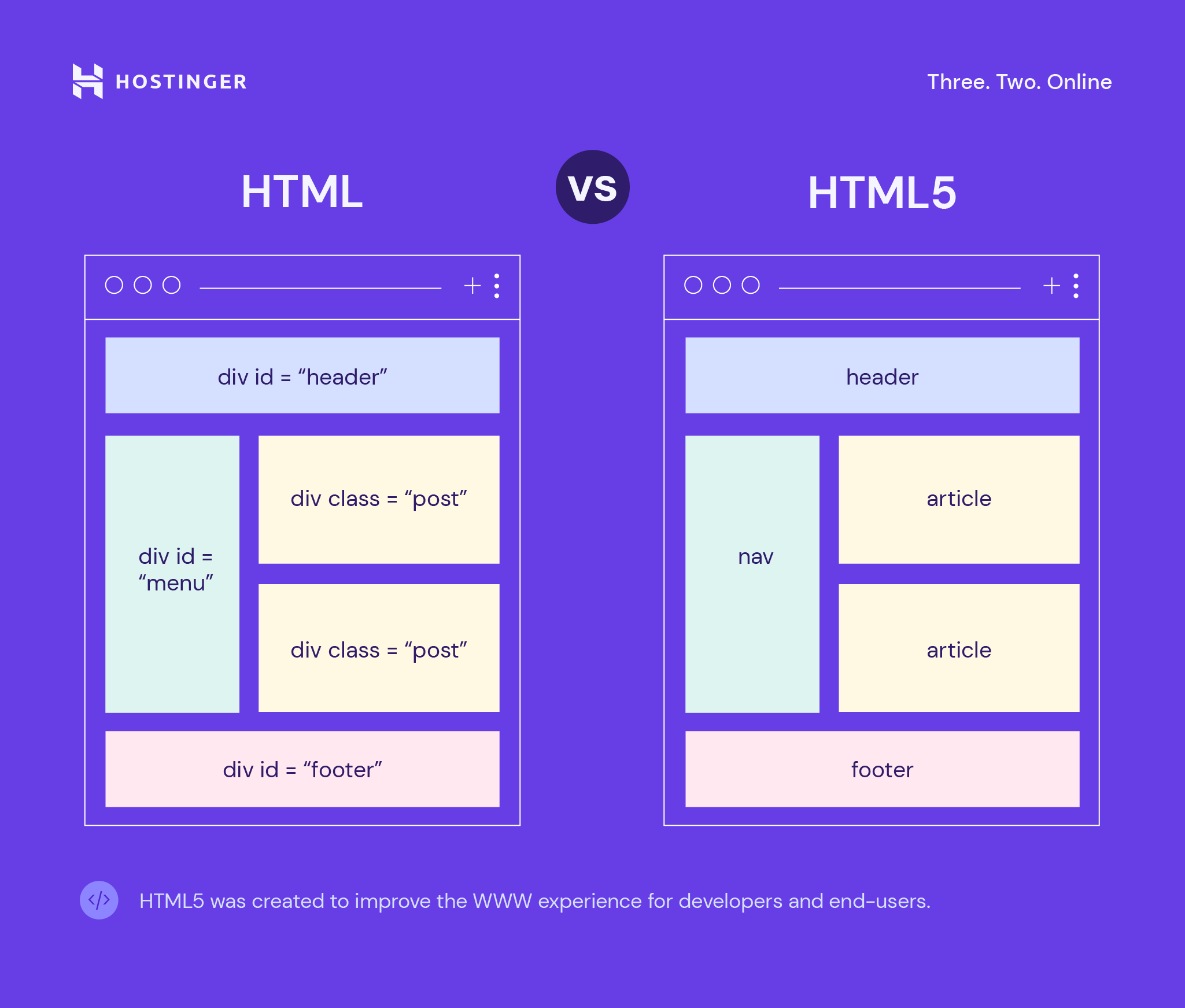
Section, article, nav, and header are the new elements replacing some obsolete div elements. Since the elements are more straightforward, the process of mistake-scanning becomes less complicated.
Enhanced Support for Web Application Features
One of the primary goals of HTML5 is to allow web browsers to function as application platforms. Thus, it provides developers with enhanced control of their websites’ performance.
In the past, developers had to use workarounds because many server-side technologies and browser extensions were not present.
Currently, there is no need to employ any JavaScript-based or Flash workaround as previously done in HTML4 because there are elements in HTML5 providing all the functionalities.
Mobile Web Made Easier
The smartphone-owning demographic has constantly been growing over the past decade, facilitating the need to improve HTML standards.
End-users want to be able to access web resources at any time via any mobile device. In other words, a mobile-friendly website is a requirement.
Luckily, HTML5 is more mobile-friendly compared to its previous versions as it caters to mobile devices like tablets and smartphones.
The Canvas Element
One of the most exciting features of HTML5 is the <canvas> element for drawing various graphics components, such as boxes, circles, text, and images.
However, it is worth mentioning that the <canvas> element is merely a graphic container. Thus, to define the graphics, a script has to be executed. Here is an example where JavaScript is used in conjunction with the element:
<canvas id=”TestCanvas” width=”200″ height=”100″></canvas>
var c = document.getElementById(“TestCanvas”);

var context = c.getContext(“2d”);

context.fillStyle = “#FF0000”;

context.fillRect(0,0,140,75);
The Menu Element
The newly added <menu> and <menuitem> elements are components of the interactive element specifications.
These two items can be used in web development to ensure enhanced web interactivity. The <menu> tag represents menu commands in mobile and desktop applications for simplicity purposes. One possible usage of the menu tag is:
<body contextmenu=”new-menu”>

    <menu id=” new-menu” type=”context”>

    <menuitem>Hello!</menuitem>

    </menu>
</body>
Customizable Data Attributes
While it is possible to add custom attributes to the older versions of HTML, it’s risky. Custom attributes can sometimes stop a page from rendering completely in HTML4 and cause incorrect or invalid documents.
Fortunately, the data-* attribute in HTML5 has brought an end to this problem.
This attribute’s primary objective is to store extra information about different elements. There are also other uses for this attribute, such as styling CSS elements or accessing an element’s data attribute via jQuery.
Custom data can now be included, giving developers the chance to make engaging and efficient pages without introducing complicated server-side lookups or Ajax calls.
Web Storage to Replace Cookies
HTML5 uses web storage or local storage to replace cookies. In the older HTML version, if developers wanted to store anything, they had to use cookies that hold a small amount of data – only around 4 KB.
However, cookies have several disadvantages – they can expire, restrict the use of complex data as they only allow string variables, and slow down performance by carrying additional scripts to the server.
By comparison, the local storage allows data to be stored permanently on the client’s computer unless the user erases it. It also features bigger data storage – at least 5 MB – and doesn’t burden the server with any requests.
HTML5 Advantages for End-Users
HTML5 presents a paradigm shift not only for developers but also end-users. Some of the advantages it provides for the end-users are:
- Reduces mobile browser crash rates.
- Supports native audio and video elements without any additional plugin.
- Offers geolocation of the user browsing any site or using applications based on an HTML5-compatible browser.
- Provides offline application caching so that pages or web applications are available even when users are not connected to a network.
- Enhanced web forms with improved text inputs, search boxes, and different fields for various purposes.
How Secure is HTML?
HTML5 is the most secure version of HTML. However, apps and sites built using HTML5 are still vulnerable to security attacks.
Common security threats typically come in the form of malicious code, which can be injected through various means such as developer error, music files, images, QR code, SSID fields, or the middleware framework.
Unfortunately, there is no one cure-all solution for building a secure website or web application using HTML5. The site or web application’s security depends on how careful and thorough the web developer is in creating it.
In addition, one needs to understand the vulnerabilities of the platform used to build their website. For example, WordPress users must understand the content management system’s security vulnerabilities to secure their WordPress websites properly.
Here are some tips and tricks for improving website security:
- Keep software and plugins up-to-date. Software and plugin updates contain performance and security improvements, including bug fixes and protection against the latest online threats.
- Get rid of unnecessary plugins and files. Unnecessary and outdated plugins and files can serve to access the website and deploy security threats.
- Use HTTPS and SSL. HTTPS and SSL provide a higher level of security for a website. HTTPS encrypts HTTP requests and responses, while SSL creates a secure connection between website and browser to ensure the safety of private information.
- Create a robust password policy. Create a password policy requiring website users to come up with strong passwords which consist of a mix of letters, numbers, and special characters.
- Choose a secure web host. Find a trustworthy hosting provider offering 24/7 support and various features, such as website backup services, free TLS encryption, and a high uptime rate.
- Back up the website frequently. Performing frequent website backups prevents the loss of important information in the event of a security breach, as one can simply restore the website from a database backup.
- Scan the website for malware regularly. Various types of malware may enter a website through plugins or other files. Perform regular malware scans to rid the website of these security threats.
- Limit login attempts. Limit the number of login attempts to prevent hackers from trying numerous password combinations.
- Manage user access. Be strict in controlling user access and permissions, ensuring only authorized people can access sensitive files and information. This is especially important for websites with multiple users.
- Install Web Application Firewall (WAF). A WAF filters, monitors, and blocks malicious HTTP traffic traveling to the application. It can enable the URL lockdown feature, preventing unauthorized IP addresses from accessing a website’s login page.
Can I Learn HTML5 by Knowing HTML?
Learning HTML5 is practically the same as learning HTML, as HTML5 is just the new version of HTML. After mastering one version, writing code using another version of HTML should not be difficult.
These days, almost anyone can learn HTML on their own, which is made even easier through websites for learning to code for free.
HTML5 Cheat Sheet
Cheat sheets can help you in your journey to learn a new language. Below, we’ve provided a downloadable sheet containing the most commonly used HTML tags and new tags for HTML5.
Download complete HTML cheat sheet
Should I Switch to HTML5?
It may be good practice to switch to HTML5. One of the main reasons being that HTML5 has already replaced Flash for providing multimedia content on various platforms.
Lots of major industry names have migrated from Flash to HTML5. Examples include Apple, Youtube, and Google Chrome.
Here are more reasons to switch from Adobe Flash to HTML5:
- Adobe Flash is proprietary software. People using the software will be subject to restrictions or licensing conditions. HTML5, on the other hand, is open-source and developed openly by an international panel.
- Security and performance concerns. Experts have pointed out that Flash is unsafe and unstable. It has become a gateway for various malware attacks, and the way Flash content is processed also impairs load time.
- Battery-draining. Viewing Flash content on mobile devices tends to drain battery power.
- Flash is not suitable for touch devices. Flash technology is primarily designed for desktop devices, not touch devices. For example, many Flash applications rely on the hovering mouse motion, which is impossible on touchscreens.
- Adobe has stopped supporting Flash Player. Adobe announced it would stop supporting Flash Player from Dec. 31, 2020. It recognizes that open standards such as HTML5 have become better alternatives and are already used by major browser vendors.
To help you decide whether to switch to HTML5, here are some pros and cons of using HTML5.
Pros
- Free. No need to pay royalty or licensing fees for using it.
- Cross-platform. Available on any device – computers, laptops, smartphones – as long as the browser supports HTML5.
- Native audio and video support. HTML5 provides audio and video support without installing extra software or applications.
- May boost SEO. HTML5’s cross-platform nature and the new semantic HTML tags it introduced may boost a website’s SEO performance. In addition, Google has stopped indexing content in Flash sites or Flash content on pages.
- Reliable storage options. HTML5 allows the temporary storage of user data in an SQL database, eliminating the need for cookies.
Cons
- Different video formats. There is no definitive standard video format for HTML5. Examples of formats used include H.264, WebM, and Ogg. Different browsers support different video formats. For example, Firefox supports WebM and Ogg, but not H.264.
- Doesn’t support legacy browsers. Users using old browsers may not be able to access HTML5 websites properly. Some newly added features on HTML5 are only compatible with modern browsers.
- Inconsistent delivery. Despite its cross-platform nature, HTML5 content may be rendered differently depending on the kind of browser and device used.
- Media licensing issues. Some video codecs contain patented technology, which means that certain uses of these video formats are subject to royalty fees to the patent owners. For example, H.264, ACC, and MPEG-4 codecs fall under this category.
- Not ideal for game development. JavaScript is HTML5’s only scripting language. While ideal for numerous applications, it may be lacking for game development purposes, especially when dealing with custom namespaces, inheritance, or member access.
If you want to switch from Flash to HTML5, here is a brief step-by-step guide to follow:
- Prepare for the transition. This may include auditing assets and deciding what to add or change, creating a cross-reference list to follow during conversion, and determining the conversion timeline, guides, and rules.
- Check the source files. Find and document source files, making sure nothing is missing.
- Collect media and content. Extract all media and content from the Flash website to be reused or converted for the HTML5 site.
- Use the appropriate conversion tool. There are many tools for Flash to HTML5 conversion. Examples include Adobe Animate, OpenFL, and Google Web Designer. More will be explained later.
- Test the new website. Once the conversion is complete, test the HTML5 website across different devices and browsers.
The kinds of Flash to HTML5 conversion tools to use depend on the files you have.
If you have the source .fla and .as3 files, we recommend using Google Web Designer or Adobe Animate. If you only have the .swf files, we recommend using tools such as Zoë from CreateJS or OpenFL.
Here are brief descriptions of each tool:
- Google Web Designer. Google’s free web editor for creating HTML5 web content using a combination of visual and code interface. It supports Windows, Mac, and Linux.
- Adobe Animate. Adobe’s multimedia authoring and computer animation software. It supports HTML5 targets and provides a migration path to convert older Flash applications and games into HTML5.
- Zoë from CreateJS. An open-source application that is part of CreateJS, a suite of JavaScript libraries for creating interactive content. This tool converts .swf animations to sprite sheets.
- OpenFL. A free and cross-platform software framework that implements the Flash API. Written in the Haxe programming language, the framework is often used for creating applications and games.
Conclusion
HTML is the most commonly used markup language for developing web pages and applications. HTML5 is the latest version of HTML.
In this HTML vs HTML5 article, we have discussed the key features distinguishing HTML5 from its predecessors and new ones such as:
- Native audio and video support.
- Vector graphics support without plugins.
- Unrestricted use of inline MathML and SVG in text.
- Shape creation support.
- Usage of an SQL database instead of cookies for the temporary storage of data.
- JavaScript and browser interface running in separate threads.
- Shorter HTML DOCTYPE declaration.
- Shorter character encoding declaration and usage of the UTF-8 character set.
- Improved parsing rules as HTML5 is not built based on Standard Generalized Markup Language.
In addition to the features above, HTML5 provides various new elements, form controls, attributes, and APIs, especially beneficial for developers and end-users.
We recommend that users of Adobe Flash switch to HTML5. Although HTML5 has its own pros and cons, many notable names in the industry have switched to HTML5 due to various security and performance concerns.
If you use Flash and want to switch to HTML5, you should do so carefully, using the appropriate conversion tools such as Google Web Designer, Adobe Animate, Zoë from CreateJS, and OpenFL.
We hope this HTML vs HTML5 article is of help to you. Good luck.

Domantas leads the content and SEO teams forward with fresh ideas and out of the box approaches. Armed with extensive SEO and marketing knowledge, he aims to spread the word of Hostinger to every corner of the world. During his free time, Domantas likes to hone his web development skills and travel to exotic places.


Comments
May 19 2018
Nice summary
July 15 2018
thank you very much and it's very nice contents
July 15 2018
You're welcome! I hope you were able to learn something new ;)
August 25 2018
Nice summary, thanks!
September 25 2018
Thanks for the refreshing content!
October 28 2018
I liked this summary. Keep on going..!
October 29 2018
Nice content.
December 02 2018
Thank you, very nicely explained.
January 13 2019
Thanks for helping with my holiday homework!
February 02 2019
Well described, loved the infographic part, very informative.
April 14 2019
Very Easy understandable and good explanation. Thank You
June 04 2020
Good experience
September 19 2023
You have a typo above, in the HTML5 column of the 4th paragraph. It reads "HTML allows users to draw shapes…" when it should be "HTML5 allows…"
September 26 2023
Hello, thanks for noticing, fixed now!
March 28 2024
Currently this article says it's dated Sep 26, 2023, but has comments spanning back to 2018 which feels like a date update to keep it performing in search but not actually being recent. This article came up as the first google result and I just keep asking myself why the hell is it talking about Flash? To my knowledge no major web browser capable of HTML 5 are even capable of displaying Flash content, so why spend so much time talking about transitioning Flash to HTML 5? ... Also, even if this article has been lightly updated since it's publishing (presumably in 2018), it really shouldn't have a date telling search engines it's newer content. Most of this info isn't even useful anymore.
April 18 2024
Hi Max, thank you so much for sharing your feedback with us. We want to clarify that our system automatically updates the date whenever there's any change made to a tutorial, not just for full rewrites. So, rest assured that even small updates trigger a date change. Your feedback is incredibly valuable to us, and we'll definitely take it into consideration. We'll make sure to update the article to reflect the most current information ?