Blogger to WordPress: A beginner’s guide to migrating your site without losing SEO
Mar 10, 2026
/
Domantas G.
/
4 min Read
Are you planning to transfer your site from Blogger to WordPress but don’t want to lose traffic and search engine rankings? Keep reading, because, in this article, we’ll explain why migrating your site can be beneficial and provide a step-by-step guide to help you complete the transfer process easier.
Why migrate from Blogger to WordPress
Blogger is a reliable but simple blogging platform for creating and publishing blog posts. But when it comes to expanding your site towards a larger-scale project (such as a digital store), Blogger may not provide all the features you need.
On the other hand, WordPress is a fully-featured CMS that you can rely on to create any kind of website, from a personal blog to a business site. Let’s cover some of its strongest features:
- Self-hosted — you can choose where to host your site, which allows for greater control over how much you spend, and what you get for it.
- Plugin and theme availability — tons of plugins and themes are available to shape your website into whatever you need it to be, and to extend its functionality.
- Completely customizable — you can easily change how your website looks and tailor it perfectly to your audience.
- SEO friendly — The WordPress libraries offer plenty of SEO plugins and SEO-friendly themes to improve how your site ranks.
- Light — WordPress doesn’t require a lot of memory, loads fast, and offers a great user experience for both visitors and webmasters.
Keep in mind that when we talk about WordPress, we talk about the CMS that can be found on WordPress.org, not the platform WordPress.com. The two platforms have many key differences when it comes to hosting, domains, monetization, etc.
3 easy steps to migrate from Blogger to WordPress
Now that you know the benefits, here are the steps to migrate Blogger to WordPress.
1. Get web hosting
The first step to WordPress migration is to find the best web hosting provider for your site.
You can check out Hostinger’s WordPress hosting plans, which provide a one-click WordPress installer, a 99.9% uptime guarantee, 24/7 customer support, and special optimization to improve WordPress performance. Here’s how you get Hostinger’s WordPress hosting:
- Navigate to the WordPress hosting page.
- Pick your preferred plan and click Add to cart.
- At the Shopping Cart, you can add other services like daily backups. Then, click Checkout Now.
- Complete the Sign Up process to create a new Hostinger account or Log In if you have one.
- Pick the payment method and complete the purchase.
If you opt for the Premium or Business plan for 12 months or longer, you can register a domain completely free for the first year. Alternatively, if you already have a domain, you can transfer it to Hostinger.
After purchasing a hosting plan, install WordPress using hPanel’s WordPress onboarding flow. Head to the Websites menu on the hPanel and select Setup. Simply follow the steps to create your new WordPress site ‒ the process takes several minutes to complete.

2. Manually transfer your site data
Next, transfer your site’s content from Blogger to WordPress manually:
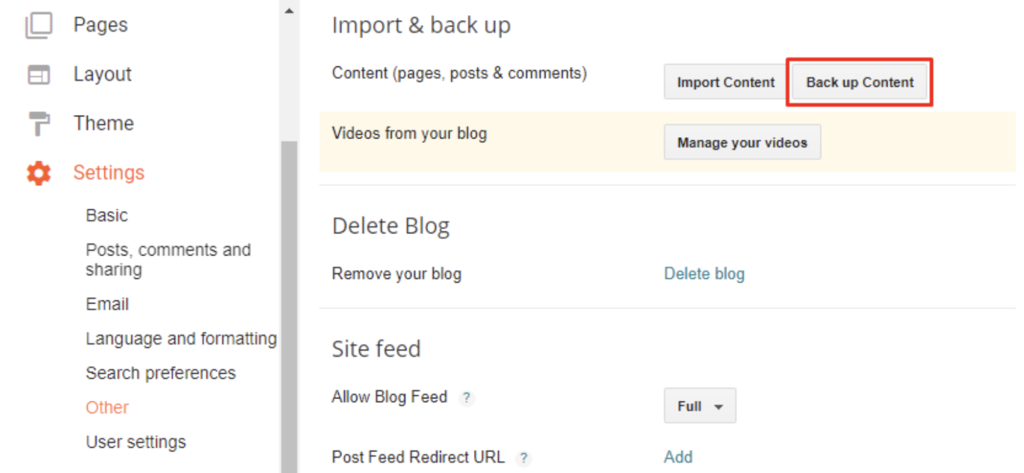
- From the Blogger Dashboard, go to Settings -> Other.
- In the Import & back up section, select Back up Content -> Save to your computer. The XML file will be downloaded automatically to your device.
- Now, head to the WordPress Dashboard, there go to Tools -> Import.
- Choose Blogger by clicking Install Now, then select Run Importer.
- On the Import Blogger page, press the Choose File button.
- Locate the XML file you’ve saved and Upload it.
- You will be redirected to the Assign Authors page. Fill out the user information and click Submit.
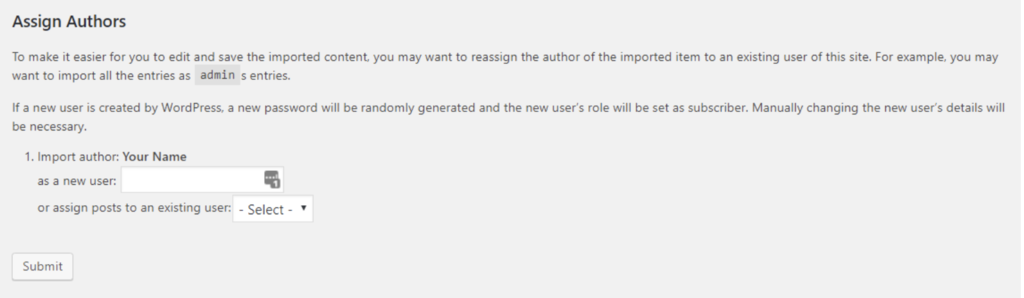
Congratulations, you have your Blogger website’s posts, comments, and categories in your new WordPress site.
3. Redirect your traffic with a plugin
The most important part of preserving SEO is having your old site redirect to the new one. In this tutorial, we’ll use a WordPress plugin ‒ Blogger To WordPress Redirection.
First, set up your WordPress permalinks to resemble Blogger’s link structure.
- Head to WordPress Dashboard -> Settings -> Permalinks.
- In the Common Settings section, choose Month & name.
- Hit Save Changes.
Now, let’s start the redirection setup:
- Download and activate the Blogger To WordPress Redirection plugin from the WordPress dashboard’s plugin section.
- Navigate to Tools -> Blogger To WordPress Redirection.
- Click the Start Configuration button to display the List of Blogs section. Then press Get Code. Copy the generated code.
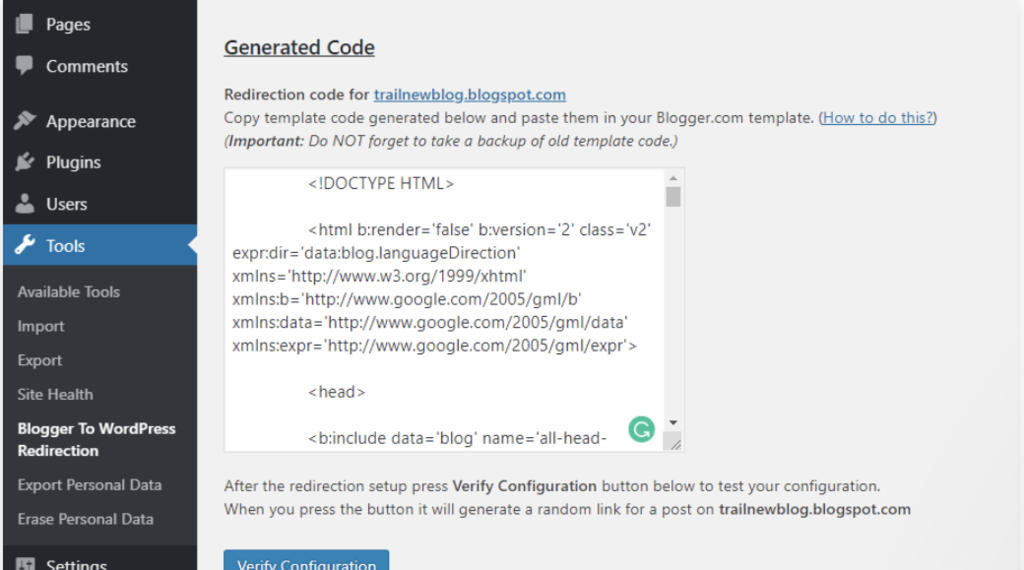
- Now, head to your Blogger Dashboard -> Theme.
- Scroll down to the bottom of the page and click Revert to classic themes. Before inserting the code, it’s recommended to backup your old Blogger theme in case anything goes wrong.
- In the Edit Theme HTML box, replace the whole code with the generated one -> Save theme.
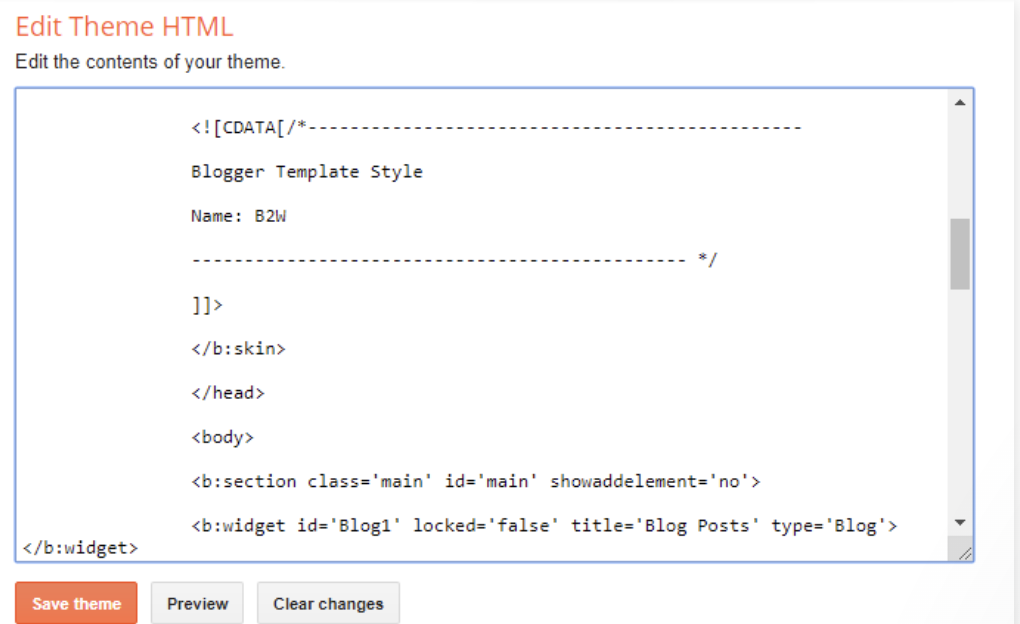
- If you want to test whether the redirection is successful, head back to the Blogger To WordPress Redirection page and select Verify Configuration. Click the Blogger link in the Test Case section.
Additionally, if your Blogger site has RSS subscribers, you also need to redirect the feed.
- Access your Blogger Dashboard -> Settings -> Other.
- In the Site Feed section, click Add next to Post Feed Redirect URL.
- Type your WordPress feed URL (Eg.: http://yoursitename.com/feed).
Conclusion
As Blogger provides basic features for building a simple blog, migrating from Blogger to WordPress is necessary to get more and better features for growing your site once you start making money blogging or online. When transferring, it’s important not to overlook a few key steps that will help carry over traffic and SEO metrics.
Here is the recap of how to carry your site over from Blogger to WordPress without affecting SEO:
- Find WordPress hosting that will meet your needs, then install the CMS.
- Transfer your site’s content manually by downloading the XML file from Blogger, then upload it to WordPress.
- Activate the Blogger To WordPress Redirection plugin to automatically redirect visitors and search engines to your new site.
Make sure to check our guide on how to start a blog to find out the post-migration steps to complete your blog set-up.
There you go. Give it a try and good luck.

Domantas leads the content and SEO teams forward with fresh ideas and out of the box approaches. Armed with extensive SEO and marketing knowledge, he aims to spread the word of Hostinger to every corner of the world. During his free time, Domantas likes to hone his web development skills and travel to exotic places.



Comments
May 30 2020
WordPress is a solid blogging platform to start your blogging career with. But over time, when you understand the true potential of blogging for proving yourself, for developing your affiliate business, and for earning money via blogging, you will need to migrate your Blogger blog to a self-hosted WordPress blog. Numerous newbie bloggers begin their blogs on BlogSpot first of all because of not spending any penny for the hosting and less for a domain. Though over time, multiple of them can able to know that the self-hosted WordPress which means a blog on WordPress is the great choice for an entirely customized blogging. That’s the point when this searching and finding on how to move from Blogger to WP will work for sure. I believe that this all your information will help many of the bloggers who’re planning to switch on the WordPress. Kudos!!!
June 10 2021
Should I delete the blogger importer plugins after all these processes in order to keep my wordpress dashboard light and fast loading?
September 21 2021
Hi Emmanuel, while any plugins you used for the actual migration can be removed, if you're using a plugin to create a redirect from Blogger posts to WordPress, it's best to keep them - otherwise your redirects would stop working.
January 01 2022
This was an excellent walkthrough and it worked with zero issues. Thank you. I am curious, though. Is there a length of time that I must keep the old blogger site open? I'm hoping to one day eliminate the old blog all together in favor of my custom domain. Should I wait a year to let the SEO work itself out so that every query that currently pulls up my blogspot now pulls up my custom domain?
January 04 2022
Hello :) Great question, Derek! Eventually your visitors will learn the new domain name and same goes for search engines. Generally Google shouldn't take longer than a few months to catch up, but a year would surely be a safe timeframe for all of it to work out.
March 22 2022
Hi what will happen to the mobile pages that listed on Google which having link. ? m=1 will they also get redirected or drop ranking. currently Google crawled different pages for desktop and mobile version
March 22 2022
Hi there, as long as you have declared your canonicals well, you should not have any problems with ?m=1 pages and your rankings should not decrease. You can always double-check if they're declared well on your Google Search Console account.
April 22 2022
Thanks for this information! I followed these steps mentioned here and absolutely no hurdles.
April 25 2022
Happy to hear you were able to migrate well!
April 26 2022
excellent.
June 27 2022
only post were importated when i created a page and redirected to wordpress see what happens blogger to wordpress page redirection shows or https://uttrakhandhub.blogspot.com/p/about-us.html Page not found Sorry, the page you were looking for in the blog Uttrakhand HuB does not exist. (but is available in my page section) then i redirected but i think redirection only working for pages not for post https://www.uttrakhandhub.in/about-us.html (newly created page) help me if anyone
July 14 2022
Hey! If after migrating your Blogger site to WordPress you get page not found (404) error, we would suggest resetting your permalinks, and you can check this resource to learn how to do it. If any issues persists, feel free to contact our Customer Success team from your account, and the team will be there to assist you further! ?
October 27 2022
I tried to reset permalinks as I was seeing 404 errors on my post pages. not on my main homepage. But still, it doesn't work any help? my site is bugreblogs.com
October 28 2022
Hi, If after resetting the permalinks you're still seeing the 404 error, you can check out this article to learn how to resolve it, you can also contact the support for your hosting for additional help.
December 15 2022
Is it possible to migrate keeping Google Domain hosting without transferring to Hostinger? Right now the cost is around 5€ per year, while with Hostinger it would be 3,99 per month
December 15 2022
Hey there! If you want to keep your domain at Google Domains and have hosting here at Hostinger, you can point your domain to our nameservers and still pay for the domain at Google Domains. You can check this article to learn how to point your domain to Hostinger.
February 28 2023
I recently switch my blog to WordPress after migration everything was ok for about 5 days I mean every post was available. Now every post show 404 Oops! Page not found We are sorry, but the page you are looking for does not exist. What is wrong with my blog. What I can do? Please help me I'm new I haven't much knowledge about WordPress.
March 03 2023
Hello! Seems like your permalinks could be broken, I would suggest fixing them as guided in this article.
August 17 2023
HI I have a blogger website with a custom domain name, how can I transfer it to WordPress with the same domain same, please guide me.
August 18 2023
Hello! Since it's not possible to directly migrate blogger website, I would highly suggest to convert it to a WordPress website. As for domain, you can also transfer it here as guided here.
June 10 2024
When I tried to migrate blog from blogger to WordPress, it caused a lot of URL errors. Some URL dates changed from old to new and some slugs have also changed. Any solution to that?
June 14 2024
Hello! Sorry to hear that. To fix this, set up 301 redirects from your old Blogger URLs to your new WordPress URLs, use a plugin for easy management, and ensure your WordPress permalink structure matches your old Blogger URLs. Additionally, update your internal links and submit your new sitemap to Google Search Console ;)