How to Deploy a ChatGPT Clone: Building and Deploying Your Own Application with OpenAI API
Mar 10, 2026
/
Matleena S.
/
10 min Read

As Artificial Intelligence (AI) continues to evolve, it opens many opportunities for developers and coding enthusiasts alike. One such opportunity is to create and deploy your AI application, like ChatGPT, using OpenAI API.
This guide provides a comprehensive walkthrough of deploying your own ChatGPT clone, tweaking it for the most efficient performance, and tips on optimizing your AI application for better results.
What Is an OpenAI API?
OpenAI API is a powerful tool that provides developers access to cutting-edge natural language processing and machine learning models for various applications like text generation, text completion, language translation, data preprocessing, and more.
OpenAI API is powered by advanced AI models, like GPT-3.5, that offer flexible options to developers seeking to integrate AI capabilities in other applications. By using ChatGPT API, developers can instruct their conversational AI models to generate creative content, answer questions, act as virtual assistants, translate languages to serve a global audience, and even simulate conversation – as ChatGPT does.
Why Build and Deploy Your Own ChatGPT Clone With Open AI API
Creating your own AI clone has several benefits, especially for businesses, developers, and AI enthusiasts who want to create personalized and intelligent conversational agents:
- Customization. By creating your own AI application, you can fully control and tailor its behavior to suit specific needs. This could include customizing the application’s conversational style, level of formality, or depth of knowledge in specific niches.
- Specific niche knowledge. When you build your own clone, you can fine-tune it using data from your specific field of interest. This way, you can create an application that is a subject matter expert in any niche you desire.
- Data privacy. Hosting the application yourself gives you full control over the data it handles. This can be especially important for businesses dealing with sensitive information.
- Integrated user experience. Your AI application can be integrated into your existing platforms (websites, apps, etc.), providing a seamless experience for your users. This can increase user engagement and overall satisfaction.
- Learning opportunity. The process of building and deploying chatbots and other AI apps is an excellent learning opportunity for anyone interested in web development. It allows you to gain hands-on experience with cutting-edge AI technology.
Using OpenAI API for developing your AI app also has its pros:
- High-quality AI. OpenAI’s GPT-3.5 is a state-of-the-art AI model that generates impressively human-like text. This allows your clone application to provide high-quality responses.
- Saves time and resources. Training such an advanced AI model from scratch would require vast computational resources and expertise. Using OpenAI’s pre-trained model via the API allows you to leverage this powerful technology more easily, essentially speeding up your chatbot development.
- Continuous model optimization and updates. OpenAI continually updates and improves its large language models. By using their API, your clone application benefits from these improvements without any extra work on your part.
How to Build a ChatGPT Clone
Building a ChatGPT clone involves three major steps, each of which is explained in detail below:
1. Set up the Environment
Setting up an environment for your application is like preparing a playground for a child. It’s the space where your application learns, grows, and interacts with the world. This is crucial because most AI models require significant computational resources to work.
Firstly, you need an environment that can support AI applications. This environment will house the resources required for building, training, and deploying your AI model. Here’s how you can create one:
Setting Up Your VPS
Virtual Private Server (VPS) hosting offers a balance of power, performance, and isolation from others on the same physical server. VPS web hosting ensures that your AI tasks don’t have their performance degraded due to other websites’ activities. You also get access to the root folder, meaning you can install and run anything you want, enabling you to add any functionality to your hosting server. Root access is necessary for the various tools you’ll use.
If it’s your first time setting up VPS hosting, look for a provider with an intuitive user interface, good tutorials, and reliable customer support.

Installing Python
Next, install Python on your VPS, as we’ll use Python-based tools. Python is commonly used in the AI and machine learning field. Most libraries and tools for these fields, including the ones we’ll use, are written in Python. Installing it on your VPS sets the stage for everything else we’ll do. In a terminal on your VPS, you can install Python by following these steps. In our case, we are using Debian-based VPS:
1. Log in to your VPS via SSH.
2. Update and refresh repository lists:
sudo apt update
2. Install supporting software:
sudo apt install software-properties-common
3. Add deadsnakes PPA:
sudo add-apt-repository ppa:deadsnakes/ppa
4. Install Python 3:
sudo apt install python3.8
2. Access OpenAI API
To build a ChatGPT clone, we leverage the OpenAI API, which provides access to the powerful GPT-3.5 model. This is the brain of your application. It’s the component that generates human-like text responses. Connecting your app to this API gives your app the ability to understand and respond intelligently to user input.
To access the OpenAI GPT-3.5 model, you need an OpenAI API key. Here’s how to obtain one:
- Visit the OpenAI website and sign up for an account.
- Navigate to the API section and follow the instructions to generate a new OpenAI API key.

Important! The API key is only shown once – when the window is closed, the key is gone forever. If you forget your key, you need to generate a new one. Also, remember to keep your API key secure! Anyone with access to this key can make requests to the OpenAI API on your behalf.
3. Prepare the Data for the Application
Data preparation is essential because an AI model is only as good as the data it’s trained on. You teach the application how to converse effectively by providing representative conversation data. This step is essentially the education of your app. The better and more varied the data you provide, the more knowledgeable and effective the application becomes.
To prepare data for your AI app, you’ll need a dataset that contains examples of user inputs and corresponding model responses. Here are some steps to help you prepare the data effectively:
- Define the scope. Determine the specific niche or topic you want your AI app to focus on. This will help you gather relevant data and train the model accordingly.
- Data collection. Gather a diverse range of user inputs and model responses. You can curate data from various sources, such as customer support chats, forum threads, and social media interactions, or even create your own dataset using simulated conversations.
- Data cleaning. Thoroughly clean and preprocess the data to ensure consistency and quality. Remove any irrelevant or noisy information, correct spelling errors, and standardize the data format.
- Formatting the data. Structure your data into input-response pairs. Each example should contain a user query or input and the corresponding model response. Ensure that the pairs are aligned correctly.
- Dataset splitting. Divide your dataset into training, validation, and testing sets. Typically, around 80% of the data is used for training, 10% for validation (to tune hyperparameters), and 10% for testing (to evaluate the model’s performance). Randomly shuffle the data to avoid any bias in the ordering.
- Tokenization. Tokenize the text data, converting words or characters into numerical representations that the model can understand. You can use libraries like the OpenAI Tokenizer or the Hugging Face Tokenizers.
- Model-specific considerations. Depending on the framework or library you use for training your AI app, you may need to follow specific guidelines for data preparation. Refer to the framework or library documentation you choose for any model-specific instructions.
- Iterative training. Train your AI app using the prepared data. Experiment with different hyperparameters, model architectures, and training techniques to optimize performance. Monitor the model’s outputs, evaluate against the validation set, and iterate on the training process as needed.
- Evaluation and testing. Assess the performance of your AI app by measuring metrics like response relevance, coherence, and correctness. Use the testing set to evaluate how well the model generalizes to unseen data and real-world scenarios. Iterate and refine your model as necessary based on the evaluation results.
Here’s a simple example of how you could prepare some training data:
training_data = [
    {"input": "Hello, how can I help you today?", "response": "What time do you close today?"},
    {"input": "We close at 9pm today.", "response": "Thank you!"}
]
Pro Tip
You would need thousands, if not millions, of such interactions to effectively train your application for the best results. Consider launching a beta version of your AI app and training it on the job.
How to Deploy Your ChatGPT Clone
The deployment process makes your app accessible to the public. It’s like opening the doors of your business to customers. After building your clone, you need to publish it so that people can interact with it. Here are the steps to do that:
1. Build a ChatGPT Clone App (With Python)
- Clone OpenAI repository via Git:
git clone https://github.com/openai/openai-quickstart-python.git
If you don’t have Git use:
sudo apt install git
2. Add your API key by navigating to the newly created directory:
cd openai-quickstart-python
3. Then, copy the .env.example file to a new .env file:
cp .env.example .env
4. Open the .env file with your favorite text editor and add your secret key to the OPENAI_API_KEY line. We are using nano:
sudo nano .env

2. Run Your App
1. Run the following commands one by one:
python3 -m venv venv

. venv/bin/activate

pip install -r requirements.txt

flask run --host=0.0.0.0
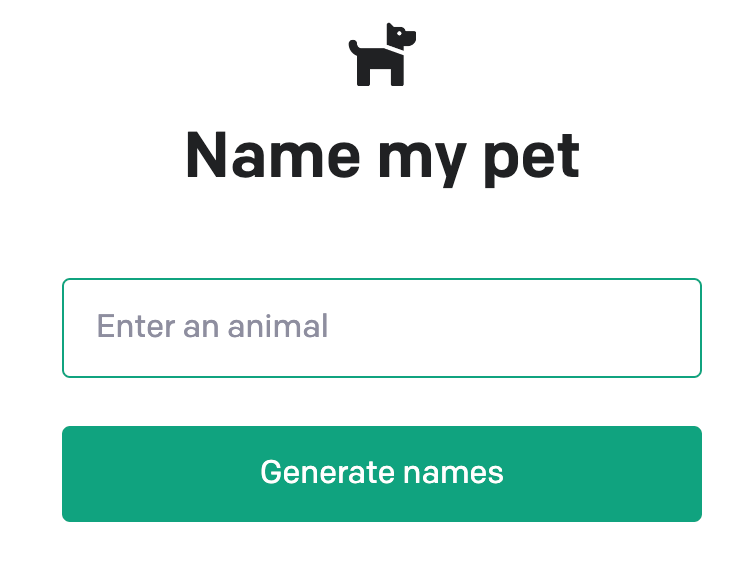
2. Visit your VPS 185.185.185.185:5000
Make sure to replace 185.185.185.185 with your actual VPS IP.
If you are getting an error about venv missing, use the following command:
sudo apt install python3.8-venv
Warning! The above app is made to be accessed publicly only for testing purposes. We do not recommend running your production applications publicly with this method.
How to Test the ChatGPT Clone
After deploying the app, it’s crucial to test it extensively. This helps ensure that your AI application functions as expected and can handle user queries. Some testing methods include conducting unit tests, performing user acceptance testing, and even running stress tests to verify its performance under high traffic.
How to Optimize the Application for Better Results
Optimization is all about tweaking the performance of your app. It’s like teaching your AI clone how to better understand and interact with people, improving the overall user experience. Optimizing the application can help improve its efficiency, response accuracy, and overall performance. Here are some methods to do so:
Increase the Amount of Training Data
Adding more training data is like giving your app more experience. The more varied and diverse conversations it learns from, the better it will be able to handle future interactions. For instance, if your app is intended for customer service, you could train it on past customer interactions, FAQs, and various scenarios that it might encounter.
Adjust the Temperature Parameter
The temperature parameter controls the randomness of the app’s output. A lower value will make the application’s responses more focused and deterministic, while a higher value produces more varied responses.
It’s like the difference between someone who always stays on script (low temperature) versus someone who occasionally goes off on tangents (high temperature). You can experiment with this parameter based on the desired nature of your AI app. For instance, a lower temperature might be more appropriate for a customer service chatbot to ensure consistent and accurate information.
response = openai.ChatCompletion.create(
  model="gpt-3.5-turbo",
  messages=[
        {"role": "system", "content": "You are a helpful assistant."},
        {"role": "user", "content": "Who won the world series in 2020?"},
    ],
  temperature=0.5,
)
In the example above, the temperature is set to 0.5. For more information on temperature, check out OpenAI’s documentation library.
Fine-Tune the Model
Fine-tuning is the process of training your application on a specific dataset after it has been pre-trained on a large corpus of text. It’s like giving your app specialized knowledge in a specific domain.
If you have a chatbot for a car dealership, for instance, you could fine-tune it on automotive-related conversations. OpenAI supports this optimization type, which can be leveraged to customize the model based on your specific requirements and help you create the best AI chatbot for your use case.
Limit the Model’s Response Length
Limiting the response length ensures that your app doesn’t provide overly verbose responses. It’s like teaching your application brevity. By setting a maximum limit, you can ensure that the AI’s responses are concise and to the point, improving user readability.
response = openai.ChatCompletion.create(
  model="gpt-3.5-turbo",
  messages=[
        {"role": "system", "content": "You are a helpful assistant."},
        {"role": "user", "content": "Tell me about the Eiffel Tower."},
    ],
  max_tokens=150,
)
In the example above, the max tokens parameter is set to 150, meaning the response will be cut off after 150 tokens.
Provide Feedback to Your Application
This involves regularly monitoring the application’s performance and manually correcting it when it makes mistakes. This continuous feedback is crucial for improving your AI over time. It’s similar to providing constructive criticism to a person; the feedback helps the AI learn from its mistakes and improve its future performance.
Dataset Quality
Ensure your training dataset is high-quality, diverse, and representative of the language patterns and scenarios your application will encounter. Clean the data, remove noise, and pay attention to the relevance and correctness of the responses. The better the dataset, the better the performance of your AI application.
Hyperparameter Tuning
During training, experiment with different hyperparameter settings, such as learning rate, batch size, number of training steps, and model size, to find the optimal configuration for your AI application. Conduct systematic experiments using grid or random search techniques to determine the best hyperparameter values that suit your AI’s specific functionality and requirements.
Model Architecture
Explore different model architectures, including transformer-based models, to identify the most suitable one for your AI application’s task. Consider advanced models like GPT-3.5 and its successors if available. Choose the architecture that best aligns with the functionality your AI application aims to provide to users.
Transfer Learning
Leverage pre-trained language models and transfer learning techniques to enhance the performance of your application. Begin with a pre-trained model, maintain context, and fine-tune it using your specific dataset. This approach saves training time and capitalizes on the knowledge the pre-trained model has acquired. Utilize environment variables and ensure your source code supports efficient transfer learning processes.
Data Augmentation
Apply data augmentation techniques, such as paraphrasing, back-translation, or adding noise, to augment your existing dataset and increase its diversity. This improves the generalization and accuracy of your AI’s responses. Consider implementing data augmentation functions within your source code and optimize the augmentation process.
Error Analysis
Analyze errors and limitations in your application’s performance by identifying common failure cases, ambiguous queries, and areas where the AI frequently struggles. Use error analysis to fine-tune your dataset and improve the training process. Implement rule-based post-processing components or ensemble methods within your codebase to mitigate weaknesses and enhance the overall performance of your application.
Monitoring And Maintenance
Deploying your AI application requires setting up monitoring systems to track its performance. Continuously monitor the model’s outputs and user interactions, and collect feedback to promptly address any issues that arise. Implement rate limiting to control the number of requests your AI processes. Regularly maintain and update your AI, considering factors like user input, context, and a potential environment variable.
Host your AI application with a reputable hosting provider and create a backup of your application to ensure seamless functionality. Periodically review and update form section components, answer section components, and prompt components based on user feedback and evolving requirements. Keep your OpenAI API keys secure and up-to-date when deploying your application.
Conclusion
Building and deploying a ChatGPT clone may seem challenging, but with OpenAI API, you can create an efficient and personalized AI application. By following this guide and continuously optimizing the application, you can provide a highly engaging user experience.
Suggested Reading
What Is NGINX?
What Is GitHub?
How to Create a Custom GPT with ChatGPT
How to Build a Website With ChatGPT
What Is React & How Does It Actually Work?
How to Install Auto-GPT and Use It
How to Deploy a ChatGPT Clone FAQ
Find answers to some of the most common questions about deploying your ChatGPT application below.
What Programming Language Is Used for ChatGPT?
ChatGPT is built using Python, a popular language for AI and machine learning projects due to its simplicity and the wide array of libraries and frameworks it offers.
How Much Training Data Is Required to Make a ChatGPT Clone?
The required training data can vary, but more is generally better. A few gigabytes of clean, representative conversation data can be a good starting point.
Do I Need to Have Programming Knowledge to Deploy a ChatGPT Clone?
Yes, deploying a ChatGPT clone involves coding and understanding machine learning concepts. Familiarity with Python or Node.JS is particularly beneficial.
Is It Possible to Customize the Responses of the ChatGPT Clone?
Yes, you can customize the responses by adjusting parameters, like temperature, and tweaking the model with specific data.

Matleena is a seasoned Content Writer with 5 years of content marketing experience. She has a particular interest in emerging digital marketing trends, website building, and AI. In her free time, Matleena enjoys cups of good coffee, tends to her balcony garden, and studies Japanese. Follow her on LinkedIn