Domain redirect vs. transfer: The key differences explained
Dec 02, 2025
/
Ariffud M.
/
5 min Read

The main difference between a domain redirect and a domain transfer is that a redirect sends visitors from one domain name to another, while a transfer moves the domain’s registration from one company (registrar) to another.
A domain redirect is often called domain forwarding. They mean the same thing: you’re pointing a URL to a different destination address.
You use a domain redirect (forwarding) when you want one domain to display the content of another, which is common if you want to send users from an old page to a new one.
In contrast, you use a domain transfer when you’re unhappy with your current domain provider or have other reasons to move your domain’s management and billing to a new one.
Here’s a quick side-by-side comparison:
| Feature | Domain redirect (forwarding) | Domain transfer |
| Definition | Points one domain or URL to another destination. | Moves the management of a domain name from one registrar to another. |
| Purpose | To send visitors and search engines to a different URL. | To change the company that manages your domain registration and billing. |
| SEO impact | Significant. A permanent (301) redirect passes SEO value. A temporary (302) one doesn’t. | Neutral. There’s no direct SEO impact if done correctly, but errors during the switch can cause downtime. |
| Setup difficulty | Easy. Usually a quick setting in your domain or hosting control panel. | Moderate. Involves unlocking the domain, getting a code, and a waiting period of several days. |
| Use cases | Rebranding, fixing broken links, consolidating multiple domains, running marketing campaigns. | Consolidating domains, getting better pricing, accessing new features, or switching to a preferred provider. |
Domain redirect vs. domain transfer: What are the use cases?
Domain redirect (forwarding) use cases include traffic management, such as rebranding or consolidating multiple domains.
On the other hand, you typically transfer your domain when you’re looking for better pricing, improved features, or want to manage all your assets in one place.
Domain forwarding is a strategy for directing visitors. It’s ideal when you need to:
- Consolidate traffic. If you own mybusiness.com, mybusiness.net, and my-business.org, you can redirect all of them to your main .com site.
- Rebrand your site. When you move from oldbrand.com to newbrand.com, a permanent redirect moves all your visitors and search engine authority with you.
- Point multiple domains to one site. You might buy common misspellings of your domain, like mydomian.com, and forward them to the correct one (mydomain.com) to capture that traffic.
If you need detailed steps, check our guide on how to redirect a domain name.

A domain transfer is an administrative action. It’s a preferred approach to:
- Get better pricing. Your current registrar might have high renewal fees, and you find a better deal elsewhere.
- Consolidate your assets. It’s much easier to manage your website hosting and domain registration under one account.
- Access better features or support. You may want to consider switching to a registrar that offers better security features, a more user-friendly control panel, or 24/7 customer support.
Domain redirect vs. transfer: What is the key difference in management?
The key management difference is that with a domain redirect, you still manage all its settings within the same registrar, while with a domain transfer, you change where you manage your domain settings to the new registrar.
When you set up domain forwarding, your domain’s registration doesn’t change. You still pay your annual renewal fee to the same company.
You are simply adding a rule (like a 301 or 302 redirect) that tells a browser, “This address is no longer the final destination; go over here instead.”
A domain transfer is a formal hand-off of your domain’s registration. This process involves unlocking your domain at your old registrar and providing an authorization code to your new registrar.
Once complete, your new registrar handles all billing and top-level settings – like DNS nameservers – for that domain.
Domain redirect vs. transfer: Which one is better for SEO?
A domain redirect has a direct impact on SEO because it tells search engines how to handle the content’s new location. In contrast, a domain transfer has no significant SEO impact as it’s just an administrative change of your registrar.
Redirects are a core part of technical SEO. Without a proper redirect (like a 301), you risk losing your ranking power and SEO value.
Below are the main redirect types and their impact:
- 301 (permanent) redirect. This tells search engines like Google that your page or site has been permanently moved. This is the correct one to use for rebranding or fixing broken links, as it passes most of your original page’s ranking power (or link equity) to the new address.
- 302 (temporary) redirect. This informs search engines that the move is temporary, perhaps while you’re doing site maintenance. It does not pass ranking power, as Google expects the original page to return.
A domain transfer is just an administrative change. As long as your domain’s nameservers (which point the domain to your web hosting) are copied correctly to the new registrar, there is zero SEO impact or downtime.
The only risk is human error, like failing to set up your DNS records correctly at the new provider, which could make your site inaccessible.
To minimize this risk, always double-check your DNS configuration. Using premium DNS also helps, as your DNS record changes propagate much faster, reducing the chance of downtime during the switch.
Domain redirect vs. transfer: Setup process
Setting up a domain redirect involves logging into your domain registrar’s or hosting provider’s control panel, finding the Redirects or Forwarding option, entering the original domain/URL, and typing in the destination URL.
It is fast and simple, and you can complete it within a few minutes.
A domain transfer requires you to unlock the domain at your current registrar, disable privacy protection, request an authorization (EPP) code, start the transfer at your new registrar using that code, and approve confirmation emails.
The process is much more involved and typically takes five to seven days.
If you plan to switch to Hostinger in the near future, learn how to transfer a domain name in four simple steps.
Domain Name Checker
Instantly check domain name availability.
When to use domain forwarding vs. domain transfer
Use domain forwarding (redirect) when your goal is to control where your traffic goes. Meanwhile, use a domain transfer when your goal is to change who manages your domain.
If you just bought my-cool-blog.net and want it to point to your main my-cool-blog.com site, you need domain forwarding. Your registrar doesn’t change.
If you’re tired of your current registrar’s high prices, lack of support or anything else, and want to move my-cool-blog.com to another one for billing and management, you need a domain transfer.
A common point of confusion within domain forwarding is a specific type called domain masking. While it’s a form of redirect, it behaves very differently and has serious downsides.
How domain masking fits into domain forwarding
Domain masking, also known as masked forwarding, is a specialized type of domain forwarding that hides the destination URL from the visitor’s address bar.
Here’s how it works: with a normal redirect, a user types domain-a.com, and their browser address bar changes to domain-b.com.
With a masked domain, the user types domain-a.com, sees the content from domain-b.com, but the address bar still says domain-a.com.
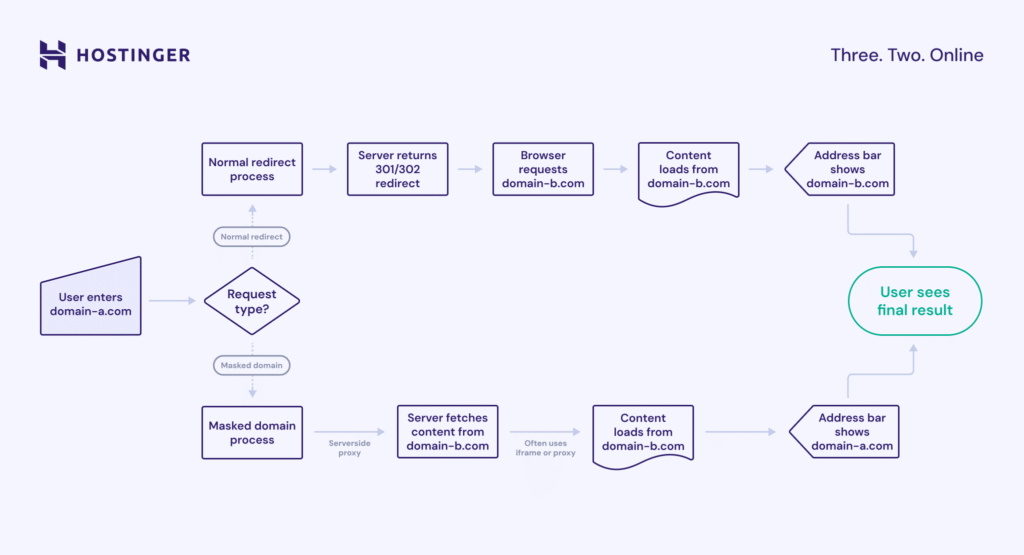
While this method has benefits like keeping your branded domain in the address bar and hiding a long or complex destination URL, it is now outdated and bad for SEO.
Search engines see this as “cloaking” or duplicate content, as the same content exists at two different addresses (domain-a.com and domain-b.com). This can severely penalize your site’s rankings, so we don’t recommend using it.
Why redirects and transfers matter for your website strategy
Domain redirects and transfers are crucial for your website strategy, because redirects guide traffic and preserve SEO value when your site’s structure changes, while transfers let you control who manages your domain asset.
In short, redirects (forwarding) are your tool for navigation and SEO, while transfers are for administration and ownership purposes.
Both are related to your domain and its management, but neither should be confused with your website’s hosting. Your domain is your address, and your hosting is the “house” where your website lives.
You can learn more about the difference between a domain vs. hosting in our article. Knowing how to use all three – redirects, transfers, and hosting – gives you complete control over your online presence.

Ariffud is a Technical Content Writer with an educational background in Informatics. He has extensive expertise in Linux and VPS, authoring over 200 articles on server management and web development. Follow him on LinkedIn.