How to fix “NET::ERR_CERT_COMMON_NAME_INVALID” Error
Mar 10, 2026
/
By Noviantika G.
/
7 min Read


When accessing a website, the browser usually has to verify the website’s SSL certificate to establish a secure connection. A website with a valid certificate will redirect the request via the HTTPS protocol, the secure version of HTTP.
However, if the “NET::ERR_CERT_COMMON_NAME_INVALID” error occurs, it means the browser has failed to verify the SSL. Most of the time, this happens because the common name in the SSL certificate doesn’t match the actual domain name.
For example, if you want to install an SSL certificate on your website example.com, the common name should also be example.com.
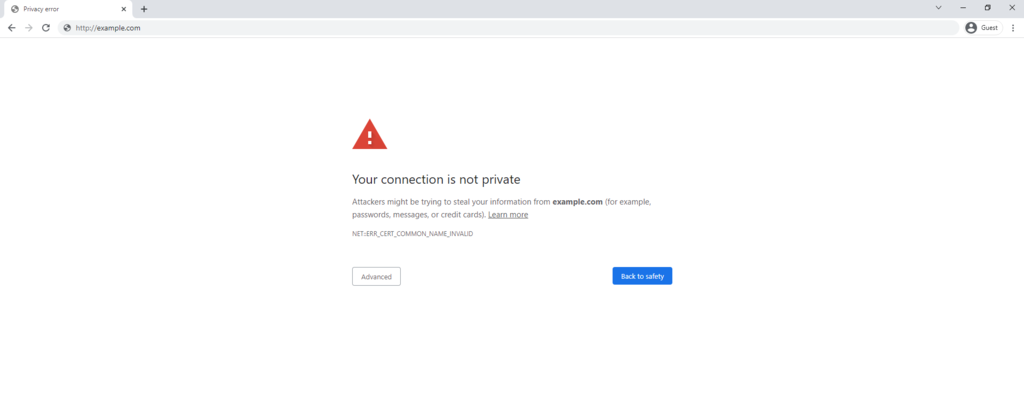
Domain mismatch is not the only reason the “NET::ERR_CERT_COMMON_NAME_INVALID” error occurs. In some instances, the issue may be caused by the site’s address itself and antivirus configuration settings, browser extensions, cache, and more.
Although this error can be tricky to troubleshoot since it has many possible causes, rest assured that there are ways to fix it quickly.
| Error code | NET::ERR_CERT_COMMON_NAME_INVALID |
| Error type | SSL Connection Error |
| Error variations | Your connection is not private Your connection isn’t private Warning: Potential Security Risk Ahead This site is not secure |
| Error causes | Invalid SSL certificate Misconfigured redirects Browser extensions conflict Antivirus issues Operating system issues |

10 methods to fix “NET::ERR_CERT_COMMON_NAME_INVALID”
Before you proceed with the methods below, check whether your site is inaccessible only for you or everyone else, as that will give you a better idea of the cause.
1. Make sure that the SSL is set correctly
A common cause of this error is a mismatch between the common name on your SSL certificate and the correct domain name. To solve the issue, make sure you have installed the correct certificate and configured the SSL properly.
Here’s how to troubleshoot the error using Google Chrome. If you use a different browser, the process will be similar:
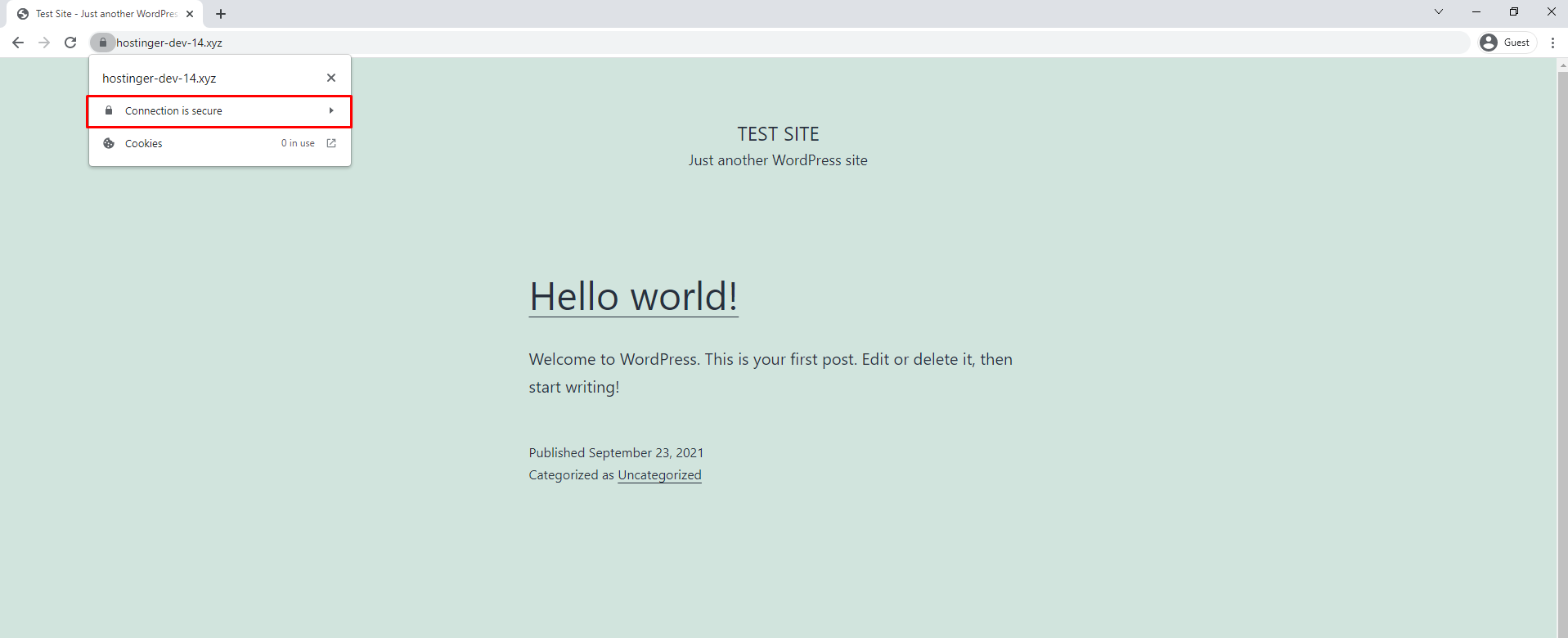
- Go to your website and click on the padlock icon on the address bar.
- From the dropdown menu, select Connection is secure.
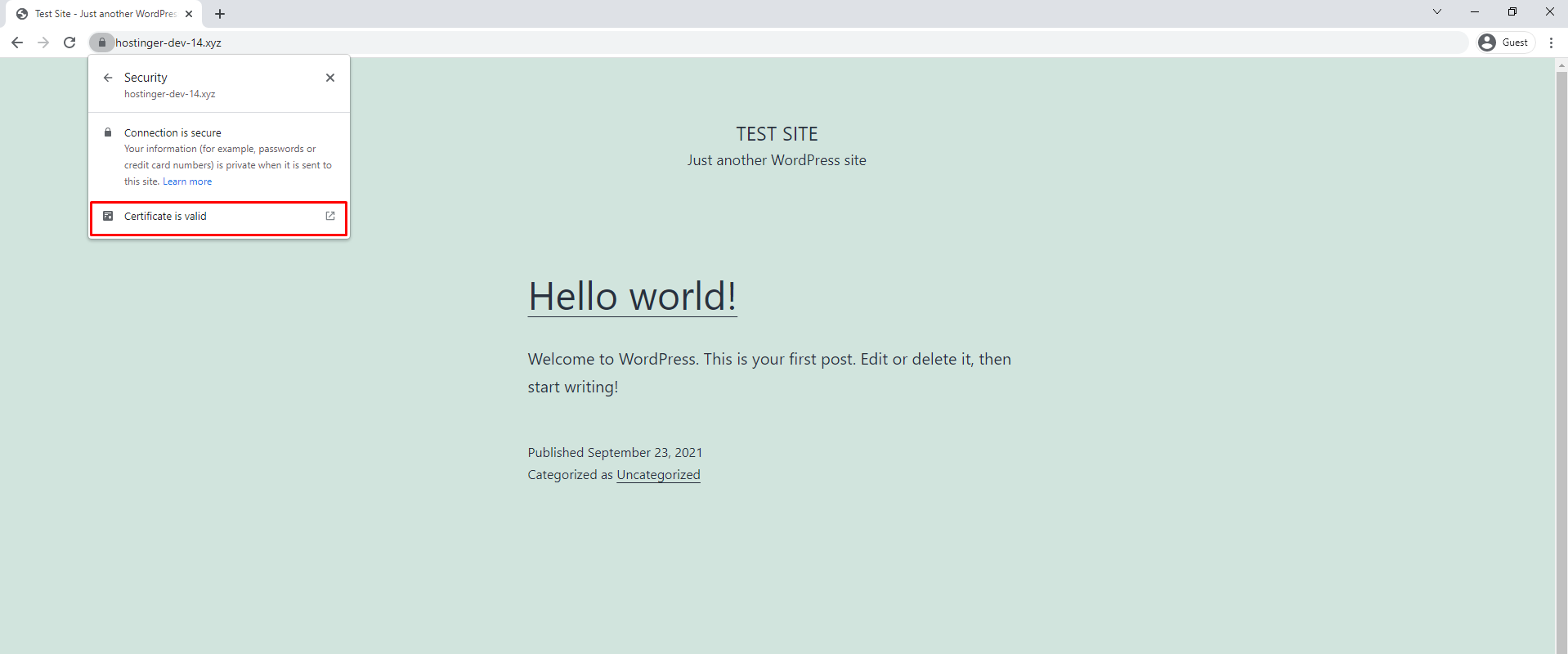
- Select Certificate is valid.
- A window will open containing the site’s SSL certificate details.
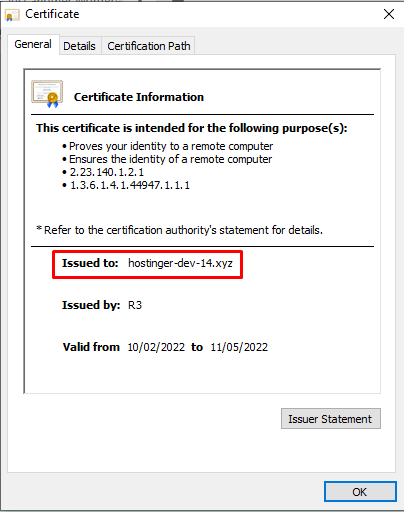
The actual domain name should match the common name listed in the SSL certificate’s Issued to domain information. If that isn’t the case, there is an SSL mismatch error between the two. The only solution is to delete and install a new SSL certificate.
Check wildcard SSL configuration
Wildcard SSL certificates can encrypt data on multiple subdomains. Therefore in some cases, the common name inside an SSL certificate is listed as a subdomain like domain.example.com.
If you use a wildcard certificate on your subdomain and encounter the “NET::ERR_CERT_COMMON_NAME_INVALID” error, it means that your SSL certificate doesn’t cover the subdomain you are trying to access.
Check Subject Alternative Names (SAN) configuration
A Subject Alternative Names (SAN) certificate allows data encryption on multiple domains pointing to one site address. It covers www and non-www versions of a website, subdomains, and top-level domain (TLD) variations.
If the website you’re trying to access uses a SAN certificate, examine the list of domains it protects by checking the certificate details. If a web address is not there, the certificate doesn’t cover it.
2. Check WWW vs. Non-WWW versions and if your site is redirecting to another URL
It is important to know whether your browser is forcing your visitors to another version of your website since not all SSL certificates cover both www and non-www site versions.
For example, if your domain is mydomain.com, and the server redirects your website visitors to www.mydomain.com, the error may appear if there is only one SSL installed for the “www” version.
There are two ways to solve this problem. The first one is to change the common name on the certificate your domain defaults to. The second is to purchase another SSL certificate to cover the domain you’re redirecting from.
3. Ensure WordPress URL is directing to the site URL
In some cases, the web protocol HTTP may have been manually changed to HTTPS without installing an SSL. As a result, the website may encounter a common name mismatch error.
If that’s the case, you should change your WordPress URL:
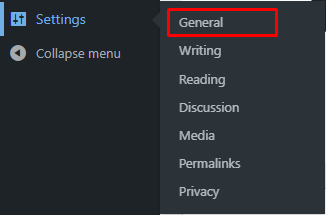
- On the WordPress dashboard, click Settings and choose General.
- Check whether the WordPress Address (URL) and Site Address (URL) match.
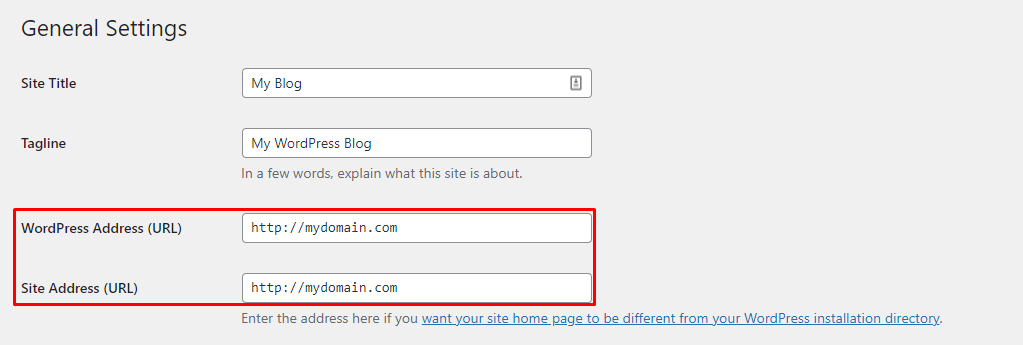
- If they don’t match, make the appropriate changes.
4. Check for any browser extension conflicts
Having too many browser extensions can cause issues as they may conflict with one another. This may be a possible cause of the common name mismatch error.
Access the website in an incognito window and see if it is reachable. If it is, the problem might be caused by a browser extension. To solve this, disable the extensions one by one while checking your site to determine the cause of the issue. Once you’ve isolated the conflicting extension, delete it.
Here is how to remove extensions from Google Chrome:
- Click the three dots at the top-right corner.
- Hover over More tools and select Extensions.
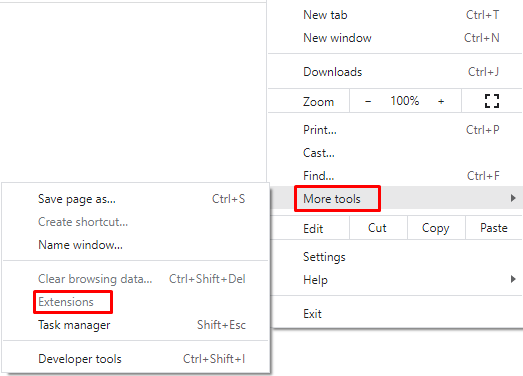
- Once the new window opens, select the extension you want to uninstall and click Remove.
To prevent this issue from happening in the future, make sure to audit and update your extensions regularly.
5. Clear the Browser Cache
Browser caching is a great feature that stores records of websites you’ve visited so the browser cloud load them faster next time.
Unfortunately, outdated cache may cause problems by loading an old website version. To prevent this, clear the browser cache regularly. This way, your browser will load the most recent version of the website and prevent the “NET::ERR_CERT_COMMON_NAME_INVALID” error from reoccurring.
6. Disable antivirus software and firewall
Some antivirus software has an HTTPS scanning feature to add more protection. That said, it may block you from visiting HTTPS sites. If you trust the website, try disabling HTTPS scanning on your antivirus.
If this option is unavailable, you may have to entirely turn off the antivirus software.
Here’s how to disable Windows antivirus software:
- Click on the Start button and look for Settings.
- Find Update & Security and choose Windows Security.
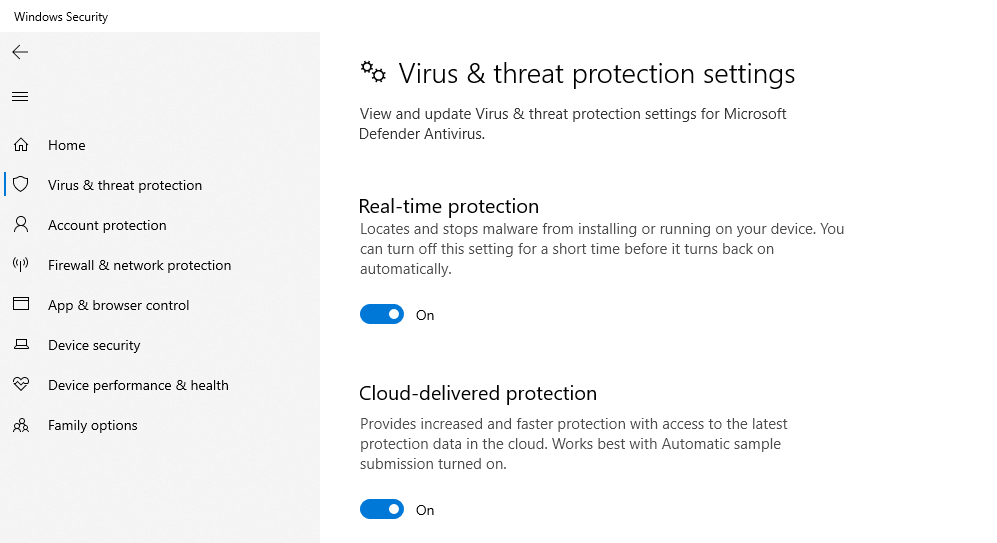
- Open Virus & threat protection and click Manage settings. Finally, switch Real-time protection to Off.
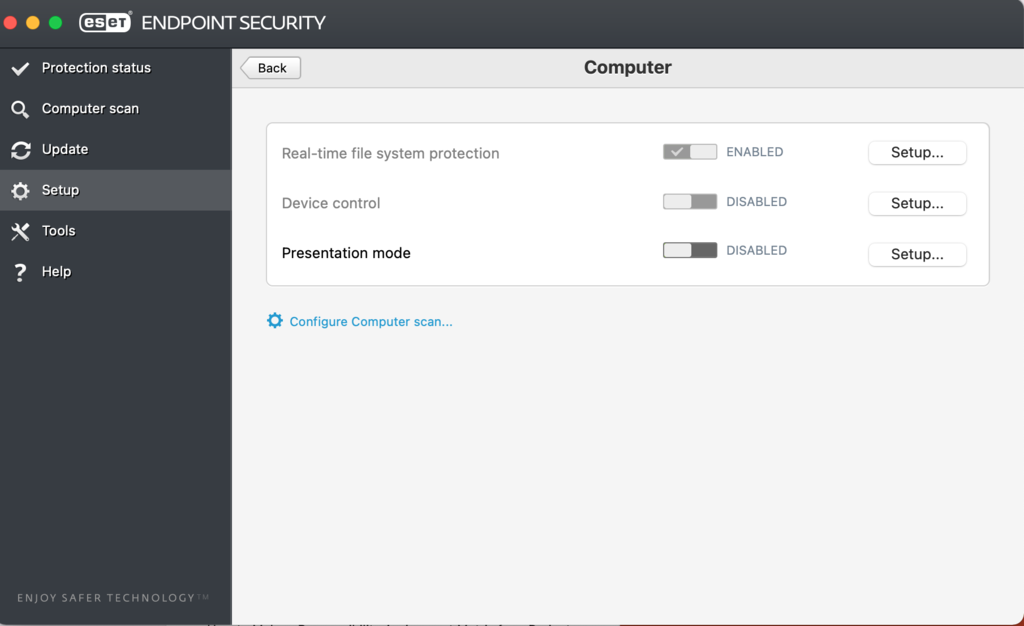
Here’s how to do it on macOS using ESET Endpoint Security:
- Open Finder and look for the ESET Endpoint Security application.
- Open the application and click Setup. Switch Real-time file system protection to Disabled.
7. Configure URL settings in phpMyAdmin
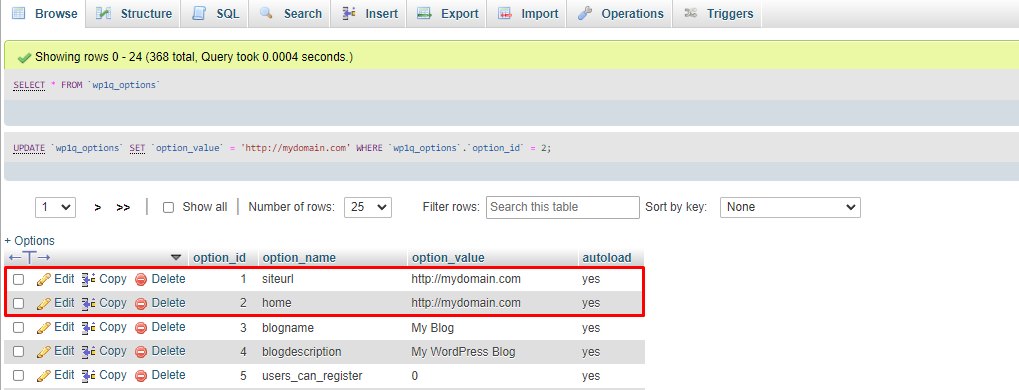
The “NET::ERR_CERT_COMMON_NAME_INVALID” may be caused by the URL difference between option_value in siteurl and home rows of your website’s database. You can change your WordPress URL settings via phpMyAdmin.
Here’s how to do it via hPanel:
- Go to your hosting account and open the phpMyAdmin application.
- Choose your site’s database and find the wp_options table. Inside wp_options, look for siteurl and home rows. Make sure both redirect toward the same URL.
8. Clear the SSL state
When you access a website, the browser will cache its SSL certificate to speed up the load time the next time you visit, which might cause the error later.
This troubleshooting method involves clearing the SSL state in the browser and operating system. The process may differ depending on your operating system and browser.
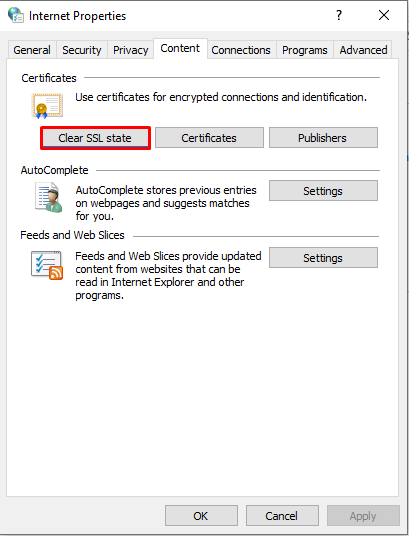
Here’s how to clear the SSL state on Windows:
- Navigate to Control Panel -> Network and Internet -> Internet Options.
- The Internet Properties window will open. Click the Content tab and choose Clear SSL state.
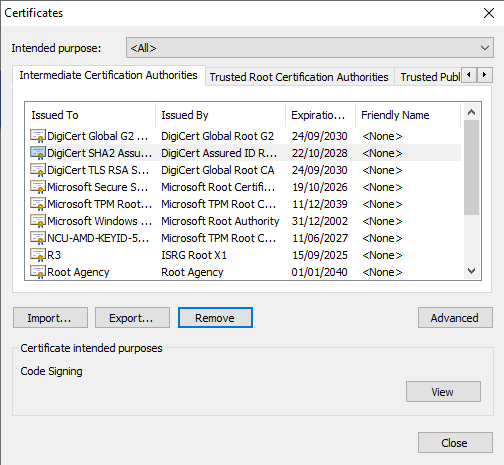
You can also clear the SSL state on your browser. Here’s how to do it on Google Chrome:
- Navigate to Settings after opening the three dots menu at the top-right corner.
- Select Security and Privacy and click the Security option.
- Scroll down and choose Manage certificates to see the list of SSL certificates cached by Google Chrome. Lastly, click Remove to clear the SSL state.
9. Change your LAN settings
Proxy settings route web traffic to protect users from malicious third parties. Any misconfiguration may restrict you from accessing websites or even cause SSL errors.
Here’s how to change the LAN settings on Windows:
- Navigate to Control Panel -> Network and Internet -> Internet Options.
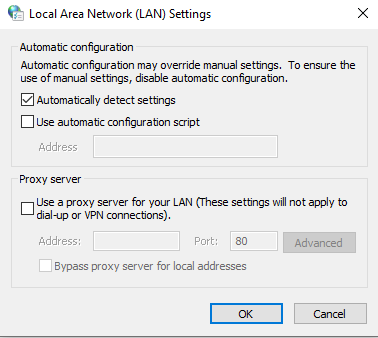
- Choose the Connections tab and select LAN Settings.
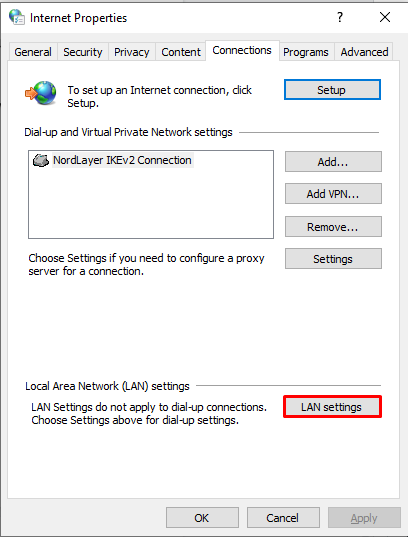
- Tick the Automatically detect settings option. Save the changes by clicking OK.
Here’s how to do it on macOS:
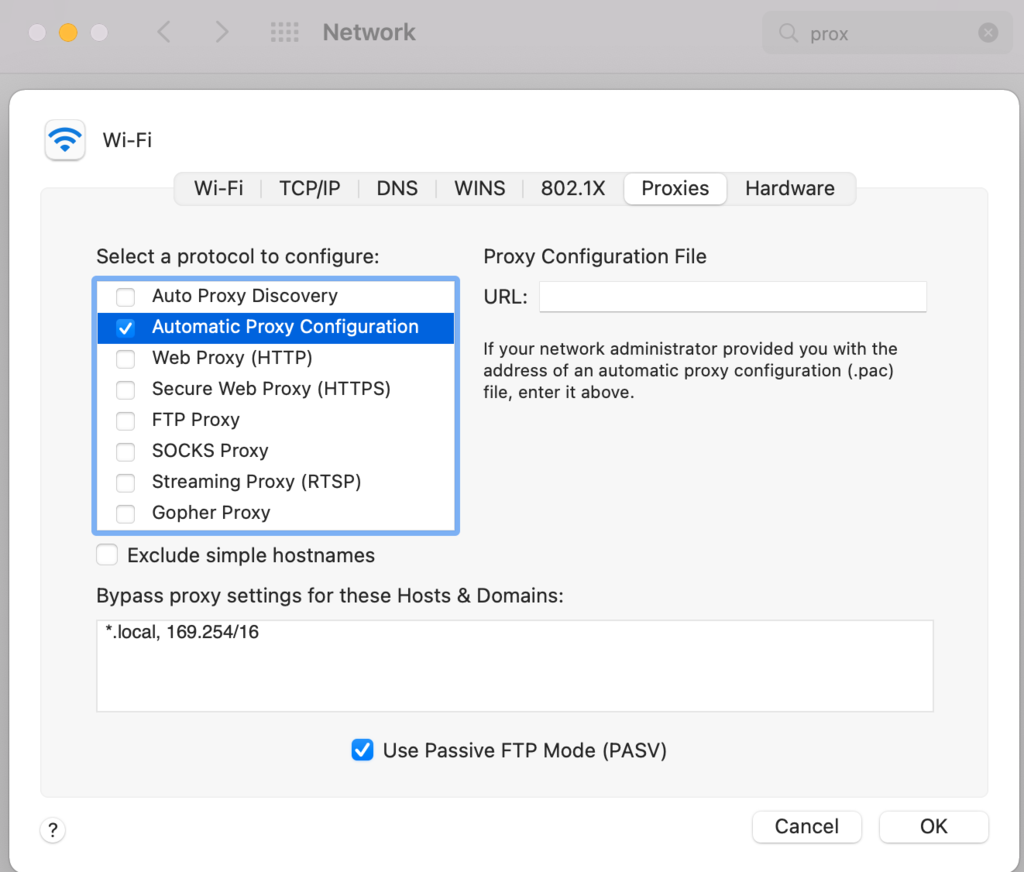
- Open Apple menu, click System Preferences, and choose Network. Select a network service from the list and click Advanced. Finally, switch to the Proxies tab.
- Tick Automatic proxy configuration and save the changes by clicking OK.
10. Update your operating system and browser
It is crucial to update your applications and operating system regularly. Failure to do so can result in software instability, potentially leading to many website errors.
Here’s how to check for Google Chrome updates:
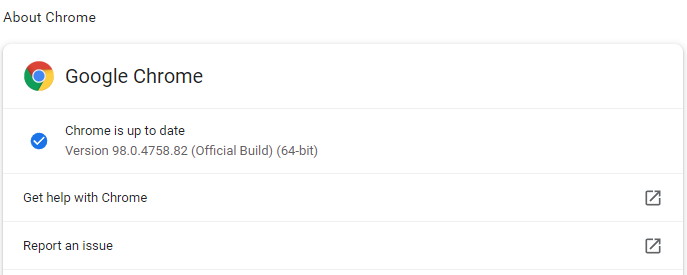
- Click the three dots at the top-right corner and hover over Help. Select About Google Chrome.
- The Settings will open, letting you know whether an update is available. If it is, click Update Google Chrome. If you can’t see this button, it means you’re on the latest version.
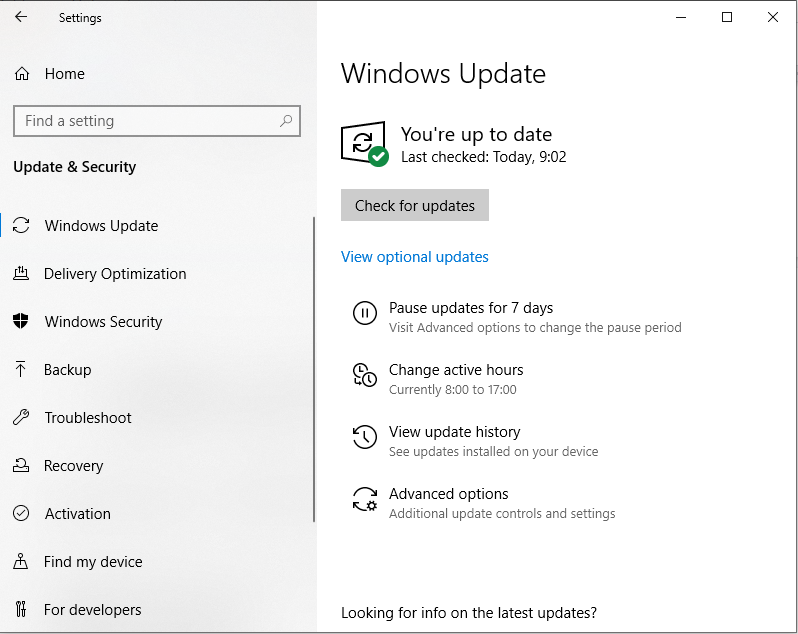
Follow these steps to update Windows:
- Go to Settings, then click Update & Security.
- Choose Windows Update. The system will let you know whether an update is available. You can also manually Check for updates.
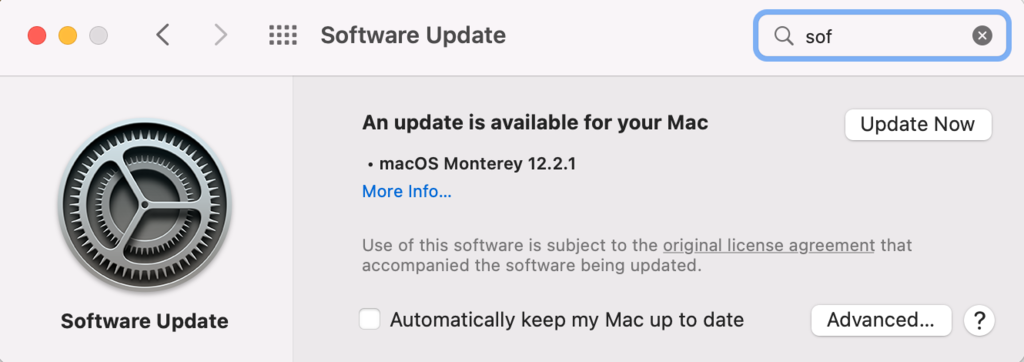
Here’s how to check for updates on macOS:
- Open the Apple menu and select System Preferences.
- Choose Software Update. Click Update Now if a new version of macOs is available.
How the “NET::ERR_CERT_COMMON_NAME_INVALID” error looks on different browsers
Depending on your browser, the common name mismatch error warning message may differ. In this section, we’ll take a look at what it looks like on several popular browsers.
Google Chrome
If you visit a website with an SSL error using Google Chrome, the browser will display the “Your connection is not private” message with “NET::ERR_CERT_COMMON_NAME_INVALID” under it. Google Chrome also warns visitors that attackers might steal their information through the website.
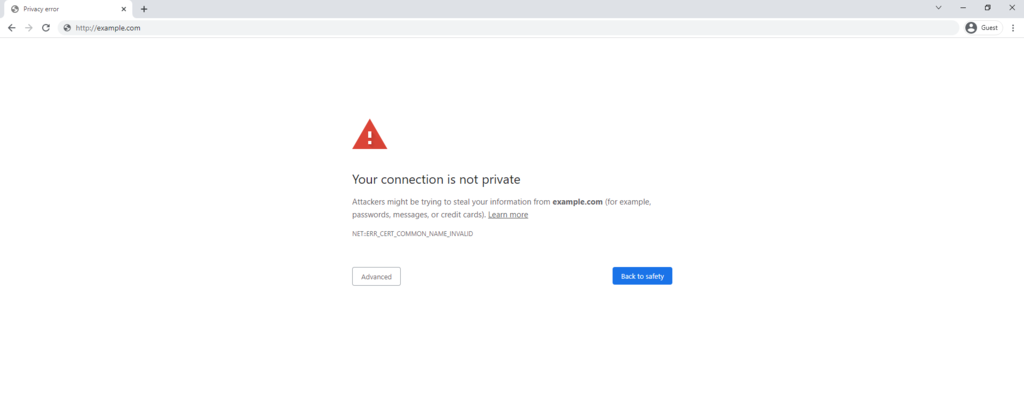
Google Chrome will recommend users to get Back to safety. That said, it’s still possible to visit the website by clicking on Advanced and choosing to Proceed to the website.
Microsoft Edge
If you encounter the “NET::ERR_CERT_COMMON_NAME_INVALID” error on Microsoft Edge, you’ll see the “Your connection isn’t private” message along with a warning that accessing the website might invite attackers to steal your personal information.
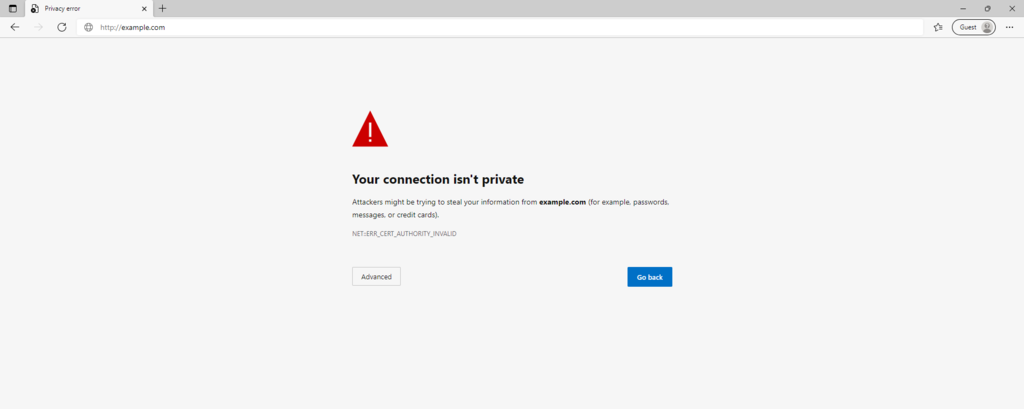
You will be able to choose whether to Go Back or visit the website by choosing Advanced.
Mozilla Firefox
Mozilla Firefox displays a unique version of this error message. It says “Warning: Potential Security Risk Ahead” and warns the visitor that the browser has detected a potential security threat and did not continue to the website.
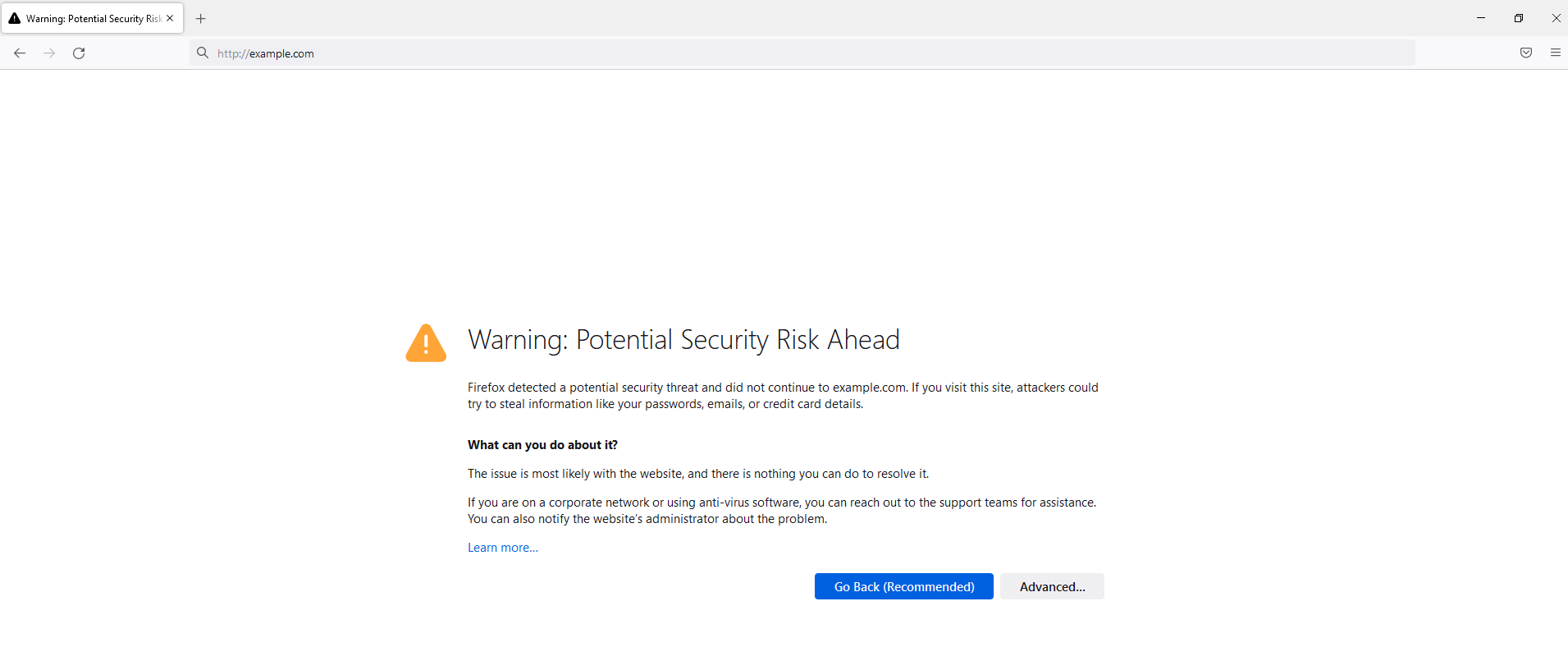
Firefox doesn’t indicate the code for the common name mismatch error. Instead, it informs visitors what happened in detail, mentions that the issue is most likely with the website, and provides solutions to the problem.
Opera
When you encounter the common name mismatch error using Opera, the browser displays a similar warning message to Google Chrome and warns you that attackers may be trying to steal your personal information.
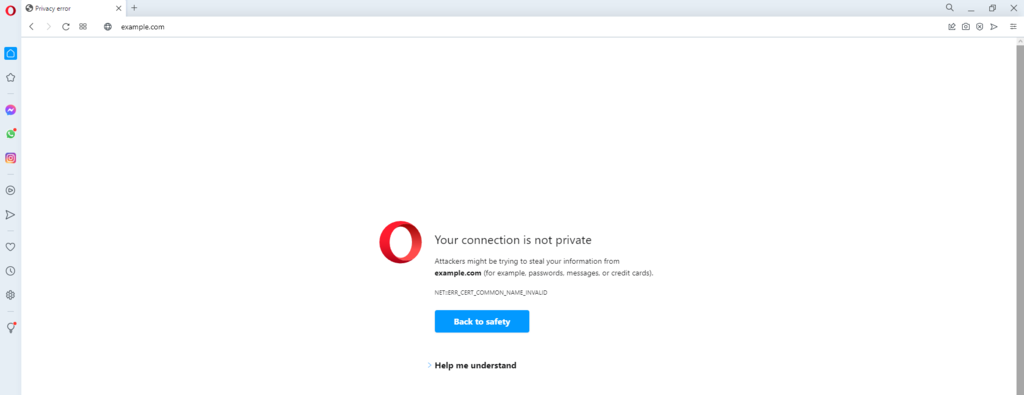
The Help me understand button describes why Opera doesn’t let visitors access the website. It says the browser doesn’t trust the SSL certificate used on the website.
Internet Explorer
Internet Explorer keeps its “NET::ERR_CERT_COMMON_NAME_INVALID” error message simple by stating, “This site is not secure.” It then explains that someone might be trying to fool the visitor or steal their information. It then warns the user to close the site immediately.
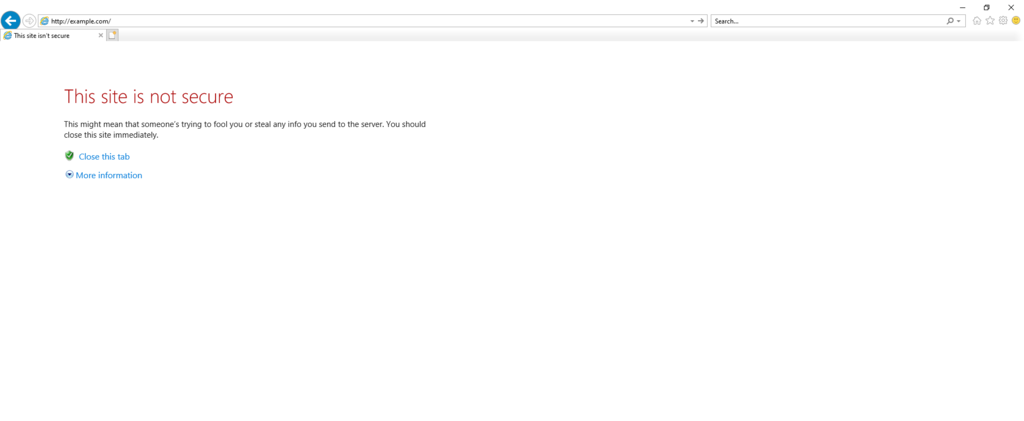
Internet Explorer users can choose to Close this tab or see More information. If you select More information, the browser explains that it doesn’t trust this website’s SSL certificate and displays the error code “DLG_FLAGS_INVALID_CADLG_FLAGS_SEC_CERT_CN_INVALID”.
Conclusion
SSL is an essential part of a website that is dedicated to protecting users’ data via encryption methods. However, if you’ve misconfigured the SSL settings, you may encounter an error such as “NET::ERR_CERT_COMMON_NAME_INVALID”.
Dealing with the common name mismatch error can be tricky, but many methods exist to solve it quickly. The solutions involve changing the SSL configuration, URL redirection, advanced browser settings, and proxy settings.
We hope this article has helped you troubleshoot the common name mismatch issues. If you have questions or tips, feel free to leave a comment below.
NETT::ERR_CERT_COMMON_NAME_INVALID FAQs
What causes “NET::ERR_CERT_COMMON_NAME_INVALID”?
“NET:ERR_CERT_COMMON_NAME_INVALID” is a certificate error that occurs when the SSL/TLS certificate presented by a website is not issued for the specific domain or subdomain that the user is attempting to access. This can be caused by a misconfigured certificate or a mismatch between the certificate and the website’s hostname.
How do I prevent “NET::ERR_CERT_COMMON_NAME_INVALID”?
To prevent this error, ensure that the SSL/TLS certificate presented by the website is valid, issued for the correct hostname, and issued by a trusted Certificate Authority. Ensure that the website’s hostname matches the name on the certificate. Avoid accessing websites that trigger SSL warnings or errors.
What are the consequences of “NET::ERR_CERT_COMMON_NAME_INVALID”?
The consequences of “NET:ERR_CERT_COMMON_NAME_INVALID” can include an inability to access the website, loss of sensitive data, and exposure to security risks. Users may also experience degraded website performance, slow page load times, and increased vulnerability to phishing attacks and malware infections.

Noviantika is a web development enthusiast with customer obsession at heart. Linux commands and web hosting are like music to her ears. When she's not writing, Noviantika likes to snuggle with her cats and brew some coffee.

Comments
0 responses