How to create a WordPress contact form in 6 steps
Sep 30, 2026
/
By Nurul S.
/
7 min Read

An effective way to boost user engagement on your WordPress website is through a contact form.
Forms aren’t just for communication – they’re a crucial bridge connecting you to your audience. Whether you’re a seasoned WordPress user or a beginner, a contact form will help enhance interactivity and strengthen connections with your users.
In this WordPress tutorial, you will learn the importance of WordPress contact forms and practical steps to integrate them into your site. Let’s get started.
Download all-in-one WordPress cheat sheet
What Is a WordPress Contact Form?
A WordPress contact form enables visitors to communicate with website owners effortlessly. These digital forms can be tailored to your needs – from simple forms for basic inquiries to complex designs that can gather detailed information.
Customizing WordPress contact forms lets you create a valuable tool to connect with and understand your audience effectively. Fortunately, many forms are also adaptable, so they can evolve with your WordPress site’s growing requirements.
Why Should You Use a Contact Form?
Let’s explore a few reasons why it’s important to have a contact form on your WordPress site:
Improve Engagement with Website Visitors
Contact forms bridge interactions between a website owner and its visitors.
They offer a simple, user-friendly method for visitors to get in touch, ask questions, or provide feedback. Its ease of use and accessibility can encourage personal and meaningful conversation, transforming passive users into active community members.
Reduce Spam
Displaying an email address on your website makes you vulnerable to spambots and unwanted messages. By using contact forms instead, website owners will get superior spam protection.
Integrating CAPTCHA or similar anti-spam measures ensures most contact form submissions are genuine. This reduces junk mail, letting you focus on authentic visitor queries and feedback.
Organize Data Efficiently
Implementing a contact form on your WordPress site leads to better organization of visitor data.
These form fields can be customized to collect specific types of information, from basic contact details to more elaborate user feedback. By tailoring all the form fields to gather specific information, you can quickly analyze and utilize it for various purposes.
Enable Automation
Integrating contact forms with CRM systems or other digital marketing tools can streamline your marketing processes through automation. Automating these processes frees up time and resources, allowing you to focus more on strategies and less on administrative tasks.
Lead generation and customer relationship management will also be more efficient because you will be able to track and nurture potential leads effortlessly.
Want to see this process in another plugin? This video demonstrates creating a WordPress contact form using Ninja Forms.


How to Add a Contact Form in WordPress
Before adding contact forms to your WordPress website, choosing the right hosting plan is crucial.
Hostinger’s WordPress hosting plans can enhance the performance and management of your website. They are designed to maximize your WordPress site’s potential by offering seamless integration, enhanced security, and robust features.

1. Install a WordPress Contact Form Plugin
A WordPress contact form plugin lets you create and manage multiple contact forms without requiring extensive coding knowledge.
In this article, we’ll use WPForms, one of the most user-friendly and versatile WordPress form plugins. To install the WPForms drag-and-drop form builder, follow these steps:
- Log in to your WordPress dashboard.
- Navigate to Plugins → Add New.
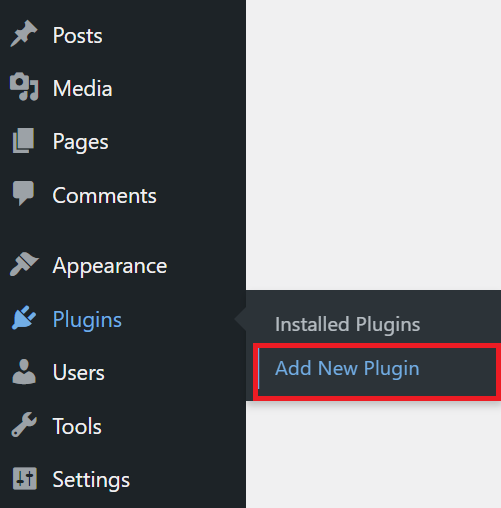
- In the search bar, type WPForms, and press Enter.
- Find WPForms in the search results and click Install Now.
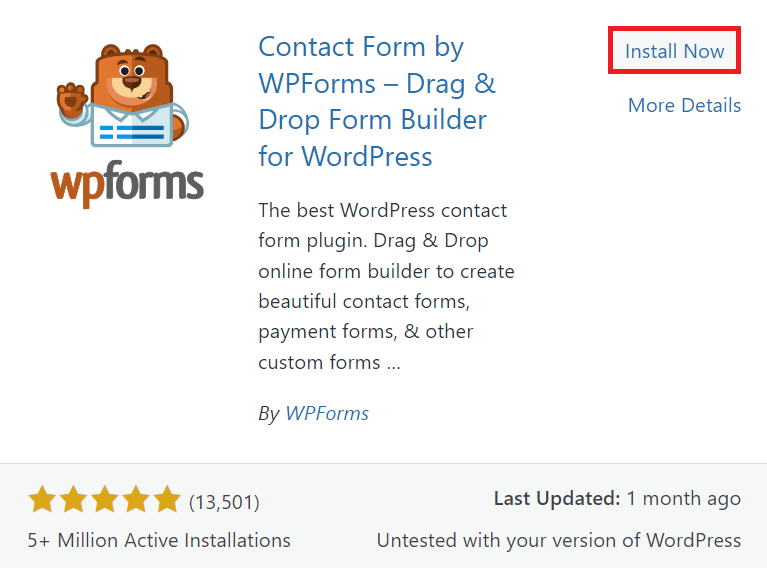
- Once the plugin installation is complete, click Activate to enable the plugin on your site.
Alternative: using WS Form
WS Form is a solid alternative worth considering if you want a different form builder. The free LITE version offers unlimited forms and submissions, a built-in styler for customizing form design without code, and multi-layer spam protection including Google reCAPTCHA, hCaptcha, and Cloudflare Turnstile.
WS Form PRO adds conditional logic, calculated fields, file uploads, ecommerce integrations, and 65+ field types.
WS Form also integrates with Hostinger Reach, so form submissions sync directly to your email marketing contact lists. New leads flow into your campaigns automatically, with support for field mapping, tagging, and subscription status.

2. Create a New Contact Form
Once WPForms is activated, it’s time to create a contact form. This process is simple, thanks to WPForms’ intuitive interface.
To get started, navigate to WPForms → Add New from the left sidebar of your WordPress dashboard.
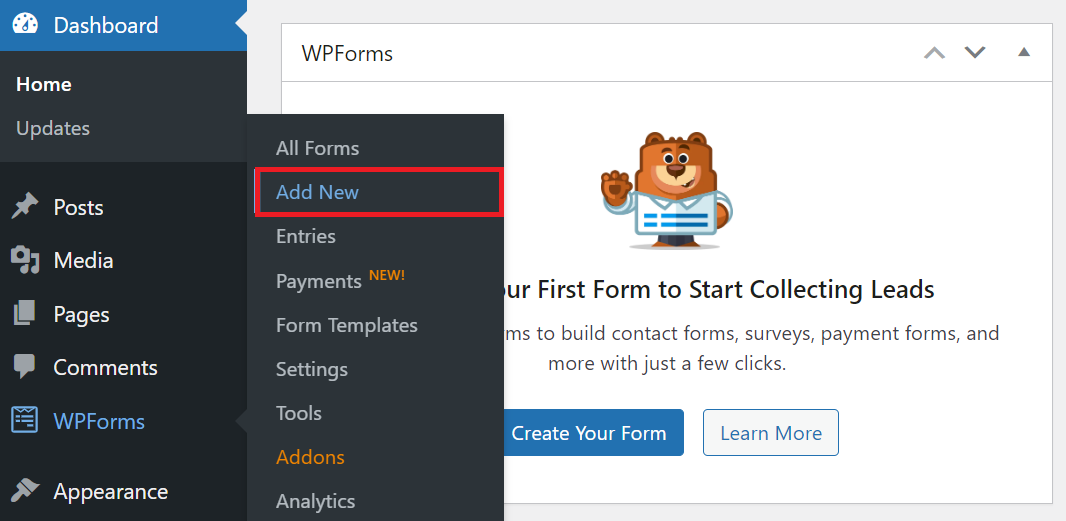
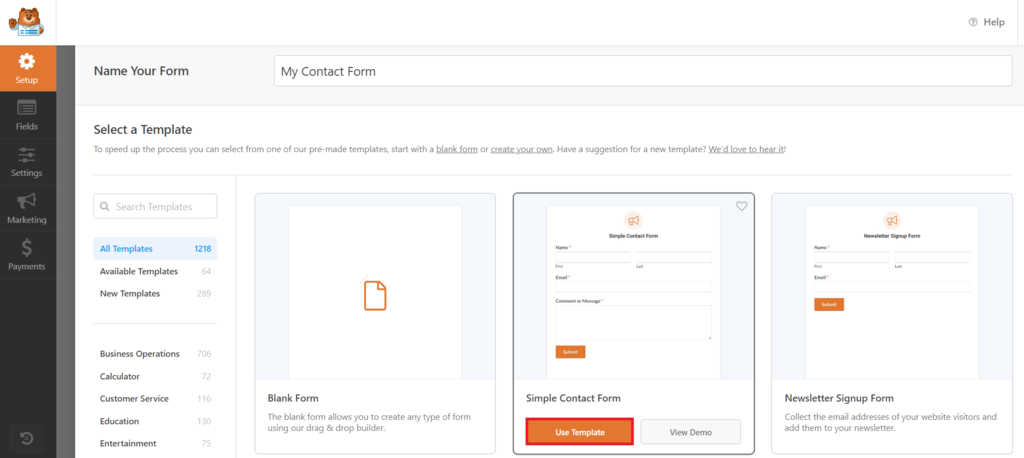
You will be presented with various pre-made templates tailored for different purposes. These templates have predefined styles and default settings, streamlining the form creation process.
Enter a form name and choose a contact form template that fits your needs, or opt for a blank form if you prefer to start from scratch. Then, click Use Template.
3. Customize the Contact Form
After selecting a template, customize the form using WPForms’ drag-and-drop builder. It offers a range of options for a simple contact form or a more advanced one.
Adding Fields
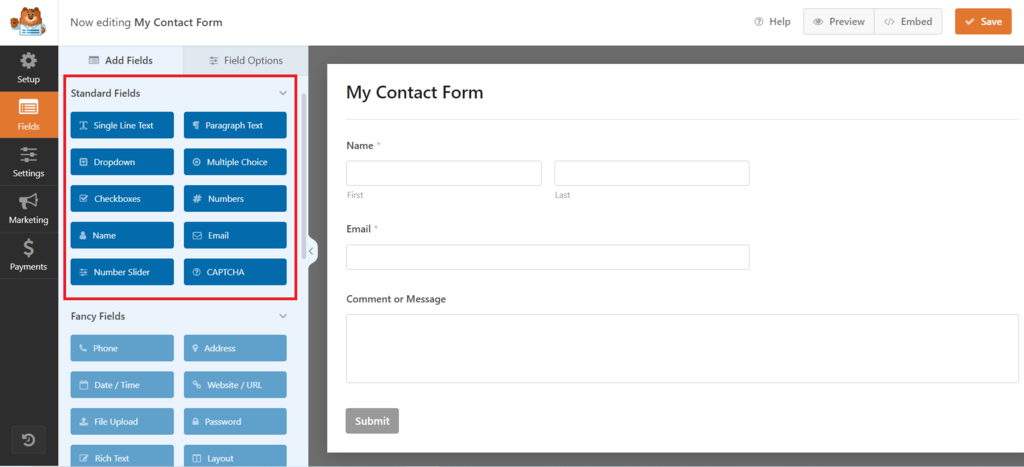
To add a new form field, drag it from the WPForms field menu to the desired location in your form.
Removing Fields
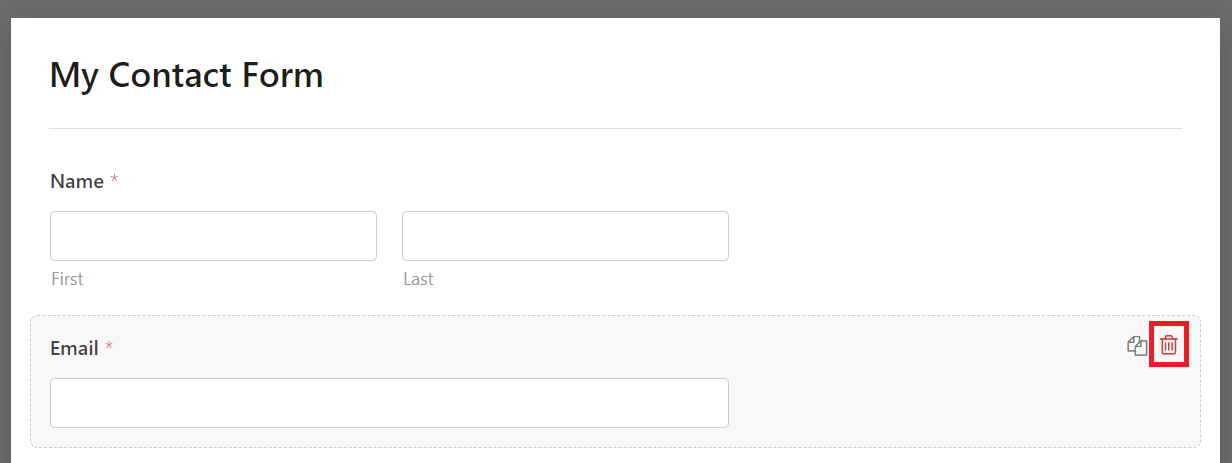
To remove a form field, select the field within your form and then click the Delete Field option.
Rearranging Fields
Click and drag a field to your preferred position within the form to match your preferred flow of information.
Customizing Field Properties
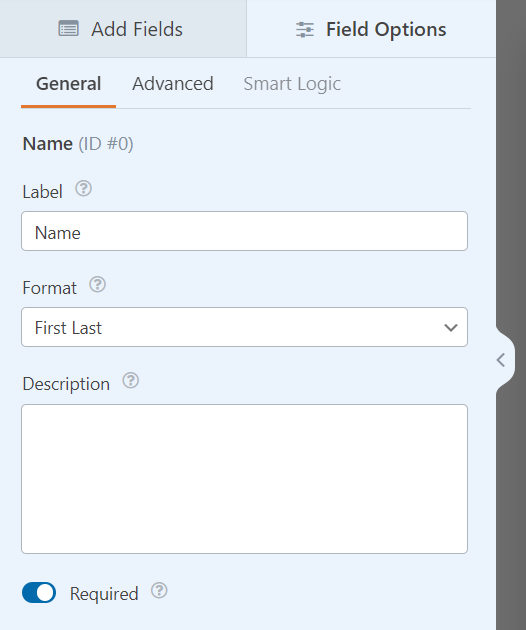
Each field comes with customizable properties. Click on a field and access the properties in the left column to adjust its size, placeholder text, and default value. You’ll be able to guide your visitors’ input more effectively.
Leveraging Advanced Features
This contact form builder also supports advanced options like smart conditional logic. It allows you to create dynamic forms that adapt to user input, making them more interactive and personalized.
4. Set Up Form Confirmation
When a website visitor submits a form, it’s crucial to provide them with a confirmation via a simple message or redirection page. Here’s how to set up form confirmation with WPForms:
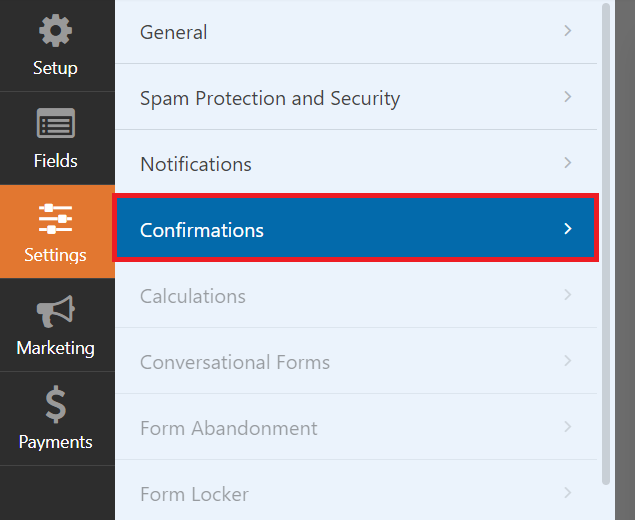
After creating your form, go to Settings → Confirmations within the WPForms form builder.
Choose the Message option and enter the text you wish to display, such as “Thank you for contacting us! We will be in touch soon.”
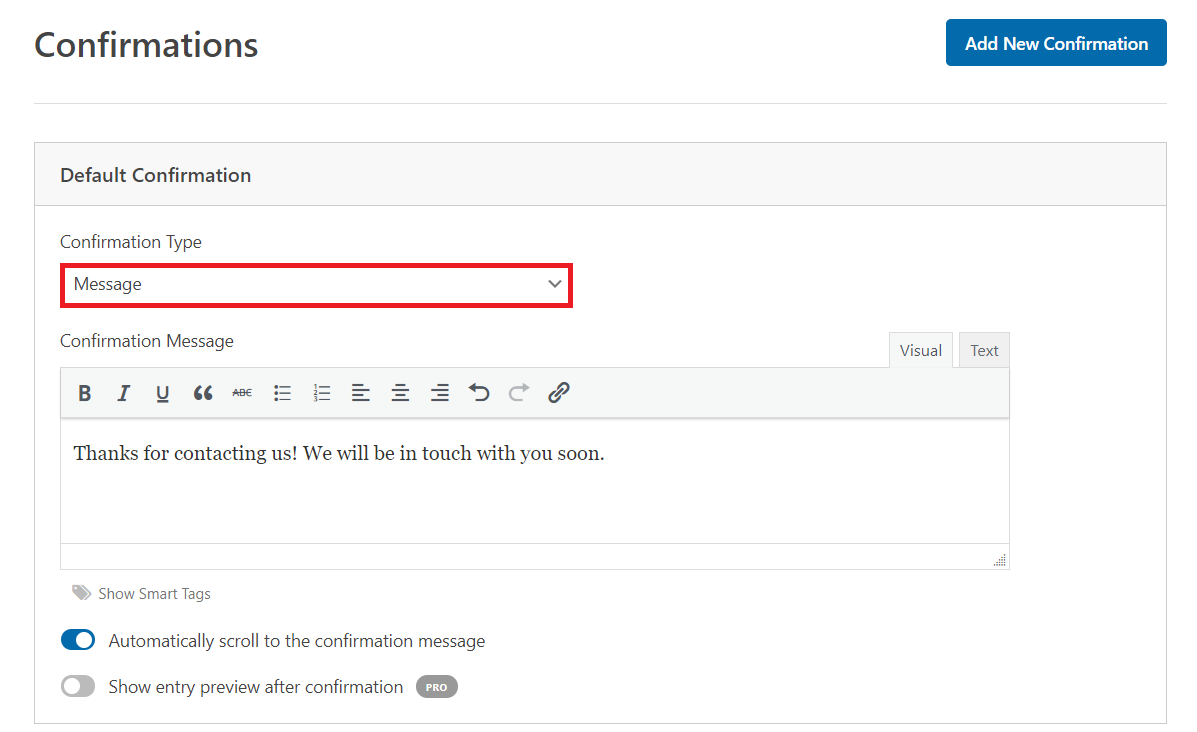
If you prefer to redirect users to a specific page, select the Show Page option. Then, choose the page from the dropdown menu.
5. Configure Form Notifications
Email notifications let you keep track of every form submission. By default, WPForms sends a notification to the admin email address associated with your WordPress site. You can customize your form notification settings.
Follow these steps to configure WPForms notifications:
- Navigate to Settings → Notifications.
- To modify the recipient, click the Send to Email Address field and input the desired email address. You can add multiple email addresses if needed.
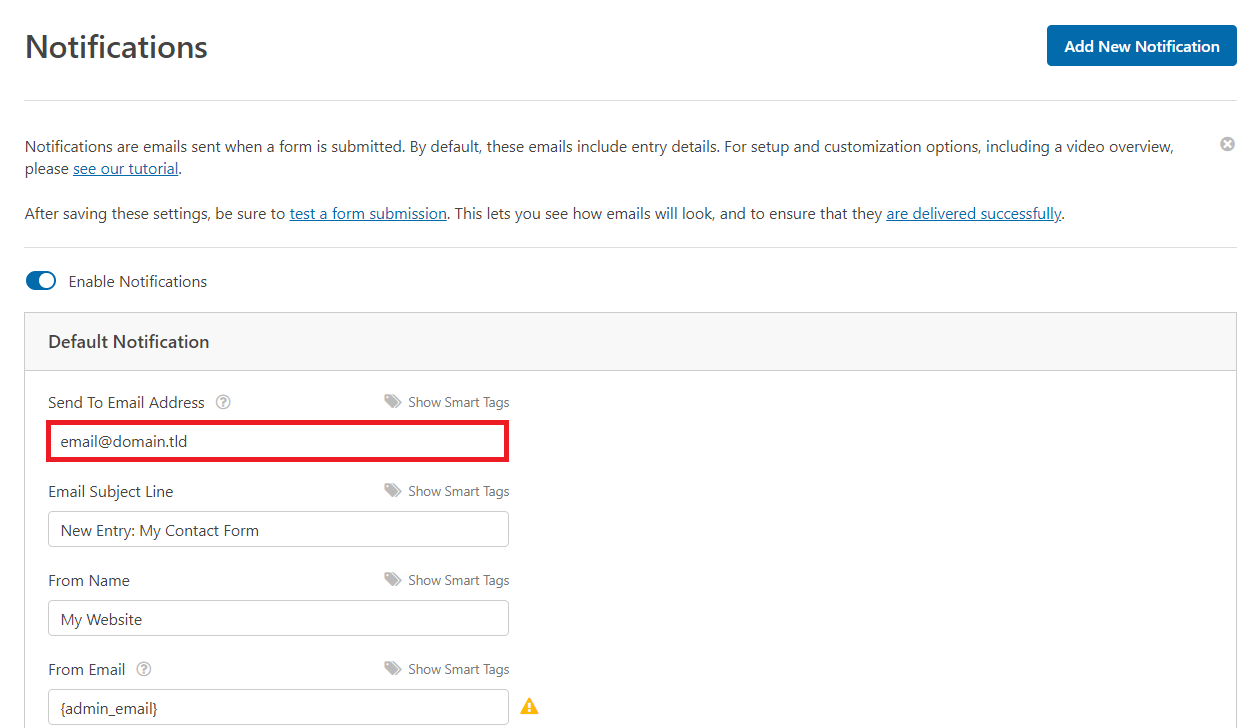
- Customize the Email Subject Line to make it easily identifiable in your inbox.
- Personalize the email notification’s content to your preference. Include details from the form data using smart tags to enhance the efficiency of your response
6. Embed the Contact Form
Let’s explore the different ways to embed a contact form on your WordPress site.
Embedding a Contact Form on a WordPress Page
Follow these steps to embed a WPForms contact form on a WordPress page via the block Site Editor:
- Open the WordPress page on the Gutenberg block editor. It can be an existing page or a new one created for the form.
- In the page editor, select the WPForms block.
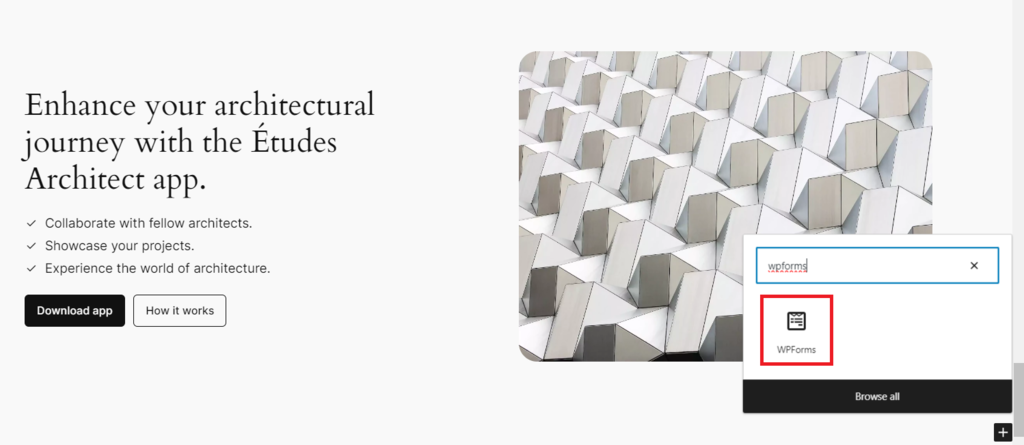
- Select the form you want to embed from the dropdown list. WPForms will automatically generate a shortcode for your form. Alternatively, enter the WPForms shortcode manually into a Shortcode block.
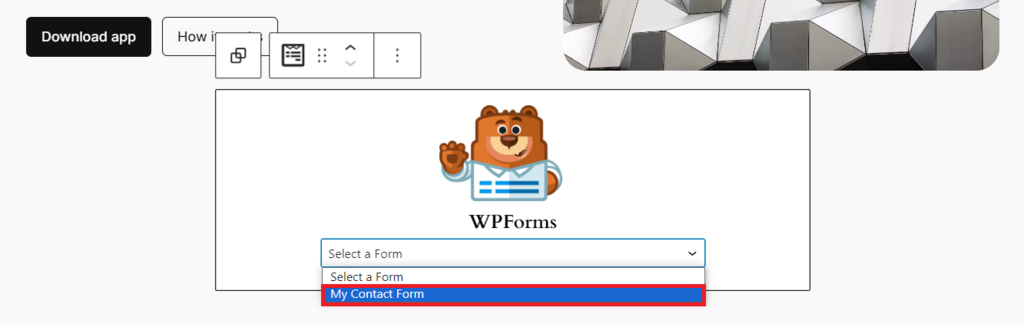
- Preview the page after adding the form to ensure the contact form appears as expected.
Embedding a Contact Form in a Widget Area
You can also embed a contact form in a WordPress widget area, such as a sidebar or footer. This method is suitable for classic themes that support widgets:
- From your WordPress admin panel, go to Appearance → Widgets.
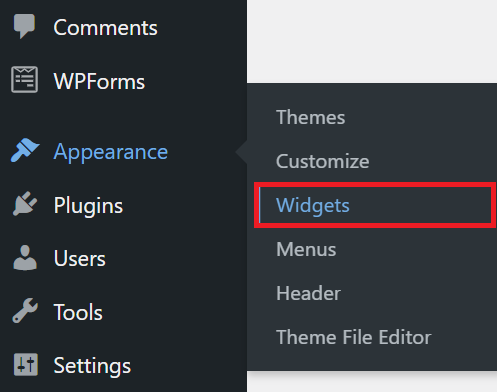
- In the Widgets area, choose the location for your contact form, such as the sidebar or footer.
- Find the WPForms widget, then select the specific contact form you wish to display.
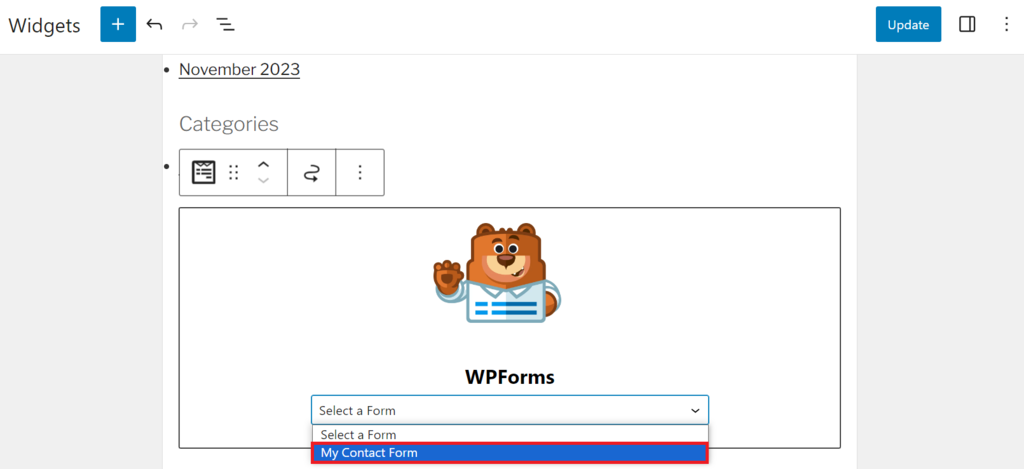
- After selecting the form, click Save to apply the changes.
Embedding a Contact Form in a Template Part
For block themes, you can embed a contact form in a template part via the Site Editor. Follow these steps:
- From the dashboard, go to Appearance → Editor.
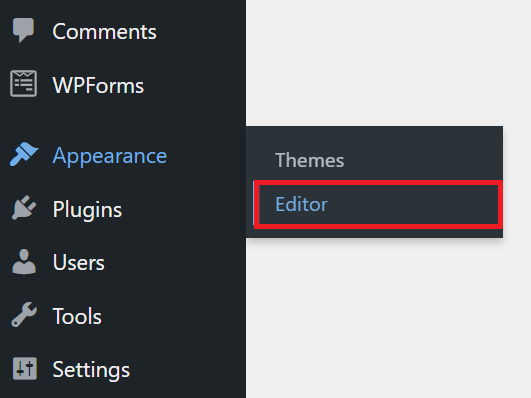
- Navigate to the template part where you want to embed the contact form, such as the header or footer.
- Click on the area in the template part where you wish to add the form, and then select Add block.
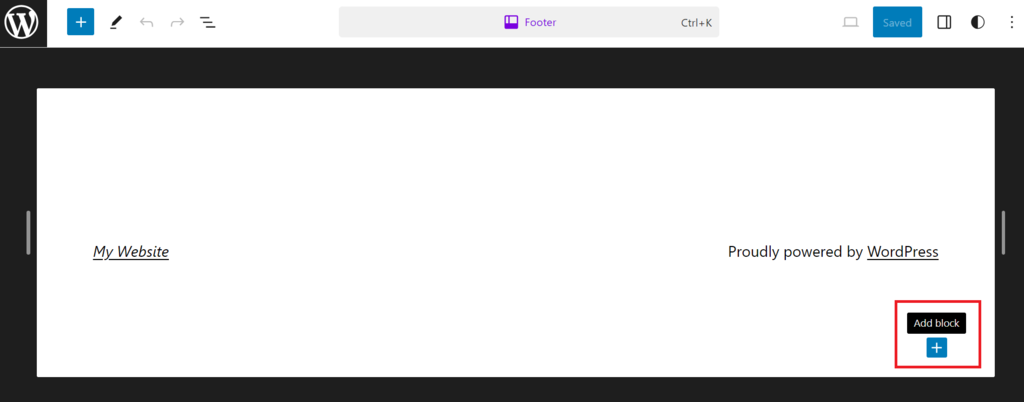
- Find the WPForms block and select the contact form you wish to embed. If you are working with smart or multi-page forms, ensure their layout and settings are correctly configured.
- After placing and configuring your form, click Save to apply your contact form customization.
Embedding a Contact Form Using the Classic Editor
For those using the WordPress Classic Editor, here’s how to embed a WPForms contact form:
- Open the post or page in Classic Editor.
- Click the Add Form button located above the text editor. If you have other plugins installed, select WPForms.
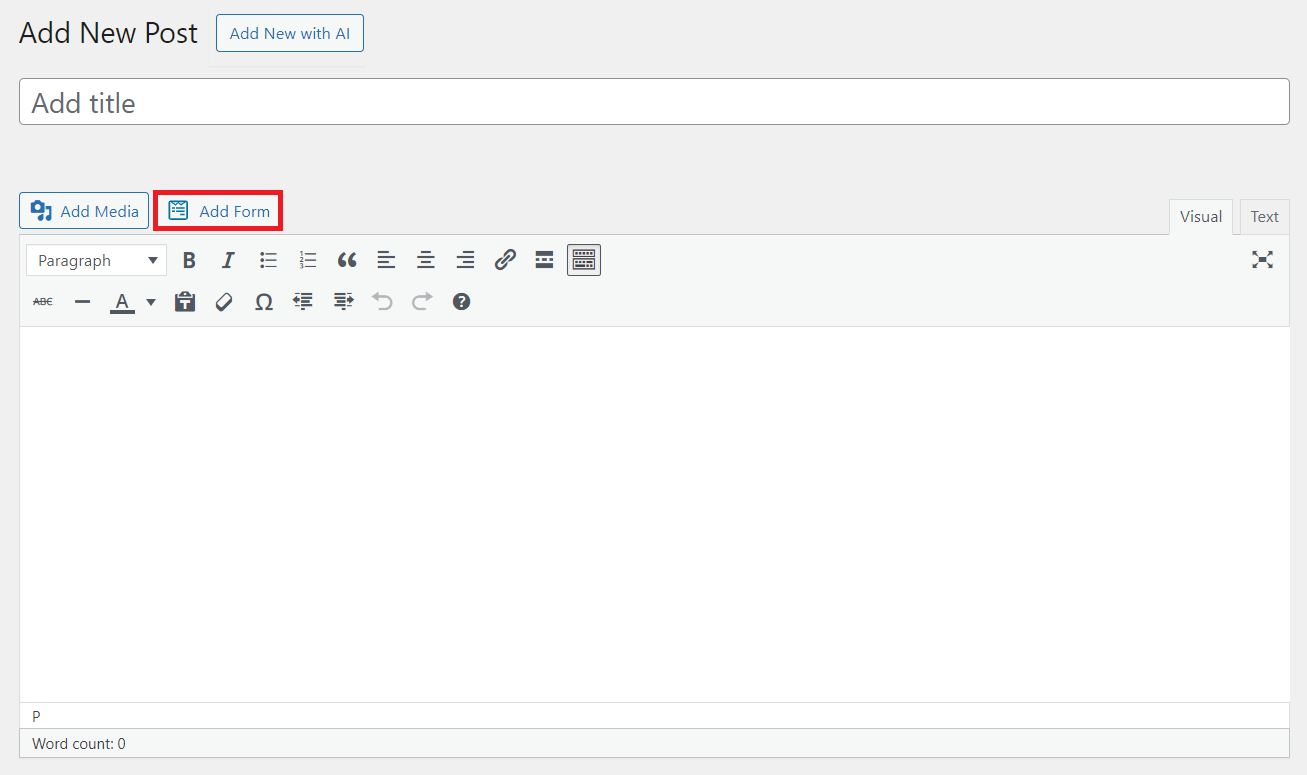
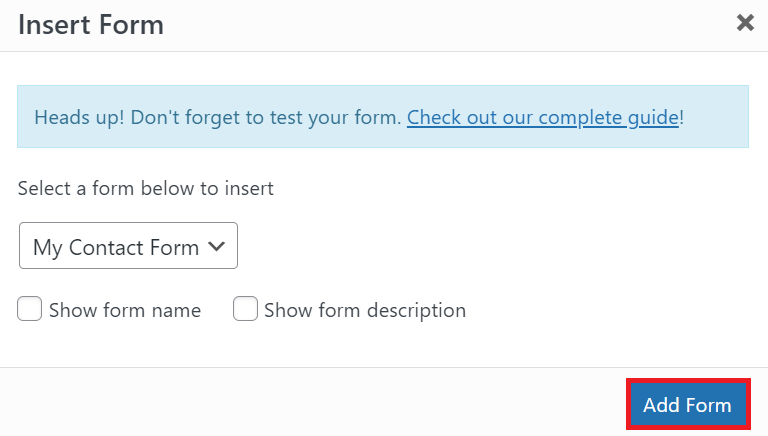
- Select the form you want to embed from the dropdown list in the popup window. You can also include the form title and description if desired.
- Click Add Form to insert a shortcode of your form into the editor.
Pro Tip
We recommend testing your embedded contact form in a private test page or staging environment. This helps ensure the contact form appears and works as intended before pushing it on the live site.
Conclusion
A WordPress contact form is a useful tool for communicating with website visitors. Regardless of the form’s complexity, WPForms allows you to customize contact forms to your liking.
This guide has explored WordPress contact forms, from basic contact form design principles to advanced integration methods. With the steps provided, you can now confidently create, customize, and implement custom forms that engage users and streamline communication.
WordPress Contact Form FAQ
This section will answer the most common questions about WordPress contact forms.
How Do I Create a Contact Form in WordPress?
To create a contact form in WordPress, install a plugin like WPForms. Next, choose a template, customize it with the builder, and embed your form using a shortcode or the block editor.
Can I Create a WordPress Contact Form for Free?
Yes, you can create a WordPress contact form for free using plugins such as WPForms Lite. This free version lets you create a simple contact form. If you need more advanced features, consider upgrading to the premium version.
Can I Create a WordPress Contact Form Without a Plugin?
Yes, but it can be difficult for those without technical skills because you would have to manually code the form and integrate it into your site. Meanwhile, a plugin lets you create contact forms with just a few clicks.
Are WordPress Contact Forms GDPR Compliant?
WordPress contact forms can be made GDPR compliant, but this largely depends on the plugin and the form’s specific setup. To comply with GDPR, make sure to include consent checkboxes and clear links to your privacy policy page in WordPress.
This article is a localized version of How to create a WordPress contact form in 6 steps, originally published in English.

Nurul Siregar has over 3+ years of experience in the tech industry with a passion for writing about digital marketing. Nurul enjoys reading fiction novels and making digital illustration in her free time. Follow her on LinkedIn.