What are WordPress hooks? How to use them and practical examples
Dec 02, 2025
/
By Vita K. & Ignas R.
/
6 min Read
WordPress hooks can help you reach your business goals by expanding your website’s capabilities. Hooks allow you to interact and modify code at specific places without modifying the WordPress core itself. They make it easy for users to modify and add various features to their WordPress plugins and themes.
In this tutorial, we will go over WordPress hooks and their purpose. Furthermore, we will include practical WordPress hooks examples to show you how to use them on your site.
What Are WordPress Hooks?
WordPress hooks allow users to manipulate WordPress without modifying its core. Learning about hooks is essential for any WordPress user as it helps them edit the default settings of themes or plugins and, ultimately, create new functions.
Purpose of Hooks
The primary purpose of hooks is to automatically run a function. In addition, this technique can add or modify features to WordPress without touching its core files.
Hooks are divided into two categories:
- Action – allows users to add data or change how their websites work. An action hook will run at a specific time when the WordPress core, plugins, and themes are executing.
- Filter – can change data during WordPress core, plugins, and theme execution.
In short, action hooks receive information, act according to it, and don’t return anything to the user. Conversely, the filter hooks get information, modify it, and return it to the user.
Hooks are essential for incorporating custom code into websites. For example, you can use them to add JavaScript to WordPress.
Important! To use any of the said hooks, a user needs to write a custom function known as a Callback and register it with a WordPress hook for a specific action or filter.
Below is an example of an action hook that connects the mytheme_script function with the wp_enqueue_scripts action.
function mytheme_script()
{wp_enqueue_script( 'my-custom-js', 'custom.js', false );}
add_action( 'wp_enqueue_scripts', 'mytheme_script' );
How to Use WordPress Hooks
Using hooks requires a bit of HTML and PHP knowledge. Luckily, creating action and filter hooks is relatively easy, even for WordPress beginners.
Creating an Action Hook
To add an action hook, you must activate the add_action () function in a WordPress plugin. To do so, add the following code to your WordPress functions.php file:
add_action( $target_hook, $the_name_of_function_you_want_to_use, $priority, $accepted_args );
Hooks use a priority scale to function properly. This scale is an automatic ordinal value based on a scale from 1 to 999. It defines the order of functions associated with that particular hook. A lower priority value means the function will run earlier, while the higher one will run later.
The scale will show the output sequence of the functions when using the same target_hook. The default value of priority_scale is 10. You can arrange the scale according to the number of your target_hook.
$accepted_args is responsible for defining the number of arguments the function accepts. By default, the system will set it as 1. Here is an example of an action hook for the Twenty Twenty-Three WordPress theme added to the end of the functions.php file:
<?php
function hook_javascript() {
    ?>
        <script>
            alert('Hello world...');
        </script>
    <?php
}
add_action('wp_head', 'hook_javascript');
?>
Note the pattern in the example above:
- <?php – the place where you put the hook to function.
- function hook_javascript() – a function that will affect the initial value, thus showing the alert for users.
- <script> – represents the text you want to display on the target_hook.
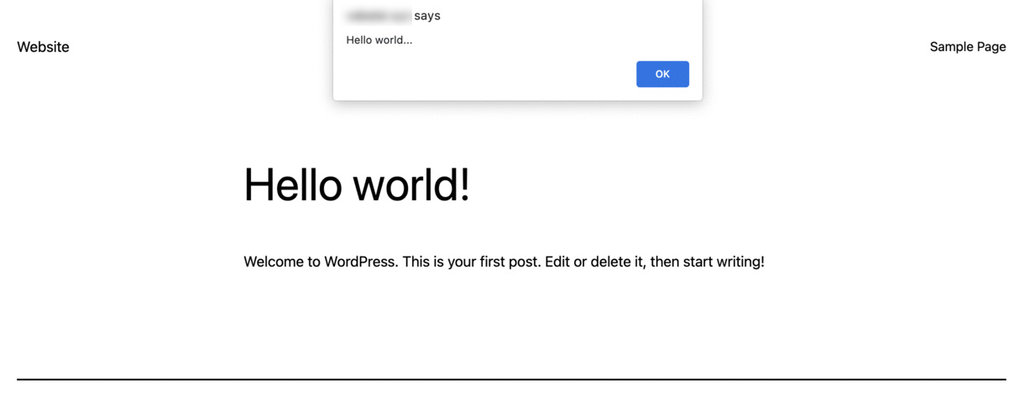
- alert(‘Hello world…’); – will display an alert for users with the “Hello World” phrase.
- add_action – the command for creating the action hook.
- ‘wp_head‘ – the target hook that the function will modify.
In practice, it looks like this:
Creating a Filter Hook
You can create a filter hook by utilizing the add_filter() function. The filter hook modifies, filters, or replaces a value with a new one.
Similar to an action hook, it filters a value with the associated filter hook functions like apply_filter.
Here is an example of a filter hook that we will add to the functions.php file for the Twenty Twenty-Three WordPress theme:
add_filter( 'the_content', 'change_content' );
function change_content ( $content ) {
    $content = 'Filter hooks are amazing!';
    return $content;
}
Let’s analyze the code snippet in more detail:
- ‘the_content‘ – the target hook that the function will modify.
- ‘change_content‘ – affects the initial value, thus changing the actual content.
- $content = ‘Filter hooks are amazing!’; – replaces the content of all your posts with the written phrase.
- return $content; – returns the new value at the end.
Now, if we open any post while using the Twenty Twenty-Three theme, we will see something like this:

As seen from the example, the filter function replaced the entire content with the phrase “Filter hooks are amazing!”.
Unhooking Actions and Filters
If you want to disable a command from add_action() or add_filter() in your WordPress code, use remove_action() and remove_filter().
These functions can exclude certain actions or filters. Using them allows users to modify a plugin with too many unnecessary hooks that might disrupt the site’s optimization.
It’s also possible to delete such unnecessary code lines. However, we only recommend that if you work with your own plugin or theme. This is because such practice with someone else’s plugins or themes can throw a fatal error if you delete the incorrect lines.
Here is an example of the remove_action() in WordPress:
remove_action( 'wp_print_footer_scripts', 'hostinger_custom_footer_scripts');
add_action( 'wp_print_footer_scripts', 'hostinger_custom_footer_scripts_theme');
function hostinger_custom_footer_scripts_theme()
{
?>
<script>//example of output by theme</script>
<?php
}
The example above shows that the remove_action() deletes the default WordPress footer scripts and replaces them with Hostinger’s custom footer scripts theme.
This command applies to all kinds of action hooks in WordPress. Furthermore, here is an example of remove_filter():
remove_filter( 'wp_mail', 'wp_staticize_emoji_for_email' );
add_filter( 'tiny_mce_plugins', 'disable_emojis_tinymce' );
}
The example above shows how to deactivate wp_staticize_emoji_for_email, which converts emojis to static images.
Then it replaces them with disable_emojis_tinymce, which will deactivate the emoji feature in WordPress. This can help speed up your site, as emojis have to make an extra HTTP request.
Moreover, you can use the remove_filter() command to disable multiple filters in a sequence. Here is an example:
function disable_emojis() {
remove_action( 'wp_head', 'print_emoji_detection_script', 7 );
remove_action( 'admin_print_scripts', 'print_emoji_detection_script' );
remove_action( 'wp_print_styles', 'print_emoji_styles' );
remove_action( 'admin_print_styles', 'print_emoji_styles' );
remove_filter( 'the_content_feed', 'wp_staticize_emoji' );
remove_filter( 'comment_text_rss', 'wp_staticize_emoji' );
remove_filter( 'wp_mail', 'wp_staticize_emoji_for_email' );
add_filter( 'tiny_mce_plugins', 'disable_emojis_tinymce' );
add_action( 'init', 'disable_emojis' );
}
The code above aims to eliminate the emoji function in WordPress. It illustrates that there is no limit on how many remove_filter commands users can embed in a functions.php file.
Practical WordPress Hooks Examples
There are a lot of hooks that users can use to create custom WordPress functions. Here are some of the most popular ones:
admin_post_thumbnail_size
This filter hook displays a thumbnail image of your post in the Featured Image section. Three parameters connect the function: $size, $thumbnail_id, and $post.
The hook should look like this:
$size = apply_filters( 'admin_post_thumbnail_size', $size, $thumbnail_id, $post );
Remember that you can change the $size parameter as you wish. For instance, if you want to set the thumbnail size to 240 x 240 pixels, utilize this code:
$size = apply_filters( 'admin_post_thumbnail_size', 240, $thumbnail_id, $post);
It is also possible to set a custom size for the thumbnail by adding the array () function. The code will look like this:
$size = apply_filters( 'admin_post_thumbnail_size', array(240, 400), $thumbnail_id, $post);
The array () function above sets the thumbnail to be displayed in 240 x 400 pixels.
after_password_reset
This action hook is activated when a user resets their password. The hook consists of two parameters, $user and $new_pass, and looks like this:
do_action( 'after_password_reset', $user, $new_pass );
For example, WordPress uses this hook with the reset_password() function.
customize_loaded_components
This hook is a filter to exclude some WordPress components from the core process. These functions work on core files, such as wp-activate.php, wp-config-sample.php, or wp-settings.php.
However, it is important to note that customize_loaded_components cannot be added to a theme since it only activates during the plugins_loaded phase.
The hook consists of two parameters: $components and $this, and looks like this:
$components = apply_filters( 'customize_loaded_components', array( 'widgets', 'nav_menus' ), $this );
The $components parameter is a batch of core functions to load, while $this refers to the object in the existing class.
It’s possible to customize the array () function to determine which components to exclude. The example above shows that widgets and nav_menus get excluded from the core process.
Pro Tip
Another way to enhance your website's functionality is to add PHP code to your WordPress page or post.
Conclusion
WordPress hooks can benefit any website owner. They allow you to add custom functions or disable processes without changing the WordPress core files. You can even create advanced customization in a WooCommerce store using hooks.
In this tutorial, we’ve created action and filter WordPress hooks and shown some practical examples.
We hope that you find this tutorial useful. If you have any questions, leave us a comment down below.
Learn More WordPress Techniques to Broaden Your Knowledge
WordPress Multisite
WordPress Text Editor
Headless WordPress
WordPress .htaccess File
WordPress Architecture: Website Structure, Common Files, and Directories
WordPress REST API Tutorial
How to Use XAMPP
WordPress Hooks FAQ
If you are interested in learning more about WordPress hooks, here are some frequently asked questions.
What Are the Basic Hooks for WordPress Plugins?
The basic hooks for WordPress plugin development include action hooks and filter hooks. Action hooks allow developers to execute custom code at specific points in the WordPress core code, while filter hooks allow developers to modify the data before it is displayed on the website.
Where Do I Add Hooks in WordPress?
Hooks in WordPress can be added in the plugin or theme’s functions.php file, or in a separate plugin file. Action hooks are added using the add_action() function, while filter hooks are added using the add_filter() function.
Are WordPress Hooks Important?
Yes, WordPress hooks are important as they allow developers to customize and extend the functionality of WordPress core, themes, and plugins without modifying the original code. They provide a structured and organized way to add custom code and modify data, making WordPress development more flexible and scalable.
This article is a localized version of What are WordPress hooks? How to use them and practical examples, originally published in English.

Vita is leading on-site, off-site SEO, and content strategies of Hostinger Tutorials. Eager to help people gain independence with a successful online presence, she is determined to grow and perfect Hostinger Tutorials. She is also obsessed with mountains, permaculture gardens, and, since recently, scuba diving.

Ignas takes great satisfaction in helping people tackle even the most complex technical issues. His current goal is to write easy-to-follow articles so that these issues will not happen at all. During his free time, Ignas likes to play video games and fix up things around his house.


Comments
0 responses