What is Next.js? How the React framework works for full-stack applications
May 14, 2026
/
By Alma
/
10 min Read

Next.js is an open-source React framework for building production-ready, server-rendered, and full-stack web applications. Developed and maintained by Vercel, it extends React with built-in routing, multiple rendering strategies, backend capabilities, and performance optimizations. You can handle both frontend and backend logic in a single codebase for many applications.
The framework’s architecture runs on Node.js and supports hybrid rendering. You pick how each route renders based on its content needs. A marketing page can be pre-built for speed, while a user dashboard renders fresh data on every request.
That per-route control, driven by how you fetch data and configure caching, is what separates this full-stack framework from a standard React setup.
On top of rendering, Next.js gives you core features like file-system routing, image optimization, and API route handlers that replace tools you’d otherwise configure yourself. The practical workflow from project setup to deployment is straightforward, and the framework powers use cases from static marketing sites to enterprise-scale applications.
What is Next.js?
Next.js combines React’s component-based UI with Node.js on the server side, plus optional Edge runtime environments. This lets you build both the interface your visitors see and backend logic in the same project, while still integrating external services when needed.
The framework gives you two routing systems:
- The App Router (using the app directory) is the modern, recommended approach. It supports React Server Components, layouts, nested routes, and streaming.
- The Pages Router (using the pages directory) is the legacy system. It’s still fully supported, but new projects should start with the App Router.
Inside the App Router, the framework separates your code into two categories. Server Components run on the server and never ship JavaScript to the browser, keeping your pages light and fast. Client Components run in the browser and handle interactivity – forms, animations, and real-time updates. Components are Server Components by default. You only opt into Client Components by adding ‘use client’ at the top of a file.
On a web server, the build system compiles your code, splits it into optimized chunks, and prepares each route according to its rendering strategy. You don’t need to stitch together separate tools for bundling, routing, or server configuration. It’s production-ready out of the box.
How does Next.js architecture work?
Next.js architecture combines React, Node.js, and optional Edge runtime environments to handle both frontend rendering and backend logic.
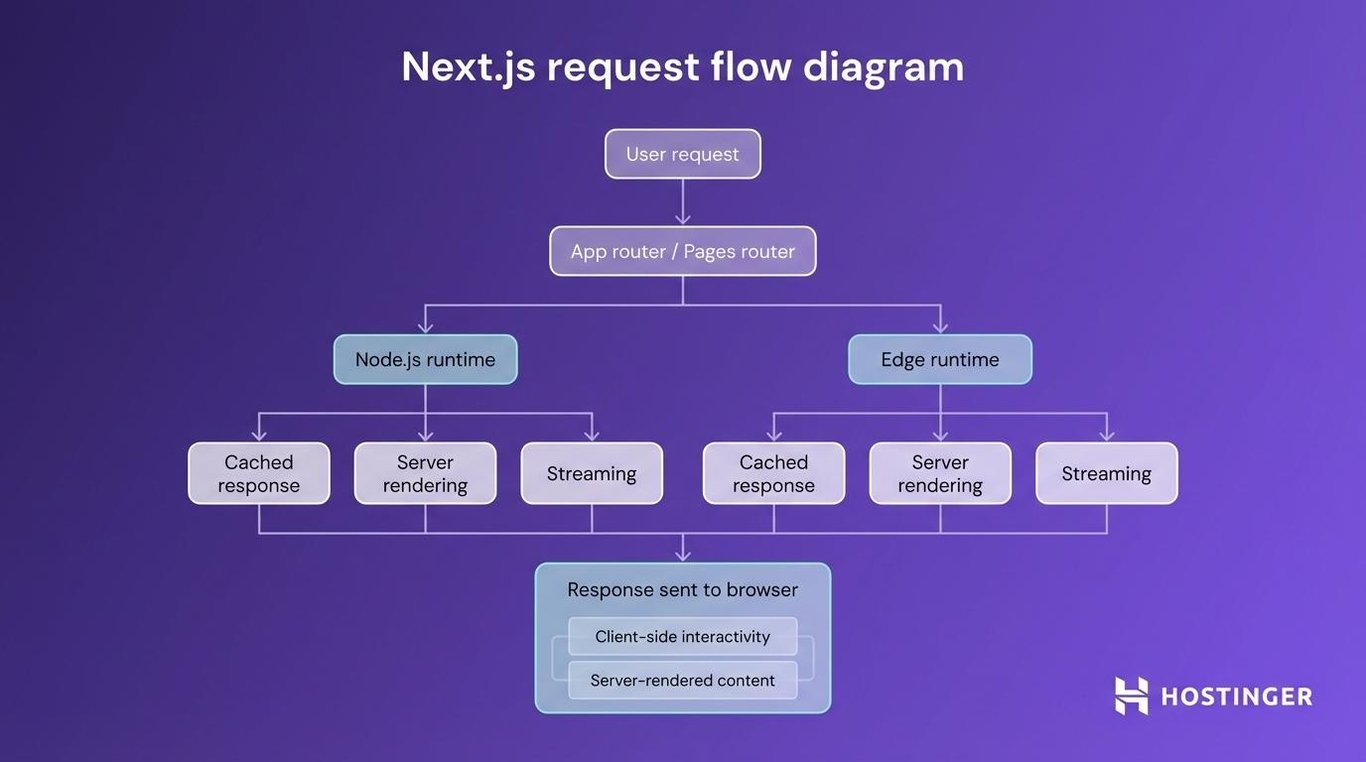
Next.js runs on Node.js for server-side rendering, API routes, and data fetching, and can also use Edge runtimes for ultra-low-latency responses. It routes requests through either the App Router or the Pages Router, mapping your folder structure directly to URLs.
At a high level, a request flows through Next.js routing, then into either a Node.js or Edge runtime depending on your setup. The framework decides whether to serve a cached response, render HTML on the server, or stream content progressively. Server and Client Components are handled separately – server-rendered output is sent first, and client-side interactivity layers on top.
A single project handles everything – rendering your homepage, processing a contact form, querying a database. No separate backend repository. Most applications don’t need a dedicated API server. One codebase, one deployment, one mental model.
What rendering methods does Next.js support?
Rendering is the core reason developers choose Next.js over plain React. It determines when and where your HTML gets generated, which directly affects load speed, search engine indexing, and how your application scales under traffic.
With standard React, everything renders in the browser. The visitor downloads JavaScript, and the browser builds the page from scratch. That works for apps behind a login screen. But it’s slow for public-facing pages and invisible to search engines until the JavaScript runs.
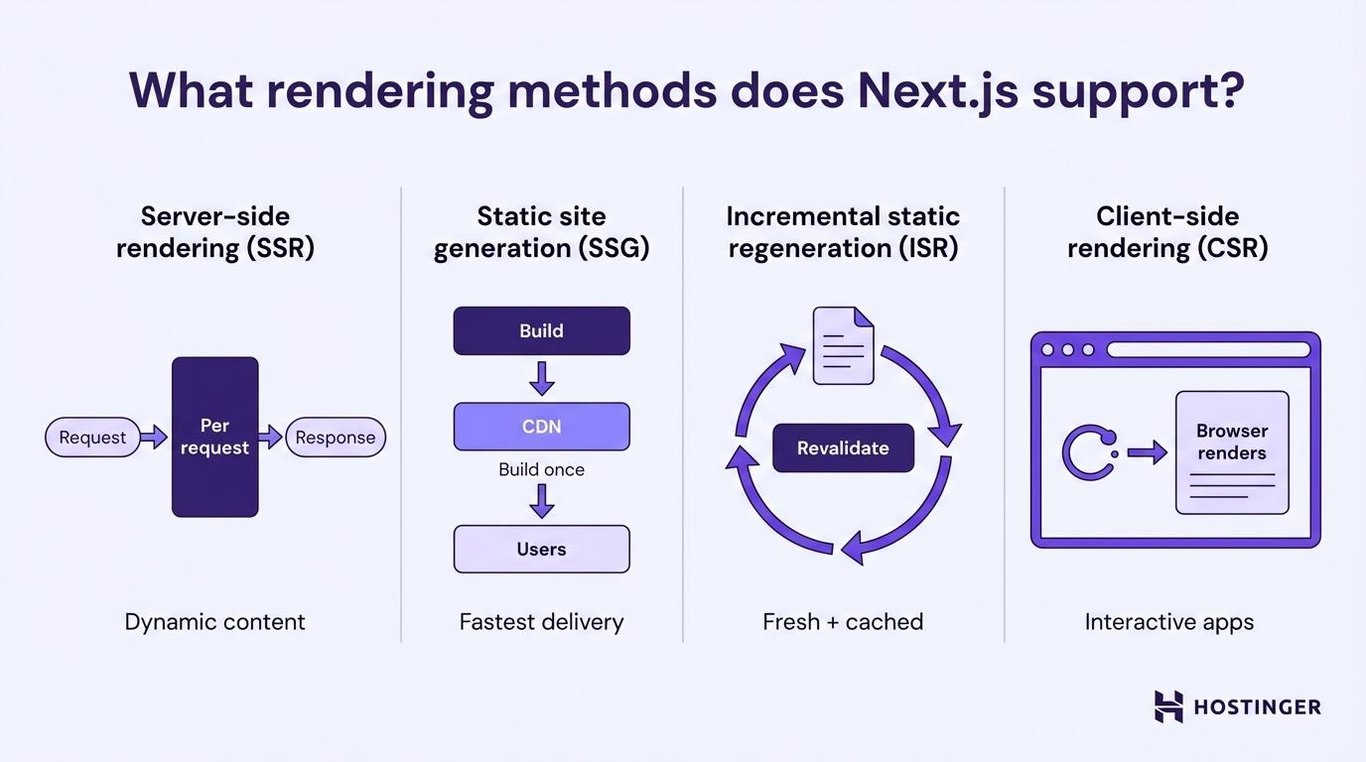
Next.js gives you four rendering methods and supports hybrid rendering across your application. You pick the right strategy for each route and even for each data fetch, based on what that content needs.
Server-side rendering (SSR)
SSR generates fresh HTML on the server for every incoming request. This request-based rendering means that when someone visits your page, the server fetches the latest data, builds the complete HTML, and sends it to the browser, ready to display.
You want this dynamic rendering approach for pages with personalized or frequently changing content. A user dashboard with real-time account data, a search results page, or a pricing page that varies by region. The visitor sees a fully rendered page immediately, and search engines index the content without running JavaScript.
But every request costs server resources. SSR pages are slower to generate than pre-built static pages. For content that doesn’t change between visitors, static generation is a better fit.
Static site generation (SSG)
SSG uses build-time rendering to pre-render your pages before deployment. The build process generates the HTML files once, and those pre-rendered pages get served directly from a CDN for every visitor.
The result is the fastest possible page load. No server processing per request. Your static website files sit on edge servers around the world and load almost instantly. Blog posts, documentation, marketing landing pages, and portfolio sites are all ideal for SSG.
The limitation is freshness. Pages are built during deployment, so content only updates when you rebuild and redeploy. For a blog that publishes weekly, that’s fine. For a product catalog that changes hourly, you need something more flexible.
Incremental static regeneration (ISR)
ISR gives you the speed of static generation with the freshness of server rendering. This hybrid static rendering approach extends SSG by letting you update individual pages after deployment – without rebuilding your entire site.
You set a revalidation interval (say, 60 seconds), and the framework serves the cached static page until that time expires. The next visitor after expiration triggers a background regeneration. The old page stays live while the new one is being built. Nobody ever sees a loading state.
This works well for product pages, news articles, or any content that changes periodically but doesn’t need real-time accuracy. A product price that updates every few minutes is a perfect ISR use case. You get website caching performance with near-real-time content.
Client-side rendering (CSR)
CSR is how standard React rendering works – browser rendering in its purest form. The server sends a minimal HTML shell, and JavaScript in the browser fetches data and builds the page after the initial load.
Use CSR for highly interactive components that don’t need search engine indexing. Admin panels, internal tools, real-time chat interfaces, or sections where content depends entirely on the logged-in user. The browser handles everything, which reduces server work but means users may see a loading state until JavaScript finishes.
CSR gives you rich interactivity at the cost of initial load speed and SEO visibility. For public-facing pages where search traffic matters, pair CSR with SSR or SSG. That way, the page loads with visible content before the interactive parts kick in.
Core features of Next.js
Rendering gets the most attention, but Next.js also includes built-in features that replace tools you’d otherwise configure yourself.
File-system routing maps your folder structure directly to URLs. Create a file at app/about/page.js, and your site has an /about page. No router configuration. Nested folders create nested routes. Special files like layout.js let you share UI elements (a header, sidebar) across pages without repeating code.
API routes and route handlers let you build backend endpoints inside your Next.js project. Need a contact form that sends an email? Create a route handler at app/api/contact/route.js and write the server logic there. Connect to databases, call third-party APIs, process payments – all without a separate backend server. If your project needs a more structured REST API approach, route handlers support that too.
Automatic code splitting breaks your application into smaller JavaScript files. When someone visits your homepage, they only download the code for that page – not every other page on your site. This happens automatically during the build.
Image and font optimization handles common performance bottlenecks. The built-in Image component automatically resizes, compresses, and lazy-loads images. Fonts are self-hosted and load without a layout shift. These details take hours to set up manually, but come ready out of the box.
TypeScript support is built in from project creation. The framework detects .ts and .tsx files automatically and provides type checking during development. No extra configuration.
Proxy configuration (proxy.ts in Next.js 16, formerly middleware.ts) runs before a request completes. Use it for authentication checks, redirects, A/B testing, or geolocation-based routing. It acts as a network boundary on the Node.js runtime, handling request logic before your page code runs.
What is the difference between React and Next.js?
React is a UI library. Next.js is a full-stack JavaScript framework built on top of React.
React gives you the building blocks for components and UI logic. Next.js adds the structure, tooling, and server capabilities for a complete application.
With React alone, you write components and manage state. But you need to add your own solutions for routing, data fetching, server rendering, and build optimization. Every team assembles these pieces differently, which adds setup time and inconsistency.
Next.js makes those decisions for you. File-based routing, multiple rendering strategies, API route handlers, image optimization, and a production-ready build system – all bundled into a single framework. Less time configuring, more time building.
Feature | React | Next.js |
Routing | Requires a third-party library (like React Router) | Built-in file-system routing |
Rendering | Client-side only by default | SSR, SSG, ISR, and CSR per route |
Backend capabilities | None – requires a separate server | API routes and route handlers included |
SEO handling | Requires extra setup for SSR and SEO | Strong – server-rendered HTML is indexable |
Configuration level | High – you assemble the tooling yourself | Low – production-ready defaults included |
When React alone makes sense – you’re building a single-page application behind authentication (like an internal admin tool), you already have a backend API, and search engine visibility doesn’t matter.
When Next.js is the better choice – you’re building a public-facing website where SEO matters, you want server-side rendering or static generation, or you need backend functionality without running a separate server. Each approach suits different types of web apps, and the choice depends on whether SEO, interactivity, or speed matters most for your project.
How does Next.js work in practice?
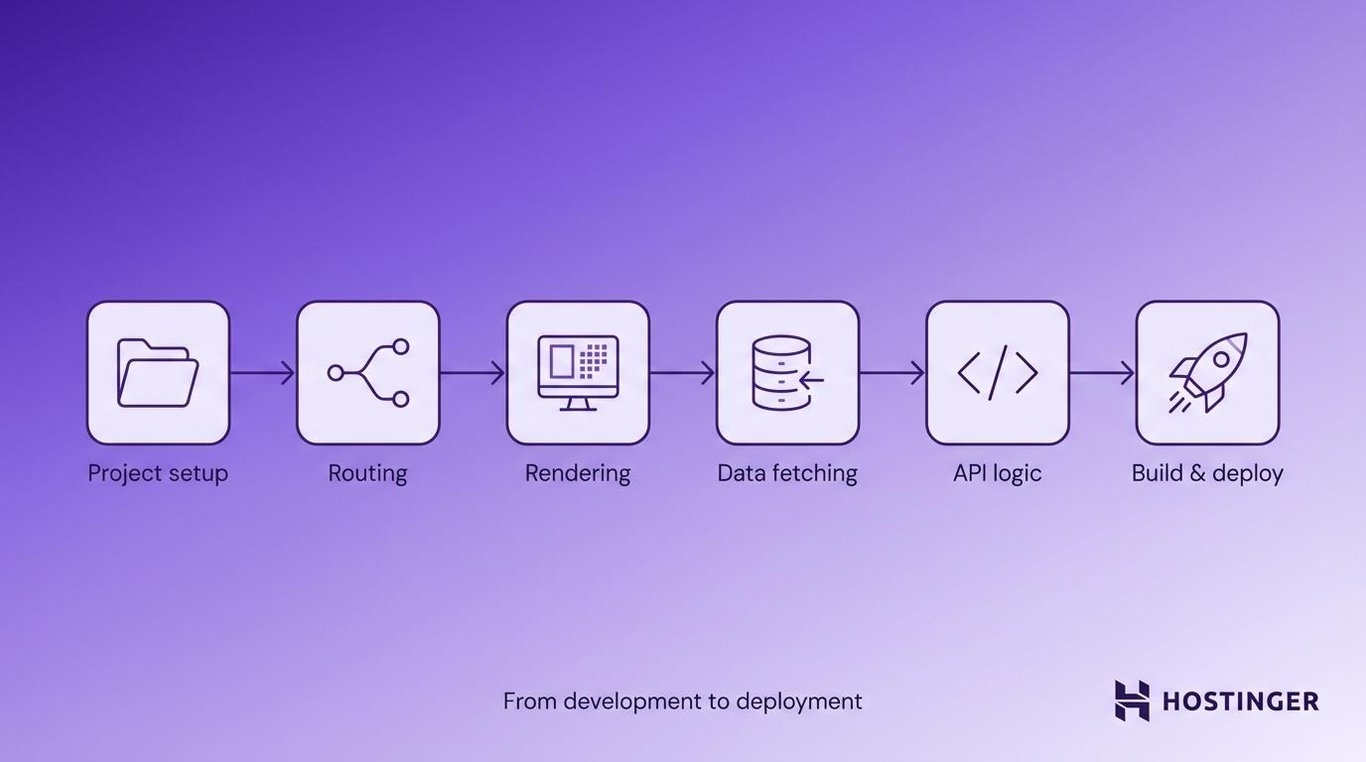
The Next.js workflow has six stages: set up the project, define routes, choose a rendering strategy, fetch data, add backend logic, then build and deploy.
1. Create a Next.js project
You start by running create-next-app in your terminal, which scaffolds a complete project with all the default configuration already in place. You’ll need Node.js installed on your machine (or server) first – then a single command sets everything up.
The command asks a few setup questions – TypeScript or JavaScript, ESLint preferences, your preferred styling approach – then generates the project structure. Your main files live inside the app directory. That’s where pages, layouts, and route handlers go.
Once the project is created, run npm run dev to start the local development server. Your site appears at localhost:3000, and changes show up instantly thanks to fast refresh. That tight feedback loop is what makes development feel productive.
2. Define routes using the App Router
Every folder inside the app directory becomes a URL route. Add a page.js (or page.tsx) file inside a folder, and that folder’s path becomes a live page on your site.
Layouts wrap shared UI around multiple pages. Create a layout.js file, and every page in that folder (and its subfolders) inherits it. Consistent navigation, sidebars, and footers without duplicating code.
Dynamic route segments handle variable URLs. A folder named [id] matches any value in that URL position. So app/blog/[slug]/page.js handles /blog/my-first-post, /blog/another-article, and every other blog URL automatically. The slug value is available as a prop inside your component.
3. Choose a rendering strategy
Each route in your application can use a different rendering method. A homepage might use SSG for instant loading. A product page might use ISR so prices stay fresh. A user dashboard might use SSR for personalized content.
You control this through how you fetch data and configure caching in each route. Server Components are statically rendered and cached by default when no dynamic data or cache overrides are used. Add a fetch with { cache: ‘no-store’ }, and the route becomes SSR. Set a revalidate value, and it becomes ISR.
This per-route flexibility means you’re always picking the right tool for the job.
Expert tip
How caching works in Next.js: Caching controls how Next.js delivers performance. By default, server-fetched data is cached. Use cache: 'force-cache' to reuse data across requests, cache: 'no-store' to fetch fresh data every time, or set a revalidate value to refresh cached data on a schedule. Many performance issues come from cache settings, not rendering choices – so this is worth learning early.
4. Fetch data on the server or client
Server Components can fetch data directly. No API layer needed. Write async functions that call databases or external APIs, and the data loads on the server before the HTML reaches the browser. Sensitive logic, such as database queries and API keys, stays off the client.
Client-side fetching handles data that depends on user interaction. Search-as-you-type, real-time notifications, or content that loads on scroll – all fetched in the browser after the page loads. React hooks like useEffect or libraries like SWR handle this well.
Caching and revalidation tie these strategies together. The framework caches server-fetched data by default and lets you set revalidation intervals to control freshness. You decide exactly how current each piece of data needs to be.
5. Handle backend logic with route handlers
Route handlers let you create API endpoints directly inside your Next.js project. A file at app/api/newsletter/route.js automatically creates a /api/newsletter endpoint that handles HTTP requests.
You’ll use route handlers for processing form submissions, connecting to a database, handling webhook callbacks from payment providers, or proxying requests to third-party APIs. Each handler exports functions named after HTTP methods – GET, POST, PUT, DELETE. The structure stays clean and predictable.
For most projects, this eliminates the need for a separate backend server. Form processing, data storage, and external integrations all live alongside your frontend code.
6. Build and deploy the application
Running next build compiles your application for production. That includes server-rendered pages, pre-built static pages, optimized JavaScript bundles, and processed assets.
You can deploy to Vercel (the company behind Next.js) for the simplest experience. Connect your repository, and every push triggers an automatic deployment with built-in CDN, analytics, and serverless functions. Or deploy to any hosting platform that supports Node.js.
Production optimization happens automatically during the build. JavaScript is minified. Images are compressed. Unused code is removed. Pages are split into the smallest possible bundles. The result is a deployment that loads quickly and is ready to scale.
Types of applications built with Next.js
Next.js powers a wide range of applications because its rendering model adapts to different content and traffic patterns.
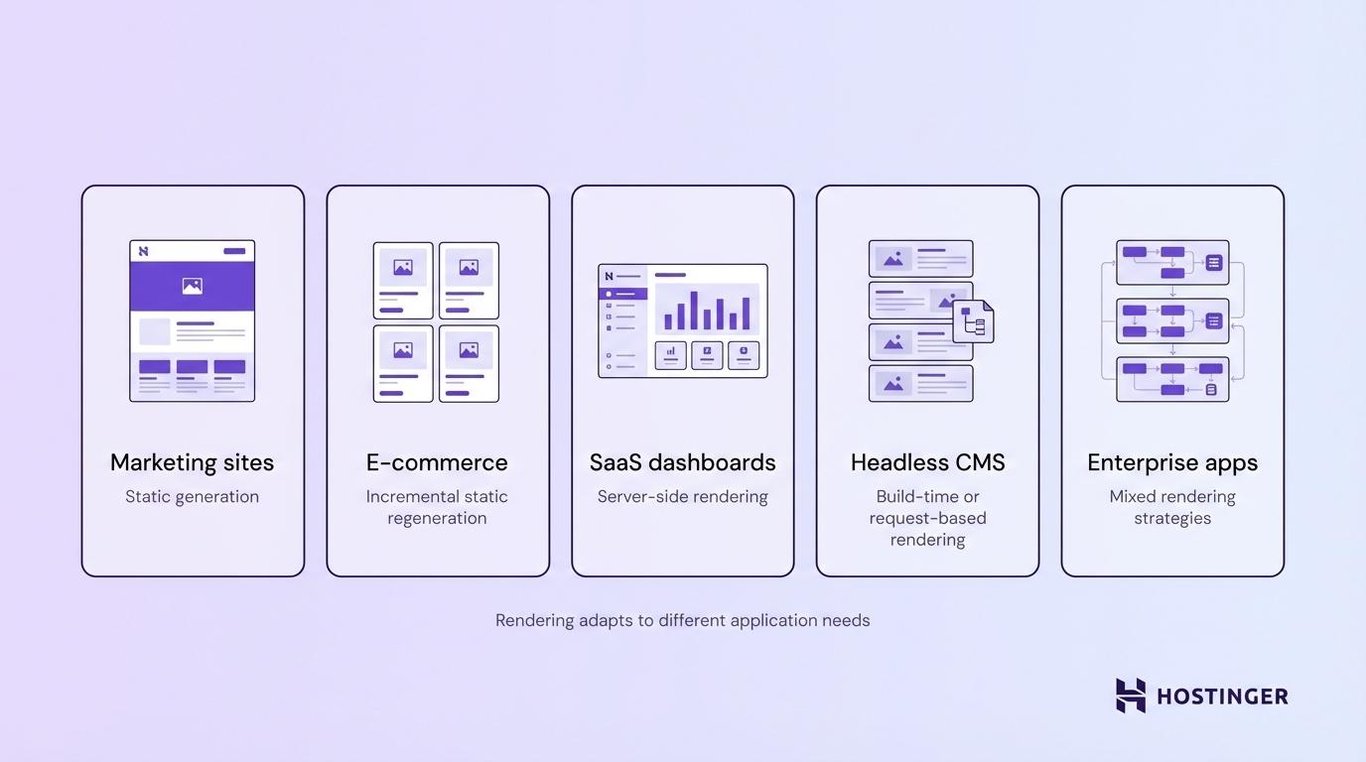
Static marketing websites work especially well. Build your pages once at deploy time, serve them from a global CDN, and get near-instant load speeds worldwide. Startups and SaaS companies use this approach to build landing pages that load quickly and rank well.
E-commerce platforms benefit from ISR. Product pages stay cached for speed but revalidate regularly to reflect inventory changes, pricing updates, and new reviews. If you’re starting from scratch, you can build an eCommerce website with this kind of setup and scale it as your catalog grows.
SaaS dashboards use server-side rendering for personalized, data-heavy interfaces. Each user sees their own data rendered on the server. The page arrives fully loaded – no blank screen while JavaScript fetches everything.
Headless CMS-driven sites pair Next.js with content management systems (CMSs) such as WordPress, Contentful, or Sanity. Editors manage content through the CMS. Next.js pulls that content at build time or per request and generates optimized pages. Clean separation between content creation and delivery.
Enterprise-scale applications rely on Next.js to handle high traffic and use different rendering strategies across sections. Next.js is used in production by companies like Netflix, Uber, Nike, and Spotify, mainly for performance-critical, public-facing pages where speed and SEO directly affect revenue.
What are the common challenges in Next.js development?
Choosing the right rendering strategy is the most common source of confusion. Four options per page can feel overwhelming, and developers sometimes pick SSR everywhere “just to be safe.”
The rule is simpler than it looks:
Use SSG unless you need fresh data. ISR if data changes periodically. SSR if data must be real-time. CSR only for interactive sections that don’t need SEO.
Server and client component boundaries trip up developers new to the App Router. Components are Server Components by default, so you’ll hit errors if you use browser-only features like useState or onClick without adding ‘use client’. The fix: move interactive logic into dedicated Client Components and keep data-fetching in Server Components.
Hydration errors happen when the server-generated HTML doesn’t match what the client renders. Common causes include browser extensions modifying the DOM, conditional rendering based on window or localStorage, or mismatched date formatting. These errors are usually small and fixable once you recognize the pattern.
Deployment and environment configuration can be tricky outside of Vercel. Self-hosted deployments need a properly configured Node.js environment. Features like ISR and proxy.ts may require extra setup depending on your hosting platform. Testing your production build locally with next start before deploying catches most configuration issues early.
How do you deploy a Next.js application?
You deploy a Next.js application by building it for production and running it on a server environment that supports Node.js.
The next build output includes server-rendered pages, pre-built static assets, and compiled API route handlers – ready for a live environment.
You have two main hosting paths. Managed platforms like Vercel handle server configuration, scaling, and CDN distribution automatically. Connect your repository and deploy with a single click. A Virtual Private Server (VPS) gives you full control over the Node.js runtime, operating system, and server configuration.
A Next.js application that uses SSR or ISR requires persistent Node.js processes and proper server configuration. VPS hosting supports this well because you control the environment entirely. Fully static builds (SSG-only) are more flexible. The pre-built files can be served from any CDN or static file host without Node.js running at all.
Before deploying your application, you must properly configure the server environment. A properly set up VPS keeps your Node.js processes running reliably and your application available under traffic.
Your hosting choice shapes the performance, scalability, and reliability that your visitors experience. Once your server environment is ready, you can deploy your Next.js project and start building scalable, production-grade web applications.


Alma is an AI Content Editor with 9+ years of experience helping ideas take shape across SEO, marketing, and content. She loves working with words, structure, and strategy to make content both useful and enjoyable to read. Off the clock, she can be found gaming, drawing, or diving into her latest D&D adventure.