Redmine vs Jira: Which tool to choose for project management
Dec 23, 2024
/
Dominykas I.
/
10 min Read
Redmine and Jira are two popular options that can help you out. However, they have distinct approaches that will benefit one kind of project more than another.
This guide compares the two in detail: we’ll explore their features, pricing, and real-world applications to help you choose the best solution for your needs.
Overview of Redmine and Jira
First things first – let’s explore what these tools are and how they work.
What is Redmine

Redmine is a free, open-source project management tool – anyone can customize its code.
This means that you can tailor almost everything to your needs: create your own issue types, add custom fields to capture specific project data, define access rights, and more.
The team also operates a sister project called Easy Redmine, which is a commercial version that adds various enterprise features and professional support.
Regardless of the version, Redmine helps you stay on top of tasks with its built-in features for time tracking, task creation, document sharing, and more.
It also fits naturally into most development environments since it works with common databases like MySQL and connects directly to Git repositories.
Redmine is best suited for:
- Teams who want complete control over their project management tool
- Projects where data must stay within the organization
- Development teams relying heavily on Git or SVN
- Companies looking for a free solution
- Projects needing unique workflow customizations
What is Jira

Jira is Atlassian’s project management and issue-tracking software. While it started as just a bug tracker for dev teams, it quickly grew into a multi-purpose platform for all kinds of projects.
The platform focuses heavily on agile project management and sprint planning, which means that teams can easily track which state a task is in and who’s responsible for it.
The latest AI features make it even more powerful, helping break down your tasks and automate routine work. The software offers a virtual intelligence agent for support, as well as options to include AI summaries, a smart editor, and filters for sorting similar issues.
Finally, as part of Atlassian’s ecosystem, Jira connects smoothly with other tools like Confluence for documentation and Bitbucket for code.
While Jira comes at a higher cost than open-source options like Redmine, its strong integrations, user-friendly interface, and in-depth reporting offer great value for any team.
Jira is best suited for:
- Software development teams using agile methods
- Companies needing detailed project tracking
- Marketing teams planning campaigns
- IT service desks managing support
- Companies wanting built-in project management tools and standardized workflows
Redmine vs Jira: A detailed comparison
Let’s examine how these project management tools compare in terms of their core features, project management capabilities, issue tracking, and more.
Features and functionality
First, we’ll take a look at Redmine’s and Jira’s built-in features which help teams create projects, track issues, and manage workflows.
Then we’ll explore how extensions expand their capabilities through additional time tracking, reporting tools, integrations, and more.
Redmine
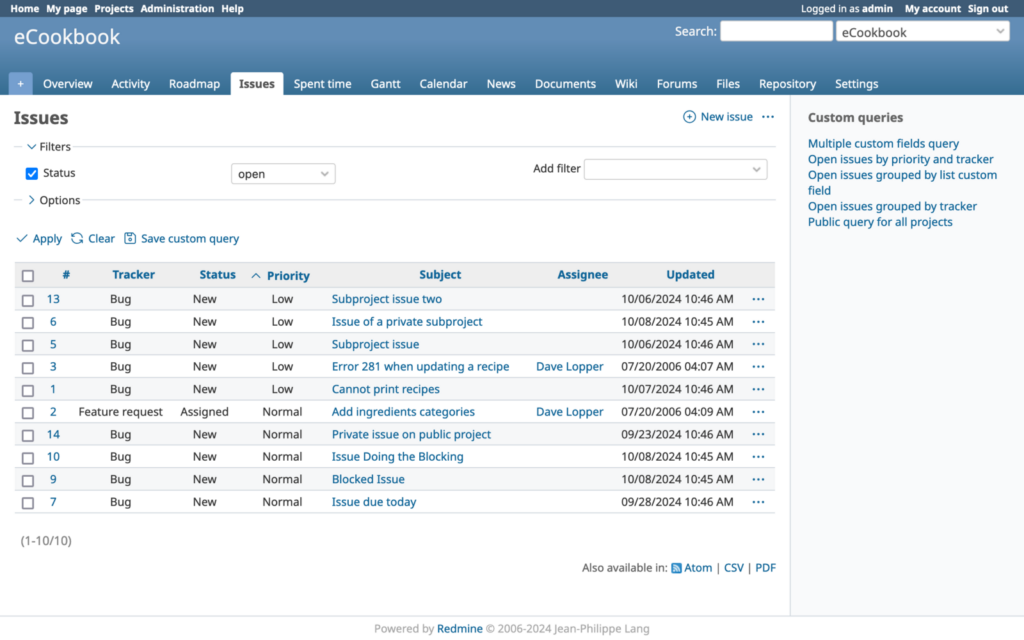
Redmine’s foundation is built on practical project management, with its core features including issue tracking, time logs, and Gantt charts.
It helps teams track their work with features for monitoring assignments, project timelines, and time spent on each task.
Beyond these basics, Redmine lets you:
- Run multiple projects with different settings and team access, including customizable progress intervals
- Create sub-projects for complex work, with column totals in issue reports
- Use the built-in wiki and forum, with the ability to quote specific message parts
- Track work in 50+ languages with enhanced fonts for better readability
- Add custom fields to capture specific data and track watchers directly from issue lists
It doesn’t stop there, either. With Redmine’s plugins and themes, you can:
- Add agile boards for sprint planning with full Scrum and Kanban support
- Create custom reports and dashboards
- Add CRM features for managing contacts and sales opportunities
- Enhance the user interface and improve navigation
Many of those plugins are completely free and can be downloaded via Redmine’s plugins directory.
Jira
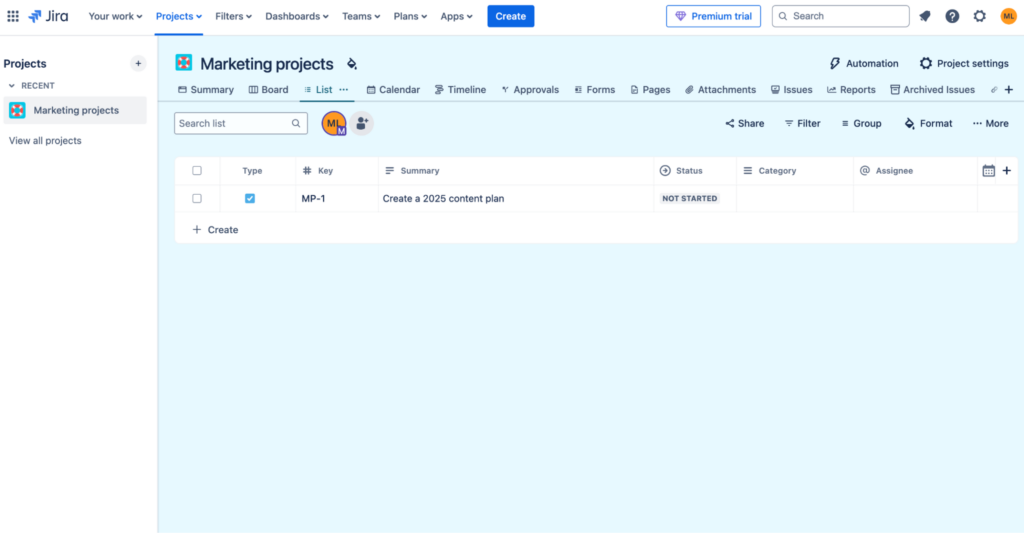
Jira offers a sleek interface and various built-in agile features, as well as pre-defined workflows and templates your team can use right away.
Overall, Jira helps teams manage their entire workflow, from planning to delivery. Here’s what you can do with the core platform:
- Plan sprints using Kanban and Scrum boards with a drag-and-drop interface
- Track progress with multiple views (List, Timeline, Calendar) and goal alignment
- Break down large tasks using AI assistance
- Coordinate work across teams with shared roadmaps
- Monitor time and resources across projects
- Create custom workflows for different teams and projects
- Set up various issue types for different work needs
The plugin marketplace lets you further extend Jira to:
- Create detailed reports with custom dashboards
- Automate routine tasks using AI workflows
- Connect with tools like Confluence and Bitbucket
- Add custom fields and workflows
- Use AI for task creation and management
Project management capabilities
When choosing a project management tool, it’s crucial to consider your team’s unique workflow.
For example, traditional teams may benefit from robust planning tools like Gantt charts, while agile teams might prioritize sprint management and adaptive planning.
Let’s see how Redmine and Jira can address these needs.
Redmine
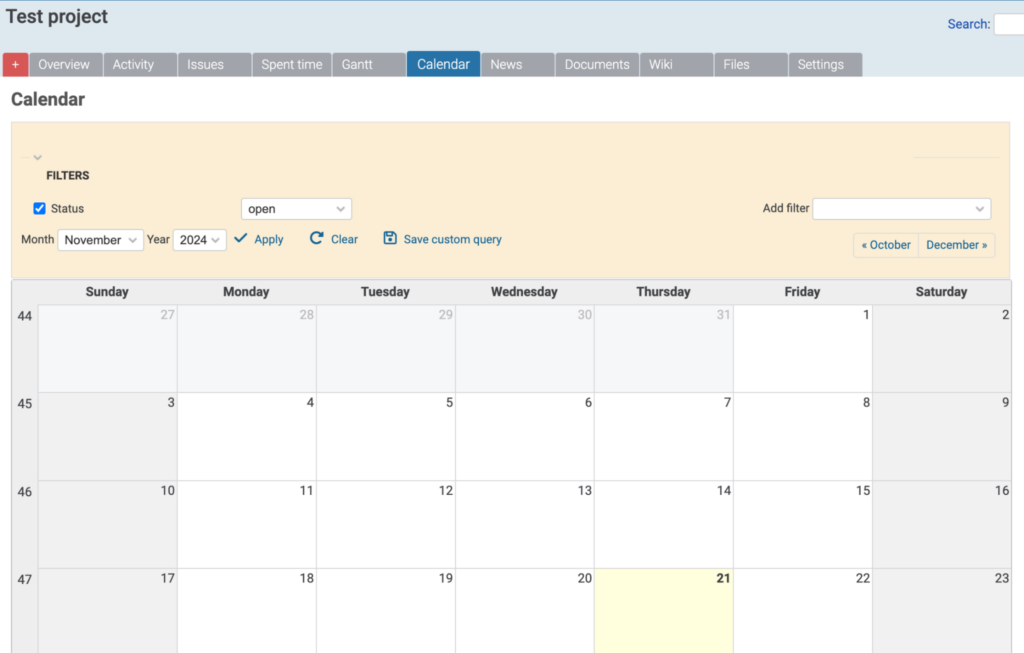
Redmine provides a solid foundation in traditional project management while keeping the door open for agile methods.
This makes it particularly valuable for organizations running different types of projects, from waterfall IT implementations to marketing sprints.
However, adding extra features like agile planning may require installing and configuring plugins and other customizations.
Redmine lets you:
- Plan projects visually using Gantt charts and calendars
- Manage multiple projects and subprojects with role-based access
- Track time at project or ticket level with custom fields
- Set up task dependencies and milestones
- Track resources and allocate work across teams
- Use plugins to add agile boards and sprint planning
- Collaborate through wikis, forums, and document sharing
Jira
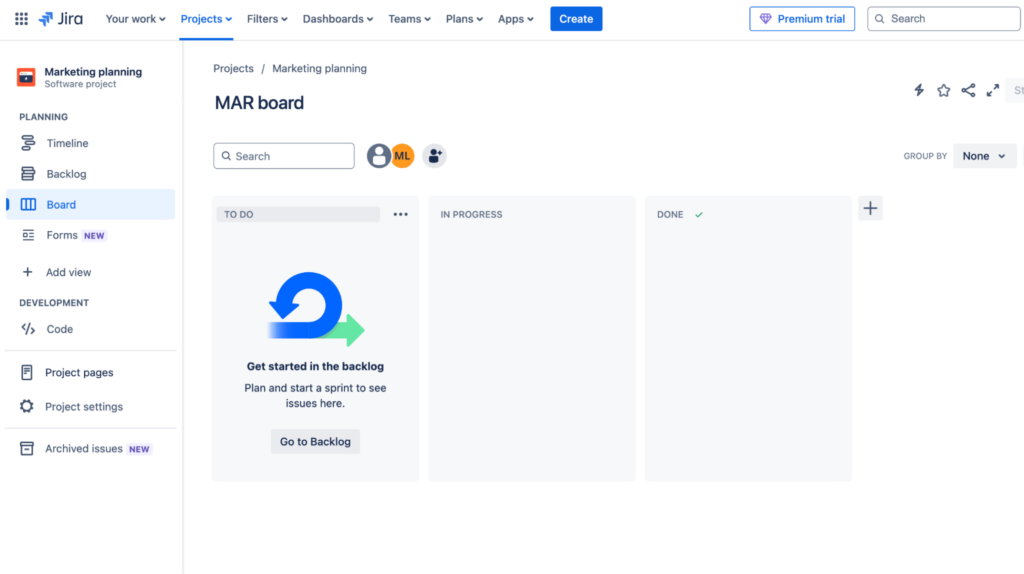
Jira works especially well for agile methodologies, which explains its popularity with software development teams.
Its core platform offers a sprint-based approach that helps you break down complex projects into manageable tasks and adapt quickly.
For project management, Jira lets you:
- Run agile projects with native Scrum and Kanban boards
- Create detailed roadmaps with dependencies and milestones
- Manage releases and sprints with built-in tools
- Monitor team workload and capacity
- Track progress through customizable dashboards
- View work in List, Timeline, or Calendar formats
- Plan across teams with AI-assisted task breakdown
- Use the drag-and-drop Program board for cross-team work
Issue tracking and bug management
A single missed bug can lead to hours of downtime for software teams. And business teams usually struggle with feature requests and tasks that get lost in messy spreadsheets.
Solid issue tracking and bug management can solve this. Let’s examine how Redmine and Jira tackle these challenges.
Redmine
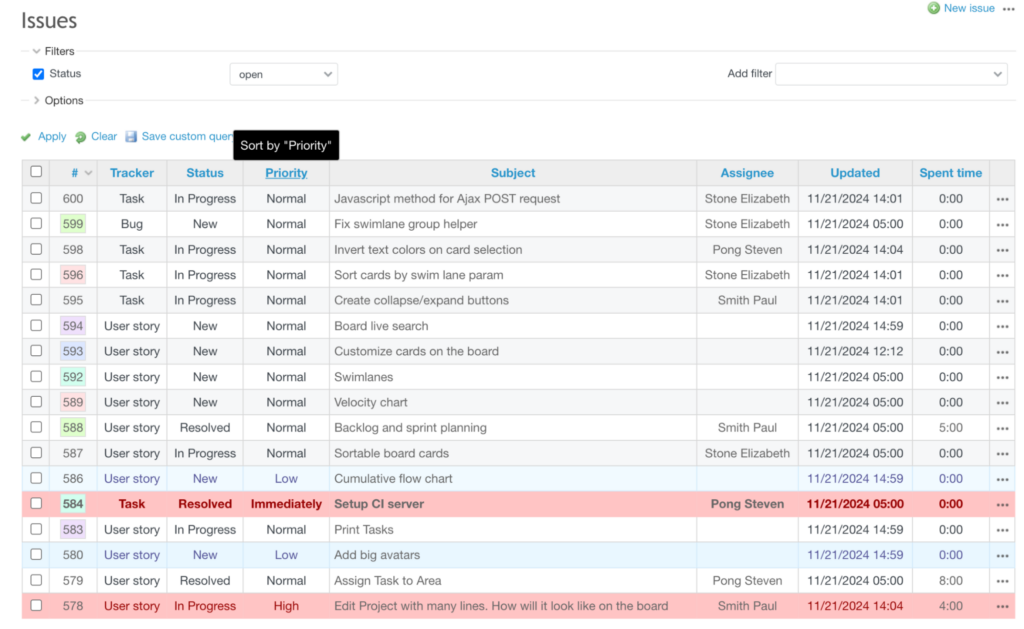
Redmine offers a traditional approach to issue tracking, but with a twist – everything can be customized to match your work processes.
Since each team tracks different kinds of tasks, Redmine lets you create your own issue types, fields, and workflows.
For development teams, Redmine’s integration with version control makes tracking code changes simple. Every issue can link directly to updates in Git or SVN, so developers always know which code changes solved which problems.
Redmine allows you to:
- Track issues across multiple projects with customizable workflows, statuses, and priorities
- Set up custom fields to record specific details unique to your team’s needs
- Filter issues by role, group, or priority using built-in tools
- Use plugins to add features like issue templates and bulk actions
The latest version (6.0.1) builds on these capabilities with important improvements – from better search capabilities to more intuitive interfaces.
Teams can now search using multiple phrases and see watchers directly in the issue list, making it easier to track who’s following each task.
Jira
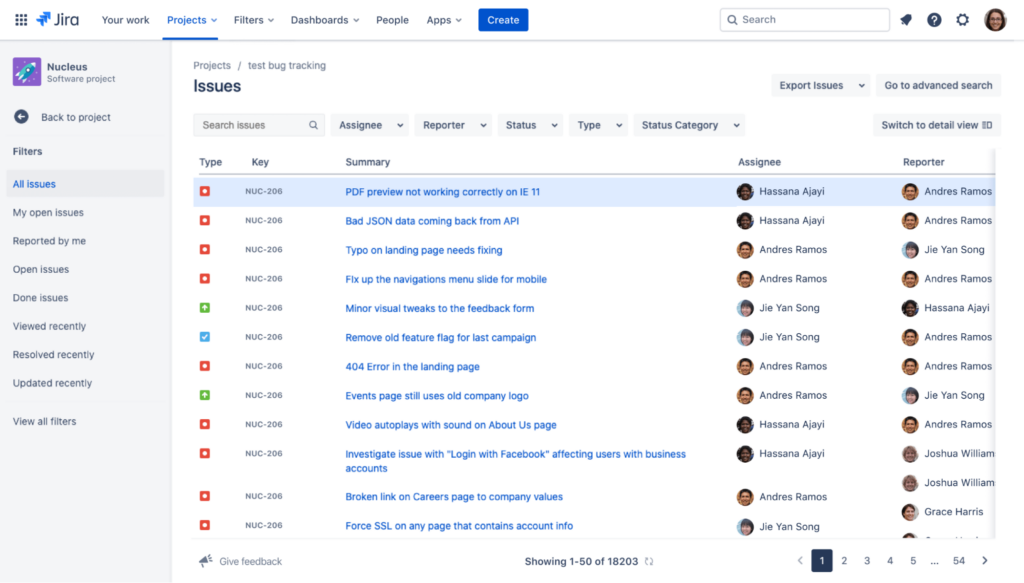
Jira takes a structured approach to issue and bug tracking. It lets you customize issue types, workflows, and fields to fit any project.
The tool is also big on automation. For example, teams can configure rule-based actions to handle repetitive tasks, like automatically assigning issues or sending notifications.
It also integrates with dev tools like Git and Bitbucker, letting you link issues directly to deployments and track the entire lifecycle of a bug or task.
With Jira, you can:
- Track and manage issues using custom types and fields that fit your projects
- Automate repetitive tasks with no-code tools like rule-based updates and notifications
- Monitor bugs and tasks with clear dashboards that show real-time progress
- Connect to development tools like CI/CD systems to keep the workflow smooth
- Use AI features to break down big tasks or rewrite issues for clarity
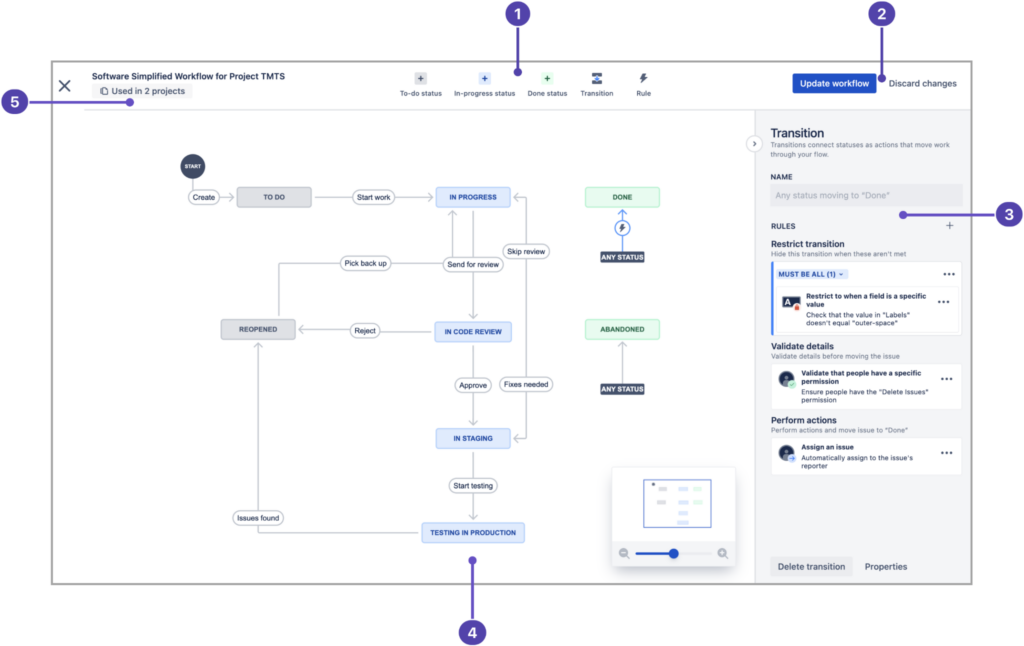
Jira’s visual tools, like its workflow editor, make it much easier to design and manage processes.
User interface and customization
Your team will spend hours using their project management tool, and a comfortable interface can help boost that productivity.
Some teams might need a simple, ready-to-go solution, while others might want to customize every detail.
Here’s how Redmine and Jira approach these different needs.
Redmine
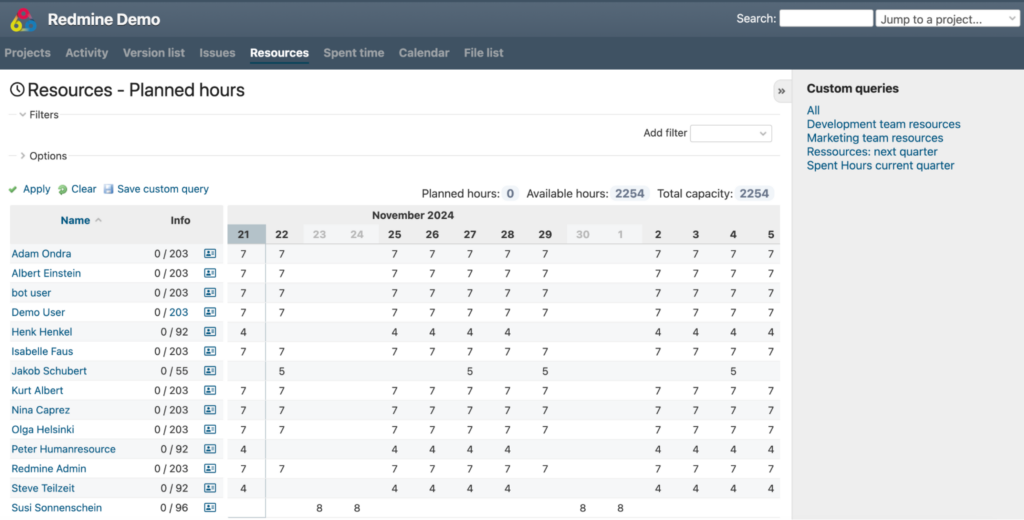
Redmine provides a functional interface that prioritizes usability.
The latest update (6.0.1) introduces improvements like SVG icons, better fonts, and a collapsible sidebar.
While its design is still much simpler compared to modern project management tools, you can use Redmine themes and plugins to optimize it to your liking.
With Redmine, you can:
- Use one of its multiple design themes
- Tailor project workflows with custom fields, roles, and permissions to fit your team’s needs
- Extend functionality with plugins that enable agile tools, CRM features, or UI enhancements
- Collaborate through built-in wikis, forums, and document repositories
While the interface is straightforward, non-technical users may find it less intuitive, especially when advanced customizations or plugin installations are required.
Easy Redmine, however, offers a more polished user experience with features like mobile-optimized views and improved navigation.
Jira
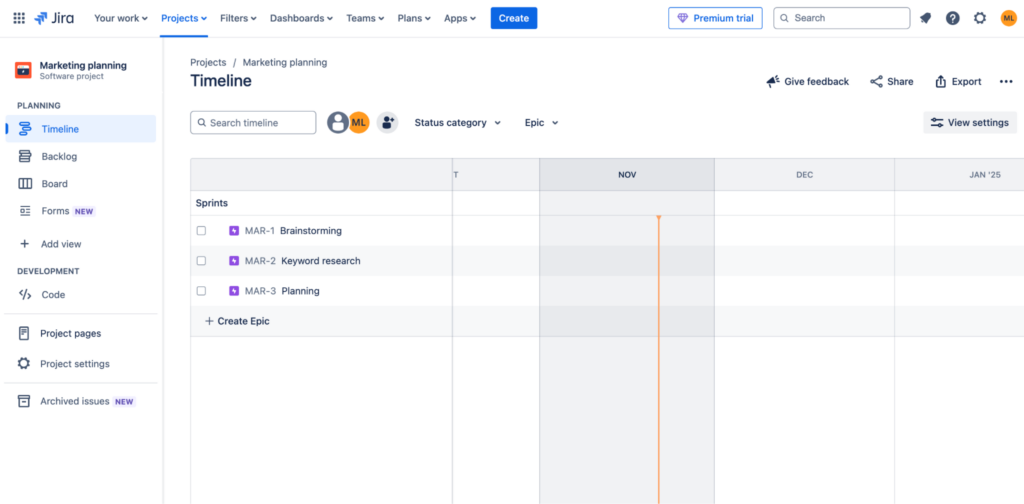
Jira’s interface is more modern and user-friendly. It is suitable for both technical and non-technical users and doesn’t require extra setup.
While it doesn’t offer the same level of deep customization as Redmine, its default interface and built-in features make it flexible enough for most workflows.
Jira lets you:
- Use the drag-and-drop functionality on Scrum and Kanban boards
- Customize your dashboards and workflows with tools like the visual workflow editor and templates for different team needs
- Adapt the interface to your work style with List, Timeline, and Calendar views, introduced in 2024
- Use AI to suggest optimized workflows, reformat issues, or break down tasks automatically
- Access the platform via its mobile apps
- Use over 3,000 add-ons available in Jira’s marketplace to expand reporting, automation, and integrations
Pricing and licensing options
Cost is an essential factor when choosing a project management tool.
Your budget, team size, project scope, and other needs will determine which pricing model works best.
Redmine’s free, open-source nature makes it appealing to smaller organizations, while Jira’s pricing scales with team size.
Let’s break down what you’ll pay for each.
Redmine
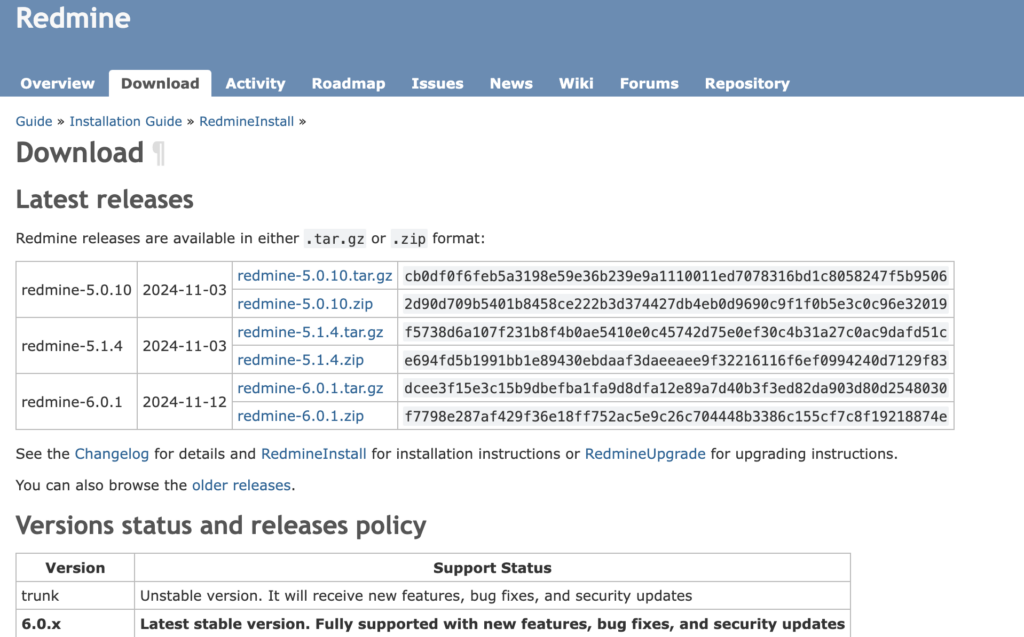
Redmine is a free, open-source solution, ideal for cost-conscious teams. You can download and install it without licensing fees.
Some additional expenses might be needed if you opt for custom development or purchasing plugins from marketplaces like RedmineUp.
Additionally, Redmine is a web-based platform, so it needs hosting. You can either host it on-premises by installing Redmine on your own servers, or choose a hosting provider that will take care of maintenance and security for you.
Here at Hostinger, we offer affordable plans for Redmine users that include fast servers, a 99.9% uptime guarantee, and 24/7 online support.
Plus, our Redmine VPS hosting comes with full customization freedom and an AI assistant to help you complete tasks faster.

Jira
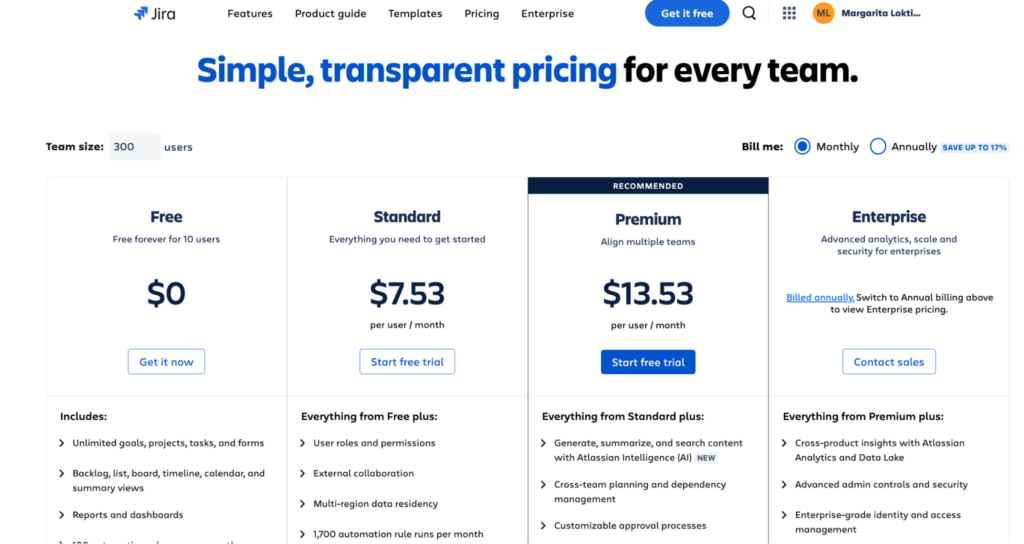
Jira offers several pricing tiers with a monthly or annual billing model:
- Free plan: Supports up to 10 users with 2GB of storage and limited features
- Standard plan: Priced at $7.53 per user/month, it includes 250GB of storage, user permissions, and 1,700 monthly automation rule runs
- Premium plan: Costs $13.53 per user/month and includes unlimited storage, advanced dependency management, AI-powered features, and 24/7 critical issue support
- Enterprise plan: Available at request and designed for large-scale organizations with advanced analytics, unlimited automation, and up to 150 sites
Jita also provides both cloud-based subscriptions and an on-premise Data Center option, which is tailored for enterprises.
Finally, you might include additional costs for some of Jira’s apps and plugins depending on your integration and customization needs.
Performance, scalability, and security
Growing teams usually face two major challenges when managing projects: effectively using their tools as projects pile up, and protecting sensitive data.
Here’s what Redmine and Jira offer in this regard.
Redmine
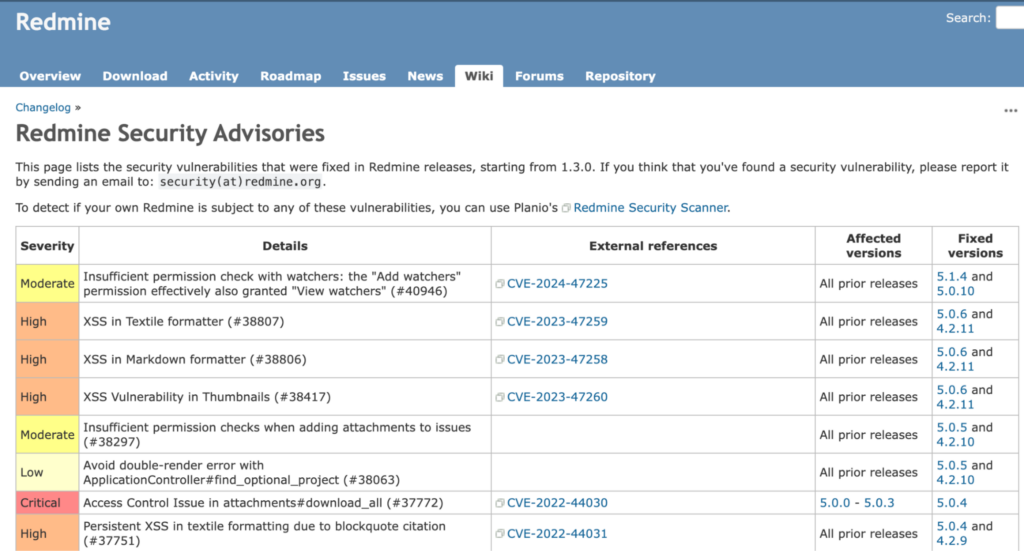
With Redmine, performance depends on your setup.
The larger your team is, the more database optimization and server power you will need to avoid slowdowns.
Redmine also includes essential security features like:
- Role-based access control – controlling who can see what
- SSL encryption – protecting your data
- Activity logs
Jira

Jira simplifies performance management through its cloud-based approach – with Atlassian handling all server management and resource allocation.
Since its platform supports up to 50,000 users per site with a guaranteed 99.9% uptime, teams can rely on consistent access to their projects.
Storage grows with your needs, starting at 2GB in the free tier and expanding to unlimited space in premium versions.
Then, there’s an enterprise plan for larger organizations that need even more security to protect sensitive data. It includes the following features:
- Multiple security certifications – proof of following industry standards
- Data encryption in transit and storage – keeping information secure
- IP allowlisting and Single Sign-On – controlling who can access your system
- Advanced audit logs – tracking all activities
- Multi-region data residency – choosing where your data is stored
Community and support
Having the right learning resources makes tool adoption much easier, especially for project management tools that need to be used by everyone on your team.
Let’s see what kind of support you can expect from Redmine and Jira.
Redmine
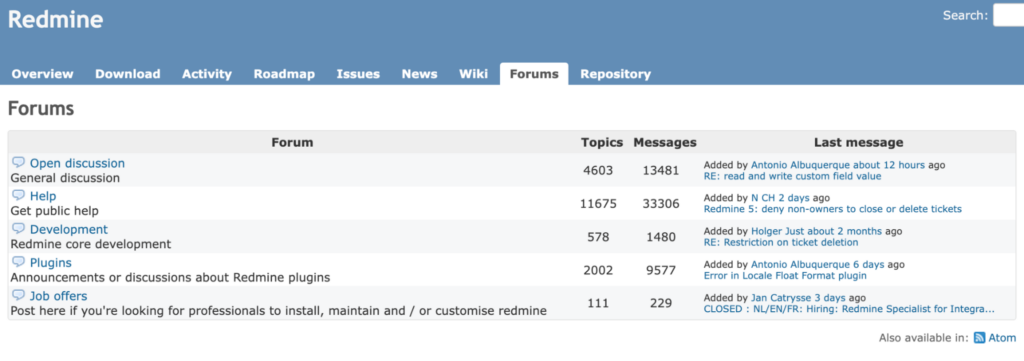
Redmine has an open-source community for support and development. The official website (redmine.org) serves as the main hub where you can find:
- Complete documentation and user guides
- Active forums for discussing issues and sharing solutions
- Real-time help through IRC chat and Slack channels
- Regular updates from community contributors
If you need professional support, use the Easy Redmine commercial option, which offers expert assistance.
Jira

Jira is a commercial product and comes with Atlassian’s extensive support system. However, it varies by plan:
- Free tier: Access to Atlassian Community support and basic documentation
- Standard: Local business hours support (9/5)
- Premium: 24/7 support for critical issues
- Enterprise: Complete 24/7 support for all issues
All users can also use extensive documentation and training materials and access regular platform updates.
Use cases and suitability
Finally, let’s revise which projects and teams can benefit the most from each tool.
Redmine
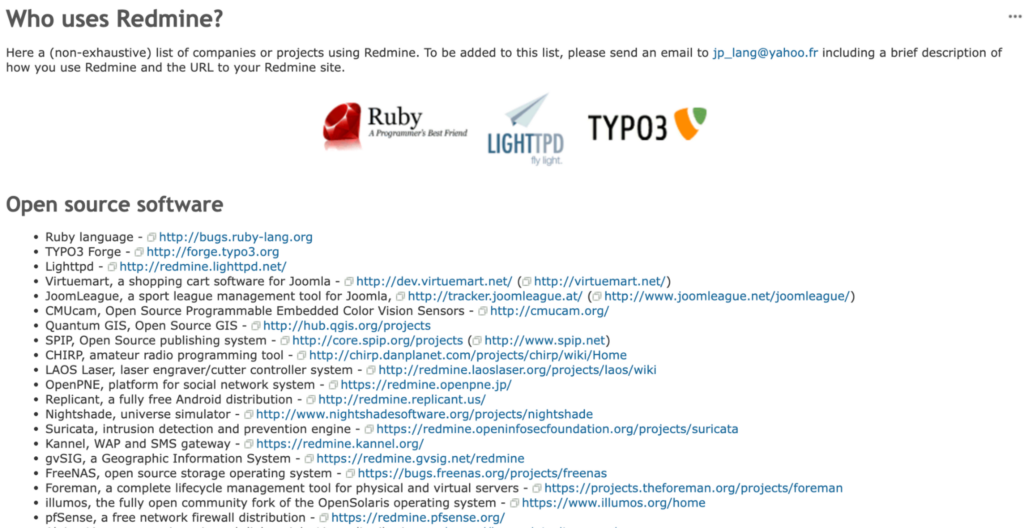
Teams choose Redmine when they need more control over their project management environments.
It works best when you need:
- Complete control over your data and hosting
- Extensive customization of workflows
- A cost-effective solution
- Heavy integration with version control
- Strict privacy requirements
It can be especially useful for software development companies with in-house IT, government and healthcare organizations, educational institutions, and open-source project communities.
For example, companies using Redmine include the Michigan State University, Alpine Linux, and Japan Aerospace Exploration Agency (JAXA).
Jira

Jira works best if you want a polished, ready-to-use solution that scales with your team’s growth. It’s a go-to option for:
- Fast-growing projects needing quick setup
- Teams practicing agile methodologies
- Organizations requiring detailed analytics
- Projects involving multiple departments
- Companies needing dedicated support
Jira can serve large enterprise companies, agile software development teams, marketing and creative departments, and IT service desks.
For instance, companies using this tool include Glovo, Reddit, Doodle, and others.
Conclusion
Both Redmine and Jira are powerful project management platforms, but they serve somewhat different needs.
Here’s how they compare across key areas:
| Redmine | Jira |
| Customizable issue tracking, time logs, Gantt charts; extensible through plugins | Built-in agile tools, AI features, sprint planning, ready-to-use templates |
| Traditional project management with optional agile features through plugins | Native agile support with Scrum and Kanban boards |
| Basic interface with customization through themes | Modern, intuitive interface with drag-and-drop functionality |
| Free, open-source (hosting costs apply); premium versions and plugins available | Subscription-based, starting at $7.53/user/month (limited free plan available) |
| Scalability depends on server resources and hosting configuration | Plans scale with team size and storage needs |
| Community-driven support through forums and documentation | Professional support included with paid plans |
| Best for teams needing complete control, self-hosting, and extensive customization | Best for organizations wanting quick setup, built-in agile tools, and professional support |
In other words, your choice will depend on your team’s specific requirements, technical expertise, and budget.
Ready to get started? Try Redmine with Hostinger’s optimized hosting or explore Jira’s free tier to test which platform better suits your needs.
Redmine vs Jira FAQ
What are the main differences between Redmine and Jira?
Redmine is a free, open-source tool that offers extensive customization. However, it requires more technical expertise to set up and maintain than its ready-to-use alternatives.
Jira is a commercial solution with a user-friendly interface, built-in agile features, and dedicated support. It comes with subscription costs and more standardized features.
Can Redmine and Jira be integrated with other tools?
Yes, both tools support integrations. Redmine offers various plugins and supports common version control systems. Jira offers 3,000+ marketplace apps and connects with other Atlassian products. Both can integrate with popular development tools.
Is Redmine or Jira more suitable for agile project management?
Jira is well suited for agile teams needing native support and dashboards for Scrum and Kanban. Redmine also provides strong capabilities for agile project management through plugins and customization. Choose Jira for immediate agile functionality or Redmine if you want to customize your workflow.
All of the tutorial content on this website is subject to Hostinger's rigorous editorial standards and values.

Dominykas began as a Marketing Specialist and is currently working as a Content Editor and Squad Lead. When he's not ensuring the quality of articles, he enjoys both reading and writing fiction.