How to Improve Your Site’s Speed in WordPress by Deferring JavaScript Parsing
Jan 31, 2025
/
By Domantas G.
/
3 min Read

If you want to cut your website’s loading time, you can try to defer parsing of JavaScript. It allows the browser to render JavaScript only after it finishes loading the main content of a site. In this tutorial, we will cover several ways on how to defer parsing of JavaScript in WordPress CMS.
Download all in one WordPress cheat sheet
Why Should You Defer Parsing of JavaScript?
When you open a website, your browser will receive the site’s content from the server and loads the code from top to bottom. However, if it finds JavaScript, the loading process will be interrupted until it finishes downloading all the JavaScript.
To solve this issue, you can defer parsing of JavaScript, which allows the browser to load the full content without waiting for the scripts to load. By implementing this task, JavaScript parsing won’t negatively affect your website’s loading time.
Keep in mind that having lots of JavaScript isn’t bad. After all, It’s one of the essential web components, which allows you to extend the functionality of your site.
The point is, there are two main benefits you can get:
- Better user experience – visitors won’t have to wait long to view your website content.
- Improved SEO ranking – Google bots can crawl your site faster.
How to Defer Parsing of JavaScript in WordPress?
This section will show you a step-by-step guide to defer parsing of JavaScript. To top it off, we’ll also show you how to analyze the problem and test the changes after applying the task.
1. Analyze the site
To find out whether you should defer parsing of JavaScript in your WordPress website, analyze it using site speed testing tools like GTMetrix. As an example, here is the performance result of a website before implementing the method:
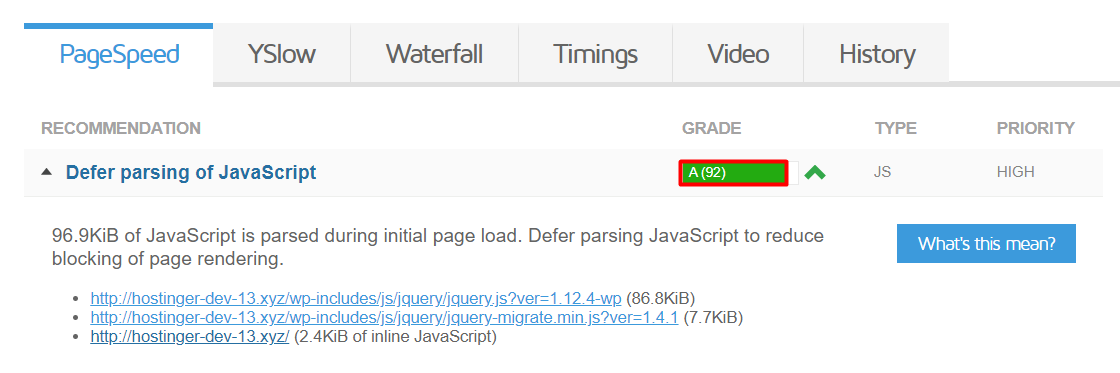
It shows that there’s an issue regarding JavaScript parsing, which means the website site needs to defer it.

2. Defer Parsing of JavaScript in WordPress
Now, let’s get into the steps of deferring parsing of JavaScript! There are two ways to do it – installing a plugin or adding a code snippet manually.
Using WordPress plugins

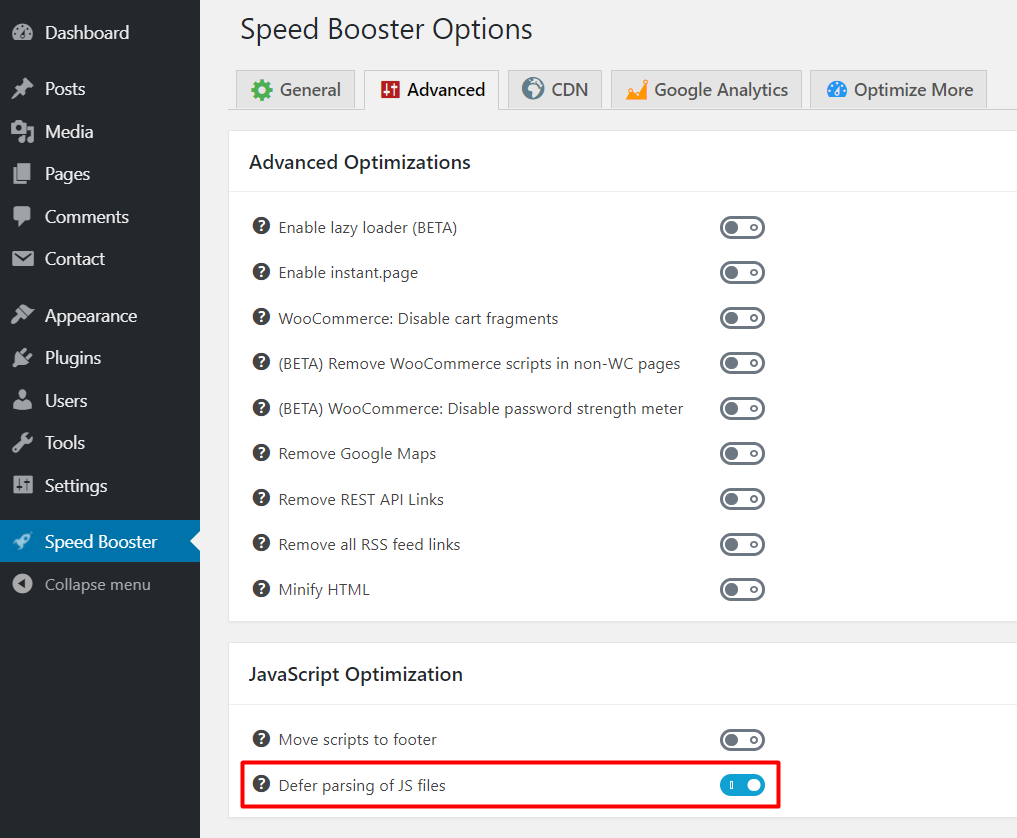
One of the easiest ways to defer JavaScript parsing is by using a plugin. Speed Booster Pack is one of the most popular plugins for this task. To begin, install the plugin and activate it, then follow these steps:
- Go to your WordPress Dashboard.
- On the left sidebar, navigate to Speed Booster.
- Click the Advanced tab, and activate Defer parsing of JS files.

- Once done, tap Save Changes.
Defer Parsing of JavaScript via functions.php
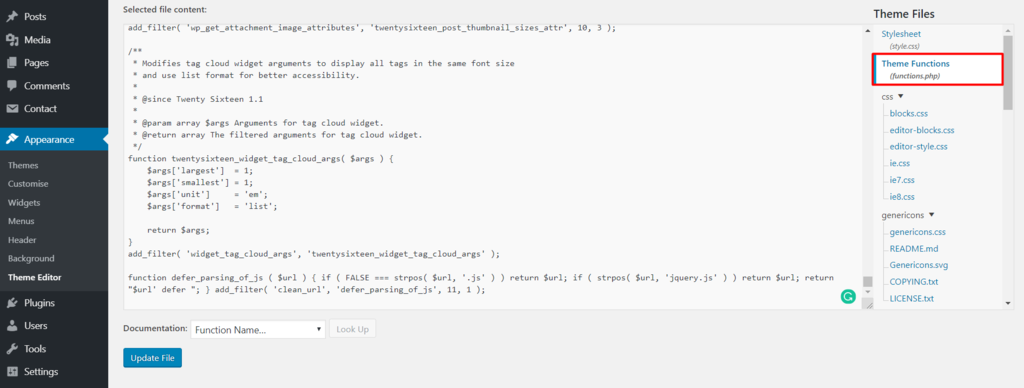
Alternatively, you can carry out the task manually by editing one of the WordPress core files. Make sure to backup your website before proceeding. Here are the steps:
- From your WordPress admin area, go to Appearance -> Theme Editor
- Select functions.php in the Theme Files

- Enter this code at the bottom of the file:
function defer_parsing_of_js ( $url ) { if ( FALSE === strpos( $url, '.js' ) ) return $url; if ( strpos( $url, 'jquery.js' ) ) return $url; return "$url' defer "; } add_filter( 'clean_url', 'defer_parsing_of_js', 11, 1 ); - Click Update File.
3. Test the Changes
After using one of the above options, re-analyze your site with GTMetrix:

Conclusion
In this tutorial, you’ve learned how to improve your WordPress site speed by deferring parsing of JavaScript. You can do so by using a plugin or adding a code snippet to the theme’s functions.php file.
Keep in mind that improving your website’s loading time will lead to better user experience and improved SEO ranking.
Do you have any questions regarding this topic? Share your thoughts in the comment section below!
Discover More Expert WordPress Techniques
How to Add JavaScript to WordPress
Combine External JavaScript in WordPress
Remove Query Strings From Static Resources
How to Fix Admin Ajax File in WordPress
How to Eliminate Render Blocking JavaScript and CSS
All of the tutorial content on this website is subject to Hostinger's rigorous editorial standards and values.

Domantas leads the content and SEO teams forward with fresh ideas and out of the box approaches. Armed with extensive SEO and marketing knowledge, he aims to spread the word of Hostinger to every corner of the world. During his free time, Domantas likes to hone his web development skills and travel to exotic places.

Comments
35 responsesApril 13 2017
Hi, thanks for the article. I tried the code both in my Wordpress wp-includes/functions.php file and my theme functions.php file and neither worked. Do you have any idea why it wouldn’t work?
April 13 2017
Thank you for contacting us. In some cases, the specific configuration in WordPress (.htaccess, specific plugins or other settings) may cause issues when trying to defer parsing of JS. In such cases, we would recommend deferring parsing of JavaScript via WordPress plugins. For more specific information, see Option 1 found in Step 2
April 13 2017
Thanks for this, it works great with one exception, it caused Yoast SEO to break. Can we exclude Yoast from being deferred?
April 13 2017
It is possible to exclude scripts from being deferred when using the “Speed Booster Pack” plugin. You will be required to access the Settings section of your plug-in, and there will be a selection that says “Exclude scripts from being deferred.” There, you will need to specify the JS file that you wish to exclude. For example `jqueryfile.min.js. If you are planning on excluding more than 4 scripts, the plugin authors suggest to disable deferring parsing of JavaScript altogether, as your page speed score might be affected.
May 12 2017
you need yoast SEO plugin to work only on wp-admin section, so bypass deferring using this: if ( is_user_logged_in() ) {} else { /* content written above */ }
May 18 2017
use this to not break Yoast SEO (it checks if user is logged in) if ( is_user_logged_in() ) {} else { function defer_parsing_of_js ( $url ) { if ( FALSE === strpos( $url, '.js' ) ) return $url; if ( strpos( $url, 'jquery.js' ) ) return $url; return "$url' defer "; } add_filter( 'clean_url', 'defer_parsing_of_js', 11, 1 ); }
April 13 2017
Hi I tried both codes, both of them worked but I think this method is not compatible with woocomerce because many woocomerce features not work when inserting that code!
April 24 2017
I put in functions.php : function defer_parsing_of_js ( $url ) { if ( FALSE === strpos( $url, '.js' ) ) return $url; if ( strpos( $url, 'jquery.js' ) ) return $url; return "$url' defer "; } add_filter( 'clean_url', 'defer_parsing_of_js', 11, 1 ) It made my website crash. I had avada themes. Be careful.
May 04 2017
Hello, It may be different for Avada theme, their support should provide you the code to defer parsing.
January 07 2019
Hi Basically this code loads in admin panel as well as front end. this is the reason your website crashed. It should load only on the fron-end. If you will load this only in front end then it should work.
April 27 2017
Hi Sr can you make some array with this? I mean...I wanna exclude jquery. js and todo.js function defer_parsing_of_js ( $url ) { if ( FALSE === strpos( $url, '.js' ) ) return $url; if ( strpos( $url, 'jquery.js','todo.js' ) ) return $url; return "$url' defer='defer"; } add_filter( 'clean_url', 'defer_parsing_of_js', 11, 1 ); But not work
May 02 2017
Hi. Thanks for this article it improved my page speed when I did this through the speed booster pack in wordpress, but then my background video didn't load. Is there a way to keep the background video active on my website and still defer parsing?
May 04 2017
It looks weird to put your code in function in wp-includes ? Are you sure it is not in function.php of the theme ?
May 04 2017
Hello, Yep, you are right. Fixed!
June 21 2017
Not working properly any of this 3 plugins :/ not even the code applied on the functions.php. The main problem is the Home slider, it doesn't appear... Any other option to solve it? Thanks!
June 23 2017
Hey, Try to exclude your home slider JavaScript from deferring.
January 06 2018
Hi Thanks for this article it improved my page speed when I did this through the WP deferred javaScript in wordpress.
January 26 2018
Thank you. Very useful post!
February 26 2018
Thanks for giving a good tips to us
March 25 2018
That is amazing. I added the php code and the site went to A100% on both page speed and YSlow scores using GTmetrix. Before that it had been in the B/C range. I'd brought it up from D/C speeds by adjusting the served image sizes, but this code really made a difference. It seems to have fixed a number of other issues also, not just the defer parsing. I'm lazy so I tried the ASync plugin first, but that didn't appear to affect anything. Thank you!
March 25 2018
ok I need to retract that. The site wasn't available after I added the code. That could account for the increased speeds. Any suggestions?
February 26 2019
Awesomeness!!! Keep up your excellent work! this code really works for me. Cheers, Mike
March 02 2019
Hi, thank for the article, step 2 works on my site keep the good
May 22 2019
two thumb up it's add speed to my website from 57 to 70 on google speed test on mobile Thank you
April 02 2020
Domantas I've tested the code in my website. WoW! ? Thanks for share!
June 02 2020
Thanks so much!! Just implemented this and immediately noticed a HUGE increase in site speed. I also appreciate you including the code to add without having to get the plugin.
August 02 2020
Thanks so much can't imagine my grade changed from F 42 to C 80 in gtmetrix.com after installing speed booster and deferred J's Asante sana
September 06 2020
Happy to help! Keep it up and you will get it to A! :)
August 13 2020
I copied the code and pasted it in function.php. Earlier my score as per Gtmetric of "defer parsing of JS" was 44, which got improved to 46. Any further help? Thanks in advance. My domain is networkhope. in
August 17 2020
It looks like the modified code in the comment section above that doesn't defer javascript parsing till later, solved the issue with customizer disappearing. BUT, I still get the same D 67 score on GTMetrix for "Defer parsing of Java script" that i always got. So no improvement
November 06 2020
Hey John, Make sure you clear your cache before accessing GTMetrix again, as it may show the old results still :)
September 04 2020
It really works. Thank you
September 04 2020
By doing this, I have increased my site speed.
July 06 2021
Should I use the speed booster plugin if I use the W3 cache plugin already?
September 16 2021
Hi Murshid, it looks like W3 plugin should be able to defer parsing of Javascript as well (without needing to use speed booster) - have a look at this thread to guide you.