Feb 10, 2025
Larassatti D.
7min Read
Feb 10, 2025
Larassatti D.
7min Read

Running an affiliate marketing campaign is a great way to widen your business’s reach and drive more sales. By offering commissions in exchange for product promotion, you create a win-win strategy that benefits both your brand and affiliate partners.
Unique affiliate links simplify performance tracking by providing insights into each affiliate’s contributions. Luckily, creating affiliate links is easy! We’ll walk you through creating affiliate links in WordPress and share the best practices for managing affiliates.
An affiliate link is a uniform resource locator (URL) containing identifiers for every affiliate (the person who joins your affiliate marketing program).
An example of a simple affiliate link looks like https://www.example.com/?affiliate_id=12345.
In the above example, affiliate_id is the identifier that ties the referral, whereas 12345 is the unique affiliate ID. It can contain more identifiers to specify other parameters, like the type of affiliate marketing campaigns you’re running.
Once an affiliate partner joins your program, generate a unique affiliate link for them. After that, here’s how an affiliate link usually works:
Note that using affiliate software to generate and manage them may incur some costs. The pricing usually depends on the tracking tool you choose. For example, a software as a service (SaaS) tracking tool typically costs more than using a WordPress affiliate plugin.
If you created your online store using WordPress, installing an affiliate plugin is the simplest way to use an affiliate tracking tool. It’s more affordable than most affiliate marketing software, and there are many free options, too.
In this section, we will show you how to create affiliate links using SliceWP, a top-rated free WordPress affiliate plugin.
As always, you need to install and activate the plugin from the official WordPress plugin repository. Note that the plugin requires minimum installation of PHP version 5.6 and WordPress 5.0.
Once activated, complete the initial setup wizard by going to the SliceWP menu from your WordPress dashboard:
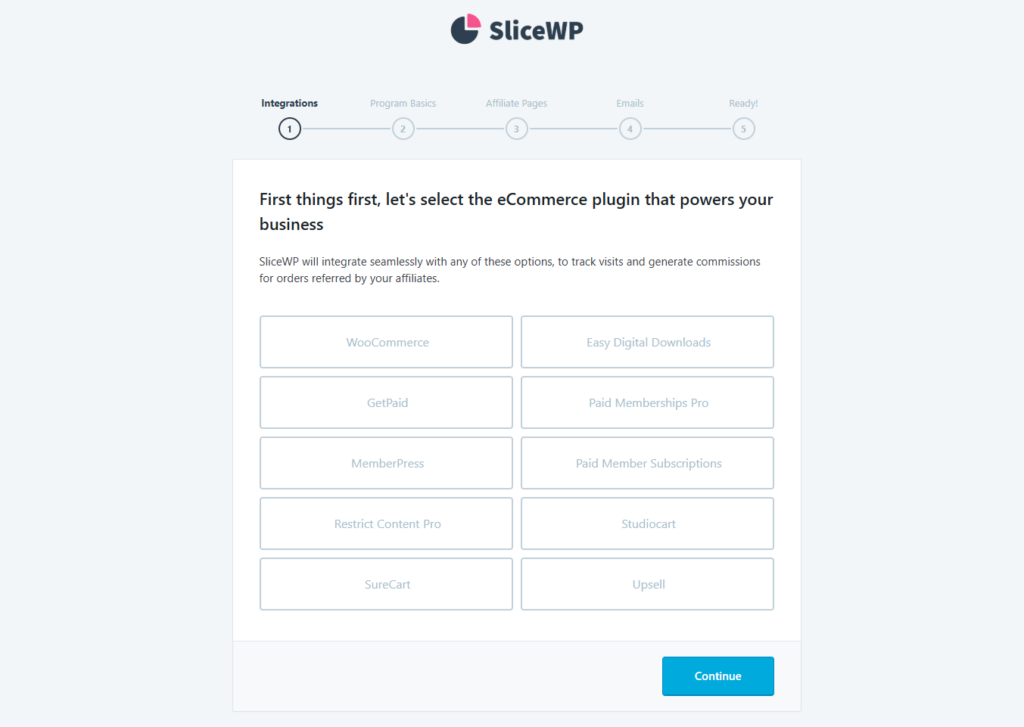
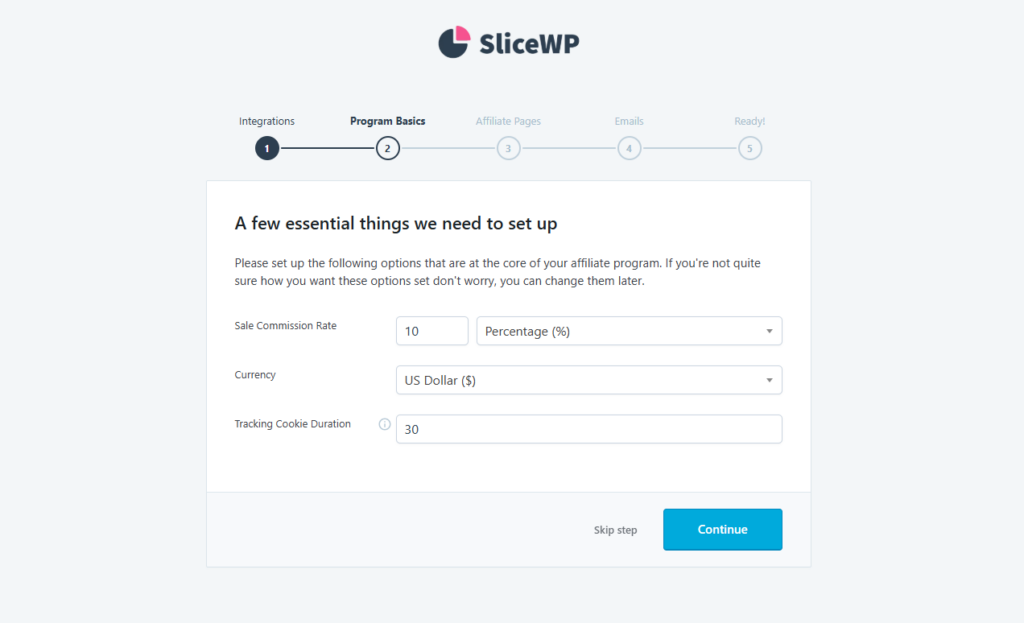
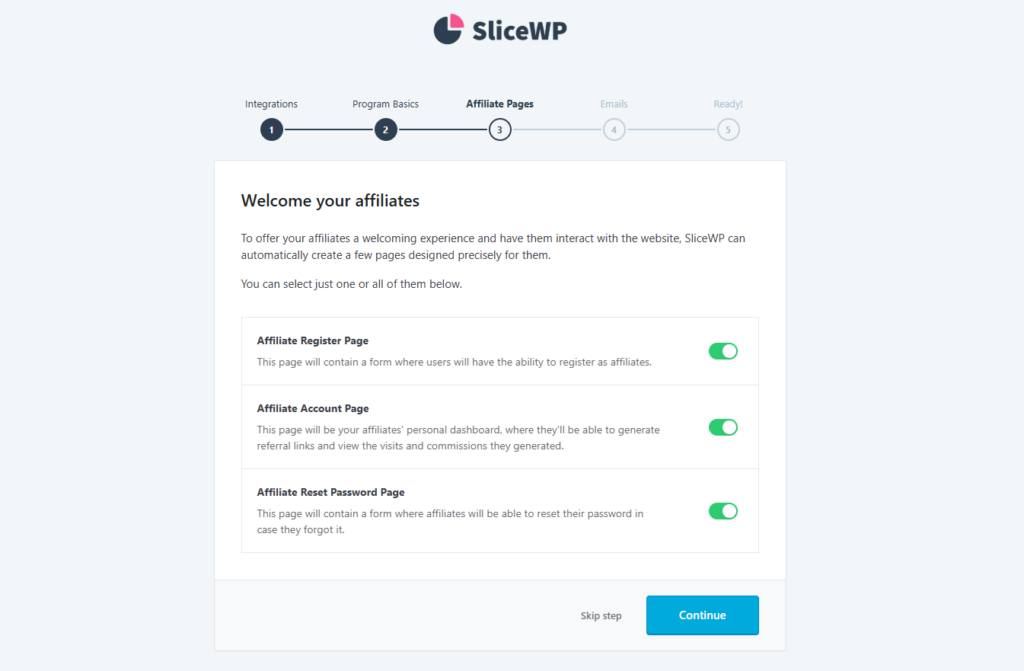

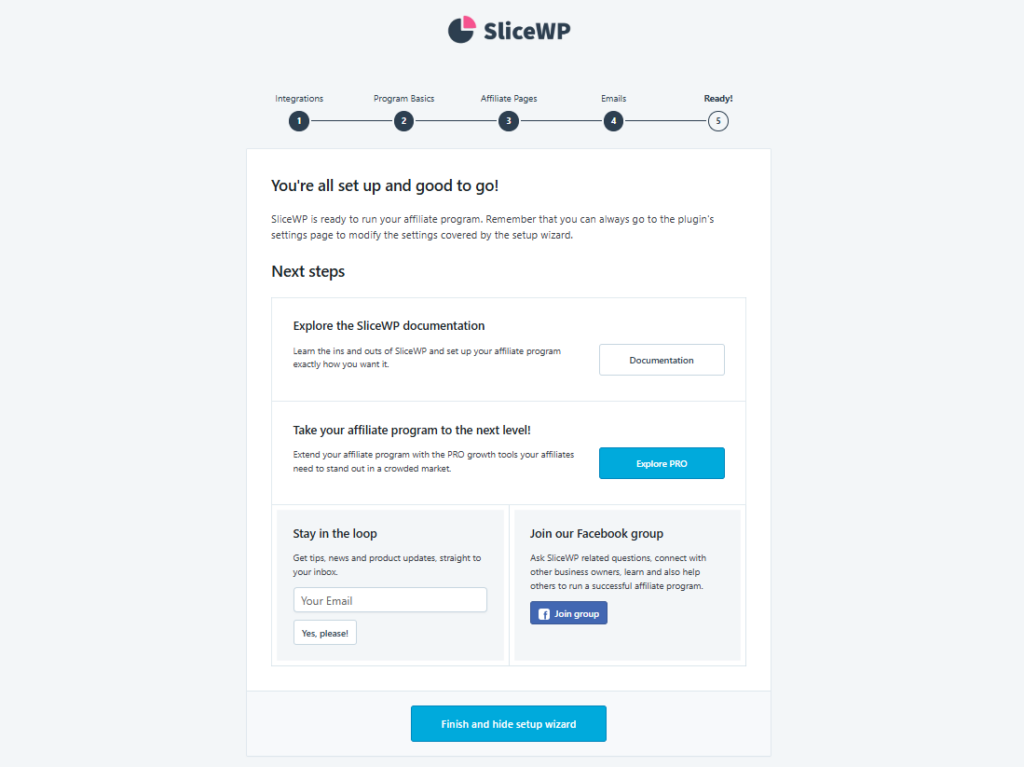
To customize the automated email notification message, navigate to SliceWP → Settings and open the Email Notifications tab. Click Customize on the type of email notifications you want to tweak.
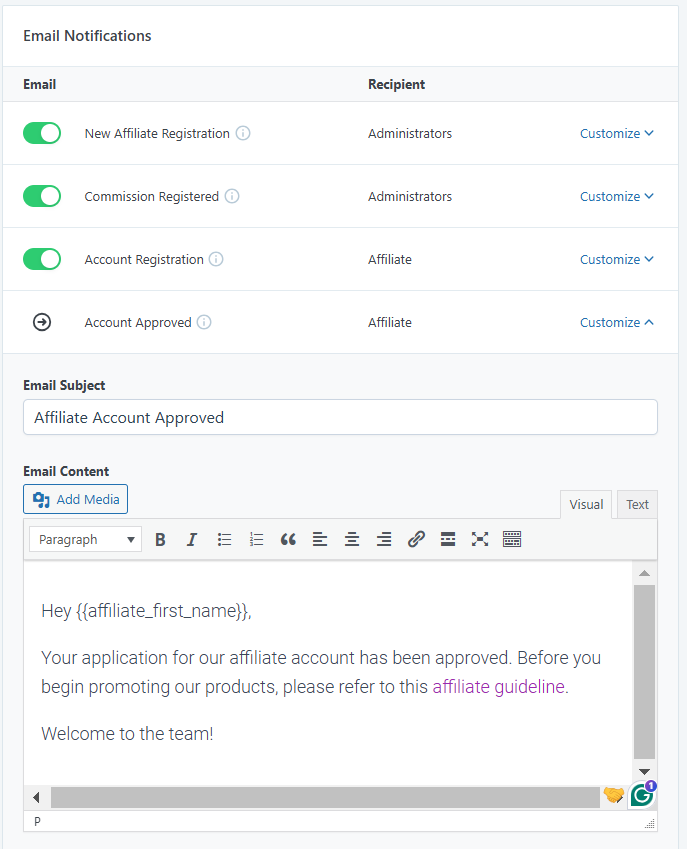
Don’t forget to click Save Settings to apply the changes.
Once your affiliate marketing program is set up, it’s time to invite potential affiliates to join your affiliate marketing program!
Now that you’ve established an affiliate marketing program, this is some information to prepare before inviting new affiliates:
You can include all this information in a single affiliate guideline document. Then, put it where it’s easily accessible for new affiliates or send it via the initial email notification.
Check out our picks of the best affiliate marketing programs to inspire you.
After the affiliate terms and conditions are set, start adding new affiliates by accepting their requests or manually adding them to your site:
Reviewing users’ affiliate applications
Users can submit their affiliate applications through the Affiliate Register page, which is accessible from your site’s navigation menu. There, they will find a registration form to complete.
To check the received applications, go to SliceWP → Affiliates. Click the Review button to see their full application.
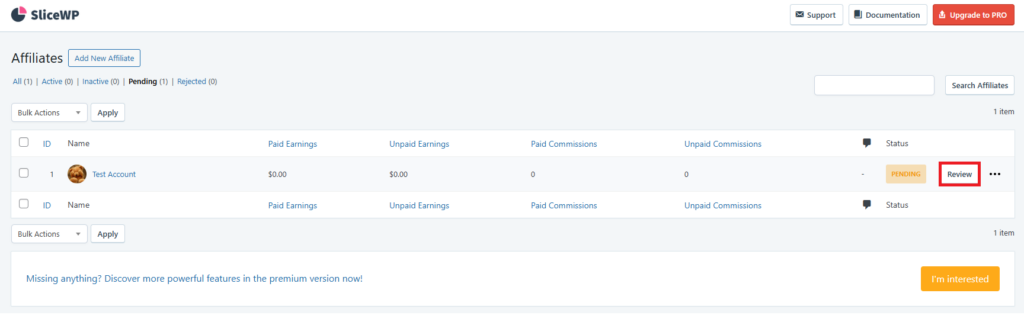
Pick an option from the Application Status drop-down menu, and hit the Approve or Reject button.

Make sure to accept candidates who align with your brand values. Carefully review their website and social media platforms to assess their content, audience engagement, and overall compatibility with your business.
Add the affiliates on your own
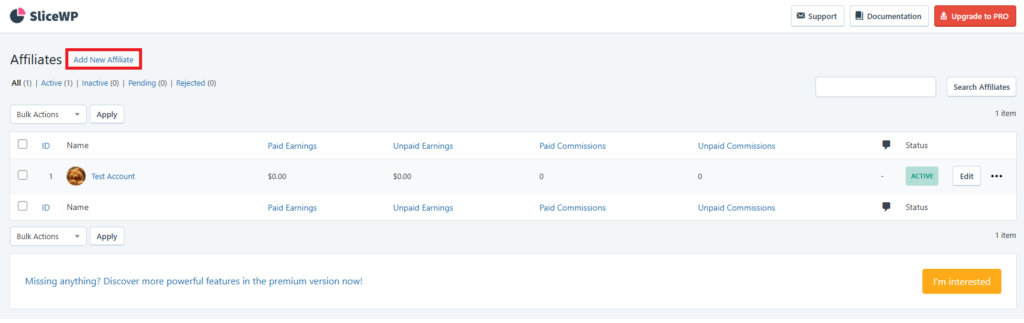
Alternatively, you can add affiliates by accessing the same Affiliate dashboard and clicking the Add New Affiliate button.
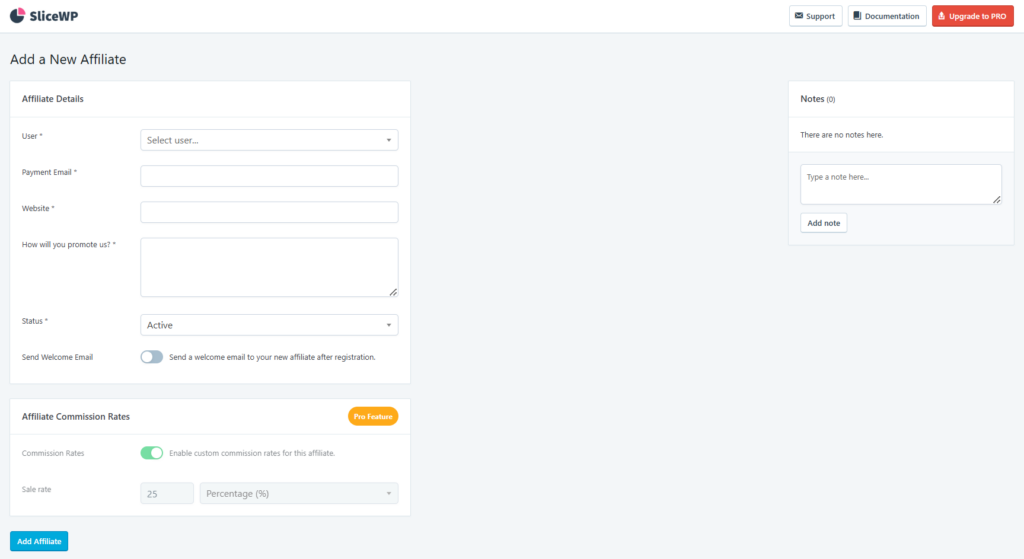
Then, fill in the affiliate details. Make sure you’ve added and customized the WordPress user roles for the affiliate, as this is required for the User field. Hit Add Affiliate to finish.
Once the affiliate’s status becomes active, they can access the Affiliate Account page on your website.
Under the Affiliate Links tab, users can find their affiliate links and generate new ones using specific product page URLs.

As you can’t access the affiliate dashboard as an administrator, we recommend creating an affiliate test account to make sure everything works as configured.
SliceWP automatically generates an affiliate link when you add an affiliate, which they can use right away to promote products.
By default, SliceWP’s affiliate URL structure will include an aff identifier and an affiliate ID. The link will look like https://example.com/?aff=1. You can customize it if you prefer a cleaner URL or have specific preferences.
With the free version, you can customize the aff part. To do so, go to SliceWP → Settings and change the default Affiliate Keyword in the Affiliate URL Settings section.
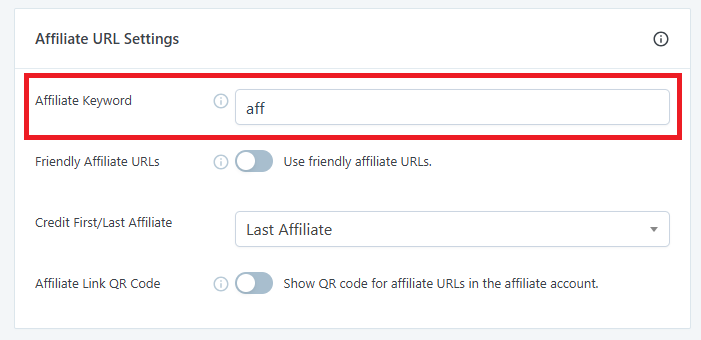
If you activate the Friendly Affiliate URLs option, the URL type will change to https://example.com/?aff/1, which makes it a little neater.
Alternatively, SliceWP’s Pro version lets you use custom strings instead of the affiliate ID. For instance, you can include the affiliate’s name in the URL so the link looks like https://www.example.com/?aff=JaneDoe.
Once the affiliates get their links, they can begin promoting your products on various platforms. Go to SliceWP → Dashboard to monitor the total revenue coming from the affiliate sales.
To track how many sales are made from each affiliate, access SliceWP’s Affiliate menu from your WordPress dashboard. You’ll see the list of affiliates and the commission you should pay.
Note that you need to manage commission payouts manually with SliceWP. So, remember to schedule the time to organize and distribute payments for your affiliates. You can do this by going to the Payouts and Commissions menus on your WordPress dashboard.
To ensure a smooth affiliate program management, here are some best practices to follow:
Recruit quality affiliates
Choose your affiliate partners carefully to maximize the program’s benefits for your business.
Partner with affiliates whose audience aligns with your target customers and brand values. To ensure the right fit, review their websites, social media platforms, and the way they engage with their audience.
Also, consider displaying affiliate requirements on your website to increase the chances of qualified candidates applying.
Offer competitive commission rates
One way to attract affiliates is to offer them competitive commission rates. This can encourage them to choose your affiliate marketing program over your competitors.
Research industry standards to offer a compelling commission structure. You can also consider tiered commissions to reward high-performing affiliates.
Share your marketing creative assets
Share resources such as banners, product images, and pre-written content to make it easier for affiliates to promote your products. Additionally, offer training sessions to help them better understand your products and services.
Maintain close communications with your affiliates
Build strong relationships by keeping affiliates engaged with regular updates, newsletters, or calls. To further show your support, quickly address their questions or concerns.
Monitor affiliates’ performance and provide feedback
Monitor your affiliates’ performance regularly to identify areas for improvement, ensure alignment with your brand values, and prevent unethical practices.
If you see any room for improvement for the affiliates, offer constructive feedback. Meanwhile, if they’re performing really well, consider giving bonuses to recognize their efforts.
Ensure timely payments
Paying affiliates on time builds trust and strengthens your relationships with them. It shows professionalism, encourages loyalty, and motivates affiliates to promote your brand. It also enhances your program’s reputation, making it easier to attract and retain top-performing affiliates.
It’s important to offer multiple payment methods to accommodate affiliates from different regions.
Stay compliant with the applicable regulations
Make sure your affiliate program complies with local regulations. For example, if you live in the United States, the Federal Trade Commission launched a disclosure guideline for affiliates.
Encouraging affiliates to disclose their partnership with your business is a good rule of thumb.
Continuously improve your affiliate program
Regularly collecting feedback from affiliates helps identify areas where they might need more support, resources, or incentives. Make the necessary improvements to nurture a better relationship with your affiliates so that you can retain them for the long term.
In addition, stay up-to-date on affiliate marketing trends and industry best practices to ensure your program remains competitive.

Affiliate marketing strategy is one of the most effective digital marketing efforts to boost sales. With affiliate links, you can track each affiliate partner’s performance and calculate the commissions.
Luckily, creating affiliate links with a tracking tool is easy. With the SliceWP WordPress plugin, it only takes four simple steps:
We hope this guide helps you take the first steps to building a successful affiliate marketing program. Good luck!
Affiliate links track actions completed through them, such as purchases. Affiliates can make money from these links when users take qualifying actions after clicking them.
First, create a clear guideline for how the affiliate program works and choose a tracking tool to monitor affiliates’ performance. Once you’ve set those up, invite potential affiliates to join your program and maintain strong partnerships with them.
If you’re building an affiliate marketing program, the cost will depend on the affiliate software you choose.
All of the tutorial content on this website is subject to Hostinger's rigorous editorial standards and values.

Larassatti Dharma is a content writer with 4+ years of experience in the web hosting industry. Laras has populated the internet with over 100 YouTube scripts and articles around web hosting, digital marketing, and email marketing. When she's not writing, Laras enjoys solo traveling around the globe or trying new recipes in her kitchen. Follow her on LinkedIn

Hytale server requirements are relatively modest for small player counts, but scale quickly as more players join and worlds grow. CPU performance and...
Hytale is a sandbox role-playing game (RPG) that combines the creative freedom of world-building with the deep immersion of an adventure game. While...
The best Hytale server hosting providers deliver low latency and high-performance hardware to handle the game’s procedurally generated worlds....