What is HTML? HyperText Markup Language explained
Jun 11, 2026
/
Astari S. & Larassatti D.
/
8 min Read
HTML stands for HyperText Markup Language. It’s a standard markup language for web pages, allowing the creation and structure of sections, paragraphs, and links using HTML elements (the building blocks of a web page) such as tags and attributes.
HTML works by using a series of tags enclosed in angle brackets to define different parts of content. Web browsers read HTML documents and render them into visible web pages by interpreting these tags. When you create an HTML file, you’re giving instructions to the browser on how to display text, images, links, and other elements on a screen.
HTML has several use cases. Developers use HTML code to design how a browser displays web page elements, such as text, hyperlinks, and media files. HTML is also heavily used for internet navigation, making it easy to insert links between related pages and websites. Additionally, HTML enables the organization and formatting of web documents.
It’s worth noting that HTML is not considered a programming language as it can’t create dynamic functionality, although it’s now considered an official web standard. The World Wide Web Consortium (W3C) maintains and develops HTML specifications, along with providing regular updates.
Download complete HTML cheat sheet
How does HTML work?
HTML works by using tags and attributes to structure content, which web browsers then read and render into visible web pages. HTML documents are files that end with a .html or .htm extension. A web browser reads the HTML file and renders its content so that internet users can view it.
The average website includes several different HTML pages. For instance, a home page, an About page, and a Contact page would all have separate HTML files.
All HTML pages have a series of HTML elements, consisting of a set of tags and attributes.
HTML elements are the building blocks of a web page. A tag tells the web browser where an element begins and ends, whereas an attribute describes the characteristics of an element.
HTML element structure
The three main parts of an HTML element are:
- Opening tag – used to state where an element starts to take effect. The tag is wrapped with opening and closing angle brackets. For example, use the start tag <p> to create a paragraph.
- Content – this is the output that other users see.
- Closing tag – the same as the opening tag, but with a forward slash before the element name. For example, </p> to end a paragraph.
The combination of these three parts creates an HTML element:
<p>This is how you add a paragraph in HTML.</p>
HTML attributes
Another part of an HTML element is its attribute, which has two sections: a name and an attribute value. The name identifies the additional information a user wants to add, while the attribute value provides further specifications.
For example, a style element adding the color purple and the font Verdana will look like this:
<p style="color:purple;font-family:verdana">This is how you add a paragraph in HTML.</p>
HTML classes
The class attribute is particularly important for development and programming. It adds style information that can work on different elements with the same class value.
For example, you can use the same style for a heading <h1> and a paragraph <p>. The style includes background color, text color, border, margin, and padding under the class important. To achieve the same style between <h1> and <p>, add class=”important” after each start tag:
<html>
<head>
<style>
.important {
   background-color: blue;
   color: white;
   border: 2px solid black;
   margin: 2px;
   padding: 2px;
}
</style>
</head>
<body>

<h1 class="important">This is a heading</h1>
<p class="important">This is a paragraph.</p>

</body>
</html>
Empty elements
Most elements have an opening and closing tag, but some elements don’t need closing tags to work. These empty elements don’t use an end tag because they have no content:
<img src="/" alt="Image">
This image tag has two attributes: an src attribute (the image path) and an alt attribute (descriptive text). However, it has no content or end tag.
DOCTYPE declaration
Every HTML document must start with a <!DOCTYPE> declaration to inform the web browser about the document type. With HTML5, the DOCTYPE declaration is:
<!DOCTYPE html>
What is HTML used for?
Here are the main HTML use cases:
- Web development – Developers use HTML code to design how a browser displays web page elements, such as text, headings, images, videos, and interactive forms.
- Internet navigation – Users can easily navigate and insert links between related pages and websites, as HTML is heavily used to embed hyperlinks.
- Web documentation – HTML makes it possible to organize and format documents with headings, lists, tables, and semantic structure.
- Email marketing – HTML lets you create styled email templates with custom layouts, images, and buttons.
- Web accessibility – HTML provides semantic elements that help screen readers and assistive technologies deliver content to users with disabilities.
Most used HTML tags and HTML elements
The most commonly used tags fall into two categories: block-level elements, which create the page layout, and inline elements, which format text and content. Currently, there are 142 HTML tags available for creating various elements that define the structure and content of web pages.
Block-level elements
A block-level element takes up the entire width of a page and always starts a new line in the document. For example, a heading element will be in a separate line from a paragraph element.
Every HTML page uses these three tags:
- <html> tag – the root element that defines the whole HTML document.
- <head> tag – holds meta information such as the page’s title and character set.
- <body> tag – encloses all the content that appears on the page.
Other popular block-level tags include:
- Heading tags – range from <h1> to <h6>, where <h1> is the largest, getting smaller as they move up to <h6>.
- Paragraph tags – the <p> tag encloses a paragraph.
- List tags – have different variations. Use the <ol> tag for an ordered list and <ul> for an unordered list. Then, enclose individual list items using the <li> tag.
Inline elements
An inline element formats the inner content of block-level elements, such as adding links and emphasized strings. Inline elements are most commonly used to format text without breaking the flow of the content.
For example, a <strong> tag renders an element in bold, whereas the <em> tag shows it in italics. Hyperlinks are also inline elements that use an <a> tag and an <href> attribute to indicate the link’s destination:
<a href="https://example.com/">Click me!</a>
What are the advantages and disadvantages of HTML?
HTML’s main advantages are its simple learning curve, free availability, and universal browser compatibility. Its primary disadvantages are the lack of dynamic functionality and the need for separate technologies to handle styling and interactivity.
Advantages of HTML
- Easy to learn – HTML has a simple syntax with straightforward tags and attributes, making it accessible for beginners. You can start building basic web pages after learning just a handful of tags.
- Free and accessible – HTML is an open standard that doesn’t require any licenses or paid software. You can write HTML using any text editor and view it in any web browser.
- Universal browser support – All modern web browsers support HTML, ensuring your content displays correctly across different platforms and devices.
- Lightweight and fast – HTML files are small in size, which means quick loading times and better performance for websites.
- SEO-friendly – Search engines can easily crawl and index HTML content, especially when you use semantic HTML tags that clearly define content structure.
- Integration with other technologies – HTML works seamlessly with Cascading Style Sheets (CSS) for styling and JavaScript for interactivity, creating a complete web development ecosystem.
Disadvantages of HTML
- Static content only – HTML cannot create dynamic functionality or process user input without JavaScript or server-side languages.
- Limited styling capabilities – HTML provides basic formatting, but creating visually appealing designs requires CSS.
- Repetitive code – Building large websites with HTML alone involves writing repetitive code for elements that appear on multiple pages, such as headers and footers.
- Browser inconsistencies – While major browsers support HTML standards, older browsers may render certain elements differently, requiring additional testing and fixes.
- Security vulnerabilities – HTML alone doesn’t provide security features, making websites vulnerable to attacks without proper implementation of security measures.
- No logic or calculations – HTML can’t perform calculations, make decisions, or handle complex user interactions without additional programming languages.
What are the differences between HTML and HTML5?
HTML5 is the latest version of the HTML standard, designed to support modern web applications and multimedia content. The main differences between HTML and HTML5 include native support for audio and video, new semantic elements for better document structure, enhanced offline storage capabilities, and improved graphics and interactivity features.
Take a look at the table below to see the improvements of HTML5 over previous HTML:
| Feature | HTML | HTML5 |
| Multimedia support | Requires third-party plugins like Adobe Flash for audio and video playback | Natively supports multimedia through <audio> and <video> tags, eliminating plugin dependencies |
| Semantic elements | Relies on non-semantic <div> tags with IDs and classes for page structure | Uses semantic tags like <header>, <footer>, <nav>, <article>, <section>, and <aside> for clearer document structure and improved SEO |
| Graphics | Requires plugins such as Flash or Silverlight for animations and vector graphics | Natively supports graphics through <canvas> for dynamic drawing and <svg> for scalable vector graphics |
| Storage | Uses cookies for data storage, limited to approximately 4KB of data | Offers localStorage and sessionStorage with up to 5-10MB storage capacity, plus Application Cache for offline functionality |
| APIs and interactivity | Provides limited APIs for web application development | Uses numerous new APIs, including Geolocation API, Drag-and-Drop API, Web Workers for background processing, and WebSockets for real-time communication |
| DOCTYPE declaration | Uses long, complex SGML-based DOCTYPE declarations | Simplified to <!DOCTYPE html>, making it easier to remember and implement |
| Error handling | Inconsistent error handling across different browsers led to unpredictable rendering | Provides standardized parsing rules for handling incorrect syntax, resulting in more consistent rendering across browsers |
| Mobile compatibility | Not designed with mobile devices in mind, requiring workarounds for mobile optimization | Built with mobile-first principles, supporting responsive design and touch-based interactions natively |
| Form elements | Limited form input types and validation options | Includes new input types like email, date, range, and color, plus built-in form validation attributes |
| Accessibility | Basic accessibility features with limited semantic meaning | Enhanced accessibility through semantic elements and Accessible Rich Internet Applications (ARIA) support |
These improvements have made HTML5 the standard for modern web development, offering better performance, enhanced user experiences, and improved compatibility across devices and browsers.
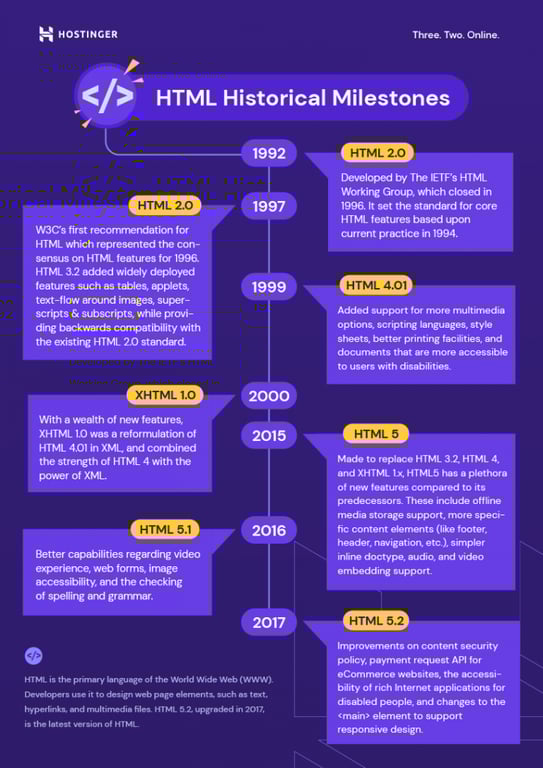
How are HTML, CSS, and JavaScript related?
HTML provides the structure and content, CSS handles the visual presentation, and JavaScript adds interactivity and dynamic behavior. Here’s how each contributes to creating a web page:
- HTML – Provides the structure and content of a web page. It defines all the elements you see, such as headings, paragraphs, images, links, forms, and tables using a system of tags. Think of HTML as the skeleton or blueprint of a web page that establishes what content exists and how it’s organized.
- CSS – Controls the visual presentation and styling of HTML elements. It defines colors, fonts, spacing, layouts, backgrounds, animations, and responsive design behavior. CSS determines how content appears to users across different devices and screen sizes. Without CSS, web pages would display as plain, unstyled text with default browser formatting.
- JavaScript – Adds interactivity and dynamic functionality to web pages. It enables user interactions like form validation, interactive menus, sliders, pop-ups, animations, and real-time content updates without requiring page reloads. JavaScript can manipulate HTML elements and CSS styles based on user actions, making web pages responsive and engaging.
All three are essential for front-end web development and are typically used together to create engaging user experiences. Modern websites rely on this trio to deliver the rich, interactive experiences users expect today.
How can I learn to code HTML?
Learning HTML opens doors to opportunities in web development and digital careers. HTML forms the foundation of all websites, so mastering it is essential whether you’re building personal projects, becoming a web developer, or simply looking to understand how the web works.
HTML skills are also highly transferable. Once you understand HTML, learning CSS and JavaScript becomes easier, putting you on the path to becoming a full-stack developer.
Additionally, HTML knowledge is valuable across many professions beyond traditional web development. Content creators, digital marketers, bloggers, and entrepreneurs all benefit from understanding HTML to customize websites, troubleshoot issues, and communicate effectively with developers.
While there are plenty of courses available online if you want to learn to code, these are the three best resources for learning HTML:
- freeCodeCamp – Provides a free, interactive curriculum covering HTML, CSS, and JavaScript with hands-on coding challenges and projects.
- Codecademy – Features interactive HTML courses with a hands-on coding environment where you can practice as you learn.
- W3Schools – Provides straightforward tutorials, examples, and exercises covering all HTML tags and attributes with an interactive “Try it Yourself” editor.
Start by learning basic HTML structure and common tags, then practice by building simple web pages. Create small projects like a personal portfolio, a blog layout, or a landing page to apply what you’ve learned.
As you become comfortable with HTML, expand your skills by learning CSS for styling and JavaScript for interactivity. This progression naturally leads you toward becoming a web developer capable of building complete, professional websites.
➡️ Check out how to link CSS and HTML in our guide.
Most importantly, practice your HTML skills consistently. Set aside regular time to code and experiment with different tags and structures. And don’t be afraid to make mistakes – they’re part of the learning process.

All of the tutorial content on this website is subject to Hostinger's rigorous editorial standards and values.


Astari is a digital marketing expert, with a focus on SEO and WordPress. She loves to share her wealth of knowledge through her writing, and enjoys surfing the internet for new information when she's not out in the waves or hiking a mountain. Her mission is to learn something new every day, and she firmly believes that there is no such thing as too much knowledge.

Larassatti Dharma is a content writer with 4+ years of experience in the web hosting industry. She has populated the internet with over 100 YouTube scripts and articles around web hosting, digital marketing, and email marketing. When she's not writing, Laras enjoys solo traveling around the globe or trying new recipes in her kitchen. Follow her on LinkedIn