What Is a URL: Examples, Structure, and More
Jul 31, 2024
/
Linda D.
/
8min read
A URL (uniform resource locator) it’s a type of uniform resource identifier (URI) that provides a way to access information from remote computers, like a web server and cloud storage.
URLs play a vital role in web navigation and online communication by providing a structured way to locate and access various web resources and hyperlinks.
It contains various elements, including the network communication protocol, a subdomain, a domain name, and its extension.
Luckily, site owners can modify their URLs. A well-crafted URL can be a powerful tool to improve user experience, resulting in better search engine optimization (SEO) performance. Therefore, optimizing URLs can be a great way to boost your website’s rankings on search engine result pages (SERPs).
This article covers everything you need to know about what is a URL, from the definition to examples, its general structure, and how to custom-create URLs.
Download glossary for web beginners
What Is a URL?
A URL, short for a uniform resource locator serves as a web address that guides users to specific resources on the internet, including domain names, paths, and protocol identifiers.
What Is an Example of a URL Address
Hostinger’s complete URL is https://www.hostinger.com/ and entering it in a browser’s address bar directs users to our website. The same rule applies to https://www.microsoft.com/ and https://www.linux.org/.
That said, URLs can get more specific.
For example, the /tutorials/ URL leads users to our Tutorials page, and /tutorials/how-to-make-a-website is a full URL for our How to Make a Website article on Hostinger Tutorials.
URLs can also send users to a particular section on a web page.
/tutorials/how-to-make-a-website#6_Optimize_Your_Website_for_SEO_and_Conversions
The above URL, for example, sends users to the tip number 6 in the How to Make a Website article.
Lastly, every uploaded image has its own URL, enabling users to access it directly. The following URL leads to the featured image of our How to Make a Website article
/tutorials/wp-content/uploads/sites/2/2021/08/how-to-make-a-website-1.png.
What Is the Structure of a URL
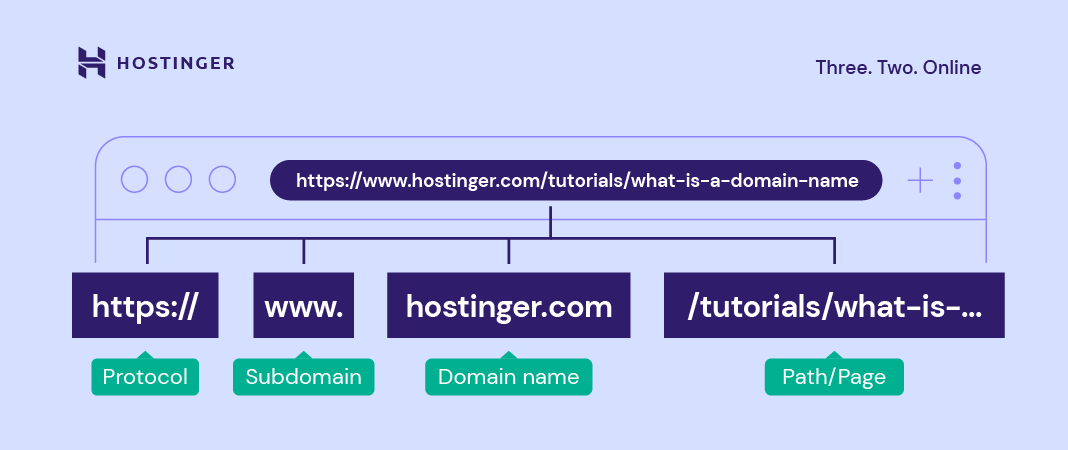
As you can see from the image, uniform resource locator (URL) contains multiple parts. To help you better understand, let’s dive deeper into the structure of a URL.
HTTP or HTTPS

HTTP (Hypertext Transfer Protocol) and HTTPS (Hypertext Transfer Protocol Secure) are protocols for network communication between web servers and browsers. They transmit messages, retrieve information through the domain name system (DNS), and return it to the browser.
The difference between HTTP and HTTPS is that the latter encrypts the data transmission process. This security protocol protects a website better and is an essential factor in improving ranking on search results.
Another difference is that HTTPS uses the Transmission Control Protocol/Internet Protocol (TCP/IP) port number 443 encrypted by Transport Layer Security (TLS). Meanwhile, an HTTP URL uses TCP/IP port number 80.
Important! Web browsers can also process other protocols, including FTP and mailto. The former allows file sharing between different web hosts, either local or remote. The latter directs users to a specific email address.
www (Subdomain)

A subdomain consists of any words or phrases that come before a URL’s first dot. Referring to the world wide web, www is the most common type. It indicates that a website is accessible through the internet and uses HTTP to communicate.
Furthermore, site owners can use any word as a subdomain for website organization purposes as it points to a specific directory from the primary domain. Some of the most popular options are “blog” and “news.”

For example, while hostinger.com uses www, the subdomain for our Knowledge Base page is “support.” Hence, the support.hostinger.com URL.
Domain Name

A domain name is what users type into their browser’s address bar to reach a website. It consists of a site name and an extension, for example, hostinger.com.
Every name is unique, and they represent their corresponding IP addresses. This unique IP address points to the website’s server. In other words, it helps users access websites easily.
Domain Extension

Also called a top-level domain (TLD), is the bit following a website name. Used for around 53% of all websites, .com is the most popular extension.
Here are types of TLD extensions to consider using:
- Generic TLD (gTLD). This category includes most of the popular extensions, including .com, .org, .net.
- Country Code TLD (ccTLD). As the name suggests, this TLD indicates a country, a territory, or a geographical area. ccTLD consists of two letters based on the international country codes, such as .mx, .in, or .at.
- Sponsored TLD (sTLD). This type of extension is sponsored and used for specific organizations. For example, Tralliance Registry Management Company, LLC sponsors .travel, and DotAsia Organization Ltd. sponsors .asia domain extension.
- New gTLD (nTLD). It’s a new generation of domain extensions. Basically, any TLD launched after 12 January 2012 are new gTLD, including .online, .store, and .tech.
Path to the Resource

A path to the resource is the part to the right of the TLD. It’s often referred to as the folder structure of the website.
A path to the resource gives extra information to a web server, enabling it to lead users to a specific location. A series of paths to resources may point to a specific page, post, or file.
A URL can have more than one path to resources. When that happens, the forward-slash sign (/) will separate each of them. The more paths to resources a URL contains, the more specific the location is.
Parameters

Parameters are query strings or URL variables. They’re the portion of a URL following a question mark.
Parameters contain keys and values separated by the equal sign (=). Furthermore, a URL can have multiple variables. In that case, the ampersand symbol (&) will separate each.
In terms of parameter use cases, here are some of the most common ones:
- Translating. Having a country code in the query string translates a web page to the associated country’s language.
- Searching. The searching parameter provides search results from a website’s internal search engine.
- Filtering. To separate distinct fields, such as topic, color, price range, and region, site owners can use the filtering parameter.
- Paginating. This parameter is especially useful for eCommerce websites, enabling site owners to sort content.
- Tracking. Usually contains the Urchin Tracking Module codes to track traffic from ads and marketing campaigns.
Suggested Reading
To better understand the web structure, check out our guide on what a website is.
What Is a URL Syntax
Syntax refers to a set of rules. In the case of a URL syntax, it sets which component and symbol are allowed in a URL. Here’s what a URL’s general syntax looks like:
http://subdomain.domain-name.domain-extension/path-to-resource?parameters
Furthermore, uniform resource locators can only contain numbers, letters, and the following characters ()!$-‘_*+.
To use other characters, site owners should translate them into programming code. For example, as URLs can’t contain spaces, site owners often utilize the plus sign, hyphens, or %20 to replace them.
URLs can contain an anchor link, also called page jump or fragment identifier. The element is represented with the number sign (#), which bookmarks a specific part inside a resource.

With an HTML file containing a page jump, a web browser will go directly to the selected section. For a video or audio document, a modern web browser will find the timestamp on which the anchor represents and play accordingly.
What Are the Different Types of URLs
In general, the most popular types of URLs are absolute and relative.
An absolute URL contains complete information, from the protocol to the path to resources or parameters. In comparison, a relative URL only includes the path to resources.
Based on the function, here are some other types of uniform resource locators:
- Canonical URLs. Site owners can use them in case they have duplicate content. Setting one URL as canonical is a way to let search engines know which internet address to crawl and index.
- Callback URLs. They refer to a home destination when users complete a process on an external system.
- Vanity URLs. Also known as custom short URLs, they are easy-to-remember web addresses. Typically, a vanity URL is a redirect of a longer URL. Site owners can use a website URL shortener tool, like Bitly, Short.io, and TinyURL, to create a vanity URL.
Where Is a URL Located
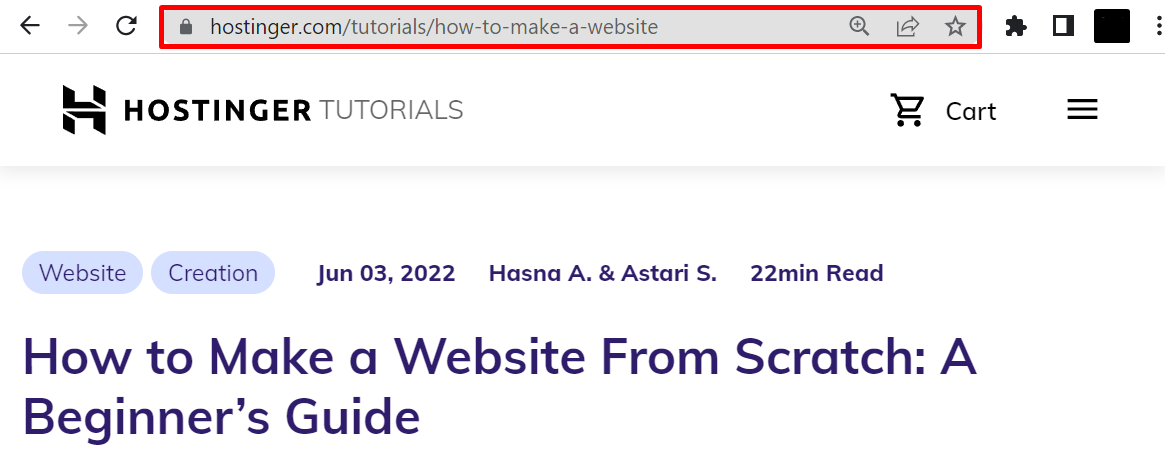
A URL can usually be found in the address bar at the top of the web browser’s window. On laptops and desktop computers, a website URL will always be visible in the address bar as users scroll through the web page.
In the case of mobile devices, the default browser behavior causes a URL to disappear as soon as users start scrolling down. However, it will reappear when users scroll up.
How to Open a URL
If you know the complete website URL, typing it on the address bar is one of the easiest ways to open a URL. If not, here are several other ways to do it:
- Clicking a hyperlink. It can be a text, an icon, or an image that links to another HTML file on the internet. Users can identify a hyperlink by hovering their mouse over the linked text or graphic. Then, a URL link will appear at the bottom of the window, telling users where the link will take them.
- Scanning a QR code. Short for quick response code, it’s a black and white barcode readable for digital devices. It stores numerous data types, including web links, account information, and encryption details.
- Copying and pasting. If you come across a website URL with no links or QR code, copying and pasting it to the address bar will open it.
How to Create a URL
To create a unique URL, like hostinger.com, microsoft.com, or linux.org, find a credible registrar to register a domain name on your behalf.
A registrar is an ICANN-accredited company for managing domain reservations and renewals. Google Domains, CloudFlare, and Domain.com are some of the most popular registrars. People can also obtain a custom name from a hosting company offering registration services.
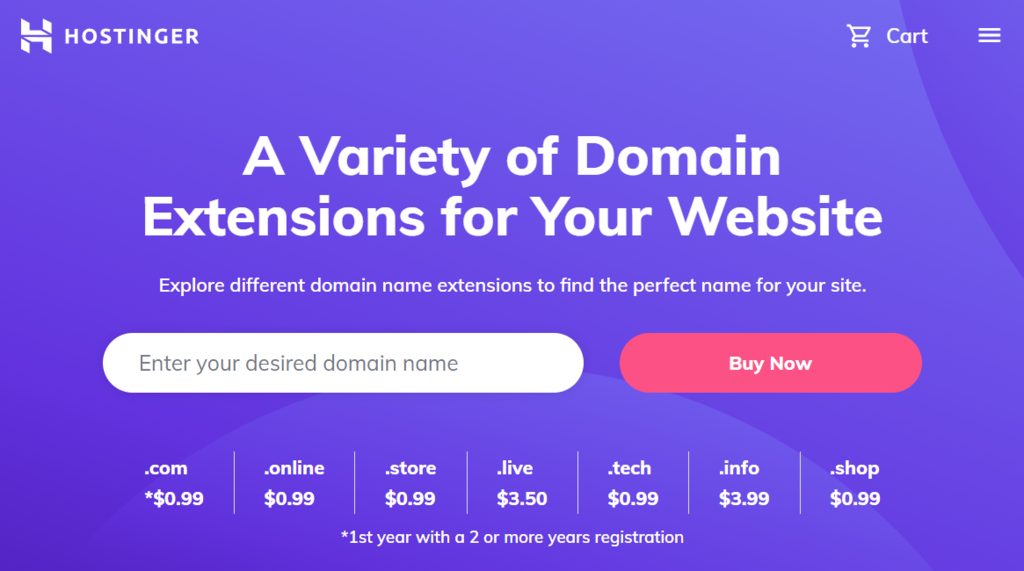
Here is a general step-by-step guide on how to buy a domain:
- Ensure the name’s availability. For this, you can run a search using a checker. Type in your desired name and extension -> click Search. It will then provide you with a list of available names.
- Proceed to check out. In this step, you will choose the registration period. Typically, a registrar requires a minimum period of one year. That said, some registrars offer up to a ten-year registration period.
- Complete the registration process. Once the payment is authorized, the registrar will need you to fill out a setup form, which may include your name, email, address, and contact information. Be sure to input all the details correctly.
- Verify name ownership. A verification link should appear on the email you use for registration a few minutes after completing the registration process. If it doesn’t arrive, you can send a request from the control panel.
As the registration isn’t a one-time purchase, every owner should keep track of their domain expiry dates.

Conclusion
A uniform resource locator (URL) is a complete web address pointing to a specific file on the internet. For example, a URL can lead users to a website, a web page, or an image.
Structure-wise, a URL consists of several elements:
- HTTP or HTTPS. It’s a network communication protocol connecting web servers and web browsers. The latter is more secure than the former.
- www. Also called a subdomain, it’s the part before a URL’s first dot. Site owners can also use any words or phrases for their website organization purposes.
- Domain name. Also known as a site address, it is what users type on their browsers to reach a website.
- Domain extension. It’s the part following a domain name, for example, .com and .org.
- Path to the resource. Separated by the forward-slash sign (/), this element gives extra information to a website address.
- Parameters. They’re often called query strings or URL variables. A question mark (?) indicates a parameter.
To create and modify a site’s URL, users will need to register a domain through a credible registrar. Alternatively, you can go with a reliable hosting provider offering this registration services.
Learn more about URLs
What Is a URL FAQ
This section will answer some of the most common questions about a uniform resource locator (URL).
How Do I Find My URL?
You can obtain a custom domain name from a registrar or a hosting provider offering this registration services. Generally, the process includes:
1. Creating a unique name.
2. Running a name search.
3. Registering the chosen name.
How to Block a URL?
Here are four ways to block a URL:
Edit the hosts file. Redirect a domain name to your localhost IP address to block a website.
Use a Google Chrome extension. Windows and Mac users can install a site blocker extension, like BlockSite.
Install a site blocker on iOS and Android. After the installation, users can add websites and apps to their block list by tapping the green plus icon.
Utilize built-in parental controls. On Windows 10, parents can create a child account to add a block list.
Is a URL the Same as an IP Address or a Web Address?
In short, no. An IP address refers to a string of numbers pointing to a computer or web server on a network. Meanwhile, a website address is a user-friendly substitute for an IP address. It’s what users type on their browser to reach a website. For example, hostinger.com is a domain name and a full URL to access our website. On the other hand, hostinger.com/tutorials/how-to-make-a-website is not a website address. It’s a complete URL to access our How to Make a Website article.
All of the tutorial content on this website is subject to Hostinger's rigorous editorial standards and values.

Linda is a seasoned Content Writer specialized in website creation. With her passion for the written world and obsession with helping others, her goal is to deliver resourceful content pieces for all skill levels. When she’s not writing, Linda likes to cross stitch and watch films. Follow her on LinkedIn.

Comments
August 20 2024
What is url,I think I dont have it
August 21 2024
Hello! A URL (Uniform Resource Locator) is basically the web address you use to visit a website or a specific page on the internet. For example, www.example.com is a URL. It’s the text you type into the address bar at the top of your browser to go to a website. If you have a website, your URL is the address that people use to find it online ;)
November 25 2024
How do i create an URL as an individual?
November 29 2024
Hello! First, you'll need to register a domain name. Once you’ve chosen and purchased your domain, you can link it to a website by setting up hosting or using a website builder. If you just want the URL to redirect to another site (like a social media profile), you can set up URL forwarding in your domain settings ;)