What is website optimization and how to do it?
Mar 10, 2026
/
Ariffud M.
/
16 min Read

Website optimization improves your site’s performance, usability, and visibility, attracting more visitors and increasing conversions. It covers several areas, including page speed, accessibility, user experience, and search engine rankings.
Website optimization is important because it shapes how people interact with your content, how search engines rank your pages, and how well your site supports your business goals.
When you optimize your site, you can increase conversions, grow organic traffic, build brand authority, and improve long-term customer retention.
To optimize your website, follow these 10 steps:
- Apply UI/UX design best practices. Align your site’s layout, navigation, and visual hierarchy with the customer journey to reduce friction and increase conversions.
- Build a content marketing strategy. Plan, create, and distribute educational content that attracts your target audience through organic search and builds brand awareness.
- Strengthen on-page SEO. Use targeted keywords, structured headings, and optimized meta tags so search engines can understand and rank your content.
- Fix technical SEO issues. Improve site structure, crawlability, and indexing, then add schema markup and an llms.txt file to increase visibility in AI-powered search.
- Improve page load speed. Compress images, minify code, enable caching, and use a CDN to lower load times and reduce bounce rates.
- Make your site mobile responsive. Use responsive design, simple navigation, and properly sized tap targets, since a considerable part of global web traffic comes from smartphones.
- Run A/B tests. Test different layouts, CTAs, headlines, and content formats to see which drive more conversions, based on real data.
- Follow web accessibility standards. Add alt text, maintain proper color contrast, use semantic HTML, and enable keyboard navigation so everyone can use your site.
- Earn high-quality backlinks. Build domain authority by getting relevant links from reputable websites through original content, guest posts, and digital PR.
- Collect customer feedback. Use NPS surveys, on-site polls, reviews, and usability tests to keep improving the experience based on real user needs.
What is website optimization?
Website optimization is a continuous, data-driven process of improving every part of your site, from its code and server configuration to its content and design, to deliver faster load times, smoother navigation, and better search engine rankings.
It’s an ongoing evaluation of how your site performs across different areas, helping you identify changes with the biggest measurable impact on your business.
The process focuses on three core areas: website performance optimization, UX optimization, and search engine optimization (SEO) to improve visibility.
- Performance optimization reduces page load times and improves server response times.
- UX optimization helps visitors navigate your site easily, find what they need, and complete key actions without friction.
- SEO, including both on-page and technical SEO, makes your content discoverable in search engines and increasingly in AI-powered answer engines.
All three areas work toward the same goal: turning visitors into customers and customers into repeat buyers.
How to optimize your website?
To optimize your website, focus on three main areas: technical configuration, design and usability, and content management.
Key steps include applying UI/UX best practices, building a content marketing strategy, improving on-page and technical SEO, speeding up page load times, making your site mobile-friendly, running A/B tests, following accessibility standards, earning high-quality backlinks, and gathering customer feedback.
1. Implement the best UI/UX web design practices
Optimizing your website’s user interface (UI) and user experience (UX) increases conversions by helping visitors find information faster and complete actions more easily.
UX design aligns your site’s layout, navigation, and visual hierarchy with the customer journey. To understand what makes a good website, map the path visitors take.
For example, an ecommerce store should minimize the number of clicks between product discovery and checkout. A SaaS landing page should clearly present the value proposition and CTA, ideally without requiring users to scroll.
Here are practical ways to improve your site’s UX:
- Optimize your menus. Place your most important pages in the header navigation and include a detailed footer menu for secondary pages. Use clear, descriptive labels instead of vague ones. For example, “Pricing,” “Blog,” or “Contact us” set clear expectations, while generic labels like “Resources” or “Solutions” make visitors guess.
- Add clear call-to-action (CTA) buttons. Position CTAs where users naturally look after reading, such as below introductory paragraphs, at the end of feature sections, or in a sticky header. Make them visually distinct from surrounding elements.
- Improve your sales funnel. Map each step visitors take from landing on your site to completing a conversion. Remove unnecessary form fields, reduce checkout steps, and add progress indicators to multi-step processes.
- Use visual hierarchy. Guide users’ attention with font size, spacing, and contrasting colors. Make the most important elements on each page stand out.
Expert tip
When deciding what to improve first in your website’s UX design, focus on these key areas:
Review your website analytics to identify which pages get the most traffic. High-traffic pages have the biggest impact, so even minor UX improvements can drive noticeable results.
Check which pages have the highest bounce rates or unusually long time on page. These signals often point to friction, confusion, or unmet expectations. You can also ask visitors for direct feedback about their experience to uncover usability issues.
Consult a professional UX designer for expert insight. An experienced designer can quickly spot structural or usability issues you might miss.

2. Create a content marketing strategy
A content marketing strategy supports website optimization by driving organic traffic. You do this by planning, creating, and distributing content that educates your audience about your products, services, and industry.
According to the Content Marketing Institute’s 2026 B2B report, 61% of B2B marketers said their content strategy became more effective over the past year. Among the most successful teams, 65% credit content relevance and quality as the top factors behind their results.
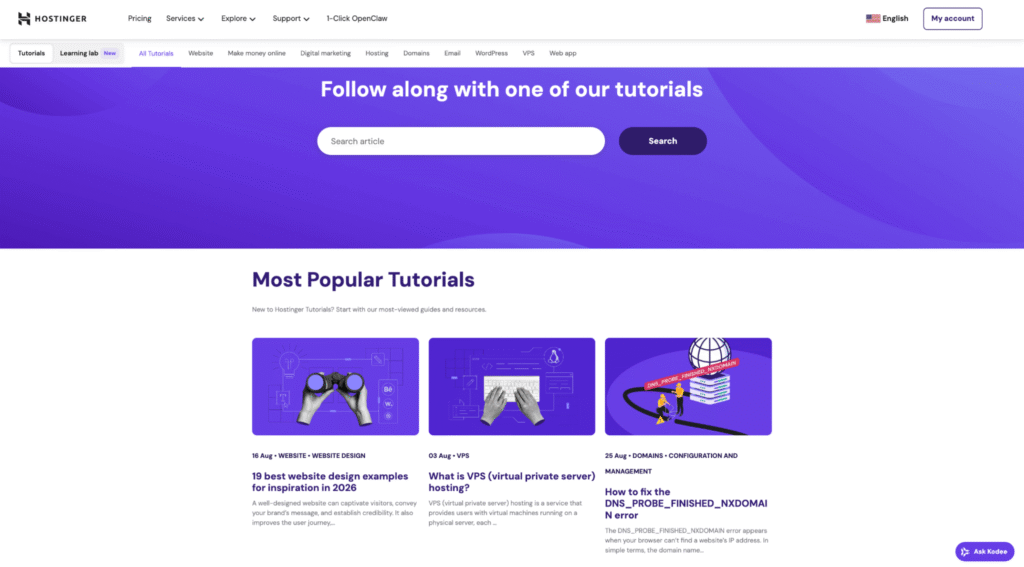
Hostinger Tutorials is a strong example of content marketing in action. It publishes regularly updated guides and articles about websites, hosting, coding, and industry trends.
The goal is simple: help users solve real problems and naturally introduce Hostinger’s products as part of the solution.
The most effective content marketing formats include:
- Blog posts. Publish in-depth articles that target specific keywords your audience searches for. Update them regularly to maintain rankings and keep information accurate.
- Landing pages. Create dedicated pages with a single, focused CTA and a clear value proposition. Each page should target a specific audience segment or campaign.
- Social media posts. Share your content on platforms where your audience spends time. Connect your website to Instagram, Facebook, and X (formerly Twitter) using social media plugins.
- Newsletters. Build an email list and send weekly or monthly updates. Segment subscribers by interest or behavior so each email feels relevant. Include clear CTAs that prompt readers to return to your site.
Once you understand the different content formats and distribution channels, you can build a structured content plan.
This involves setting clear goals and a realistic budget before creating content, organizing your content library with tags and categories to identify gaps, and running regular content audits to update or remove underperforming pieces.
3. Improve on-page SEO
On-page SEO means optimizing individual web pages so search engines understand your content and rank it for relevant queries.
Strong on-page signals show Google that your page directly answers what someone is searching for, which helps improve your position on search engine results pages (SERPs).
Higher rankings drive more traffic. According to First Page Sage’s report, the top three organic results capture more than two-thirds (68.7%) of all clicks on the Google search page.
Understanding what SEO is and how it works at the page level helps you prioritize the right elements:
- Keyword placement. Add your primary keyword to the title tag, H1 heading, first paragraph, and at least one H2. Use related keywords and synonyms naturally throughout the body text. On ecommerce sites, include relevant keywords in product titles, descriptions, and image alt text.
- Header tags. Follow a clear heading hierarchy. Use one H1 per page, H2s for main sections, and H3s for supporting points. Headings help users and search engine crawlers understand your content structure.
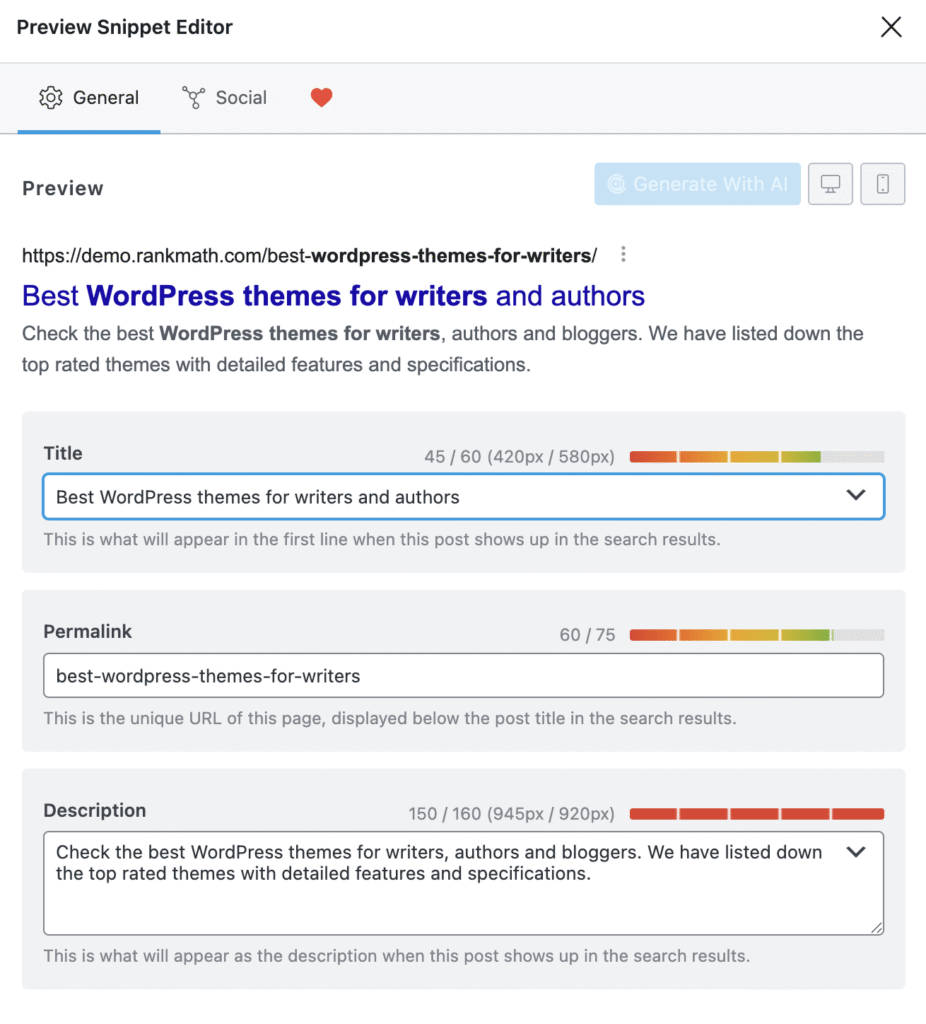
- Meta titles and descriptions. Write a unique meta title under 60 characters and a meta description under 160 characters for every page. Include the primary keyword in the title, and use the description to highlight the page’s value and encourage clicks.
- Internal linking. Link to related pages using descriptive anchor text. This helps search engines understand how your pages connect to one another and keeps users on your site longer.
SEO plugins like Yoast SEO and Rank Math make it easier to check and optimize these elements on each page.
4. Fix technical SEO issues
Technical SEO helps search engines crawl, index, and understand your website. Without a strong technical foundation, even great content might not appear in search results because bots can’t access or process it properly.
Focus on these key technical SEO areas:
- Site structure and URLs. Use a consistent, descriptive URL structure that reflects your site hierarchy. For example, domain.tld/blog/website-optimization is clearer than domain.tld/p=1234. Create an XML sitemap and submit it through Google Search Console to help search engines discover and index your pages faster.
- Crawling and indexing. Submit your site to search engines and configure your robots.txt file to guide bots to your most important pages. Check the Coverage report in Google Search Console regularly to catch indexing errors, such as pages blocked by noindex tags or server issues.
- Broken links and duplicate content. Scan your site for 404 errors and redirect broken URLs with 301 redirects. Add canonical tags (rel=”canonical”) to pages with similar content to prevent duplicate content issues.
- Schema markup. Add structured data using JSON-LD format. Implement relevant schema types, especially Article, HowTo, FAQ, and Organization, to give search engines more context about your content and increase your chances of appearing as rich results in SERPs. Use Google’s Rich Results Test to validate your setup.
- AI search optimization. Large language models (LLMs) and LLM-based tools like Google’s AI Overviews, ChatGPT, and Perplexity increasingly reference web content. To improve visibility, add an llms.txt file to your site’s root directory so AI crawlers can understand your content structure and permissions. Write clear, factual definitions and concise answers near the beginning of your pages, since AI systems often pull from content that directly answers a question in the first few paragraphs.
Tools like Screaming Frog and Google Search Console help you identify and prioritize technical issues. Run a full site crawl at least once a month to catch problems before they affect your rankings.
5. Speed up your site
Page speed is a confirmed Google ranking factor and one of the most important parts of user experience.
According to a Portent study analyzing more than 100 million pageviews, a site that loads in one second has a conversion rate three times higher than one that loads in five seconds.
Before making changes, run a speed test using tools like Google PageSpeed Insights or GTmetrix. These tools give you a performance score and specific recommendations you can act on.
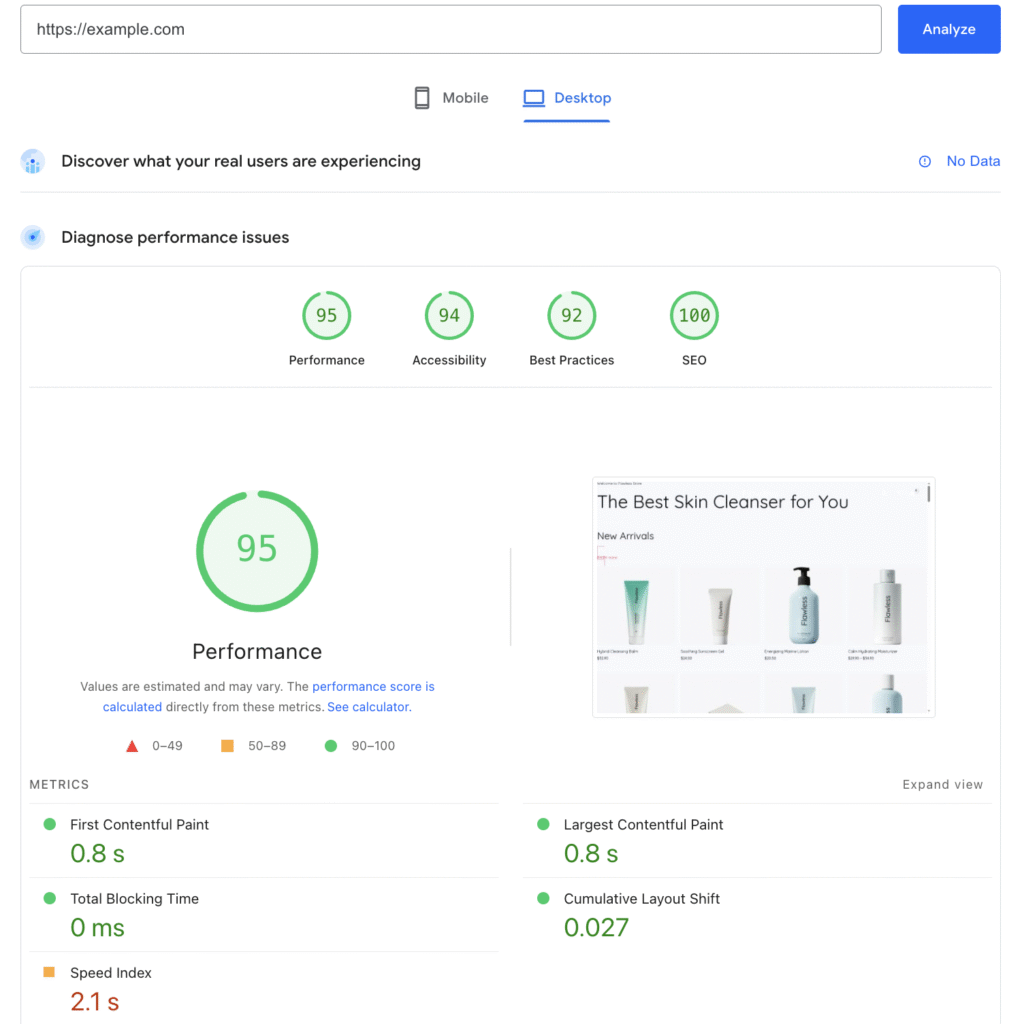
The most effective ways to optimize website speed include:
- Minify and compress code. Remove unnecessary characters, whitespace, and comments from your HTML, CSS, and JavaScript files. Tools like Terser (for JavaScript) and cssnano (for CSS) automate this process.
- Optimize images. Compress images before uploading them. Use modern formats like WebP or AVIF, which provide better compression than JPEG or PNG at similar quality. Enable lazy loading so images below the fold load only when users scroll to them.
- Set up a content delivery network (CDN). A CDN stores copies of your site’s static files on servers around the world and delivers them from the location closest to each visitor. This reduces latency and improves load times for global audiences.
- Enable browser caching. Configure your server to set cache headers so returning visitors don’t need to download static assets like stylesheets, scripts, and images again.
- Use a fast web server. Web server software like LiteSpeed handles concurrent connections and serves static content more efficiently than Apache. If your hosting provider offers LiteSpeed, switching to it can lower time-to-first-byte (TTFB) without changing your site’s code.
Your web hosting plan also affects page speed. A plan that uses NVMe SSD storage and supports HTTP/3 delivers faster response times than one running on older hardware.
Choose a hosting provider that makes upgrades easy. If your current plan struggles during traffic spikes, you can scale to a higher tier with more CPU, RAM, or built-in CDN support without migrating to a new provider.

6. Prioritize mobile-friendliness
Mobile devices account for 50.59% of global website traffic as of January 2026, according to Statcounter GlobalStats.
Google uses mobile-first indexing, which means it primarily evaluates the mobile version of your site for ranking. If your site works well on desktop but breaks on mobile, you’ll likely lose rankings.
Test your site’s mobile usability with Google’s Lighthouse audit in Chrome DevTools or the Mobile Usability report in Google Search Console.
Follow these key practices to make your website mobile-friendly:
- Use responsive design. Choose a theme or framework that automatically adjusts layouts, font sizes, and images for different screen sizes. Keep your content consistent across desktop and mobile, since major layout or content differences between versions can hurt your rankings.
- Simplify navigation. Replace wide horizontal menus with a hamburger icon or a collapsible dropdown menu on mobile. Make sure users can access critical pages, such as product, contact, and pricing pages, with two taps.
- Size tap targets properly. Buttons and links should measure at least 48 × 48 pixels and have sufficient spacing between them. Small, crowded links frustrate users and increase bounce rates.
- Avoid intrusive interstitials. Google penalizes pages that display large pop-ups that block the main content on mobile. If you use pop-ups, keep them small, easy to close, and away from the primary content.
7. Test and run experiments regularly
Testing different versions of your web pages helps you identify what actually drives conversions, rather than relying on assumptions.
A/B testing shows two variations of a page, or a specific element, to different visitors and measures which version generates more conversions. The elements most worth testing are:
- CTA buttons. Test different texts, colors, sizes, and placements. Even small changes, such as switching “Sign up” to “Get started free,” can noticeably affect conversion rates.
- Page layouts. Experiment with the position of images, text blocks, testimonials, and pricing sections. A layout that places social proof above the fold may outperform one that hides it at the bottom.
- Landing page copy. Test different headlines, value propositions, and content lengths. Shorter pages often convert better for simple products, while longer pages work better for complex or high-priced offerings.
- Social sharing placement. Try different positions and styles, such as icons versus full platform names, to see which version drives more shares.
Tools like VWO make it easier to run A/B tests. These tools offer advanced targeting, audience segmentation, and multivariate testing for production environments.
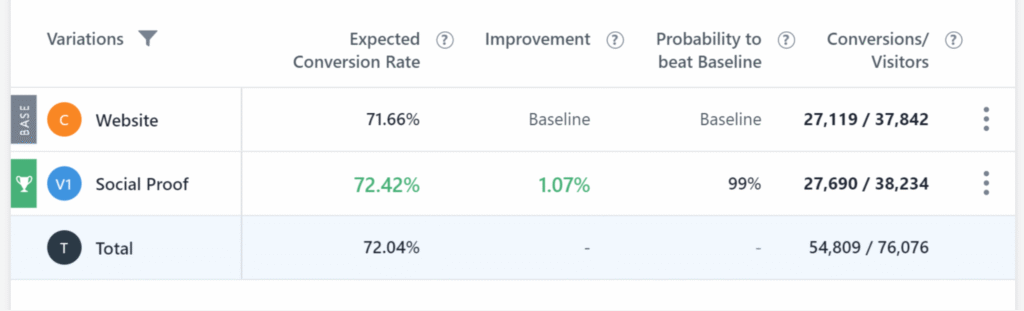
When you run tests, follow these guidelines to protect your SEO:
- Avoid cloaking. Make sure search engines and real visitors see the same content. If Google detects that you’re showing a different version of a page to its bots than to users, it can remove your site from search results.
- Set canonical URLs. If your test creates a second version of a page at a different URL, add a rel=”canonical” tag on the test page that points to the original. This tells search engines which version is the main one, so they don’t treat both pages as duplicate content.
- Use 302 redirects. If your test sends visitors to a different URL, use a 302 (temporary) redirect instead of a 301 (permanent) redirect. A 302 status code indicates that the redirect is temporary and that the original page should retain its rankings.
8. Follow web accessibility best practices
Web accessibility means designing your site so people with visual, auditory, motor, or cognitive disabilities can use it effectively.
Following the Web Content Accessibility Guidelines (WCAG) 2.2 improves usability for all visitors and makes your content easier for search engine bots to understand.
Accessibility also affects your reach. If your site ignores accessibility, you exclude a significant number of potential visitors and customers with disabilities.
When you fix accessibility issues, you gain a competitive advantage. Accessible sites reach a wider audience and often convert better.
Follow these practices to improve web accessibility:
- Add alternative text. Write descriptive alt text for every image. Alt text helps screen reader users understand visual content and can improve visibility in Google Image Search.
- Include captions and transcripts. Add captions to video content and provide transcripts for audio. Tools like Happy Scribe or VEED can speed up the process.
- Maintain proper color contrast. Follow the WCAG minimum contrast ratio of 4.5:1 for normal text and 3:1 for large text. Use tools like the WebAIM Contrast Checker to test your color combinations.
- Use semantic HTML. Structure your pages with proper heading levels (H1-H3), landmark elements such as <nav>, <main>, and <footer>, and ARIA labels where necessary. Semantic markup helps screen readers and search engine bots understand your content hierarchy.
- Enable keyboard navigation. Make sure users can access every interactive element, including links, buttons, forms, and dropdown menus, using only a keyboard. Test your site by navigating with the Tab key.
💭 Did you know?
In the United States, more than 5,000 web accessibility lawsuits were filed in 2025 under the Americans with Disabilities Act (ADA), according to UsableNet. By proactively applying accessibility best practices, you reduce legal risk and make your site usable for every visitor.
9. Get quality backlinks
Link building means earning links from other websites to your website. Search engines treat backlinks as signals of trust and authority. When a reputable site in your industry links to you, it shows that your content is worth referencing.
Focus on quality over quantity. One backlink from a high-authority, relevant website carries more ranking value than dozens of links from low-quality directories or unrelated sites.
Google’s algorithms evaluate the authority of the linking site, the relevance of the linking page to your content, and the placement of the link.
A contextual link within the body of an article holds more weight than one placed in a footer or sidebar.
Here are effective ways to build quality backlinks:
- Guest posting and outreach. Contribute articles to reputable publications in your industry. Most guest posts include a link back to your site, which builds authority and referral traffic.
- Community engagement. Participate in forums, platforms like Reddit, and niche communities. Share helpful answers and link to your content only when it genuinely solves someone’s problem.
- Digital PR. Create newsworthy content, such as surveys, industry reports, or infographics, and pitch it to journalists and bloggers. A mention in a respected publication can generate strong backlinks and increase brand visibility.
- Link-worthy content. Publish original research, case studies, data reports, or in-depth guides. When you offer unique insights others can cite, backlinks follow naturally.
Link building costs money, but you’re paying for the work, not the links themselves.
Your budget usually covers outreach tools to find and contact relevant websites, creating high-quality guest post content, and possibly hiring a specialized agency to manage everything.
You might spend a few hundred or several thousand dollars per month, depending on your outreach volume, the authority of your target sites, and whether you handle it in-house or outsource it.
One important rule: never buy backlinks. Paying a site to place your link violates Google’s spam policies and can result in a manual penalty that severely harms your rankings.
Investing in content and outreach that earns links is a legitimate strategy. Purchasing link placements is not.
10. Gather customer feedback
Customer feedback gives you direct insight into what visitors need, what frustrates them, and what keeps them coming back.
Without feedback, you rely on guesswork. You might redesign a page that already works while ignoring a checkout flow that pushes users away.
Feedback helps you base optimization decisions on real user behavior instead of assumptions.
For example, if multiple visitors say they can’t find your pricing page, that’s a clear sign to improve your navigation, not redesign your entire site.
Here are effective ways to collect feedback:
- Net Promoter Score (NPS). Ask visitors how likely they are to recommend your site or product, on a scale of 1 to 10. NPS surveys are quick to complete and give you a clear metric to track over time. A score above 50 is excellent, while anything below 0 signals serious friction – meaning users are encountering more obstacles than positive moments in their experience.
- On-site surveys. Trigger short surveys based on user behavior, such as after a purchase, on exit intent, or after a set time on a page. Tools like Hotjar and Survicate let you add surveys as widgets or slide-ins without disrupting the experience.
- Customer reviews. Enable reviews on product or service pages. Reviews serve two purposes: they give you feedback and provide social proof for future visitors.
- Post-purchase email surveys. Send a short survey after a transaction. Include two to four focused questions, such as “How did your experience compare to your expectations?” and “Is there a feature you wish we had?”
- Usability testing. Ask real users to complete specific tasks on your site while you observe. Tools like Maze and UserTesting simplify remote testing and provide session recordings.
Collect feedback continuously, not just once. User expectations change, and your site evolves. Regular feedback cycles keep your optimization efforts aligned with real user needs.
Why should you perform website optimization?
Website optimization delivers both short-term and long-term results. In the short term, it increases your conversion rate and traffic by removing friction from the user journey.
Over time, it builds trust and authority, encourages repeat customers, and positions your brand as a reliable resource in your industry.
Increase conversion rate
Visitors convert at higher rates on well-optimized websites because they encounter fewer obstacles from arrival to action.
The gains don’t come from a single fix. Each strategy improves a different stage of the visitor journey.
For example, faster load times reduce drop-offs, clear navigation guides users to the right page, and tested CTAs move them from interest to action.
When these improvements work together, progress at one stage supports the next.
A visitor who lands on a fast page stays longer, finds what they need through simple navigation, and reaches a CTA that you’ve already validated with real data.
That’s how small, focused optimizations add up to measurable revenue growth.
Gain more traffic
Higher visibility in search engine results drives more organic traffic to your site.
A single well-optimized page can rank for dozens of related keywords and generate traffic for months or even years without ongoing ad spend. That’s the compounding advantage of organic search compared to paid channels.
Paid ads stop delivering the moment you stop paying. Organic rankings, built through on-page SEO, technical improvements, and link building, continue working in the background.
Over time, a library of optimized pages becomes a traffic engine that grows with every new piece of content you publish.
Ensure website accessibility
Website accessibility reduces legal risk and expands your potential audience. The US Department of Justice has consistently stated that websites must comply with the ADA.
Businesses that ignore accessibility requirements may face digital accessibility lawsuits, which continue to increase each year.
By applying web accessibility best practices, such as adding alt text, maintaining proper color contrast, enabling keyboard navigation, and using semantic HTML, you lower legal risk and reach a broader audience.
An accessible site ensures you don’t exclude a significant portion of potential visitors and customers.
Establish brand authority
Website optimization strengthens brand authority by making your content more visible, useful, and widely referenced.
When your pages consistently rank on the first page of Google for industry-related queries, users begin to associate your brand with expertise.
This authority also extends to AI-powered search. The technical foundations, such as structured data, an llms.txt file, and clear factual content, make your site easier for AI answer engines to reference.
The stronger your topical depth and site structure, the more likely these systems are to surface your content alongside traditional search results.
Content marketing, link building, and accessibility improvements all reinforce this cycle. Consistent, high-quality content builds awareness.
Backlinks from reputable sites signal credibility. An accessible, well-structured site provides the organized information that search engines and AI systems prefer.
Maintain customer retention
Customer retention improves when visitors consistently experience a fast, accessible, and well-designed website. A smooth user experience encourages repeat visits and lowers the chance that users will switch to a competitor.
When you run experiments regularly, gather feedback, and update content based on user behavior, you build stronger relationships with your audience.
If visitors see that your site consistently responds to their needs, they’re more likely to come back.
Recommended tools to optimize your website
Top website optimization tools include Google Analytics 4 for traffic and conversion tracking, Google Search Console and Ahrefs for SEO insights, Google PageSpeed Insights and LiteSpeed Cache for performance optimization, Screaming Frog for technical audits, Hotjar for user behavior analysis, and WAVE for accessibility testing.
- Google Analytics 4. The primary tool for tracking website traffic, user behavior, engagement metrics, and conversions. The free version provides enough data for most websites, including real-time reports, audience insights, and acquisition channels. Large businesses can upgrade to Analytics 360 for advanced analysis and higher data limits.
- Google Search Console. A free tool that shows how your site performs in search results. It reports impressions, click-through rates, indexing status, and Core Web Vitals data. You can also submit sitemaps, inspect URLs, check mobile usability, and identify technical SEO issues.
- Ahrefs. An all-in-one SEO platform for keyword research, backlink analysis, competitor research, and rank tracking. Its Site Audit tool identifies on-page and technical issues and clearly prioritizes them.
- Screaming Frog SEO Spider. A desktop crawler that scans your site for broken links, duplicate content, missing meta tags, redirect chains, and other technical issues. The free version crawls up to 500 URLs.
- Google PageSpeed Insights. Analyzes mobile and desktop performance and provides a score based on Core Web Vitals, including Largest Contentful Paint (LCP), Cumulative Layout Shift (CLS), and Interaction to Next Paint (INP). It also gives actionable recommendations.
- LiteSpeed Cache. A free WordPress plugin that adds server-level caching, image optimization, CSS and JavaScript minification, and database optimization. If your hosting also uses the LiteSpeed web server, the plugin integrates smoothly and can significantly improve performance with minimal setup.
- Hotjar. A behavior analytics tool that generates heatmaps, session recordings, and on-site surveys. It helps you understand how visitors interact with your pages and where they drop off.
- WAVE. A free web accessibility evaluation tool that highlights issues such as missing alt text, color contrast errors, and heading structure problems. It’s available as a browser extension for quick audits.
Tracking your website optimization results
Tracking your website optimization results means measuring specific performance indicators to see whether your changes improve search visibility, page speed, and user engagement.
Without consistent tracking, you won’t know which optimizations drive real results and which ones waste time and resources.
The key metrics to monitor are organic traffic growth, keyword ranking positions, Core Web Vitals (LCP, CLS, and INP), bounce rate, and conversion rate. Each metric relies on different tools.
Use Google Search Console and keyword tracking platforms like Ahrefs to monitor search performance. Measure Core Web Vitals with Google PageSpeed Insights. Track user behavior and conversions with analytics platforms.
Review speed metrics weekly. Check rankings and conversions monthly. Analyze broader trends, such as visitor retention and backlink growth, quarterly.
This schedule gives you enough data to make informed decisions without overreacting to short-term fluctuations.
Google Analytics 4 is the main tool for tracking engagement, conversions, and traffic sources in a single place. It also integrates with Google Search Console, so you can see how users find your site and what they do after they arrive.
If you want to set up proper tracking and understand your reports clearly, check our Google Analytics 4 tutorial, which walks you through installation, key reports, and conversion tracking step by step.
All of the tutorial content on this website is subject to Hostinger's rigorous editorial standards and values.

Ariffud is a Technical Content Writer with an educational background in Informatics. He has extensive expertise in Linux and VPS, authoring over 200 articles on server management and web development. Follow him on LinkedIn.