What is WordPress SMTP, how to configure it, and recommended plugins
Mar 10, 2026
/
Aris S. & Marco C.
/
8 min Read

The Simple Mail Transfer Protocol (SMTP) lets users send emails using an external service instead of the website’s server. It provides higher security and deliverability than the default Hypertext Preprocessor (PHP) mail() function.
In WordPress, SMTP is set by connecting your email account and a mailer using a plugin. In this WordPress tutorial, we will explain how to configure SMTP in five steps.
Moreover, we will explore the best plugins for enabling the mailing protocol on your website and third-party services that help improve deliverability.
What Is WordPress SMTP?
WordPress SMTP is a protocol that allows users to send emails across the internet using a third-party mailer instead of the website’s host server. By using SPF and DKIM records, SMTP is more secure and reliable than WordPress’ default PHP mail() function.
Why You Should Use SMTP for WordPress
Sending emails using PHP is less reliable due to several drawbacks. For example, its lack of SMTP authentication makes PHP a target for cyber crimes like spoofing.
Unlike the default PHP mail() function, SMTP has Sender Policy Framework (SPF) and Domain Keys Identified Mail (DKIM) records. Therefore, recipients are less likely to identify emails from an SMTP mailer as spam, ensuring deliverability.
SPF lets a domain determine the permitted and authorized IP addresses to send emails. Meanwhile, creating custom DKIM records enables the sender to digitally sign their messages for authentication.
Some web hosts disable the WordPress email settings by default to prevent abuse and spam. Luckily, the SMTP protocol lets you enable the mailing service regardless of your server configuration.
Finally, it is also easy to set up since users only need a third-party SMTP server and a WordPress plugin.
How to Configure WordPress SMTP to Send Emails
In this section, we will explain how to configure WordPress SMTP using a plugin. Though these steps work for all web hosts, we recommend Hostinger’s WordPress web hosting plan, which includes up to 100 free professional email accounts.

1. Set Up an Email Account
After purchasing a Hostinger WordPress hosting plan and activating the included free domain, create your email account by following these steps:
- Log in to hPanel and click Emails on the top menu.
- Select the domain for your email account and choose Create email account.
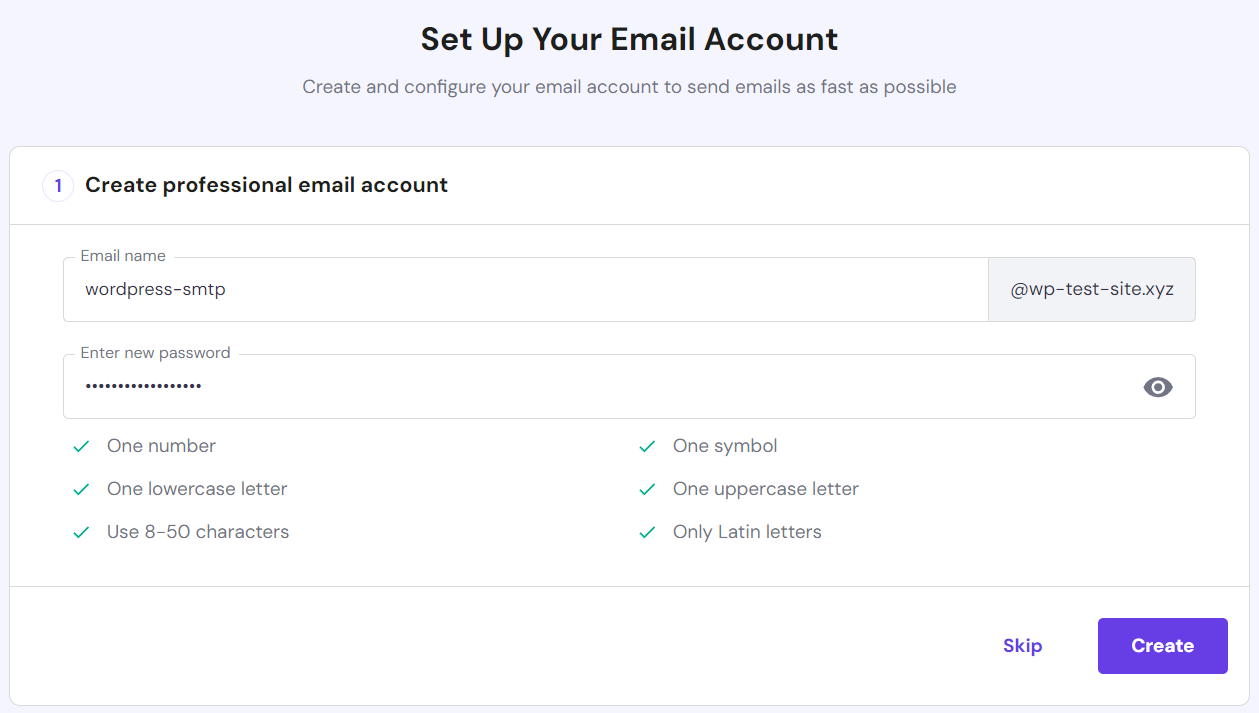
- Enter your email address and password. Click Create.
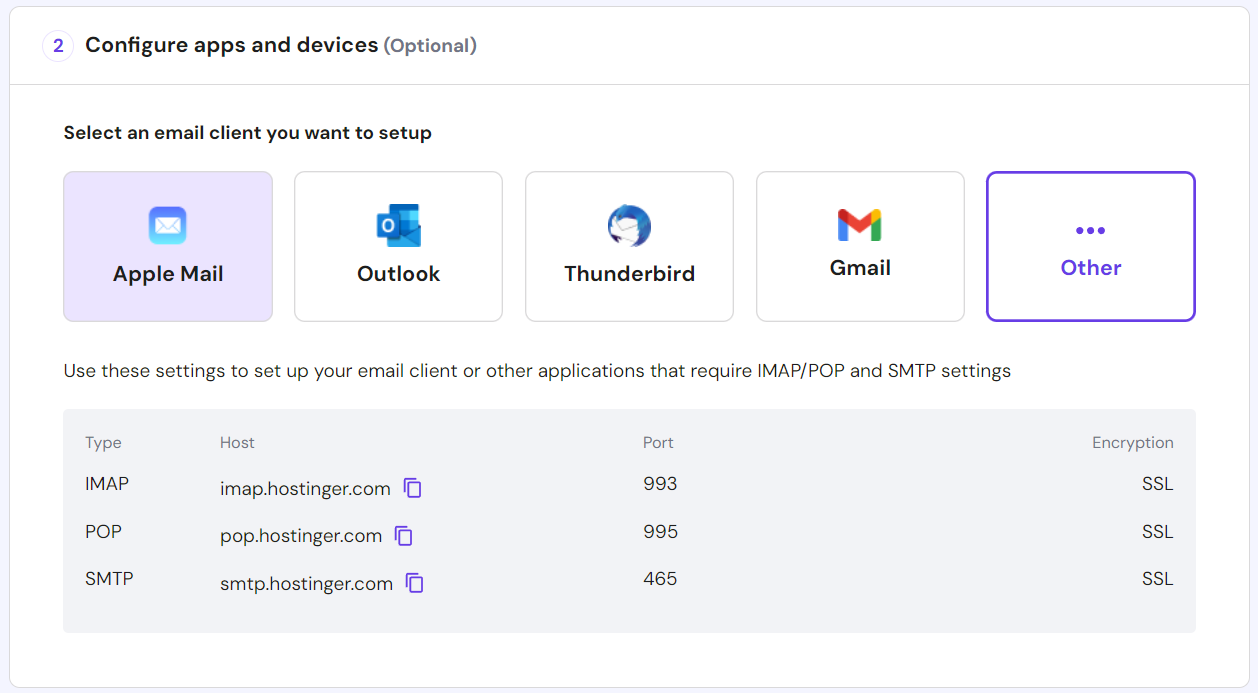
- Under the Configure apps and devices section, select Other. Save the SMTP Host, Port, and Encryption information since we’ll use them to connect the WP Mail SMTP plugin with the outgoing mail server.
- Click Complete, I’ve set up my client.
If you forgot to save the SMTP information during the creation process, access it by going to the Connect Apps & Devices menu in the sidebar.
2. Install and Configure WordPress SMTP Plugin
To configure SMTP, we’ll use the WP Mail SMTP plugin. After launching your WordPress website, follow these steps:
- Open your WordPress admin dashboard.
- Select the Plugin menu on the sidebar → Add New Plugin. Search WP Mail SMTP and install the plugin.
- The plugin will prompt you with the Setup Wizard interface. Click Go back to the Dashboard.
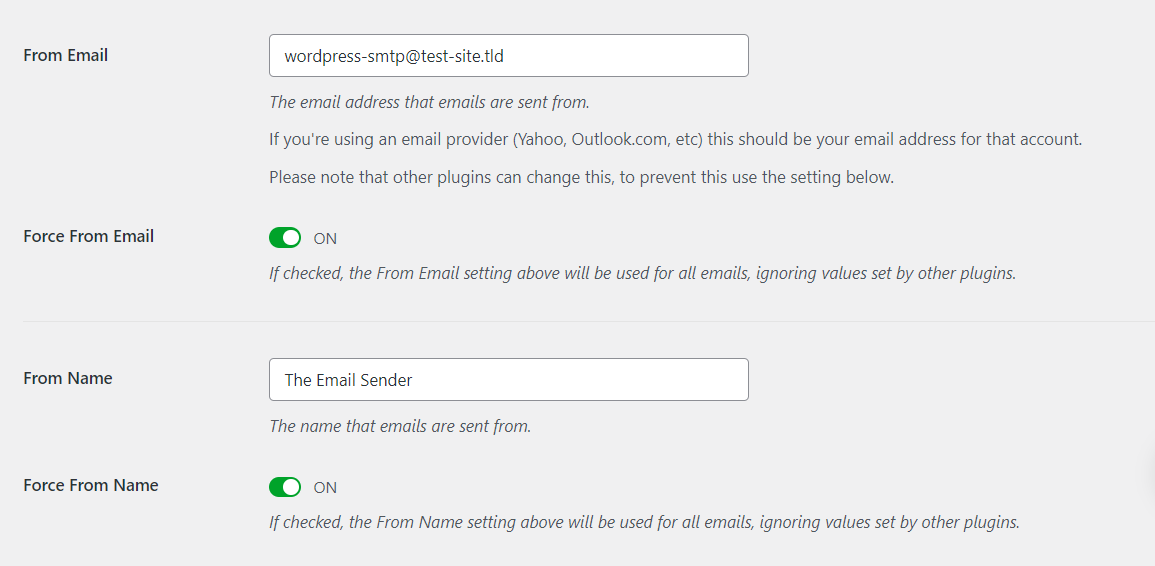
- You will be automatically redirected to the WP Mail SMTP settings. Scroll down to the Primary Connection section and enter your email address in From Email.
- Enter the From Name field. It is the name displayed for outgoing emails.
- Set the Return Path setting as off to disable bounce messages.
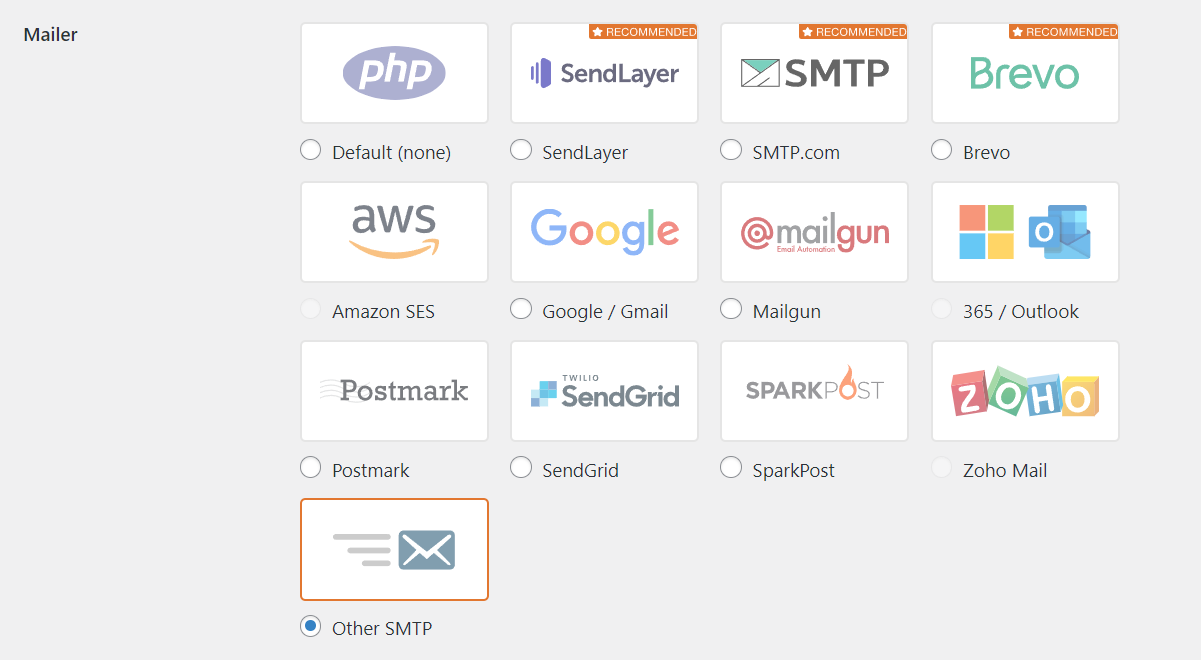
- In the Mailer setting, select Other SMTP. Enter the SMTP host, encryption, and port you saved earlier.
- Toggle Auto TLS and Authentication on.
- Enter your email address as an SMTP username and create a new password.
- Click Save Settings to apply the changes.
Pro Tip
Save the SMTP password and username in the wp-config.php file to improve security.
Remember that the steps can slightly differ if you use a different plugin.
If you purchase the WP Mail SMTP Elite plan, you’ll get a free White Glove setup service that handles the configuration process.
3. Send a Test Email
Send a test email to check whether the SMTP service works properly. Here’s how to do it using the WP Mail SMTP plugin:
- In the WordPress dashboard, go to the sidebar → WP Mail SMTP → Tools.
- Enter the destination email address. It must be different from the one you have configured.
- Enable HTML and press Send Email.
The plugin should confirm that it sent the email successfully. Otherwise, check the destination address and the WordPress SMTP settings.

If you use the premium WP Mail SMTP plugin, enable the Alerts and Email Log settings to track whether you sent the messages properly.
4. Troubleshoot Any Issues
If you encounter an issue when sending an SMTP email, check out some of the most common causes and their solutions:
- Incorrect WP Mail SMTP Settings. Make sure WP Mail SMTP is connected to the mailer server using the SMTP credentials, host, port, and encryption method.
- Mailer server issue. Temporarily switch to a free SMTP server like Gmail to check whether it’s a provider-related issue.
- Web hosting configuration. Check whether the SMTP port is open and verify if your web hosting provider allows the connection.
Hostinger’s hosting plans enable SMTP connection and port to ensure your WordPress mailing service works properly. You can also install any plugin without incompatibility issues.
Important! Connecting to a Google Workspace email account requires different information from SMTP. You’ll need a client ID, a secret key, and an authorized redirect URI.
Use the WP Mail SMTP plugin’s built-in debugging feature to simplify troubleshooting. To access it, go to your WordPress sidebar → WP Mail SMTP → Tools → Debug Events.
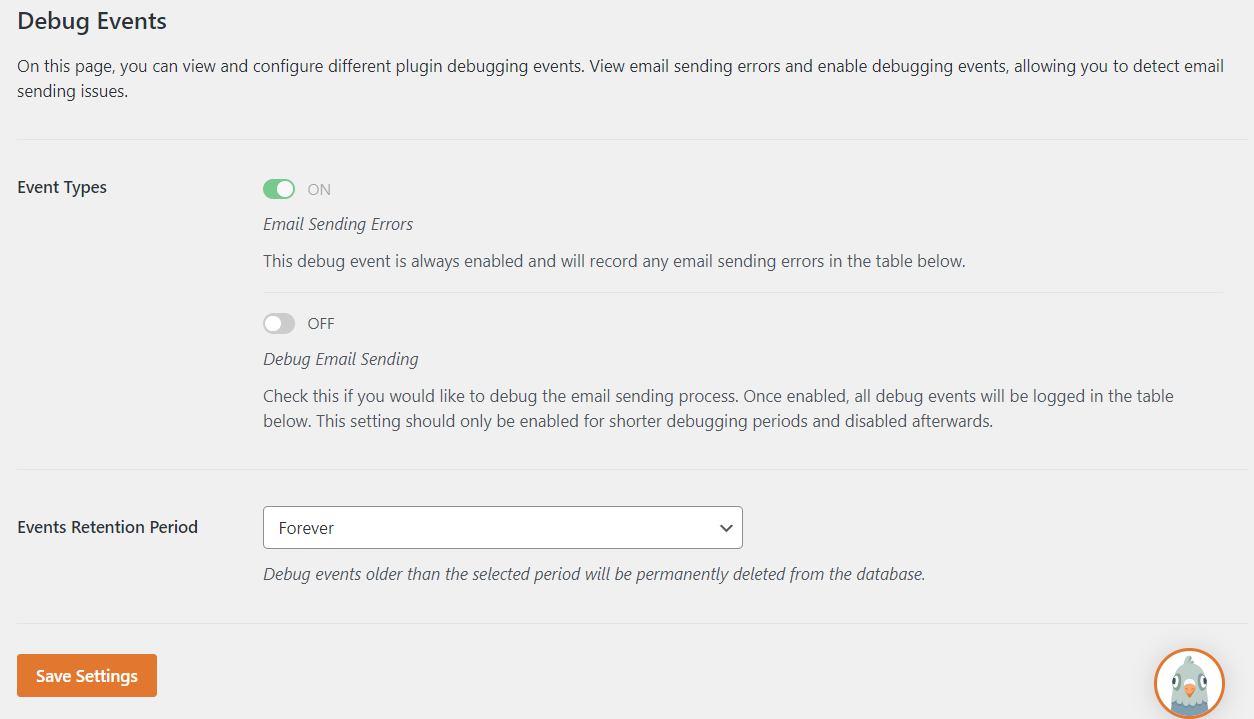
If you use its White Glove Setup service, the plugin developer will troubleshoot the issues and ensure your SMTP server settings are properly configured.
5 Best WordPress SMTP Plugins and Solutions
Plugins help users integrate their WordPress site with a mail server to relay and send messages. Meanwhile, SMTP solutions are third-party services that improve email deliverability. In addition to WP Mail SMTP, here are our five best picks.
1. Easy WP SMTP
Easy WP SMTP Stats:
- Rating: 4.6/5
- Best for: personal blogs
- Price: freemium (starting at $49.50/year)
Easy WP SMTP is one of the most popular WordPress email plugins. It offers a user-friendly interface and integration with popular mailer services, including Microsoft Outlook, Hotmail, Zoho Mail, and Google Workspace.
This plugin also supports SMTP.com and a custom SMTP server. However, you must manually configure mailer settings and your email account due to the lack of a built-in integration system.
While the plugin’s free version supports SMTP, you must purchase the premium plan to integrate popular mailer service providers. The paid version also includes additional features like email logging and reporting.
This plugin has an email testing feature to check whether your SMTP server is configured properly. It also has a debug events logging tool that tracks all sent emails and their errors.
Key Features
- Debug Events. Easy WP SMTP logs all email-sending attempts with their issues to simplify error troubleshooting.
- Email log. This plugin saves information about all emails sent from your WordPress site, including deliverability status and engagement.
- Tracker widget. Users can check sent, delivered, failed, opened, and clicked email stats in a single area using the built-in dashboard widget.
Cons
- No built-in integration system. Users must manually connect their email accounts and configure the mailer servers to set up WordPress SMTP.
[DOWNLOAD]
2. Post SMTP
Post SMTP Stats:
- Rating: 4.8/5
- Best for: blogs, eCommerce, and other business websites
- Price: freemium (starting at $49.99/year)
Post SMTP is the best WordPress SMTP plugin for users looking for comprehensive features.
To ensure optimal deliverability, this plugin provides a Fallback Mailing system. Users can define a backup WordPress SMTP host when the main one fails or encounters an error.
It also supports many popular SMTP mailer service providers. For example, you can integrate your Mandrill, Mailgun, Brevo, or Google Workspace account.
Moreover, Post SMTP offers a Setup Wizard to simplify the configuration process. Users can also export and import plugin settings to quickly set up WordPress SMTP on multiple websites.
Post SMTP also offers various add-ons to expand its functionality, like the Microsoft 365 API Delivery and Report & Tracking Pro extensions. In addition, it provides dedicated customer support via forums, email, and Slack.
Key Features
- Comprehensive testing features. Post SMTP has built-in tools to test email deliverability, check connectivity, and diagnose issues.
- Mobile app. Users can track their WordPress websites’ email logs, check errors, and resend failed messages on the go via the mobile application.
- Notification system. This plugin will notify users via email, pushover, or Slack when it fails to send an email.
Cons
- Expensive premium plan. The plugin’s starting premium plan costs $49.99/year and is only usable for one website.
[DOWNLOAD]
3. FluentSMTP

FluentSMTP Stats:
- Rating: 4.8/5
- Best for: blogs and personal websites
- Price: free
FluentSMTP is the best free SMTP WordPress plugin with extensive compatibility. Users can integrate it with over 10 popular mailing services like Amazon SES and Gmail API.
This plugin is also compatible with all SMTP servers, which users can configure by entering the host, port, encryption method, and credentials. However, it doesn’t have a built-in feature for sending a test email.
This free SMTP plugin has a debugging tool and logging feature that helps track deliverability. Users can monitor their daily email statistics using its intuitive graph and chart via the WordPress dashboard.
Key Features
- One-click migration. Users can import configurations from popular plugins like WP Mail SMTP to FluentSMTP with a single click.
- Automatic email routing. FluentSMTP lets users connect multiple email addresses to route messages to specific accounts.
- Custom database tables. This plugin logs emails in a dedicated database table, keeping the others clean and optimized.
Cons
- Minimum features. FluentSMTP lacks several features like an email tester, setup wizard, and notification system.
[DOWNLOAD]
4. Brevo

Brevo Stats:
- Rating: 4.1/5
- Best for: eCommerce stores or digital marketing agencies
- Price: freemium (paid plans start at $25/month)
Brevo is the best SMTP service for WordPress if you want comprehensive marketing tools. For example, it provides heatmap reporting, open-and-click tracking, and recipients’ geographic statistics.
Brevo’s Enterprise plan offers a dedicated IP address and SSO authentication to improve email deliverability. Its free version has a 300 emails/day limit, but you can upgrade it by purchasing the paid plan.
To create WordPress transactional emails, choose a template and customize it using the drag-and-drop editor. Users can also send messages in bulk and personalize the content for each recipient.
Key Features
- Email automation. Users can set custom automatic email workflows based on user activity or website behavior.
- Built-in A/B testing tool. This SMTP service provider lets users test different email content and subjects to compare campaign performance.
- Contact management. A custom WordPress contact form helps you gather customer details for a more personalized campaign.
Cons
- Support. While email support is available in all versions, the live chat and phone services are accessible only in the Business and Enterprise plans.
[DOWNLOAD]
5. SendGrid

SendGrid Stats:
- Rating: 4/5
- Best for: production-grade websites
- Price: freemium (paid plans start at $19.95/month)
SendGrid is an SMTP provider offering a cloud-based mail transfer agent. It uses API to integrate its service into a WordPress website and provide real-time insights.
This provider applies robust mailing features like dedicated IP addresses, SPF and DKIM records, and reverse DNS. It also offers additional expert services to help set up your email account and identify areas for improvement.
Moreover, this SMTP provider has a comprehensive real-time tracking feature. It lets you monitor metrics like email engagement rate and recipient geolocation to gain insights into your campaign performance.
To enable a secure SMTP connection with SendGrid, users need additional information from their hosting providers, such as their client ID and API key.
Key Features
- Dedicated IP addresses. A dedicated IP address helps isolate your mailing service from other users, ensuring you don’t get flagged as spam.
- Adaptive Communication Engine (ACE). This artificial intelligence (AI) tool learns users’ mail-sending patterns to identify potential deliverability issues.
- Link branding. This SMTP provider lets you customize trackable links in your email with a custom domain to ensure consistent branding.
Cons
- Limited features on the lower-tier plans. Upgrade to the Pro plan starting at $89.95/mo to make the most out of SendGrid.
[DOWNLOAD]
Conclusion
Simple Mail Transfer Protocol (SMTP) allows users to send emails over the internet using a third-party host instead of the website’s server. It offers higher security and deliverability than WordPress’s default PHP mail() function.
In this article, we have explained how to use a Hostinger email account and the WP Mail SMTP plugin for WordPress SMTP setup. After purchasing a hosting plan, follow these steps:
- Set up an email account. Select Email from the hPanel’s top menu. Choose a domain and create a new email account with Other as the application.
- Install and configure the plugin. Download and install the WP Mail SMTP plugin. Enter your email address and SMTP server information. Select Save Settings.
- Send a test email. Navigate to the WP Mail SMTP plugin’s Tools menu and send a mockup email to check if the account is configured correctly.
- Troubleshoot issues. When encountering errors, recheck all settings and temporarily switch to another free SMTP server. Also, verify whether your web hosting provider blocks the port.
While plugins simplify the WordPress email setup process, third-party SMTP services help improve deliverability. For example, use SendGrid to identify potential issues in your email-sending patterns with AI.
Suggested Reading
Best WordPress Page Builders
How to Install WordPress
How to Access and Use Hostinger Email
WordPress SMTP FAQ
In this section, we will answer several common questions about WordPress SMTP.
Does WordPress Have SMTP?
WordPress supports SMTP functionality, but it isn’t set up by default. Users must configure it using a plugin or via a service provider.
How Do I Use SMTP With WordPress?
Purchase an email hosting plan from a web host like Hostinger and create an account. Then, open your WordPress website and install WP Mail SMTP or other plugins based on your preferences. Next, enter your email account details and SMTP credentials in the plugin settings. Finally, test the mailing functionality by sending a message.
Why Do I Need to Set Up SMTP for My WordPress Site?
The default WordPress emails lack authentication, prompting the recipient server to move them to the spam folder automatically. It also makes outgoing emails more vulnerable to spoofing attacks.
Can I Use My Personal Email Account for SMTP on My WordPress Site?
Yes, but we don’t recommend it. Personal email might have improper infrastructure, security, and authentication methods. By using a professional business email, you can improve your website’s credibility and boost customer trust, potentially increasing conversion rates.

Aris is a Content Writer specializing in Linux and WordPress development. He has a passion for networking, front-end web development, and server administration. By combining his IT and writing experience, Aris creates content that helps people easily understand complex technical topics to start their online journey. Follow him on LinkedIn.

Marco Chiesi is the Head of WordPress at Hostinger, with over 20 years of experience as a software engineer in the web industry. He specializes in open-source technologies and the WordPress ecosystem, where he has contributed in different areas: Plugin Developer (with over 10 million downloads), WordCamp speaker and organizer, Meetup organizer, Translator, and Core Contributor. He is passionate about leading his team to create innovative solutions for Hostinger's web hosting product, which hosts over 5 million WordPress installations. Follow him on LinkedIn.



Comments
August 20 2021
"Type of Encryption — select the STARTTLS protocol command to secure your connection." STARTTLS doesn't work. SSL/TLS option works fine.
September 20 2021
Hi Alexander! Thank you for pointing that out - sometimes (depending on application you're using, different versions, etc.) you might need to switch between SSL/TLS and STARTTLS as well as ports 587 and 465. Happy it worked out for you :)
January 10 2022
This information is now displayed in Configuration Settings. Thanks.
January 20 2022
Agree with other comment about encryption type, should be SSL/TLS for this tutorial I think as I'm running a very standard setup of Wordpress, woocommerce and Hosting SMTP and STARTTLS wasn't working for me either. wasted a lot of time until I switched that - the tutorial should at least say "try SSL/TLS if it doesn't work"
January 25 2022
Hi Josh, thanks for the input! I've updated the article as well :)
March 31 2022
I m using hostinger I have installed a PHP scripts named AToz SEO tools in its admin panel I'm trying to setup email settings but failed smtp error what should I do. Smtp.hostinger.com Port 465
April 06 2022
Hi Adnan, did you try using 587 port?
June 28 2022
Should be SSL. Star/TLS doesn't work at all.
July 01 2022
Hey there! The encryption depends on the port, if you're using port 465 then SSL encryption should be used as it's an SSL port. If you decide to use port 587, then you would need to use the TLS encryption, as port 587 is a TLS port ?
July 08 2023
Hi guys, for me, I have tried SSL and TLS but I don't recieve any mail once someone signs up, can anyone help with this issue, Thanks
July 14 2023
Hello, receiving issues are usually related to MX records of your domain, please make sure you got them set properly