Types of SSL certificates: which one should you pick?
Mar 10, 2026
/
Maisha R.
/
7 min Read

An SSL certificate is a security protocol that encrypts the connection between a site and the web browsers that visit it. It is heavily recommended for website owners to install this feature, especially if they request sensitive information from users.
That said, SSL certificates come in several types, and some are better for certain websites than others. Ideally, you want a paid or even free SSL certificate most suitable for your business, budget, and site’s size.
To help with your decision, this guide will explain the different types of SSL certificates. We will discuss the pros and cons of each one and the differences between SSL validation levels.

Why Do You Need an SSL Certificate?
SSL stands for Secure Sockets Layer. It’s a collection of small data files issued to a website by a third party called the Certificate Authority (CA). Its purpose is to add a secure layer over the protocol used to transfer web traffic on the internet, otherwise known as HTTP.
When a website has an SSL certificate, its URL will start with https:// instead of http://. A padlock icon will also appear on the address bar.
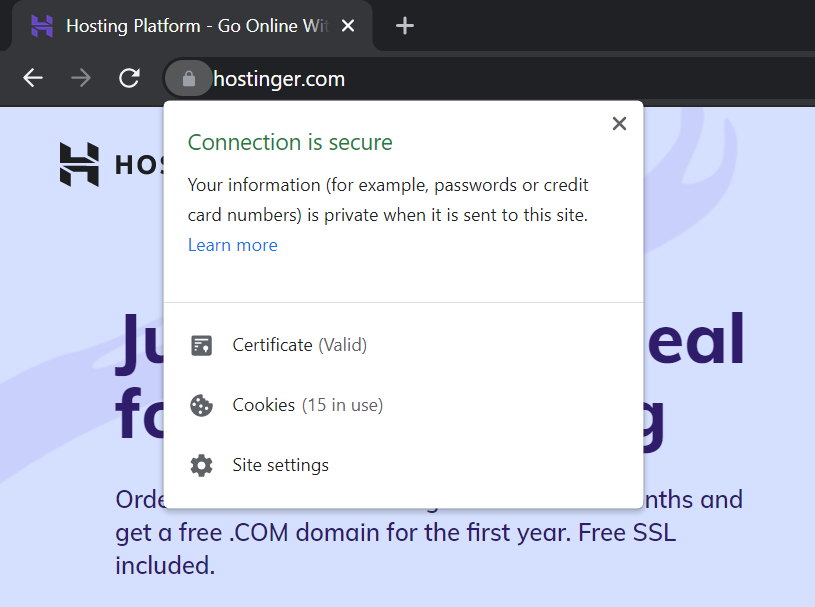
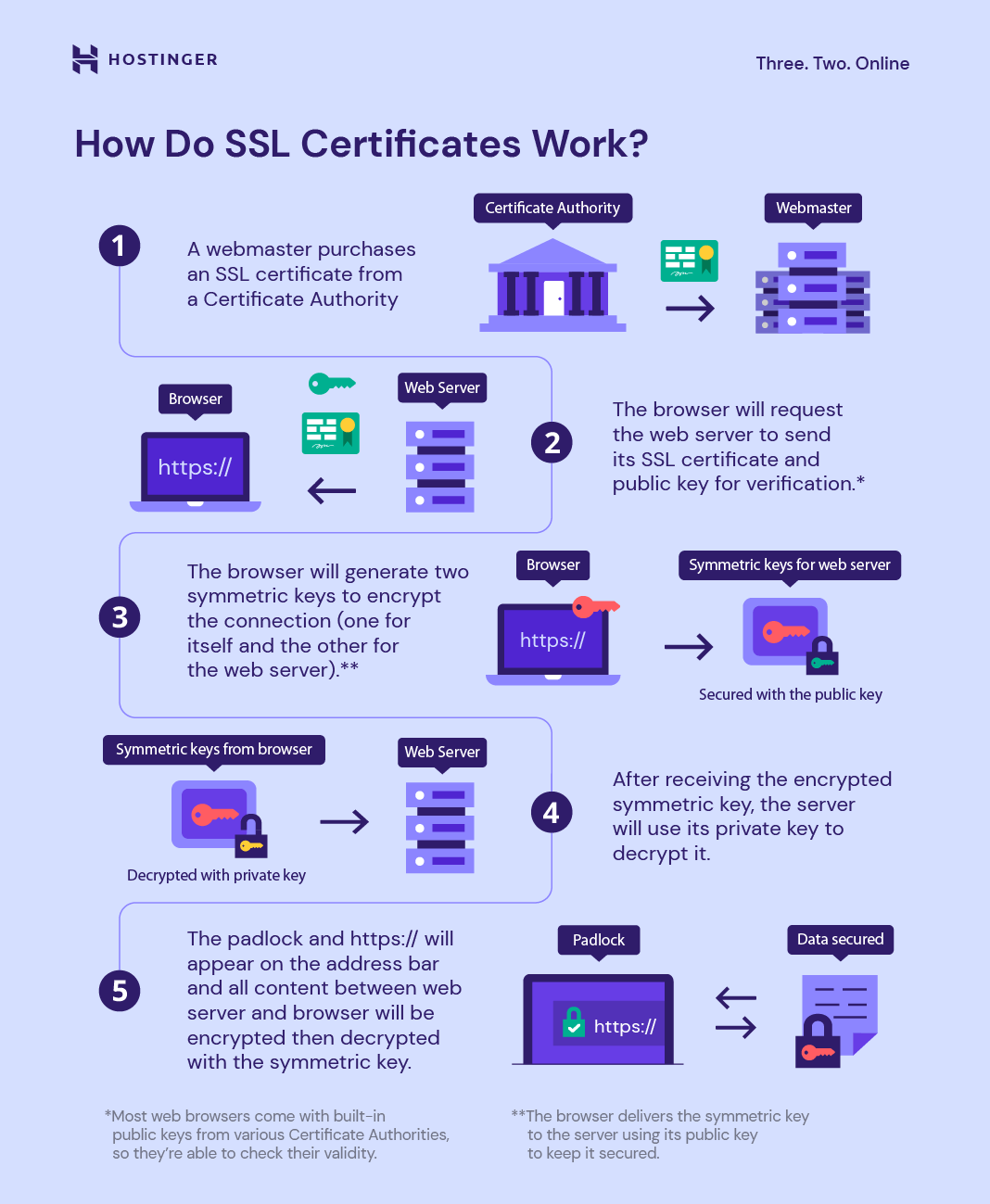
Below is a brief explanation of how SSL certificates work:
- First, the webmaster purchases an SSL certificate from a Certificate Authority. If the process is successful, the site will get a public and a private key.
- When a user opens the website, the browser will request the web server to send its SSL certificate and public key for verification. Most web browsers come built-in with public keys from various Certificate Authorities, so they’re able to check their validity.
- If successful, the browser will generate two symmetric keys to encrypt the connection – one for itself and the other for the web server. The browser delivers the symmetric key to the server using its public key to keep it secured.
- After receiving the encrypted symmetric key, the server will use its private key to decrypt it. With both the browser and server having symmetric keys, they can now establish a secure connection to transfer information.
- If successful, the padlock and https:// will appear on the address bar.
SSL certificates offer the following benefits:
- Better protection. With encryption, your and your visitors’ information won’t be easily intercepted by unauthorized users. For online business owners, having an SSL certificate also helps with PCI compliance.
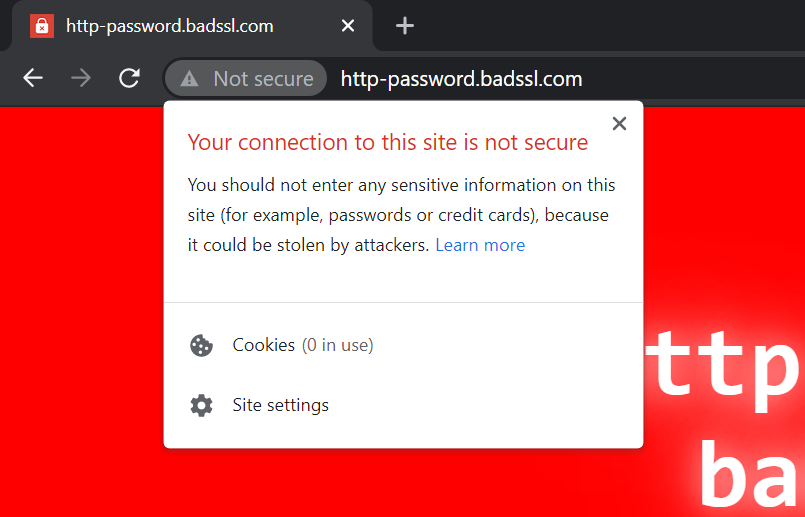
- Improved user experience. When a site isn’t SSL-certified, major browsers like Chrome and Safari will advise visitors not to enter any sensitive information. This warning can be harmful to businesses.
- SEO. Google generally prefers sites with an SSL certificate as it considers HTTPS a vital part of a good page experience.
Now that we understand how SSL certificates work and what they do, let’s go over the different SSL types.
Four Types of SSL Certificates
Before delving into the classification, note that this guide doesn’t cover the self-signed certificate. While it is free of charge, it is not issued by a CA and therefore doesn’t encrypt data as well as other types of SSL certificates.
With that in mind, the following SSL certificate types offer the same level of security across the board. What makes each of them different is how many domains or subdomains they can protect.
Single-Domain SSL Certificates
A single-domain SSL certificate protects only one domain specified in the Certificate Signing Request (CSR) and all the pages under it. That said, it won’t secure any subdomains related to the website.
In other words, a single certificate will protect example.com and all of its subdirectories like example.com/blog. However, it won’t work on its subdomains, such as support.example.com.
Since a single SSL certificate only covers one domain, this type usually comes at a low price. However, it can be time-consuming to install such certificates one by one if you have multiple domains or subdomains.
Wildcard SSL Certificates
Wildcard SSL certificates offer protection for a single domain and unlimited subdomains associated with it. Therefore, they will secure example.com as well as websites like support.example.com or store.example.com.
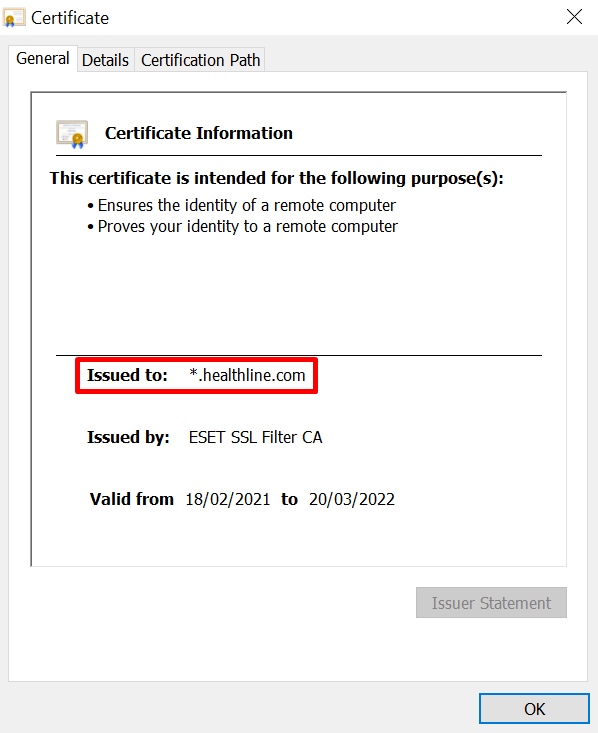
To see if a website uses a wildcard certificate, click on the padlock icon on the address bar and open the Certificate. If there is an asterisk before the domain name, it means the protocol also covers the site’s subdomains.
Naturally, a wildcard SSL certificate is more expensive than a single-domain one. However, this type is a more cost-effective option for those using multiple subdomains.
The downside to wildcard certificates is that they only cover subdomains at the first level, which means that a subdomain like login.store.example.com will not be protected.
Secondly, they may pose additional security risks since the private key is shared among all the servers that host the subdomains. If an unauthorized person has the private key, they can impersonate any domain that uses it.
Multi-Domain SSL Certificates
Multi-domain SSL certificates secure multiple domains that aren’t associated with each other. So, aside from example.com, they can also protect example-one.com and example-two.com.
Like a wildcard SSL certificate, this type of SSL certificate can protect unlimited subdomains of each site.
The number of sites the certificate can secure depends on the provider, though the typical range is between 100 and 250.
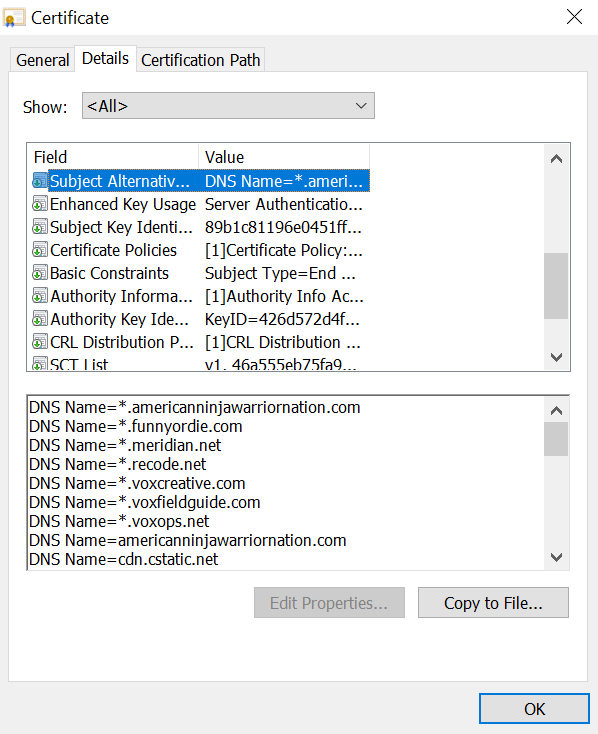
Websites that use multi-domain SSL certificates will have several names listed in the Subject Alternative Name (SAN) section of the Certificate Details.
One benefit of multi-domain SSL certificates is that they are more affordable than purchasing separate single certificates for each site. That’s why they’re suitable for those running multiple online businesses.
That said, similarly to a wildcard SSL certificate, there will be security risks associated with sharing a private key between multiple servers. Furthermore, the number of domains added to the certificate can affect the site’s size, thereby slowing it down.
Finally, every time you modify the list of domains on the certificate, the CA has to renew and reissue the file. This process may cause all the protected sites to go offline for some time.
Unified Communications Certificates
A Unified Communications Certificate (UCC) is the predecessor of the multi-domain SSL certificate. It is intended for websites and applications hosted on Microsoft Exchange and Live Communications servers.
While it’s possible to use UCCs for non-Microsoft platforms, they have specific configurations that make them best to secure Microsoft Exchange server environments.
Three Types of SSL Certificate Validation Levels
Types of SSL certificates also vary by their validation level – the degree to which a CA checks the legitimacy of the person or company who owns the website. The more rigorous the vetting process, the more legitimate the certificate will look to the visitor.
There are three different types of SSL certificates based on their validation levels – Domain Validation, Organization Validation, and Extended Validation certificates.
Domain-Validated Certificates
Best for: Personal bloggers and freelancers
A Domain-Validated SSL certificate (DV) is the easiest and most affordable certificate to obtain.
At the domain validation level, the website owner only has to prove their domain ownership to the CA by email, phone call, or changing the DNS record. They won’t have to submit any documentation to install the certificate.
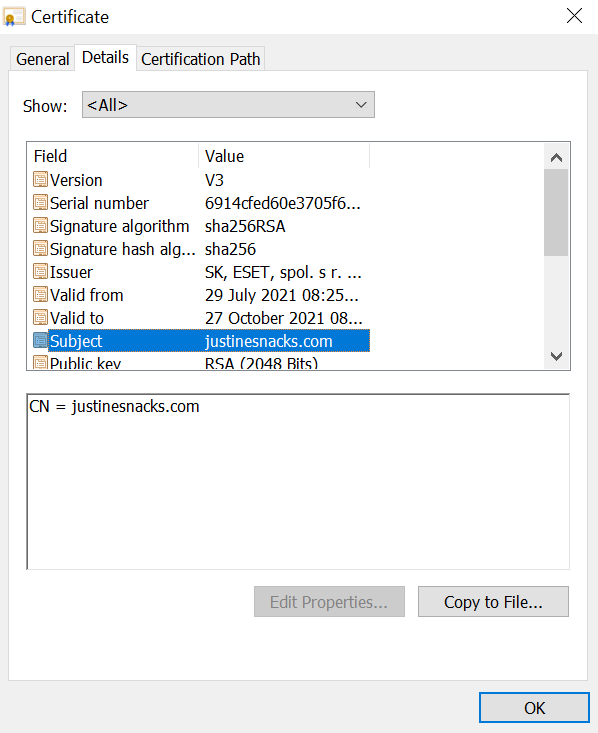
Websites that use DV SSL certificates will only show the domain name in the Subject field of the Certificate Details.
Organization-Validated Certificates
Best for: Small and medium-sized enterprises (SMEs) that deal with customers’ personal information
Organization Validation (OV) involves a more thorough vetting process than DV. Aside from domain validation, the CA will also check the applying entity’s information to determine if it’s a legitimate business.
To obtain an OV certificate, the registrant usually has to provide the CA with documentation that verifies their business name, physical address, phone number, and legal status. The process can take up to three days.
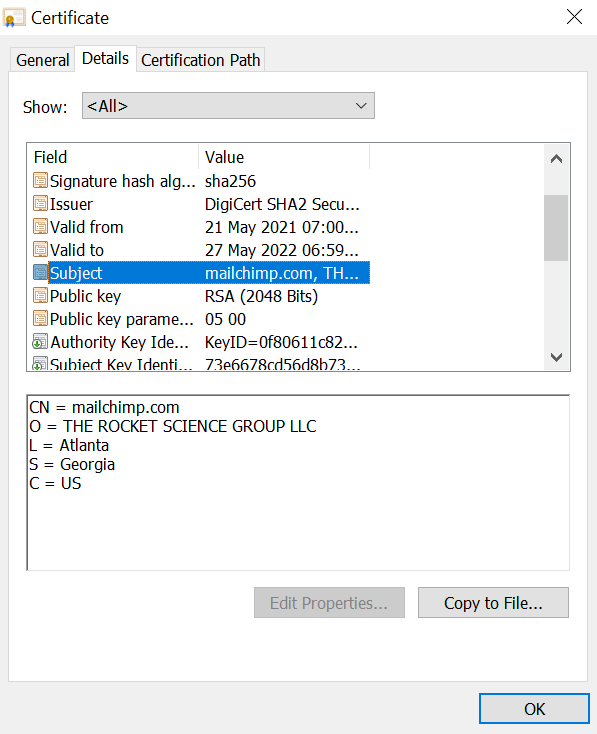
Websites that implement OV SSL certificates will display the business’s location information in the Subject line in the Details section. For this reason, this type of SSL certificate can make the entity appear much more legitimate to visitors.
Extended Validation Certificates
Best for: Large organizations
Extended Validation (EV) SSL certificates offer the most credible proof of legitimacy. The validation process is even more comprehensive than OV.
In addition to verifying the official records through an extensive background check, the CA will contact the registrant to confirm their physical location, legal status, and order details. This process can take up to several weeks.
Check the CA/Browser forum’s EV SSL certificate guidelines for the standardized procedures to obtain an EV SSL certificate.
To see if a website has an EV certificate, click the padlock on the address bar. This type of SSL certificate will usually feature the organization’s name, like so:
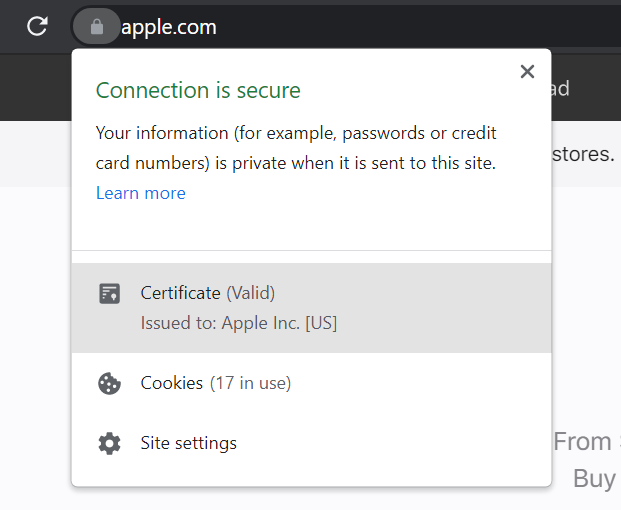
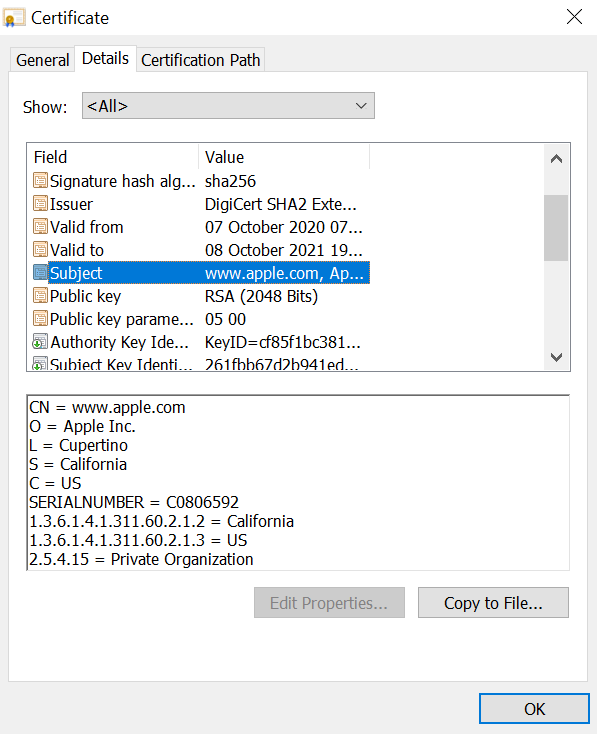
Click on Certificate and navigate to the Details tab -> Subject field. EV certificates will typically include the company number and object identifiers for the country and region where the business is based.
How to Install an SSL Certificate
Most hosting companies like Hostinger offer a built-in feature to install an SSL certificate. That way, users can easily set up a certificate instead of searching for one on their own.

The following sections will show you how to install Let’s Encrypt’s Lifetime SSL certificate on Hostinger. Note that it is a single-domain and use domain validation.
Alternatively, you can install a custom SSL certificate.
How to Install a Lifetime SSL Certificate
All Hostinger web hosting plans come with a free Lifetime SSL certificate which users can install right from their hosting control panel.
Here are the installation instructions:
- Log in to the hPanel, select your plan, and go to the Security → SSL section.
- Select a domain and click Install SSL.
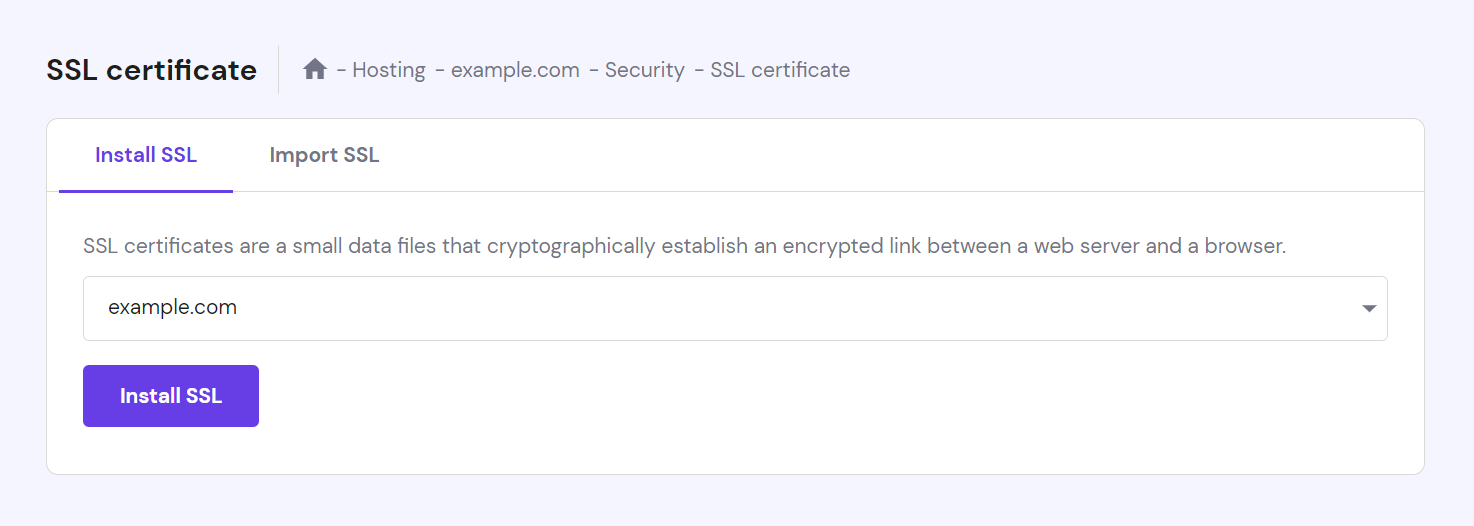
3. You will see that the SSL is installing. Give it a couple of minutes. Once the process is successful, the Status column will let you know that the certificate is Active.

Expert Tip
Make sure that the domain is pointing to Hostinger’s nameservers, or an error message will appear. If you purchase a domain from Hostinger, it will use our nameservers by default. Otherwise, log in to your domain registrar’s account and change the nameservers to the ones below: ns1.dns-parking.com ns2.dns-parking.com

Conclusion
In this guide, we’ve explored the different types of SSL certificates. Short for Secure Sockets Layer, an SSL certificate is responsible for encrypting the connection between a website and its visitors’ browsers.
There are four types of SSL certificates based on the number of domains they can protect:
- Single domain SSL certificate. Secures one website only.
- Wildcard SSL certificate. Protects one website and its associated first-level subdomains.
- Multi-domain SSL certificate. Applicable for multiple domains that aren’t subdomains of each other.
- Unified communications certificate. A multi-domain certificate that’s configured for Microsoft servers.
There are also three levels of certificate validation: Domain Validation, Organization Validation, and Extended Validation. DV has the least rigorous vetting process as webmasters only need to verify their domain ownership via email or phone. EV and OV require submitting some business documentation, though they offer the highest level of authentication.
When choosing between different types of SSL certificates, make sure to pick one that best suits your website and business needs. Good luck.
Types of SSL Certificates FAQ
How Many Types of SSL Certificates Are There?
There are 3 types of SSL certificates ‒ extended validation (EV), organization validated (OV), and domain validated (DV). The level of authentication based on Certificate Authority standards refers to how each differs from one another. DV SSL certificates are the most basic of the 3 types.
Free vs Paid SSL – Which One Should I Choose?
Both free and paid SSL certificates provide the same encryption services. However, the former only authenticates the domain they’re issued for, while the latter verifies the company behind the domain. Paid SSL certificates generally come with 24/7 technical support.
What Is a Class 3 SSL Certificate?
A Class 3 SSL certificate caters to servers and software signing as it provides a high level of assurance. Certificate Authority only issues this certificate after doing an extended validation of identity and authority of the applicant’s identity.
How Do I Know Which Type of SSL Certificate I Have?
Open your website on a browser and select the lock icon on the URL bar. If you use Google Chrome, navigate to Connection is secure -> Certificate is valid. After the popup window has appeared, open the Details tab to see the certification information.

Maisha is a proponent of high-quality, actionable content. When she's not writing for Hostinger Tutorials and Blog, she immerses herself in the English thesaurus. Her love for personal development essays drives her to help her fellow writers succeed in the world of content marketing.