How to install Django? Using Hostinger VPS template and manually
Mar 10, 2026
/
Andzelika D. & Valentinas C.
/
5 min Read
Django is a high-level Python web framework that promotes rapid development and clean, pragmatic design. It simplifies many web development tasks, so you can focus on building your application without reinventing the wheel.
In this tutorial, we’ll guide you through two methods to install Django on your virtual private server (VPS): using the Hostinger template for a quick setup and manually for more control over your environment.
By the end, you’ll have Django running in a virtual environment, ready for development.
Prerequisites
Before installing Django, it’s important to be familiar with a few key concepts:
- Basic Python knowledge – Django is a Python-based web framework, so you should understand Python fundamentals like data types, control flow (if/else, loops), functions, classes, and modules. Familiarity with Python libraries and tools will also be beneficial.
- HTML, CSS, and JavaScript basics – while Django focuses on back-end development, basic knowledge of front-end technologies such as HTML, CSS, and JavaScript is essential for creating templates and managing static files.
- Understanding of databases – Django interacts closely with databases to store and manage data. Basic database concepts (tables, records, primary and foreign keys) are important. Knowledge of SQL is helpful, though Django’s object-relational mapping (ORM) abstracts many database operations.
- Command-line interface (CLI) familiarity – many Django tasks are performed through the command line. Basic knowledge of Linux commands is necessary for managing your project.
Suggested Reading
Check out Python real-life use cases and learning tips in our article.
How to install Django using Hostinger’s VPS template?
Hostinger makes it easy to set up Django on your VPS using a dedicated template. This method simplifies the installation process, letting you avoid command-line setup while providing a stable and optimized environment for your Django application.
To start, consider your project’s needs:
- CPU and RAM – a faster CPU and more RAM improve performance, particularly for complex applications or high traffic.
- Storage – Django applications handle databases and static files. Ensure your VPS has sufficient SSD storage for these requirements.
- Bandwidth – choose a plan with enough bandwidth to handle expected traffic without slowdowns.
For a basic Django project, our Django VPS lower-tier plans, like KVM 1 or KVM 2, will suffice. As your project grows, you can easily scale up to a higher-tier plan.
After selecting your desired plan, set up the framework by choosing the OpenLiteSpeed and Django (built on Ubuntu 24.04) template during the onboarding process.
If you use our regular VPS plan or have previously installed a different template, follow these steps instead:
- Log in to hPanel and navigate to VPS → Manage.
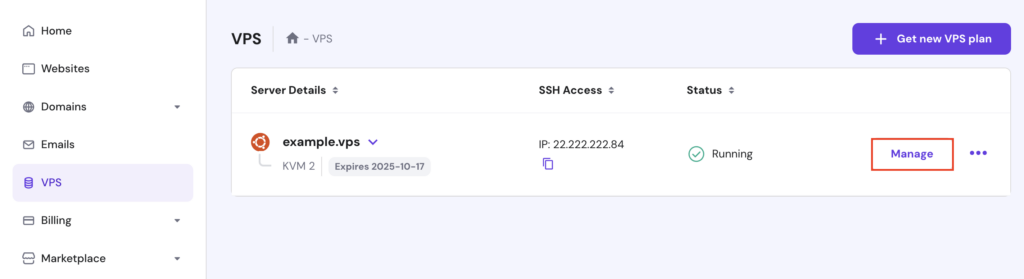
- On your VPS dashboard’s left sidebar, select OS & Panel → Operating System.
- In the Change OS section, go to the Application tab.
- Select OpenLiteSpeed with Django. You can also find it easily using the search menu.
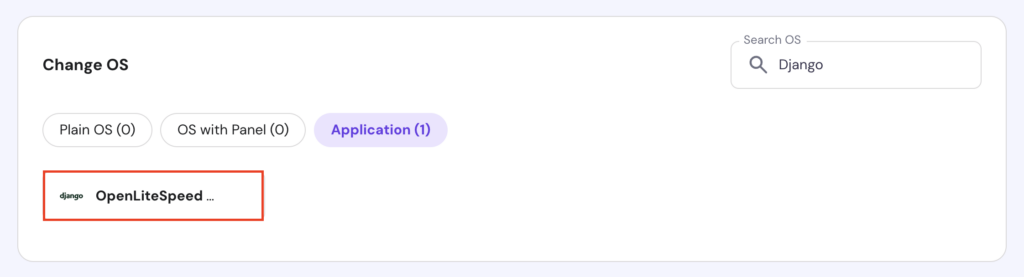
- When the popup appears, click Change OS, acknowledge the data deletion warning, and enter a new password for your server.
- Hit Confirm and wait for the process to complete within 10 minutes.
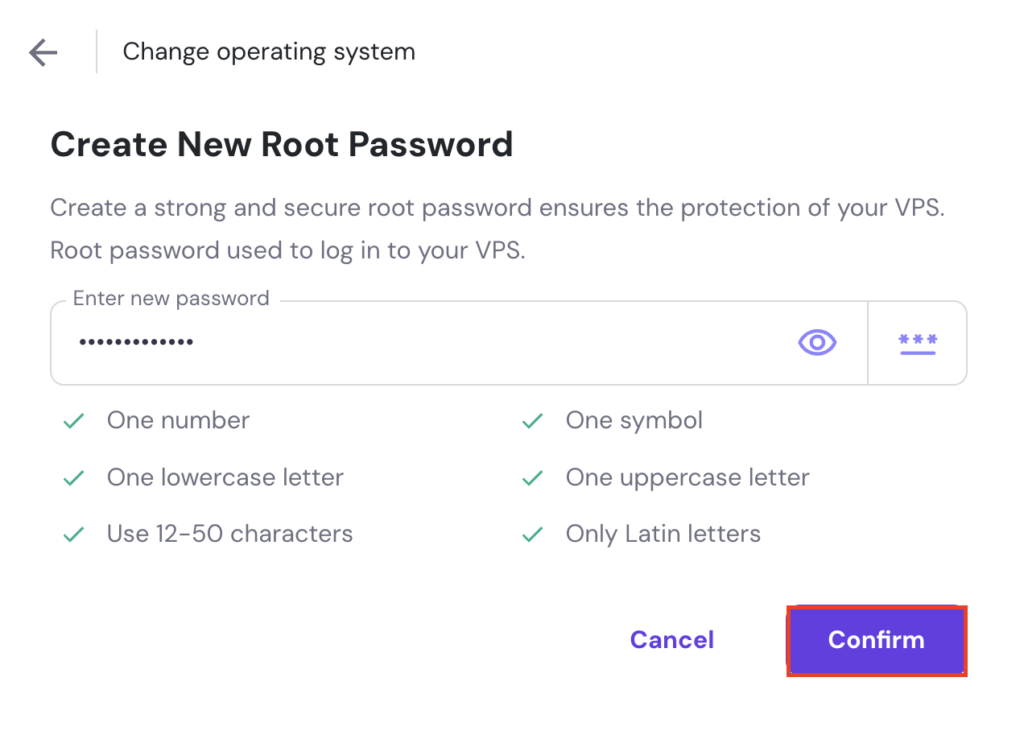
Once done, you’ll have a fully-configured server running Ubuntu 24.04 with Django and the OpenLiteSpeed web server.
💡 Pro tip
You can change your server's password later if needed, either via the Settings menu or by using Kodee, our AI assistant. Using Kodee is simpler – just type a prompt asking it to change your password and include the new one. For example: "Please change my server password to MyNewSecurePassword123."

How to install Django manually?
If you prefer using a different operating system, web server, or need more flexibility in setting up Django, you can manually install it using commands. Follow these steps:
1. Access your VPS
To manually install Django, you first need to connect to your VPS using a terminal or an SSH client like PuTTY. Here are the instructions:
- Open your terminal and run the following command, replacing your_vps_ip with your VPS’ actual IP address:
ssh root@your_vps_ip
- When prompted, enter your root password to gain server access.
For Hostinger VPS customers, you can find your server’s IP and root login credentials by navigating to the VPS details section in your VPS dashboard.
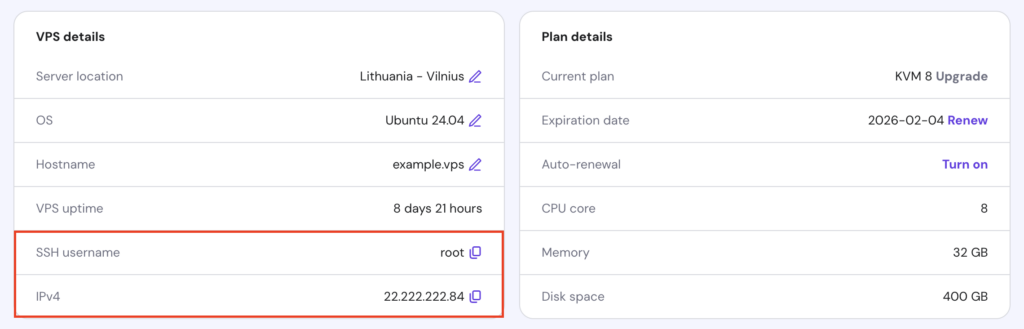
If you don’t want to use external software, Hostinger users can also access their server via the Browser terminal feature. Simply hit the button in the top right corner of your VPS dashboard to log in automatically.
- Once logged in, it’s a good practice to update and upgrade your server with:
apt update && apt upgrade -y
After updating, your VPS will be ready to install Python and other required dependencies for Django development.
2. Install Python and pip
To run Django, you’ll need to install Python and pip on your VPS. Most modern Linux distributions, like Ubuntu, come with Python pre-installed.
Here’s how to verify if Python is installed and to install or update it if necessary:
- Run the following command to check the current version of Python:
python3 --version
- If the command returns the Python version number, Python is already installed, and you just need to install pip, the package installer for Python.

- If it returns an error, you’ll need to install Python.
- Here are the commands to install Python 3 and pip:
sudo apt update
sudo apt install python3 python3-pip -y
After that, you’re ready to set up a virtual environment for your Django project.
3. Set up a virtual environment
A virtual environment is an isolated space where you can install Python packages and dependencies for a specific project. This method doesn’t affect the system-wide Python environment or other projects.
Using a virtual environment is especially important when working with Django, as different projects may require different versions of packages. It ensures that each project’s dependencies are neatly contained and don’t conflict with others.
Follow these steps to set up a virtual environment on your VPS:
- Install the venv package, if it’s not already installed:
sudo apt install python3-venv -y
- Create and navigate to your project directory. Here, we name it myproject:
mkdir myproject
cd myproject
- Create a virtual environment, replacing env_name with your preferred name:
python3 -m venv env_name
- Activate the virtual environment:
source env_name/bin/activate
Once activated, your shell prompt will change to reflect the virtual environment name, indicating you’re working within it.
4. Install Django
The last step is to install Django itself. You can do it by following these steps:
- Use pip to install the latest Django version:
pip install django
This will download and install Django and all its dependencies within the virtual environment.
- Execute this command to check if Django is installed and to see the version:
django-admin --version
You should see an output showing the current Django version, indicating that installation was successful.

That’s it! Now you can start building your Django application.
Conclusion
In this guide, we’ve covered installing Django on your VPS using Hostinger’s pre-configured template and through manual installation.
The former simplifies the process with just a few clicks, perfect for users who prefer easy setup. In contrast, the latter offers greater flexibility, especially if you use a different OS or need more control over your configuration.
With either approach, you now have a clean, isolated environment to efficiently build your Django application.
How to install Django FAQ
Is Python required to install Django?
Yes, Python is required to install Django. To install the latest version of Python and pip, run the following command: sudo apt install python3 python3-pip -y
What version of Python do I need to install Django?
Django supports older Python versions, but we suggest installing a newer version for better features, support, and performance. Python 3.8 or higher is ideal for compatibility with the latest Django features.
How do I verify my Django installation?
Run the django-admin –version command in your terminal. If Django is successfully installed, you will see the version number. If you see an error message, Django is not installed.

Andzelika is a Content Writer and Editor with over 5 years of experience in the digital marketing industry. With passion for technology and the art of the written word, she loves to combine the two worlds and produce actionable content.

Valentinas Čirba, Hostinger's Head of VPS, is a seasoned product leader specializing in VPS products with over ten years of experience. He's an expert at setting product strategy, leading cross-functional teams, and making smart decisions to deliver innovative solutions. Valentinas is committed to creating products that not only meet business objectives but also truly serve the customer. Follow him on LinkedIn.