How to create a membership website with WordPress in 10 steps + useful tips
Mar 10, 2026
/
Will M. & Marco C.
/
14 min Read
Creating a membership website can be an effective way to monetize your expertise and content.
Exclusive access to your resources, community features, or services must create value for your visitors and convince them to pay for the subscription. To offer more benefits, build a dedicated community around your membership site platform, fostering engagement and loyalty.
In this WordPress tutorial, we’ll walk you through 10 key steps to create a membership site, providing practical advice along the way. We’ll cover everything from understanding your audience and selecting a membership model to the technical WordPress setup.
How to Build a Membership Website With WordPress
We recommend choosing WordPress to start a membership website, as this all-in-one platform lets you share exclusive content, build a vibrant online community, and establish a steady stream of revenue. Whether you’re looking to create online courses, niche eBooks, or exclusive blog posts, a well-structured membership site can be the cornerstone of your digital strategy.
Here’s how to create a membership website in 10 easy steps:
1. Choose a Topic and Research the Target Audience
Selecting the right topic for your membership site is crucial. It sets the foundation for your membership website design and content, attracts your target audience, and can dictate the site’s long-term success. Here’s how to choose a topic that not only interests you but also appeals to visitors and potential members.
Identify Your Passion and Expertise
Start with what you know and love. Your enthusiasm for the subject will translate into engaging and authentic content. Consider areas where you have significant knowledge or skills that others might find valuable.
Understand Your Audience
Research your potential members to understand their interests, needs, and challenges. Tools like Google Trends can offer insights into popular content trends, while forums and social media can provide a direct line to your audience’s preferences. This understanding will help you create content that meets their needs.
Analyze Market Demand
Use keyword research tools like Ahrefs and Semrush to gauge interest in your chosen topic. High search volumes indicate a strong interest, but they also signal competition. Look for niches within broader topics where you can offer unique insights or solutions.
Evaluate Monetization Potential
Consider how your chosen topic can generate revenue. Membership websites often rely on exclusive content, such as online courses, educational resources, or specialized advice, that members are willing to pay for. Assess whether your topic can sustain a variety of content formats and offers that justify a membership fee.
Check out Competitors
Research existing membership websites in your chosen niche. Note what they do well and where there might be gaps in their offerings. This can help you position your site to offer something unique or improve the existing content.
To-Do List
- Consider your interests and areas of expertise. Identify topics you’re passionate about and knowledgeable in.
- Conduct audience research. Use social media, forums, and keyword tools to understand what your potential members are looking for.
- Analyze market demand and competition. Use keyword research tools to assess interest levels and competition in your chosen niche.
- Brainstorm content ideas. Think about the types of exclusive content, like online courses or webinars, you could offer to new members.
- Evaluate monetization strategies. Consider various revenue models, such as subscription fees, tiered membership levels, or selling physical and digital products.
2. Decide the Membership Model
After choosing a topic that resonates with both you and your target audience, the next step is to select the right membership model.
This will define how existing members interact with your site, access content, and, most importantly, how you generate revenue. Here are some popular membership models and how to choose the one that fits your site best:
Subscription-Based Model

A subscription-based website is the most common model for a paid membership site. Members pay a recurring fee, often monthly or annually, to access exclusive content. This model is ideal for most membership sites that offer new courses, continuous educational content, or regular updates.
Tiered Access Model

In a tiered model, you create multiple membership levels, each offering a different level of access to content or perks. As a result, new members can choose a level that suits their needs and budget, as well as upgrade it later.
One-Time Payment Model

Some membership sites opt for a one-time payment that grants lifetime access to content. This model can be attractive for offering comprehensive online courses or complete content libraries without recurring fees.
Freemium Model

The freemium model offers basic membership content or features for free for non-members, while premium content requires a paid subscription. This approach can attract a large user base and convert a portion of those users into paying members by offering a taste of what’s available behind the paywall.
Community-Centric Model
If your site focuses on networking, peer support, or community interaction, consider a model that prioritizes access to forums, networking events, or group coaching sessions over traditional gated content.
How to Choose the Right Model
Consider the following when choosing the right subscription model for your membership site:
- Content. Ensure the membership model complements your content type. Subscription models are ideal for continuous content, while one-time payments suit standalone offerings like courses or eBooks.
- Audience. Understand your target audience’s preferences and financial capacity, tailoring your model to fit young professionals or established individuals accordingly.
- Goals. Reflect on your long-term objectives and how you want to make money online. Choose between steady revenue streams via subscriptions or rapid community growth through freemium models.
- Competitors. Investigate the models used by similar sites to gain insights into effective strategies and common pitfalls.
- Scalability. Ensure the chosen model can adapt to your site’s evolving needs and growing member base.
3. Create Your Brand Identity
Before diving into the technical aspects of setting up your membership site, it’s important to establish a strong brand identity. This will guide the visual design of your membership platform and influence member perception and engagement. Here’s how to craft a compelling brand identity for your membership site:
Define Your Brand Identity
Your brand identity is the core characteristic that defines you to your members. It should resonate with your target audience and reflect the values and mission of your membership site. Whether it’s empowerment, education, community, or innovation, ensure your brand essence is clear and consistent across all touchpoints.
Choose a Brand Name
Select a name that is memorable, easy to spell, and reflects the nature of your membership site. It should give visitors a hint of what to expect and set the tone for the member experience. Consider using name generators for inspiration, and ensure your chosen name is unique and available as a domain.
Design Your Logo and Other Visual Elements
Your logo is often the first visual element that potential members will associate with your brand. Design a logo that is simple, versatile, and aligned with your brand essence. Along with your logo, choose a color scheme, typography, and imagery style that supports your brand identity and appeals to your target audience.
Create Your Brand Voice
Your brand voice is how you communicate with your audience, from website copy to email marketing. It should be consistent and reflect your brand’s personality. Whether it’s professional, friendly, inspirational, or humorous, ensure your brand voice resonates with your target audience and is appropriate for your content.
Build a Brand Story
Your brand story is the narrative that ties your brand elements together and explains why your membership site exists. It should highlight your journey, your mission, and the value you bring to your members. A compelling brand story can foster a deeper connection with your audience and encourage engagement.
To-Do List
- Brainstorm. Create a membership site that has certain values and mission. How do you want members to feel when they interact with your brand? Create a word cloud or mindmaps to visualize what your brand stands for.
- Design. Either work with a designer or use online design tools to create your logo, select your color palette, and define your visual style. Ensure these elements are flexible for various uses, from your website to social media.
- Test. Write sample messages, website copy, and social media posts to refine your brand voice. Ensure it’s consistent and authentic to your brand essence.
- Build a narrative. Write down the story of your membership site, focusing on why it was created, the problems it solves, and the community it builds. This story can be a central part of your About Us page and marketing materials.
4. Get Managed WordPress Hosting
Understanding how to choose a web hosting plan is important when setting up a membership site, as your web host has an impact on site performance, security, and scalability. Managed WordPress hosting is an excellent choice for those looking for optimal performance for their membership site.
What Is Managed WordPress Hosting
Managed WordPress hosting provides a hosting environment specifically optimized for WordPress, offering features like automatic updates, enhanced security, and expert support. This type of web hosting is ideal for membership sites since you can use one-click installers and benefit from automatic WordPress updates, enabling you to focus on content and member engagement.
How to Choose a WordPress Hosting Provider
When choosing a managed WordPress hosting provider, consider the following features that are particularly beneficial for a membership site:
- Performance. Look for web hosts that offer fast server speed and high uptime guarantees to ensure your site is always accessible and provides a smooth user experience.
- Security. Membership sites often handle sensitive information. Choose a host with robust security measures like SSL certificates, daily backups, and malware scanning.
- Scalability. Your web hosting resources should be able to grow with your site. Look for providers that offer easy scalability options to accommodate increasing traffic and content as your membership base grows.
- Support. Opt for a host with a strong reputation for customer support, especially if you’re not technically inclined. Access to WordPress experts can be invaluable for troubleshooting and advice.
- Add-ons. Opt for WordPress hosting plans that include a free domain registration for the first year. This can be a cost-effective way to secure your brand’s domain name and simplify your setup process.
- Integration and onboarding. Choose a hosting provider that offers seamless WordPress integration and a straightforward onboarding process. This can significantly reduce the technical challenges of setting up your site, especially if you’re new to WordPress.
Hostinger’s Managed WordPress hosting is designed to cater to the needs of membership sites, ensuring optimal performance, security, and growth potential.

5. Set up Your WordPress Site
Next, it’s time to start building your membership website using WordPress. If you opt for a hosting service other than managed WordPress hosting, you might need to install WordPress manually.
Choose a WordPress Theme
The theme you select sets the tone for your site’s design and user experience. It’s important to choose a theme that aligns with your subscription model and brand identity, or can be easily customized to match your vision. Here are some of the best WordPress themes known for their versatility and suitability for membership sites:
- Astra. A lightweight and customizable theme that works seamlessly with popular page builders and membership plugins.
- Divi. Famous for its visual builder, Divi offers extensive customization options, making it easy to design your site without coding.
- OceanWP. A versatile theme that provides a range of demo templates, including ones ideal for membership sites.
- MemberPress Themes. Designed specifically for membership sites, these themes are optimized for the MemberPress plugin but work well with other membership plugins, too.
- BuddyBoss. Ideal for community-centric membership sites, BuddyBoss integrates well with forums and social network plugins.
Pro Tip
Not sure how to install a theme? Follow our easy guide on how to install a WordPress theme.
Enable User Registration
To allow visitors to become members, you need to enable user registration on your membership website. To do so, follow these steps:
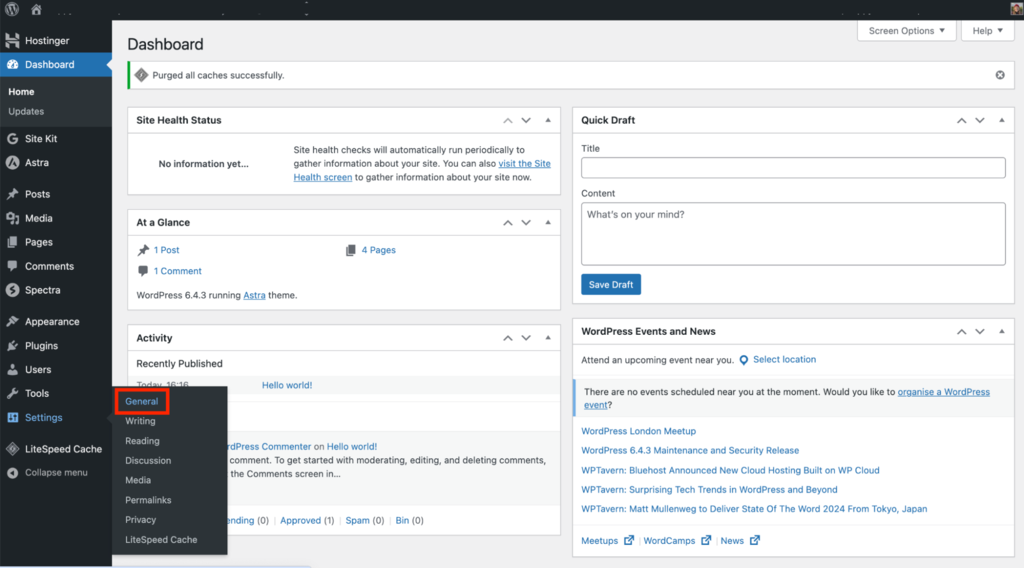
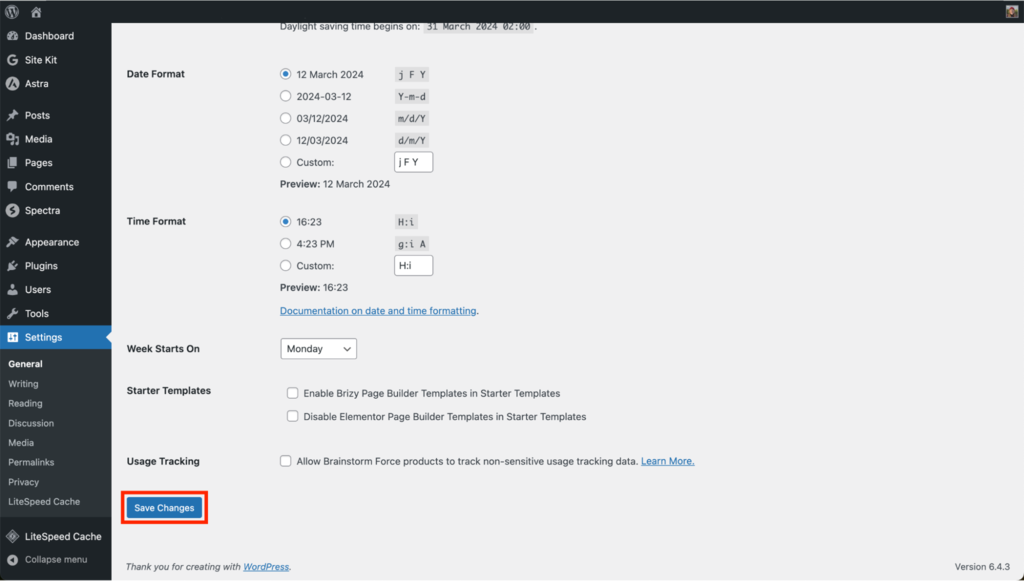
- Navigate to your WordPress dashboard and go to Settings → General.
- Scroll down to the Membership section and check the box next to Anyone can register.
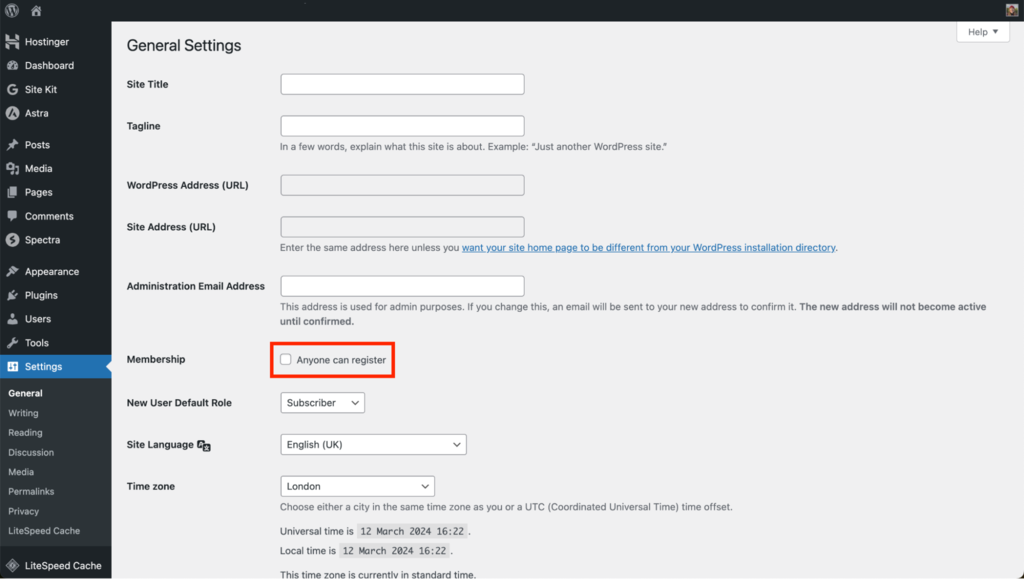
- Save your changes. Enabling this setting allows visitors to register on your site, which is essential for building your membership community.
Install a Membership WordPress Plugins
To add comprehensive membership functionality to your site, you’ll need to install a membership plugin. These plugins offer features like content restriction, membership levels, and payment gateway integration.
Here are some popular free and premium membership plugins to consider:
- MemberPress. Offers robust access rules for content restriction, customizable membership levels, and is known for its ease of use.
- Paid Member Subscriptions. Facilitates the setup of membership sites with features for subscription management, content restriction, and easy WooCommerce integration for enhanced eCommerce functionality.
- Paid Memberships Pro. A versatile plugin with a wide range of features, including customizable membership levels, extensive payment options, and detailed reporting.
- Restrict Content Pro. Provides a simple interface for content restriction, membership management, and integrates with several payment gateways.
- WooCommerce Memberships. An excellent choice if you’re also running an online store, as it seamlessly integrates memberships with WooCommerce.
Pro Tip
First time installing a plugin? Follow our step-by-step tutorial on how to install a WordPress plugin.
6. Set up Payment Gateways
The ability to accept payments is an important part of your membership website. Whether users are signing up for a free trial, a monthly subscription, or a premium membership, integrating reliable payment gateways ensures that financial transactions are secure and efficient.
Why Payment Gateways Are Essential
Payment gateways serve as the intermediary between your membership site and the payment processors. They encrypt sensitive information, ensuring that your members’ payment details are secure. Offering multiple payment options increases the likelihood of people signing up to your membership site, as users can choose their preferred payment method.
Setting Up Payment Gateways With Paid Member Subscriptions
For this guide, we’ll demonstrate the setup process using Paid Member Subscriptions. However, the process is similar across different plugins:
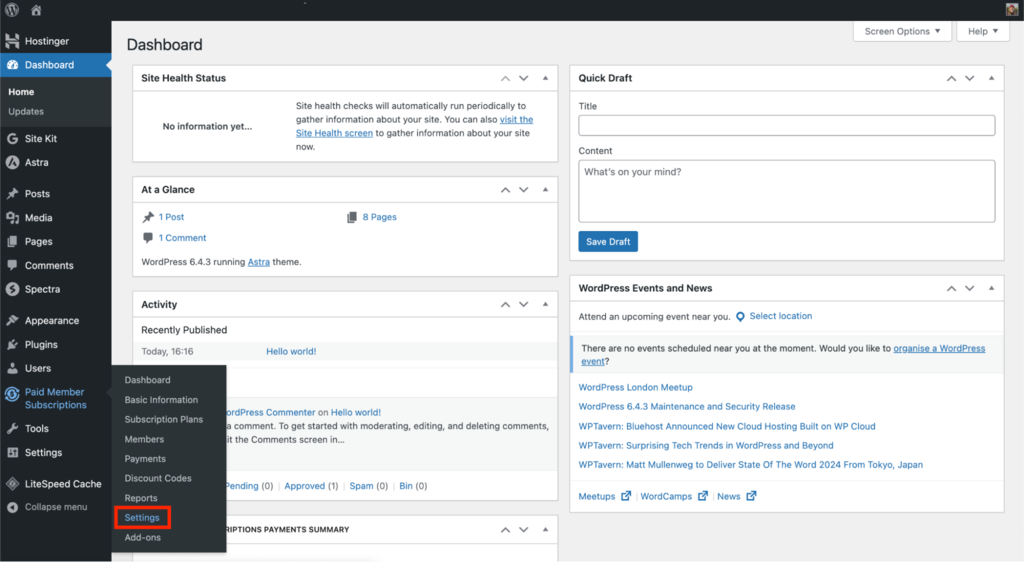
- In the WordPress dashboard, navigate to Paid Member Subscriptions → Settings.
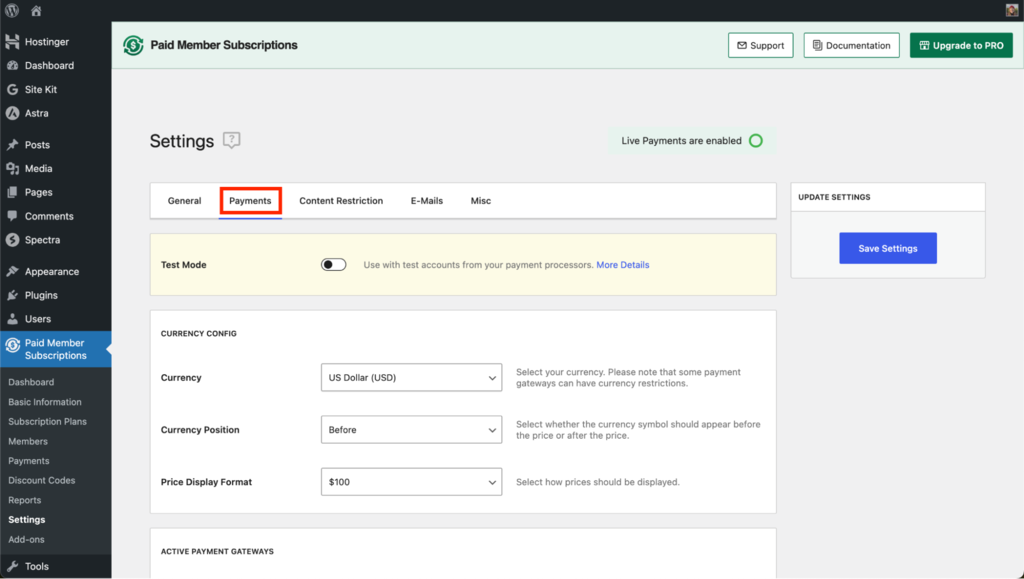
- Click on the Payments tab.
- Scroll down to the Active Payment Gateways section. Enable the payment methods you want to offer by toggling the slider. Designate a default payment gateway, which will be the pre-selected option for members during checkout.
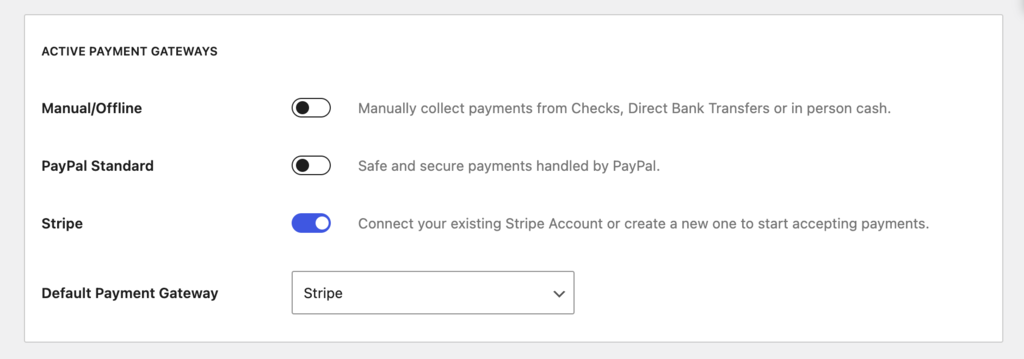
Each payment gateway has its own set of configurations. For instance, if you’re using Stripe for your WordPress site, you’ll need to enter your Stripe API keys, which you can find in your Stripe account. Similarly, for PayPal, you’ll need to provide your PayPal email address or API credentials. This ensures that the payments processed on your site are linked to your financial accounts.
Before going live, conduct a few test transactions to ensure the payment process is smooth and secure on your membership site. Most payment gateways offer a sandbox or test mode for this purpose, allowing you to simulate transactions without processing real payments.
7. Create Subscription Plans
Ideally, you should offer subscription plans that cater to different user needs and preferences on your membership site. By doing so, you provide users with various price points, membership durations, and benefits, making your membership content more attractive to a wider audience.
Here’s how to set up your subscription plans using the Paid Member Subscriptions plugin:
Set up Subscription Plans
The Paid Member Subscriptions plugin makes it straightforward to create and manage multiple subscription levels, each with its own set of access rules, pricing, and duration. To get started, do this:
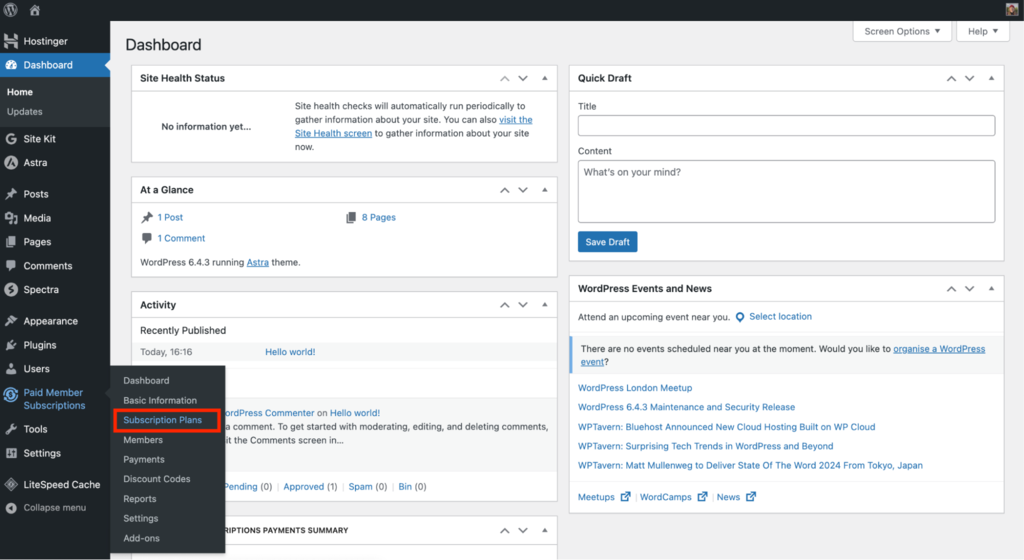
- Navigate to your WordPress dashboard and select Paid Member Subscriptions → Subscription Plans. This will take you to the page where you can manage your existing plans or create new ones.
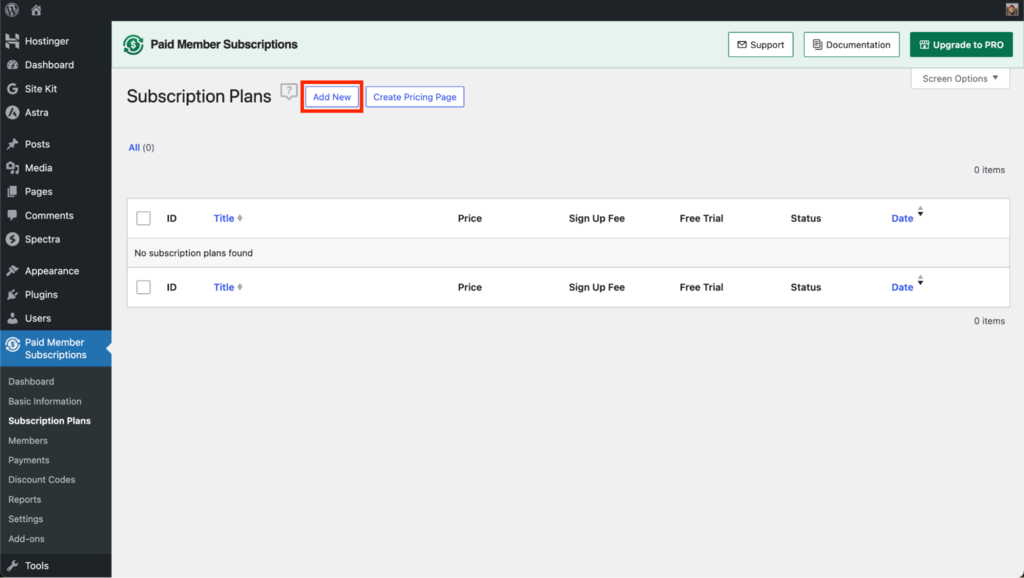
- To add a new plan, click on the Add New button. This will open a form where you can define the details of your new subscription plan.
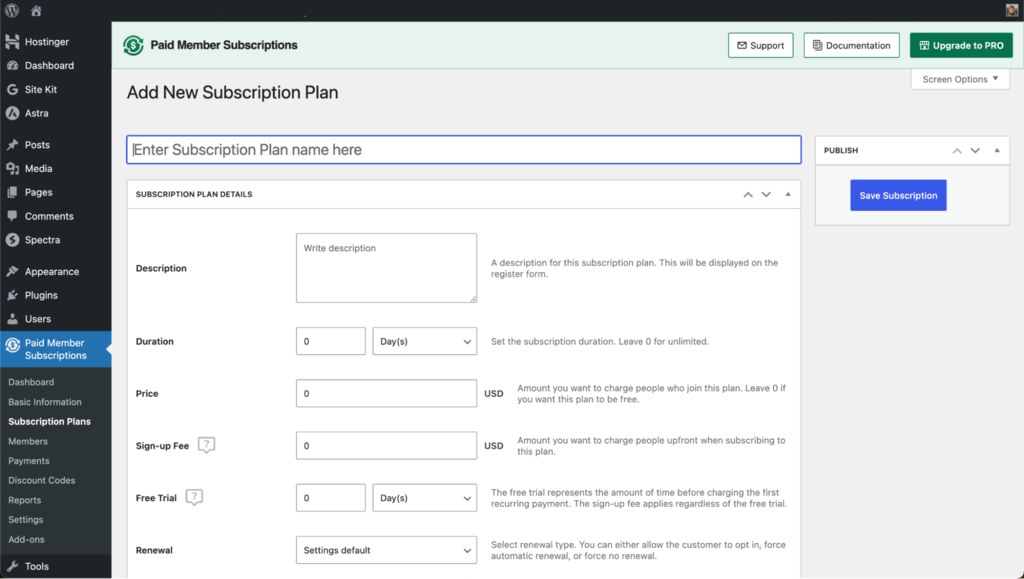
- Fill in the plan details and click on Save Subscription when finished.
Define Plan Details
When creating a subscription plan, consider several key details:
- Name and description. Give your plan a clear and descriptive name, and use the description field to outline the membership features and benefits. This information helps potential members understand the value of each tier.
- Duration. Set how long each subscription period lasts before it needs renewal. This can be a month, a year, or any other duration that fits your content delivery schedule. You can also offer lifetime access for a one-time payment.
- Price. Determine the cost of each subscription level. Consider offering a range of price points to cater to different budgets. Competitive pricing is crucial, so research similar membership sites in your niche to set realistic prices.
- Trial. Offering a free trial can entice users to sign up by giving them a taste of your members-only content without any upfront payment. When deciding on the length of the trial period, keep in mind that it should be long enough for users to see the value in becoming paying members.
- Sign-up fee. You have the option to charge an initial fee when a new member signs up, separate from the recurring subscription fee. This can be useful for covering administrative costs or as an upfront investment in high-value content.
- Status. Ensure your subscription plan is set to active so it is available to potential members.
8. Create Essential Pages
Building a membership website that functions smoothly requires certain key pages. These pages help members with different tasks, such as signing up and logging in to manage their accounts. Here’s a rundown of the essential pages you need for your membership site:
- Registration. This is where new users can sign up for a membership. This page should be straightforward, inviting, and clearly explain the benefits of joining.
- Login. A login page allows returning members to access their accounts. The user login form should be easily accessible and, ideally, include options for social login to enhance user convenience.
- Account. On the account page, members can view and edit their profile information, manage their subscription details, and track their activity or course progress.
- Password reset. It’s crucial to have a system in place for users to reset their passwords if they forget them. A password reset page reduces the administrative burden on your side and improves user experience.
- Pricing. This page showcases the different membership levels, what each offers, and their costs. As it’s a critical page for converting non-members into paying customers, make it clear and compelling by highlighting the value of each plan.
How to Set up Website Pages
Many WordPress membership plugins offer setup wizards that automatically create these essential pages for you. This can significantly streamline the setup process and ensure that these pages integrate seamlessly with your membership system.
This is how the setup wizard of Paid Member Subscriptions looks like:
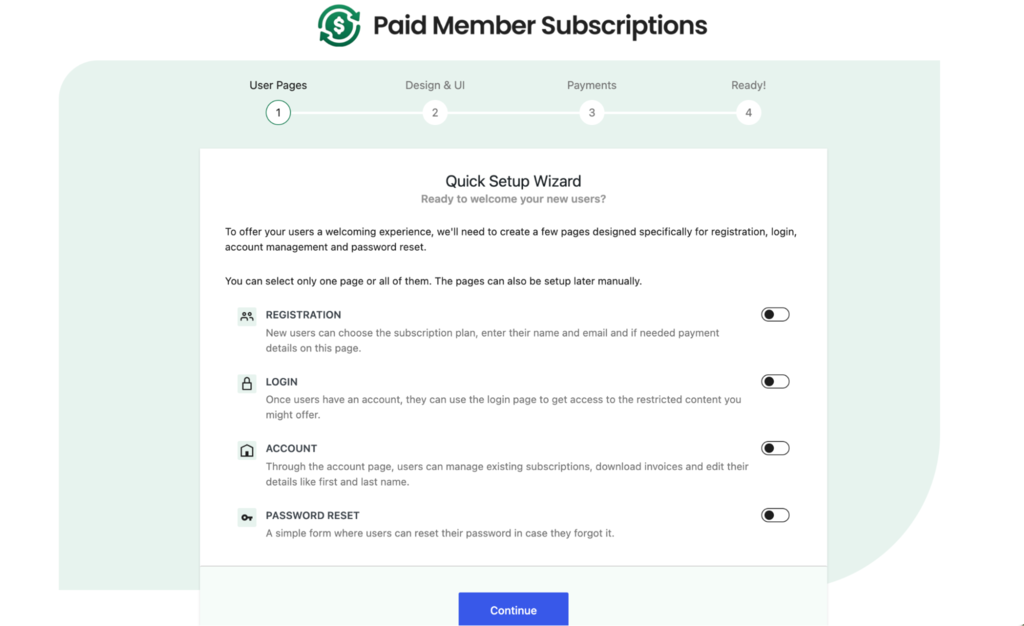
If you prefer more control over the design and content of these pages, or if your plugin doesn’t offer a setup wizard, you can create them manually. Here’s how:
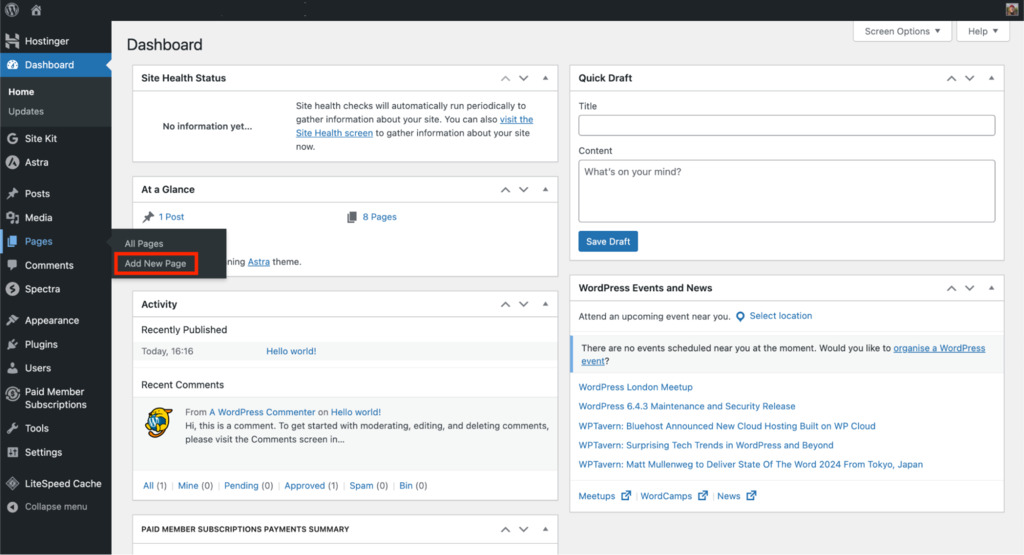
- In your WordPress dashboard, go to Pages → Add New for each page you want to create.
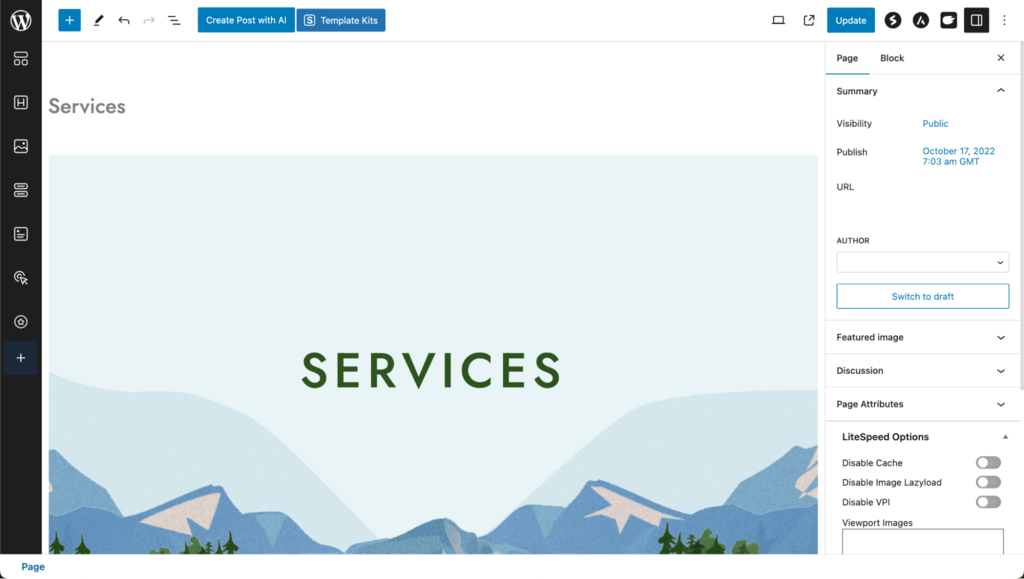
- Add the necessary information and customize the layout to match your site’s design. For registration, login, and account pages, you’ll likely need to embed shortcodes provided by your membership plugin, which will render the necessary forms and information dynamically.
- Once your pages are ready, go to your membership plugin’s settings. For Paid Member Subscriptions, navigate to Settings.
- From there, select General and scroll down to the Membership Pages section.
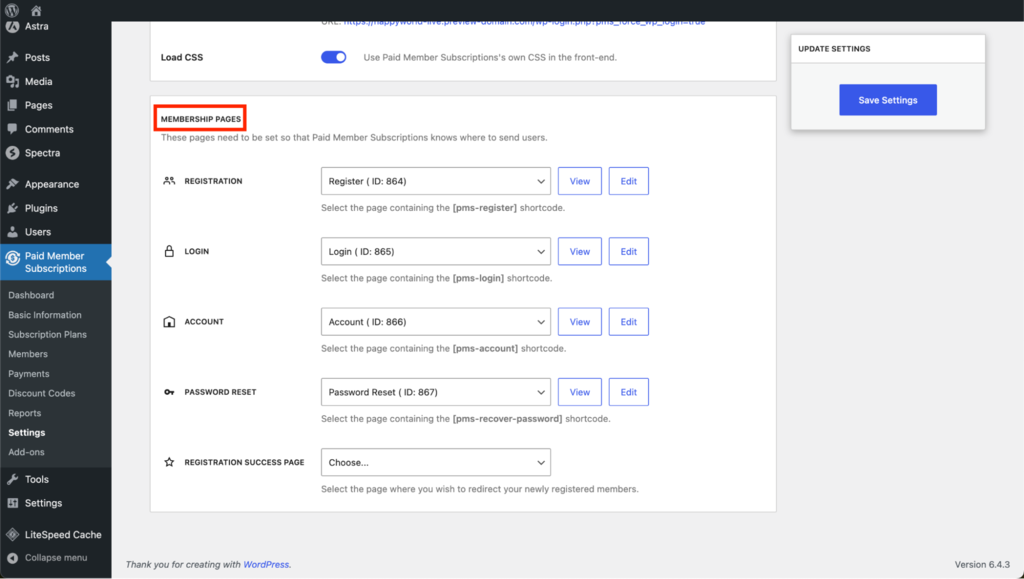
- Assign each page its role. Click on Save Settings when done.
9. Publish Members-Only Content
With your membership site set up, it’s time to create members-only content that will draw users in and keep them engaged.
By carefully curating and restricting your content, you create a clear value proposition for your membership site. Members will know that their subscription grants them access to content that can’t be found elsewhere, making their investment worthwhile.
To do so, follow the steps below:
Publish Your Content
Begin by adding the content only members will access. This can be articles, videos, courses, or any other type of content that aligns with your membership site’s focus.
Use the standard editor to create and add a new post to your WordPress website.
Enable Content Restrictions
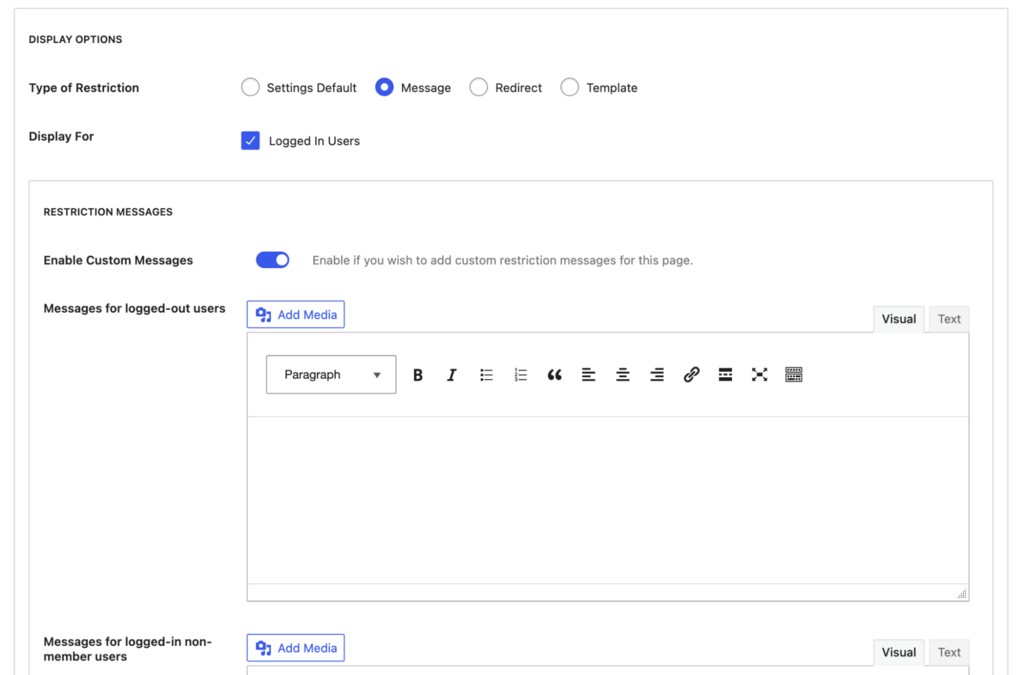
To ensure that only the right eyes see your members-only content, you’ll need to set up content restrictions. The Paid Member Subscriptions plugin offers a straightforward way to manage these restrictions directly from the post or page editor.
- Start by creating a new post or page. Alternatively, edit an existing one where you intend to add members-only content.
- Scroll down to the bottom of the editor. You should find a section labeled Content Restriction near the bottom of the page.
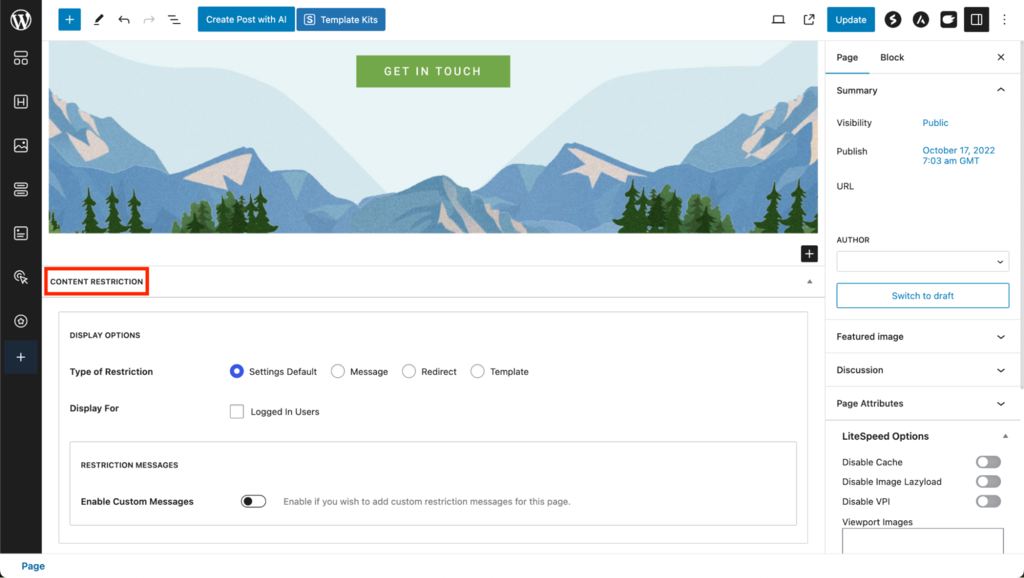
In the Content Restriction section, you can restrict access based on membership levels. Do so by specifying which membership levels can access the content. If a visitor doesn’t meet the access criteria, they won’t be able to view the content.
- You can also set a custom message that unauthorized or non-members will see when they attempt to access restricted content. This is a great place to encourage sign-ups, free trials, or membership upgrades by highlighting what members gain access to.
10. Promote Your Membership Website
Now, your own membership site is ready to welcome members, and it’s time to start promoting it online. Effective promotion will help you attract new members and start building your online community. Here are some strategies we recommend to get the word out:
- Search engine optimization (SEO). Optimize your content for search engines to increase your visibility in search results. Use relevant keywords, create quality content, and ensure your site has a good structure and fast loading times.
- Email marketing. Build an email list and engage potential members with regular updates, exclusive offers, and valuable content. Email marketing can be a powerful tool to nurture leads and convert them into paying members.
- Social media. Utilize social media platforms to reach more people. Share snippets of your members-only content, engage with your followers, and use targeted ads to attract potential members. Encourage members to share quotes from subscriber content on their own social media to foster a sense of belonging and amplify your reach.
- Content marketing. Create valuable free content that showcases the quality and depth of what members can expect. This can include blog posts, webinars, or free courses that lead users to your membership offers.
- Partnerships and collaborations. Collaborate with influencers, bloggers, or other membership sites in your niche to reach new audiences. Guest posting, podcast interviews, and joint webinars are effective ways to gain exposure.
Tips for Managing a Membership Website
To ensure your membership site remains profitable and engaging for members, follow these best practices:
Keep Content Fresh and Relevant
Consistently update your site with new content to maintain member interest and encourage renewals. Incorporating a mix of high-quality images, videos, and graphics can significantly enhance your storytelling and user experience, making the content more compelling and engaging.
Enhance Community Engagement
Build a strong sense of community through interactive platforms like forums, live Q&A sessions, and member-only discussions. This requires your active involvement, but it also offers members exclusive access to you, adding significant value to their membership.
Track Website and Membership Performance
Utilize analytics tools to keep an eye on key metrics such as site traffic and engagement. This data can guide your content strategy and community engagement efforts, ensuring they align with your members’ interests and needs.
Offer Customer Support
Provide accessible and responsive support channels to help members with any issues they may encounter. This includes a dedicated email, chat support, or a comprehensive FAQ section on your site.
Encourage Feedback and Suggestions
Create opportunities for members to share their thoughts on your content and community features. This feedback is invaluable for improving the offers on your membership site and can make members feel more invested in the community.
Conclusion
A membership website enables you to generate a steady stream of revenue by offering exclusive content or services to subscribers. It also helps in building a loyal community around your brand or niche, enhancing engagement and customer retention.
To create a membership site with WordPress, start by setting up Managed WordPress hosting. Then, install membership software, such as the Paid Member Subscriptions plugin, to manage subscriptions, content access, and payments. Customize your site with a suitable theme and create valuable content for your members.
Enhance your membership website with features like forums, live Q&A sessions, and personalized member profiles to further increase member satisfaction and loyalty. Regularly update your content and listen to feedback to keep your community active and ensure your membership site’s long-term success.
How to Create a Membership Website FAQ
Find answers to the most common questions about how to make a membership site below.
What Is a Membership Website?
A membership site restricts access to exclusive content or services, primarily for registered members. It’s a dynamic model to foster a community and drive recurring revenue, often relying on a robust membership model that can include free membership and premium membership tiers for enhanced benefits.
What Are the Essential Features of a Membership Website?
Crucial elements of a membership site include seamless member registration, effective content restriction, varied subscription plans, reliable payment gateways, and responsive customer support for an optimal user experience. A successful membership site also typically features a dedicated members-only area, fostering a sense of exclusivity and community.
How Can I Protect the Paid Content on My Membership Website?
Install a WordPress membership plugin to limit content access. This tool ensures only your members with the appropriate subscription levels can view premium content, safeguarding your exclusive offerings. Additionally, integrating payment gateways like Stripe or PayPal helps manage online payments securely, ensuring only paid members gain access to the gated content on your membership site.

Will Morris is a staff writer at WordCandy. When he's not writing about WordPress, he likes to gig his stand-up comedy routine on the local circuit.

Marco Chiesi is the Head of WordPress at Hostinger, with over 20 years of experience as a software engineer in the web industry. He specializes in open-source technologies and the WordPress ecosystem, where he has contributed in different areas: Plugin Developer (with over 10 million downloads), WordCamp speaker and organizer, Meetup organizer, Translator, and Core Contributor. He is passionate about leading his team to create innovative solutions for Hostinger's web hosting product, which hosts over 5 million WordPress installations. Follow him on LinkedIn.



Comments
November 12 2018
This is great and really timely for me, as I’m considering starting a membership site in the parenting field. Thanks!
November 12 2018
That's great, Ray! Good luck with the website ;)
March 18 2020
That's a great read! One of the detailed and concise pieces on building membership websites. The best thing about executing a membership website with WordPress is the fact that, it becomes extremely easy to execute the wordpress plugins in a way which eases the whole effort of setting up different elements of the website.