How to export a database in phpMyAdmin
Dec 02, 2025
/
Domantas G.
/
2 min Read

The easiest way to back up or migrate your website’s data is by exporting your database. If you’re managing a MySQL database, phpMyAdmin can make the process hassle-free. In this article, we will uncover how to use phpMyAdmin to export a database and create a backup.

What is phpMyAdmin?
phpMyAdmin is one of the most popular tools used to administrate MySQL databases. This free and open-source tool has a user-friendly interface that allows you to run MySQL queries and manage your databases easily, including but not limited to exporting them.
Most web hosting providers add phpMyAdmin to their control panel. If you use Hostinger’s web hosting, you can access phpMyAdmin from the hPanel’s dashboard, listed under Databases.
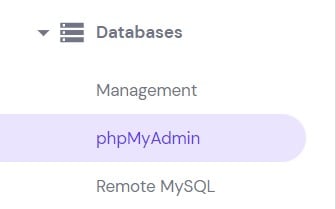
How to export MySQL database using phpMyAdmin
- Enter phpMyAdmin from your hosting control panel.
- On the left side of the phpMyAdmin dashboard, click on the MySQL database you want to export. Then, select the Export tab on the top menu bar.
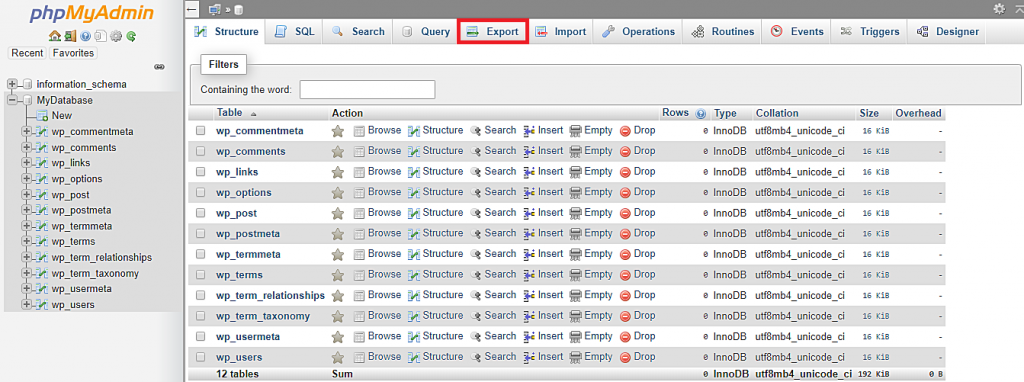
- phpMyAdmin has two export options: Quick and Custom. If you’re not familiar with SQL tables or want the simplest way to export your database, you can select the Quick option.
- In the next section, choose SQL from the dropdown menu as your preferred format for the backup file. SQL is the default format used to import and export MySQL databases as various systems generally support it.
- Once you’re done, press Go.
If you want more control over the backup process, you can go with the Custom method. This method allows you to change three groups of settings:
- Tables – lets you export only selected tables.
- Output – manages tables names and file name templates and enables compression on the MySQL backup file.
- Format-specific options – provides various compatibility settings depending on the selected format of the backup file. For example, you can change the columns separator when exporting the database as a CSV file.
Now that you know how to export a MySQL database using phpMyAdmin, you should also learn how to use the backup file. This article will guide you through the steps to restore a MySQL database from a backup using phpMyAdmin.

Conclusion
Exporting the database as a file is a simple way to back up your entire database within a website. With the phpMyAdmin export database feature, you get to do it quickly and effortlessly. Additionally, you have the option to convert the backup into various other file formats to accommodate your needs.
If you have any additional questions, feel free to leave a comment below!

Domantas leads the content and SEO teams forward with fresh ideas and out of the box approaches. Armed with extensive SEO and marketing knowledge, he aims to spread the word of Hostinger to every corner of the world. During his free time, Domantas likes to hone his web development skills and travel to exotic places.