Best AI Prompts for Web Designers and How to Integrate Them Into the Design Flow
Mar 10, 2026
/
By Matleena S.
/
7 min Read
Artificial Intelligence (AI) has emerged as a powerful tool in the world of web design, offering innovative solutions to boost efficiency and create user-centric designs.
In this tutorial article, we will explore different AI prompts for web designers and how they can revolutionize your design workflow. We will look at the capabilities of platforms like ChatGPT and Gemini through practical examples of AI prompts and provide valuable insights on integrating these prompts seamlessly into the web design workflow.
Whether you are a freelancer or a web agency, join us as we unlock the potential of AI for websites.
Benefits of Using AI Prompts in Web Design
From improved productivity to a more cohesive creative process overall, there are plenty of benefits when it comes to using artificial intelligence in web design.
Increases Efficiency
Artificial intelligence offers web designers instant suggestions and helps automate design tasks, significantly enhancing efficiency and saving valuable time. By leveraging AI algorithms, designers can quickly generate alternative design options, experiment with layouts, and preview the visual impact of various elements. This rapid prototyping and iteration process speeds up the design cycle, allowing designers to explore more possibilities in less time.
Improves User Experience
Designers should use AI to gain valuable insights into design elements directly impacting user experience (UX) design. AI can offer recommendations and suggestions to enhance usability by analyzing user interactions and behavior. From user flow optimization to dynamic content personalization based on user data, AI helps designers create intuitive and engaging experiences for site visitors.
Maintains Consistency and Coherence
AI prompts assist web designers in maintaining consistency and coherence throughout site design. Artificial intelligence ensures a cohesive visual identity by suggesting matching color palettes, font pairings, and layout compositions. Designers can create harmonious and visually appealing websites that convey a unified brand message, producing a more professional and polished appearance.
Provides Data-Driven Insights
By analyzing user interactions and patterns, AI algorithms help designers make informed decisions about design elements, such as content placement, imagery selection, and call-to-action placement. This data-driven approach ensures that your design choices are backed by empirical evidence, leading to more effective designs that resonate with the intended target audience.
Streamlines Content Creation
Artificial intelligence assists web designers in generating images and text content for their websites. Using natural language processing (NLP) and descriptive prompts, AI can help designers generate engaging copy, meta descriptions, and other textual elements. This streamlines the content creation process, allowing designers to focus on other design aspects while AI assists with the written components.
Helps with Rapid Prototyping and Iteration
AI helps to accelerate the prototyping and iteration process for designers. By quickly generating alternative design options, experimenting with layouts, and previewing visual impact, designers can efficiently explore many possibilities simultaneously, saving time and delivering more polished designs.
AI-Driven Design Prompts for Web Designers
We have compiled some of the best AI-powered web design suggestions below to help you start incorporating AI prompts in your web design workflow. Consider using an AI platform like ChatGPT or Gemini for executing each prompt.
AI Prompts for Color Schemes and Palettes
AI can help create captivating color schemes and palettes. You can ask AI to suggest resonant color combinations and matching schemes that cater to the desired aesthetic and target audience. You can also use AI to ask for guidance on creating accessible color schemes that comply with web accessibility standards.
AI text prompt examples:
- “Suggest a color scheme that evokes a modern and energetic vibe for a tech startup site.”
- “Recommend a complementary color palette for a nature-themed blog.”
- “How can I create an accessible color scheme that meets WCAG standards for my eCommerce site?”
- “Generate a vibrant and playful color palette for a children’s educational app.”
- “Provide a monochromatic color scheme with a soothing and minimalist feel for a meditation site.”
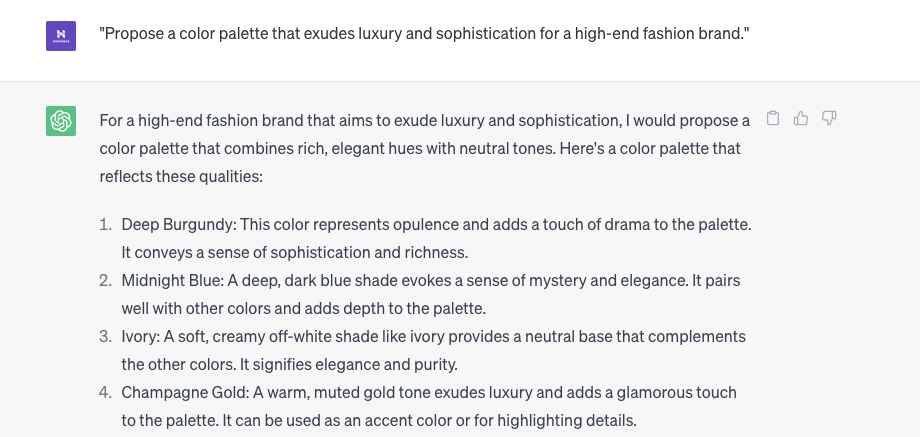
- “Propose a color palette that exudes luxury and sophistication for a high-end fashion brand.”
- “Assist in creating a gender-neutral color scheme for a diversity and inclusion nonprofit organization.”
AI Prompts for Typography and Font Selection
When it comes to typography and font selection, AI can be a valuable ally. It can suggest font pairings that perfectly harmonize and convey the desired tone and style. An AI tool like ChatGPT can also assist in creating font styles and variations that enhance readability and legibility across various devices and screen sizes.
AI prompt examples:
- “Can you suggest font pairings that convey a modern and minimalistic aesthetic for my site?”
- “Recommend font styles that enhance readability and legibility across different screen sizes and devices.”
- “How can I create a cohesive typography system that aligns with my brand identity?”
- “Provide guidance on choosing fonts that evoke a specific mood or emotion for my site.”
- “Help me optimize the typography for accessibility and comply with web standards.”
- “Suggest font combinations that work well together and create a visual hierarchy for my content.”
- “Assist me in selecting web-safe fonts that are widely supported across various browsers and platforms.”
AI Prompts for Site Layouts
AI gives web designers insights and suggestions for optimizing site layouts. AI tools for web designers can recommend grid systems that establish visual hierarchy and improve user experience (UX) design. AI can also automate layout suggestions based on the content, ensuring balanced and visually appealing designs.
AI prompt examples:
- “Recommend a grid system that promotes a clean and organized layout for an online portfolio.”
- “How can I create a visually engaging layout for a landing page focusing on a call-to-action?”
- “Provide automated layout suggestions based on the content for a blog post template.”
- “What are some effective layout strategies to improve the user experience of my site?”
- “How can I create a visually balanced layout that guides the user’s attention to important elements?”
- “Recommend techniques for organizing content and creating clear visual hierarchies in my site layout.”
- “Can you suggest layout options that enhance the readability and scannability of long-form content?”
AI Prompts for Image Optimization and Selection
AI platforms with image recognition capabilities can suggest relevant visuals that align with your web design’s content and purpose. Additionally, AI can assist with image resizing and compression, optimizing image file sizes without compromising quality. AI can also help you generate automatic alt text for images, enhancing accessibility and search engine optimization (SEO) efforts.
AI text prompt examples:
- “Suggest relevant images that capture the essence of adventure and exploration for a travel site.”
- “How can I optimize my site’s images for faster loading without compromising quality?”
- “Generate alt text for an image that accurately describes its content and enhances accessibility.”
- “What are some effective strategies for responsive image handling to ensure optimal display on different devices?”
- “Can you provide guidance on choosing the right image formats (e.g., JPEG, PNG, SVG) for different types of content?”
- “How can I balance image file sizes with maintaining sufficient visual impact on my site?”
- “What are some accessibility considerations when it comes to optimizing images and alternative text?”
- “Suggest ways to incorporate images effectively into my site design to enhance storytelling and engagement.”
AI Prompts for Responsive Design and Mobile Optimization
AI can provide recommendations on defining responsive breakpoints, ensuring seamless site adaptation across different devices. Artificial intelligence can also offer adaptive content suggestions, ensuring a consistent and user-friendly experience regardless of the device used to access the site.
AI prompt examples:
- “Recommend responsive breakpoints for a photography portfolio site to ensure optimal display on different screen sizes.”
- “Ensure a seamless user experience across devices by suggesting adaptive content for my eCommerce site.”
- “Recommend strategies for optimizing site performance on mobile devices for faster loading times.”
- “How can I ensure a seamless user experience across various mobile browsers and platforms?”
- “Provide advice on prioritizing and adapting content for mobile users on my site.”
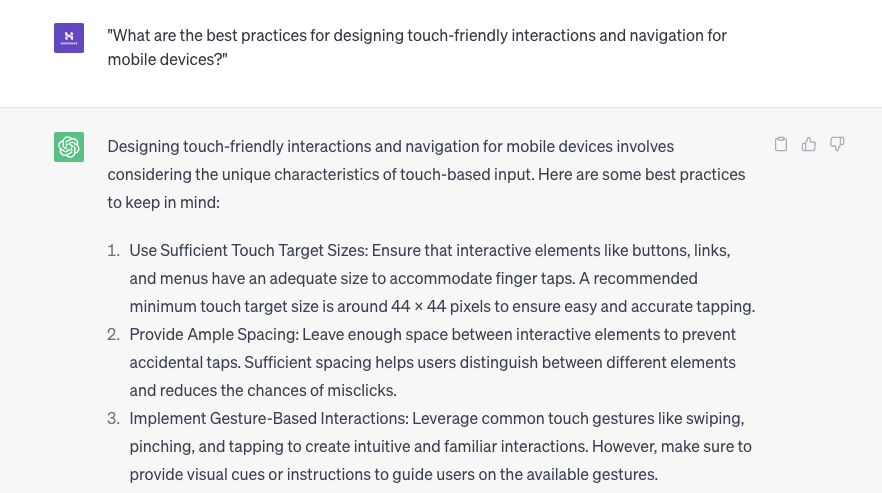
- “What are the best practices for designing touch-friendly interactions and navigation for mobile devices?”
- “Suggest ways to optimize images, videos, and other media for mobile viewing without sacrificing quality.”
- “How can I test and evaluate the mobile responsiveness of my site to ensure a consistent experience?”
Suggested “Reading
Check out our guide on 70+ AI prompts for web developers.
Optimizing User Experience With AI Prompts
These types of prompts can offer suggestions for optimizing user flows, guiding designers in creating intuitive and engaging online experiences. AI can also provide personalized recommendations based on user data, allowing designers to tailor the website experience to individual users.
AI prompt examples:
- “Provide suggestions to improve the user flow and navigation for a multi-step checkout process.”
- “How can I personalize the website experience based on user preferences and behavior?”
- “Inspire creative micro-interactions that enhance user engagement and delight on a product showcase site.”
- “What are the key principles for designing effective user interactions and feedback mechanisms?”
- “Provide guidance on designing clear and visually appealing user interfaces for optimal usability.”
- “How can I conduct user research and gather feedback to inform my UX and UI design decisions?”
- “Suggest ways to optimize user flows and streamline the user journey on my site.”
- “What are the best practices for designing responsive and touch-friendly interactions?”
- “Can you help me identify and address usability issues through usability testing and user feedback?”
How to Integrate AI Prompts into the Web Design Process
From AI-guided web design iterations to in-depth data analysis, the benefits of using AI in web design are indisputable. But how should you get started? Consider trying some of the following approaches:
Using an AI Website Builder
One way to integrate AI into your workflow is by utilizing an AI web builder. These platforms leverage AI capabilities to simplify and speed up the overall web design process.
Hostinger AI website builder offers pre-designed templates, intelligent suggestions, and an intuitive interface that allows designers to easily create professional-looking websites.
By using an AI builder, designers can harness the power of AI in a user-friendly and efficient manner.
Incorporating AI Prompts in Web Design Workflow
AI prompts can be incorporated at different stages of the web design flow, from initial inspiration to final refinements. Designers can start by using AI prompts for ideation, generating creative ideas, and exploring design possibilities. During the wireframing and prototyping phase, AI prompts can provide valuable feedback and suggestions for layout, color choices, and content placement. And in the refinement stage, AI can assist in fine-tuning design details, ensuring consistency and enhancing user experience.
Design Assistance Using AI
Designers can submit their designs, ideas, or requirements to an AI tool and receive immediate feedback and guidance. AI can analyze the design and suggest improvements, such as adjusting spacing or aspect ratio, optimizing contrast, or refining typography. By utilizing AI as a design assistant, designers can benefit from additional expertise and insights, leading to more polished and refined designs.
Combining Human Creativity With Artificial Intelligence Guidance
AI should be seen as a tool to complement and enhance human creativity rather than replace it. AI can help designers discover new design possibilities, generate fresh ideas, and expand their creative horizons. By combining human intuition and ingenuity with AI guidance, designers can push the boundaries of their creativity and deliver exceptional web designs.
Conclusion
Designers can enhance efficiency, improve user experience, maintain consistency, and gain data-driven insights with AI. Remember, AI prompts should complement human creativity. Consider using it to review and brainstorm ideas, double-check wireframes, and speed up the more manual tasks of your work processes to free up space for more strategic and creative tasks.
Suggested Reading
How to Design a Website with AI
How to Build a Site With Gemini
How to Make a Website From Scratch
Web Design Best Practices to Attract More Website Visitors
How to Become a Web Designer
Best Web Design Tools Designers and Developers Need to Use
AI Prompts for Web Designers FAQ
Find answers to some of the most common questions about enhancing web design with AI prompts below.
How to Choose the Right AI Tools for Web Design?
Consider ease of use, compatibility, available features, and user reviews when choosing AI-powered tools for web design. Look for a tool with intuitive interfaces and features to help you with different design tasks. Try free trials to find the best fit.
Can AI Generate Unique and Creative Design Ideas?
Yes, AI can generate unique ideas for web design. While trained on existing data, AI can come up with novel ideas based on its training data. Use AI-generated ideas as inspiration or the basis for your final designs.
Are There Any Tools for AI Prompts in Web Design?
Yes, popular platforms include ChatGPT, Gemini, and other AI-powered platforms with a chatbot interface. Explore different options to find the one that aligns with your design needs and preferences.
This article is a localized version of Best AI Prompts for Web Designers and How to Integrate Them Into the Design Flow, originally published in English.

Matleena is a seasoned Content Writer with 5 years of content marketing experience. She has a particular interest in emerging digital marketing trends, website building, and AI. In her free time, Matleena enjoys cups of good coffee, tends to her balcony garden, and studies Japanese. Follow her on LinkedIn
Comments
0 responses