Rocky Linux review: important factors to consider before migrating
Jun 11, 2026
/
By Aris S.
/
7 min Read
Rocky Linux is a binary-compatible operating system based on the Red Hat Enterprise Linux (RHEL) source code. It is regarded as the unofficial successor to the discontinued CentOS.

What Is Rocky Linux?
Like CentOS, Rocky Linux downstream distribution is a popular option for workstations and virtual private servers (VPS). It is a popular alternative to another RHEL clone, CentOS.
Rocky Enterprise Software Foundation (RESF) develops the operating system and offers ten-year support with regular updates. This enterprise-ready Linux distribution is commonly used for business servers or workstations.
This Rocky Linux review will explain its features, use cases, pros, and cons.
Overview of Rocky Linux OS
In this section, we will go over general information about Rocky Linux to help you understand more about it.
Licensing
Rocky Linux is a free version of RHEL, as the latter costs $349/year. Since it acts like an unlicensed RHEL, some of Red Hat’s features are unavailable.
For instance, RHEL 8.1 comes with the kpatch live kernel patching feature. Rocky Linux doesn’t support it and requires a third-party paid service for the task.
All elements in the Rocky Linux project are licensed under the 3-Clause Berkley Software Distribution (BSD). This applies to the operating system’s reuse, redistribution, and modification.
As a distribution, Rocky Linux includes several packages or software with different licenses. When using the operating system, you must also comply with the regulations of each one.
To see the installed components’ licenses, use the following command in the Terminal:
$ sudo yum info package-name

Replace the package-name with the package title you want to check.
To get a list of the installed packages, execute the following:
$ sudo yum list installed
Repositories
Rocky Linux provides a different set of base repositories for every major release. There are also community-approved ones that are installable from the additional repositories.
Rocky Linux supports three types of repositories that are included by default or can be installed manually:
- Base – the default repositories that are pre-installed in Rocky Linux.
- Extra – contains additional packages intended to improve your system’s functionality. Some of them are required for the community-approved repositories installation.
- Community-approved – repositories from third-party providers containing unofficial packages. They are also available for other enterprise Linux distributions.
Most base repositories come with Rocky Linux 8 and 9 by default. However, some of them must be enabled manually using this command:
$ sudo dnf config-manager --set-enabled repository-id
To learn more about their IDs and availability, refer to the Rocky Linux repositories page.
Since Rocky Linux is relatively new, it doesn’t have all the community-approved repositories, but here are some of the available ones:
- Extra Packages for Enterprise Linux (EPEL) – provides rebuilds of Fedora packages for other enterprise distros. Adding new features and tools to your Rocky Linux system is highly favorable.
- Community Enterprise Linux Repository (ELRepo) – contains packages that improve Rocky Linux’s hardware support. For instance, it has storage, hardware monitoring, and network drivers.
- RPM Fusion – a repo containing additional packages unavailable in Fedora. It provides software versions with free and paid licenses.
- Remi Repository – stores the latest version of PHP stacks and other software packages for enterprise distros. It offers a -safe version to ensure the repo doesn’t replace the default packages.
Features
As an RHEL clone, Rocky Linux is compatible with most of its features. However, some proprietary ones are only available in RHEL, like live patching and Red Hat Sattelite.
Albeit an enterprise distribution, Rocky Linux’s features are also helpful for personal use. Some of them include the following:
- Graphical User Interface (GUI) – Rocky Linux has a great user interface (UI). It is especially practical for users unfamiliar with a command line interface.

- Desktop environment – this Linux distribution uses GNOME 40 as the default desktop environment. Its redesigned apps, UI, and settings make Rocky Linux ideal for personal use.
- XFS file system – the XFS is designed to handle large data without compromising performance. This makes Rocky Linux suitable for enterprise-grade servers and storage arrays.
- Up-to-date compliers – developers can optimize and debug their code more easily with the GCC compiler in Rocky Linux. It also improves hardware usage efficiency for optimal performance.
- Module packaging – various package management systems like Flatpaks and RPM Package Manager are compatible with Rocky Linux. They let developers install and use their preferred package more easily.
- System monitoring – Rocky Linux supports the Cockpit web console for performance monitoring. It helps identify issues related to abnormal resource and network usage.
Security
Rocky Linux uses the Security-Enhanced Linux (SELinux) architecture. It allows administrators to have more control over their system’s access permissions.
SELinux separates information based on confidentiality and uses security policies to assess access requests. These policies determine which data is accessible and which is not.
Unlike CentOS, you can perform security-focused package management in Rocky Linux. It lets you query the available security updates and choose a particular one to install.
The latest stable version of Rocky Linux has several features that help improve your VPS security, such as:
- OpenSSL – a toolkit that provides a secure connection with a Rocky Linux system for data transfer. It enforces a 2048-bit RSA encryption key for the crypto-policies to improve security.
- OpenSSH – a connectivity feature that lets you securely log in to a Rocky Linux server via the SSH protocol. It now has the option to use SHA-1 for signatures.
- SHA-1 – due to security issues, Rocky Linux 9 no longer supports SHA-1 for most cryptographic purposes.
- Security compliance – Rocky Linux automatically configures its setting to comply with data protection regulations. It saves time and helps avoid misconfiguration.
What Rocky Linux Is Best For
Rocky Linux is ideal if you need reliable and high-performance enterprise distribution for your VPS. It is also suitable for desktops, workstations, and cloud services. If you’re looking to set up a VPS with Rocky Linux, consider checking out different Rocky Linux VPS hosting solutions to find the best plan for your needs.
As an enterprise distribution, Rocky Linux is packaged with features and additional software for corporate use. Moreover, its long-term support and regular updates make Rocky Linux perfect for business.
Rocky Linux is especially suitable for users needing an alternative to CentOS or RHEL. It is bug-for-bug compatible with RHEL and shares most of the features.
Since Rocky Linux is free, it is a great option for users wanting to try Linux and RHEL. Its GUI and native desktop environment also help users to easily transition from one operating system to another.
Rocky Linux Advantages and Disadvantages
If you plan to use Rocky Linux, consider the following advantages and disadvantages to help you determine if the distro suits your needs.
Rocky Linux Advantages
Stability
As a downstream rebuild of RHEL, Rocky Linux’s main advantage is its stability. Before new changes are applied to Rocky Linux, they must be first submitted to the upstream distribution like Fedora.
Rocky Linux only uses features and code previously tested in upstream RHEL. Due to the different processes, it receives fewer updates but with greater stability.
Also, Rocky Linux releases must undergo a thorough testing process with different environments and scenarios to ensure their stability.
Open Source
Since it’s considered an open-source operating system, Rocky Linux users can access its code freely. The community can use it for various purposes, such as checking for security flaws, troubleshooting bugs, or creating documentation.
Rocky Linux also provides a Peridot build system that lets users recreate the distribution from scratch. It helps speed up the new releases and maintain the project’s longevity.
Support
Rocky Linux has a lengthy ten-year support lifecycle for its major release alongside regular updates. It receives the updates for the first five years and goes into maintenance-only mode until its life cycle ends.
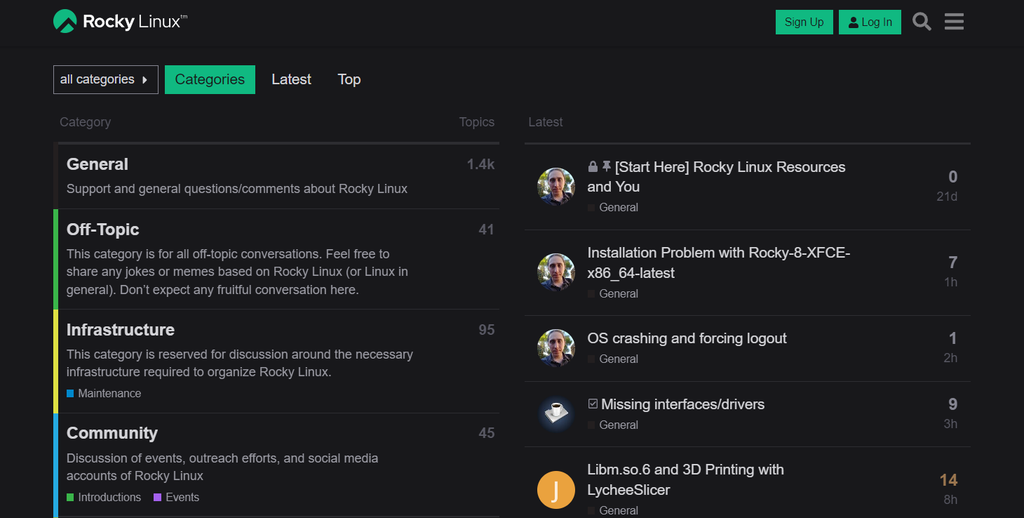
Rocky Linux has a community support forum where users can discuss updates or troubleshoot issues. Its growing user base means this distro will remain actively supported for years to come.
It also partners with different support provider companies like CIQ that are also involved in its development.
Compatibility
Being binary-compatible with RHEL, Rocky Linux supports several other Red Hat software out of the box. It means the software code can run properly on Rocky Linux without recompiling.
This Linux distribution is also compatible with several system architectures like CentOS. For instance, the Rocky Linux 9 supports x86_64, ARM64, PPC64, and s390x.
Rocky Linux also provides a migration script that helps users switch to the operating system easily. It automatically changes the system’s repository to Rocky Linux and updates the installed packages.
Currently, the script is available for distros based on Red Hat Enterprise Linux, like Oracle Linux, CentOS, and CentOS stream.
Important! CentOS Linux and CentOS Stream are two different distributions. The former is a downstream release of RHEL, while the latter is upstream.
Rocky Linux Disadvantages
Very much like any other operating system, Rocky Linux has some disadvantages you should know about.
Slow Updates
Rocky Linux major releases receive a new update every six months. While slower updates help maintain stability, some users prefer more frequent updates.
For such users, use an upstream Linux distribution with a continuous update delivery like CentOS Stream. It updates weekly and is promised to receive support until 2027.
Future Uncertainty
It is difficult to determine Rocky Linux’s longevity as it is a rather new distribution. As an open-source project, the operating system’s update continuity depends on the community and third-party funding.
Fortunately, Rocky Linux’s rapid user base growth helps form a dedicated community backing up the project. In addition, it receives funding from large companies like Google and Microsoft.
Peridot also helps avoid end-of-live issues similar to the CentOS project. Users can create new RHEL forks themselves in case Rocky Linux discontinues.
Lack of Experience
Rocky Linux’s recent release date means there is a lack of experience working with the operating system. While user reviews, bug reports, and documentation are available, they may not be comprehensive at the time of writing.
Due to the lack of long-term user involvement, it is tricky to assess its actual performance. This is a drawback since enterprises need an operating system with evidently consistent long-term performance.
Should You Move to Rocky Linux?
Although Rocky Linux is a well-performing distribution, it may not be ideal for all users. If you need a replacement for CentOS, it might be one of the best Linux distros for you.
CentOS and Rocky Linux are similar in design, allowing users to transition more easily. Even for non-CentOS users, Rocky Linux is a great option if you want to experience RHEL.
Regardless, there are several considerations before switching:
- Packages version – executing the Rocky Linux migration script will replace all of your system’s packages. Create a backup file before installation if you have custom packages or use different versions.
- SecureBoot – SecureBoot is not available in the older version of Rocky Linux. If your current system relies on it, ensure to install Rocky Linux 8.5 or newer.
- System architecture – every Rocky Linux’s major releases have a different CPU architecture compatibility. Refer to the Rocky Linux download page to learn more about it.
- Other distros compatibility – Rocky Linux migration script only works on RHEL-based distros. For other distributions, you must do the installation and package update manually.
- Migration path – users with CentOS 9 or lower can’t directly migrate to Rocky Linux since the earliest version uses RHEL 8 source code. Upgrade to CentOS 8 first and then switch to Rocky Linux.

Conclusion
Rocky Linux is a downstream distribution based on the Red Hat Enterprise Linux (RHEL) source code. It is binary-compatible with RHEL and intended to be an alternative to its Linux predecessor, CentOS.
This enterprise-ready Linux distribution is ideal both for corporate and personal use. It is commonly implemented for servers, workstations, and cloud services.
Here is a general overview of the distro:
- Licensing – Rocky Linux uses the 3-Clause BSD license for reuse, redistribution, and modification. Like CentOS Linux, it has no licensing fee.
- Repositories – this distribution has comprehensive repositories containing several different packages. Installing them lets you expand the operating system’s functionality.
- Features – the distribution inherits most Red Hat features optimized for enterprise servers or personal use.
- Security – Rocky Linux implements SELinux to restrict access to the system. Compared to CentOS Linux, it offers more flexibility as you can install a specific security patch.
Rocky Linux is very stable and compatible with different system architectures. However, its drawbacks include slower updates, lack of user experience, and guaranteed longevity.
If you plan to switch from CentOS, Rocky Linux can be the ideal replacement if you plan to switch from CentOS.
Before migrating, always remember to back up installed packages and use the latest Rocky Linux version to avoid compatibility issues.
This article is a localized version of Rocky Linux review: important factors to consider before migrating, originally published in English.

Aris is a Content Writer specializing in Linux and WordPress development. He has a passion for networking, front-end web development, and server administration. By combining his IT and writing experience, Aris creates content that helps people easily understand complex technical topics to start their online journey. Follow him on LinkedIn.