What is a URL? Structure and examples
May 26, 2026
/
By Linda D. & Simon L.
/
8 min Read

A URL (Uniform Resource Locator) is a unique address that points to a specific resource on the internet, like a web page or a file.
When you type a URL into your browser’s address bar or click a link, the browser uses that address to find the right server and retrieve the content you want to open.
A URL is made up of several key components, each with a specific job. Here’s a quick look at the parts you’ll find in most web addresses:
- Scheme or Protocol. This tells the browser how to connect to the server. For websites, the most common protocols are HTTP and HTTPS. HTTPS is the secure version, meaning any data you share is encrypted.
- Subdomain. A part of the main domain, like www or blog, used to organize a website’s content.
- Domain name. The unique name that identifies a website, like the hostinger part of hostinger.com.
- Domain extension. The ending of the domain name, like .com or .org, also known as a top-level domain (TLD).
- Path to the resource. This is the specific folder and file on the server, which directs the browser to the correct page, like /tutorials/what-is-a-url.
- Parameters. These are used to pass extra information to the server and come after a question mark.
While most URLs you see are absolute URLs that contain a full address, there are also relative URLs, which point to a file or page within the same website.
Creating a URL is straightforward. It all starts with registering a domain name through a provider like Hostinger and connecting it to a hosting plan, which automatically generates the main URL for your new website.
What is the structure of a URL?
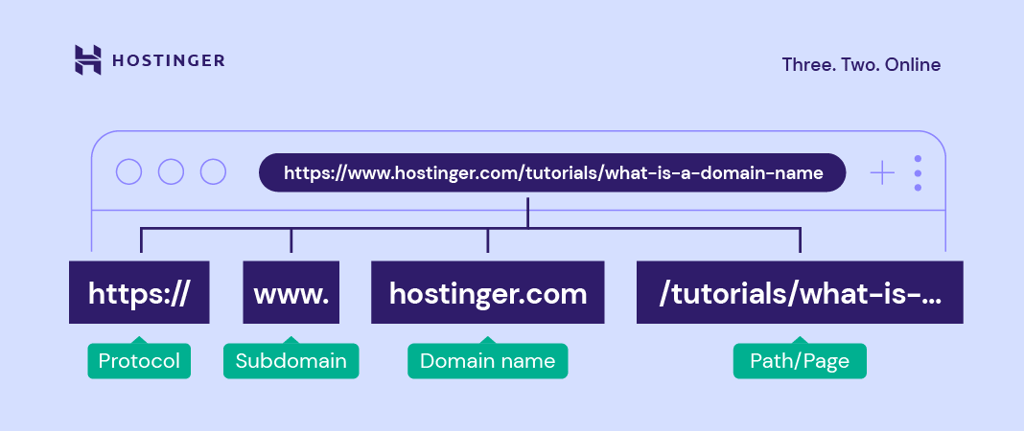
As you can see from the image, a Uniform Resource Locator (URL) consists of multiple parts. To help you better understand, let’s dive deeper into the structure of a URL.
Scheme
The scheme is the first part of a URL. It defines the protocol your browser uses to connect to a website’s server.
HTTP (Hypertext Transfer Protocol) and HTTPS (Hypertext Transfer Protocol Secure) are protocols for network communication between web servers and browsers. They transmit messages, retrieve information through the Domain Name System (DNS), and return it to the browser.
The protocol in the above diagram is https://.
The difference between HTTP and HTTPS is that the latter encrypts the data transmission process. This security protocol protects a website better and is an essential factor in improving ranking on search results.
Another difference is that HTTPS uses the Transmission Control Protocol/Internet Protocol (TCP/IP) port number 443 encrypted by Transport Layer Security (TLS). Meanwhile, an HTTP URL uses TCP/IP port number 80.
Important! Web browsers can also process other protocols, including FTP and mailto. The former allows file sharing between different web hosts, either local or remote. The latter directs users to a specific email address.
Subdomain (WWW)
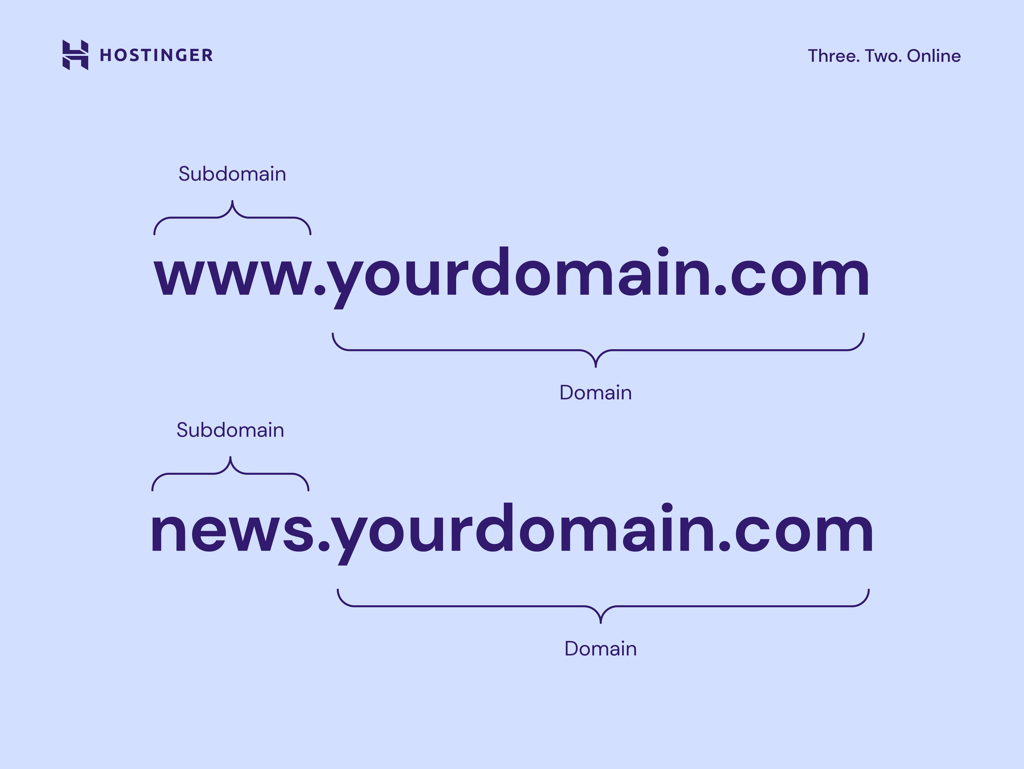
A subdomain consists of any words or phrases that come before a URL’s first dot. The most common type is www. It is the most common subdomain, traditionally used for web content, but it’s not mandatory.
Furthermore, site owners can use any word as a subdomain for website organization purposes, as it points to a specific directory from the primary domain. Some of the most popular options are “blog” and “news.”
For example, while hostinger.com uses www, the subdomain for our Knowledge Base page is “support.” Hence, the support.hostinger.com URL.
Domain name
A domain name is what users type into their browser’s address bar to reach a website. It consists of a site name and an extension, for example, hostinger.com or yourdomain.com.
Every name is unique, and it represents its corresponding IP address (a numerical identifier like 192.168.1.1). This unique IP address points to the website’s server. In other words, it helps users access websites easily.
Domain extension
Also known as a top-level domain (TLD), it is the part that follows a website name. According to the latest domain name statistics, .com has over 157.2 million registrations, making it the most popular extension.
Here are types of TLD extensions to consider using:
- Generic TLD (gTLD). This category includes most of the popular extensions, including .com, .org, .net.
- Country Code TLD (ccTLD). As the name suggests, this TLD indicates a country, a territory, or a geographical area. ccTLD consists of two letters based on the international country codes, such as .mx, .in, or .at.
- Sponsored TLD (sTLD). This type of extension is sponsored and used for specific organizations. For example, Tralliance Registry Management Company, LLC sponsors .travel, and DotAsia Organization Ltd. sponsors .asia domain extension.
- New gTLD (nTLD). It’s a new generation of domain extensions. Basically, any TLD launched after 12 January 2012 is a new gTLD, including .online, .store, and .tech.
Path to the resource
A path to the resource or simply URL path is the part to the right of the TLD. It’s often referred to as the folder structure of the website.
In the URL https://www.hostinger.com/tutorials/how-to-make-a-website, the path to the resource is /tutorials/how-to-make-a-website.
A path to the resource provides additional information to a web server, enabling it to direct users to a specific location. A series of paths to resources may point to a specific page, post, or file.
A URL can have more than one path to resources. When that happens, the forward-slash sign (/) will separate each of them. The more paths to resources a URL contains, the more specific the location is.
Parameters
Parameters are query strings or URL variables. They’re the portion of a URL following a question mark.
Parameters consist of keys and values separated by an equal sign (=). Furthermore, a URL can have multiple variables. In that case, the ampersand symbol (&) will separate each.
An example of a URL with a parameter is: https://www.example.com/search?q=blue-widgets
In terms of parameter use cases, here are some of the most common ones:
- Translating. Having a country code in the query string translates a web page to the associated country’s language.
- Searching. The searching parameter provides search results from a website’s internal search engine.
- Filtering. To separate distinct fields, such as topic, color, price range, and region, site owners can use the filtering parameter.
- Paginating. This parameter is especially useful for ecommerce websites, enabling site owners to sort content.
- Tracking. Usually contains code to track traffic from ads and marketing campaigns.
To keep learning, download our free Web Development Glossary for Beginners PDF to have all the key terms in one place.
Download glossary for web beginners
What is an example of a URL address?
Hostinger’s complete URL is https://www.hostinger.com and entering it in a browser’s address bar directs users to our website. The same applies to examples like https://www.microsoft.com and https://www.linux.org.
That said, URLs can get more specific.
For example, on our website the relative URL /tutorials/ – this will look like “https://www.hostinger.com/tutorials/” in the browser address bar – leads users to our Tutorials page, and /tutorials/how-to-make-a-website is the URL for our How to make a website article on Hostinger Tutorials.
URLs can also send users to a particular section on a web page. These are called anchor links and look like this: /tutorials/how-to-make-a-website#6_Optimize_Your_Website_for_SEO_and_Conversions
The above URL, for example, sends users to tip number 6 in the How to make a website article.
Lastly, every uploaded image has its own URL, enabling users to access it directly. The following relative URL leads to the featured image of our How to make a website article: /tutorials/wp-content/uploads/sites/2/2021/08/how-to-make-a-website-1.png.
What is a URL syntax?
Syntax refers to a set of rules. In the case of a URL syntax, it sets which components and symbols are allowed in a URL. Here’s what a URL’s general syntax looks like:
http://subdomain.domain-name.domain-extension/path-to-resource?parameters
Each component has a fixed position—you can’t rearrange them. The protocol and domain are required, while subdomain, path, parameters, and anchors are optional.
URLs can only use certain characters directly: letters (A-Z, a-z), numbers (0-9), and a few special characters like hyphens (-), underscores (_), and periods (.).
Any other characters, including spaces, need percent encoding (also called URL encoding). This converts characters into a format browsers can process. For example, a percent sign becomes %25, a space becomes %20, and an exclamation mark becomes %21.
URLs can contain an anchor link, also called a page jump or fragment identifier. The element is represented with the number sign (#), which bookmarks a specific part inside a resource.
For example: /tutorials/how-to-make-a-website#6_Optimize_Your_Website_for_SEO_and_Conversions.
With an HTML file containing a page jump, a web browser will go directly to the selected section. For a video or audio document, a modern web browser will find the timestamp that the anchor represents and play accordingly.
How to find a URL in your browser
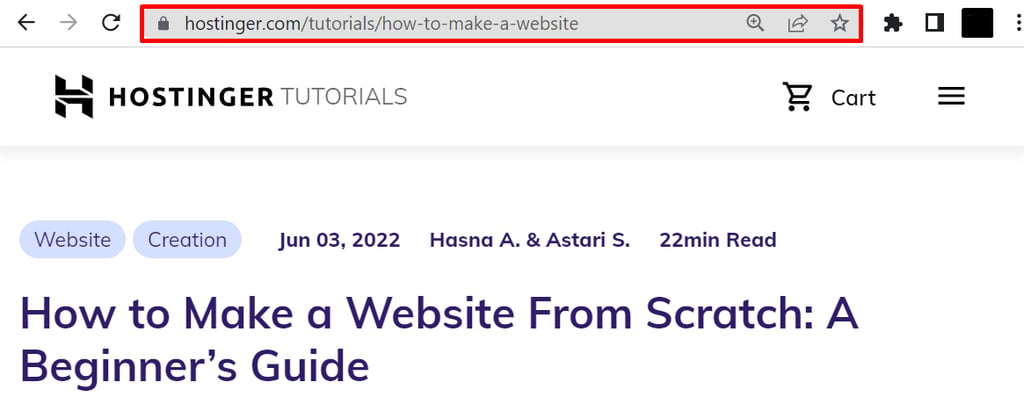
A URL can usually be found in the address bar at the top of the web browser’s window. On laptops and desktop computers, a website URL will always be visible in the address bar as users scroll through the web page.
In the case of mobile devices, the default browser behavior causes a URL to disappear as soon as users start scrolling down. However, it will reappear when users scroll up.
How to use a URL
If you know the complete website URL, typing it in the address bar is one of the easiest ways to use a URL. If not, here are several other ways to do it:
- Clicking a hyperlink. It can be a text, an icon, or an image that links to another HTML file on the internet. Users can identify a hyperlink by hovering their mouse over the linked text or graphic. Then, a URL link will appear at the bottom of the window, telling users where the link will take them.
- Scanning a QR code. Short for quick response code, it’s a black and white barcode readable by digital devices. It stores numerous data types, including web links, account information, and encryption details.
- Copying and pasting. If you come across a website URL with no links or QR code, copying and pasting it to the address bar will open it.
What are the different types of URLs?
The two main types of URLs you’ll encounter are absolute and relative, but there are several other types used for specific functions like marketing and search engine optimization.
Here’s a breakdown of the most common URL types and their purpose.
1. Absolute URLs
- What they are: A complete web address containing all the information needed to locate a resource, including the protocol (https://), domain name (hostinger.com), and path (/tutorials).
- Example: https://www.hostinger.com/tutorials/what-is-a-url
- Purpose: To link to any resource on the internet, whether it’s on your own website or an external one.
2. Relative URLs
- What they are: A partial address that only includes the path to a resource relative to the current page. The browser fills in the rest of the information (the protocol and domain) from the page you’re currently on.
- Example: /tutorials/what-is-a-url
- Purpose: Used for linking between pages on the same website. This makes site maintenance easier, as links won’t break if you change your domain name.
3. Dynamic URLs
- What they are: URLs that are generated based on a user’s action and often contain parameters like ? or & to retrieve specific information from a database.
- Example: https://www.example-shop.com/products?category=shoes&color=black
- Purpose: To display content that changes based on user input, standard on ecommerce sites, search results pages, and web applications.
4. Canonical URLs
- What they are: The preferred URL for a piece of content that might be accessible through multiple addresses. Site owners specify the canonical URL in the page’s code.
- Example: You might have two URLs for the same page: https://example.com/product and https://example.com/product?source=facebook. The canonical URL would be the first one.
- Purpose: To prevent issues with duplicate content in search engine results and consolidate your SEO value to a single, preferred page.
5. Vanity URLs
- What they are: Short, memorable, and custom-branded URLs. They are created to be easily shared and typically redirect to a longer, more complex web address.
- Example: YourBrand.com/Sale (which might redirect to a longer URL with tracking parameters).
- Purpose: Primarily used in marketing and social media campaigns to create user-friendly links that are easy to remember and type.
How to create a URL
Creating a functional URL, like hostinger.com, microsoft.com, or linux.org, starts with registering a domain name and connecting it to a web hosting service. The domain forms the core of your URL, while hosting enables the actual website that responds when someone visits that address.
A registrar is a company that manages domain reservations and renewals. Hostinger is one of the most popular hosting providers and domain registrars.
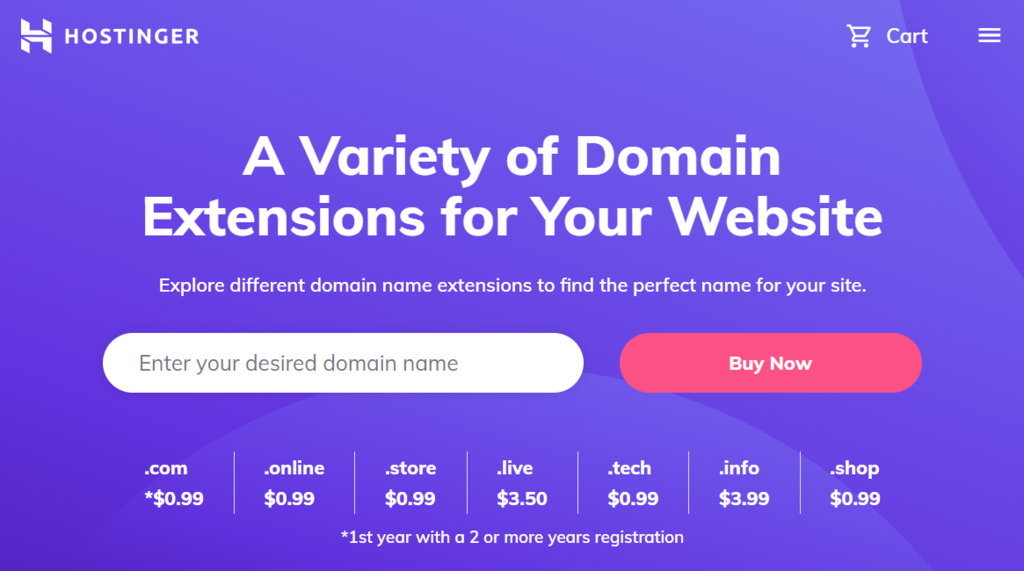
Here is a general step-by-step guide on how to buy a domain:
- Ensure the name’s availability. For this, you can run a search using a domain checker. Type in your desired name and extension and click Search. It will then provide you with a list of available names.
- Proceed to check out. In this step, you will choose the registration period. Typically, a registrar requires a minimum period of one year. That said, some registrars offer registration periods of up to ten years.
- Complete the registration process. Once the payment is authorized, the registrar will need you to fill out a setup form, which may include your name, email, address, and contact information. Be sure to input all the details correctly.
- Verify name ownership. A verification link should appear in the email you use for registration a few minutes after completing the registration process. If it doesn’t arrive, you can send a request from the control panel.
As the registration isn’t a one-time purchase, every owner should keep track of their domain expiry dates.
Domain Name Checker
Instantly check domain name availability.
How to choose the best domain name for your URL
Now that you understand all the components that make up a URL, the next step is creating one for your own website. The most important part is the domain name, it shapes your web address, supports your brand identity, and helps people remember where to find you online.
To get started, read our guide on how to choose a domain name. It walks you through the process step by step, from brainstorming name ideas to checking availability and avoiding common mistakes. Picking the right domain name will make your URL more trustworthy, memorable, and easier to share.
This article is a localized version of What is a URL? Structure and examples, originally published in English.

Linda is a seasoned Content Writer specialized in website creation. With her passion for the written world and obsession with helping others, her goal is to deliver resourceful content pieces for all skill levels. When she’s not writing, Linda likes to cross stitch and watch films. Follow her on LinkedIn.

Simon is a dynamic Content Writer who loves helping people transform their creative ideas into thriving businesses. With extensive marketing experience, he constantly strives to connect the right message with the right audience. In his spare time, Simon enjoys long runs, nurturing his chilli plants, and hiking through forests. Follow him on LinkedIn.