WordPress excerpt length: what it is, how to change it + plugin recommendations
Dec 02, 2025
/
By Ratna
/
3 min Read
If you’re a WordPress user, you already know that the theme and WordPress core automates a lot of the features that dictate how your content is displayed. A common example is how pages display excerpts of your articles. But did you know that you can customize the WordPress excerpt length? This tutorial will explain how you can do just that!
Download all-in-one WordPress cheat sheet
What is the Excerpt in WordPress
An excerpt is a part of a post that links to the full article. It’s used to interest readers and makes them want to read further. It helps to highlight key points of your content as sometimes a title is not enough to get your audience’s attention.
By default, WordPress limits excerpts to the first 55 words of your post.
When using the classic WordPress editor, excerpts can be automatically added to your content by pressing the Read More button. It will add the <!–more–>tag to the HTML, which can be seen in the HTML editor. You can also type in a custom message like <!–more Continue Reading!–>.

Alternatively, you can change its length according to your needs. Providing more text can attract readers’ attention to the article.
There are different ways of doing this task. Below you will find instructions that will lead you through the process.
How to Change the Excerpt Length
The two most common ways to change the excerpt length are either by doing it manually or by using a WordPress plugin.
Manually Changing WordPress Excerpt Length
The manual method involves tweaking the code. However, you don’t need to have in-depth knowledge in any programming language to do this.
Here are the steps to manually change the length of an excerpt:
- Hover on the Appearance tab and select Theme Editor.
- Open the functions.php file and insert the code:
function my_excerpt_length($length){ return 80; } add_filter(‘excerpt_length’, ‘my_excerpt_length’); - Change the word limit from 80 to any number you like, and press the Update File button.
For some themes, like Twenty Sixteen WordPress, you’ll need to edit the content.php file as well. Follow the guide below:
- While still in the Theme Editor, scroll down until you find template-parts. Under that heading, click on the content.php file.
- Search for the lines:
<div class=“entry-content”> <?phpAdd the following code snippet just below them:
if ( is_home() || is_category()||is_archive()){ the_excerpt(”); }else{ - Find the statements:
?> </div><!-- .entry content -->Then insert the following line above them:
} // end of if statements - Click Update File, and you’re done!
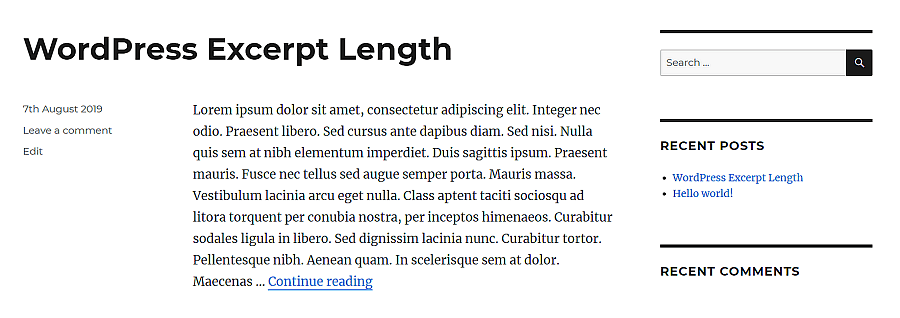
The final result will look something like this:
Changing WordPress Excerpt Length With a Plugin
One of the easiest ways to customize excerpt length is by changing it with a plugin. A recommended option for this task would be the Advanced Excerpt plugin. It’s free and easy to use.
By using the plugin, you can:
- Trim the excerpt by word count or characters.
- Add a ‘Read More’ link and customize it.
- Complete the last word of the excerpt so that it doesn’t end midway.
- Keep the HTML markup and choose which tags will be included.
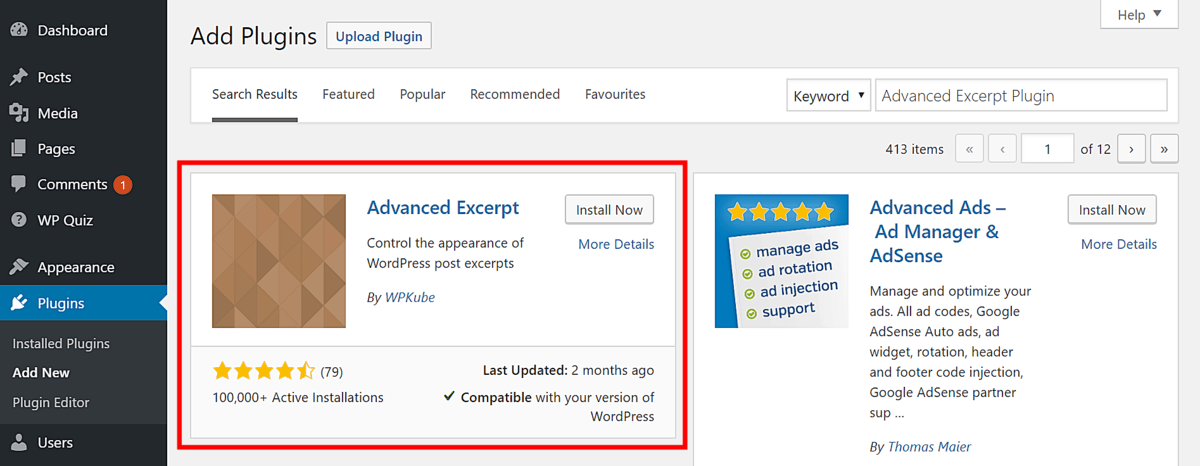
To install it, hover on Plugins on your WordPress Dashboard, and press Add New. Type in “advanced excerpt plugin” in the Keyword bar. Click the Install Now button, then Activate it.
Check out our other article on how to install plugins for a complete tutorial.
To use the plugin, follow the guide below:
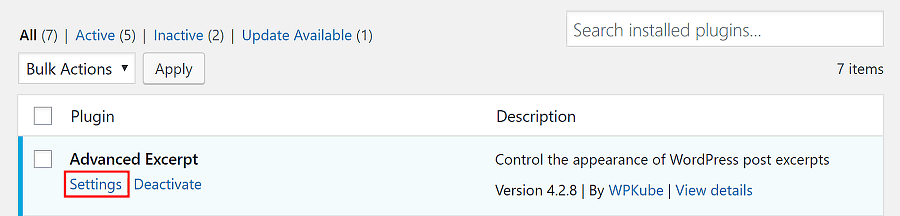
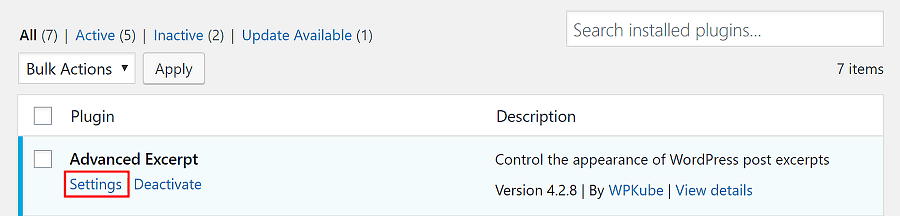
- Go to the Plugins tab and press Settings under the plugin.
- Customize the available options to your liking.
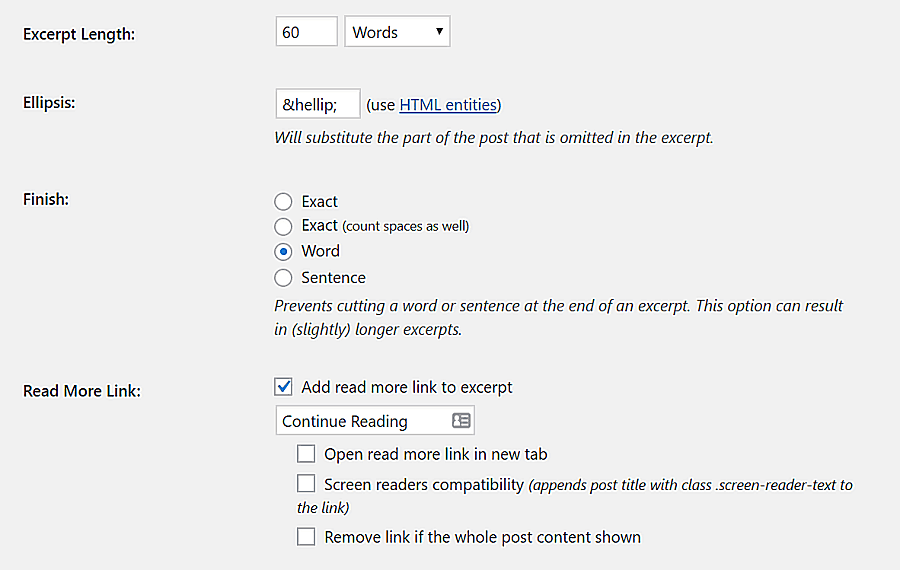
- Click the Save Changes button.

Conclusion
One of the points that contribute to triggering a reader’s curiosity towards an article is the excerpt. When using WordPress, you can change the default excerpt length in two ways:
- Manually ‒ inserting code into the function.php file of a theme.
- Using a plugin ‒ installing the Advanced Excerpt plugin and configuring its settings.
Happy editing!
More Advanced WordPress Tutorials
How to Hide Page Title
How to Add Custom Fonts
How to Change Font Size
WordPress Custom Fields
WordPress Button Shortcode
This article is a localized version of WordPress excerpt length: what it is, how to change it + plugin recommendations, originally published in English.

Ratna is a web hosting expert. With her experience with all things tech and SEO, she is ever-ready to share. In her spare time, Ratna likes to read a good book or resume her cross-stitch project.


Comments
2 responsesDecember 23 2024
I used the following code in my functions.php as suggested above: function my_excerpt_length($length){ return 80; } add_filter(‘excerpt_length’, ‘my_excerpt_length’); And it gave a critical error on my website. Please test this code again...
January 09 2025
It sounds like there might be an issue with how the code was added. Please double-check if you edited the active theme's
functions.phpfile and ensure there are no missing PHP opening or closing tags. You can also try redoing the steps using a File Manager or an FTP client to make sure everything is added correctly. If the issue persists, I recommend enabling debug mode to identify the exact error. You can follow this guide to learn how to debug WordPress ;)