Best n8n templates to boost your productivity
Mar 10, 2026
/
By Alanas M.
/
8 min Read
Modern workflows require more than efficiency—they demand smart automation, and n8n delivers exactly that. As a workflow automation tool, it helps businesses and individuals optimize their workflows.
To make n8n accessible to everyone interested in it, the n8n community offers ready-made templates that eliminate the need for complex setups. In this article, we’ll cover some of the best n8n templates to help you boost efficiency and focus on what really matters.
Best n8n templates for small businesses
Small businesses often struggle with time-consuming manual tasks that slow down operations – chasing leads, managing orders, handling invoices, and tracking expenses. These processes drain your resources and leave less time for growing your business.
The following n8n templates directly tackle these common pain points, helping you spend your time where it matters most.
Scrape business emails from Google Maps
Finding new customers can be very time-consuming, and manually searching for leads online is tedious. Instead of copying contact details one by one, this template automatically scrapes contact information from Google Maps.
While n8n takes care of getting the leads, you can focus on outreach and closing deals instead.
Benefits:
- Saves hours of manual researching
- Effortlessly expands your outreach
- Eliminates reliance on expensive lead databases
Try the Google Maps scraping template
Content creation with AI
Producing quality content consistently can be challenging for many small businesses. However, this template utilizes AI to automate the creation of high-quality articles, organizes them in Google Drive, and tracks their progress in Google Sheets.
By optimizing content generation, you can maintain an active online presence without dedicating excessive time to writing.
Benefits:
- Ensures regular content updates
- Saves time on content creation
- Efficiently organizes your content
Try the AI content creation template
Automated customer feedback collection
Understanding customer sentiment is critical for improving your products and services, but collecting feedback requires a lot of extra effort. This template handles that for you, sending surveys to customers, categorizing feedback based on satisfaction, and organizing it in Google Sheets.
With this workflow in place, you gain valuable insights into your service quality without the manual effort.
Benefits:
- Automates feedback collection
- Provides sentiment analysis
- Organizes data for easy review
Try the customer feedback collection template
Automated invoice generation
Invoice creation is time-consuming and error-prone. This template automates the process by generating invoices based on Typeform submissions and sending them to clients.
By automating invoicing, you can ensure timely and accurate billing, reduce your workload, and focus on selling rather than documenting sales.
Benefits:
- Speeds up the invoice process
- Eliminates human errors from billing
- Ensures timely payment collection
Try the invoice generation template
Expense tracking and financial reporting
This template automates expense tracking through a simple chat interface. Just input your expenses, and an AI agent will parse your message and store the data in Google Sheets.
With this template, you can easily maintain accurate financial records without the hassle of manual data entry.
Benefits:
- Simplifies expense logging
- Utilizes AI for data parsing
- Organizes expenses systematically
Try the expense tracking template
These templates are just a small sample of what’s available for small businesses. The n8n workflow library is full of other templates that you can adopt for your business. Some useful categories include:
Best n8n templates for personal productivity
Managing emails, organizing tasks, and scheduling meetings can waste valuable time.
n8n templates can help you save time by automating repetitive tasks, keeping you organized, and making it easier to stay on top of your workflow.
Automated Notion task reminders via Slack
To help you avoid missed deadlines, this template tracks incomplete tasks from a Notion database and sends Slack reminders to keep you on track. It is set to run every weekday at 9am, ensuring you never forget an important pending task.
Benefits:
- Ensures you stay up to date on pending tasks
- Reduces the risk of missing deadlines
Try this task reminder template
AI email drafting
This workflow uses OpenAI’s GPT-4 Turbo model to automatically draft responses to incoming emails. Once it is in place, you can edit the generated messages and send out replies.
Benefits:
- Speeds up responses
- Automatically determines if a response is needed
- Ensures well-written and consistent drafts
Try this email drafting template
AI-powered web scraping with Jina, Google Sheets, and OpenAI
Research can be a very long process that often involves browsing through hundreds of different pages until you find what you need.
This workflow handles web scraping for you, organizes extracted content, and generates summaries, allowing you to spot key pieces of information quickly instead of reading entire articles.
Benefits:
- Automates online research
- Summarizes key insights
- Organizes insights and data
Try this web scraping template
Auto-label incoming Gmail messages with AI nodes
Sorting out your inboxes is either an overwhelming effort or requires a complex set of mailbox rules configured.
This template allows you to skip manual inbox sorting and complex inbox rules. It labels incoming messages based on common categories, making it much easier to find important messages.
Benefits:
- Automatically categorizes emails
- Highlights priority messages
- Greatly reduces manual mailbox management
Try this email labeling template
Zoom AI meeting assistant
Taking meeting minutes, reviewing recordings, or trying to remember key points can easily become frustrating and error-prone when trying to summarize takeaways from a work meeting.
This workflow automates that work for you by summarizing Zoom meetings, generating structured action lists, and scheduling follow-ups. This frees you up to focus exclusively on the meeting, enhancing the value you can provide.
Benefits:
- Automatically generates meeting summaries
- Extracts key action items and follow-ups
- Saves time on reviewing recordings and notes
Try this Zoom AI meeting template
These templates can boost your productivity, but they may not fit every situation. Explore these n8n workflow categories to find the right solution for you:
Best n8n templates for IT automation
Managing resources, handling incidents, and ensuring smooth operations require significant effort and attention. With n8n, you can automate these processes and improve IT operation efficiency.
Here are some templates designed for IT operations to help make your team’s lives easier.
SSL expiry alert
An expired SSL certificate can cause downtime and security issues for your website. Furthermore, some SSL certificate providers might revoke expired SSL certificates, which lengthens your restoration efforts.
This template helps you prevent these risks and renew SSL certificates on time by monitoring a list of websites and letting you know when the certificate is due to expire soon.
Benefits:
- Prevents downtime due to expired certificates
- Reduces manual monitoring efforts
Try this SSL expiry alert template
IT Ops AI SlackBot
IT teams frequently deal with requests for simple troubleshooting or general questions that have already been answered in a knowledge base.
With this template, a custom AI SlackBot uses your internal knowledge base as a source for answers to various requests, reducing response times and freeing up engineer time.
Benefits:
- Automates responses to common questions
- Reduces workload on IT teams
Monitor a file for changes and send an alert
Some configuration or mission-critical files are best left untouched. If any changes occur, you’ll want to know immediately. This template monitors specific files and sends real-time alerts whenever they are modified, keeping you informed and in control.
Benefits:
- Detects file modifications instantly
- Helps maintain stability of mission-critical files
Try this file monitoring template
Chat with PostgreSQL database
Fetching data from a database is a relatively straightforward process, but it can be challenging if you need to establish connections to a database and type out your own queries every time.
This template simplifies querying PostgreSQL databases. It utilizes an AI Agent to create a chatbot interface that interprets your text prompts and interacts with the database for you.
Benefits:
- Removed reliance on technical teams for database querying
- Simplifies data retrieval for non-technical people
Try this PostgreSQL querying template
Purge n8n execution history
Yes, you can even use n8n templates to help manage your n8n instance! If you’re running multiple workflows and storing execution logs in a database, tables can grow quickly. While manual cleanup is simple, it’s repetitive and very easy to forget.
This template automates database cleanup by running an SQL query that deletes old entries from the execution_entity table, keeping it fast and efficient.
Benefits:
- Prevents database size exponential growth
- Reduces storage costs
Try this n8n history management template
There is an abundance of ways to optimize IT through automation. If the templates above are not what you’re looking for, here are some useful categories you might want to check out:
How to install an n8n template?
Installing n8n templates is an easy and straightforward process, but before you can start with the template installation, you need to make sure you have a running n8n instance that will host your templates. You can follow our guide to learn how to install n8n on a Hostinger VPS.
When your n8n instance is ready, you can start with the template installation:
- In your browser, navigate to the n8n templates page and open the template you want to install. For this example, we will use the SSL expiry alert template.
- Click the Use workflow button.
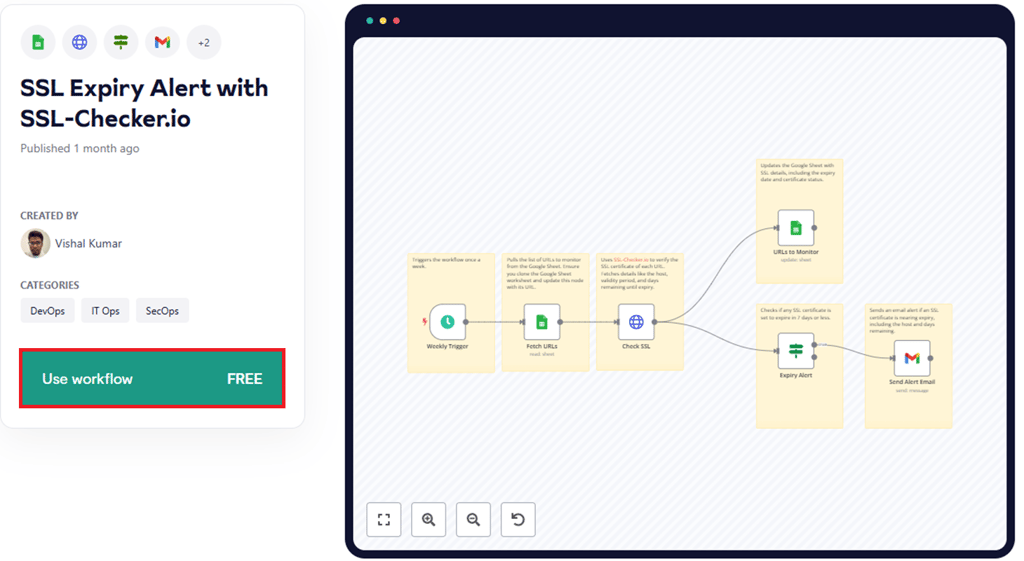
- Under Import to an n8n destination, you can click Import template to <your_server_url> self-hosted instance for a quick and straightforward installation or Copy template to clipboard (JSON) if you want to set it up manually. We will cover both options.
Important! If you haven’t yet logged into your n8n instance, you will not have the import template to option available to you, with the Get started free with n8n cloud option being presented instead. In that case, you will still have the Copy template to clipboard (JSON) option for manual setup.
Importing template to a self-hosted instance:
- Click Import template to <your_server_url> self-hosted instance. This will open a new tab for your n8n instance:
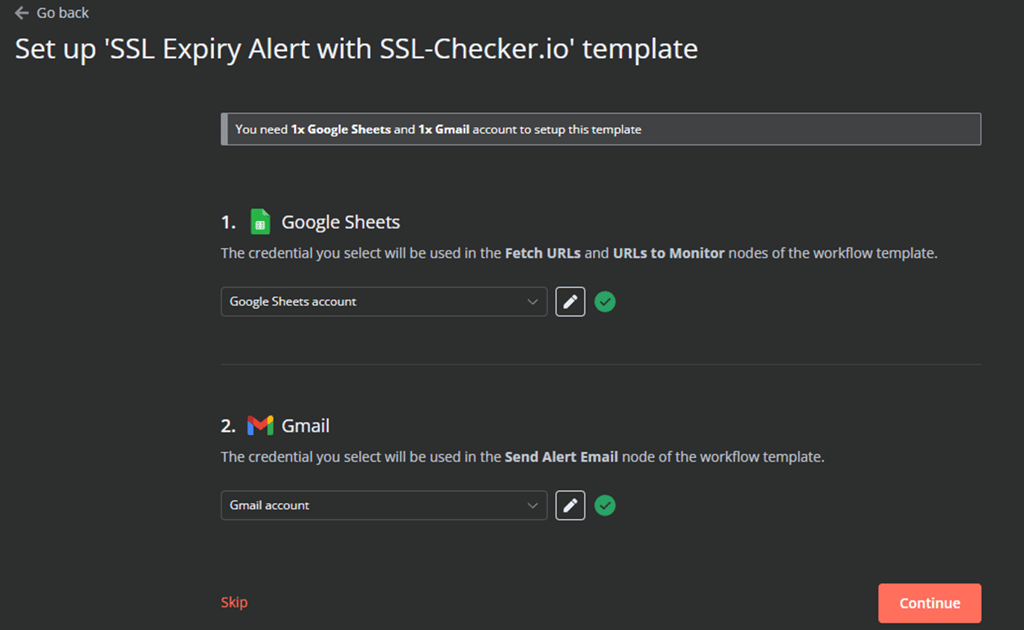
- In this case, you need to set up Google Sheets and Gmail credentials. You can set them up or skip this for now – we will be covering credential setup in the Configuring your template section of this guide.
If you decide to configure your template here, follow the steps outlined in the n8n interface, click Continue, and proceed to the Configuring your template section.
Manual setup:
- Click Copy template to clipboard (JSON) and paste the copied template to a text file. Save it as a .json file.
- Connect to your n8n instance via your preferred method and enter your login credentials.
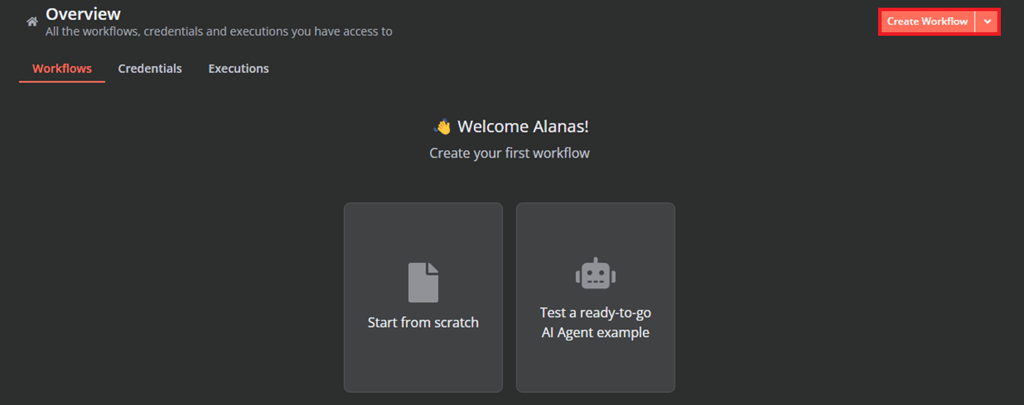
- In your n8n instance, navigate to Overview and click Create Workflow.
- In the top-right, click the triple-dot and then Import from file…
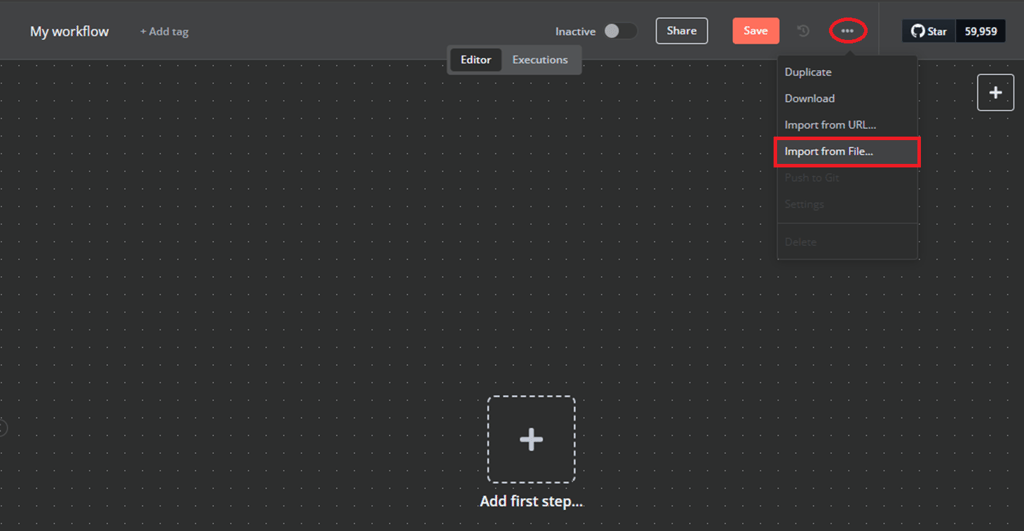
- Select your saved file, and your template will be uploaded.
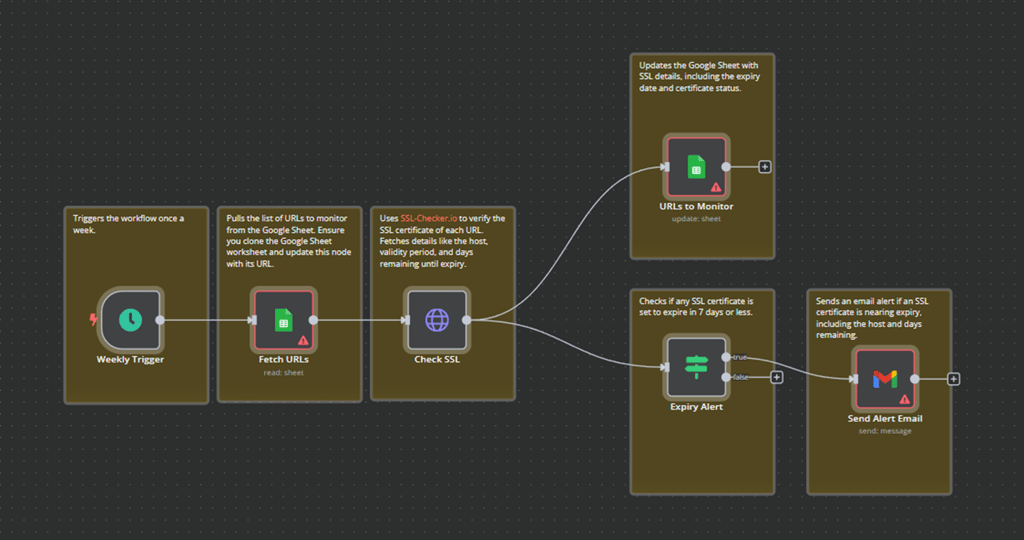
Important! Take note of the nodes which are highlighted in red – this means that the node is not ready for use and needs configuration.
Configuring your template
Premade n8n template nodes may require some configuring before they can be used. These required configurations are typically noted under Template description. Make sure you read them and add the relevant configuration.
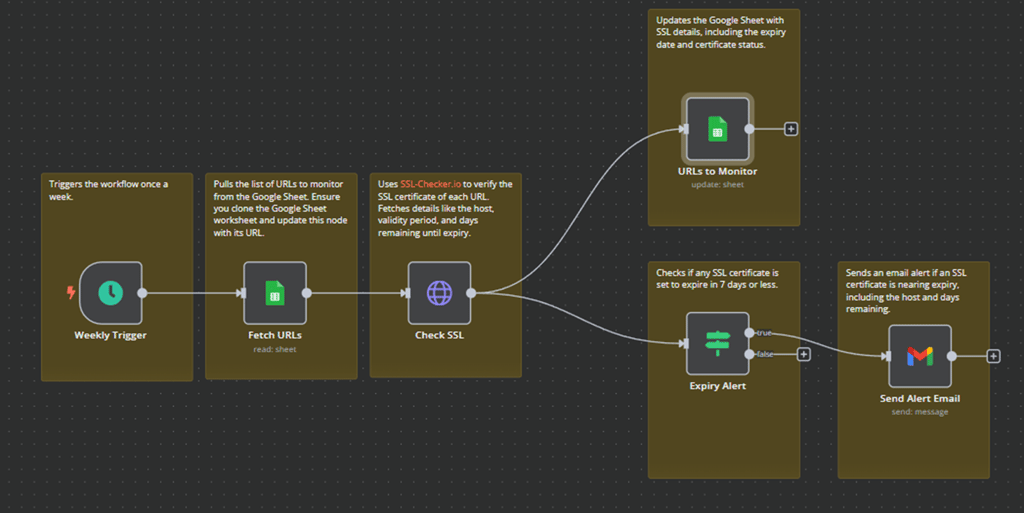
This template requires the Fetch URLs, URLs to Monitor and Send Alert Email nodes to be configured. Let’s configure the Fetch URLs node.
- Double-click the node. This will display the node configuration. Required values that are not filled will be highlighted in red.
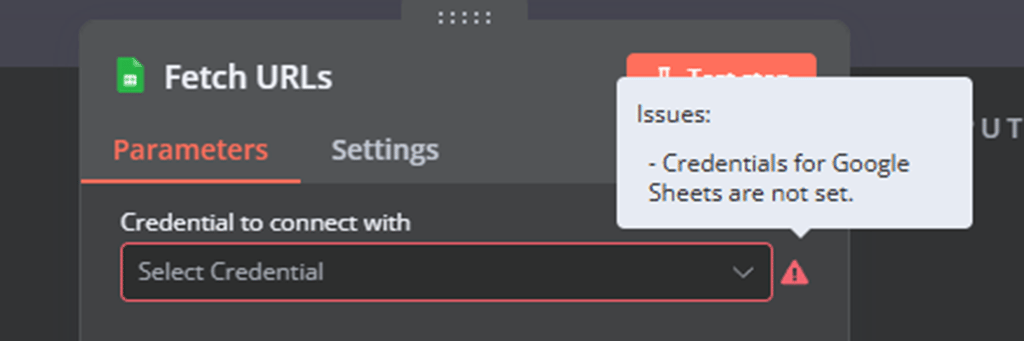
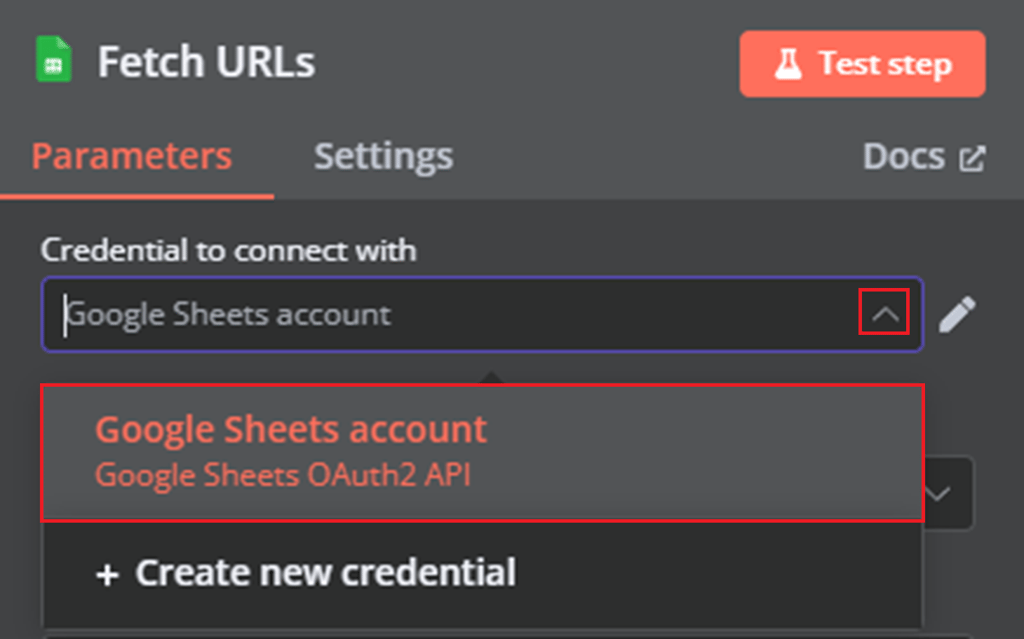
- If you have existing credentials configured, click the drop-down list, select the credentials you wish to use, and move to step 8.
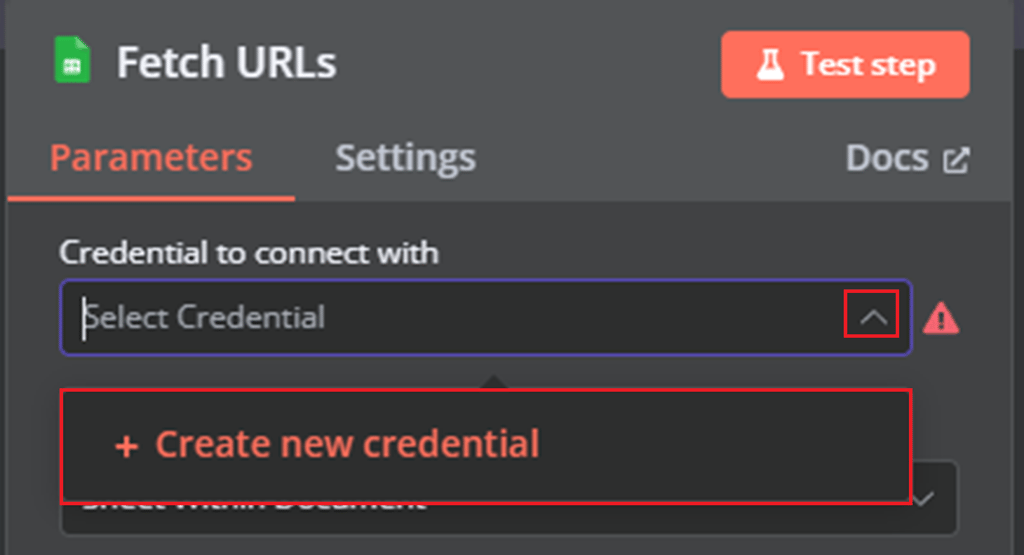
- If you don’t have credentials yet or want to use new ones, click the drop-down list → Create new credential
- Fill in your details to integrate n8n with Google Cloud through its API. If you need help, n8n provides a step-by-step tutorial for setting up OAuth.
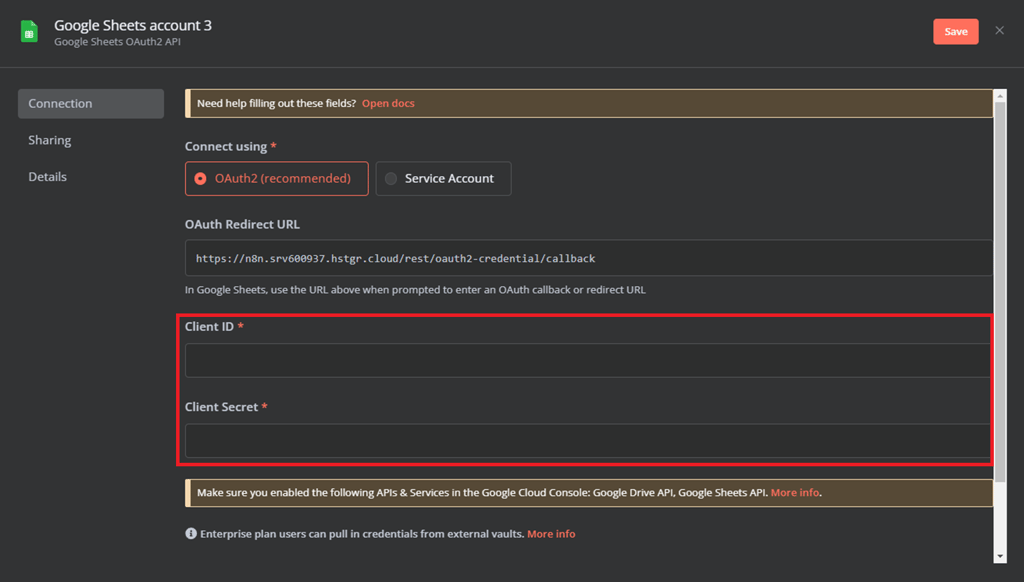
- When the Client ID and Client Secret fields are filled in, click Sign in with Google and authenticate with your Google account:
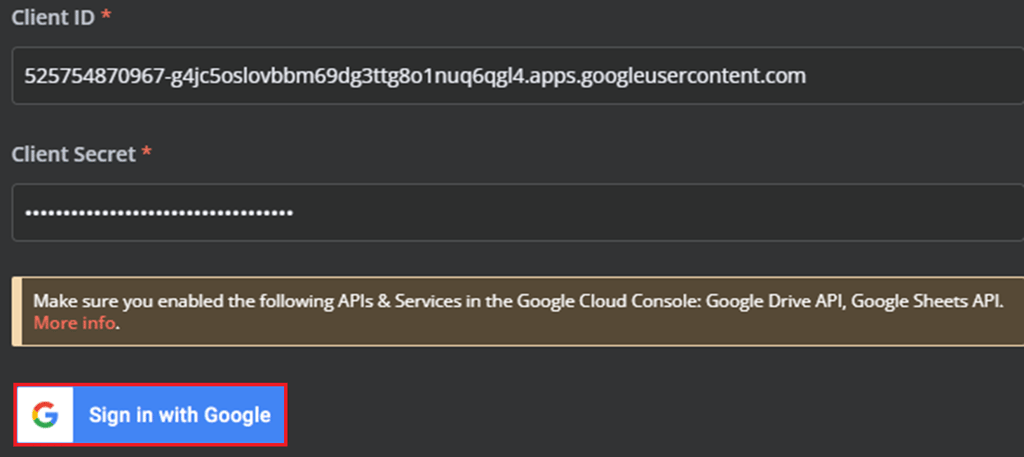
- After you sign in with Google, you will see the connection successful confirmation.
- Close the interface for your credential configuration to go back to your node settings. Verify that your credentials are set and that the Document and Sheet values are pointing to a Google Sheets file containing URLs you wish to monitor.
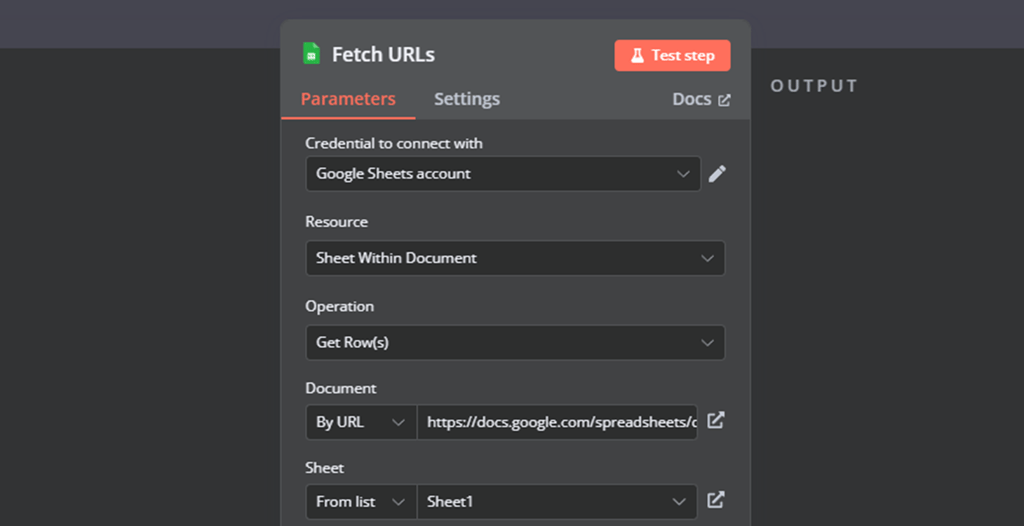
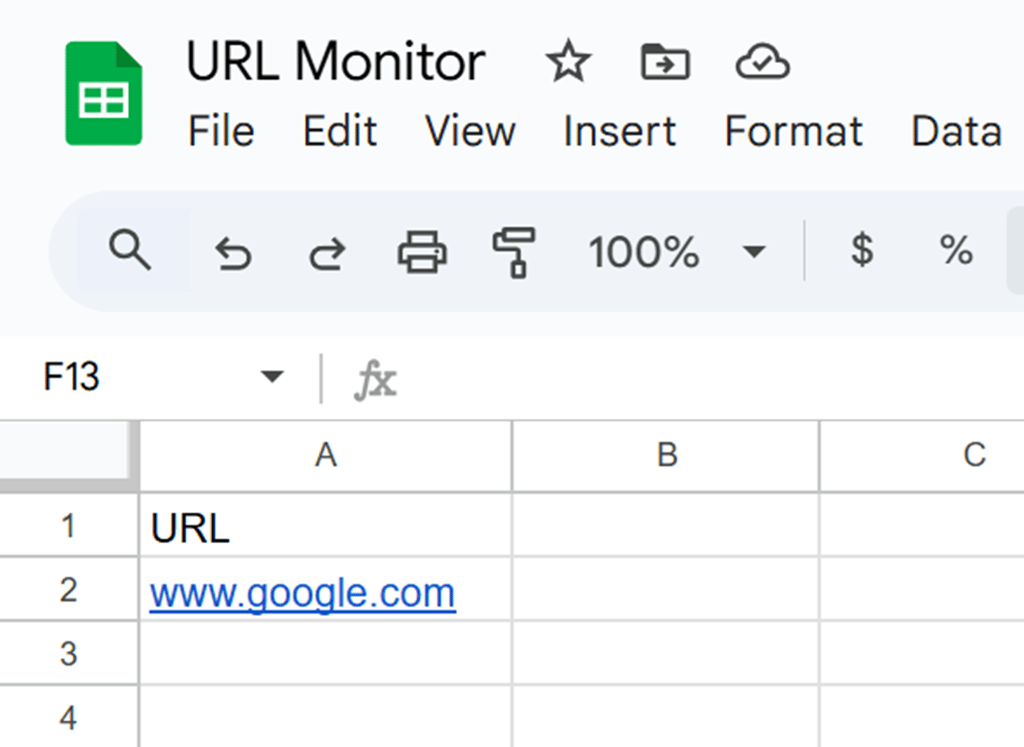
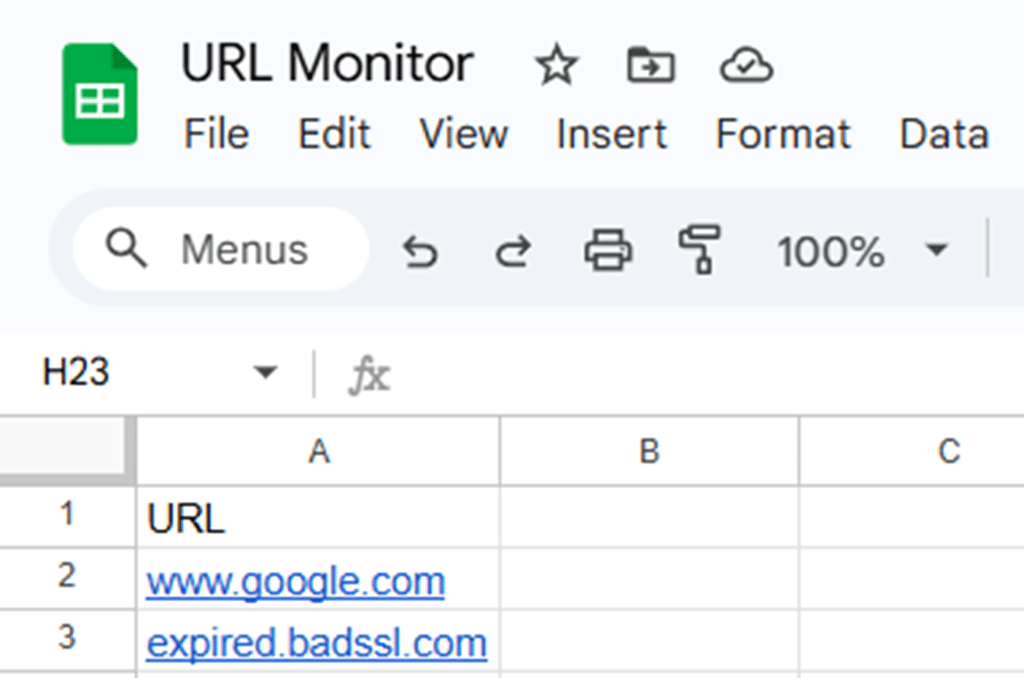
The Google Sheets file is a simple sheet that contains a header in the first row and a list of URLs below the header in column A. This is how an example sheet could look like:
Now let’s quickly double-check the rest of the nodes:
- The URLs to Monitor node should automatically use the credentials you authenticated in the previous steps. However, you will need to set the Document and Sheet values.
- To set up the Send Alert Email node, you will need to authenticate your account again because n8n requires separate credentials defined for each integration type. However, you can reauthenticate the same OAuth client you configured for Google Sheets. Then, enter the email you want to send the alert to in the To field.
Update these nodes the same way you’ve configured the Fetch URLs node.
With the configuration complete, your workflow should have no nodes highlighted in red:
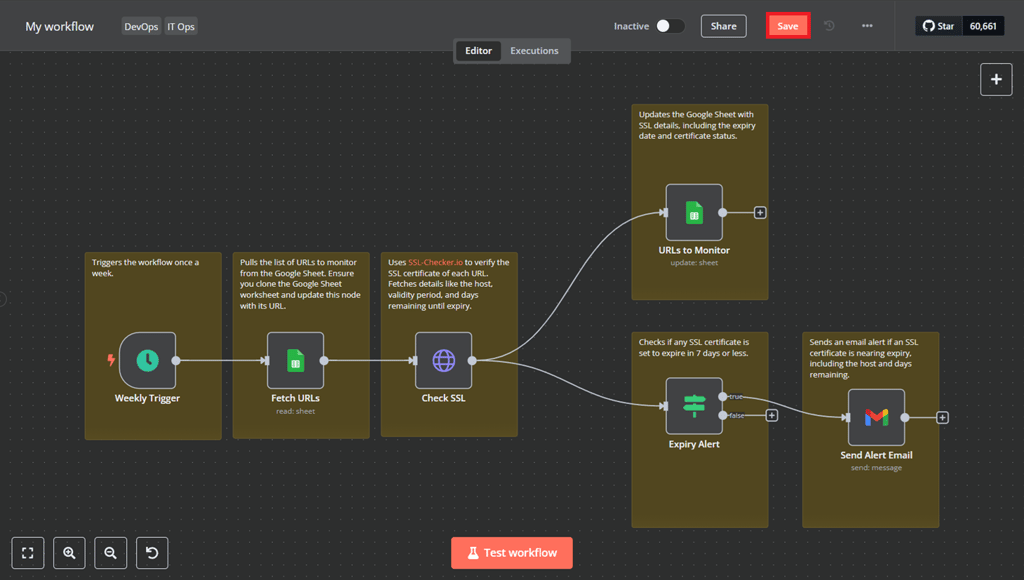
To save your workflow, click Save.
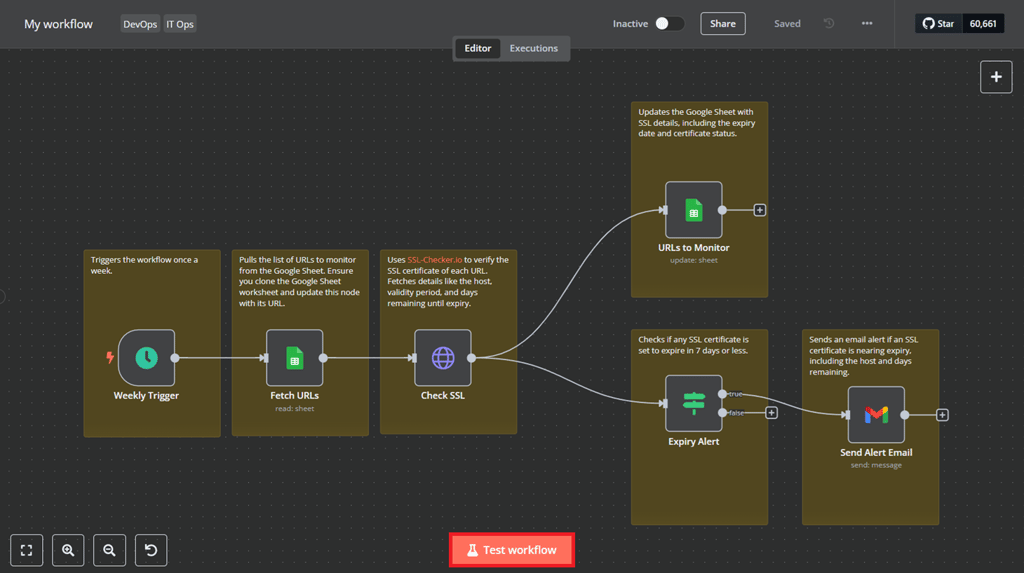
Testing your workflow
After you set everything up, it’s time to test it. At the bottom of the workflow screen, click Test workflow.
Let’s examine the output:
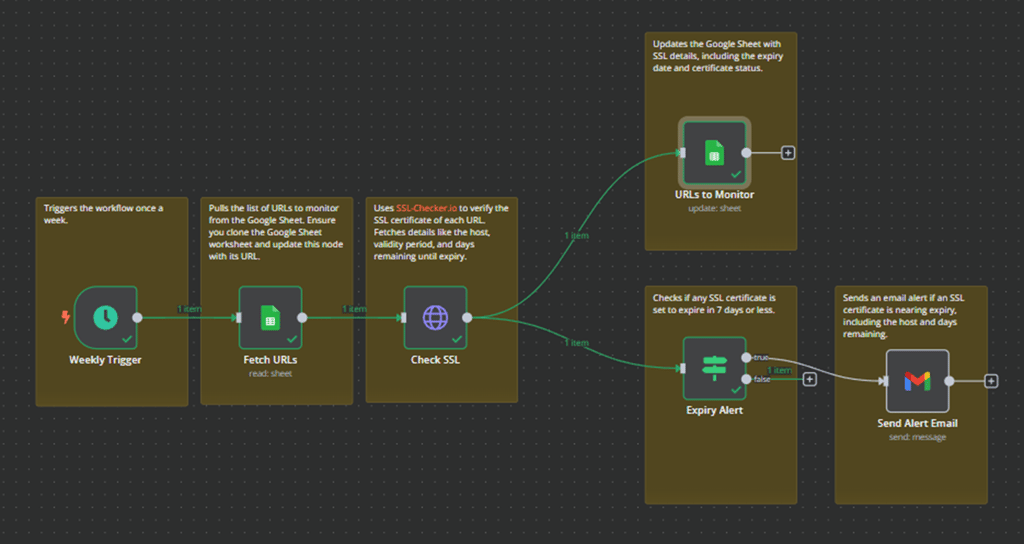
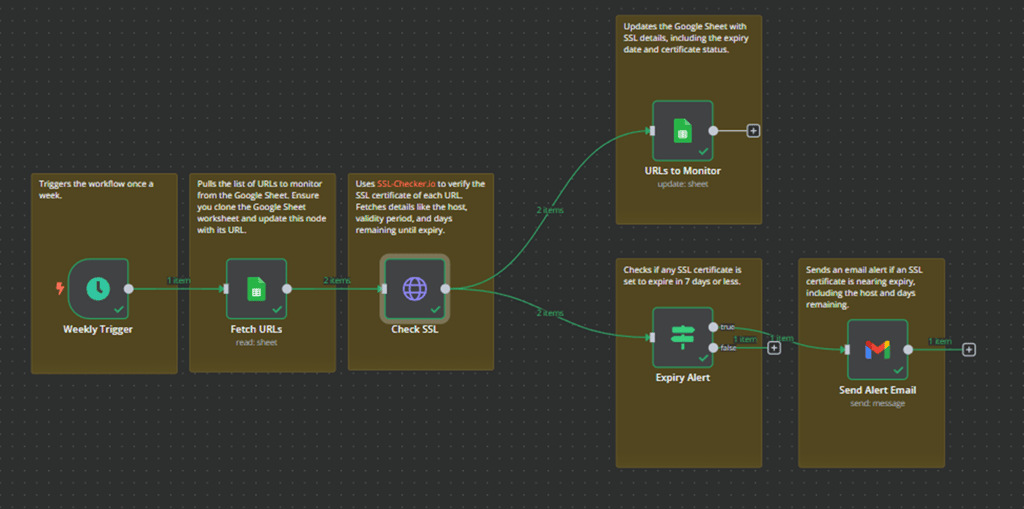
Nodes highlighted in green have been executed successfully, but you can see that the Send Alert Email node is still gray – which means it has not run. This makes sense, as the URL list only contains www.google.com – a website that has a valid SSL certificate.
Let’s add expired.badssl.com to the URL list, which is a testing site with an expired SSL certificate, and re-run the test:
As expected, since you now have an expired SSL certificate in our list, the Send Alert Email node has triggered:
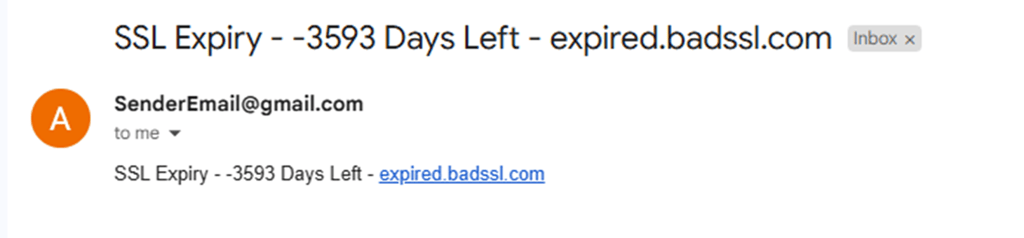
If you check the email you set for the Send Alert Email node, you should see a new message in your inbox:
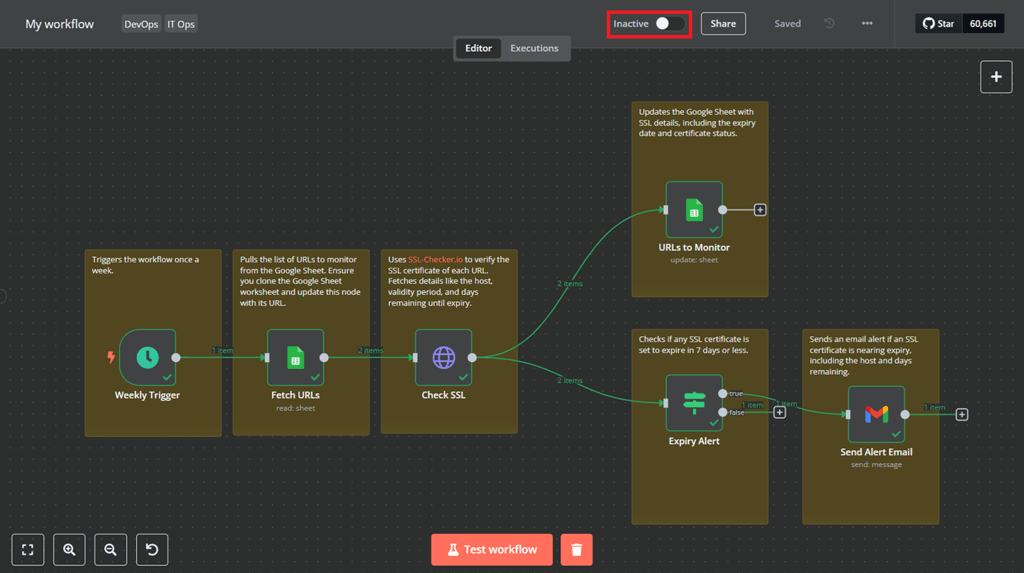
And that wraps up the configuration and testing of the n8n template. All that’s left is to activate it by toggling the Inactive option:
Suggested Reading
Want to learn more about automating Google Sheets? Check out our article on how to integrate n8n with Google Sheets.
Conclusion
n8n templates make building automation accessible to everyone – turning long, complex tasks into quick and effortless workflows. Whether you’re handling IT, optimizing your business, or need some extra help staying productive, these ready-made workflows are here to make your life easier.
These templates represent just a fraction of n8n’s versatility – its automation capabilities extend from routine task scheduling to more complex IT operations, illustrating what can be automated with n8n.
By using n8n, you can save time, minimize errors, and improve efficiency across various tasks. With a bit of setup, you can integrate your favorite tools, set up workflows, and let them handle the rest.
This article is a localized version of Best n8n templates to boost your productivity, originally published in English.

Alanas is a Content Writer with a foundation in IT and Operations. His expertise spans cloud engineering, DevOps, and process definition and optimization, gained through his experience in fintech and data-driven organizations of various sizes. Outside of work, he enjoys traveling, exploring history, gaming, and spending quality time with his family. Find him on LinkedIn.


Comments
0 responses