How to Generate and Customize a QR Code for Your Website
Oct 14, 2026
/
By Nurul S.
/
8 min Read
A quick-response code (QR code) is a barcode type that is scannable by a digital device. These codes have become increasingly popular in recent years, as they provide an easy way to access content or information without typing in a long URL.
Website owners benefit from using QR codes by providing users with easy access to the site on their mobile devices. Additionally, QR codes can be used as a part of marketing as they can be customized with images and logos, making them more visually appealing and memorable.
In this article, we will explain the difference between static and dynamic QR codes and how to generate them using different methods. Let’s get started.
Download glossary for web beginners
Static vs Dynamic QR Codes
A static QR code contains a fixed URL that cannot be changed once it’s generated. This means that if the website’s URL changes, the QR code will no longer work, and a new one will need to be generated.
Static QR codes are best for use in physical media, such as business cards, posters, and flyers. They’re also helpful for one-time promotions or events.
On the other hand, a dynamic QR code allows the URL to be edited or changed after it’s created. This is especially helpful for websites that frequently update their content or have changing URLs.
Dynamic QR codes also allow tracking and analysis, offering valuable insights into a marketing campaign or advertisement’s effectiveness.
Understanding the difference between these two will help you determine which best suits your agenda. If you’re looking for a long-term solution with the same URL, go for a static QR code. But if you need flexibility and tracking capabilities, a dynamic QR code is the way to go.
How to Generate a QR Code
Let’s review five ways to create both static and dynamic QR codes. We’ll explain each method’s best use so you can see which one best suits your needs.
Using Chrome
Chrome provides a built-in feature that allows users to generate a static QR code from any website. The desktop and mobile browsers generate the code slightly differently, but both methods are straightforward.
On desktop
- Simply open the website in Chrome and right-click on the page.
- Select Create QR Code for this Page from the drop-down menu.
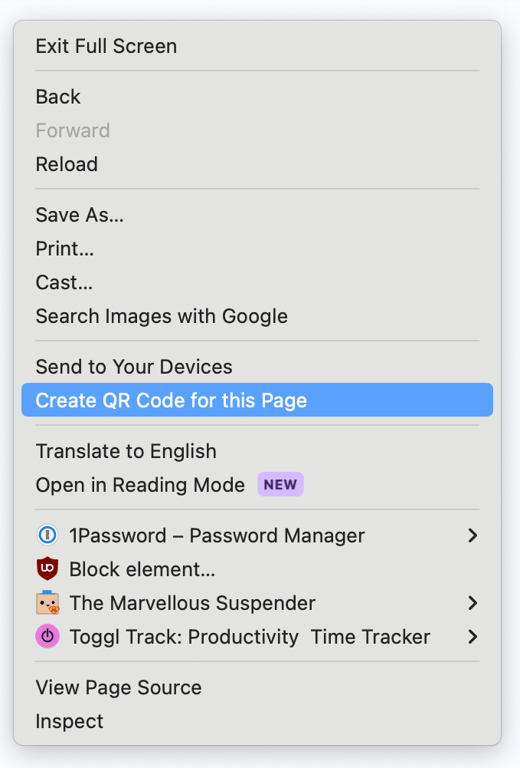
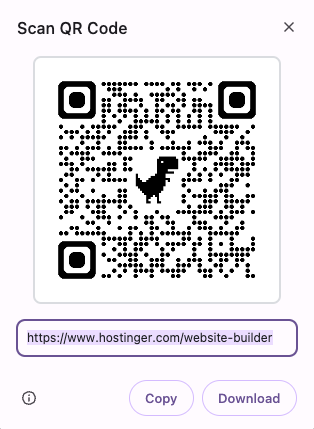
- Click Download to save the QR code to your device. Alternatively, click Copy to save the QR code as an image to your clipboard for easy pasting onto your preferred platform.
On mobile
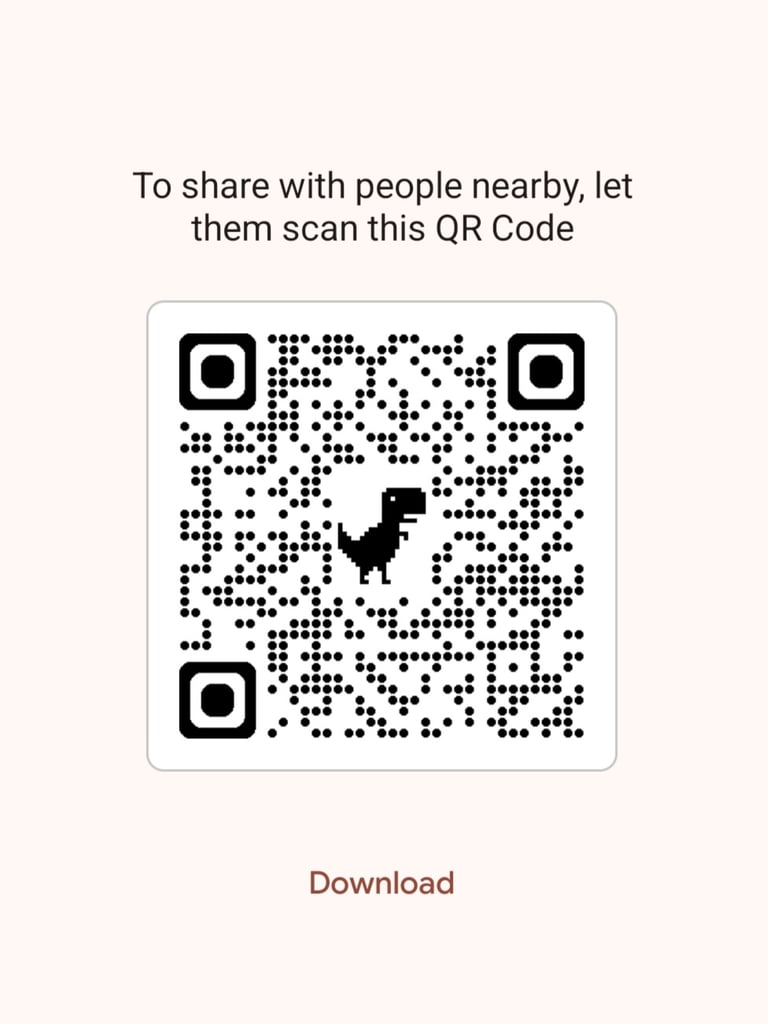
- Go to the website you want, and instead of right-clicking, locate the three horizontal dots in the top right corner.
- Choose Share and find the QR code option.
- After that, Chrome will generate the code that you can share with people nearby or download to your mobile device.
Using Hostinger AI Builder
Hostinger AI Builder is a site-building platform with comprehensive features, including a static QR code generator. This method is best for users looking to build their first websites with custom QR codes to share their websites, show product information, and more.

To create QR codes using Hostinger AI Builder, you need to create and publish a website. Follow these steps to get started:
- Choose one of the builder plans: The Premium plan for CA$ 4.19/month or the Unlimited plan for CA$ 5.59/month.
- Once you make the payment, select whether you want to create the website with AI or a pre-made template.
- Take the time to build the page or section for which you want to create the QR code. This could be a product page, blog page, or contact page.
- Once all is done, publish the website.
After that, follow these steps to create QR codes:
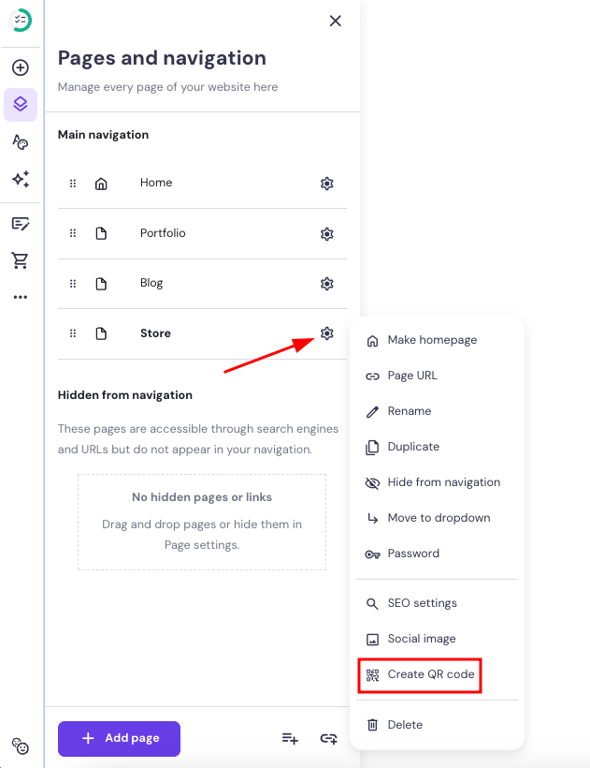
- Go to Pages and navigation. Choose the page you want and click the Settings icon.
- Choose the Create QR code option.
- Customize the QR code’s background and pattern colors. You can choose a white or transparent background.
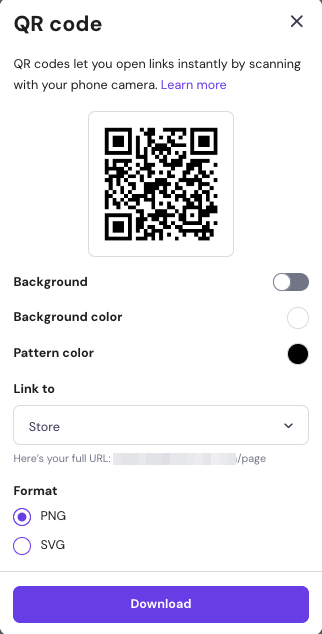
- Click Download to save the QR code in PNG or SVG format. Downloading in SVG format ensures that the generated QR codes are scalable without losing quality, making them suitable for print materials.
Alternatively, you can build a website and generate the QR code using Hostinger AI Builder with your mobile device. This method works best for those who want to generate and share a QR code quickly. Follow the same steps using your mobile device to create it on the go.
Using Hostinger dashboard
If you use Hostinger but haven’t created your website with our builder, you can generate a QR code using Hostinger dashboard. This method is ideal for those running WordPress, any other CMD, or custom-coded websites.
Simply head to Hostinger dashboard and navigate to Domains → Domain portfolio. Then, select the domain you want to create the QR code for. That’s it – in the Generate QR code window, click Generate.

Using an Online QR Code Generator
The QR Code Generator is ideal for creating static QR codes across different platforms. It also allows you to share contact details, accept Bitcoin payments, play MP3 files, and more.
A Pro version is available, which allows you to create dynamic QR codes. It also lets you add a logo to the QR code, customize the design, choose the print quality, and track the number of scans.
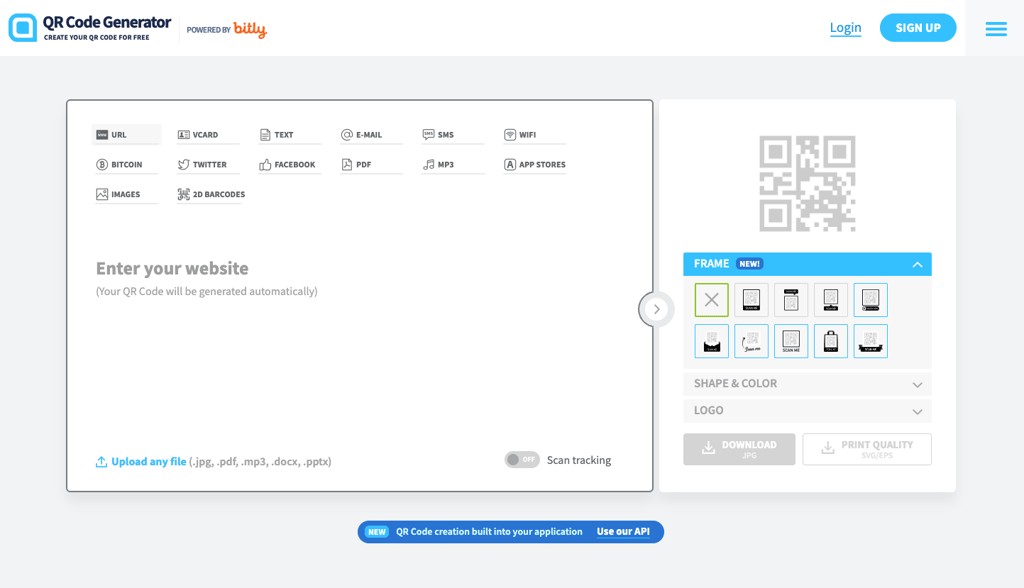
Here’s how to create a QR code without creating an account:
- Go to the QR Code Generator page.
- Choose the type of QR code to create. In this case, you can create a QR code from a URL to Twitter without needing an account.
- Enter your details.
- Click Download to save the QR code.
- A pop-up window will appear, indicating that your QR code is being downloaded.
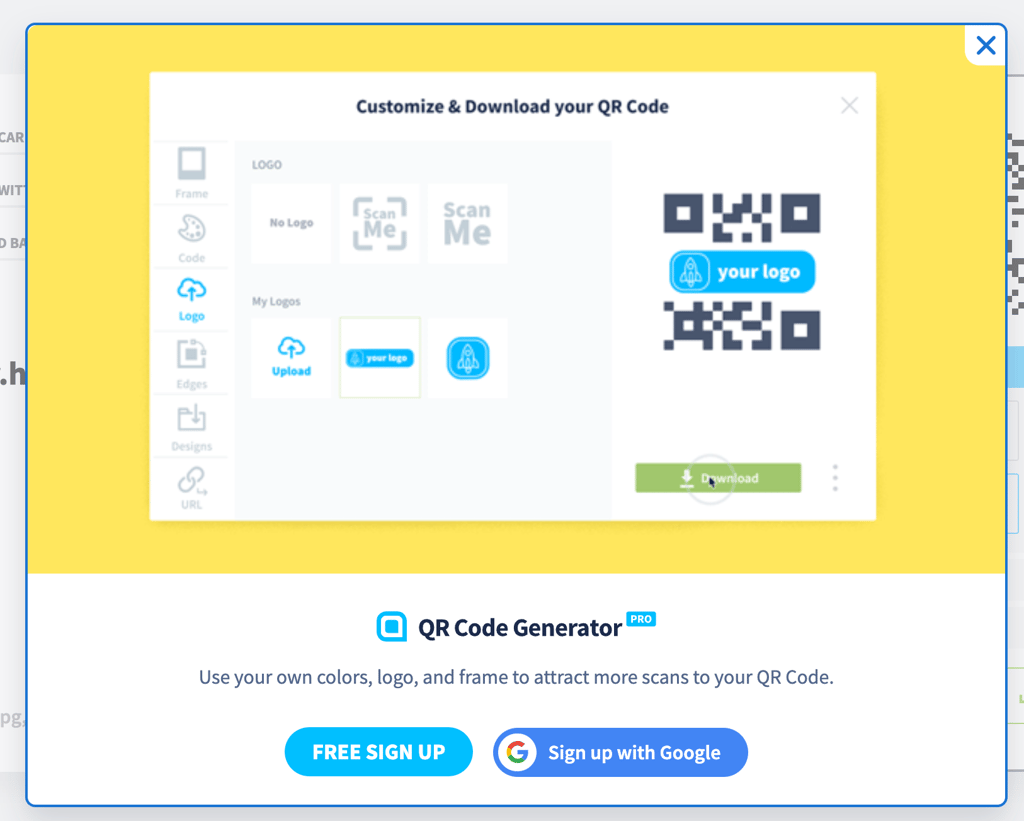
Here’s how to generate a QR code with a Pro plan:
- Sign up or sign to your QR Code Generator account.
- On the Dashboard, click the Create QR Code button to start the process.
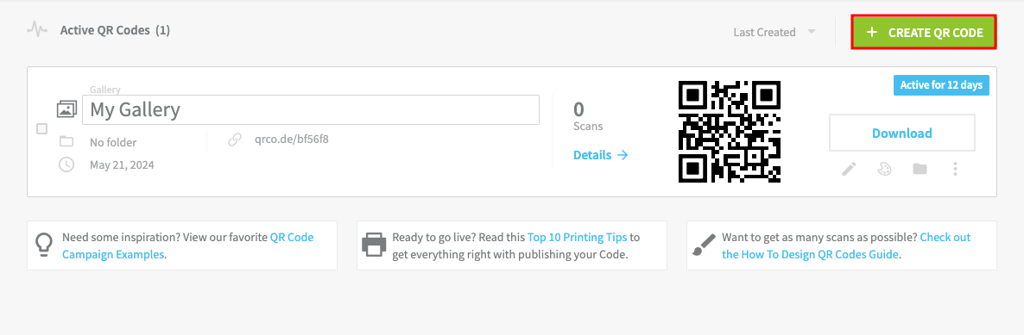
- Choose between creating QR codes for Facebook, PDFs, MP3s, app stores, images, and 2D barcodes. Note that the Pro plan lists the dynamic QR codes first and then static codes second.
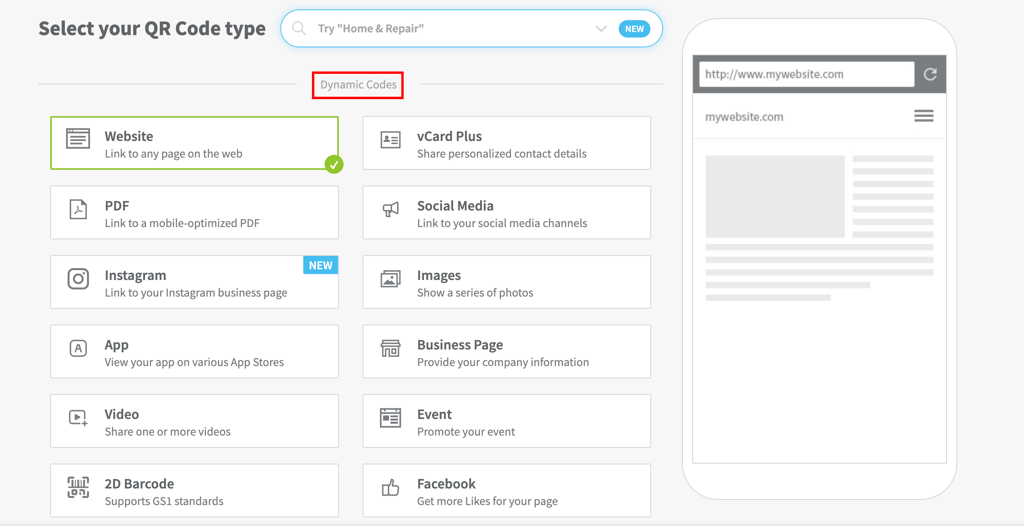
- Enter your details.
- Customize your QR design. For example, here’s the customization page for Images QR codes. You can add multiple images, a link, and a button.
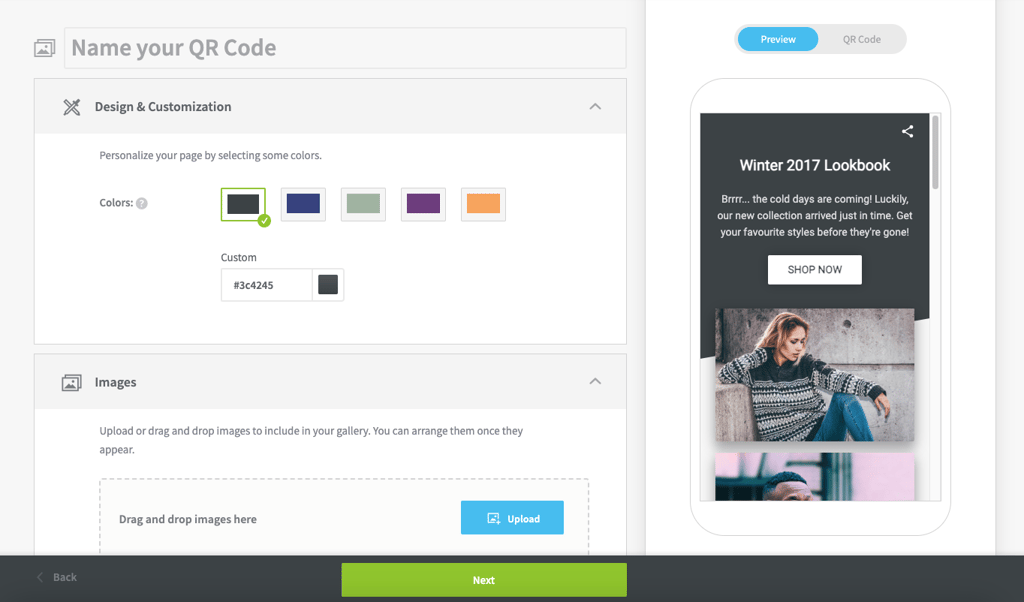
- Click Next once you’ve made your changes.
- Adjust the QR code design from the frame color to the text.
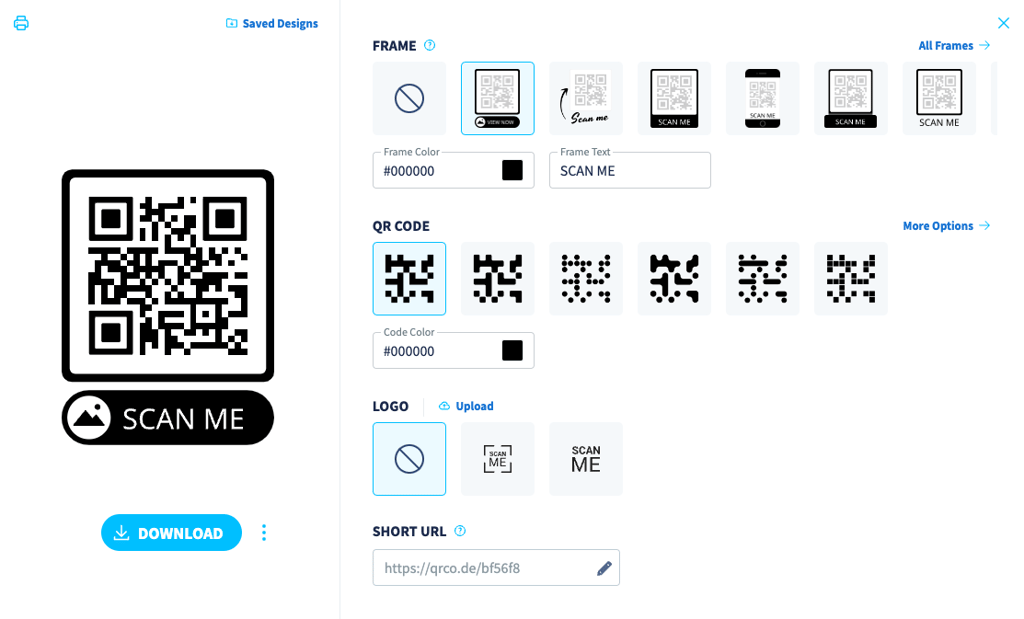
- Click Download to save the QR code.
Using Canva
Canva is a free, beginner-friendly design tool with a built-in QR code generator. With it, you can add a QR code to your printed or promotional materials without switching platforms. Canva also allows you to create both static and dynamic QR codes.
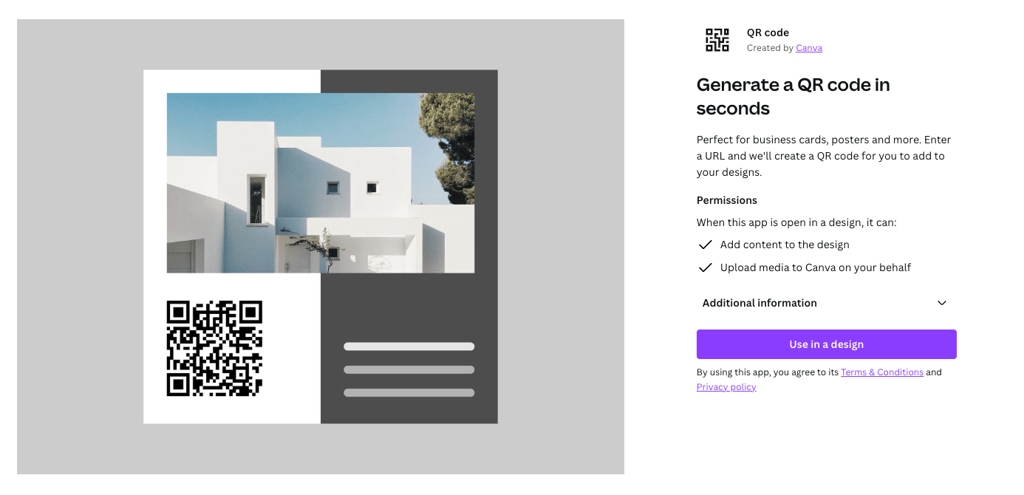
To use the static QR code generator on Canva, simply follow these steps:
- Sign up or sign in to your Canva account.
- On the dashboard, click on Create a design and select the type of design you want to create. Alternatively, you can also add a QR code to an existing design.
- Choose the QR Code option on the left sidebar.
- Enter your link, and Canva will generate the QR code.
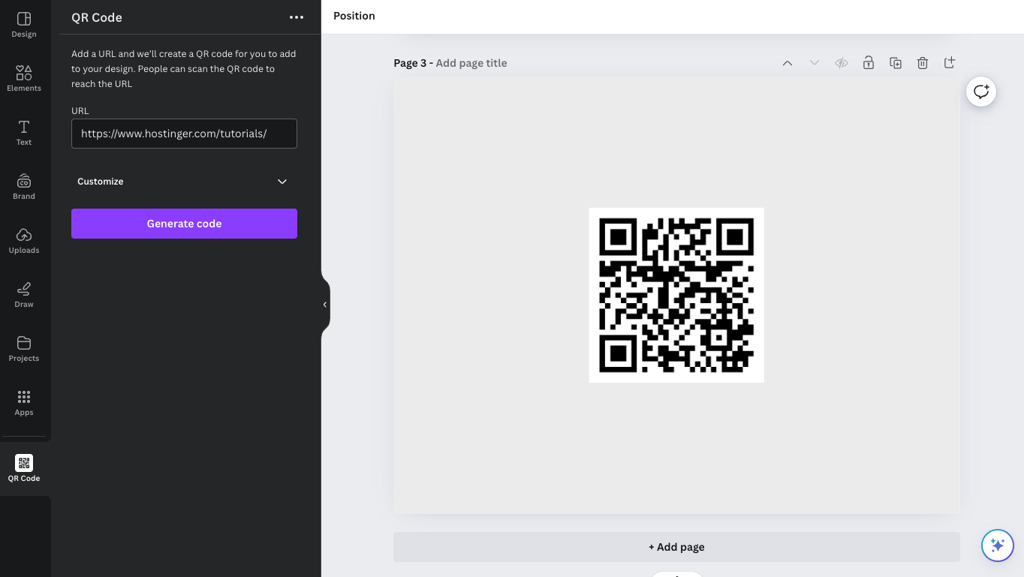
Feel free to place the QR code wherever you want. Repeat the process to generate and add multiple QR codes to your design.
As for generating a dynamic QR code, the process is similar:
- Go to the dynamic QR code page.
- Choose between adding the code in a new or existing design.
- Add the details and customize the QR code.
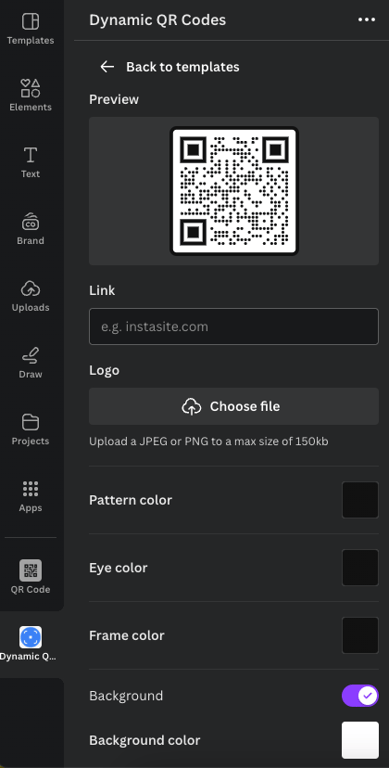
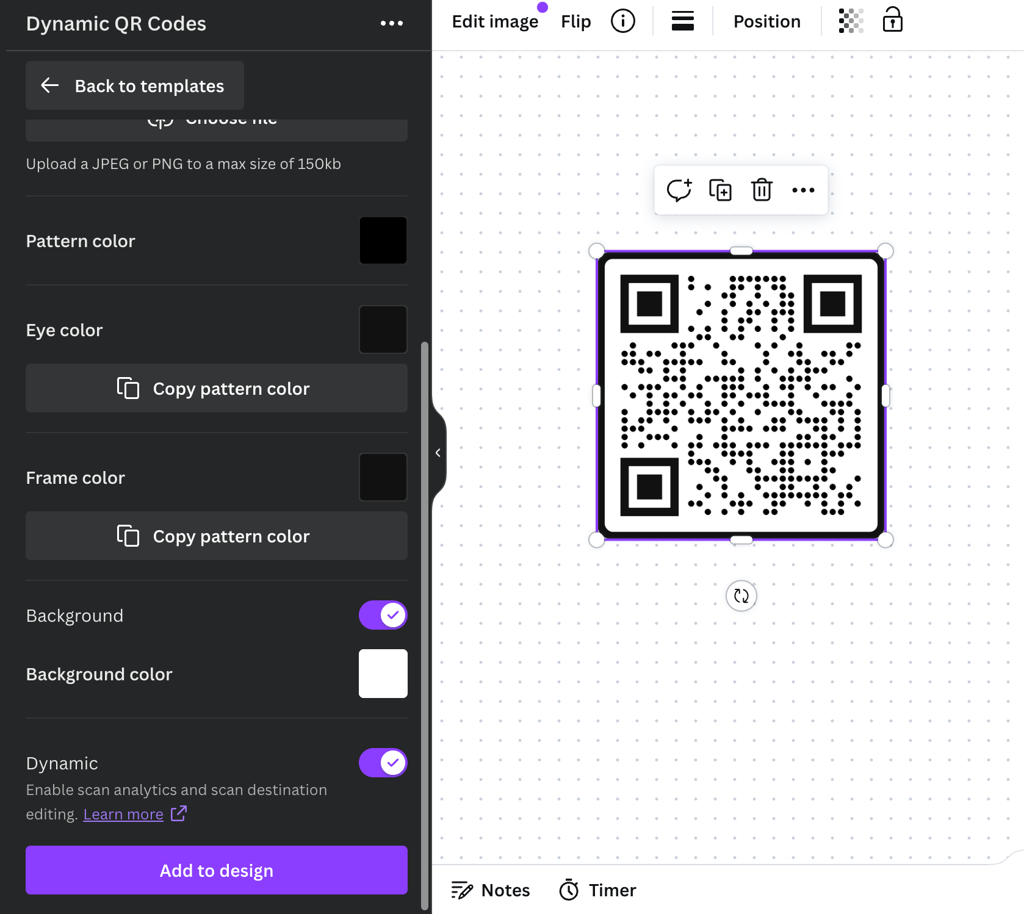
- Just above the Add to design button, toggle the Dynamic option on to create a dynamic QR code.
- Since Canva is integrated with Hovercode to create dynamic QR codes, you need to create an account. Add your name, email, and password to set up and connect the account with Canva.
- Once you’ve created the account, go back to your Canva design.
- Click Add to design to insert the QR code.
Using OpenAI’s GPT-4
OpenAI’s GPT-4 is another great way to generate a QR code. This method is best for quick static QR code generation. Here’s how to do it:
- Open the GPT-4 website and create a new chat.
- Write a simple prompt and add the link for which you want to create the QR code. For example, we used our Hostinger Tutorials page.
- GPT-4 will generate a QR code and give you the download link.
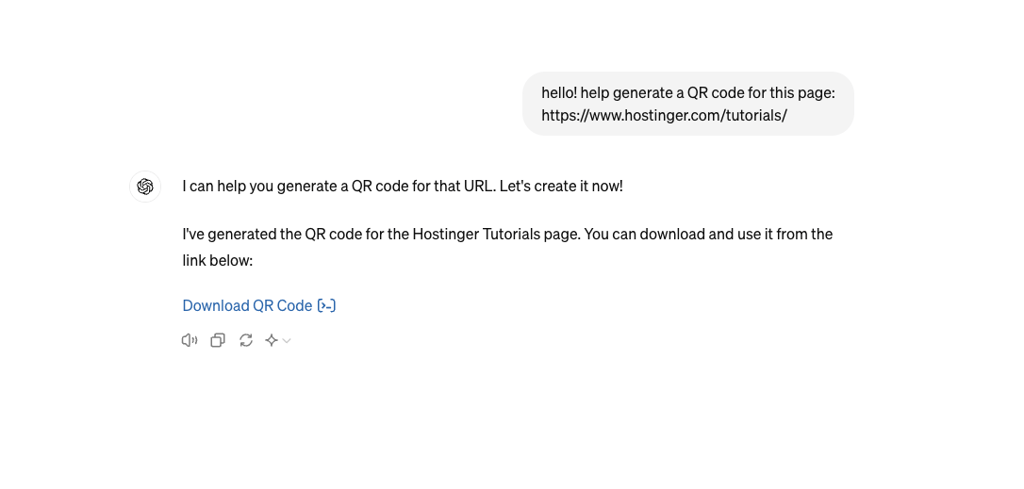
- Click the download link, and it will automatically download the QR code in PNG format.
Best Practices for Using QR Codes
Now that you know how to generate QR codes, let’s talk about the most effective ways to use them.
Customizing QR Codes with Design Elements
Customizing QR codes with unique design elements not only makes them more attractive but can also enhance brand recognition. Here are some tips to consider:
- Adjust the color of the QR code and its background. This can help customers identify your brand.
- Resize the QR code to fit different platforms. For example, if you are using QR codes in print materials, make sure they are large enough to be scanned easily.
- Use high-resolution QR codes for better scanability. To ensure quality, avoid downloading QR codes in low resolution and opt for SVG format instead.
- Add a logo to the QR code. This can help with brand recognition and make the code more visually appealing.
- Use custom shapes for the code. Instead of the original square shape, consider using a custom shape that fits your brand or product.
Adding Text or URLs to QR Codes
Text provides a great way to give context to your QR code and encourage users to scan it. It could be a call to action, instructions on how to use the code or a brief description of what the QR code leads to.
Similarly, adding URLs can provide even more context and make it easier for users to access the intended content. Shorter URLs are easier for users to scan and type, so try using URL shorteners if your link is too long.
Testing and Verifying QR Codes
Test your QR code with different devices and scanners to ensure it works properly. This will ensure that the code directs to the correct URL, displays the right information, and is readable by the QR code scanner.
The simplest way to test is by scanning the QR code with your mobile device. Another way is to use Google Lens or a QR code reader app.
If your QR code leads to a website, make sure the page is optimized for mobile viewing. This means it should be responsive and easily readable on smaller screens. Additionally, check if any multimedia content, such as videos or images, loads properly on mobile devices.
Placing QR Codes
Placement is key to QR code effectiveness. Place your QR codes in visible locations, such as posters, business cards, flyers, and product packaging. Make sure the code is not obstructed by any other objects or is difficult to scan.
It’s also important to consider the context of where the QR code is placed. For example, if it’s on a restaurant menu, make sure it leads to relevant information about the dishes or promotions.
Tracking and Analyzing QR Code Scans
QR code scans gather user engagement data. Tracking and analyzing it can help improve future marketing strategies. However, remember that only dynamic QR codes are trackable. Therefore, consider using a QR code generator that offers this feature.
Additionally, make sure to track and analyze the QR code data regularly. This will provide insights into which platforms or marketing campaigns are driving the most scans and conversions.
Conclusion
QR codes offer a simple way to share information and engage with audiences. However, make sure you choose correctly between static and dynamic QR codes according to your needs.
To sum up, this article covered multiple methods of creating a QR code:
- Chrome – free QR code generator best for sharing website pages quickly with other users.
- Hostinger AI Builder – best QR code generator for long-term use since it’s integrated with your website. If you run an online store, the QR code is beneficial for sharing your products online on various platforms.
- Hostinger dashboard – the easiest way to generate QR codes for Hostinger customers who don’t use Hostinger AI Builder.
- Online QR Code Generator – best standalone QR code generator. The Pro version allows you to create dynamic QR codes and offers more customization options.
- Canva is best for adding a QR code to print materials such as restaurant menus, event invitations, and more. It also offers dynamic QR code generation.
- OpenAI’s GPT-4 – ideal for quickly generating QR codes for personal use or one-time needs without requiring tracking or analysis.
Follow best practices for creating, placing, testing, and tracking your QR code to ensure you get the maximum results.
How to Generate a QR Code FAQ
Read answers to the most frequently asked questions on QR codes.
What Is a QR Code, and How Does It Work?
A QR code is a two-dimensional barcode consisting of black and white squares. When scanned with a smartphone or other QR code reader, it quickly unlocks information stored in the code.
Can I Generate a QR Code for Free?
Absolutely, numerous websites and apps allow you to create basic QR codes at no cost. However, for more advanced features and tracking capabilities, you may need to upgrade to a paid plan.
What Information Can I Encode in a QR Code?
A QR code can encode a wide range of information, including website URLs, plain text, phone numbers, email addresses, Wi-Fi network credentials, and more.
This article is a localized version of How to Generate and Customize a QR Code for Your Website, originally published in English.

Nurul Siregar has over 3+ years of experience in the tech industry with a passion for writing about digital marketing. Nurul enjoys reading fiction novels and making digital illustration in her free time. Follow her on LinkedIn.