How to Make a Charity Website in 9 Easy Steps
Mar 10, 2026
/
Matleena S. & Miglė C.
/
8 min Read
A charity website lets you share your cause with a global audience and raise more funds to make a difference. However, paying for a web developer to build a custom website can be too expensive for nonprofit organizations.
Using a charity website builder like Hostinger Website Builder streamlines the website design process and helps you create an easily accessible website for your organization.
In this guide, we will walk you through the steps of creating a beginner-friendly charity website, from choosing a template to adding charity-specific features and pages.
Download guide to using Hostinger
How to Make a Charity Website
Create a new website for your nonprofit organization by following the steps below:
1. Choose the Right Website Builder and Domain
Selecting a user-friendly website builder for nonprofits is essential for ensuring your charity website is both effective and easy to manage.
Some key things to consider when choosing a website builder for your charity website include the following:
- Donation functionality. Make sure the builder accepts online donations, including recurring ones. In addition, make sure it supports your preferred payment methods.
- Drag-and-drop editing. This enables you to create and update your website, even without any technical knowledge.
- Mobile-friendly templates. Choose a builder that offers responsive charity website templates that look great and function well on mobile devices. This is important since many users browse on cell phones and tablets.
- 24/7 customer support. Reliable customer support is crucial in case you encounter any issues while building your website.
- Website cost. Look for a platform that has no hidden costs and preferably a fixed monthly fee for easy budgeting.
Hostinger Website Builder’s intuitive drag-and-drop interface simplifies the web development process, enabling anyone to build a website.
Built-in donation features and mobile-friendly website templates empower charities to raise funds and showcase their causes effectively, all at an affordable price. Our expert Customer Success team is also available around the clock, meaning that you can get help at any point.

For your charity, choosing a memorable and relevant domain name is crucial for establishing a strong online presence. Use our domain name search to easily find the perfect domain for your nonprofit website:
Domain Name Checker
Instantly check domain name availability.
2. Select a Charity Website Template
The right website template should resonate with your charity’s mission and facilitate key actions like donations and volunteer sign-ups.
Opt for templates that are visually appealing and equipped with charity-specific features, such as a donation page, an embedded donation form, event calendars, and volunteer registration forms. This blends aesthetics with functionality and provides an engaging on-page experience for your website visitors.
Choose the right template with Hostinger Website Builder like this:
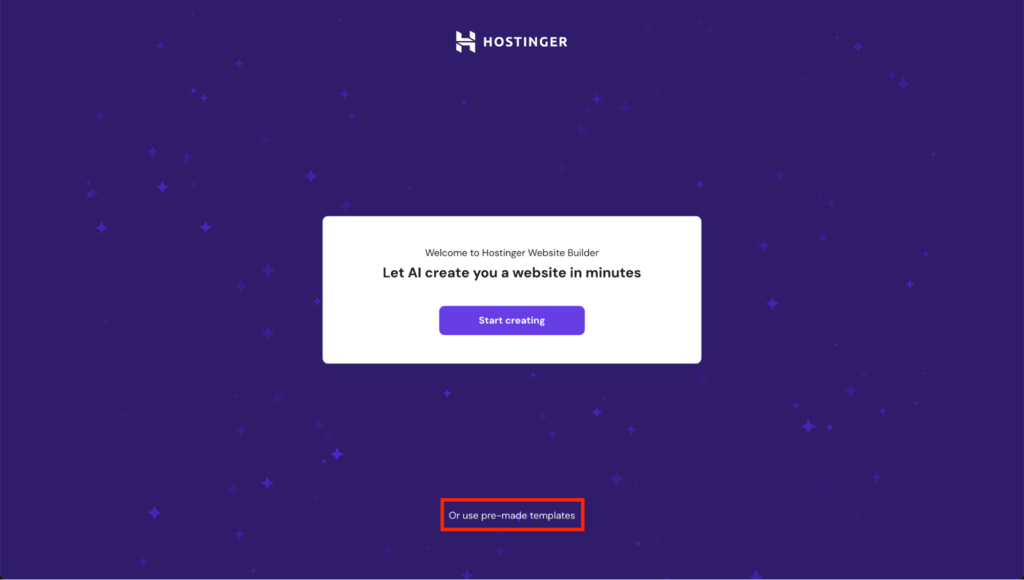
- Choose and pay for your website builder plan. Select the pre-made template option in the onboarding flow.
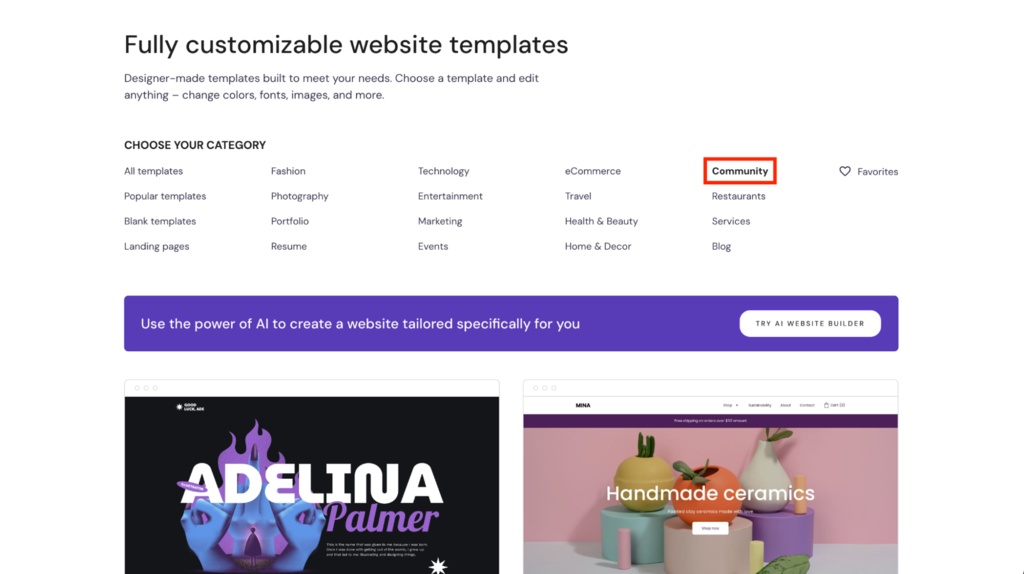
- Click on the Community category to narrow the templates down to charity or non-profit templates.
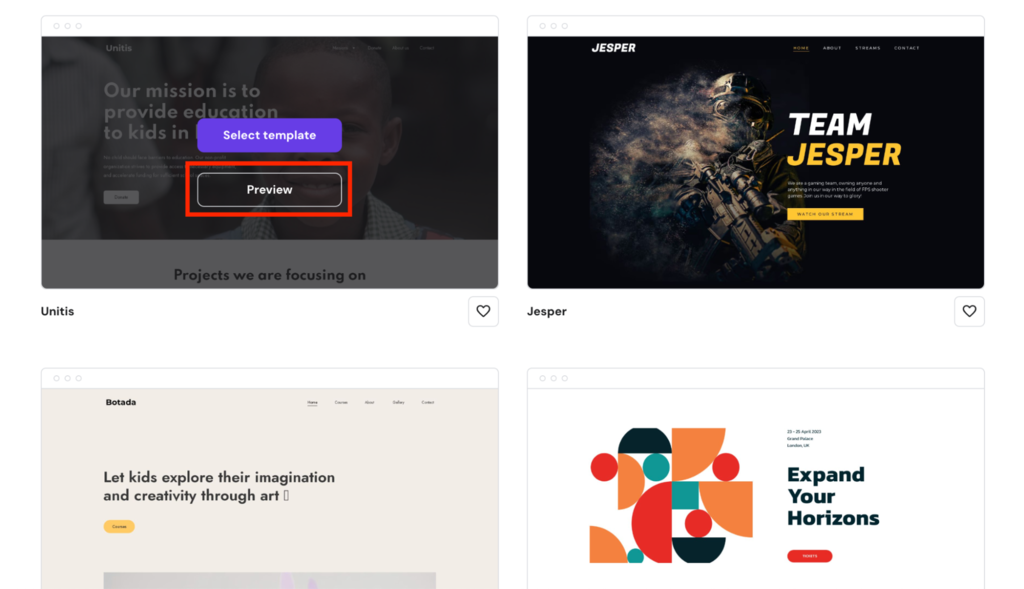
- Preview templates to see how they align with your charity’s values and mission.
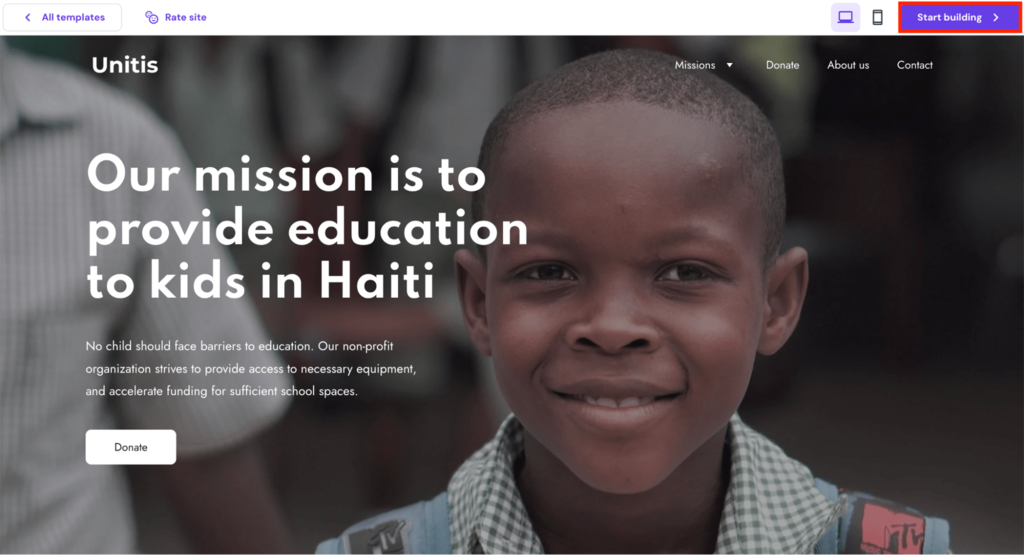
- Select a template that looks good and comes with features like a donate button and a volunteer sign-up form. Click on Start building to open the website editor and build your website.
3. Add Essential Pages
Next, it’s time to customize your website. A charity website should include essential pages like Home, About Us, Our Mission, Donation, Volunteer, Events, and Contact.
These pages should have a clear layout and engaging content that conveys your mission, the impact of what your nonprofit does, and how visitors can contribute.
Aim for a website structure that calls for action and clearly communicates your charity’s objectives and achievements.
Manage your pages like this:
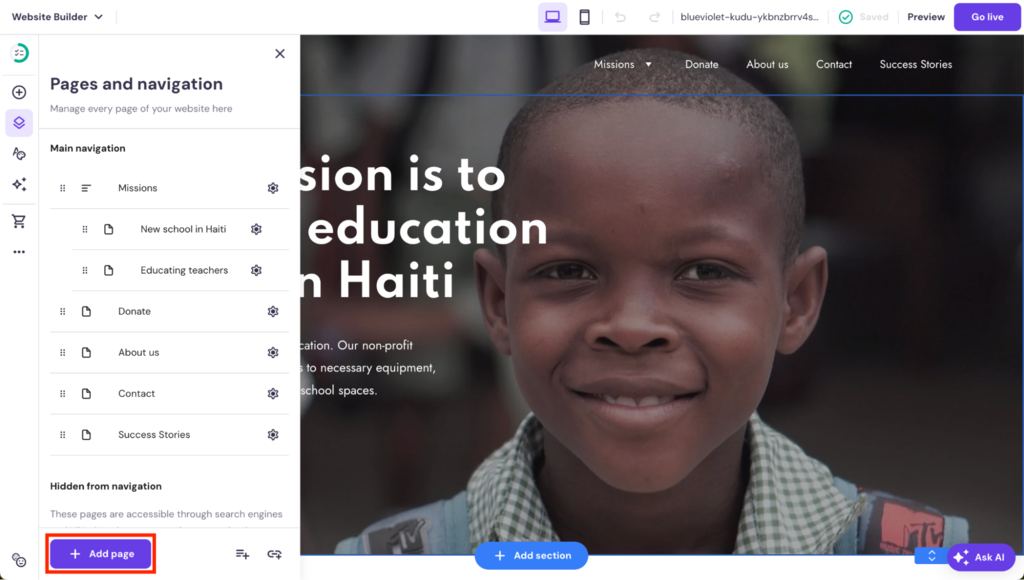
- In the editor, add new pages by opening the Pages and navigation menu and clicking on the Add page button.
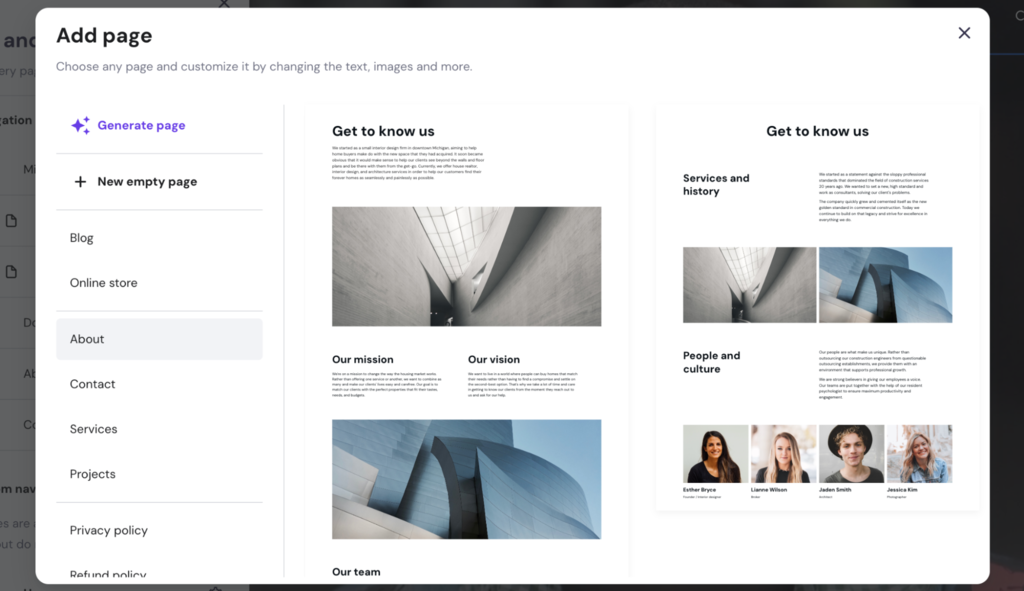
- Choose from ready-made page layouts or create a new blank page. You can also use AI to generate a new page.
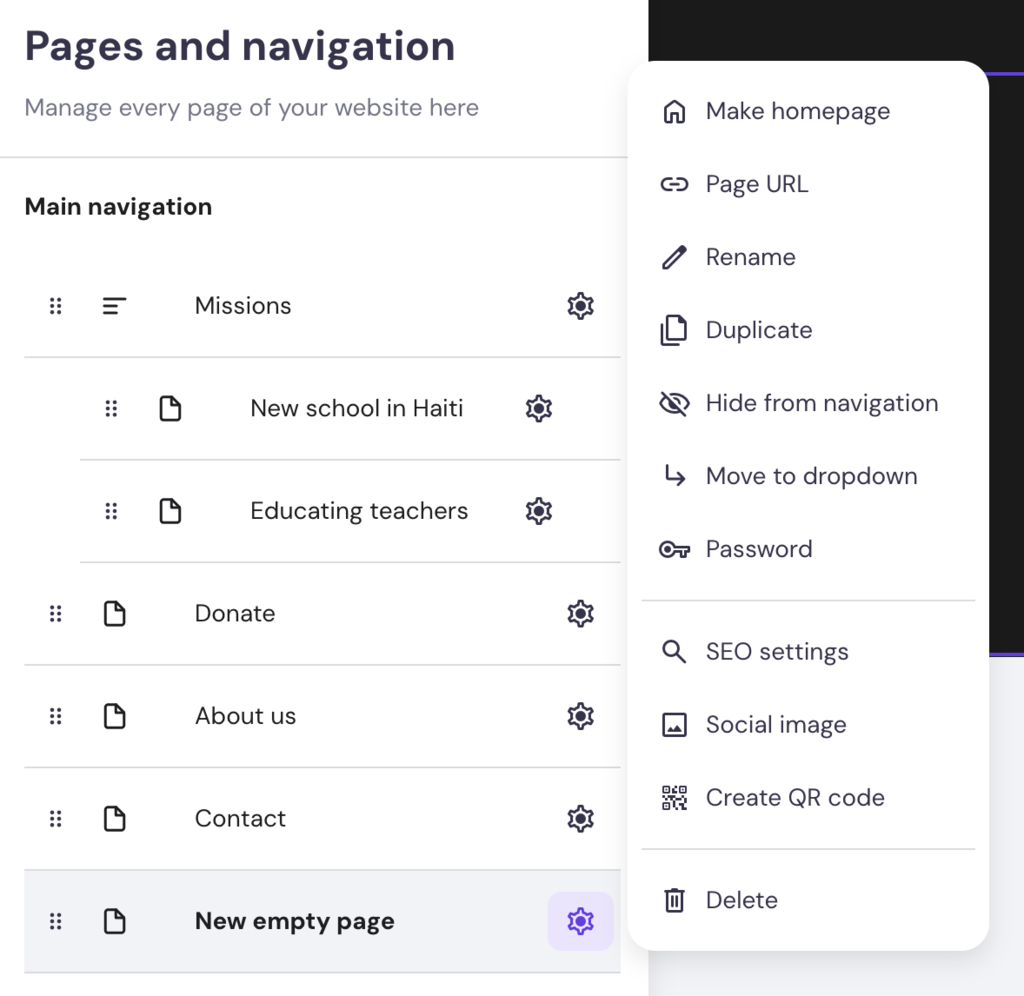
- Click the wheel icon to open page settings.
4. Design Your Charity Website
The design of your charity website should show the heart and soul of your organization.
Use color schemes, fonts, and imagery that speak to your cause and resonate with your target audience.
Prioritize a user-friendly interface with straightforward website navigation, especially for critical actions like making donations or signing up as volunteers, to boost engagement and support.
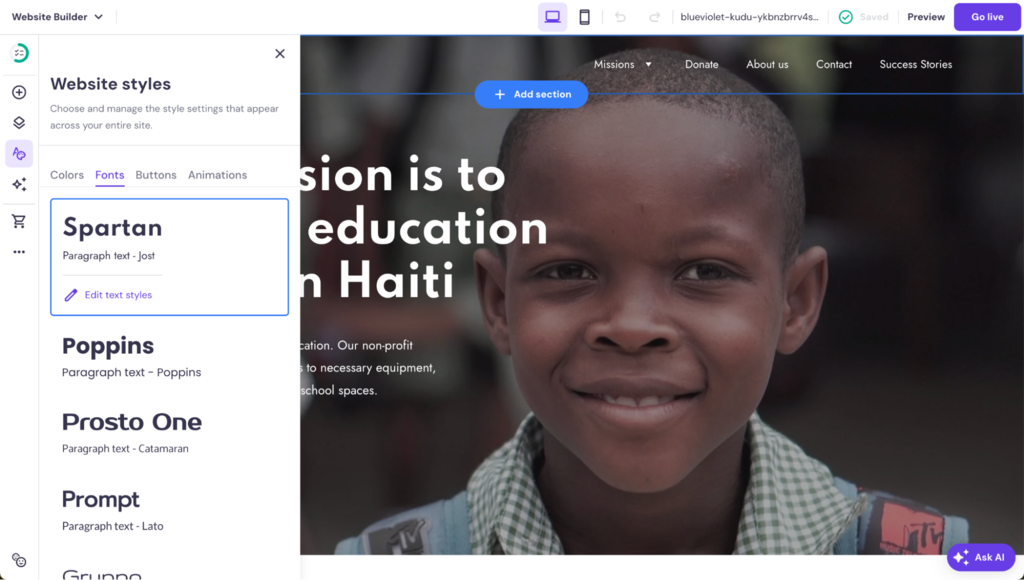
Adjusting your site’s layout, colors, and fonts is simple:
Layout
For each page, utilize different content elements like text boxes, images, and videos to make your pages engaging and informative. Drag and drop elements to structure your pages, adding or removing sections as needed to showcase your charity’s work:
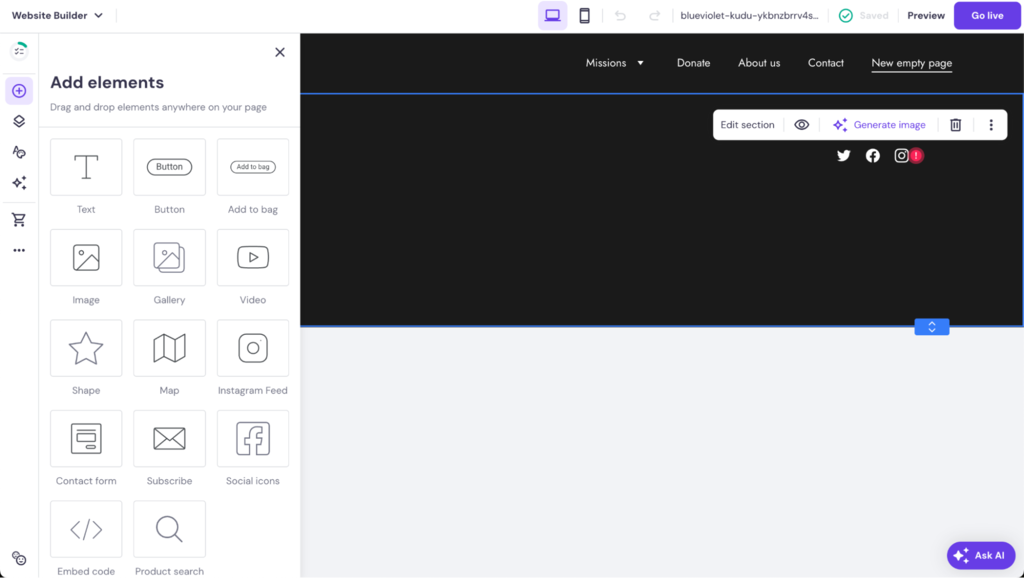
- Access all elements in the Add elements menu by dragging and dropping them to the desired spot on the page.
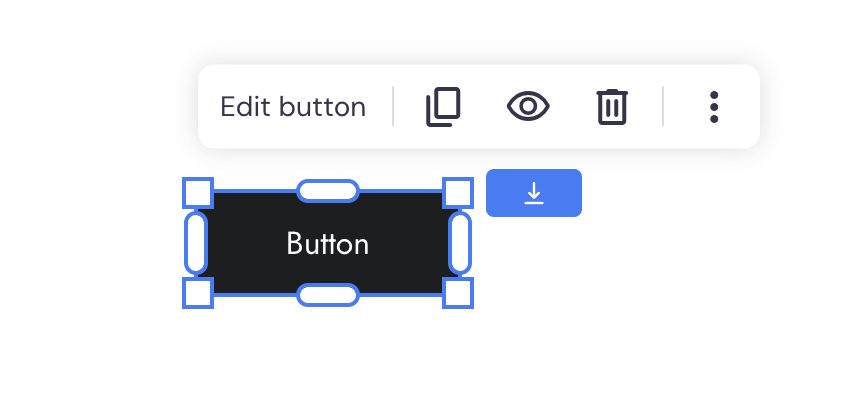
- Open the settings for each element by clicking on it.
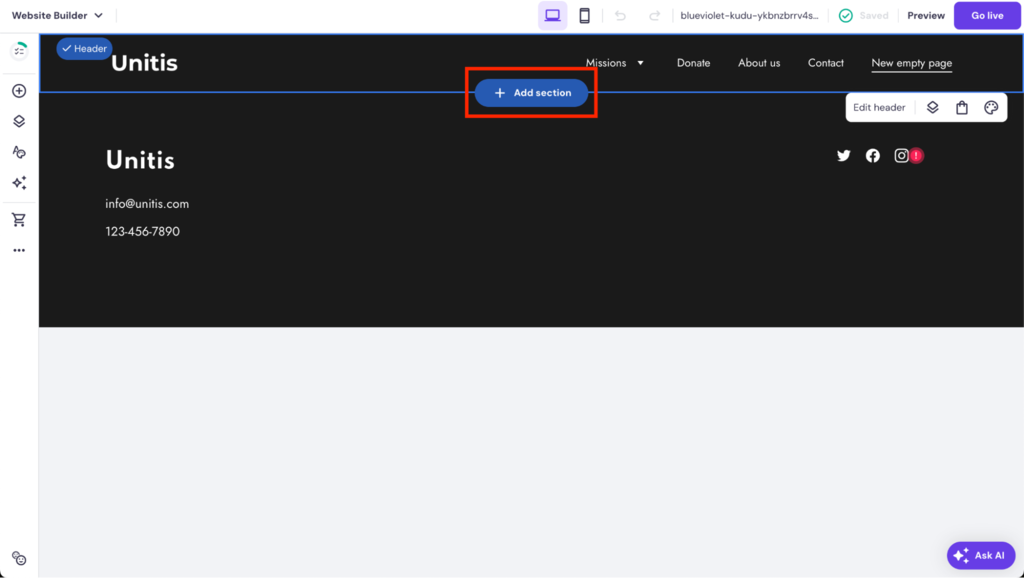
- Add new page sections by hovering between two sections and clicking on the Add section button.
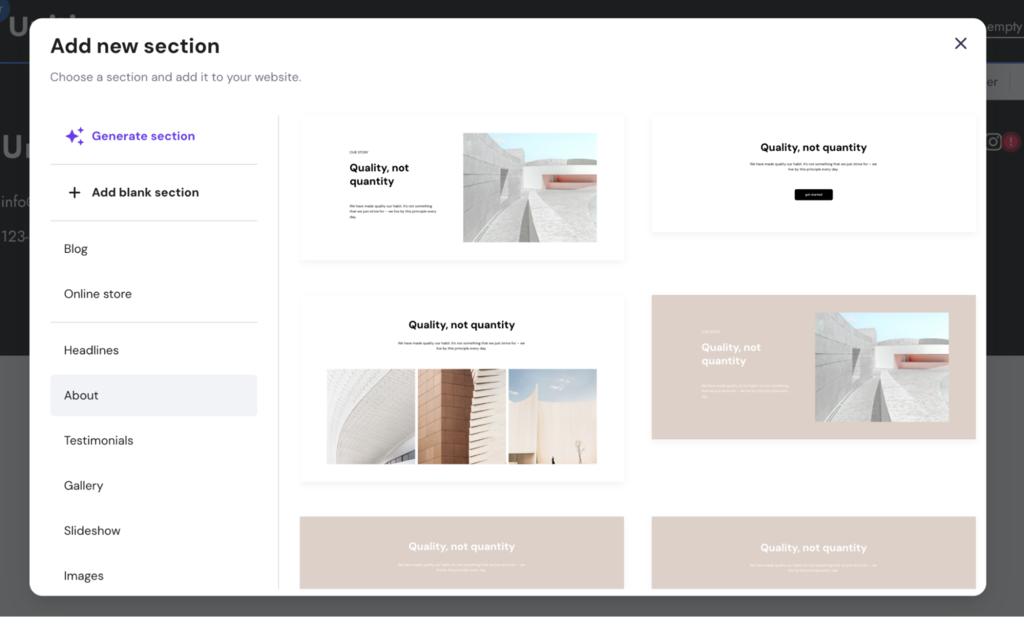
- Choose from ready-made sections, create a blank one, or use AI to generate a new section for you.
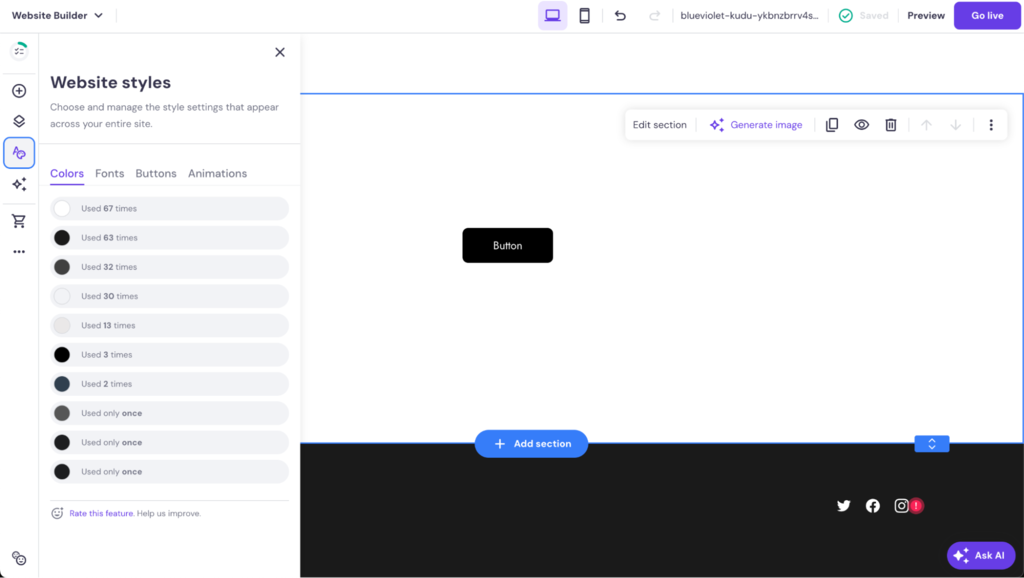
Colors
Access the Colors tab in Website styles settings to fine-tune your site’s color palette to match your charity’s branding, creating a cohesive look across your site.
Fonts
In the Fonts tab in Website styles settings, choose fonts for your headings and paragraphs to ensure your text is legible and aligns with your brand’s tone.
More on Design
If you are new to web design, check out these guides:
How to Design a Website: Tips for Creating an Effective Site Design
What Is UX Design?
5. Incorporate Donation Features and Payment Gateways
Having a variety of secure, user-friendly payment gateways makes accepting donations easy. This way, you give donors the option to use their preferred payment method and can manage donors from one platform yourself.
To integrate a donate button into your nonprofit website, do this:
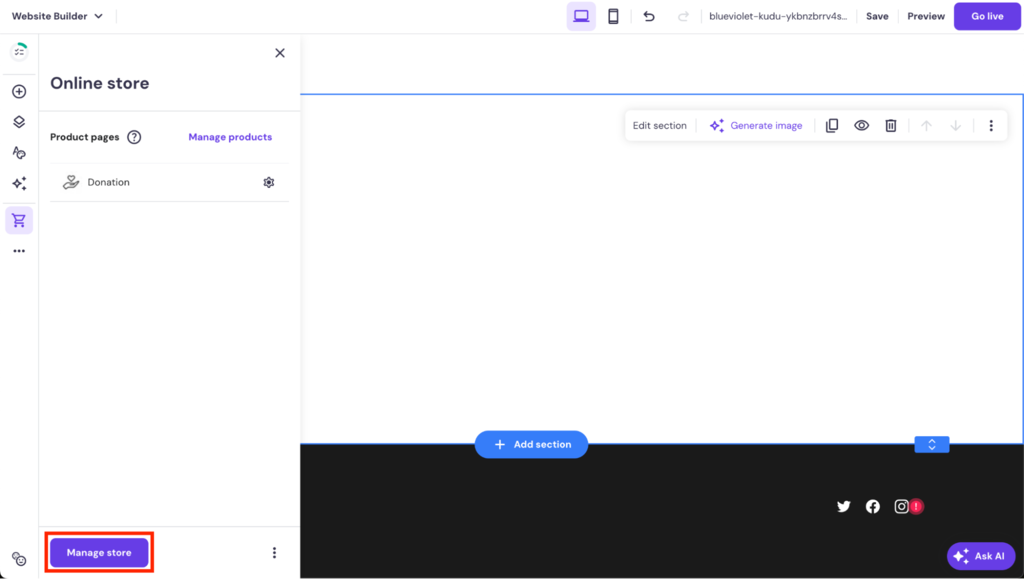
- Open the online store side menu, and click on Manage store to open the Store settings.
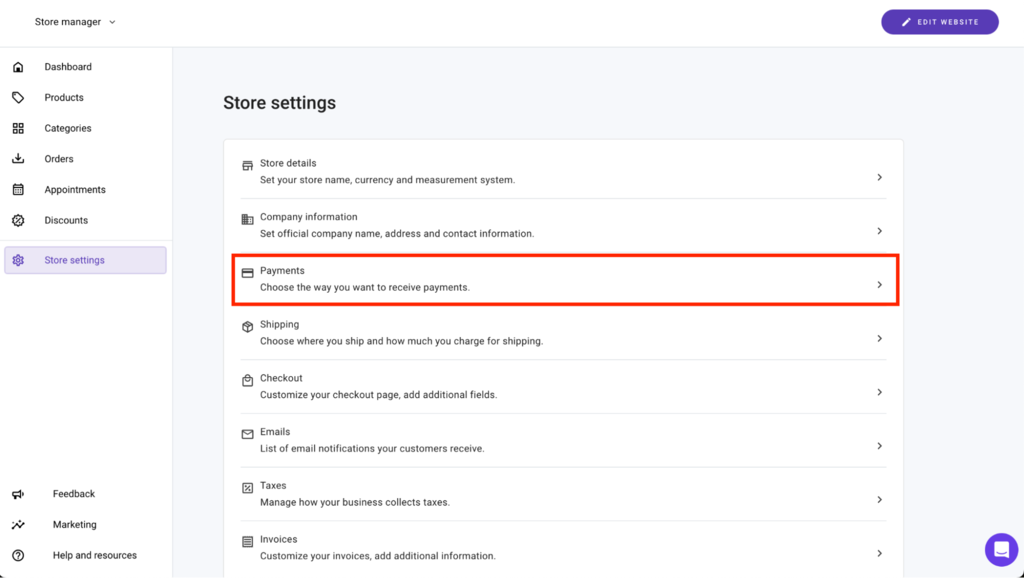
- Select Payments.
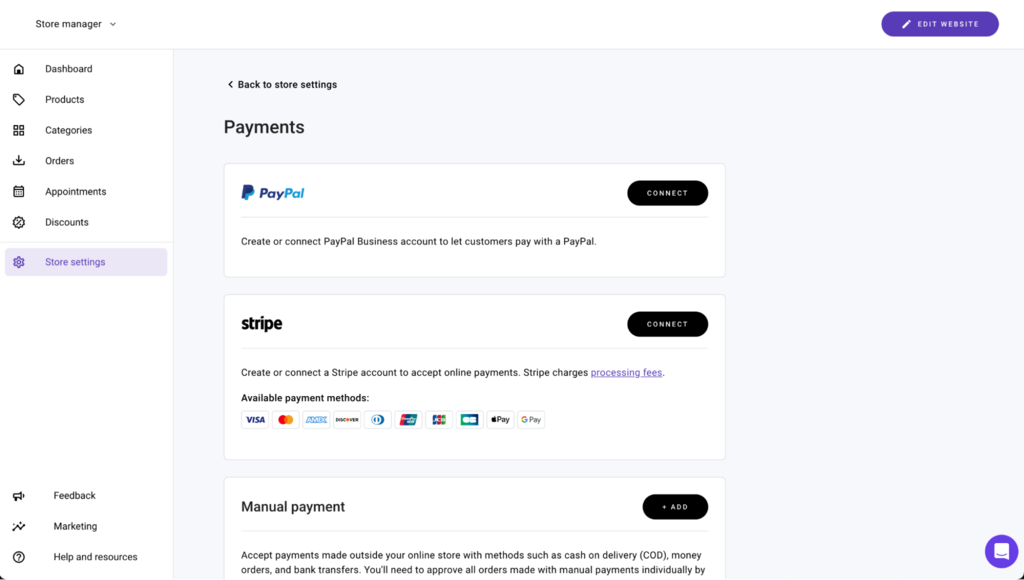
- Set up your desired payment gateways. Hostinger Website Builder supports various payment processors, like Stripe and PayPal, ensuring a secure and seamless process for online donations. You can also accept manual payments, like cash.
6. Implement Volunteer Registration and Sign-Up Forms
A simple volunteer sign-up form helps you gather the necessary information without discouraging potential volunteers with lengthy sign-up processes.
Create a volunteer sign-up form like this:
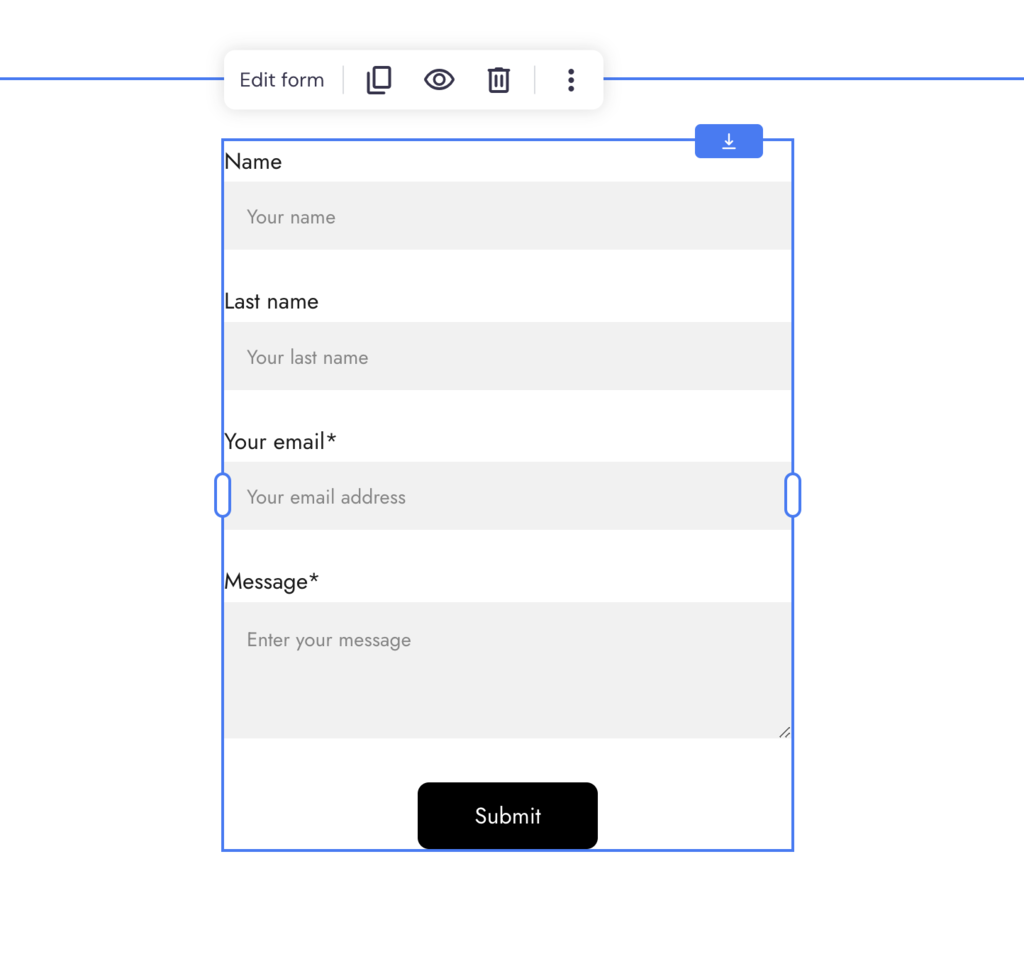
- Drag and drop the form element from the Add elements menu to the desired spot on the page.
- Click on Edit form to open the settings.
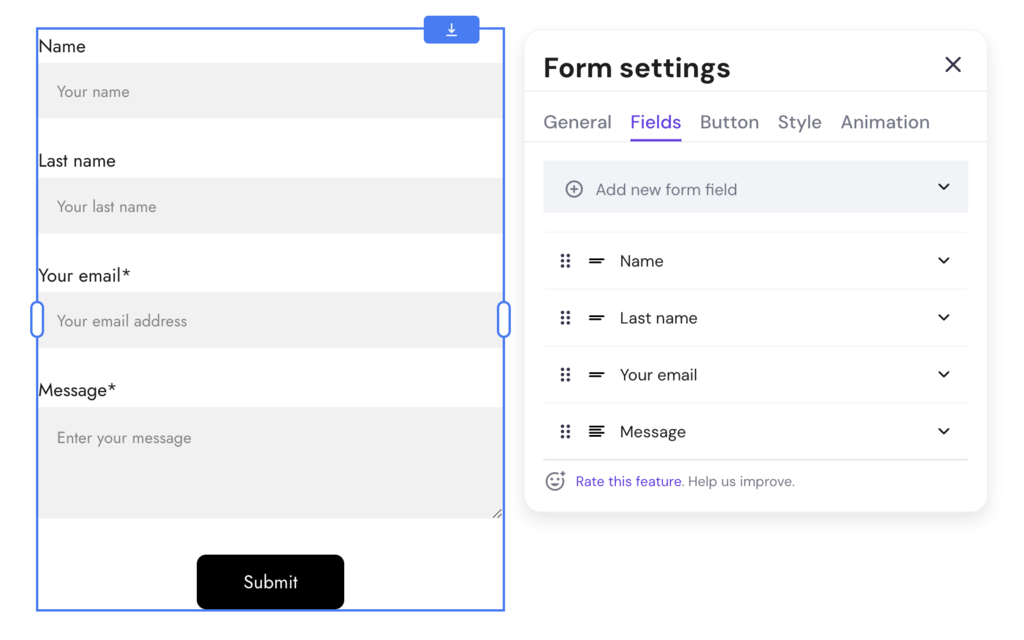
- In the Fields tab, customize the fields to capture essential information from volunteers, keeping the process as simple as possible to encourage sign-ups.
7. Feature Success Stories and Testimonials
Incorporate stories and testimonials from those impacted by your charity, along with accounts from volunteers and donors, to build trust and emotional connections. Successful charity websites often use testimonials and stories strategically to underscore the positive change their organization is making and to motivate others to support their mission
Present these real-life examples in a compelling, respectful manner, underscoring the positive change your charity is making and motivating others to support your mission.
Add success stories and testimonials to your nonprofit website like this:
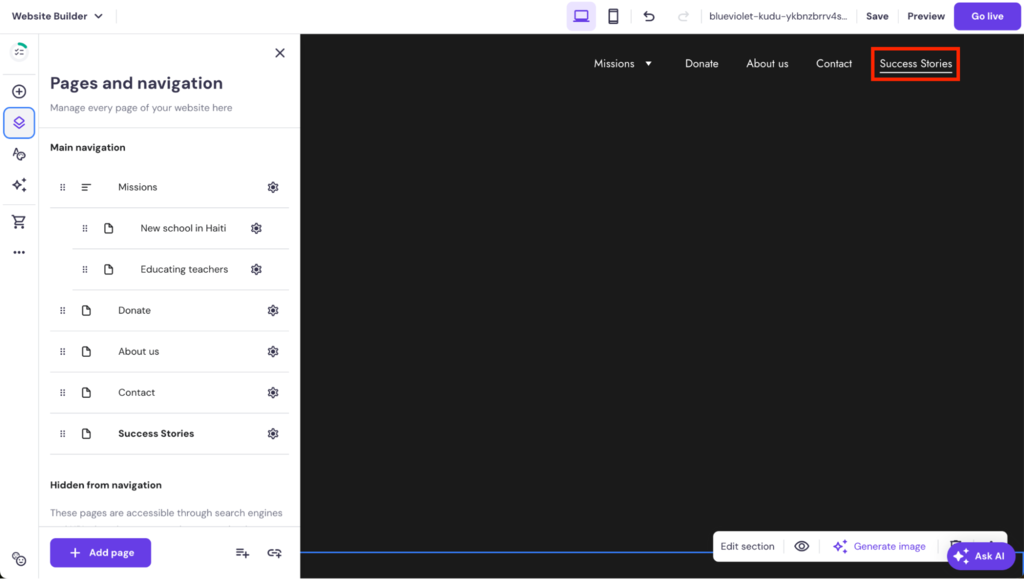
- Create a dedicated section or a new page for success stories and testimonials.
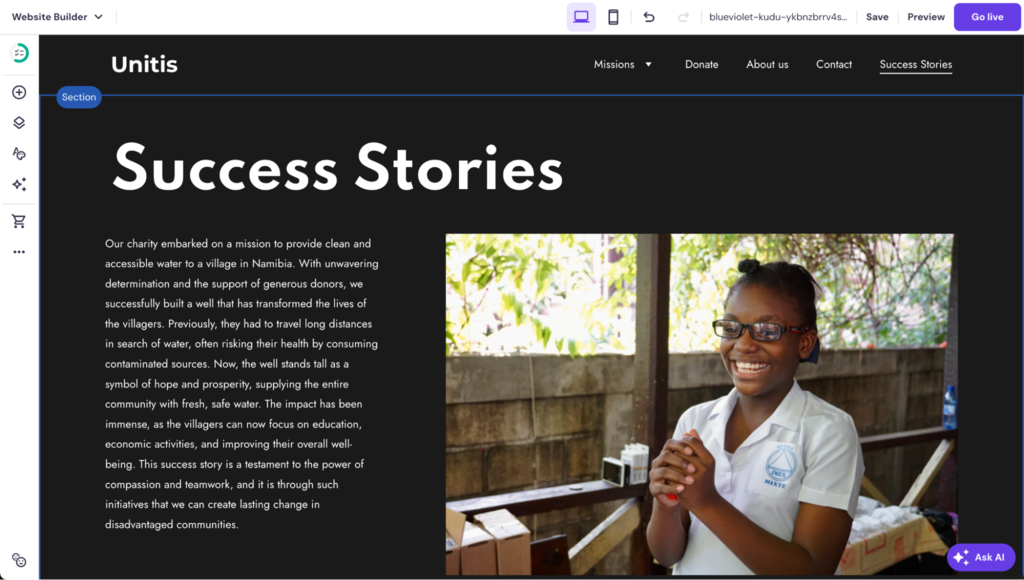
- Use text elements, photos, and videos of your charity’s work and the people it has helped, adding authenticity and emotional appeal to your website.
8. Implement an Event Calendar
An event calendar is a must-have for keeping your audience informed about upcoming events and initiatives.
Ensure the calendar is easy to use and always up-to-date with detailed information on each event, including how to get involved.
Linking your event calendar with social media and email campaigns can further extend your reach and engagement.
With Hostinger Website Builder, add an event calendar detailing all fundraising initiatives to your site like this:
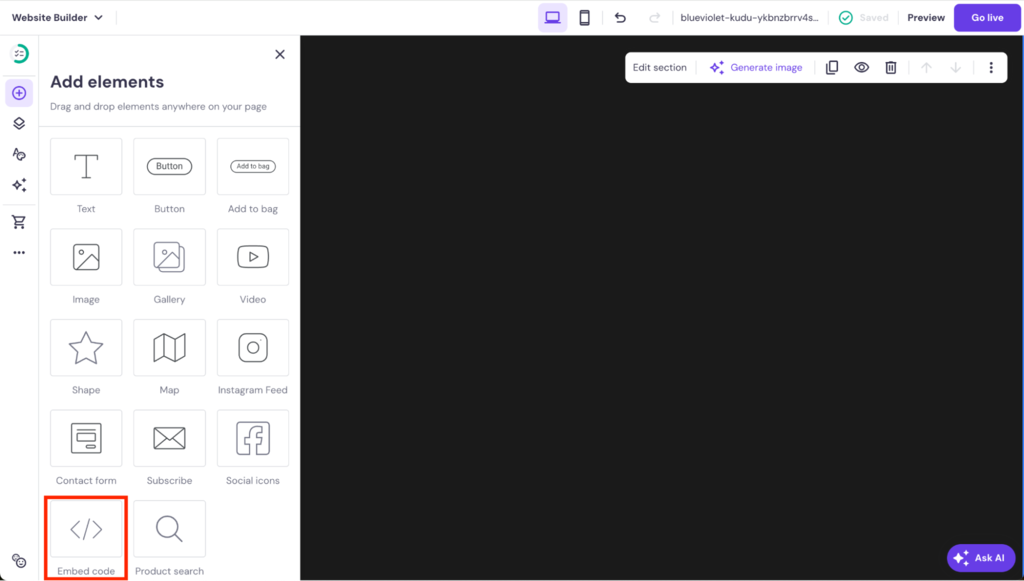
- Add the Embed code to your page from the Add elements menu.
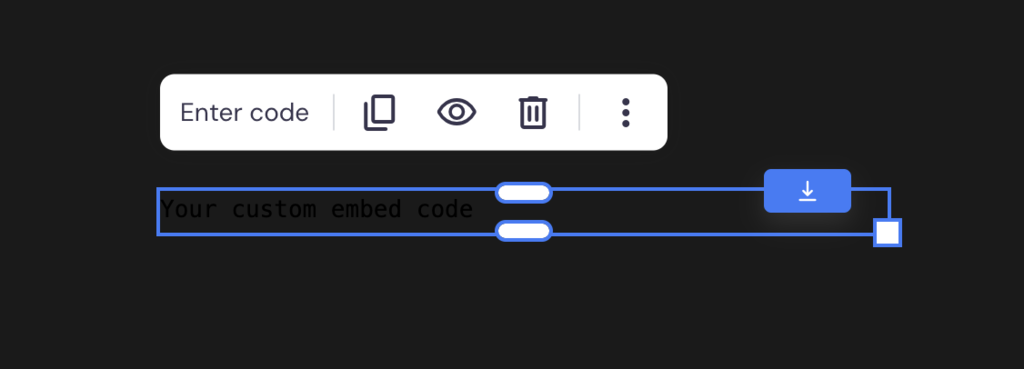
- Open the settings by clicking on the element and selecting Edit code.
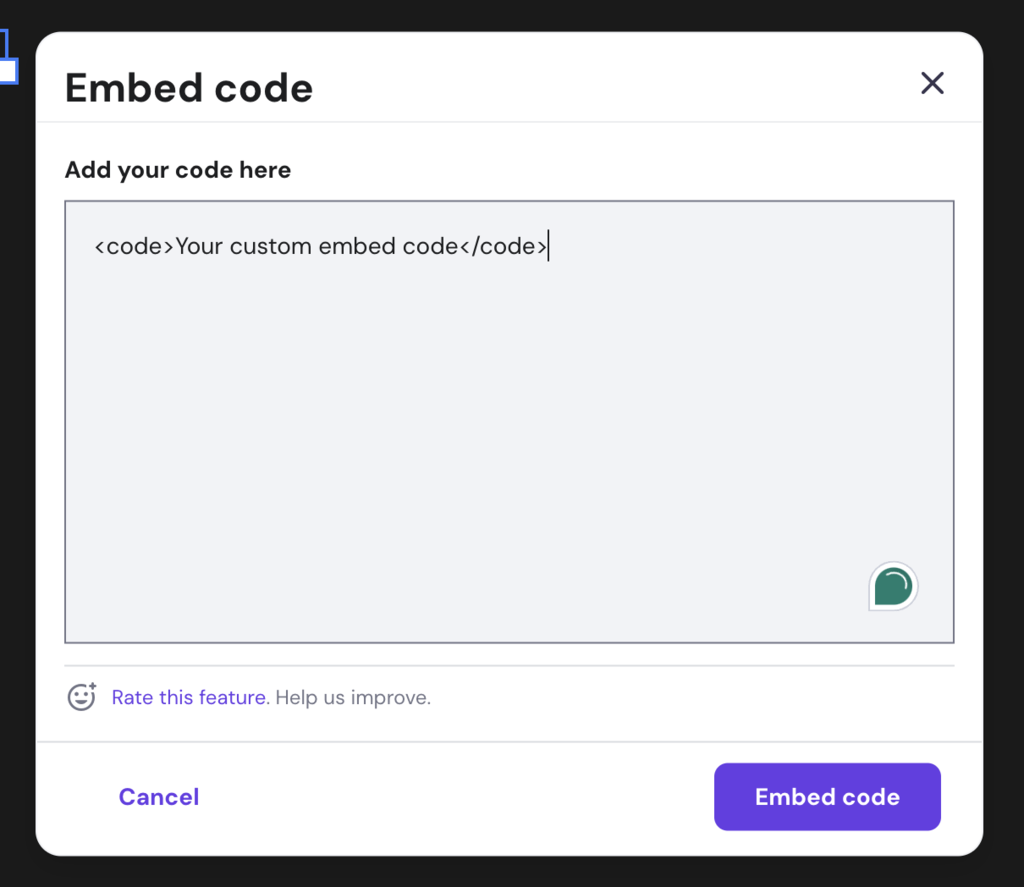
- Add code from a third-party calendar, like a Google Calendar, to your website.
- Resize the calendar so it fits your overall page design.
9. Launch and Promote Your Website
When your website is ready to launch, promote it across different channels, including social media, email newsletters, and paid advertising platforms.
Continuous promotion is key to keeping your audience engaged and informed about your charity’s ongoing activities, as well as aware of how they can contribute to your cause.
Remember that there are plenty of ways to promote your website for free, if you don’t have the budget to start with paid ads immediately.
For post-launch nonprofit marketing activities, consider adapting these strategies to empower your mission and connect with your audience:
Social Media
Social media platforms like Facebook and Instagram are great for driving traffic to your website.
They help spread awareness about your charity’s cause and engage directly with supporters and potential donors. To get the word out about your nonprofit, consider trying out these specific campaigns:
- Impact stories series. Share a sequence of posts highlighting real-life stories of how your charity has made a difference. This builds a narrative around your mission and the lives it touches.
- Community content. Encourage volunteers, donors, and other supporters to share their stories and experiences related to your charity. This user-generated content can boost authenticity and your overall reach.
- Live Q&A sessions. Host live sessions to discuss your cause, answer questions from the community, and showcase the impact of donations and volunteer work.
Email Marketing
Email marketing helps to keep your supporters informed and engaged with different fundraising initiatives and events. To get visitors to sign up for your email list, consider adding a newsletter sign-up form to the footer of your website, or place it strategically on the donating page.
With Hostinger Website Builder, simply use the contact form element and adjust the available fields to collect the names and email addresses of visitors.
Once you have collected some email addresses, test out these strategies:
- Welcome series. Use an incentive, like exclusive updates or stories from the field, to get visitors to subscribe for your newsletter, and then welcome new subscribers with a series of introductory emails.
- Impact newsletters. Send regular newsletters sharing success stories, upcoming events, and the tangible impact of donations, keeping your mission front and center in your supporters’ minds. Read our tutorial on how to create an email newsletter if you’re unsure how to get started.
- Segmented campaigns. Tailor your email content to different segments of your audience, such as one-time donors, recurring donors, and volunteers, to increase relevance and engagement.
Content Marketing
Creating and sharing valuable content helps raise awareness and establish your charity as a thought leader in your cause area. Understanding the basics of search engine optimization (SEO) and keyword research makes it easier to ensure the content on your site gets seen by the right people at the right time.
Start your content marketing efforts by focusing on the following:
- Educational content. Produce blog posts, videos, and how-to guides on topics related to your cause, offering valuable information that supports your mission and engages your audience. For more information, read our guide on how to create SEO-friendly content.
- Share positive impact stories. Use your blog or video channel to tell stories about the people and communities your charity supports, the challenges they face, and how your charity is making a difference. You can share this on social media, too.
- Guest contributions. Invite experts, community leaders, or beneficiaries to contribute content, providing diverse perspectives related to your cause. Get these shared on platforms like LinkedIn for better coverage.
Paid Advertising
While paid advertising requires investment, it can significantly expand your reach and attract new supporters. If you have the budget, you could get started with:
- Targeted campaigns. Use platforms like Google Ads and social media to run ads targeting demographics aligned with your potential supporters, using messaging that resonates with their values and interests.
- Ad grants. Explore programs like Google Ad Grants for non-profits. These schemes offer free advertising to eligible charities, helping you reach a wider audience without the typical costs.
Conclusion
Creating a charity website allows nonprofits to share their cause globally and boost fundraising.
Website builders enable you to make your own website and accept donations online without needing to hire a web developer.
A good charity website design focuses on clear navigation and page layout, with impactful visuals and content to convince people to donate money to your cause. Your chosen platform should also have eCommerce capabilities to accept donations.
We recommend using a drag-and-drop website builder, such as Hostinger Website Builder, to build, manage, and grow your charity site.
You can get started without prior experience in web development and create a site that looks good for visitors and search engines alike. It also supports various AI and marketing tools, and our 24/7 Customer Success team is at hand if you need help.
How to Make a Charity Website From Scratch FAQ
Find answers to frequently asked questions about nonprofit websites below.
What Are the Essential Features of a Charity Website?
A nonprofit website must be transparent, featuring clear mission statements, impact reports, and donation options. Accessibility and mobile responsiveness are crucial to reach a wider audience, alongside secure payment gateways for donor confidence.
What Should Be Included in the Homepage of a Charity Website?
A good homepage should instantly convey the charity’s mission statement with compelling visuals and narratives. A prominent donation button, success stories, and an easy main navigation bar for detailed information about the cause are key to engaging site visitors.
What Are the Key Elements of an Impactful Call-To-Action on a Charity Website?
An impactful CTA on a charity website should be emotionally engaging, using persuasive language that highlights the urgency and importance of the cause. Clarity in what action is needed and how it will make a difference is essential.


Matleena is a seasoned Content Writer with 5 years of content marketing experience. She has a particular interest in emerging digital marketing trends, website building, and AI. In her free time, Matleena enjoys cups of good coffee, tends to her balcony garden, and studies Japanese. Follow her on LinkedIn

Miglė Cicėnaitė-Jocė is a Product Manager for Hostinger's Website Builder. She is on a mission to redefine website creation, focusing on the AI flow and its features, and is always eager for product feedback and market insights to improve the user experience. Follow her on LinkedIn.


Comments
0 responses