How to create an event website that converts visitors into attendees
Oct 14, 2026
/
By Nurul S. & Auksė Ž.
/
9 min Read
An event website is a platform that serves as the virtual hub for your event. It lists all the essential information about your event, such as the event date, location, and other details that your potential attendees need.
Creating an event website that converts visitors into attendees requires careful planning and execution. In this article, we’ll show you how to create an event website that converts.
Download website launch checklist
How to create an event website
Here are the seven steps to make a website for your event. Each step is designed to help you create a website that effectively promotes your event and encourages visitors to attend.
1. Evaluate your event website needs
Whether you’re planning a music festival, wedding, seminar, or exhibition, understanding the purpose behind your event website is crucial. Aside from having a solid online presence, having a website also helps to:
- Spark interest and excitement around your event.
- Draw in a broader audience, crucial for online events with potential global reach.
- Facilitate the registration process and ticket sales efficiently.
- Collect insightful data to understand your event attendees better and tailor future events to their preferences.
To evaluate your website needs, identify your target audience. A target audience is the specific group of people most likely to be interested in your event.
Finding your target audience involves analyzing both demographic and psychographic aspects. The former includes age, gender, education, location, and nationality. The latter includes lifestyle, social class, values, interests, and behaviors.
With a clear understanding of your audience, you can then decide on the must-have factors of your website:
- Event details. Clearly outline the what, when, where, and why of your event. This includes dates, venue information or virtual event platform details, agendas, speaker bios, and any other information for your audience.
- Event registration form. An accessible, user-friendly event form is key for converting website visitors into event attendees. Ensure it’s easy to find and fill out.
- Ticket details. Whether it’s a paid or free event website, include a page or section on your website for visitors to RSVP or purchase their tickets.
- Contact information. Provide clear and multiple channels for potential attendees to reach out with questions, including email, phone, and possibly a chat feature.
- Partners and sponsors page. Aside from providing exposure for your partners and sponsors, including them on your event website can also help boost your credibility and attract more attendees.
Pro Tip
This step is part of the pre-event planning stage. Consider your timeline and the remaining time you have until your website goes live.
2. Choose a platform for your event website
There are plenty of platforms you can choose to create your event website. We recommend website builders for their simple and quick setup, specifically Hostinger AI Builder.
Hostinger Event Website Builder offers a beginner-friendly interface, affordability, and extensive customization options – perfect for event websites.
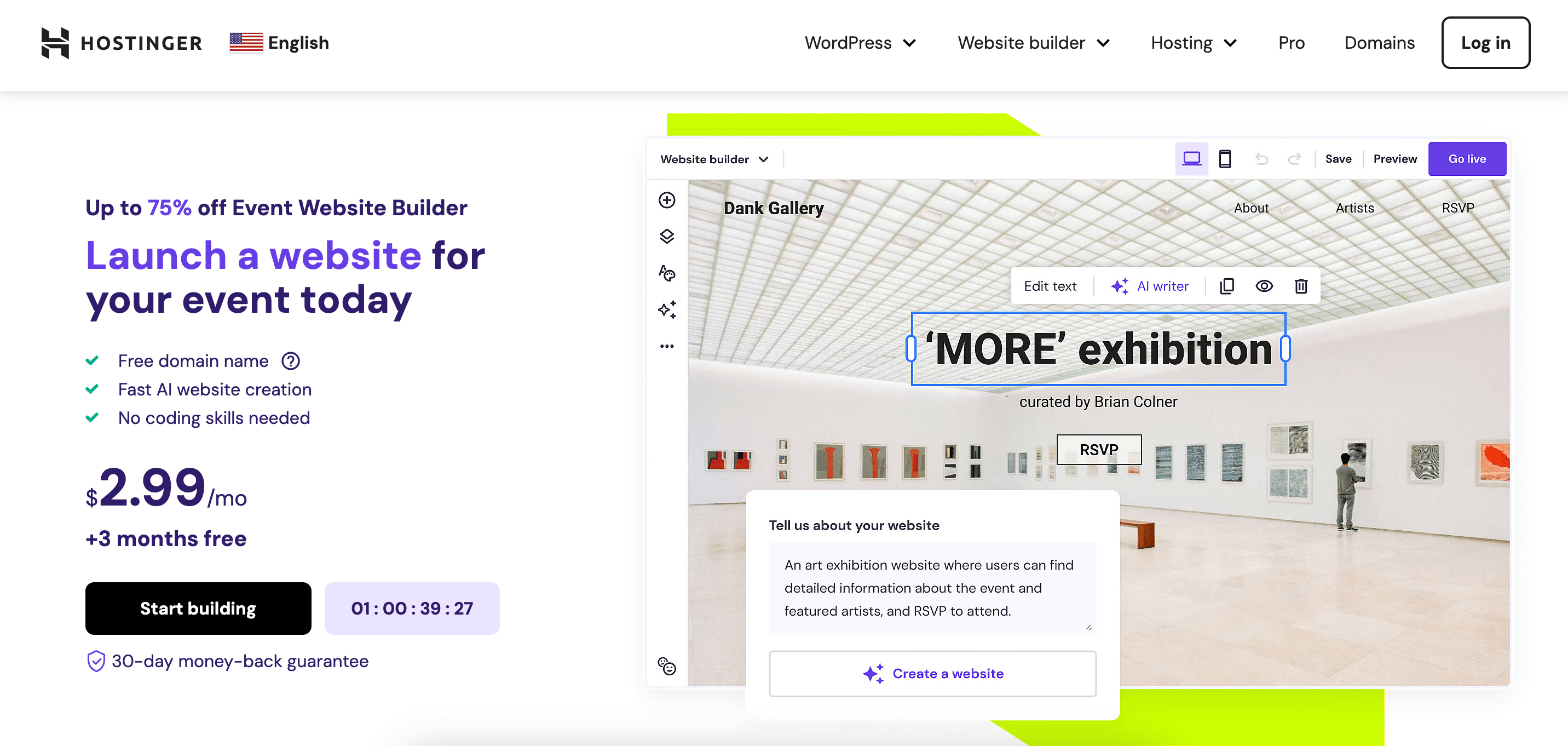
Additionally, you’ll enjoy features such as:
- Drag-and-drop intuitive builder. Choose various elements to add to your event site and place them anywhere you want on the event page.
- Secure web hosting. No need to worry about the safety of your event website with Hostinger’s security measures.
- Mobile responsive design. The builder ensures your event website will look great on mobile devices. You’ll also have a live preview for various screen sizes to see how the website will look.
- Built-in SEO tools. Utilize search engine optimization to attract more visitors and potential attendees to your event website.
- Custom domain name. Claim a free event website domain name when you purchase the 48-month plan and above. You can also choose a domain extension other than .com, such as .info or .pro.
- Built-in payment gateways. Selling tickets is easier with PayPal, Stripe, and Google Pay integrations.
- Templates for event websites. Choose from a variety of event templates and customize accordingly. The next step will show you how.

3. Select an event website template
Choosing the right template for your event website helps set the tone and first impression for potential attendees.
Here are a few tips for choosing the right template for your event’s target audience:
- Reflect on your event’s theme. Whether it’s professional, casual, artistic, or tech-focused, select a template that aligns with your event’s theme and atmosphere.
- Consider your audience. Think about the demographics and preferences of your target audience. A template that appeals to a younger, tech-savvy crowd might differ from one aimed at professionals in a more traditional field.
- Look for flexibility. Choose a template that offers customization options to adjust elements like colors, fonts, and layout to fit your specific needs.
- Focus on navigation. Ensure the template offers a clear, intuitive navigation structure, making it easy for visitors to find information about the event, register, or contact you.
If you’re not sure where to start, check out our event templates. Choose from Marian, Arroyo, or Efes as a start, and work your way through the list to find what fits best.
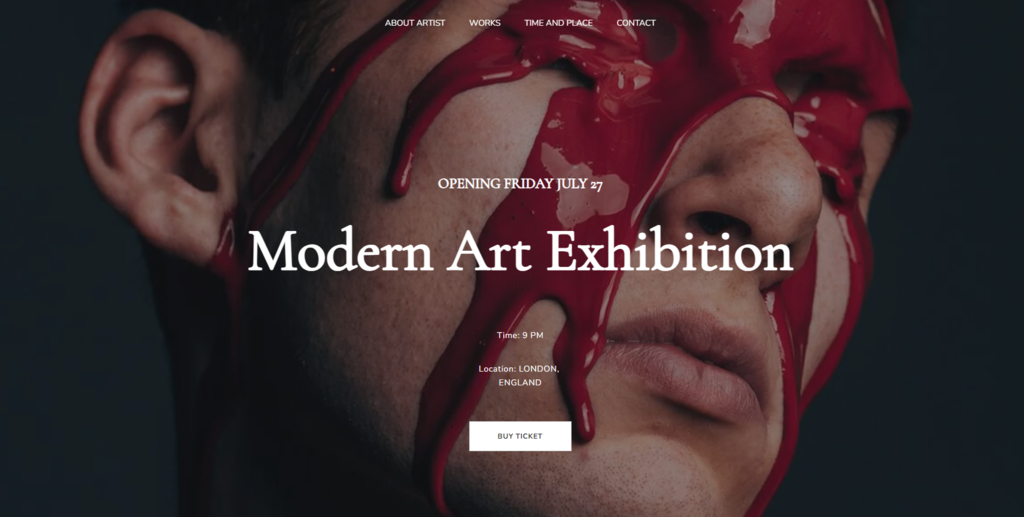
Once you’ve picked a template, it’s time to customize the design. Start by adding your logo and continue to customize the color schemes, fonts, images, and typography to align with your event or brand image. Keep them consistent throughout all pages to create a professional look.
4. Set up essential features
After customizing the site template, it’s time to add essential event website features that are available on Hostinger AI Builder. This includes:
Homepage
An event landing page is crucial for providing key information about your event, such as date, time, location, and theme. According to landing page statistics, embedding videos on landing pages can increase conversion rates by 86%, making it a powerful tool for engaging visitors. Discover what is a landing page.
Take inspiration from WordCamp Asia 2024 or other event website examples on their landing page design . It displays all the core information and a call to action (CTA) button without scrolling. This makes it easier for visitors who are looking to register quickly. The event landing page also includes statistics related to participants and sponsors to increase credibility.
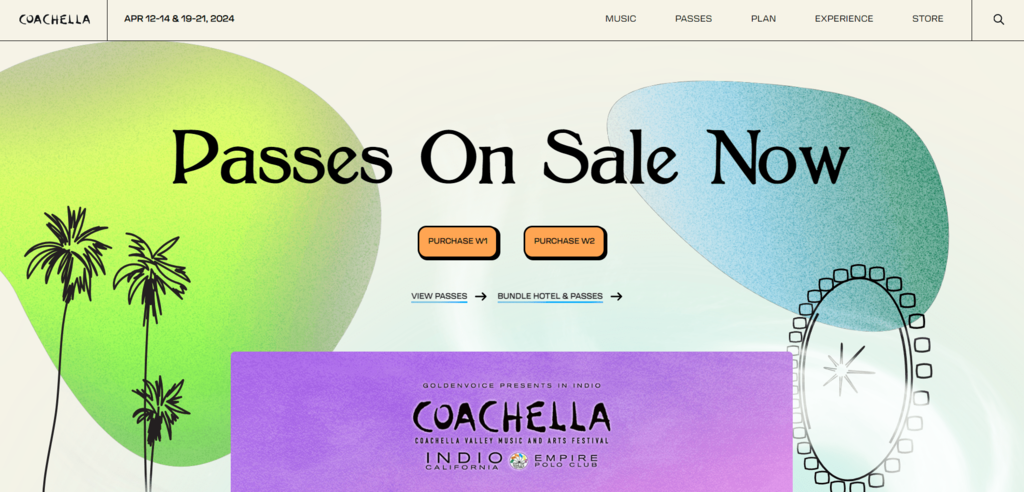
Another example is Coachella’s landing page. To cater to the target audience, it features playful shapes and simple animations to capture the attention. It also has two main buttons for two different ticket purchases. Learn how to create a landing page with our guide.
Event page
Having an event page works best for recurring or annual events with various agendas. On this page, add speaker’s photo and bio, as well as in-depth details about the event.
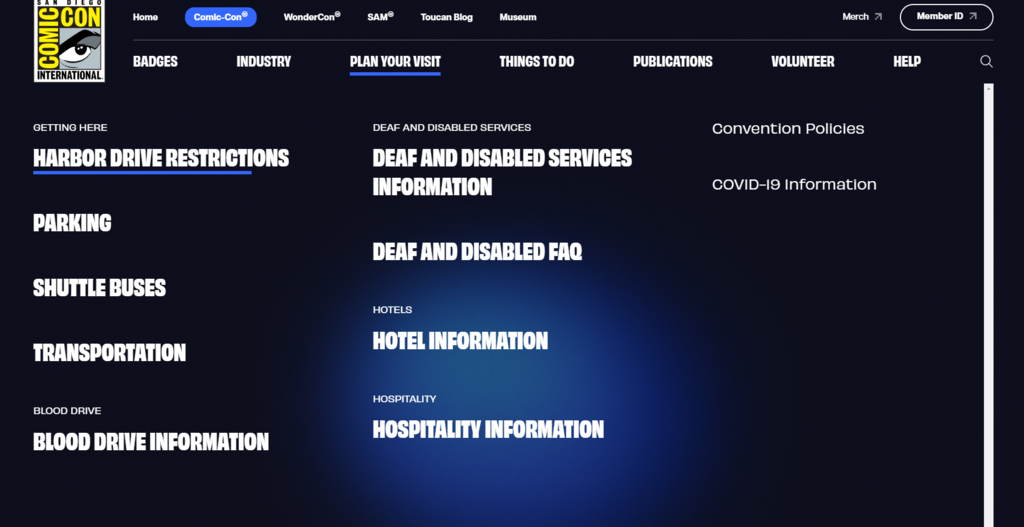
Taking inspiration from Comic Con 2024’s website page, you can also add information about how to get to the venue, where to stay nearby, and offer accessibility assistance if available.
An events calendar or schedule
To create an events calendar or schedule, start by outlining the key activities and their timings. It’s important to provide a clear and organized overview for participants to navigate through the event easily. Consider using a visually appealing layout that is easy to read and comprehend.
An event registration form
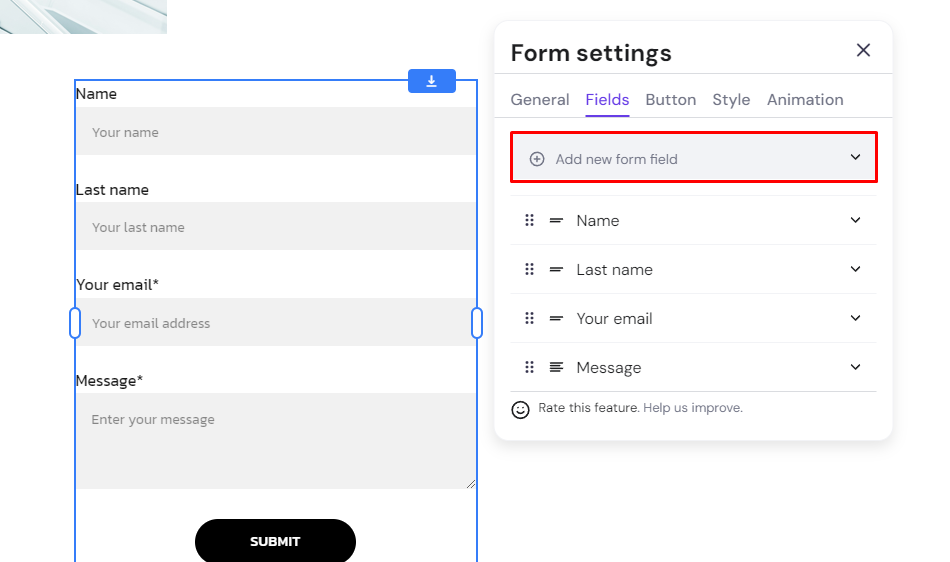
Set up a registration form for potential attendees and manage the list seamlessly. Use Hostinger AI Builder’s contact form to collect data. Go to Add elements and click Contact form. To further streamline the check-in process and enhance attendee management, consider using QR codes for events either for registrations or tickets.
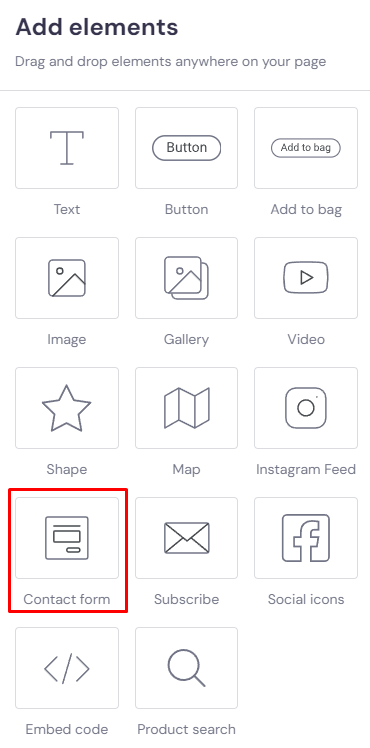
Customize the contact form and add more form fields if needed. With Hostinger’s event website builder, you can add a new form field, ranging from short answers to multiple choice.
Integrate social media and multimedia elements
Social proof is an effective way to increase interest. You can add social media links on your landing page, event detail page, or contact page. Every page of the Hostinger’s event website templates includes social media links in the footer, ensuring visibility throughout the site.
Additionally, add a YouTube video related to your event and add it to the landing page. Learn from how Singapore Art Week 2024 implemented one seamlessly into their website.
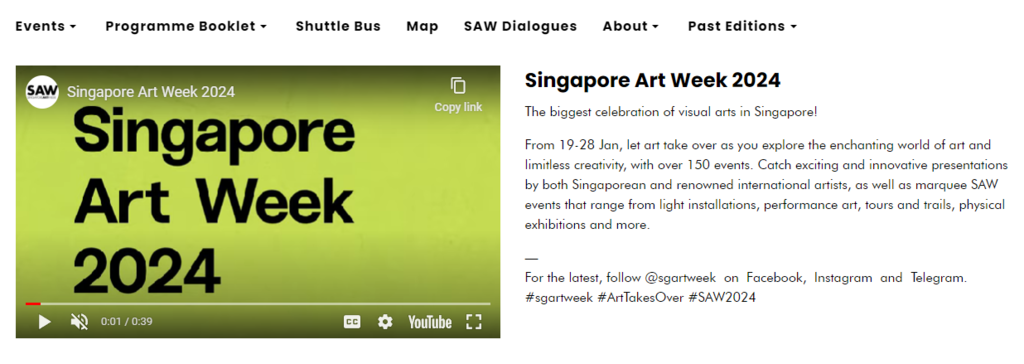
Other than videos on event information, you can also add the live streaming link for virtual events. This is especially useful these days, with virtual events becoming more common and popular with the younger demographic.
Add payment gateways for ticket sales.
For paid events, set up payment gateways with PayPal, Stripe, and Google Pay to sell tickets. This will make it easier for attendees to purchase tickets and for you to track sales.
Want to see this whole build in action? This video walks through creating an event website from scratch: pages, RSVP forms, a countdown timer, SEO, and a QR code for promotion.

5. Optimize for search engines and performance
Search engine optimization (SEO) is important as it helps improve your ranking in search engine results pages (SERPs). This means when someone searches for keywords related to your event, your website will appear higher on the result list.
To optimize your website, start with keyword research. Identify key terms and phrases related to your event and use Google Keyword Planner or SurferSEO to find the right keywords. Use these keywords throughout your website titles, headings, descriptions, and alt tags for images.
After that, make sure your URLs are clear and descriptive. Use short and simple words for your event page names and separate them with hyphens. This will make it easier for search engines to crawl and index your website.
Hostinger Event Website Builder’s built-in SEO tools can further help your SEO. It works by analyzing SEO opportunities and guiding you step-by-step on how to add those to your pages. Here are some of the SEO-related functionalities that our builder offers:
- Image optimization. Avoid using large-size images as they can slow down loading time. Additionally, make sure to add image alt text. You can use Hostinger AI Builder’s AI Writer to help write the alt text.
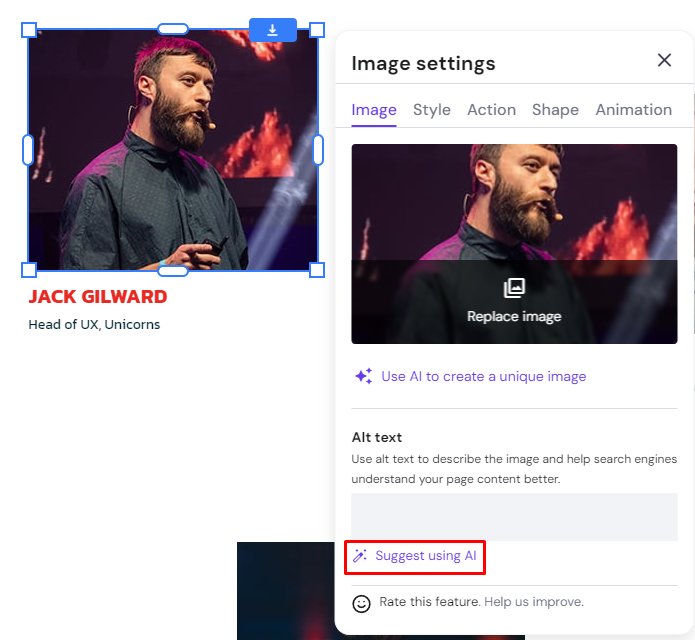
- Meta title and description. Write up to 60 characters for meta titles and up to 160 characters for meta descriptions. Similar to image alt text, you can use the AI Writer to create meta titles and descriptions.
- Heading optimization. Our builder will ensure H1 headings for your pages as they will help provide a clear site hierarchy.
Aside from SEO tools, Hostinger AI Builder also ensures your website loads fast. Fast-loading websites help improve user experience, and Google favors fast-loading websites.
Suggested Reading
Learn more SEO practices by reading our tutorial on How to Create an SEO-Friendly Website
6. Launch and promote your event website
Before launching your event website, make sure that every page is perfect. This involves a thorough check of all the information for accuracy, from the event details to registration flow.
Additionally, proofreading all the copy on your event page is essential to avoid any spelling or grammatical errors.
Once you’re confident that everything on your website is in order, you can proceed with the publishing process. Take note that after your website goes live, it’s better to wait a while to make any updates since it can affect your site’s search engine performance.
Pro Tip
Frequent changes post-launch can negatively impact your SEO ranking, as search engines value stability and consistency in content when indexing and ranking sites.
After publishing, you can start promoting the event site. Here are some event marketing strategies we recommend:
- Share on social media. Post event details to your social media feed. Don’t forget to use relevant keywords to reach the right audience.
- Utilize event listing sites. Submit your event details to popular event listing websites such as Meetup and Facebook Events.
- Set up an online ad campaign. Create targeted ads using Google Ads. If your website is made using Hostinger AI Builder, the Google Ads app is available right there in your website dashboard.
- Collaborate with external parties. Find partners and influencers related to the event’s topic and ask them to promote your event on their channels.
- Email marketing. Use your existing email list or create a new one to send out a newsletter or dedicated email promoting the event. Personalize the message and include a clear call to action.
7. Maintain and update your event website
To ensure visitors have up-to-date information and establish yourself as a reliable event organizer, it’s important to maintain and update your event website regularly.
Maintain your website analytics and search engine performance to keep track of how it’s doing. Also, maintain the ad campaign by checking the click-through rate (CTR) and updating the ad copy if it’s not performing well.
When it comes to updating the website, focus on your website content, such as blog posts, event recaps, and photo galleries. Doing so will engage your audience to return for more updates.
For regular or annual events, adding past events also works to maintain engagement and keep track as an organizer.
If you have an upcoming event, use the feedback from past events to help plan and optimize it better. Collect attendee insights through surveys or feedback forms to understand what aspects were appreciated and what areas need enhancement.
Conclusion
Creating an event website is a strategic step toward boosting your event’s visibility, accessibility, and engagement. The core challenge lies not just in attracting visitors to your site but in converting them into registered attendees.
To conclude, here are the steps on how to create a website for an event:
- Evaluate your event website needs.
- Choose a platform for your event website.
- Select an event website template.
- Set up essential features.
- Optimize for search engines and performance.
- Launch and promote your event website.
- Maintain and update your event website.
Remember, your event website is your event’s online home. It’s where people decide whether or not to join your event. So, make it inviting, informative, and easy to use to make your next event website easier. Good luck!
How to create an event website FAQ
Read the most frequently asked questions on creating an event website.
An event website serves as a digital hub, providing essential information about an event, including the date, location, agenda, and registration details. It’s a go-to resource for potential participants to learn everything they need about the event.
Creating an event website can amplify your event’s reach and accessibility, providing a platform for engagement, information dissemination, and attendee management.
While there are many great platforms for event websites, we recommend Hostinger AI Builder. The builder contains all the necessary features and functionality for your event site, from an intuitive editor to built-in SEO tools.
The cost varies widely based on the complexity and features of the site. However, with Hostinger’s builder for events, you only need $2.99/month to start designing your website.
This article is a localized version of How to create an event website that converts visitors into attendees, originally published in English.

Nurul Siregar has over 3+ years of experience in the tech industry with a passion for writing about digital marketing. Nurul enjoys reading fiction novels and making digital illustration in her free time. Follow her on LinkedIn.

Auksė Žirgulė is Vice President of Product at Hostinger, where she focuses on innovating products that help people build and grow their online presence. She currently leads Hostinger AI Builder and Hostinger Ecommerce. Passionate about solving real customer problems, Auksė enjoys turning customer insights into products that drive both user value and business growth. Follow her on LinkedIn.