Bulk email marketing: What it is and how it works
May 24, 2026
/
Ksenija
/
13 min Read
Bulk email marketing is the practice of sending a single email campaign to a large group of subscribers at the same time.
Businesses use bulk email marketing to share promotions, newsletters, announcements, and other updates with people who have opted in to receive emails from them.
Companies use it to promote products, announce updates, nurture relationships with customers, and drive traffic to their websites.
Because messages reach subscribers directly in their inboxes, bulk email campaigns offer a consistent channel for maintaining brand visibility and generating measurable engagement.
Bulk email campaigns also differ from other types of email communication. One-to-one emails involve personal messages sent between individuals, while transactional emails are automatically triggered by user actions such as purchases or password resets.
In contrast, bulk email campaigns are scheduled marketing messages delivered simultaneously to many subscribers as part of a broader communication strategy.
Several core elements make bulk email marketing possible. Businesses build opt-in subscriber lists through signup forms and other consent-based methods, send campaigns through specialized email marketing platforms, personalize messages using subscriber data, and track engagement through analytics such as open rates, click-through rates, and conversions.
Together, these components allow companies to communicate with large audiences efficiently while measuring the results of each campaign.
Bulk email marketing explained
Bulk email marketing means sending the same email to a large group of subscribers at the same time as part of a planned marketing effort.
Businesses use it to promote offers, share updates, send newsletters, and build an email marketing strategy that keeps them in regular contact with their audience.
The term is often used interchangeably with mass email marketing or email blast marketing. All three describe the same core activity: one message distributed to many recipients simultaneously.
The difference is mostly linguistic.
Bulk email marketing is the technical term commonly used by email marketing platforms.
Mass email marketing is a general phrase that highlights the large audience size.
Email blast marketing is an informal marketing term that historically described sending a promotional message, such as a sale announcement, to an entire subscriber list.
Despite the terminology, legitimate bulk email marketing is not spam. The defining difference is permission.
Spam targets recipients who never asked to receive messages, while bulk email campaigns are sent to subscribers who voluntarily joined a list through signup forms, purchases, or other opt-in mechanisms.
This permission-based model changes both legality and performance. Subscribers expect communication, which leads to higher engagement, fewer complaints, and better deliverability across mailbox providers.
In practice, bulk email marketing operates at a significant scale. A small business may send campaigns to a few thousand subscribers, while large ecommerce brands distribute promotional emails to hundreds of thousands or even millions of recipients.
These campaigns typically follow a consistent schedule, such as weekly newsletters, product announcements, seasonal promotions, or limited-time offers.
Benefits of bulk email marketing
The main benefits of bulk email marketing include:
- Cost-effective distribution and strong return on investment
- Direct communication with subscribers
- Measurable engagement and performance data
- Automation and scalability as audiences grow
Each of these advantages contributes directly to business outcomes such as website traffic, product sales, and customer retention.
Cost-effectiveness and ROI
Once a subscriber list exists, sending an email campaign to thousands of contacts adds only a small additional cost.
A company with 20,000 subscribers can promote a new product, seasonal sale, or event announcement with a single send.
Even modest engagement rates often translate into measurable revenue. In fact, the average ROI of email marketing campaigns is $36 for every $1 spent, which explains why many businesses treat email as a core revenue channel.
Direct customer communication
Bulk email marketing gives businesses direct access to their audience’s inboxes. Unlike social media or search platforms, where algorithms control visibility, emails are delivered straight to subscribers who choose to receive them.
This direct channel strengthens brand recall and ongoing relationships. A weekly newsletter, product update, or limited-time promotion keeps the brand visible between purchases.
Over time, consistent communication builds familiarity and trust, increasing the likelihood that subscribers will return to the website or store.
Engagement and measurability
Bulk email campaigns provide detailed performance data that shows how audiences respond to each message. Email marketing platforms track metrics such as open rate, click-through rate, and conversions.
For example, a campaign sent to 10,000 subscribers might generate a 35% open rate and a 4% click rate. These numbers reveal how many people noticed the message and how many interacted with it.
Marketers use this data to improve future campaigns. Subject lines, send times, and content can be adjusted based on real engagement results rather than guesswork.
Automation and scalability
Bulk email marketing scales easily as subscriber lists grow. The same campaign can be sent to hundreds or hundreds of thousands of contacts without additional manual effort.
Automation features also reduce repetitive work. Businesses can schedule newsletters in advance, trigger follow-up emails after a purchase, or send targeted promotions to specific subscriber segments.
This combination of email automation workflows and scalability allows companies to maintain consistent communication with large audiences while keeping operational effort relatively low.
How bulk email marketing works
The bulk email process begins with permission. Businesses collect email addresses from people who voluntarily subscribe through signup forms, purchases, or downloadable resources.
Once a list exists, marketers segment email subscribers. Dividing audiences by interests, behavior, or customer status enables businesses to send more relevant messages rather than broadcasting the same email to everyone.
Email platforms manage sending infrastructure, authentication, and sending speed to ensure campaigns reach inboxes instead of spam folders.
In practice, running a successful campaign follows a predictable workflow that begins with email campaign planning and moves through list building, segmentation, message creation, sending, and performance analysis.
Step 1: Build an opt-in email list
The first step in the bulk email process is creating an opt-in email list, which means collecting email addresses from people who explicitly sign up to receive your emails.
To build an email list, start by placing email signup forms where visitors already interact with your site, such as the homepage, blog articles, checkout pages, or the website footer. You can also use pop-ups or dedicate specific landing pages to collect subscribers.
Keep the form simple. Ask only for an email address and first name to increase the number of signups. Clearly state what subscribers will receive, such as weekly tips, product updates, or exclusive promotions.
Offer a lead magnet, which is a benefit people receive in exchange for subscribing with their email address. Give visitors a clear reason to sign up by offering something immediately useful.
For example:
- Offer 10% off the first order.
- Provide a free template, checklist, or toolkit that helps potential customers start using your SaaS product.
- Share a downloadable guide, cheat sheet, or resource that expands on one of your blog’s most popular topics.
Once someone submits the signup form, send a confirmation email that asks them to verify their address. This process is called double opt-in and requires the subscriber to click a verification link before being added to your email list.
The confirmation step ensures the email address is valid and prevents fake or mistyped signups from entering your database.
Important! Avoid buying or importing third-party email lists. These contacts did not give permission to receive your messages, which can violate email regulations and damage your sender’s reputation.
Step 2: Segment the audience
The second step in the bulk email process is email list segmentation, which means dividing your subscribers into smaller groups based on shared characteristics.
Instead of sending the same message to your entire list, organize subscribers so you can send targeted bulk emails that match their interests or behavior.
Start by reviewing the information you already collect about subscribers. Most email marketing platforms allow you to segment your list using simple filters such as location, signup source, purchase history, or past engagement.
Use this data to create practical audience groups. For example:
- Separate new subscribers from existing customers so each group receives different messages.
- Create a segment for people who opened your last campaigns and another for inactive subscribers.
- Group customers by past purchases or product categories to send relevant promotions.
For instance, an ecommerce store selling sports equipment might send one campaign promoting running shoes to subscribers who previously browsed running gear, while another campaign highlights gym equipment for customers interested in home workouts.
Segmentation improves engagement by delivering emails that match subscribers’ interests rather than generic messages.
Better engagement also improves email deliverability. When subscribers consistently open and interact with your emails, mailbox providers are more likely to place future campaigns in the inbox instead of the spam folder.
Step 3: Design and personalize the email
After defining your audience segment, create an email that clearly communicates your message and encourages subscribers to take action. Focus on three elements: the subject line, the email content, and the visual layout.
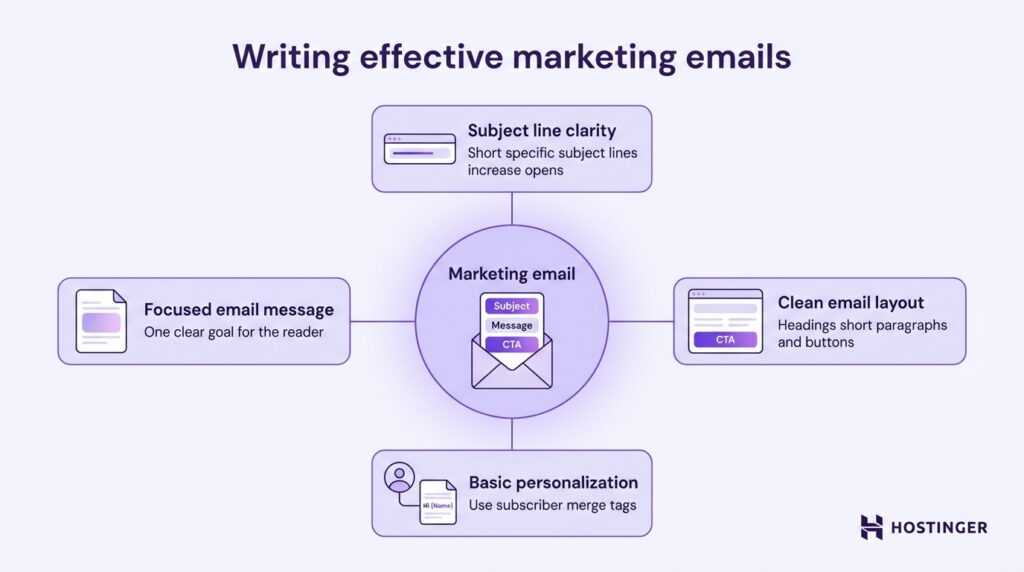
Start with a clear subject line that explains why subscribers should open the email. Keep it short and specific.
For example, instead of writing “Monthly update,” write something like “New features now available in your dashboard” or “20% off running shoes this weekend.” Test different subject lines over time to see which ones generate higher open rates.
Next, write concise email copy that focuses on one main goal. Decide what you want the reader to do, such as visit a product page, read a new article, or claim a discount. Place the main call-to-action early in the email and repeat it near the end if the message is longer.
Use a clean visual layout that guides readers through the message. Break text into short paragraphs, add clear headings, and include buttons for important links.
Add basic email personalization to make the message feel relevant to each recipient. Use the merge tags provided by your email platform to automatically insert subscriber data.
For instance, include the subscriber’s name in the greeting or reference a recent purchase if applicable.
Finally, make sure the email works well on mobile devices. A large portion of subscribers read emails on their phones, so use responsive email templates, keep subject lines short, and ensure buttons are thumb-friendly.
Pro Tip
Send a test email to yourself and review how it appears on both desktop and mobile before launching the campaign.
Step 4: Send emails using a bulk email platform
Send bulk email campaigns through a dedicated bulk email service or email sending platform (ESP) instead of your regular inbox.
Standard email providers such as Gmail or Outlook are not designed for high-volume sending and will quickly block or limit messages if you try to send campaigns to large lists.
Start by choosing an email marketing platform that supports bulk sending. Import your subscriber list, select the audience segment you want to target, and schedule the campaign inside the platform.
Most AI email marketing tools also allow you to preview the email, send test messages, and confirm the recipient count before launching the campaign.
Dedicated platforms handle the sending infrastructure required to deliver large volumes of email. Instead of sending thousands of messages at once from a single mailbox, the platform distributes them through specialized email servers designed for marketing campaigns.
The platform also controls sending speed, often called throttling. Emails are released in controlled batches rather than all at once. This protects your sender reputation and helps mailbox providers process the campaign without flagging it as suspicious activity.
Your sender reputation plays a major role in whether emails reach the inbox or the spam folder. Email platforms track engagement, bounce rates, and spam complaints to evaluate sending quality.
To maintain a strong reputation, send campaigns only to subscribers who opted in, remove inactive contacts regularly, and avoid sending sudden spikes of email to old or unverified lists.
Step 5: Track performance and optimize
After sending a campaign, review its performance to understand how subscribers responded and how you can improve future emails.
Most email marketing platforms provide bulk email tracking through analytics dashboards that show how recipients interacted with your message.
Start by monitoring three core metrics:
- Open rate – the percentage of recipients who opened your email. This metric helps you evaluate whether your subject line and sender name encouraged subscribers to open the message.
- Click-through rate (CTR) – the percentage of recipients who clicked a link or button inside the email. This shows whether the content and call-to-action motivated readers to take the next step.
- Conversions – the number of recipients who completed the desired action after clicking, such as making a purchase, signing up for a webinar, or downloading a resource.
Review these metrics soon after sending the campaign. For example, a high open rate but low click-through rate suggests the subject line worked, but the email content or call-to-action needs improvement.
Low open rates may indicate that the subject line needs to be clearer or that the email was sent at a less effective time.
Use A/B testing to identify what works best. Create two versions of an email that differ in a single element, such as the subject line, call-to-action button, or email layout.
Send each version to a small portion of your list, measure the results, and then send the better-performing version to the rest of the audience.
Treat every campaign as a learning opportunity. Track performance regularly, test small improvements, and apply the insights to your next campaign.
What are the best bulk email marketing tools and platforms
Bulk email campaigns require specialized software designed to send messages to large subscriber lists while managing deliverability and engagement.
These top email marketing tools handle tasks such as campaign creation, list management, scheduling, and performance tracking.
In practice, businesses rely on two main types of tools for bulk email marketing: email marketing platforms and SMTP-based email infrastructure, including transactional email services.
Email marketing platforms help you design campaigns, manage subscriber lists, and automate marketing communication.
Simple Mail Transfer Protocol (SMTP) and transactional email services focus on reliable message delivery and infrastructure for high-volume sending.
Is Hostinger Reach a good bulk email marketing tool?
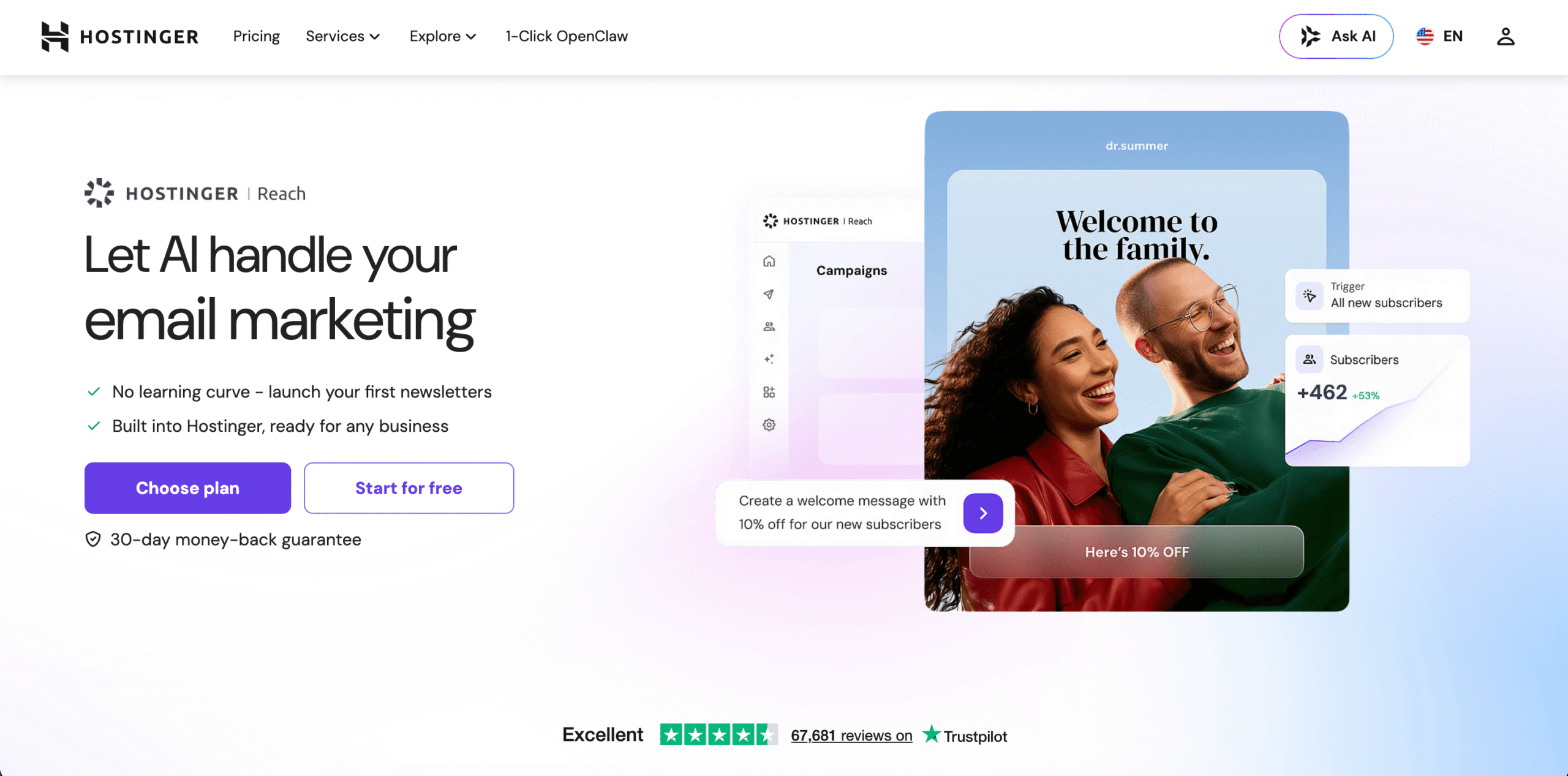
Hostinger Reach is an AI email marketing platform for beginners, small businesses, and creators who want to start sending campaigns quickly without dealing with complex setup or multiple tools.
The platform automatically handles the technical setup required for sending campaigns, including authentication and deliverability configuration.
Reach lowers the barrier to entry with built-in AI-powered email creation. Instead of designing emails from scratch, you type a short description of the message you want to send and generate a ready-to-edit email template.
The system can also suggest subject lines, campaign ideas, and layouts, which helps you launch campaigns faster.
You can import subscribers, sync contacts from your website or WordPress forms, and create audience segments directly inside the dashboard. This makes it easy to send targeted bulk email campaigns without using external tools.
Reach includes the core features required for bulk email marketing:
- Ready-to-use email templates generated with AI
- Personalization using subscriber data, such as name or email
- Campaign scheduling and test emails before sending
- Automation for welcome emails, post-purchase messages, and abandoned cart reminders
- Performance tracking for opens, clicks, and campaign results
Another key advantage is deliverability. Hostinger Reach manages the sending infrastructure and spam protection required for bulk email campaigns, helping emails reach subscribers’ inboxes rather than spam folders.
Domain authentication, spam checks, and sending optimization are handled automatically.
The platform also offers a low entry cost, including a free plan and affordable paid tiers that allow you to start with a small subscriber list and scale as your audience grows.
Transactional and SMTP email services
Transactional and SMTP email services handle high-volume email delivery for system-generated messages that must reach inboxes reliably. They focus on sending infrastructure and deliverability rather than campaign creation.
Use these services when your website or application needs to send emails automatically in response to a user’s action.
Common examples include password reset emails, order confirmations, account verification messages, and receipts. These emails are triggered individually and must be delivered immediately.
SMTP services provide the technical infrastructure that applications use to send these messages.
Your website, ecommerce store, or SaaS platform connects to the service through SMTP or an Application Programming Interface (API), and the provider handles email routing, sending speed, bounce handling, and inbox placement.
For example:
- Send an order confirmation automatically after a customer completes a purchase.
- Deliver a password reset email when a user requests account access.
- Trigger an account verification email after someone signs up for your platform.
Use transactional or SMTP services when emails are triggered by system events and require reliable delivery.
Use email marketing platforms to design campaigns, manage subscriber lists, segment audiences, and send promotional bulk email.
Legal and deliverability considerations for bulk email marketing
Sending emails to large audiences without following compliance rules or deliverability best practices can lead to blocked campaigns, spam placement, or even penalties under email marketing regulations.
Email providers actively monitor sending behavior. High spam complaints, invalid addresses, or messages sent without consent can damage your sender reputation and cause future campaigns to be filtered or rejected.
Email marketing laws and consent
Bulk email campaigns must be sent only to people who have given clear permission to receive them. This usually happens when someone signs up through a website form, downloads a resource, or checks a consent box during account creation.
Use explicit opt-in methods when collecting email addresses. A signup form should clearly explain what subscribers will receive, such as newsletters, promotions, or updates.
Avoid sending marketing emails to purchased or scraped email lists because these contacts did not provide consent.
Several major regulations govern email marketing, including CAN-SPAM in the United States, GDPR in the European Union, and CASL in Canada. While the exact rules differ, most laws require the same core practices:
- Obtain consent before sending marketing emails
- Clearly identify the sender or business
- Include a visible unsubscribe link in every email
- Provide a physical mailing address or company identification
Always allow subscribers to unsubscribe easily. When someone clicks the unsubscribe link, remove them from future marketing campaigns. This helps maintain compliance and prevents spam complaints.
Avoiding spam filters and inbox placement issues
Even when emails are legally compliant, they still need to pass spam filtering systems to reach the inbox.
Mailbox providers evaluate sender reputation, authentication records, and engagement signals before deciding where a message should appear.
Start by setting up proper email authentication, including SPF, DKIM, and DMARC records for your sending domain. These records verify that your email platform is authorized to send messages on behalf of your domain and help prevent spoofing.
Maintain a healthy subscriber list by removing invalid addresses and regularly cleaning inactive contacts. Sending campaigns to outdated or unengaged lists increases bounce rates and reduces sender reputation.
Content quality also affects inbox placement. Write clear subject lines, avoid misleading wording, and focus on sending messages that subscribers expect and value.
Bulk email marketing vs other email types
Bulk email marketing is one category within a broader email ecosystem that includes promotional campaigns, automated sequences, and system-generated messages.
The key difference lies in how emails are triggered and what purpose they serve.
Bulk email campaigns are typically sent manually to a large group of subscribers at once. They are commonly used for newsletters, announcements, promotions, and product updates.
Other email types, such as transactional emails and drip campaigns, follow different sending logic and serve different communication goals.
Bulk email marketing vs transactional email
Bulk email marketing sends promotional or informational messages to many subscribers at the same time. Marketers schedule these campaigns manually to promote products, share updates, or distribute newsletters.
Transactional emails are triggered automatically by a specific user action. These messages are sent individually and contain information related to a transaction or account activity.
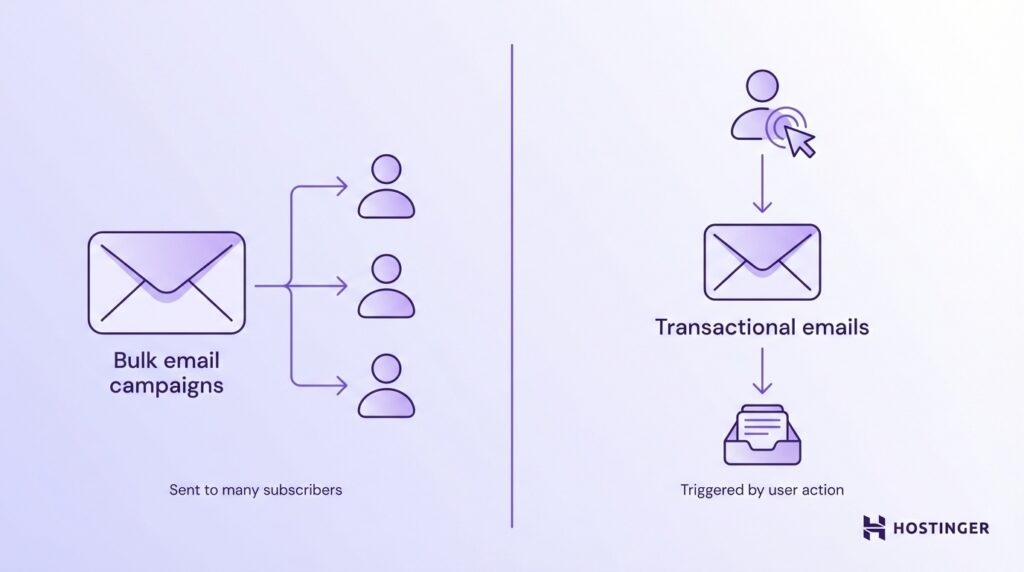
For example:
- An order confirmation email sent immediately after a customer completes a purchase.
- A password reset email sent when a user requests access to their account.
The purpose and expectations differ as well. Bulk email campaigns focus on marketing and engagement, while transactional emails provide essential information that users expect to receive immediately.
Compliance requirements also differ slightly. Transactional emails are usually allowed without marketing consent because they relate directly to a user action.
Promotional bulk emails, however, require explicit subscriber consent and must include an unsubscribe option.
Bulk email marketing vs drip campaigns
Bulk email marketing typically involves one-time sends to a defined audience segment. You prepare a campaign, select the recipients, and send the message at a specific time.
Drip campaigns are automated email sequences sent over time according to predefined rules. Instead of sending a single message, you create a series of emails that are delivered gradually based on subscriber behavior or timing.
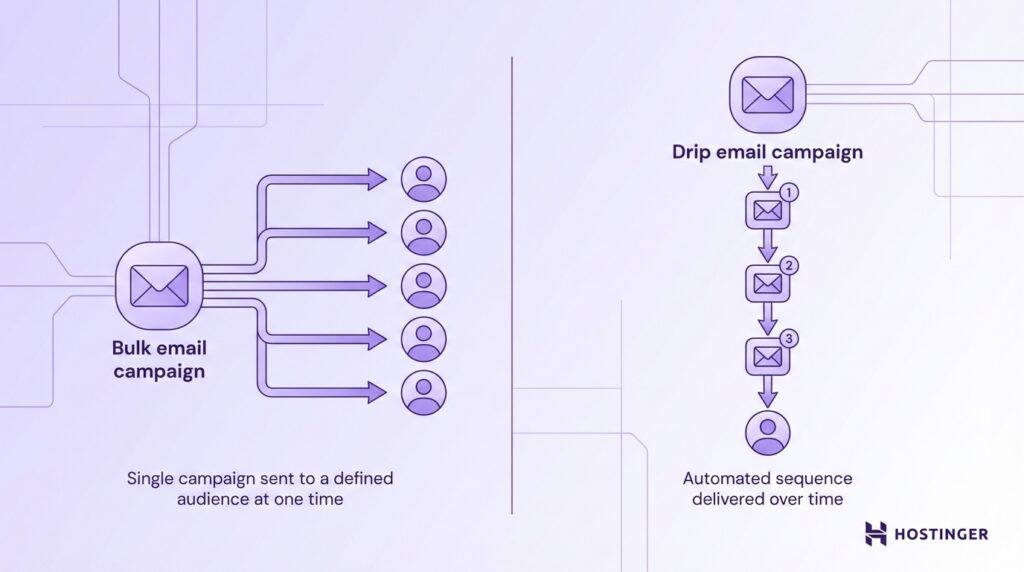
For example, a product launch announcement sent to the entire subscriber list is a bulk email campaign. A drip campaign, in contrast, might send a sequence of onboarding emails to new subscribers during the first seven days after signup.
Both approaches play different roles in an email marketing strategy. Bulk campaigns drive timely announcements and promotions, while drip campaigns nurture relationships through automated, ongoing communication.
How to ensure the success of bulk emailing
Successful bulk email marketing depends on consistent optimization, careful testing, and maintaining a healthy subscriber list over time. Sending campaigns regularly is not enough.
You need to monitor performance, improve each campaign, and ensure your audience remains engaged.
Here are some of the best bulk email marketing tips you can use:
- Track key metrics after every campaign. Monitor open rates, click-through rates, and conversions to measure how subscribers respond to your emails.
- Use campaign data to improve future emails. Adjust subject lines, content, and send timing based on performance results.
- Run A/B tests regularly. Test one variable at a time, such as subject lines, call-to-action buttons, layouts, or send times, to identify what performs best.
- Apply winning test results to the full campaign. Send test versions to a small segment of your list, then use the better-performing version for the remaining subscribers.
- Maintain a healthy subscriber list. Remove invalid email addresses and inactive contacts to reduce bounce rates and protect deliverability.
- Avoid emailing disengaged subscribers. Continuing to send emails to inactive contacts increases spam complaints and harms inbox placement.
- Send emails on a consistent schedule. Regular newsletters, updates, or promotions help maintain audience engagement and brand visibility.
- Monitor engagement trends over time. Use long-term performance data to refine your email strategy and improve future campaigns.

Ksenija is a digital marketing enthusiast with extensive expertise in content creation and website optimization. Specializing in WordPress, she enjoys writing about the platform’s nuances, from design to functionality, and sharing her insights with others. When she’s not perfecting her trade, you’ll find her on the local basketball court or at home enjoying a crime story. Follow her on LinkedIn.