What is the inbox zero method and how to implement it
May 10, 2026
/
By Ksenija
/
7 min Read

The inbox zero method is a productivity and email management technique focused on keeping your inbox empty or close to empty through consistent email processing.
The goal is to maintain control over incoming messages so emails do not pile up into an unmanageable backlog.
Inbox zero replaces passive email reading with active decision-making. It follows four core actions: deleting unnecessary emails, responding to quick requests, organizing completed conversations, and processing larger tasks through delegation or scheduling.
The inbox itself becomes a temporary processing space instead of long-term storage.
Inbox zero works best when applied gradually through reducing incoming clutter, checking email at scheduled times, and handling messages through the same repeatable process every day.
Inbox zero method explained
The inbox zero method is a structured way to organize email by keeping your inbox empty or nearly empty.
The method focuses on processing emails consistently so important tasks, requests, and conversations do not pile up.
The system works by turning every email into a decision. Instead of opening messages, reading them, and leaving them in the inbox, you process each one immediately.
You decide whether to reply, archive, delete, delegate, schedule, or save it for later action.
Email overload happens when people read messages without completing an action. An email gets opened, skimmed, and left behind “for later.” After a few days, the inbox fills with unread newsletters, half-finished tasks, meeting requests, and conversations that still need answers.
Inbox zero fixes that cycle by creating a clear process for every message. A client request gets answered or scheduled. A receipt gets archived. A marketing email gets deleted. A task-heavy message moves into a task manager instead of staying buried in the inbox.
Imagine a manager with 3,000 unread emails. Important requests sit next to shipping updates, promotions, and internal notifications.
Finding urgent work becomes slow and stressful. With the inbox zero method, each email gets handled once and moved out of the inbox after a decision is made.
The 4 key actions of the inbox zero method
The inbox zero method runs on a simple decision system. Every email ends with one clear action. You open the message, decide what to do with it, and move on immediately.
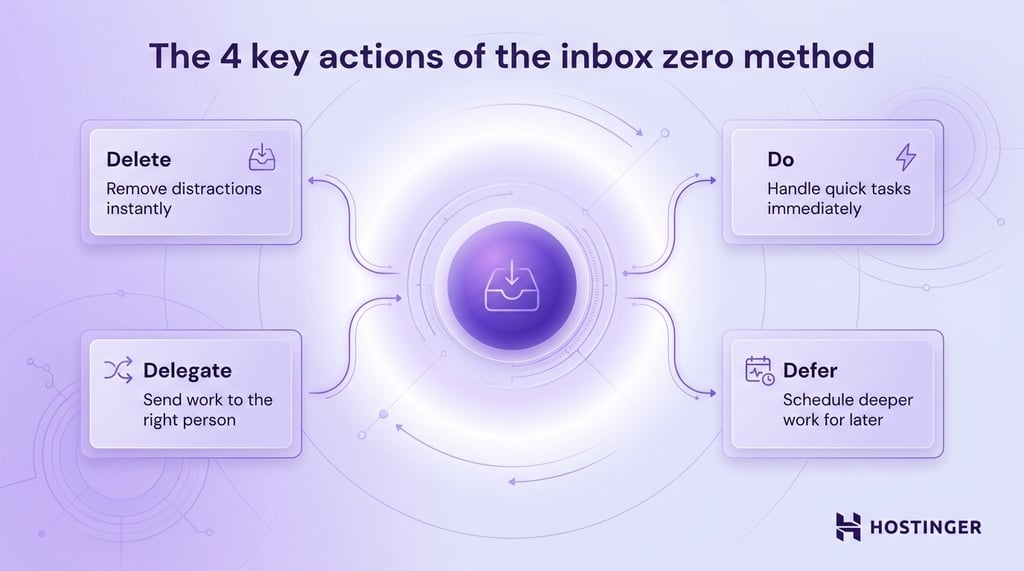
The system uses four actions: delete, do, delegate, and defer.
Delete
Delete emails that serve no purpose. Promotional messages, outdated notifications, duplicate threads, and irrelevant updates do not need to fill up your inbox.
Quick deletion clears visual clutter right away. It also makes important emails easier to spot because fewer distractions compete for your attention.
Use unsubscribe links whenever the same type of email keeps returning. Fewer incoming messages make inbox management easier every day.
Do
Complete the task immediately if it takes only a few minutes.
Short actions pile up fast when postponed. Replying to a scheduling email, approving a document, or confirming a meeting takes less time than reopening the message later and trying to remember the context.
This step keeps small tasks from becoming mental baggage. Your inbox stays lighter because quick work disappears before it can accumulate.
Delegate
Forward emails to the team member responsible for the task. Include enough context so the other person understands what needs attention.
Clear delegation saves time because the conversation reaches the right person immediately. It also prevents long back-and-forth chains where people ask for missing details.
If a customer asks a billing question, send it directly to the finance team with a short note explaining the issue.
The same approach works across everyday tasks:
- Forward technical problems to IT with screenshots, error messages, and device details.
- Send contract questions to legal with the relevant files attached.
- Pass hiring requests to HR with the job title, timeline, and candidate information.
- Route delivery complaints to operations with the order number and customer message.
- Share design feedback with the creative team and summarize the requested changes in one sentence.
Defer
Schedule emails that need deeper work or more time.
Some tasks require research, planning, or long replies. Leaving those emails in your inbox creates visual pressure and increases the chance of forgetting them.
Move those tasks into a calendar, task manager, or reminder app instead. Set a specific time to return to them.
Once you capture the task elsewhere, archive the email to keep your inbox clear and manageable.
How to apply the inbox zero method step by step
Inbox zero works best as a repeatable daily system. A one-time inbox cleanup may feel productive for a day or two, but the clutter quickly returns without a consistent process.
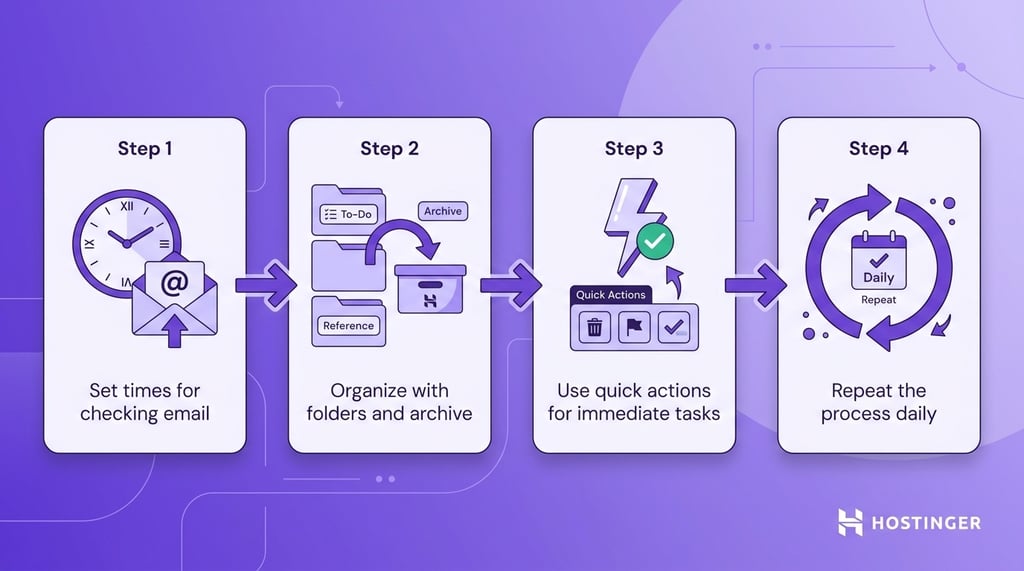
The goal is to create simple habits that keep email manageable every day. Once the workflow becomes routine, inbox maintenance takes far less effort.
1. Control incoming emails and check at set times
Start by limiting how often you check your inbox.
Constant email checking breaks concentration and turns small interruptions into a full-day distraction. Every new notification pulls your attention away from work that requires deeper focus.
Set specific times to process email instead. Check messages once in the morning, once after lunch, and once before the end of the workday. That schedule keeps communication under control without creating nonstop interruptions.
During each email session, quickly separate urgent messages from non-urgent ones. A client issue affecting revenue requires immediate attention. A newsletter or internal update can wait until later or disappear entirely.
Reducing incoming clutter also makes the system easier to maintain. Unsubscribe from mailing lists you never read, block unwanted emails from repetitive senders, and filter automated notifications into separate folders so they skip the main inbox.
2. Clear the inbox through organization
Treat your inbox as a processing space.
Once you finish handling an email, archive it. Leaving completed messages in the inbox creates clutter and makes unfinished work harder to spot.
Folders and labels help when you need structure, but keep the system simple. Too many categories slow down decision-making because every message turns into an organizational task.
A few practical folders cover most needs:
- Action needed
- Waiting for reply
- Receipts or invoices
- Reference material
Search tools already make old emails easy to find. You do not need dozens of folders for every project or topic.
3. Take action immediately when possible
Handle quick tasks right away.
A short reply, meeting confirmation, or document approval takes less than a few minutes. Completing those actions immediately prevents small tasks from stacking up throughout the week.
When an email requires deeper work, move the task into your calendar or task manager. Assign a clear deadline or time block so the work has a dedicated place in your schedule.
4. Repeat daily to maintain control
Inbox zero depends on consistency.
Daily maintenance takes far less time than cleaning thousands of unread emails after months of neglect. Even 15 to 20 minutes of focused email processing each day keeps most inboxes under control.
Some days your inbox will stay completely empty. Other days, it will fill faster than expected. Both situations are normal.
Focus on keeping the system active instead of chasing perfection. As long as emails move through a clear process, your inbox stays organized, actionable, and easier to manage.
Strategies to maintain inbox zero
Inbox zero works best when you build small daily habits around email management.
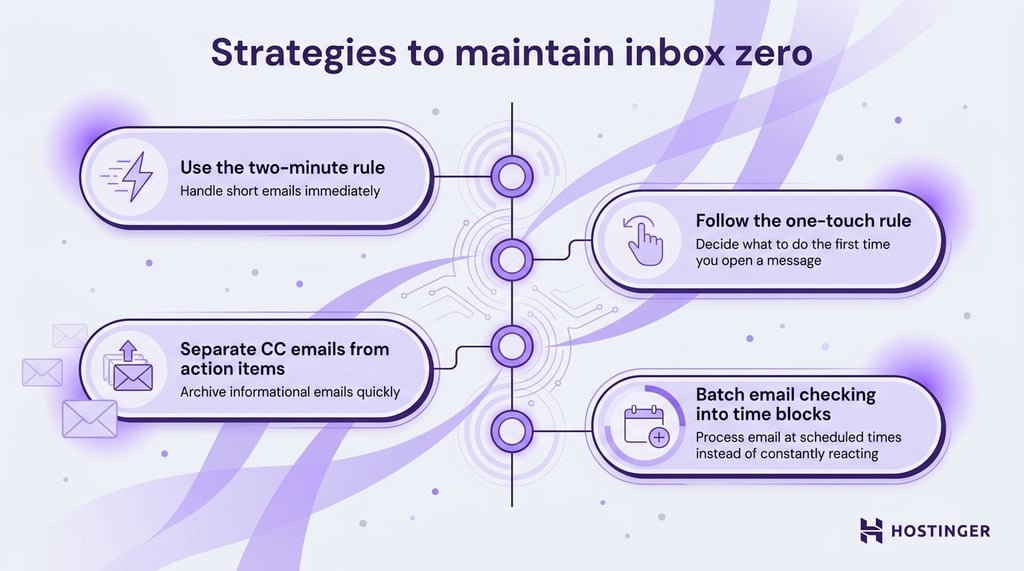
These simple routines prevent clutter from building up again and help you process messages faster with less effort:
- Use the two-minute rule: Handle any email that takes less than two minutes immediately. Reply to a meeting request, confirm an approval, or send a quick update before moving to the next message.
- Follow the one-touch rule: Make a decision the first time you open an email. Archive it, reply to it, delegate it, schedule it, or delete it. Reopening the same message several times wastes time and increases mental clutter.
- Separate CC emails from action items: Many CC messages only provide updates or background information. Read them once and archive them if no action is required. Keep actionable emails visible only when they still need attention.
- Batch email checking into set time blocks: Process email at scheduled times during the day instead of reacting to every notification.
Benefits of the inbox zero method
An unmanaged inbox creates constant mental pressure. Important tasks get buried under newsletters, notifications, and long email threads. You waste time searching for information, rereading old messages, and switching attention between unfinished conversations.
That constant context switching drains focus throughout the day. A quick inbox check often turns into 20 minutes of reacting to random requests, updates, and notifications. Deep work becomes harder because your attention keeps moving in different directions.
Inbox zero solves that problem by replacing passive reading with active decision-making.
Instead of opening emails, scanning them, and leaving them in the inbox, you process each message with a clear action. You reply, archive, delete, delegate, or schedule follow-up work immediately.
That shift changes how email fits into your workflow. The inbox stops acting like a pile of reminders and becomes a processing system you control.
Inbox zero also encourages better communication habits. Quick decisions reduce delayed replies, forgotten requests, and unnecessary email buildup across teams.
Two related concepts support the system:
- Email triage: A fast sorting process where you identify urgent, important, and low-priority emails within seconds. Similar to hospital triage, the goal is to decide what needs attention first.
- Email batching: Processing emails during scheduled time blocks instead of checking messages continuously throughout the day. This approach reduces interruptions and protects your concentration.
Real-world applications of inbox zero
People use the method in personal inboxes, office settings, customer-facing roles, and fast-moving teams with hundreds of daily messages.
- Personal inboxes: Focus on reducing clutter from newsletters, shopping emails, bills, reminders, travel confirmations, and personal communication.
- Professional workflows: Organize client requests, project updates, meeting coordination, approval requests, vendor communication, and internal team discussions. Structured inbox management also helps teams maintain business email compliance by keeping important records organized and easier to retrieve.
- High-volume roles: Process large numbers of emails quickly through prioritization, delegation, filters, templates, shared inboxes, and scheduled review blocks. Common examples include customer support teams, recruiters, sales representatives, operations managers, and executive assistants.
What are the best tools to implement inbox zero
Email platforms, task managers, and calendar apps help reduce manual sorting so you can focus on decisions instead of inbox maintenance.
The best setup depends on how you work. A freelancer managing client communication needs a different system than a customer support team handling hundreds of daily emails. Start with simple tools that solve your biggest email bottlenecks first.
Email automation tools such as Gmail filters, Outlook rules, and services like SaneBox or Clean Email can automatically sort receipts, newsletters, notifications, invoices, or internal updates into separate folders. Forwarding rules also route messages to the right team members without manual handling.
Templates like Gmail templates, Outlook Quick Parts, and customer support platforms like Zendesk or Help Scout allow teams to reuse responses for meeting scheduling, onboarding instructions, follow-ups, and common customer questions.
Task managers such as Trello, Asana, ClickUp, Todoist, and Monday.com let you turn emails into scheduled tasks with deadlines and priorities, rather than leaving messages unread as reminders.
Calendar integration also improves email management by making scheduled work immediately visible. Meeting requests, follow-ups, approval deadlines, and project reviews move into dedicated time blocks instead of competing for attention inside the inbox.
Tools should reduce friction and speed up decisions. Complex systems with dozens of folders, labels, and rules often create more maintenance work than they solve.
Solutions like Hostinger Business Email help streamline inbox zero by offering features such as email filtering, forwarding rules, and AI-assisted replies. This allows you to process emails faster, keep conversations organized, and maintain a clean inbox with minimal effort.

This article is a localized version of What is the inbox zero method and how to implement it, originally published in English.

Ksenija is a digital marketing enthusiast with extensive expertise in content creation and website optimization. Specializing in WordPress, she enjoys writing about the platform’s nuances, from design to functionality, and sharing her insights with others. When she’s not perfecting her trade, you’ll find her on the local basketball court or at home enjoying a crime story. Follow her on LinkedIn.